
GHome Smart Plug Outlet Extender
4.4Editor score
App and voice control
Individual smart outlet control
Three always-on outlets
Timers and schedules
2.4GHz WiFi support
Explore the best smart home office gadgets for 2026, with clear comparisons of smart power, lighting, labeling, charging, audio, and organization tools.
A productive smart home office depends on more than a fast computer and an ergonomic chair. Useful gadgets can organize charging, automate power, improve task lighting, label shared spaces, and add atmosphere while reducing clutter. The right additions should work together without creating another complicated setup or crowding the desk.
We compared all ten products across their core functions, including outlet capacity, charging options, lighting controls, app support, dimensions, organization features, safety protections, and suitability for a home office. The guide covers smart power strips, towers, labels, desk lamps, pixel displays, cleaning tools, and multifunctional bedside-office accessories.
Each review identifies where a product stands out, explains its limitations, and clarifies the type of workspace it suits best. Ratings and technical details reflect the supplied product information, while availability and pricing can change. Always compare current listings, compatibility requirements, and included accessories before purchasing.
4.4Editor score

4.8Editor score

4.7Editor score
This side-by-side overview highlights the main capacities, features, and limitations of each product, helping you identify the right gadget for your desk, power setup, and daily routine.



The Addtam Surge Protector combines five AC outlets, four USB charging ports, and a built-in night light in one wall-mounted unit. Its 4.6 rating reflects a versatile approach to a common office problem: creating a convenient power hub while keeping the floor and tabletop clear. The three-sided design is particularly useful when several bulky adapters compete for space.
We may earn a commission when you buy through this link, at no additional cost to you.
Its most distinctive feature is the edge-mounted LED light, which uses a dusk-to-dawn sensor to activate when ambient illumination is low. A touch sensor allows manual control when automatic behavior is not desired. The charging section includes one USB-C port rated up to 3A and three USB-A ports rated up to 2.4A, with output determined by each connected device's requirements.
The trade-off is that five AC outlets are less generous than the twelve offered by the larger power strip towers in this guide. Installation also involves deciding whether to secure the unit with the included screw or rely on its rear plastic prong. The instructions note that the plastic prong must be cut off before using a USB receptacle or GFCI outlet.
This extender is a strong choice for a compact home office, bedside work area, or hallway setup where automatic low-level lighting and convenient charging are both valuable. It is less appropriate for a desk with a very large collection of full-size power adapters, but for most hybrid work setups, its combination of functions is unusually practical.
The integrated night light removes the need for a separate plug-in lamp in frequently darkened spaces. Its automatic dusk-to-dawn behavior is useful after late work sessions, while manual touch control provides flexibility when the sensor does not match the desired lighting schedule.
The three-sided design separates outlets around the unit and creates approximately 1.7 inches of space between sockets. That arrangement gives large plugs more breathing room than a compact flat strip and helps reduce accidental unplugging in busy work areas.
We may earn a commission when you buy through this link, at no additional cost to you.
This 6FT Power Strip Tower is built for offices where device count matters more than a minimal footprint. It combines twelve wide-spaced AC outlets with four USB charging ports, including two USB-A and two USB-C connections. The 4.7 rating makes it one of the strongest technical matches in this roundup for multi-device desks, studios, dorm rooms, and shared workspaces.
We may earn a commission when you buy through this link, at no additional cost to you.
Its vertical design measures 3.15 by 3.15 by 5.79 inches, making it narrower than many horizontal power strips when viewed from above. A 0.3-inch flat plug sits flush against the wall, while 45-degree angled outlets help preserve access to neighboring sockets. The six-foot extension cord provides more placement freedom than a direct wall plug.
All four USB ports share a total output of 3.4A. Individual USB-A ports can reach 3.1A, and the USB-C ports can reach 3.4A, with the USB-C claim of charging up to 30% faster than a standard 5W charger. The shared output means several power-hungry devices connected simultaneously may not receive each port's maximum current.
Choose this tower when you routinely connect a laptop, monitor, phone, tablet, lights, and assorted peripherals. It is less suitable for a minimalist desk with only two or three devices, where its capacity and vertical profile could be more than necessary. Even so, it offers an effective way to centralize a crowded charging and power setup.
Twelve AC outlets create substantial flexibility for bulky adapters and multiple workstations. Wide spacing reduces competition between plugs, while the vertical tower keeps the entire connection point compact enough to sit beside a monitor or behind a display.
Two USB-C and two USB-A ports cover both newer and older charging standards. The total 3.4A output is helpful for a mixed collection of devices, although planners with several high-draw accessories should distribute charging across more than one power source.
We may earn a commission when you buy through this link, at no additional cost to you.
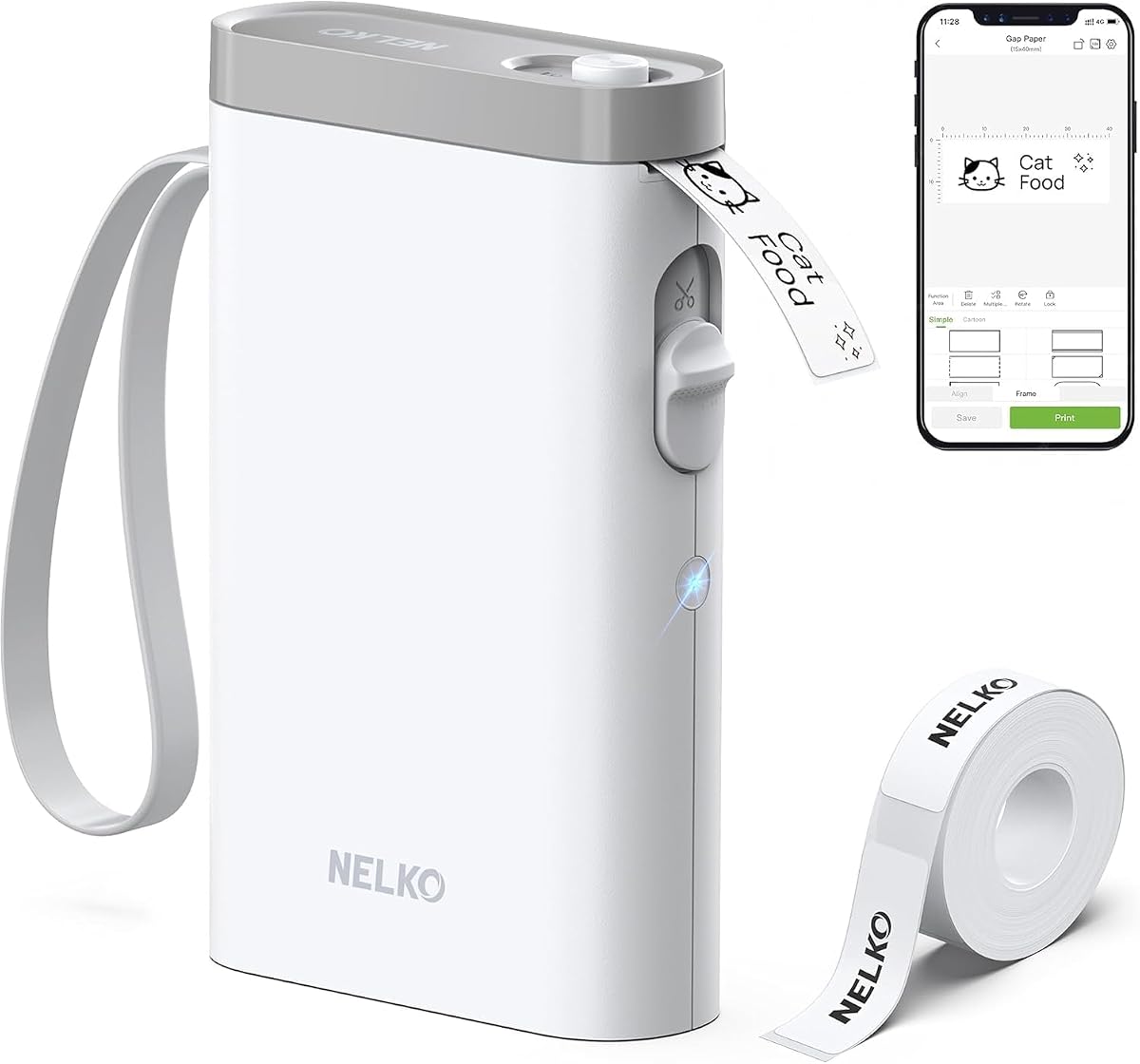
The Nelko P21 is a compact Bluetooth label maker designed for people who want to identify cords, files, supplies, and shared storage without relying on handwritten tags. It has a 4.4 rating and uses direct thermal printing at 203 DPI, producing monochrome text without ink or toner. Its small size makes it easy to keep in a drawer, laptop sleeve, or supply cabinet.
We may earn a commission when you buy through this link, at no additional cost to you.
Labels are created through the Nelko app for iOS and Android, which includes text, QR codes, barcodes, images, time details, borders, and many templates. The listed library includes more than 3,600 icons, 700 borders, 5,500 materials, 750 templates, and 29 languages. The built-in rechargeable battery supports extended use without a disposable battery, though a charging adapter is not included.
Compatibility requires attention. iOS users should update the app to version 4.8.0, and the product is not compatible with Google Pixel phones running Android 14. It also does not connect directly to computers, and continuous label tapes are unsupported. Labels must use fixed widths and lengths, including 14 by 40 millimeters, 14 by 50 millimeters, and 14 by 75 millimeters.
The P21 is an excellent choice for shared family offices, home studios, teachers, and anyone who wants a portable organizational tool. It is less suitable for long, uninterrupted labels or professional workflows that depend on desktop computer software. Within its supported tape formats, it is a creative and practical way to bring order to mixed office supplies.
The app makes common labels quick to create by offering preset formats, icons, borders, and materials. Users can also add QR codes, barcodes, images, and time information, allowing a single compact printer to handle cabinet labels, shipping reminders, and personalized storage tags.
The small body and built-in battery support labeling away from a desk, which is valuable for shared rooms or storage areas. Fixed label lengths and the lack of computer support are meaningful limits for specialized labeling, so checking project dimensions before purchasing is important.
We may earn a commission when you buy through this link, at no additional cost to you.
The second 6FT Power Strip Tower option delivers the same broad combination of twelve AC outlets, four USB charging ports, and a six-foot cord in a compact vertical housing. Its 4.7 rating makes it a particularly attractive choice for anyone whose office has many peripherals or needs a single centralized charging location.
We may earn a commission when you buy through this link, at no additional cost to you.
The 0.30-inch flat-head plug and 45-degree right-angle outlet orientation are important for real-world placement. The plug can sit behind furniture or against a wall without projecting as far into the room as a conventional angled plug, and the outlets are less likely to block another plug on the same receptacle. Four rubber feet help the tower remain stable on a desk.
Like the other tower in this guide, the USB system has a total 3.4A output rather than separate full-power budgets for every port. It also adds a 1800-joule surge protector with overload, short-circuit, and over-current protection. A reset and off switch provides a convenient way to shut off connected equipment.
This listing is a good fit for a permanent charging station, a compact home studio, or a dorm workspace where outlet density matters. It may be less convenient beneath a deep desk because its 5.79-inch height can prevent it from sliding fully under the work surface. Those who want easy outlet access and a stable vertical footprint will get the most from it.
The flat plug and angled outlet face improve access where a standard plug would create a large gap behind a sofa, bookcase, nightstand, or headboard. This makes the tower more adaptable than a basic strip when the wall outlet is not in an open, central location.
Four rubber feet help prevent the tower from sliding while cables are connected or removed. Placing it near the center of a desk gives every device a reachable connection point and reduces the temptation to stretch cords awkwardly across the workspace.
We may earn a commission when you buy through this link, at no additional cost to you.
The Angry Mama Microwave Cleaner is a simple but genuinely useful gadget for an office kitchen, studio break room, or home workspace where a microwave regularly heats lunches. Its 4.4 rating reflects an uncomplicated approach: add vinegar and water, heat the container, and let the steam loosen residue before wiping it away.
We may earn a commission when you buy through this link, at no additional cost to you.
The perforated design allows steam to rise through the character-shaped top and circulate around the microwave interior. The product description indicates that this steam process can clean stubborn buildup while reducing cleaning time. A small amount of lemon liquid may also be added to improve the resulting aroma, giving the routine a more pleasant sensory finish.
The container is made from plastic and is described as non-toxic and dishwasher safe. It is not intended for cleaning other appliances or surfaces, and the cleaning cycle involves hot steam. Users should allow the appliance and container to cool appropriately before opening or handling them, and follow the microwave manufacturer's directions.
This is a good budget-oriented addition to a shared kitchen where regular wipe-downs are inconvenient. It will not replace cleaning for spills that occur outside the microwave or stubborn material that has already hardened. Still, for a straightforward steam-cleaning routine, it makes one of the least complicated gadgets in this roundup.
Heating water and vinegar creates a steam environment that softens interior residue and stains. Allowing the steam to circulate for the stated five-to-seven-minute period can make the remaining wipe-down task faster and reduce direct contact with greasy surfaces.
Regular microwave cleaning helps maintain a more pleasant break-room environment without adding another complicated appliance. The simple container is also easy to rinse or place in the dishwasher once the heated vessel has cooled.
We may earn a commission when you buy through this link, at no additional cost to you.
The karidi LED Desk Lamp with Power Strip is the most complete workstation upgrade in the guide, combining task lighting, three AC outlets, and four USB ports in one base. It carries a 4.8 rating, the highest among these selections. For a home office where desk space is limited, reducing the need for a separate lamp and power strip is its strongest advantage.
We may earn a commission when you buy through this link, at no additional cost to you.
Touch controls provide five color temperatures ranging from a warm glow to daylight and five brightness levels. The 180-degree rotatable head and adjustable arm can direct light toward a keyboard, book, craft project, or artwork. A weighted base improves stability, while the integrated power strip includes surge protection and supports up to 1875W. Devices continue charging when the light is off.
The product data does not specify individual USB charging rates or confirm app-based controls, so buyers needing exact fast-charging specifications should check the current listing. It also remains more specialized than a basic lamp: someone who only needs adjustable light may find the charging hub unnecessary. The all-in-one design makes more sense when desk area is valuable.
This is our Editor's Choice because it addresses two recurring office problems with one stable, flexible unit. It is particularly suitable for students, remote workers, gamers, and crafters who want focused lighting without sacrificing access to outlets. The combination of broad articulation, multiple lighting modes, and high outlet capacity makes it the most versatile desk-focused choice.
Five color temperatures and five brightness levels let the user move from focused, cool task lighting to a softer evening setting. The adjustable head and arm support precise positioning, which can reduce eye strain caused by repeatedly leaning or repositioning a fixed lamp.
Three AC outlets and two USB-A plus two USB-C ports turn the lamp into a central desk hub. The 1875W surge-protected capacity is suitable for many common office electronics, while separate USB-A and USB-C connections reduce adapter clutter.
We may earn a commission when you buy through this link, at no additional cost to you.
The RayCue Maclock WB-8 brings an early-computer aesthetic to a home office while functioning as a digital alarm clock. Its 4.5 rating reflects a product that appeals strongly to retro-tech enthusiasts, with a pixel LCD that displays the time, calendar, day and date, and room temperature simultaneously.
We may earn a commission when you buy through this link, at no additional cost to you.
Five alarm settings cover Off, One-Time, Weekdays, Weekends, and Daily. A top touch dial handles alarm selection, while a separate bottom dial adjusts backlight brightness. The warm glow can be dimmed at night, and the product includes a USB-C cable, manual, floppy disk holder, and retro sticker sheet for recreating a classic boot sequence.
The temperature function is not entirely independent of the display lighting. To avoid heat from the backlight influencing readings, the clock pauses temperature updates while the backlight is on; turning the backlight off briefly restores normal readings. This is a thoughtful accuracy feature, but it adds a small step to checking the temperature.
Choose the Maclock WB-8 when personality and visual character matter alongside timekeeping. It is well suited to a creative desk, gaming setup, or retro-inspired home office, though it does not offer the broader app-based control found in more conventional smart desk accessories. It is an engaging decorative clock with genuinely useful scheduling features.
Separate settings for weekdays, weekends, daily use, and one-time events help prevent unnecessary alarms on changing workdays. This is particularly useful for hybrid schedules that alternate between office days and remote days.
The pixel display combines time, calendar, date, and temperature in a compact format. Adjustable backlighting and the included floppy disk prop reinforce the early-computer theme without preventing the unit from serving as an everyday desk clock.
We may earn a commission when you buy through this link, at no additional cost to you.
The 32×32 LED Pixel Art Display is an ambient lighting and visual customization device for gamers, hobbyists, and creative workspaces. Its 3.9 rating is the lowest in this selection, but the product still offers a clear advantage for buyers who want personal artwork rather than a conventional decorative lamp.
We may earn a commission when you buy through this link, at no additional cost to you.
The dedicated mobile app provides templates, editable text, animations, and pixel clock modes. Users can create custom pixel art for the display, making it possible to show status messages, artwork, graphics, or changing visual scenes. The panel can stand on a desk or be mounted on a wall, which allows the same device to support a gaming station, bedside area, studio, or home office.
USB wired power keeps the display running without a built-in battery and avoids the routine of recharging it. That makes it practical for continuous display use, but it also means the panel needs access to a power source or a nearby USB-powered hub. Its slim ABS housing helps conserve desk space, though the display is primarily decorative rather than a functional task light.
This panel is best for someone who values customization and atmosphere enough to accept its narrower utility. Its 3.9 rating may give cautious buyers pause, so checking recent customer feedback for app and update reliability is sensible. For a gaming room or creative corner, however, the ability to create original pixel displays gives it a distinctive creative role.
Editable text, animations, templates, and clock modes turn the panel into a customizable information surface. A work-status message, animated design, or rotating pixel clock can make a shared office feel more intentional and engaging.
The same slim panel supports desktop placement or wall mounting. This lets users move it from a monitor setup to a creative display wall without changing the core device, while USB power supports sustained use without a battery-charging routine.
We may earn a commission when you buy through this link, at no additional cost to you.
The GHome Smart Plug Outlet Extender is the most genuinely automated option in the guide. It combines three individually controlled smart outlets, three group-controlled smart USB ports, and three always-on outlets in a single unit. Its 4.4 rating makes it a strong premium pick for users who want to manage office equipment through an app, voice assistant, schedules, or remote access.
We may earn a commission when you buy through this link, at no additional cost to you.
GHome app controls support individual outlets, grouped USB charging, countdowns, timers, recurring cycles, and random modes. Compatible users can also operate the smart outlets through Alexa or Google Home. This makes the device well suited to lamps, fans, humidifiers, and other equipment that should switch on or off according to a work routine.
The unit supports only 2.4GHz WiFi, not 5GHz, which can be the most important setup consideration. Its three smart USB ports can be turned on or off as a group, but they do not offer individual control like the three smart AC outlets. The remaining three regular outlets are always on, providing dependable power for equipment that should not be automated.
Safety features include overload and over-current protection, a fuse, a V0 fire-retardant shell, and FCC and ETL certification. The product is rated for 15A and 1875W, with a stated operating range of negative 20 to 40 degrees Celsius. It is a premium choice because it automates an entire outlet bank rather than merely adding more sockets.
Timers, countdowns, recurring schedules, and random modes allow connected equipment to follow predictable routines. A desk lamp can be scheduled around working hours, while a fan or humidifier can be switched remotely without reaching behind the desk.
The three smart AC outlets provide individual and group control, the smart USB ports operate as a group, and the standard outlets remain constantly powered. This mixed design supports both automated accessories and equipment that should never lose power unexpectedly.
We may earn a commission when you buy through this link, at no additional cost to you.
The Smart LED Table Lamp integrates ambient lighting, a Bluetooth speaker, a digital alarm clock, a wireless phone charger, and app-based controls in a single G-shaped desktop unit. Its 4.0 rating reflects a product whose greatest strength is versatility. It is particularly useful in a home office that doubles as a bedside workspace or a compact study area.
We may earn a commission when you buy through this link, at no additional cost to you.
The companion app handles lighting colors, effects, alarms, wake timers, and audio playback. The clock synchronizes its time automatically after Bluetooth pairing, eliminating manual time setting. A built-in microphone supports hands-free calls, while 6mm high-low frequency drivers and a 36mm custom diaphragm provide the stated 360-degree sound. Music-reactive lighting can synchronize the visual effects with playing audio.
Wireless charging is convenient, but compatibility and alignment matter. The phone must support wireless charging, its charging area must align with the lamp's charging zone, and cases with metal rings, magnets, cards, grips, or thickness above 4mm are not recommended. The included power adapter should be used for optimal performance. Misalignment can cause slow charging or elevated temperature.
The lighting offers ten preset colors, 256 dynamic modes, 16 million customizable colors, and stepless dimming. This is a compelling choice for a creative desk or bedroom office where ambience matters. It is less suitable for users who need a dedicated high-output task light, and its many functions may feel excessive in a strictly minimalist workspace.
The digital clock, adjustable backlight, and warm ambient lighting make the unit useful near a bed as well as on a desk. Automatic time synchronization keeps the display accurate after Bluetooth pairing, while wake timers add another layer of routine support.
A compatible phone can be placed on the designated charging area for cable-free power during work or study. The charging zone is sensitive to alignment and case design, so users should review the included guidance and avoid accessories known to interfere with charging.
We may earn a commission when you buy through this link, at no additional cost to you.
The most useful office gadget solves a recurring spatial, charging, lighting, or organizational problem. Start with the friction you encounter each day, then check compatibility, capacity, controls, and the amount of desk or outlet space available.
Begin by identifying the problem that creates the most daily inconvenience. A crowded charging area calls for a tower or desk lamp with more outlets, while shared rooms and unlabelled supplies benefit from a portable label maker. Dim or poorly directed task lighting points toward an adjustable lamp, and equipment that must switch off automatically is better served by a WiFi-controlled outlet. A microwave that repeatedly needs scrubbing may be the real reason a steam-cleaning accessory belongs in an office kitchen rather than another electronic desk gadget.
Power products should be judged by the types and quantity of connections you actually need. The towers in this guide offer twelve AC outlets, while the Addtam extender offers five, and the karidi desk lamp includes three. USB arrangements also differ: some products provide only USB-A, while others combine USB-A and USB-C. Check the laptop, monitor, printer, phone, tablet, lamp, and hard drive that need connections, and leave some capacity for future accessories.
A USB-C port does not automatically mean every connected device receives its maximum possible output. On the power strip towers, all four USB ports share a total output of 3.4A, while individual USB-A and USB-C limits are stated separately. When multiple phones, tablets, or laptops charge at once, their power is shared. If fast simultaneous charging is important, distributed outlets and multiple power sources may deliver a more dependable experience.
Smart features depend on a compatible ecosystem. The GHome power strip requires 2.4GHz WiFi and works with its app, Alexa, and Google Home. The Nelko P21 uses Bluetooth with iOS and Android apps, does not support computer connections, and has listed phone exclusions. The Smart LED Table Lamp also relies on a companion app and Bluetooth pairing. Verify these requirements before buying, especially if your network uses only newer WiFi bands or your devices run restricted operating systems.
Lighting quality depends on brightness control, color temperature, direction, and stability. The karidi lamp offers five color temperatures, five brightness levels, an adjustable arm, and a 180-degree rotatable head. Ambient RGB lighting can create atmosphere, but it is not a substitute for focused task illumination over documents or detailed work. Consider where the light will point, whether it can be adjusted, and whether the base can remain stable at the intended angle.
A compact product can still create clutter if its cord placement or height is awkward. The vertical towers occupy a small tabletop footprint, while their six-foot cords provide placement freedom. The Addtam unit projects outward from a wall outlet, and the karidi lamp stays in place but requires room for its head and arm. The RayCue clock and pixel display are small enough for secondary surfaces, whereas the multifunctional table lamp has a larger 3.3 by 9.13 by 9-inch profile.
Surge and overload protection matter when multiple electronics share one connection. The power towers state 1800-joule surge protection, while the Addtam extender states 1050 joules and multiple protection circuits. The GHome unit is rated for 15A and 1875W, and the karidi lamp also supports up to 1875W. Higher wattage ratings indicate suitability for more demanding equipment, but users should still avoid overloading any circuit or power strip.
Small usability requirements can determine whether a gadget becomes a daily tool. The Nelko P21 works only with specific label formats, does not print from computers, and includes continuous-tape limitations. App-controlled products should be checked for the features users need, such as individual outlet control, grouped USB control, alarms, lighting effects, or pixel customization. Reading current compatibility notes can prevent frustration after the initial setup.
Begin by mapping the intended location and identifying the devices that will use it. Place a tower near the center of the desk, position an adjustable lamp opposite the main work area, and keep a smart outlet within reach of equipment that benefits from scheduling. For a label maker, organize supplies by category and prepare a consistent naming system before printing a batch of tags.
Set up connected products within their supported networks and permissions. Join the GHome strip to 2.4GHz WiFi, update the Nelko app before pairing its printer, and confirm Bluetooth access for the table lamp and clock. Create conservative schedules first, test voice commands, and verify that always-on devices are on the correct outlets. Wireless charging users should also confirm phone support and use the supplied adapter.
Care for each category according to its design. Keep power strips dry, avoid overloading them, and unplug them when not needed for extended periods. Clean the microwave cleaner after it cools and follow safe steam-handling practices. Wipe lamps and displays with a soft cloth, avoid moisture entering charging areas, and replace only the specified label formats in the Nelko P21. Periodically inspect cords, plugs, and adhesive mounts for signs of strain or damage.
The karidi LED Desk Lamp with Power Strip is particularly useful for small desks because it combines adjustable lighting, three AC outlets, and four USB ports in one base. The 6FT power strip towers are also compact vertically, but they require enough floor or surface space to stand upright. The ideal choice depends on whether lighting, charging, or outlet capacity is the greater constraint.
No. On the power strip towers, the four USB ports share a total output of 3.4A, so simultaneous high-demand charging can reduce the power available to each device. The individual port limits are still useful, but users with several tablets or laptops should distribute them across multiple outlets or chargers when maximum simultaneous output matters.
The GHome Smart Plug Outlet Extender supports 2.4GHz WiFi but not 5GHz WiFi. If your home or office network combines both bands, make sure the smart device can reach the 2.4GHz network during setup. The app, voice control, timers, and schedules depend on a successful connection.
No. The P21 connects through Bluetooth to compatible iOS and Android phones rather than directly to a computer. It is also not compatible with Google Pixel phones running Android 14, and iOS users need the latest listed app version. It works best for short, fixed-format labels created from mobile templates.
The GHome smart power strip provides the broadest outlet automation, including individual controls, grouped USB control, timers, countdowns, recurring schedules, and random modes. The Smart LED Table Lamp also has app control for lighting, alarms, wake timers, and audio, while the pixel display uses an app for artwork and animated displays. Their functions serve different purposes, so app breadth depends on whether you want power automation, ambience, or customization.
Only phones that support wireless charging can use that function. The charging area must also align correctly with the phone's charging coil, and cases containing metal rings, built-in magnets, cards, grips, or more than 4mm of thickness may interfere. The included power adapter is recommended for optimal charging performance.
Their 0.3-inch flat plug is designed to fit more closely against a wall and behind sofas, nightstands, bookshelves, or headboards. The 45-degree outlets also improve access to neighboring plugs. Check the available depth because the tower itself stands 5.79 inches high and may not slide beneath a deep desk.
A portable label maker can be valuable when several people use the same room and need consistent identification for cords, supplies, storage boxes, or shared equipment. The Nelko P21 adds portability because it prints from a phone and uses a rechargeable battery. For a single desk with only a few items, simple labels or other organization methods may be enough.
The strongest overall choice is the karidi LED Desk Lamp with Power Strip because it combines focused lighting, flexible positioning, three AC outlets, and four USB connections in a compact workstation hub. The 6FT Power Strip Tower stands out for high outlet capacity, while the GHome Smart Plug Outlet Extender takes automation further with app, voice, timer, and schedule controls.
Prioritize the problem your office actually has. Choose a tower for numerous connected devices, the karidi lamp for combined lighting and charging, the GHome extender for automated power, the Nelko P21 for portable labeling, and the microwave cleaner for a shared kitchen. Decorative displays and retro clocks can add character, but they should complement rather than replace practical tools.
Before ordering, verify WiFi and phone compatibility, charging output, outlet clearance, label formats, and the amount of desk space available. Product details and current listings can change over time, so review the latest information carefully. Prices also fluctuate, making it worthwhile to compare current availability and the complete package before making a final decision.