
Auto Face Tracking Tripod with Stand
4.5Editor score
App-free face tracking
Gesture start and pause
70-inch telescoping pole
A face tracking tripod for iPhone gives solo creators a hands-free way to record vlogs, livestreams, video calls, tutorials, and social clips. The best models recognize a face or body, follow movement, and offer a dependable way to keep the subject framed while the phone remains stable.
This guide compares ten tracking tripods based on their stated tracking systems, gesture controls, rotation, height, phone-holder design, lighting options, remotes, construction, portability, and accessory compatibility. It covers models that use conventional clamps as well as magnetic mounts and distinguishes app-free tracking from broader multi-function shooting setups.
The recommendations show which product suits different priorities, from value-focused everyday recording to premium magnetic convenience or a feature-rich tripod with lighting and stabilization. Product details and availability can change, so readers should verify current specifications, compatibility, and current prices before purchasing.
4.5Editor score

4.6Editor score

4.5Editor score
As an Amazon Associate we earn from qualifying purchases.
The comparison below places each tripod's most important practical characteristics side by side, including tracking range, maximum height, mounting method, lighting, remote control, and construction.

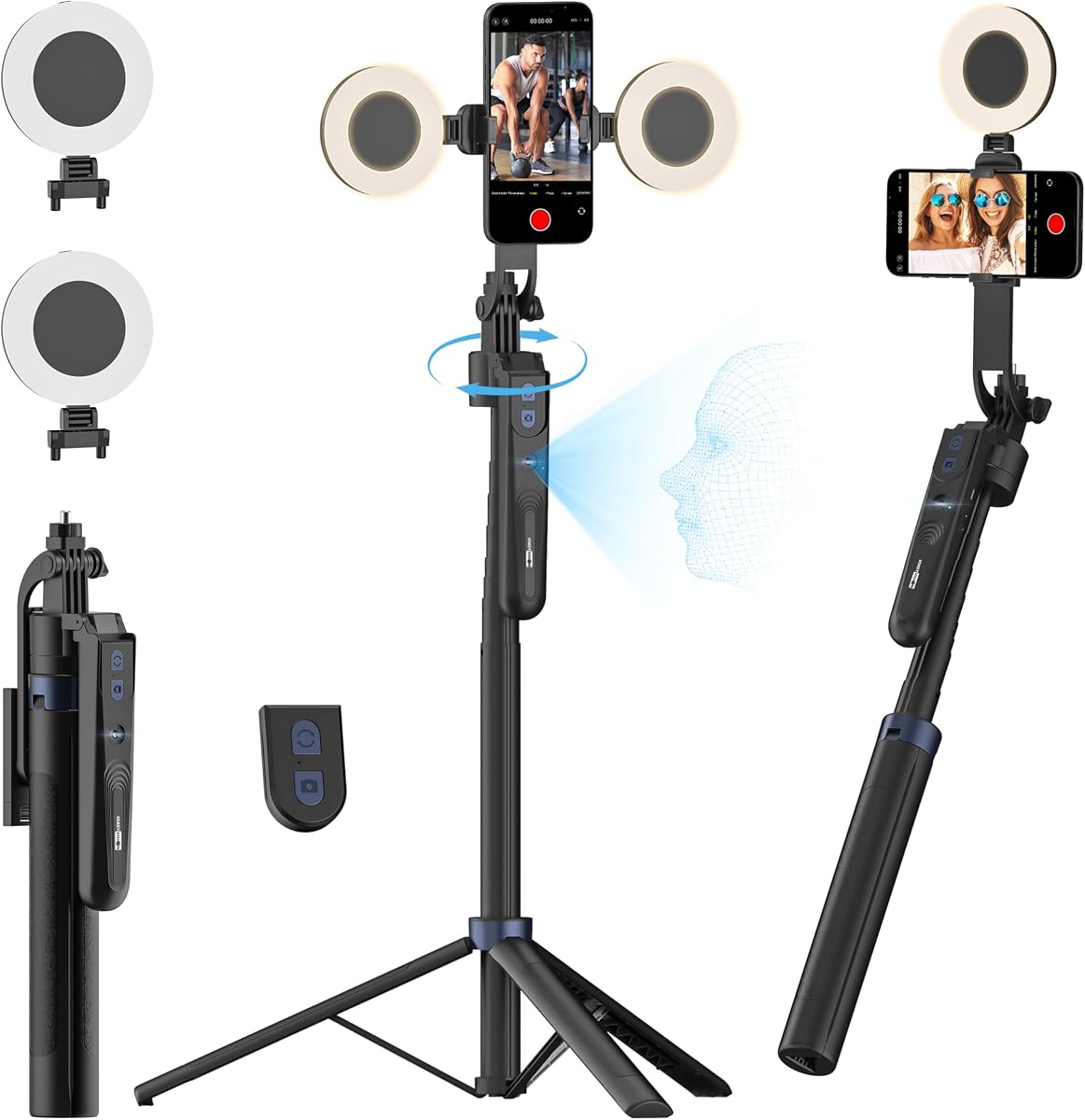


The Yeaki 71-Inch Auto Face Tracking Tripod is a versatile phone stand for creators who want extended reach, remote operation, and built-in illumination without assembling separate accessories. Its 4.4 rating reflects a well-rounded feature set, while the combination of 360-degree tracking and a 71-inch extended height distinguishes it from compact desktop stands.
We may earn a commission when you buy through this link, at no additional cost to you.
Its automatic tracking recognizes a face and follows movement after the user presses the lock button. An OK gesture begins tracking and a palm gesture stops it, making the tripod practical for demonstrations, recipe videos, group shots, and livestreams. The rechargeable Bluetooth remote offers scrolling, swiping, double-tap functions, and remote triggering, while the light provides warm, white, and natural color options.
Adjustment is unusually broad for a value-oriented model. The rotating head, tilting range, balanced handle, and quarter-inch threaded connection support cameras, GoPro devices, and ring lights. The phone holder accepts screens from 4.7 to 7 inches, and the aluminum body folds from 71 inches to 13 inches. The main limitation is that maximum-brightness lighting lasts about 50 minutes, and the clamp may feel less elegant than a magnetic mount.
This is an excellent choice for a new creator who wants one support that can handle overhead framing, desktop use, and moving-subject recording. It combines a generous working range with a remote and lighting at a practical entry point. Choose it when versatility and useful accessories matter more than magnetic convenience or an extended battery specification.
The telescoping pole, 360-degree head, 270-degree tilt, and balanced handle make it possible to frame the same subject from a floor-level, eye-level, or overhead position. That flexibility is useful when filming a workout, crafting project, live performance, or unboxing.
The rechargeable remote reduces the need to approach the phone after recording begins, while the integrated light helps maintain consistent illumination in dim rooms. Choose the color mode that best matches the environment rather than relying on automatic exposure alone.
We may earn a commission when you buy through this link, at no additional cost to you.
The Acer Gadget Auto Face Tracking Tripod stands out as a well-rounded production tool with a 4.6 rating, the highest among the products reviewed. It combines app-free face and body tracking with a rotating gimbal, a detachable ring light, a remote control, and several support configurations for creators who move between shooting styles.
We may earn a commission when you buy through this link, at no additional cost to you.
The tracking system recognizes a face or body and changes its shooting angle as the subject moves. Gesture recognition uses an OK sign to start and an open palm to pause, while the detachable Bluetooth remote provides one-click capture from a working distance of 0.5 to 5 meters. Its 360-degree gimbal is intended to reduce unwanted shaking during movement.
It can operate as a selfie stick, desktop tripod, floor stand, or handheld stabilizer. The aluminum quadpod extends to 64.4 inches and folds to 13 inches, while the four-foot base is designed to resist tipping. A quarter-inch connection supports cameras, GoPro devices, and lights, and the removable mini ring light offers warm, cool, and natural tones.
The trade-off is that a device supporting many configurations may feel more complicated than a straightforward phone stand. Its maximum height is also several inches shorter than the tallest alternatives. Even so, the strong rating, stabilization-focused design, and mix of tracking, lighting, and remote functions make it the most complete general-purpose recommendation here.
A 360-degree rotating gimbal is especially useful when a creator walks, changes posture, or shifts position. Combined with face and body recognition, it gives solo performers more freedom than a fixed stand without requiring a second camera operator.
The floor stand and desktop modes make the tripod useful for tutorials, online lessons, video calls, and traditional live broadcasts. Its detachable light helps provide a more consistent appearance when the filming location lacks strong ambient illumination.
We may earn a commission when you buy through this link, at no additional cost to you.
The USKEYVISION UTK-02 is a 4.4-rated 3-in-1 phone tripod with 70.9-inch extension, 360-degree face and body tracking, gesture control, a rechargeable remote, and two detachable ring lights. It is aimed at creators who need more lighting options than a conventional tracking selfie stick offers.
We may earn a commission when you buy through this link, at no additional cost to you.
Two 360-degree rotation modes are available for following face or body movement. An OK gesture starts tracking and an open palm pauses it. The removable rechargeable remote operates up to 32.8 feet away, and the dual lights provide three brightness levels across warm, natural, and cool color temperatures. Their flip-up and rotating design can improve coverage and reduce facial shadows.
The aluminum alloy tripod uses a traditional triangular base with nonslip feet and extends to 70.9 inches before folding to 12.6 inches. The holder supports iPhone and Android devices between 2.56 and 3.86 inches wide but does not support tablets or foldable phones. A quarter-inch thread allows an extra microphone or light to be added.
This is a strong fit for family gatherings, travel, sports, parties, and indoor content where adjustable lighting is particularly important. It provides more lighting granularity than several competing tripods, although the clamp design and explicit phone-size restrictions make it less accommodating for unusual devices.
The separate brightness and color-temperature settings make it easier to match a subject to a room, neutralize mixed lighting, or create a warmer social-video look. The lights can be repositioned rather than fixed in one location above the phone.
The 70.9-inch pole helps capture a full-body demonstration without forcing the subject to remain close. A 32.8-foot remote range allows a creator to begin and stop recording while remaining outside the shot, which is particularly useful for fitness and family content.
We may earn a commission when you buy through this link, at no additional cost to you.
The Acer Gadget Magnetic Auto Face Tracking Tripod emphasizes speed and simplicity. Rated 4.3, it uses a magnetic phone mount rather than a conventional expanding clamp, has a one-touch automatic tripod deployment, and supports 360-degree AI face tracking with gesture control.
We may earn a commission when you buy through this link, at no additional cost to you.
The magnetic design eliminates the need to resize a clamp each time the phone changes. Once the correct magnetic setup is in place, the phone can snap onto the support quickly. The tripod also opens automatically with a single tap, reducing the number of setup steps before recording begins.
Tracking is activated with an OK gesture and paused with an open palm, allowing the creator to control the camera from within the frame. A detachable mini light offers warm, cool, and natural modes for dim settings. The telescoping pole reaches 64 inches, and the 360-degree tracking head is designed to follow movement.
Its magnetic approach is convenient, but a secure magnetic connection depends on the phone, case, or magnetic accessory. Buyers should verify that their iPhone setup is compatible rather than assuming every case will hold equally well. For creators who prioritize rapid attachment and fewer adjustments, this Acer Gadget model remains a practical choice.
A magnetic mount can be quicker than repeatedly widening and tightening a clamp. It is particularly useful for creators who switch frequently between a single phone, a second phone, or a case with a magnetic ring.
The one-touch opening mechanism reduces setup time when an idea or activity begins unexpectedly. Creators can deploy the support, attach the phone, select a gesture, and begin recording with less manual assembly.
We may earn a commission when you buy through this link, at no additional cost to you.
The Auto Face Tracking Tripod with Stand offers a 4.5 rating and a useful balance of long reach, automatic tracking, and accessory support. It is a particularly attractive option for creators seeking the core tracking functions without a complicated app-based setup.
We may earn a commission when you buy through this link, at no additional cost to you.
Its smart tracking system can identify a face or body and rotate horizontally and vertically as the subject moves. The OK gesture starts tracking, while an open palm pauses it. The pole adjusts from 12.59 to 70.9 inches, providing enough reach for full-body recordings, group content, and elevated angles.
A quarter-inch interface accepts most digital cameras, action cameras, GoPro devices, and ring lights, while the phone holder supports iPhone and Android use. The stated optimal tracking distance is 5 meters. That range is useful for normal presentation distance, but the manufacturer warns that very rapid movement or excessive distance can cause the system to lose the subject.
The main omission is integrated lighting, so creators filming in dark spaces may need a separate light. Even so, the generous height, wide rotation, remote-free gesture operation, and broad mounting options make this a strong budget-oriented choice for TikTok, YouTube, video calls, classes, and livestreams.
The app-free design is convenient for creators who prefer a straightforward setup. Starting and pausing with hand gestures keeps remote controls out of the shot, although deliberate gestures should be made within the camera's field of view.
The 12.59-inch minimum height works for compact handheld-style footage, while the 70.9-inch maximum supports overhead and full-body framing. A standard quarter-inch mount also makes it possible to connect a separate light when indoor illumination is poor.
We may earn a commission when you buy through this link, at no additional cost to you.
The Auto Face Tracking Selfie Stick Tripod for iPhone is a comprehensive creator package with a 4.3 rating. It combines a 70.9-inch tracking stand, a detachable phone holder, two ring lights, a seven-button remote, a carrying bag, and four operating modes in one package.
We may earn a commission when you buy through this link, at no additional cost to you.
The upgraded tracking system recognizes a face or body and keeps the subject near the center of the frame. The stated tracking range extends as far as 5 meters. The four-in-one design can operate as a selfie stick, desktop tripod, handheld stabilizer, or automatic tracking tripod, and the removable holder can also serve as a standalone stand.
The two ring lights each offer warm, cool, and natural colors, with three brightness levels for every color mode. At maximum brightness, the stated continuous use time is 50 minutes. A 33-foot wireless remote provides start and stop control, while the aluminum alloy four-leg structure and umbrella-like frame are designed to create a stable base.
The package is generous, but the numerous detachable parts create more opportunities to misplace a component. The light runtime may be limiting for lengthy indoor sessions unless it is used intermittently. Despite those trade-offs, it is well suited to content creators who want tracking, lighting, remote control, and travel storage in one purchase.
Three colors and three brightness levels per color provide nine useful combinations for different locations. Because the lights detach and reposition, they can be mounted where they reduce shadows rather than simply pointing from the phone mount.
The included carrying bag and 11.8-inch folded size make the kit easier to transport than a fully extended 70.9-inch stand. The detachable remote, lights, and holder can be organized separately, which is useful when switching locations during a production day.
We may earn a commission when you buy through this link, at no additional cost to you.
The 70.9-Inch Auto Face Tracking Selfie Stick Tripod is one of the strongest-rated products in the group, with a 4.6 rating. It provides app-free face and body tracking, 360-degree rotation, a wireless remote, and a one-click opening base while remaining focused on the core job of hands-free recording.
We may earn a commission when you buy through this link, at no additional cost to you.
The AI tracking system identifies and follows a face or body, rotating the phone as the subject changes position. An OK gesture turns tracking on and a palm gesture pauses it. The removable remote works up to 33 feet away, and the button at the base opens the tripod quickly when a creator is ready to begin.
The telescoping length runs from 12.68 to 70.86 inches, and the rotating phone holder supports both horizontal and vertical orientation. A standard quarter-inch interface allows a ring light, GoPro, or phone holder to be mounted. This accessory connection is particularly useful for creators who already own separate lighting equipment.
There is no integrated light, so the tripod is less suitable for dark environments unless another accessory is added. Its construction is also more straightforward than some multi-axis premium alternatives. For buyers who want a highly rated, app-free tracker with a long extension and capable remote, it remains an efficient and understandable option.
The one-click opening mechanism removes several deployment steps. Combined with a removable remote, it allows a creator to position the stand, step into frame, and begin recording without walking back to the phone.
Horizontal and vertical clamping makes the holder suitable for widescreen tutorials as well as vertical social posts. The quarter-inch interface supports a separately purchased light or action camera when the content requires more than the standard phone setup.
We may earn a commission when you buy through this link, at no additional cost to you.
The ULANZI TT23M is a premium-feeling magnetic tracking tripod with a 4.5 rating. Its defining feature is a built-in magnetic ring for direct MagSafe attachment on compatible iPhones, while Android users can use a compatible case or the included magnetic ring adapter.
We may earn a commission when you buy through this link, at no additional cost to you.
The 360-degree rotating gimbal follows the subject using an OK gesture to activate and an open palm to pause. The rotating head also provides 270-degree tilt, and the balanced handle allows different shooting angles. One-click deployment opens the four-leg base by touching it to the ground, reducing setup time.
The standard quarter-inch connection can accept DJI Osmo Pocket and 360-series devices, GoPro MAX, Insta360 Luna or X-series cameras, several mirrorless cameras, action cameras, and other compatible equipment. The tripod extends to 64 inches, folds to 13 inches, weighs 1.1 pounds, and includes a detachable remote along with a tabletop stand mode.
The premium benefit is the refined magnetic workflow rather than a longer extension or integrated lighting. iPhone owners can attach the device quickly when using compatible magnetic hardware, but Android users may need an additional compatible case or the included ring adapter. It is best suited to creators who value quick attachment, compact construction, and broad camera support.
A magnetic connection removes the repeated width adjustment required by many clamps. The phone can approach the mount in the natural orientation, attach, and remain positioned for tracking, which can make spontaneous shooting noticeably smoother.
The quarter-inch interface broadens the tripod beyond phone use. Compatible action cameras and compact cameras can be used for movement-focused footage, while the 270-degree tilt and balanced handle help frame low, high, and panoramic perspectives.
We may earn a commission when you buy through this link, at no additional cost to you.
The ULANZI TT23 combines a 4.5 rating with a 360-degree tracking gimbal, 270-degree tilt, a 360-degree balancing handle, and detailed frame-position controls. It is built for creators who want more control over exactly where the subject appears in the frame.
We may earn a commission when you buy through this link, at no additional cost to you.
An OK gesture activates tracking and an open palm pauses it. Its most distinctive feature is the L or double-L gesture used to correct framing. In pause mode, the creator can place the subject to the left, center, or right and hold the gesture for two seconds to initiate tracking around that preferred position.
The adjustable clamp fits devices from 2.56 to 3.74 inches and is listed for several iPhone series and many Android devices. A quarter-inch connection supports cameras, GoPro devices, and ring lights. The ABS and aluminum construction extends to 64 inches, folds to 13 inches, and weighs 1.1 pounds.
The learning curve is slightly higher because the framing gesture must be performed deliberately. The tripod also lacks integrated lighting, leaving that responsibility to the creator or a separately mounted light. Those trade-offs are worthwhile for users who prioritize refined composition controls and broad mechanical adjustment.
The frame-position gesture allows the tracked subject to remain off-center when a composition calls for it. This is useful when leaving space for text graphics, product demonstrations, or another person entering the shot.
The gimbal, tilt, and balancing handle offer considerable freedom for low-angle, high-angle, and panoramic compositions. A detachable phone holder can also operate as a tabletop stand for calls, streaming, or viewing.
We may earn a commission when you buy through this link, at no additional cost to you.
The K&F CONCEPT 71-Inch Auto Face Tracking Tripod is a feature-heavy 4.4-rated model with a claimed tracking range of up to 10 meters. It offers five gesture commands, seven shooting configurations, two fill lights, and a six-axis gimbal, giving creators a large selection of ways to produce content.
We may earn a commission when you buy through this link, at no additional cost to you.
The tripod recognizes a face or body without requiring an app. OK, palm, and victory gestures can lock onto the subject, pause, or follow, while the rotating arm adjusts to movement. It can be configured as a selfie stick, floor or desktop tripod, stabilizer, panoramic arm, overhead mount, or livestream mount.
Its base unfolds automatically after the selfie stick is released from a height of 10 centimeters, and three folding methods are intended to make storage safer. The device extends from 37 centimeters to 1.8 meters. Two fill lights provide up to six hours of battery life, while the quarter-inch interface can accept additional lights or action cameras.
The main mechanical restriction is the maximum external camera load of 1 kilogram, so heavier cameras are not appropriate. The many modes may also be more than a simple creator needs. Nevertheless, the 10-meter range, long extension, quick-fold design, and flexible configuration make this a compelling option for varied production work.
The multiple configurations allow the same device to function as a handheld stabilizer, overhead support, floor tripod, desktop stand, panoramic arm, and livestream mount. This versatility is useful for creators who produce several kinds of content.
A stated 10-meter tracking distance offers room for larger rooms and active demonstrations, though tracking reliability still depends on movement and framing. The one-kilogram external camera limit should be respected when attaching a separately purchased camera.
We may earn a commission when you buy through this link, at no additional cost to you.
The most useful tracking tripod is one that follows a subject reliably, holds the phone securely, fits the recording space, and works with the creator's preferred shooting style. Reviewing these factors before buying helps prevent an expensive mismatch.
Most products in this category use an integrated tracking camera and intelligent recognition to identify a face or body, then rotate the phone as the subject moves. App-free operation is a major convenience because it reduces setup steps and keeps the creator from having to configure tracking manually for each session. Gesture control is another important factor: an OK sign commonly starts tracking, while an open palm pauses it.
The advertised range varies considerably. Several models specify an optimal working distance of 5 meters, while the K&F CONCEPT lists tracking up to 10 meters. A larger range can be helpful in a large room, but it does not guarantee equal accuracy at every distance. Fast movement, abrupt gestures, poor lighting, and multiple people in the frame can all make tracking less consistent. Buyers should view tracking range as a practical guideline rather than a guarantee.
Clamp and magnetic mounts offer different workflows. An adjustable clamp accommodates a broad range of phones and cases, while a MagSafe-style magnetic system can attach more quickly but depends on the phone or case providing the correct magnetic connection. Android users should check whether a compatible case or separate ring adapter is needed.
Phone-holder width is equally important because unusually large phones, thick cases, and foldable designs may not fit every listed holder. The USKEYVISION explicitly excludes tablets and foldable phones, while other models provide narrower stated dimensions. Buyers should compare the actual width of their device and case with the listed limits. If a tripod will also carry an action camera or conventional camera, a quarter-inch threaded connection adds useful flexibility.
Maximum height determines whether the tripod can capture a full body, group activity, overhead task, or floor-level demonstration. Most options extend between 64 and 71 inches, and that small difference becomes meaningful when the phone needs to be well above a standing subject. Smaller compact ranges are often more practical for desk recording and tabletop streaming.
Collapsed size matters just as much as extended height. Models that fold to approximately 11.8 to 13 inches fit more easily into luggage and vehicle compartments. Buyers should also consider the base diameter and whether the tripod can stand safely at full extension. A tripod that is tall but visibly light or narrow may be less stable than a shorter model with a broader four-foot base.
Tracking only helps when the resulting footage remains steady. Aluminum alloy is used in many of the featured tripods, while some combine metal with ABS. Four-leg bases can provide a broad support area, whereas traditional triangular stands are often lighter and easier to reposition. The rotating gimbal may also help reduce abrupt movement as the head changes direction.
Constructors should consider weight, joint looseness, foot grip, and how quickly the telescoping sections lock. A lightweight model is easier to carry, but a fully extended stand benefits from a low center of gravity and a wide base. The magnetic ULANZI TT23M is listed at 1.1 pounds, while the Yeaki model is listed at 1.2 pounds. Those weights are convenient for travel but should not be confused with a universal measure of stability.
Integrated or detachable lights can make a substantial difference in indoor videos, particularly when the phone is several feet from the subject. Common color options include warm, natural, and cool light, while some models add multiple brightness levels. Two independently positioned lights can reduce shadows more effectively than one fixed lamp, but they also add components to carry and recharge.
Battery duration is another consideration. The Yeaki light is stated to run for approximately 50 minutes at maximum brightness, and one other model has the same maximum-brightness limitation. The K&F CONCEPT's fill lights are listed with up to six hours of battery life, although the exact test conditions are not provided. Creators should consider whether they need continuous maximum output or occasional supplementary lighting.
Gesture controls are useful when a creator must remain within the camera's view, while a remote is valuable when the phone is far away or the subject's hands are occupied. Most tripods support an OK gesture to start and an open palm to pause. Some remotes extend to approximately 33 feet, and the USKEYVISION remote is listed at 32.8 feet. The Yeaki remote additionally provides scrolling, swiping, and double-tap-style actions for social apps.
A remote does not replace gesture tracking in every workflow, but it adds a dependable way to begin and stop recording. Buyers who shoot frequent livestreams may also need to confirm whether the remote controls the phone's camera or only the tracking tripod. The best setup is often one that supports both methods: gestures for natural starts and pauses, and a remote for greater distance.
A tripod that is quick to deploy can be much more useful for spontaneous content than one that requires a full assembly. Several featured products use one-click or automatic bases that spring open when touched to the ground or released from a compact position. This is particularly useful for travel, family events, workouts, and demonstrations that begin without warning.
Folded dimensions, included carrying cases, and the number of detachable pieces should be considered together. A model with two lights, two removable mounts, and a remote may be well equipped but can take longer to pack and organize. Check whether a carrying case is included, whether the phone holder can be used separately, and whether the base has enough width to remain stable on the intended surface.
A tracking tripod can become a selfie stick, desktop stand, floor tripod, handheld stabilizer, overhead mount, or panoramic arm. The K&F CONCEPT lists seven modes, while the Acer Gadget and Auto Face Tracking Light Tripod each support several distinct configurations. These extra modes make one device useful for calls, classes, livestreams, tutorials, and traditional video recording.
Versatility is not automatically better than simplicity. A creator who only records seated talking-head videos may have little use for a floor stand or overhead mode, whereas a multi-format creator may value each configuration. External equipment can also influence the choice: a quarter-inch mount supports action cameras and lights, while some tripods include a built-in fill light or standalone phone holder.
Begin by fully extending and locking the tripod on a level surface, then attach the phone securely in portrait or landscape orientation. Confirm that the camera can see the face or body before relying on automatic tracking. Place the subject within the stated working range, choose the appropriate lighting mode if a light is included, and use the OK gesture to start tracking once the desired composition is set.
During recording, move deliberately rather than making sudden gestures. An open palm usually pauses tracking, which can be useful when adjusting the frame. If the phone drifts from the subject, pause, reposition, and reactivate tracking. Use the remote for long-distance starts and stops, and make sure gestures remain visible to the tracking camera rather than occurring outside the phone's field of view.
After filming, remove the phone and electronics, collapse the stand using its intended folding sequence, and store detachable lights and accessories in the supplied case or another protected container. Keep the quarter-inch mount free of dust, wipe the phone holder and feet gently, and avoid exposing the electronics to moisture. Let removable lights cool before packing them, especially after extended maximum-brightness use.
All ten products described in this guide emphasize app-free operation, using an integrated tracking camera and gesture controls instead. Most use an OK gesture to begin following the subject and an open palm to pause. This makes setup quicker and avoids the need to grant app permissions, although users should still follow each manufacturer's operating instructions.
The appropriate distance depends on the model, but many of the listed tripods specify an optimal range of about 5 meters. The K&F CONCEPT advertises tracking from as far as 10 meters. Staying within the recommended range and moving at a moderate pace generally produces more consistent framing than standing near the maximum distance.
Yes, these tripods are designed to rotate the phone and follow a recognized face or body. They work best with smooth, deliberate movement and a clear view of the subject. Fast motion, abrupt changes in direction, crowded scenes, poor lighting, and gestures performed outside the camera's view can reduce tracking accuracy.
No. A magnetic holder needs either a magnetically compatible phone system or a case with an embedded magnetic ring and proper alignment. The ULANZI TT23M is designed around MagSafe-style attachment, while Android users may need a compatible case or the included magnetic ring adapter. Check the case manufacturer's magnetic compatibility before purchasing.
Most of the featured tripods include a standard quarter-inch threaded interface for compatible action cameras, compact cameras, ring lights, and other accessories. The K&F CONCEPT has a listed maximum external camera load of 1 kilogram, so heavier equipment should not be attached. Always follow the load and balance requirements for the specific tripod.
Gesture control lets the creator start or pause tracking while remaining visible to the phone, which is natural for talking-head and demonstration videos. A remote offers more distance and can be useful when the creator is exercising, demonstrating a full-body activity, or recording a group. Models supporting both methods offer the greatest flexibility.
Usually not. Strong daylight generally provides more than enough illumination, and a fill light may be unnecessary or even overpower the scene. Lights are most helpful indoors, at night, or when the subject is backlit. Creators should match brightness and color temperature carefully so the added light blends naturally with the environment.
Remove the phone and any cameras first, collapse the pole fully, and follow the model's intended folding method to avoid pinched fingers. Detach lights, remotes, and magnetic accessories as appropriate, then place them in a padded case or protected compartment. Keep the quarter-inch mount and charging ports free from dust and moisture.
The Auto Tracking Selfie Stick is the strongest budget-oriented option, combining app-free face tracking, generous extension, and a standard accessory mount. The Acer Gadget Tracking Tripod takes the editor's choice for its balanced combination of 360-degree tracking, stabilization features, a detachable ring light, multiple shooting modes, and a strong 4.6 rating.
For a premium magnetic workflow, the ULANZI TT23M provides rapid MagSafe-style attachment, one-click deployment, gesture tracking, broad quarter-inch camera compatibility, and a lightweight four-leg design. Buyers should prioritize the features they will actually use: reliable tracking within their normal shooting distance, a secure mount for their phone and case, suitable height, and sufficient lighting for the recording environment.
Current specifications, compatibility details, customer feedback, and prices can change, so check the latest listing before making a final decision. Comparing the stated tracking range, phone-holder design, folded length, and included accessories against the intended recording setup is the best way to select a tripod that will remain genuinely useful.