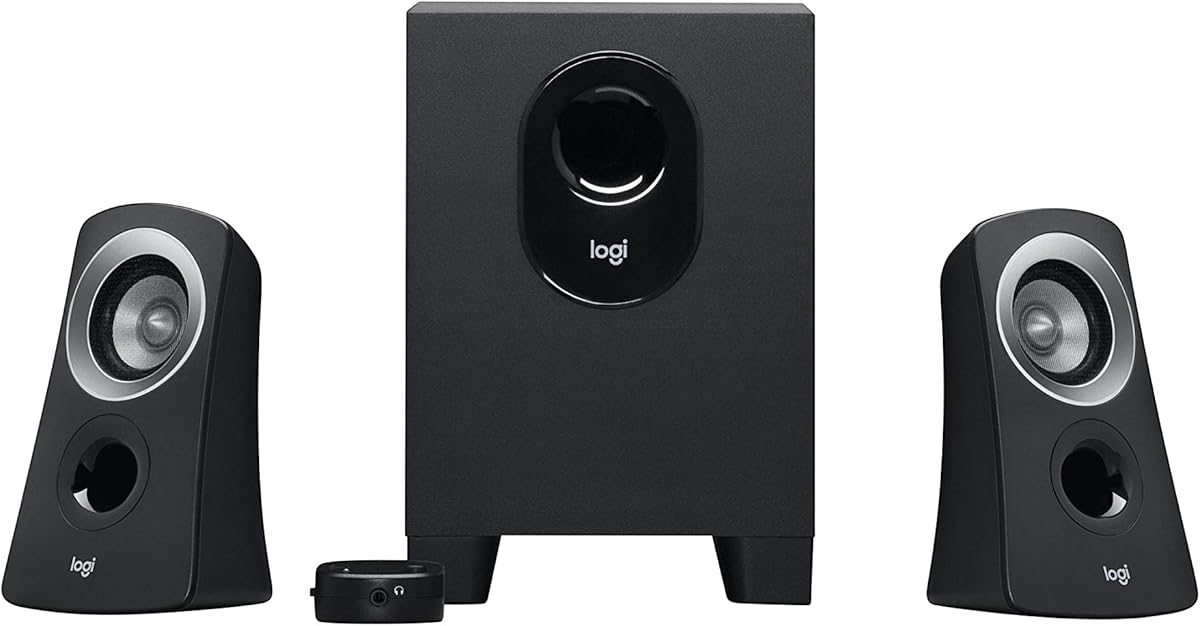
Logitech Z313
4.4Editor score
Compact subwoofer design
25 watts RMS output
Convenient control pod
Simple multimedia setup
Our 2.1 Channel Desktop Speakers guide compares sound quality, bass, connectivity, controls, design, and compatibility to help you choose the right system.
A quality 2.1 channel desktop speaker system combines two compact satellite speakers with a dedicated subwoofer, making it easier to enjoy balanced music, detailed game audio, and fuller movie sound from a computer setup. The right model should fit your available space, match your device connections, and provide enough output for the way you listen.
We compared the 10 systems in this guide by examining their driver configurations, amplification, bass capability, wired and wireless connectivity, controls, dimensions, and intended uses. The list covers everything from compact USB-powered models to substantial THX-certified systems and feature-rich options with RGB lighting, Bluetooth, and app-based customization.
Each pick highlights a different balance of strengths, so the best choice depends on whether your priority is fidelity, output, affordability, connectivity, compactness, or visual customization. Product ratings and configurations are current to the supplied information, while prices and availability can change, so check the current listing before purchasing.
4.4Editor score

4.6Editor score
4.2Editor score
The following comparison highlights the major differences in output, bass hardware, connection options, controls, and design. It is intended to make it easier to identify the most suitable 2.1 channel system for a particular desk, device, and listening priority.


The Klipsch ProMedia 2.1 THX Certified Computer Speaker System earns a 4.5 rating and stands out as the most balanced overall recommendation in this guide. Its defining combination is clear, efficient horn-loaded satellite speakers and a substantial 6.5-inch side-firing subwoofer. Together, they provide a more convincing sense of scale than a conventional all-in-one desktop pair.
We may earn a commission when you buy through this link, at no additional cost to you.
Klipsch Microtractrix horn technology gives the two-way satellites a direct, articulate character while making efficient use of their amplification. Each satellite combines a 3-inch midrange driver with a high-frequency horn, while the ported subwoofer handles the low end. The stated 200-watt peak output and 110 dB in-room maximum give the system enough headroom for music, movies, and gaming.
The control pod is a practical feature, providing main volume and subwoofer gain adjustment without forcing a trip to the subwoofer. A 3.5 mm input broadens compatibility with computers, televisions, music players, and game consoles. The trade-off is physical size and limited wireless flexibility: the subwoofer occupies more space than a compact model, and there is no Bluetooth or USB audio connection.
This is the strongest choice for listeners who want a traditional, high-performance 2.1 arrangement without relying on RGB effects or app-based controls. It is particularly suitable for a larger desk, entertainment center, or gaming setup where fuller bass and higher output will make a meaningful difference. For smaller workspaces, the Logitech Z623 or Creative Pebble Plus may be easier to accommodate.
The two-way satellite design separates midrange and high-frequency reproduction, helping voices remain intelligible while music retains definition. Klipsch horn technology controls dispersion and delivers sound efficiently, a useful quality for desktop listening where directional clarity matters.
The 6.5-inch ported subwoofer supplies the low-frequency foundation, while the dedicated gain control lets listeners balance bass against satellites or near-wall placement. This makes the system more adaptable than basic fixed-tone 2.1 sets.
We may earn a commission when you buy through this link, at no additional cost to you.
The Logitech Z313 carries a 4.4 rating and represents a practical entry into dedicated 2.1 channel desktop audio. Rather than trying to imitate a full-size home theater system, it focuses on the essentials: two satellites, a compact subwoofer, and a convenient control pod. That restrained design makes it easy to understand and use.
We may earn a commission when you buy through this link, at no additional cost to you.
Its stated 25 watts RMS output is sufficient for close-to-medium desktop listening, particularly for system sounds, music, videos, and casual games. The subwoofer adds a lower-frequency layer that a pair of small satellite speakers cannot reproduce effectively on its own. A separate control pod keeps the primary volume adjustment accessible without taking up desk surface area.
The limitation is output and feature depth. Compared with the Logitech Z623, Cyber Acoustics CA-3610, and Klipsch ProMedia 2.1 THX, the Z313 has less amplification and a smaller woofer. It also offers a more limited connection and control scheme, so it is not the natural selection for filling a large room or managing several source devices.
Choose the Z313 when you want an uncomplicated dedicated subwoofer at a modest level of output, especially for a home office, dorm room, or compact workstation. It is a good match for buyers who value recognizable Logitech styling and straightforward operation without paying for elaborate lighting, wireless audio, or app features.
The subwoofer handles low frequencies separately from the satellites, producing a fuller and more balanced presentation than small two-way speakers. Its compact construction also makes it easier to place than many larger 2.1 systems.
The control pod provides a convenient way to adjust the system level. Keeping the main adjustment separate from the subwoofer reduces the need to reach behind or beneath the desk for routine volume changes.
We may earn a commission when you buy through this link, at no additional cost to you.
The Logitech Z623 has the highest rating in this group at 4.6 and is built for people who want a 2.1 channel system with enough output for games, films, and music. Its 400-watt peak and 200-watt RMS specifications exceed those of the other Logitech model in the list, while THX certification supports a more deliberate home-entertainment positioning.
We may earn a commission when you buy through this link, at no additional cost to you.
The system uses two 35-watt satellite speakers and a 130-watt subwoofer. This gives the satellites room for clear midrange and treble while the subwoofer produces the deep, forceful low end needed for explosions, action sequences, and modern electronic music. It can fill a large entertainment room, although careful subwoofer placement will help avoid overly boomy results.
RCA and 3.5 mm inputs can accommodate up to three audio devices, making the Z623 useful with a computer, television, game console, disc player, or other source. Compatibility extends across major console families and common mobile devices. The trade-offs are its substantial subwoofer and the absence of Bluetooth, USB, or wireless control.
This is a strong recommendation for a dedicated gaming or media station where wired connectivity is acceptable and room-filling output is the priority. It is less ideal for a minimalist laptop setup or a small desk where footprint and cable-free operation matter more than maximum power.
The combination of 35-watt satellites and a 130-watt subwoofer provides generous amplification for dynamic music and effects-heavy games. Higher headroom also reduces the temptation to run the system at an excessive level simply to make bass seem more noticeable.
RCA and 3.5 mm inputs support up to three connected sources. That makes the Z623 particularly practical for a desktop that also serves a television, game console, or portable media player.
We may earn a commission when you buy through this link, at no additional cost to you.
The Creative Pebble X Plus scores 4.2 and is the most stylistically ambitious system in the guide. Its spherical black satellites, compact subwoofer, and RGB lighting are designed for contemporary desks where the audio setup should look as deliberate as the rest of the workspace. The visual treatment is backed by practical connectivity and communication features.
We may earn a commission when you buy through this link, at no additional cost to you.
Upgraded 2.75-inch drivers and a compact subwoofer support up to 15 watts RMS, with the ability to reach 30 watts RMS when connected to a 30-watt or higher USB PD adapter. The supplied information does not include a USB PD adapter, so buyers should account for that accessory when expecting maximum amplification.
Connectivity includes USB digital audio, Bluetooth 5.3, and a universal 3.5 mm AUX input. Dual headset and microphone ports add value for gaming, online meetings, and work calls, allowing the system to serve as a more complete desktop hub. The counterpoint is that the feature set can feel excessive for listeners who only need a straightforward wired pair and subwoofer.
The Pebble X Plus is a compelling choice for a modern workstation where appearance, wireless convenience, and communication ports matter. It also suits shared gaming spaces where switching between Bluetooth and wired sources is convenient. Listeners seeking a traditional, neutral-looking audio system may prefer the Logitech Z313 or Klipsch ProMedia Lumina instead.
USB, Bluetooth 5.3, and AUX make it possible to move among a docked computer, phone, and other source without changing the overall speaker setup. The included communication ports can simplify headset and microphone connections at a desk.
The RGB system supports up to 16.8 million color combinations and six presets, allowing the speakers to coordinate with a gaming setup or remain understated. Lighting affects appearance rather than sound quality, so it is best treated as a personalization feature.
We may earn a commission when you buy through this link, at no additional cost to you.
The Bluedee 2.1 PC Speakers earn a 4.4 rating and offer a flexible, modern approach to desktop audio. Their combination of DSP tuning, a dedicated subwoofer, several wired connections, Bluetooth 5.4, and RGB lighting targets buyers who want more flexibility than a basic multimedia speaker set.
We may earn a commission when you buy through this link, at no additional cost to you.
The DSP tuning is intended to reduce distortion and harsh high frequencies while keeping vocals clear and the overall presentation balanced. An independent bass unit handles low frequencies, helping the satellite speakers remain focused on midrange and treble. The listed 80-watt peak output is suitable for ordinary desktop entertainment without approaching the scale of the larger Logitech Z623.
USB, USB-C, 3.5 mm AUX, and Bluetooth make the system adaptable to different devices. A single control knob manages volume, playback, lighting effects, and operating modes, reducing desk clutter. The main compromise is that the RGB treatment and multi-mode control hub may be less appealing in a professional or minimalist environment.
The Bluedee set is a good match for a hybrid work or gaming setup that changes between wired computer use and wireless phone playback. It is also a reasonable choice for those who want a dedicated subwoofer without moving to a large home-theater-style enclosure. Its priority should be convenience and flexible everyday listening rather than reference-level nuance.
DSP processing is used to smooth the overall output and reduce harshness. This can be particularly useful during long work sessions, where a less fatiguing presentation may matter more than maximum detail or high output levels.
The integrated control knob handles several frequently used functions. Combining playback, lighting, and mode control into one accessible component keeps the system tidy and reduces the number of separate devices on the desk.
We may earn a commission when you buy through this link, at no additional cost to you.
The Cyber Acoustics CA-3090 has a 3.9 rating and serves as a basic, space-conscious 2.1 system. Its 18-watt peak and 9-watt RMS ratings are the lowest in this collection, so it is best understood as an entry-level option for modest listening levels rather than a high-impact entertainment system.
We may earn a commission when you buy through this link, at no additional cost to you.
The package includes two satellite speakers with 2-inch drivers and a ported, 4-inch side-firing polycarbonate subwoofer. That dedicated woofer adds useful low-frequency weight to a basic desktop setup. A control pod handles volume and power, while a separate knob on the subwoofer provides bass adjustment, giving users a degree of tonal control despite the simple design.
The flat-panel satellites have a clean appearance, and the complete package includes a 110-volt AC power adapter and user guide. The product also carries a one-year manufacturer warranty. The main limitation is low amplification, which can become obvious when the system is asked to handle a large room, high-volume gaming, or dynamic modern music.
Choose the CA-3090 for a small office, study space, or secondary computer where a dedicated subwoofer is desired without a large footprint. It is also a sensible starting point for casual listening. Buyers wanting greater output, richer detail, and broader source support should look toward the Logitech Z313, CA-3610, or Creative Pebble Plus.
A dedicated bass control on the subwoofer allows listeners to refine the balance independently of the main system level. This is valuable in small rooms or on desks where too much low-frequency output can quickly overwhelm the satellites.
The system focuses on core desktop functionality rather than wireless convenience. Its included power adapter and straightforward control pod make setup uncomplicated for users who primarily connect a computer or another analog source.
We may earn a commission when you buy through this link, at no additional cost to you.
The Creative Pebble Plus holds a 4.3 rating and is built around convenience. USB power removes the need for a wall outlet, while the 3.5 mm AUX connection handles audio from computers and laptops. Although its output is modest, the dedicated 4-inch down-firing subwoofer gives this compact system more low-frequency capability than many similarly sized desktop sets.
We may earn a commission when you buy through this link, at no additional cost to you.
The 2-inch satellite drivers are elevated at 45 degrees, directing sound toward the seated listener. That orientation can improve perceived clarity and make the speakers easier to enjoy at a desk. A High Gain Mode can raise output to 8 watts RMS when used with a 5-volt, 2-amp USB adapter, which is not included.
The main limitation is that the system's ceiling is relatively low even in High Gain Mode. It is not designed to power a large entertainment room or deliver the same dynamic impact as the Logitech Z623 or Klipsch ProMedia THX. The requirement for a capable USB source also means that older laptops or constrained hubs may not provide ideal power.
The Pebble Plus is a strong fit for a laptop-focused workspace, dorm room, or office where avoiding a wall outlet is important. It also works well for listeners who value directional drivers, discreet styling, and a separate subwoofer over high volume. It is less suited as the primary system for a large gaming setup.
The 45-degree elevated driver orientation places the acoustic output more directly toward the listener. This design can improve clarity at a desk and makes the satellites feel intentionally shaped for near-field computer listening.
USB-powered operation reduces cable clutter and avoids occupying a nearby power outlet. A suitable USB adapter can enable High Gain Mode, although standard operation is designed to work with ordinary powered USB connections.
We may earn a commission when you buy through this link, at no additional cost to you.
The Cyber Acoustics CA-3610 earns a 4.2 rating and offers a well-balanced middle ground for desktop listeners. Its 62-watt peak and 30-watt RMS output provide more authority than compact USB systems, while its subwoofer and multi-driver satellites should satisfy listeners who want clearly separated bass and midrange performance.
We may earn a commission when you buy through this link, at no additional cost to you.
Each satellite uses dual 2-inch titanium drivers to provide crisp highs and warm midtones. A 5.25-inch down-firing subwoofer with a tuned port supplies the low end, and a control pod allows adjustment of overall volume and bass. The system also includes a headphone jack, enabling private listening without replacing the desktop setup.
The supplied compatibility information covers PCs, Macs, laptops, PS4, PS5, Xbox, Nintendo Switch, tablets, and smartphones when they have a 3.5 mm audio connection. As a wired system, it lacks Bluetooth, USB digital audio, and wireless control. The subwoofer and required 120-volt AC adapter may also be less convenient for minimalist laptop setups.
The CA-3610 is best for a stationary desktop or entertainment area that benefits from a substantial 5.25-inch woofer and traditional analog connectivity. It is particularly attractive to gamers and movie listeners because of the dedicated bass control and headphone option. For a smaller or more flexible workspace, consider one of the Creative systems.
Using two 2-inch titanium drivers in each satellite gives the left and right channels more driver area than basic single-driver desktop speakers. The result is a better platform for clear high frequencies and warm midrange content.
The 5.25-inch down-firing subwoofer is one of the larger drivers in this guide. Combined with the ported enclosure, it provides a more noticeable bass foundation while remaining usable beneath many desks.
We may earn a commission when you buy through this link, at no additional cost to you.
The Logitech Z407 has a 4.3 rating and focuses on a clean, flexible user experience. Its most distinctive feature is the wireless control dial, which lets users adjust volume, bass, and playback from across a room. The oval satellites and dedicated subwoofer also give the system a more polished appearance than conventional square desktop speakers.
We may earn a commission when you buy through this link, at no additional cost to you.
The system provides 80 watts peak and 40 watts RMS output. Digital signal processing supports a 20-watt bass section, while the ported, down-firing subwoofer adds impact to music, films, and games. The satellites may be placed vertically or horizontally, making it easier to arrange them around a monitor or within a compact entertainment area.
Bluetooth, micro USB, and 3.5 mm input allow up to three devices to be connected, with dedicated controls for switching between wired and wireless sources. The limitation is that there is no RCA input, and the wireless dial's stated 30-meter range assumes line of sight. It also remains a wired audio system for its main inputs rather than a fully wireless speaker set.
The Z407 is a strong option for a multipurpose living room, bedroom office, or entertainment desk where convenience and remote control are important. It suits users who want a dedicated subwoofer and balanced output without a large subwoofer enclosure. Listeners who need legacy RCA equipment or maximum amplification should consider the Logitech Z623 instead.
The wireless dial handles volume, bass, and playback commands without requiring a walk to the desk. It is particularly useful for listening from a sofa or bed, where reaching the speakers would otherwise be inconvenient.
The dual-position satellites can stand upright or lie horizontally. That flexibility makes it easier to align the pair with a monitor, place them near a television, or fit them into a compact entertainment arrangement.
We may earn a commission when you buy through this link, at no additional cost to you.
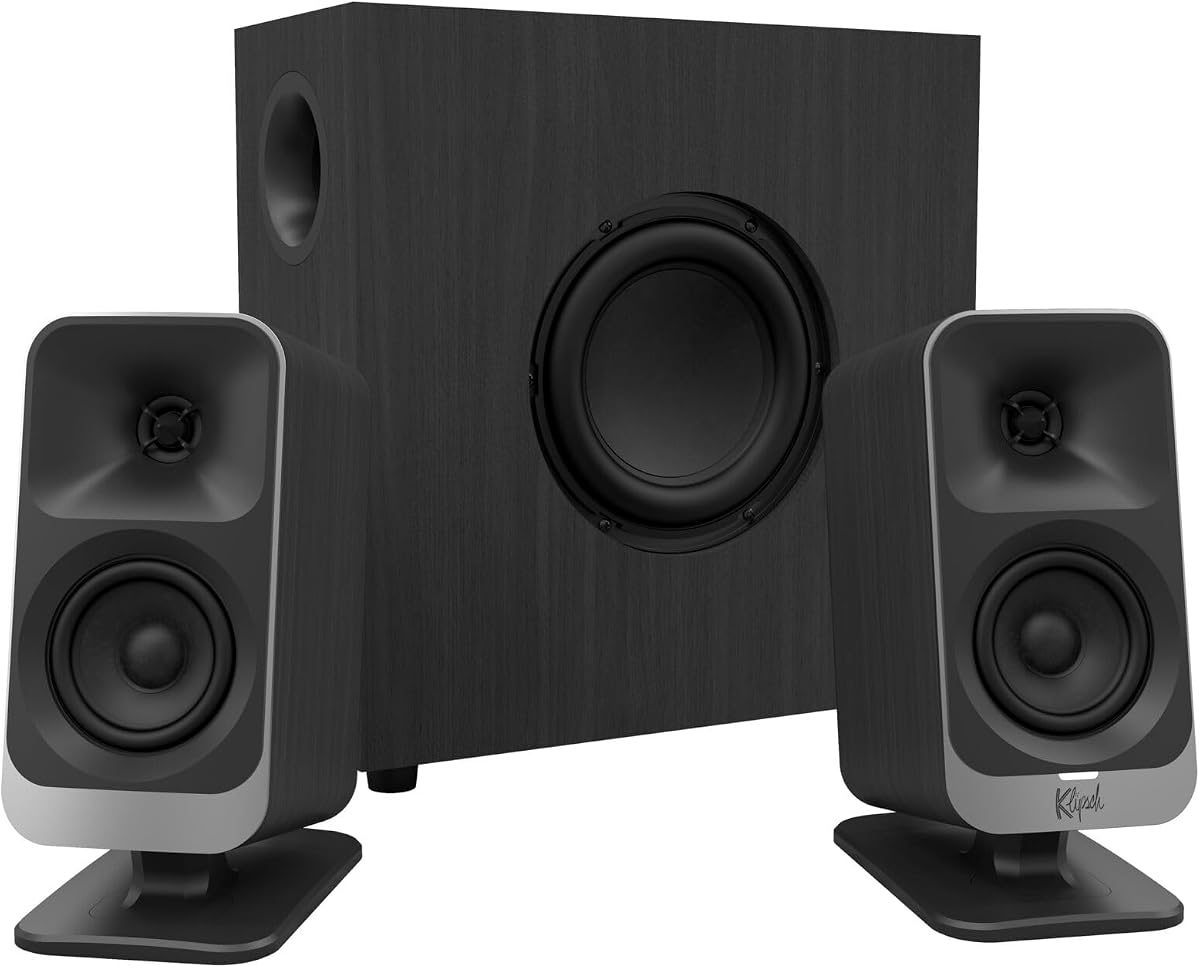
The Klipsch ProMedia Lumina carries a 4.2 rating and is the premium choice for a modern workstation. It revisits Klipsch's long-running ProMedia computer speaker concept with a redesigned cabinet, tiltable stands, low-profile subwoofer, updated controls, and integrated RGB effects. Its goal is to combine a familiar high-performance desktop format with current connectivity and customization.
We may earn a commission when you buy through this link, at no additional cost to you.
The system connects through USB-C, AUX, and Bluetooth 5.3, making it suitable for computers, mobile devices, and other audio sources. The subwoofer includes an adjustable gain knob, and the speaker stands can be tilted to suit the user's position. The Klipsch Control desktop app adds EQ adjustment, lighting control, night mode, and music-reactive lighting options.
The main trade-off is that some advanced functions depend on software, which adds another layer beyond basic plug-and-play operation. The supplied information also does not identify this model as THX-certified, so buyers should not equate it directly with the Klipsch ProMedia 2.1 THX system. Nevertheless, its connectivity and compact low-profile subwoofer make it more contemporary than many wired alternatives.
The Lumina is best for gamers, content creators, and music or movie enthusiasts who want a premium-looking setup and want their speakers to integrate with a modern desk. It is especially attractive where USB-C or Bluetooth 5.3 is preferred over legacy analog audio. Buyers who want a simpler system with fewer controls should consider the Logitech Z623 or Creative Pebble X Plus.
USB-C supports a streamlined digital connection to a modern computer, while Bluetooth 5.3 removes the need for a cable when playing from a phone or another compatible source. AUX preserves support for conventional analog equipment.
The Klipsch Control app provides access to EQ, lighting, night mode, and music-reactive effects. This gives the system more depth than a basic hardware-only control scheme while allowing users to tailor its presentation and appearance.
We may earn a commission when you buy through this link, at no additional cost to you.
Choosing a 2.1 channel desktop speaker system involves balancing output, driver size, connectivity, controls, and available space. The most important step is to identify how and where the system will be used, then avoid paying for features that do not improve that particular experience.
Subwoofer size has a major effect on both low-frequency capability and physical practicality. Models such as the Logitech Z623 and Cyber Acoustics CA-3610 use larger enclosures and larger woofers, which can provide more authority for music and movies. The Creative Pebble Plus and Logitech Z313 are more compact, making them easier to position beneath a modest desk. Measure the available width, height, and depth before purchasing, and allow room around a ported subwoofer for airflow and bass response.
Peak wattage is not the same as sustained output, so compare RMS figures when they are available. The Logitech Z313 is listed at 25 watts RMS, the Creative Pebble X Plus can reach 30 watts RMS with suitable USB PD power, the Cyber Acoustics CA-3610 delivers 30 watts RMS, and the Logitech Z407 reaches 40 watts RMS. The Klipsch ProMedia 2.1 THX lists 200 watts peak, while the Z623 lists 400 watts peak and 200 watts RMS. Consider room size and comfortable listening levels rather than choosing only by the largest headline figure.
A larger driver can move more air, but enclosure design, porting, amplification, and the rest of the signal chain also shape the result. The Klipsch ProMedia 2.1 THX uses two-way satellites with Microtractrix horn technology, while the Cyber Acoustics CA-3610 uses dual 2-inch titanium drivers per satellite. At the opposite end, the CA-3090 uses 2-inch satellites and a 4-inch side-firing woofer. Comparing the complete configuration provides a more useful picture than focusing on one driver measurement.
A 3.5 mm AUX input is widely compatible, but USB-C digital audio can offer a more direct computer connection. Bluetooth adds cable-free playback from phones and tablets, while RCA inputs remain useful for legacy entertainment equipment. The Z623 stands out with both RCA and 3.5 mm inputs, and the Pebble X Plus supports USB, AUX, and Bluetooth 5.3. The Klipsch Lumina offers USB-C, AUX, and Bluetooth 5.3. Choose based on the devices you actually use rather than paying for wireless features you will rarely employ.
Control placement can have a greater effect on daily convenience than a small difference in technical specifications. A separate control pod, as found on the Logitech Z313 and Cyber Acoustics CA-3610, keeps volume within reach. The Bluedee system consolidates playback, lighting, and modes into one knob, and the Logitech Z407 provides a wireless dial. The Klipsch Lumina relies more heavily on its app for EQ and lighting. The Klipsch ProMedia 2.1 THX and CA-3090 also provide separate bass controls for balancing low frequencies.
A 2.1 system occupies more visual and physical space than a two-speaker set, so cabinet design should complement the room. The Logitech Z407 uses oval satellites that can be placed vertically or horizontally, while the Creative Pebble X Plus and Bluedee system include RGB effects. Klipsch Lumina also offers app-controlled lighting. RGB can enhance a gaming setup, but it adds little to sound quality and may not suit a professional office or minimalist workspace.
Check the system against every device you plan to connect, including computers, televisions, consoles, tablets, smartphones, and music players. The Logitech Z623 explicitly supports a broad range of wired source types, while the CA-3610 highlights use with PCs, Macs, laptops, current and previous console generations, tablets, and phones. The Creative Pebble X Plus adds communication ports for headsets and microphones, making it especially relevant to online meetings and gaming. A headphone output can also support private listening without replacing the main speakers.
A subwoofer can sound different in a corner, beneath a desk, beside a wall, or in an open room. Systems with independent bass controls, such as the Klipsch ProMedia 2.1 THX, Logitech Z313, Cyber Acoustics CA-3090, and CA-3610, make it easier to reduce boominess when the placement adds excess low frequency. Start with moderate source volume and adjust from there. Keep the subwoofer off the floor if vibration is excessive, and leave clearance around ports.
Begin by positioning the two satellite speakers symmetrically on either side of the monitor, with the tweeters or elevated drivers aimed toward the listening position. Place the subwoofer near the desk or entertainment area while leaving space around its port. Connect the system to the intended source, power it on, and set the source volume low before raising the speaker-system level.
After connecting the audio source, use the main volume control for routine changes and adjust bass only when necessary. Begin with the subwoofer gain near the middle, listen to familiar material, and make small corrections based on room placement. Wireless systems should be paired with one source initially, while multi-device models should be tested to confirm that input switching behaves as expected.
Keep the drivers and ports free from dust, and avoid pushing the system to sustained maximum output. Place the subwoofer on a stable surface rather than directly against a resonant wooden surface. For long periods of use, powering the system off when it is not needed can reduce wear and help maintain a consistent connection when you return.
A 2.0 system uses two full-range speakers, while a 2.1 system adds a separate subwoofer for low frequencies. The satellites handle most midrange and high-frequency content, and the subwoofer provides bass that the smaller satellite drivers cannot reproduce efficiently. A 2.1 setup generally sounds fuller but requires more desk or floor space.
Yes, especially when directional game effects and strong low-frequency cues matter. Models with dedicated bass controls, such as the Logitech Z407, Cyber Acoustics CA-3610, and Klipsch ProMedia 2.1 THX, allow the subwoofer to be balanced for different games and room positions. Headphone and microphone ports on the Creative Pebble X Plus also add convenience for online communication.
Most of the systems in this guide are designed to work with a laptop, but the required connection depends on the model. The Creative Pebble Plus uses USB power and a 3.5 mm AUX cable, the Z407 supports micro USB and 3.5 mm connections, and the Klipsch Lumina supports USB-C and AUX. Check whether your laptop includes the necessary port or whether an adapter is needed.
No. A larger subwoofer can produce deeper and louder bass, but it may be excessive in a small room and harder to place. A compact 4-inch model may be more suitable beneath a small desk, while a 5.25-inch or 6.5-inch driver can provide greater impact in a larger entertainment area. Independent bass control and careful placement are important with any size.
Wired systems often provide a more consistent connection and avoid wireless latency or pairing concerns. Bluetooth is valuable for switching between a computer and phone without reconnecting cables. The best choice depends on your devices: prioritize wired inputs for gaming and stationary entertainment, or Bluetooth when convenience and cable-free placement are more important.
Start by moving the subwoofer away from corners and tightly enclosed spaces, then lower its bass gain or the subwoofer control in small increments. If the system lacks separate bass adjustment, reduce the source level and use the main control. Wall placement can also add low-frequency buildup, so experiment with the subwoofer position before making permanent changes.
It is not required for normal operation, but the system can reach its higher stated output of 30 watts RMS when connected to a 30-watt or higher USB PD adapter. The adapter is not included. For the Creative Pebble Plus High Gain Mode, a 5-volt, 2-amp USB adapter is specified.
The Logitech Z313 is among the simplest because it uses a conventional multimedia layout, a control pod, and straightforward wired operation. The Creative Pebble Plus is also convenient for laptop users because USB power eliminates the need for a wall adapter. Systems with Bluetooth, RGB, or app control take slightly more initial configuration but add flexible day-to-day operation.
The Logitech Z623 is the strongest all-around choice for shoppers who prioritize strong output, THX certification, and broad wired compatibility. The Logitech Z313 delivers the essential 2.1 experience in a more compact and approachable package, while the Klipsch ProMedia Lumina stands apart as the premium modern option with USB-C, Bluetooth 5.3, RGB lighting, and app-based control.
For most buyers, the right choice comes down to power versus footprint and wired versus wireless operation. Larger woofers suit music and movies, compact systems suit laptops, and RGB or remote controls should be chosen only when they will improve your daily setup. Whichever model you select, matching its connectors to your devices and allowing room for subwoofer placement will improve the final result.
Ratings, specifications, and product configurations can evolve, while prices and availability are subject to change. Check the current product listing and user guide before ordering, particularly if you need a specific adapter, USB power standard, source connection, or system-control feature.