
Elderly Large Print Keyboard
4.5Editor score
High-contrast white keycaps
Full 104-key QWERTY layout
Broad Windows and Mac support
Simple USB wired connection
Our Large Print Keyboard guide compares 10 high-visibility, full-size options for seniors, beginners, and low-vision users, including backlit, spill-resistant
A large print keyboard can make typing easier for seniors, beginners, and anyone who struggles to identify small characters on a standard computer keyboard. The most useful models combine enlarged legends, strong color contrast, familiar layouts, and comfortable full-size designs rather than simply making every key physically oversized.
We compared the 10 featured products by examining print size, key contrast, backlighting, layout familiarity, wired connectivity, compatibility, spill resistance, wrist support, and everyday usability features. The guide covers traditional high-contrast models, illuminated keyboards, ergonomic options, and designs intended for shared offices, libraries, schools, and home computers.
Each pick highlights a different reason to choose, including visible legends, flexible lighting, familiar number pads, useful media controls, and added comfort features. Product ratings, configurations, and prices can change, so readers should confirm the current listing and their computer's connection requirements before making a final choice.
4.5Editor score

4.9Editor score

4.6Editor score
The comparison below highlights the essential differences among all 10 keyboards, including print contrast, illumination, key count, spill protection, connectivity, and comfort features. Each option is best suited to slightly different needs, so the most important distinctions are visibility, familiar layout, lighting control, and device compatibility.


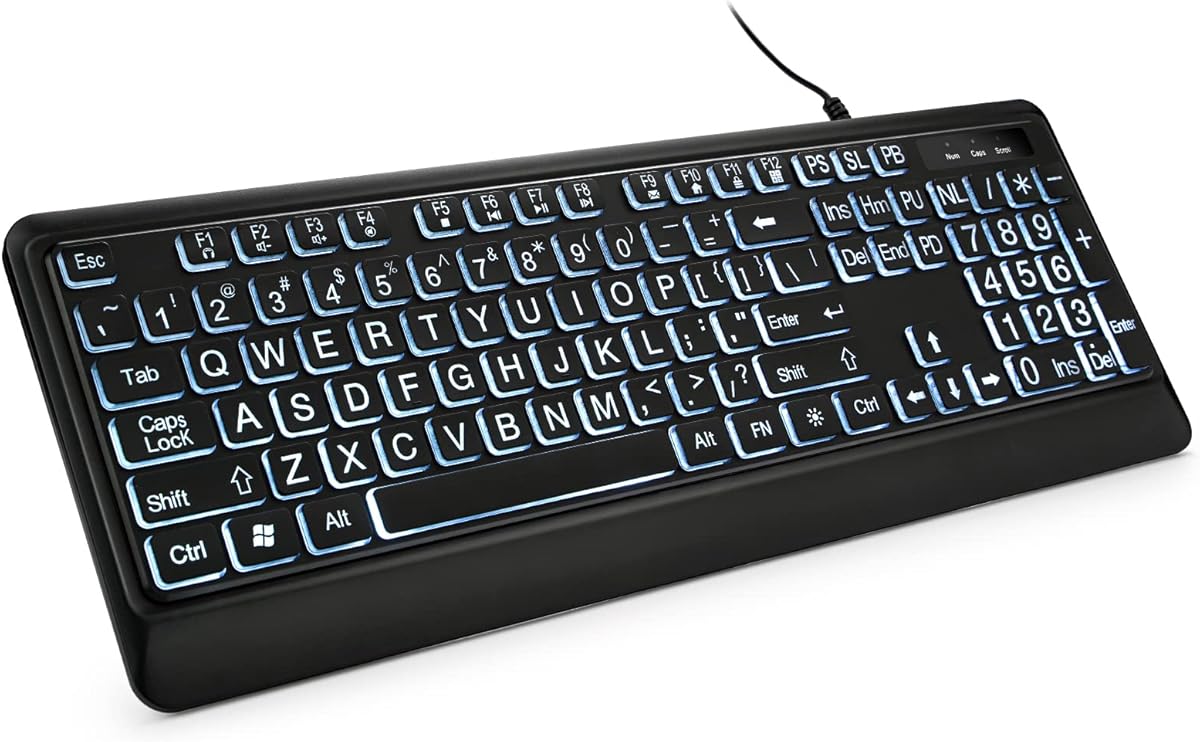


The Elderly Large Print Keyboard is a straightforward, high-visibility option with a 4.5 rating. Its defining feature is the combination of white keycaps and large black characters, a combination that can make labels easier to locate than small white markings on conventional black keys. The full 104-key US QWERTY layout includes a number pad and preserves the arrangement many users already know.
We may earn a commission when you buy through this link, at no additional cost to you.
Visibility is supported by the claimed oversized print, which the product description identifies as the largest available on a full-size keyboard. The design is aimed at older adults, beginners, and low-vision users, but it can also suit anyone who simply prefers prominent legends. Its membrane switches are described as durable to five million keystrokes and intended to provide a quieter, accurate typing experience.
This model is deliberately simple. It connects through a USB wired interface, requires no installation disc or special software, and is listed as compatible with multiple Windows versions as well as OS X. That broad support is valuable for owners of older desktop and notebook computers. The main limitations are equally straightforward: there is no backlight for dim rooms, and the keyboard does not add media keys, a palm rest, or a cover.
It is a strong recommendation for buyers who want dependable visibility without extra lighting controls or a less familiar layout. The high-contrast design, conventional key arrangement, and simple wired setup make it particularly appropriate for a senior's home computer, a classroom, a library, or a shared workstation. Those who regularly type at night may prefer an illuminated model, but this keyboard offers the most direct solution for reading the labels.
Large black characters printed on white keycaps create a strong visual contrast, making the keyboard easier to scan without requiring illumination. This is particularly helpful for users who need more time to locate individual keys.
The standard 104-key arrangement includes a dedicated number pad and conventional US placement, so users do not need to relearn basic typing positions. Its broad compatibility also reduces the likelihood of setup complications.
We may earn a commission when you buy through this link, at no additional cost to you.
The X9 Large Print Backlit Keyboard combines bold legends with unusually broad lighting controls, earning a 4.5 rating. It is designed for users who need larger characters and may also work in dim rooms, offices, or late-night study sessions. Unlike a basic high-contrast keyboard, it allows the user to choose among seven backlight colors and four brightness levels.
We may earn a commission when you buy through this link, at no additional cost to you.
The underlying layout is a full-size 107-key design with a number pad and 12 shortcut keys. This makes it more useful for spreadsheet work, general productivity, and frequent navigation than a compact option without a numeric pad. Its wired USB connection is described as dependable and requires no software, allowing it to serve as an easy replacement for a desktop, laptop, or Chromebook keyboard.
The trade-off is that the model is more feature-oriented than the simplest high-contrast designs. Seven colors and four brightness levels may be unnecessary for someone who only needs clearer printed legends, while the extra shortcut controls can be confusing for a beginner. System-dependent hotkeys are also a common consideration with full-featured multimedia keyboards, so users should confirm that their preferred controls function as expected.
The X9 is best for buyers who want one keyboard to handle daytime and low-light typing without sacrificing a familiar full-size arrangement. Seniors may find the illumination valuable, while students and office users can benefit from the number pad and shortcuts. It is less compelling for someone who only needs large print in a bright room, but it is a more versatile all-around choice for mixed lighting conditions.
Seven colors and four brightness levels let the user adjust the keyboard to a dim room, a brightly lit office, or personal visual preferences. This flexibility is the X9's strongest distinction from a standard high-contrast model.
The 107-key arrangement adds a number pad and shortcut keys to the familiar typing section. It is therefore a practical fit for accounting, spreadsheets, and users who want convenient system controls.
We may earn a commission when you buy through this link, at no additional cost to you.
The BOOGIIO Large Print Computer Keyboard is built around strong yellow-and-black contrast and carries a 4.4 rating. Its enlarged characters and larger, bolder command-key printing are intended to help people who have difficulty seeing ordinary legends. The 104-key US QWERTY arrangement includes a number pad, minimizing the need to relearn familiar typing positions.
We may earn a commission when you buy through this link, at no additional cost to you.
Unlike many standard office keyboards, this model is described as water resistant for protection against accidental spills. That feature is useful in homes where drinks are kept near the computer, in classrooms, and in busy work areas. The membrane switches are stated to support a five-million-keystroke lifecycle while providing faster response and quieter operation than many mechanical-style alternatives.
The trade-off is the absence of an integrated backlight. Users who work in dark rooms may need external lighting, whereas the X9 and other illuminated choices are more self-contained. The product also warns that non-Windows systems may not support every hotkey, although basic typing is compatible with macOS and OS X. Its corded USB connection keeps setup uncomplicated.
This keyboard is an excellent match for users who prioritize maximum label contrast and spill protection over colorful illumination. The fluorescent yellow keycaps and large black printing offer a different visual treatment from white-on-black or black-on-white models, and that distinct appearance may be easier for certain users to recognize. It is well suited to shared environments, schools, libraries, and special-needs workspaces.
Large black characters against fluorescent yellow keycaps provide a pronounced visual difference from a conventional keyboard. This can make the keys easier to find without changing the familiar US layout.
The water-resistant design adds practical protection in locations where coffee, water, or other liquids may be present. As the description advises, a keyboard exposed to liquid should be air-dried completely before further use.
We may earn a commission when you buy through this link, at no additional cost to you.
The Large Print Backlit Keyboard is a 4.5-rated option focused on visibility, illumination, and practical protection. Its printed characters are described as four times larger than standard keyboard fonts, while the white LED backlight is intended to make the keys visible in lower-light environments. A one-click control is included for turning the illumination on or off.
We may earn a commission when you buy through this link, at no additional cost to you.
This model also addresses physical comfort. It has folding feet, a wrist support, and keys described as quick-rebounding to help reduce hand fatigue during extended sessions. Twelve FN-plus-key combinations provide access to volume, mute, media playback, email, homepage, and other common tasks. Those shortcuts make it useful for daily productivity without requiring a mouse for every function.
The included original cover is a noteworthy accessory. It can protect against splashes, dust, pet hair, and debris, while also helping keep the keyboard clean. There is an operational caveat: the white backlight cannot be switched off while the computer is in standby and locked, and it turns off only when the computer is powered down. Mac users should also note that multimedia shortcuts may not work completely.
This is a strong choice for a senior who types in changing light, works at a shared desk, or wants a protective cover for a frequently used computer. Its 104-key layout and numeric keypad make it a familiar full-size option. The standby-light behavior may be inconvenient in a bedroom, but for a home office, classroom, or active shared workstation, the visibility and maintenance benefits are compelling.
Large legends are supplemented by evenly spread white illumination, offering a second way to identify the keys. Users who work during the evening or in poorly lit spaces can adjust the keyboard to their surroundings.
The included cover helps block dust and liquid, while the integrated wrist support and folding feet support longer sessions. Together, they make the model practical for frequent home or office use.
We may earn a commission when you buy through this link, at no additional cost to you.
The KOPJIPPOM Large Print Keyboard receives a 4.6 rating and combines four-times larger fonts with extensive illumination controls. It is one of the most visually adaptable products in the guide, offering seven backlight colors—blue, green, red, cyan, purple, yellow, and white—along with three brightness levels.
We may earn a commission when you buy through this link, at no additional cost to you.
The large print is designed to make characters easier to see and type, particularly for older adults, low-vision users, students, and people who are still learning keyboard skills. The standard 104-key US QWERTY layout preserves familiar key locations and includes a number pad, so users can gain the visibility benefits without moving to an unfamiliar compact format.
Its wired USB connection removes battery charging and driver installation from the setup process. Listed compatibility covers Windows versions through Windows 11, Vista, Raspberry Pi 3 and 4, and Mac OS, although multimedia keys may not function completely on Mac systems. The keyboard also has a spill-resistant design and folding feet intended to reduce hand fatigue during long sessions.
This model is best for someone who wants large text and enjoys being able to tailor the appearance of a desk setup. It is particularly appropriate for evening computer use, students, and home offices where a number pad remains useful. The absence of a wrist rest and possible Mac shortcut differences are minor drawbacks compared with the broad color selection and straightforward plug-and-play operation.
The lighting can be adjusted to match a room, improve character definition, or reflect personal preference. This makes the keyboard more adaptable than models offering only a single white illumination.
Support for current Windows versions, Mac OS, and Raspberry Pi systems broadens the range of devices that can be used with the keyboard. No batteries, charging, or driver installation are required.
We may earn a commission when you buy through this link, at no additional cost to you.
The KOPJIPPOM Large Print Backlit Keyboard is a 4.5-rated model that focuses on the essentials: large legends, white LED lighting, a familiar full-size layout, and dependable wired operation. Its characters are stated to be four times larger than standard keyboard print, giving users a clearer target without requiring a specialized or compact layout.
We may earn a commission when you buy through this link, at no additional cost to you.
The white backlight is evenly distributed across the keys and can be turned on or off with brightness adjustment. This makes the keyboard useful in dim rooms, studios, and offices without introducing colorful lighting that could reduce character contrast. The design also includes folding feet intended to reduce hand fatigue and make extended typing more comfortable.
The 104-key US QWERTY format includes a numeric keypad, and the keyboard connects through USB without requiring drivers or batteries. Listed operating system support includes Windows 2000, XP, 7, 8, and 10, Vista, Raspberry Pi 3 and 4, and Mac OS. As with the other KOPJIPPOM model in this guide, multimedia behavior may not be fully compatible with Mac systems.
This is a good recommendation for a buyer who wants a straightforward backlit keyboard without numerous controls or a decorative color system. It also works for general gaming setups where large legends and consistent illumination are useful, provided the user is comfortable with a standard membrane keyboard rather than a specialized gaming switch. The main limitation is that the lighting is limited to white.
A single white backlight provides consistent visibility without the visual complexity of multiple color settings. Brightness adjustment lets the user select an appropriate level for different working environments.
The familiar 104-key arrangement, folding feet, and spill-resistant construction are designed for regular home or office use. A numeric keypad also supports users who regularly enter figures into spreadsheets or forms.
We may earn a commission when you buy through this link, at no additional cost to you.
The SABLUTE Large Print Wired Keyboard has a 4.2 rating and emphasizes visibility, comfort, and desk organization. Oversized font designs make the characters easier to identify, while a backlit system offers seven color choices and seven brightness levels for use in lower-light conditions. The lighting can be turned on or off and adjusted to suit the user's preferences.
We may earn a commission when you buy through this link, at no additional cost to you.
Its standout ergonomic addition is a palm rest with bottom support, intended to reduce wrist fatigue and discomfort during prolonged use. The keyboard also incorporates a phone or tablet holder. That holder can keep a screen visible for video calls, reference material, or tutorials while the user works, although it does not provide a charging function.
The wired USB connection offers stable operation without charging or battery replacement. The product description also states that the keyboard enters automatic sleep mode after five minutes of inactivity and can be awakened by pressing any key twice. A practical limitation is that the lighting settings do not have a memory function, meaning the user may need to make adjustments again after waking the device.
This keyboard is a good fit for a home office where comfort, illumination, and device placement matter more than a minimalist design. It may also appeal to students watching lessons while typing notes. The 4.2 rating is lower than those of the other featured products, but the model offers a distinctive combination of large print, wrist support, and a media-viewing holder. Buyers who value those features will find it more compelling than a basic standard keyboard.
The integrated palm rest and lower support are intended to keep the hands more comfortable during prolonged work. This makes the keyboard relevant to users who spend many hours typing at a shared or home desk.
The raised holder keeps a phone or tablet visible for a video call, reference material, or instructional content. It adds useful desk organization, though it does not charge the device.
We may earn a commission when you buy through this link, at no additional cost to you.
The Adesso AKB-132UY Luminous 4X Large Print USB Keyboard combines bold yellow keycaps with large black printing and a 4.4 rating. The four-times print size makes the key labels visually prominent, and the fluorescent color provides a strong alternative to the white-on-black legends found on many conventional keyboards.
We may earn a commission when you buy through this link, at no additional cost to you.
This model is especially useful for media-heavy use. Eight dedicated media keys provide controls for play and pause, stop, previous and next tracks, volume up and down, and mute. Six additional one-touch Windows controls can open applications or functions such as My Computer, Search, Calculator, Mail, Home, and Favorites. These controls reduce the need to reach for a mouse during common tasks.
The membrane switches are described as quieter and capable of a life cycle of up to five million keystrokes. The keyboard uses a 104-key US layout, is powered through USB, and does not require battery charging. Its main limitations are the lack of an integrated light source and the Windows orientation of the shortcut keys, which may be of limited value in a Mac-focused environment.
The Adesso is a strong recommendation for a Windows user who wants a high-contrast keyboard and convenient controls for music, video, and common applications. It is also appropriate for older adults or beginners because the bright labels are easy to distinguish and the extra keys provide direct access to frequently used functions. Users who need a dim-room keyboard should consider an illuminated alternative.
Dedicated playback, stop, track, and volume keys make music and video navigation faster. The extra control row is more substantial than the limited shortcut sets found on many basic large-print keyboards.
Keys for Calculator, Search, Mail, and other Windows functions support everyday productivity. The layout remains recognizably conventional, allowing users to benefit from the controls without navigating a completely unfamiliar design.
We may earn a commission when you buy through this link, at no additional cost to you.
The TECURS Large Print Backlit Keyboard stands out with a 4.9 rating, the highest among the featured products. It combines four-times larger printed letters, adjustable illumination, and broad device connectivity in a full-size design. The key arrangement is intended to help seniors, low-vision users, students, and anyone who needs faster character recognition at home or in the office.
We may earn a commission when you buy through this link, at no additional cost to you.
One of its most useful features is the two-in-one USB and Type-C connector. That arrangement gives it broader compatibility with newer laptops and desktop setups while retaining a familiar wired connection. Seven brightness levels allow the backlight to be adjusted for dim rooms, while dedicated multimedia keys provide quick access to music and video controls. The product also includes an independent numeric zone for spreadsheets, accounting, and general data entry.
The 117-key layout is more extensive than the standard 104-key format used by many competitors, providing additional dedicated controls. It may require a short adjustment period for users accustomed to a smaller keyboard and will occupy more desk space. The soft membrane structure is designed to reduce noise, making it suitable for shared offices, study rooms, and quiet home workspaces. Folding feet support a more comfortable angled typing position.
This keyboard is the strongest all-around recommendation in the guide because it combines prominent print, excellent lighting control, quiet operation, and modern connector flexibility. It is well suited to a senior who needs clarity in a dim room, a professional who wants a quiet full-size board, or a student moving between different computers. Its extra keys are a benefit for productivity-oriented users who are willing to adjust to the broader layout.
The combined USB and Type-C connector reduces adapter dependence across a wider range of computers. It is a particularly useful feature for owners who alternate between a newer laptop and a traditional desktop.
Four-times larger print and seven lighting levels support clear key recognition, while the soft membrane structure is intended to minimize typing noise. The result is suited to both low-vision use and shared work environments.
We may earn a commission when you buy through this link, at no additional cost to you.
The Nuklz N Large Print Keyboard offers a clean, uncomplicated alternative for users who want clearer characters without extra lighting controls. It has a 4.4 rating and uses large lettering on high-contrast black-and-white keys. That makes the important characters easier to locate for seniors, beginners, and people with visual impairments.
We may earn a commission when you buy through this link, at no additional cost to you.
The full-size design is specifically promoted for users who are still learning to type because larger numbers and letters can be found more quickly. Soft keys are intended to create a quiet, comfortable typing experience, while the overall shape is said to help keep the hands in a relaxed, neutral position. It offers a more deliberate alternative to a compact keyboard with abbreviated labels or an unfamiliar arrangement.
Setup is straightforward: the keyboard uses a wired USB connection and requires no drivers or special software. It is listed as compatible with both Windows and Mac OS. The tradeoff is that it does not provide the adjustable backlight, multimedia shortcuts, wrist rest, or phone holder found on several feature-rich alternatives. It also offers no backlight for low-light work.
This keyboard is best for a beginner who needs help identifying characters or a senior who values a simple, familiar design over lighting and shortcut features. It is also a logical choice for a shared computer because the wired connection and cross-platform support make it easy to move between systems. Users who spend significant time typing in a dim environment should favor an illuminated option instead.
Large numbers and letters make the keyboard less intimidating for someone developing touch-typing skills. The high-contrast design helps users find each key without guessing or repeatedly checking a standard legend.
Soft membrane keys offer a quieter feel, and the full-size format supports a natural hand position. Plug-and-play USB connectivity keeps the setup approachable across both Windows and Mac systems.
We may earn a commission when you buy through this link, at no additional cost to you.
Choosing a large print keyboard is primarily a matter of matching visibility, comfort, illumination, and layout to the user's abilities and workspace. The following factors help separate models that look similar in a listing but differ considerably in daily use.
The size of the characters is the defining feature in this category, but it should be considered together with color and spacing. Several models in this guide use legends described as four times larger than standard print, while the first product claims especially large characters on a full-size keyboard. Larger print can reduce the time needed to locate keys and may be particularly useful for beginners, older adults, and users with reduced visual acuity. Users should also consider whether command labels are enlarged, since clearly visible letter keys are less useful if frequently used functions remain difficult to identify.
High contrast makes labels stand out independently of room lighting. Black characters on white keycaps provide a clean, conventional appearance, while black characters on fluorescent yellow keycaps create a bolder visual distinction. Both approaches can be easier to scan than small white characters on black keycaps, and the best choice depends partly on personal preference. A user who has a specific vision condition may also have a stronger preference for one combination, making it worth examining representative product images and considering an in-person demonstration when possible.
A backlit keyboard can make a major difference in dim rooms, at night, or when glare makes printed characters harder to distinguish. The featured lighting options range from a single white LED system to seven colors and multiple brightness levels. White illumination usually keeps attention on character contrast, while colored backlights add personalization. Adjustable brightness is more useful than a fixed setting because a level suitable for a dark room may be excessive in a bright office. Buyers should also review operational notes, such as whether the light remains active during computer standby.
Most of these keyboards use a familiar US QWERTY arrangement, but the number of keys varies. A 104-key layout provides a standard typing section, function row, navigation cluster, and number pad. Models with additional multimedia or system keys offer convenient shortcuts but may take longer to learn. A compact keyboard would save desk space, yet none of the featured options prioritizes portability. Users who rely on a number pad for accounting or spreadsheets should avoid sacrificing it, while those who only type should consider whether the extra dedicated controls are genuinely useful.
A wired USB keyboard avoids charging, battery replacement, wireless pairing, and possible connection interruptions. That reliability is valuable for seniors, offices, schools, and anyone who wants a one-step setup. Most models support common Windows versions and Mac OS, although some multimedia hotkeys may behave differently on Mac systems. The TECURS model goes further by offering a combined USB and Type-C connector, which is useful with a wider variety of modern devices. Buyers should still check the current compatibility notes before connecting a keyboard to an older or specialized system.
A keyboard near a coffee cup, water bottle, medication area, or active family workspace is always exposed to potential spills. Several featured models use spill-resistant construction, and one includes a removable protective cover. These features do not make a keyboard waterproof, and the product instructions still call for a spilled keyboard to be air-dried fully before use. A cover may also help keep dust and pet hair out of the gaps between keys. For institutional use, especially in libraries, classrooms, or reception areas, easy cleaning and spill protection can be more important than decorative illumination.
Large print improves visual access, but a keyboard can still become uncomfortable during long sessions. Folding feet can raise the rear of the board, while a palm rest or lower support can reduce strain around the wrists. The SABLUTE model is the most focused on these comfort features, and several other products include folding feet. A wrist rest is not automatically better for every person, so users should consider desk height, chair position, and preferred typing posture. The best setup keeps the forearms supported without forcing the wrists to bend sharply upward.
Most of the featured keyboards use membrane-style switches rather than mechanical switches. The general benefit is quieter, smoother typing that works well in shared rooms, study spaces, and homes with nearby sleepers. Product descriptions also cite key-switch lifecycles of five million keystrokes or more, which indicates suitability for regular daily use. Those figures are manufacturer-provided rather than independently verified in this guide. Buyers should consider the environment: a home user may prioritize quiet operation, while a high-volume office may focus more heavily on durability, familiar layout, and a full-size number pad.
Begin by connecting the keyboard through its USB cable while the computer is powered on or in a state that permits USB recognition. Most of the featured models are plug and play, so users should not need a software disc or driver. If the system does not recognize the keyboard immediately, unplug it, reconnect it directly rather than through an unpowered hub, and restart the computer. Users who prefer illuminated keys can adjust brightness or color afterward, although some models do not retain the last lighting setting.
To become comfortable with the layout, begin with the large letter keys and common punctuation, then practice locating the number pad by touch. The full-size QWERTY arrangement is familiar to many users, but the command and function keys may have larger labels or additional shortcut controls than on the previous keyboard. Allow a short adjustment period and keep the keyboard flat and stable. Raise the folding feet only as far as is comfortable for the user's hands, and position the mouse close enough to avoid repeated reaching.
For maintenance, disconnect the keyboard before cleaning it and use a soft, lint-free cloth rather than pouring liquid directly onto the keys. Remove dust and crumbs with gentle compressed air or a soft brush, and wipe surfaces with a lightly dampened cloth. If a drink is spilled, disconnect the keyboard, air-dry it completely, and avoid using it until the interior is dry, as directed in the product descriptions. A protective cover can reduce dust and splash exposure, but it should not be treated as a substitute for careful cleaning.
A large print keyboard usually enlarges the characters printed on otherwise conventional keys. An oversized-key keyboard physically makes the keys themselves larger. Large-print models are often easier to carry and type on because they retain a familiar standard layout, while oversized designs can be helpful when the user's hand mobility or touch perception is the main concern. The products in this guide emphasize enlarged legends rather than dramatically enlarged keycaps.
Yes, large print keyboards are specifically designed to make key labels easier to see and identify. High-contrast colors, enlarged characters, and optional backlighting can improve visibility in bright or dim environments. Vision needs vary, however, so a user with a specific condition may benefit from trying several models or consulting an appropriate healthcare professional for device guidance.
Most models use a standard USB connection and are described as compatible with laptops and Chromebooks. A USB-A keyboard may connect directly on many systems, while newer laptops that lack that port may require an appropriate adapter. The TECURS keyboard includes USB and Type-C connectivity, which can be especially convenient with a broader mix of current devices.
Every keyboard in this guide is wired and powered through USB, so none requires battery charging or replacement. Most are also described as plug and play, meaning no drivers or special software should be necessary. Some multimedia shortcuts may behave differently across operating systems, but ordinary typing functions are broadly supported on the listed Windows and Mac systems.
A backlit model can make the entire key surface easier to see when room lighting is weak. Adjustable brightness is preferable because one setting may be too dim at night and too bright during the day. White illumination is generally the most neutral, while colored lighting can provide useful personalization. Print size and contrast remain important because illumination does not make every small label equally legible.
Large characters can help beginners identify letters and numbers more quickly, reducing hesitation while they search for the correct key. A familiar full-size QWERTY layout also provides a stable reference for touch-typing practice. However, a keyboard alone does not teach typing technique, so beginners may still benefit from structured lessons and gradual practice sessions.
Spill-resistant construction is intended to reduce damage when small amounts of liquid reach the electronic components. It does not mean the keyboard can be submerged or washed under running water. If a spill occurs, the safest course is to disconnect the keyboard, turn it over, and allow it to air-dry completely before attempting further use.
A number pad is useful for entering calculations, spreadsheets, dates, and quantities, and it is included in all of the featured full-size models. A traditional 104-key layout is familiar to many users, while the TECURS keyboard expands the arrangement to 117 keys. If desk space is limited, a number pad makes the keyboard wider and may require the user to reach farther to the right.
The TECURS Large Print Backlit Keyboard is the strongest all-around choice because it combines four-times larger printing, seven brightness levels, a quiet membrane design, and USB plus Type-C connectivity. The Elderly Large Print Keyboard is the most direct high-contrast option, while the KOPJIPPOM seven-color model offers the most personalized lighting experience. Each of these choices emphasizes clear labels and a familiar full-size layout.
Before buying, prioritize the factors that most affect the intended user: print size, color contrast, illumination, familiar key placement, and device compatibility. A senior working in a dim room may need backlighting, while a beginner in a well-lit classroom might benefit more from distinct yellow-and-black keys. Users who type for long periods should also examine wrist support, folding feet, noise, and spill protection.
Finally, confirm the current product listing, rating, included accessories, and operating system support before ordering, as configurations and prices can change. The linked listings provide the most current details. Whichever option is selected, a large print keyboard should make finding keys less demanding and typing more comfortable without forcing the user to abandon a familiar full-size workflow.