
Korg Volca Drum
4.4Editor score
Six-part synthesized drum engine
Sixteen-step sequencer with slicing
Portable design with built-in speaker
Our Digital Drum Machine guide compares ten leading models for sound quality, sequencing, sampling, connectivity, portability, and live performance.
A digital drum machine gives musicians a repeatable source of rhythm, percussion, and electronic texture without requiring a full acoustic kit. The right model depends on whether you value classic programmed sounds, deep sampling, hands-on sequencing, compact portability, or hands-free control during a live performance.
We compared the ten featured models using their documented sounds, engines, sequencers, effects, controls, sample capabilities, and connectivity. The list includes traditional drum machines, hybrid synthesizers, portable samplers, studio workstations, and a foot-operated rhythm system for players with different workflows.
Each selection highlights a different route into beatmaking: a feature-rich Roland flagship, a portable Akai sampler, an approachable Korg groove box, or alternatives for live rigs and focused studio work. Product specifications and availability can change, so confirm current features and prices with the retailer before purchasing.
4.4Editor score

4.8Editor score

4.4Editor score
The comparison below covers the sound engine, sequencing approach, sampling flexibility, and practical connections offered by each model, helping you narrow the field before reading the full reviews.
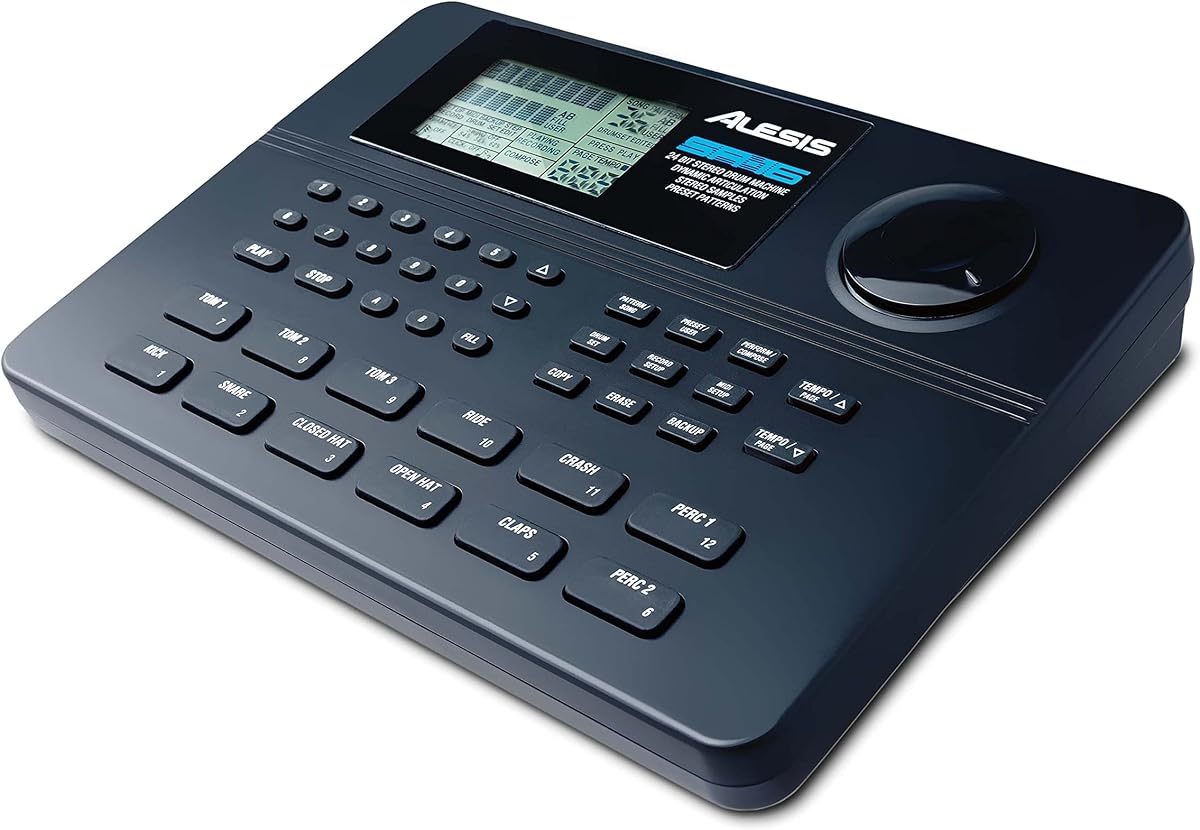


The Alesis SR-16 is a classic-style standalone drum machine with a 4.4 rating, offering a substantial collection of sounds and a performance layout that rewards hands-on playing. Its 233-sound library, 50 preset kits, 50 user kits, 12 velocity-sensitive pads, and Dynamic Articulation make it a capable choice for songwriters who want immediate access to common drum-machine voices.
We may earn a commission when you buy through this link, at no additional cost to you.
Sound stacking, step editing, stereo samples, reverb, and ambience add useful depth without moving into the complexity of a large production system. Complete MIDI support lets the SR-16 work with keyboards, computers, DAWs, and electronic drum kits, while stereo output pairs and start/stop plus control footswitch jacks support a practical studio or stage setup.
The main limitation is that the SR-16 concentrates on a conventional drum-machine experience rather than modern deep sampling. Its interface is designed around sounds, kits, and patterns rather than waveform editing, chopping, or extensive sound management. Musicians seeking those capabilities may find a portable sampler or dedicated sampler workstation more suitable.
This is a strong recommendation for performers who value velocity response, tactile pads, broad programming options, and immediate electronic rhythm production. It also works well for electronic kit owners because of its MIDI connectivity. Choose the SR-16 when straightforward hands-on control matters more than a contemporary sample-editing workflow.
Dynamic Articulation and velocity-sensitive pads help the SR-16 react to how each hit is played. That makes it more musical than a basic fixed-velocity pattern box, particularly for live performances and electronic drum control.
Complete MIDI support, four stereo output pairs, and two footswitch functions provide straightforward paths into a DAW, an electronic kit, or a live signal chain without requiring a computer.
We may earn a commission when you buy through this link, at no additional cost to you.
The Roland TR-8S earns a 4.8 rating by combining historically important TR drum-machine sounds with modern production tools. It includes detailed circuit models of the 808, 606, 909, 707, 727, and several modified variations, giving producers a broad palette of recognizable, genre-spanning rhythms.
We may earn a commission when you buy through this link, at no additional cost to you.
Its standout capability is the freedom to combine authentic TR voices with samples. Users can import mono or stereo sounds through the SD card slot and then alter decay, tuning, sample start points, speed, and direction. Effects can be applied selectively, including delay on rim shots, overdrive on kicks, filters on toms and cymbals, and precision reverb on selected instruments.
TR-8S is more complex than a simple groove box, and that breadth can create a learning curve. However, Instrument and Master Effects are stored with each kit, so carefully programmed sounds travel with the project. The free TR-EDITOR adds visual organization and control, benefiting users who want deeper management than the hardware panel alone provides.
The TR-8S is the most complete all-purpose pick here for producers who care equally about heritage drum sounds, modern sampling, and live-ready kits. It suits electronic musicians, remix engineers, studio producers, and performers who want a substantial rhythm instrument rather than a minimal pattern maker.
Detailed circuit models preserve the character of influential Roland rhythm machines while allowing users to build new kits. It is a persuasive choice for producers who want familiar sonic landmarks alongside contemporary editing.
Imported sounds can be tuned, resequenced, reversed, and processed with instrument-specific effects. Saving those settings with the kit ensures a polished sound remains intact when a project is performed later.
We may earn a commission when you buy through this link, at no additional cost to you.
The Korg Volca Drum is a compact digital percussion synthesizer with a 4.4 rating and a feature set that extends well beyond a basic step sequencer. Its six-part DSP engine and waveguide resonator can shape a broad range of drum sounds, making it useful for electronic genres, sound design, and quick beat construction.
We may earn a commission when you buy through this link, at no additional cost to you.
The 16-step sequencer is approachable, while Active Step allows individual steps to be replaced for each part without rebuilding the entire pattern. The slice function divides a step into smaller subdivisions for drum rolls and intricate rhythms. Accent control, choke grouping, and two randomization functions add further variation to the creative process.
Its limitations are primarily related to scale. A 16-step sequencer cannot offer the depth of a 64- or 128-step workstation, and the instrument is built around synthesis rather than extensive personal sampling. Even so, the focused design makes it quicker to learn and highly portable, especially with its built-in speaker.
Choose the Volca Drum for inexpensive entry into hardware beatmaking, compact live use, or sound-driven experimentation. It is a particularly good fit for beginners and electronic musicians who want characterful percussion and rapid pattern changes without navigating a large instrument.
Active Step lets a performer insert or replace notes at selected positions, creating fills and rhythmic changes in real time. It preserves the underlying pattern while adding just enough variation to keep a groove active.
The built-in speaker and compact enclosure make the Volca Drum easy to carry between rooms, rehearsals, and small stages. The same focused feature set also makes it a manageable introduction to hardware sequencing.
We may earn a commission when you buy through this link, at no additional cost to you.
The Yamaha DTX Multi Pad has a 4.3 rating and emphasizes breadth, offering 1,061 drum, percussion, and effects sounds alongside 216 keyboard sounds. This unusually large catalog makes it attractive for producers who want many starting points rather than a small set of synthetic percussion voices.
We may earn a commission when you buy through this link, at no additional cost to you.
Mute and Layer functions support dynamic arrangement, while the sequencer and preset loops provide ready-made foundations for new patterns. A 64 MB flash-ROM area for user samples adds room to incorporate personal material and distinguish a kit from the stock sound set.
The breadth can also become a weakness. Thousands of options may overwhelm someone who wants a simple control path, and the specification does not describe the advanced chopping and waveform manipulation found on modern dedicated samplers. Its value depends on how effectively the player organizes sounds and uses the layering tools.
The DTX Multi Pad is best for musicians who prioritize variety and expressive layering, especially those building arrangements around multiple drum and percussion roles. It also serves users who want melodic keyboard sounds within the same performance system. Buyers should focus on how easily the sound organization matches their creative habits.
The combined drum, percussion, effects, and keyboard catalog supports everything from straightforward kit programming to layered ensemble arrangements. It gives producers a wide palette without requiring several separate instruments.
Layer and mute functions help shape complex patterns without duplicating the entire kit for every variation. These tools support both quick song construction and more deliberate arrangement decisions.
We may earn a commission when you buy through this link, at no additional cost to you.
The Akai MPC Sample has a 4.8 rating and distills the established MPC workflow into a compact, modern standalone instrument. Its 16 responsive pads, 2.4-inch full-color display, sampler, sequencer, and effects processor provide a credible path into sample-based beatmaking for newcomers and experienced users alike.
We may earn a commission when you buy through this link, at no additional cost to you.
More than 100 factory kits, Instant Sample Chop Mode, real-time timestretch and repitch, and internal resampling with effects make it easy to move from a raw recording to a usable groove. Four internal effect processors provide 60 types, including Flex Beat, Color Compressor, vinyl and tape emulations, and a new master compressor with retro color.
Standalone operation is one of its strongest distinctions. A rechargeable lithium-ion battery, built-in speaker, internal microphone, and microSD storage allow recording and editing away from a DAW. At the same time, USB-C audio and MIDI connectivity, stereo line I/O, headphones output, sync output, and MIDI support suit home studios and live rigs.
The MPC Sample is ideal for beatmakers, finger drummers, DAWless creators, and songwriters who want a complete portable workflow. It is less suitable when a large display is essential for detailed visual sample editing, but its pad-focused interface makes many routine tasks fast and intuitive.
Recording, chopping, and playback can be completed on the unit itself. Battery power and microSD storage remove the computer from the central creative loop, making the instrument particularly useful for mobile sketching.
Instant Sample Chop Mode, timestretching, repitching, and resampling help turn recordings into playable elements quickly. The result is a short path from an idea captured in the room to a pattern performed on the pads.
We may earn a commission when you buy through this link, at no additional cost to you.
The teenage engineering EP-133 K.O. II carries a 4.7 rating and develops the original K.O! concept into a compact sampler, drum machine, and sequencer. It includes 128 MB of memory, 999 sample slots, 12 stereo voices or 16 mono voices, and a four-track sequencing engine designed for rapid pattern construction.
We may earn a commission when you buy through this link, at no additional cost to you.
Its workflow allows users to build combinations from four groups of 99 patterns. Patterns can be swapped by group, while a commit function freezes the current idea and moves into arranging a verse or break. The redesigned sequencer makes variations accessible without navigating a deeply technical interface.
Sounds can be sampled through the line input or built-in microphone, and OS 2.0 adds resampling, chopping, a pumping sidechain, Song Mode for arrangements up to 9,801 bars, an optimized playback engine, and extended MIDI support. Six master effects and 12 punch-in effects add further shaping, with a multifunctional fader for live adjustment.
The K.O. II is a persuasive choice for portable beatmaking, experimentation, and rapid song sketching. It runs on four AAA batteries or USB-C and includes a built-in speaker. The small format and 128 MB memory will not satisfy every collector, but the streamlined design turns those constraints into a deliberate, portable creative tool.
Four groups and 99 patterns per group let users assemble grooves from interchangeable sections. Swapping patterns by group makes it easier to test alternatives and build a full song without recreating every sequence.
The internal microphone, line input, 999 sample slots, resampling, and chopping functions create a complete capture-to-sequence process. Preloaded drums, bass, and keys provide a starting point when the user does not want to sample.
We may earn a commission when you buy through this link, at no additional cost to you.
The Korg drumlogue has a 3.6 rating, the lowest in this group, but it stands apart through its threefold hybrid engine. Analog, digital, and multi-engine synthesis combine with open-source User Oscillator and Effects, noise, and VPM, offering a less conventional approach to programmed percussion.
We may earn a commission when you buy through this link, at no additional cost to you.
Front-panel knobs provide immediate control over tuning and attenuation for common bass drums, snares, toms, and other instruments, while dedicated volume knobs for each part support live mixing. The 11-part, 64-step sequencer can produce performances and songs by combining Loop and Chain functions, and per-part reverb and delay can operate alongside a master effect.
Connectivity is unusually broad for a drum machine. It includes stereo and four assignable outputs, USB-C sample loading, audio input for processing other instruments, DIN MIDI input and output, and audio sync. These connections make the drumlogue useful as part of a larger hybrid electronic setup rather than only as a standalone pattern box.
The drumlogue rewards musicians who enjoy experimenting with synthesis methods and want direct control over multiple sound layers. Its rating does not make it a poor choice, but buyers should expect a more involved learning process. It is best suited to technically curious producers who value unusual timbres and flexible routing.
Analog, digital, and multi-engine methods offer different routes to a final percussion sound. This makes the instrument useful for designers who prefer synthesis experimentation over selecting from a conventional preset library.
Four assignable outputs, audio input, MIDI, USB-C, and sync allow the drumlogue to process or distribute sounds in a larger system. The hardware becomes a central rhythm and effects node rather than an isolated device.
We may earn a commission when you buy through this link, at no additional cost to you.
The Behringer LM DRUM Classic has a 5.0 rating and combines a 16-voice sampling architecture with an unusually extensive output and sequencing system. Its 64-step sequencer supports polyrhythm, step repeat, note repeat, real-time triggering, track mute, track solo, and additional performance controls.
We may earn a commission when you buy through this link, at no additional cost to you.
Sixteen independent analog outputs are the defining feature for detailed studio routing. Each drum voice can be recorded or processed separately, while the integrated effects bus adds a Wave Designer and dual-mode analog filter with per-voice assignment. This arrangement offers more control than a conventional stereo-output drum machine.
MIDI input, output, and thru, USB 2.0 Type B, sync input and output, multiple audio outputs, an audio input, and a headphone connection provide broad integration options. The included headphones and auxiliary cable add immediate monitoring utility, although the many connections also demand careful setup.
This is a strong choice for producers who want individual drum stems, external processing, and a deep sequencing system. It may be less convenient for a beginner seeking a small portable unit, but the control and routing make it particularly attractive for serious home-studio and live workflows.
Sixteen independent analog outputs allow individual voices to be treated with external compression, distortion, equalization, or recording. That degree of separation is useful for professional mixing and ambitious sound-design workflows.
Polymeter, step-repeat, note-repeat, real-time triggering, mute, and solo functions support a broad range of rhythmic behavior. Dedicated controls for random, autofill, MIDI, USB, and sync keep common actions accessible.
We may earn a commission when you buy through this link, at no additional cost to you.
The Elektron Digitakt II earns a 4.4 rating as a sophisticated 16-track drum computer and sampler. Every track can handle stereo or mono samples or MIDI, while a 128-step sequencer provides ample room for complex patterns, variations, and arrangement ideas.
We may earn a commission when you buy through this link, at no additional cost to you.
Three assignable LFOs per track bring movement and detailed control, and per-track delay, reverb, chorus, bit reduction, sample reduction, and overdrive allow each sound to be shaped independently. The selectable filter system includes a base-width filter plus options for Multi mode, low-pass four, comb, equalization, and legacy low-pass or high-pass filtering.
Four trigger modes, a Euclidean sequence generator, and Song Mode make this more than a conventional pattern box. The workflow is dense, however, and its premium placement means it is not the natural entry point for a user who only wants a handful of drum sounds and simple controls.
The Digitakt II is ideal for producers who want detailed sound design, long sequences, and complete song arrangement on dedicated hardware. It is also a strong MIDI centerpiece for a studio system. For advanced beatmakers, its depth justifies the investment; for beginners, a more focused model may be easier to master.
Independent effects and filter choices for all 16 tracks allow similar samples to occupy different sonic spaces. This makes detailed differentiation possible without sacrificing the economy of a unified instrument.
A 128-step sequencer, Euclidean generator, trigger modes, and Song Mode provide multiple ways to move from short grooves to structured arrangements. The hardware can hold a considerable amount of rhythmic detail in one project.
We may earn a commission when you buy through this link, at no additional cost to you.
The Singular Sound BeatBuddy 10th Anniversary Edition has a 4.5 rating and takes a different approach from conventional tabletop drum machines. Its foot-pedal format controls a beat in real time, freeing a guitarist, solo performer, or live looper to concentrate on other instruments while maintaining a stable rhythmic foundation.
We may earn a commission when you buy through this link, at no additional cost to you.
The content library includes more than 200 songs across 24 genres and 10 realistic drum kits. Storage extends to 3.2 million songs and 300 drum sets, while downloadable content and custom song creation provide room to adapt the instrument to different performance situations. The sound is designed to imitate a real drummer rather than present only abstract electronic percussion.
A visual metronome on the LCD helps players work on timing and understand complex time signatures. The pedal itself is compact and lightweight, with two foot switches, 9V power, and 100 mA low power consumption. Those characteristics suit rehearsal spaces, home practice, and touring, although the pedal cannot serve the same purpose as a playable pad controller.
The BeatBuddy is a good fit for musicians who need autonomous live accompaniment rather than manual drumming. It is especially compelling for guitarists, singer-songwriters, and solo performers. Users who want to trigger individual sounds with their hands should favor a conventional drum machine or sampler instead.
The pedal format allows both feet to manage the backing pattern while the player performs another instrument. This can simplify live arrangements and make rehearsal more productive.
More than 200 included songs, ten kits, and extensive downloadable storage make it possible to cover many styles. A visual metronome gives the player useful feedback while they learn transitions and timing.
We may earn a commission when you buy through this link, at no additional cost to you.
The right digital drum machine depends on your sound sources, musical ambitions, and performance setup. Consider sequencing depth, sampling freedom, controls, output options, and portability before choosing the model that best matches your work.
A basic groove box may provide 16 steps, which is enough for punchy loops but can feel restrictive when arranging a complete song. Devices with 64 or 128 steps, multiple pattern groups, chain functions, and Song Mode offer much more room for verses, breaks, transitions, and evolving arrangements. Look for a clear pattern structure and an efficient way to recall variations during a performance.
Choose a short sequencer for simple beats, but favor a deeper system for live sets or studio composition. The most important feature is not only step count, but how easily you can move, combine, and perform those steps.
Preset-based drum machines provide quick access to established sounds, while analog, digital, and multi-engine systems can generate more varied timbres through synthesis. Pay attention to whether sounds feel musically useful, whether parameters can be modified directly, and whether classic machine voices are included. A broad library is useful only if you can navigate it efficiently.
Users focused on familiar character should compare authentic TR-style models. Experimental producers may prefer an instrument with extensive synthesis controls, while beatmakers can gain more from flexible sample manipulation than from a very large preset catalog.
Sampling support turns recorded sounds, loops, vocals, and found percussion into new musical material. Examine the available storage, number of sample slots, chopping tools, timestretching, resampling, reverse functions, and onboard effects. A device with only preset sounds cannot support the same personal library as one designed for sample management.
Prioritize fast workflow and adequate memory. If you intend to import many sounds, check how files transfer and whether the device can handle stereo and mono material. Personalization is especially valuable for producers seeking a distinctive sound rather than a familiar factory kit.
Pads, knobs, buttons, and displays affect how comfortably an instrument can be played and programmed. Velocity-sensitive pads support expression, while direct knobs for tuning, filter, and level make sound shaping faster. A foot-pedal system is valuable for guitarists and solo performers, whereas a tabletop unit may be more appropriate for a DAWless producer who works with both hands.
Consider the controls you will use most and ignore features that do not support your style. A less complex interface can be a strength when portability and quick decisions matter more than exhaustive editing.
MIDI, USB, sync, line-level audio, headphones, and dedicated outputs determine how a drum machine joins the rest of a studio or stage rig. MIDI enables control from a DAW or keyboard, while individual outputs allow external processing of separate voices. Audio input can turn a drum machine into a processor for another instrument.
Match the connections to your existing equipment. A stereo output may be sufficient for live use, but multiple assignable outputs are valuable for detailed mixing. Confirm connector types, included cables, and adapter requirements before buying.
A truly portable machine should be easy to carry, powered without a wall, and able to make sound without a computer. Built-in speakers and microphones are especially valuable for sketching ideas away from a studio. Battery life, enclosure size, controls, and storage determine whether an instrument can accompany you to rehearsals, lessons, and small performances.
For travel, favor a compact unit with simple navigation. For a permanent studio centerpiece, screen size and editing depth may be more useful than battery convenience. Portability and power are separate considerations, so consider both.
Per-part effects let a snare, kick, or cymbal occupy its own sonic space, while master processing shapes the complete kit. Look for filtering, reverb, delay, distortion, compression, chorus, bit reduction, and modulation, along with the ability to save those settings with a kit or project. Effects can be a shortcut to a polished result, but excessive processing can obscure the original sound.
Check whether effects are applied globally or per voice. Per-part control is more flexible, while global processing is simpler and may be enough for straightforward beatmaking.
Some drum machines integrate closely with computer-based editing software, while others are designed to operate entirely on their own. Check whether files can move between hardware and a DAW, whether the supplied software improves organization, and whether the hardware supports standard MIDI or audio connections. This determines how naturally the device can fit into an existing production system.
A standalone device offers freedom and reliability, but computer integration can improve visual control and backup. Consider both needs rather than assuming one workflow is automatically superior.
Begin with a simple kit and a short pattern rather than immediately loading every available sound. Set the tempo, choose a kick, snare, and cymbal, and create a steady foundation before adding bass drums, percussion, or melodic elements. Save the starting kit and pattern under a clear project name so later experimentation remains reversible.
Build arrangements by duplicating the core pattern and changing only the elements that need attention. Add a fill at the end of a section, mute a voice to create space, or alter one percussion layer in the final steps. If the instrument supports velocity, accents, choke groups, or real-time triggering, use those functions to add expression without changing the underlying notes.
For sound design, begin with a small selection of effects and make one deliberate change at a time. Listen at different volumes, in headphones, and through the actual studio monitors or live speakers you will use. Save useful kit settings, keep samples organized by source, and back up projects and user files. Handle the instrument with dry hands, protect the display and controls, and follow the manufacturer's guidance for batteries, storage media, and firmware.
A drum machine is designed primarily for rhythm and percussion, usually pairing drum sounds with a sequencer and performance controls. A digital sampler focuses more heavily on loading, editing, and playing recorded or synthesized audio. Modern drum machines such as the Akai MPC Sample and Roland TR-8S combine both approaches, so the categories can overlap.
Yes, all of the featured models are designed for standalone use, although their workflow depth differs. The Korg Volca Drum, teenage engineering EP-133 K.O. II, and Akai MPC Sample include especially portable features such as built-in speakers, and the K.O. II also includes a microphone. Computer connectivity remains useful for editing, file transfer, and DAW integration, but it is not required to create beats.
The Korg Volca Drum is among the most approachable because its 16-step sequencer, physical controls, active-step editing, and focused feature set keep the workflow manageable. The Akai MPC Sample is also approachable for users interested in sampling. Beginners should prioritize an instrument whose controls match their musical goals rather than choosing based only on the number of features.
Velocity sensitivity is not essential for every workflow, but it can make programmed patterns sound more natural and expressive. It is especially useful for live performance, electronic drums, and acoustic-feeling kits. If your goal is simply to build loops with consistent programmed hits, a model such as the Volca Drum can provide plenty of character without needing a large velocity-sensitive pad set.
Many can, provided they support MIDI and the electronic kit exposes suitable MIDI trigger data. The Alesis SR-16 specifically lists complete MIDI support for use with electronic drum kits, while the other featured models offer MIDI connectivity in varying forms. Check the exact connector, required adapter, and channel or note-mapping requirements before buying.
A 16-step sequencer is effective for focused loops, dance grooves, and compact performances because variations can be created through velocity, mutes, accents, and live changes. Longer arrangements are easier when the instrument offers pattern chaining, song mode, or a larger step count. Models such as the drumlogue, LM DRUM Classic, and Digitakt II provide more space for formal song structure.
Choose a synthesis-based model if you want immediate sounds, hands-on timbral controls, and less file management. Choose a sampler-based model if recording, chopping, layering, or resampling personal sounds is central to your work. Hybrid instruments are attractive because they support both approaches, although their larger feature sets can require more study.
Use MIDI for note-level control and a separate audio connection for playback, unless the machine supports audio over USB. Configure the DAW to receive MIDI from the drum machine, enable local monitoring where appropriate, and select the correct input and output channels. Consult both manuals because the required routing varies by model.
The Roland TR-8S is the strongest all-around selection for its combination of classic TR character, modern sampling, detailed effects, and performance-ready kits. The Akai MPC Sample is the leading option for portable sample-based creation, while the Korg Volca Drum delivers the most approachable entry point with a compact built-in speaker and an expressive 16-step sequencer.
Prioritize the workflow that will actually shape your music. A producer focused on sample manipulation should look to the MPC Sample, a hardware-based beatmaker may favor the TR-8S, and a new user seeking compact electronic percussion may prefer the Volca Drum. Advanced studio producers can consider the Digitakt II, while live guitarists and solo performers have a distinct alternative in the BeatBuddy pedal.
Features, bundles, software, and availability can change, and retailer pricing should be checked at the time of purchase. Review the current product listing, manuals, and compatibility details for the selected model. The right digital drum machine is ultimately the one that supports your sound, workflow, and next musical idea without creating unnecessary friction.
