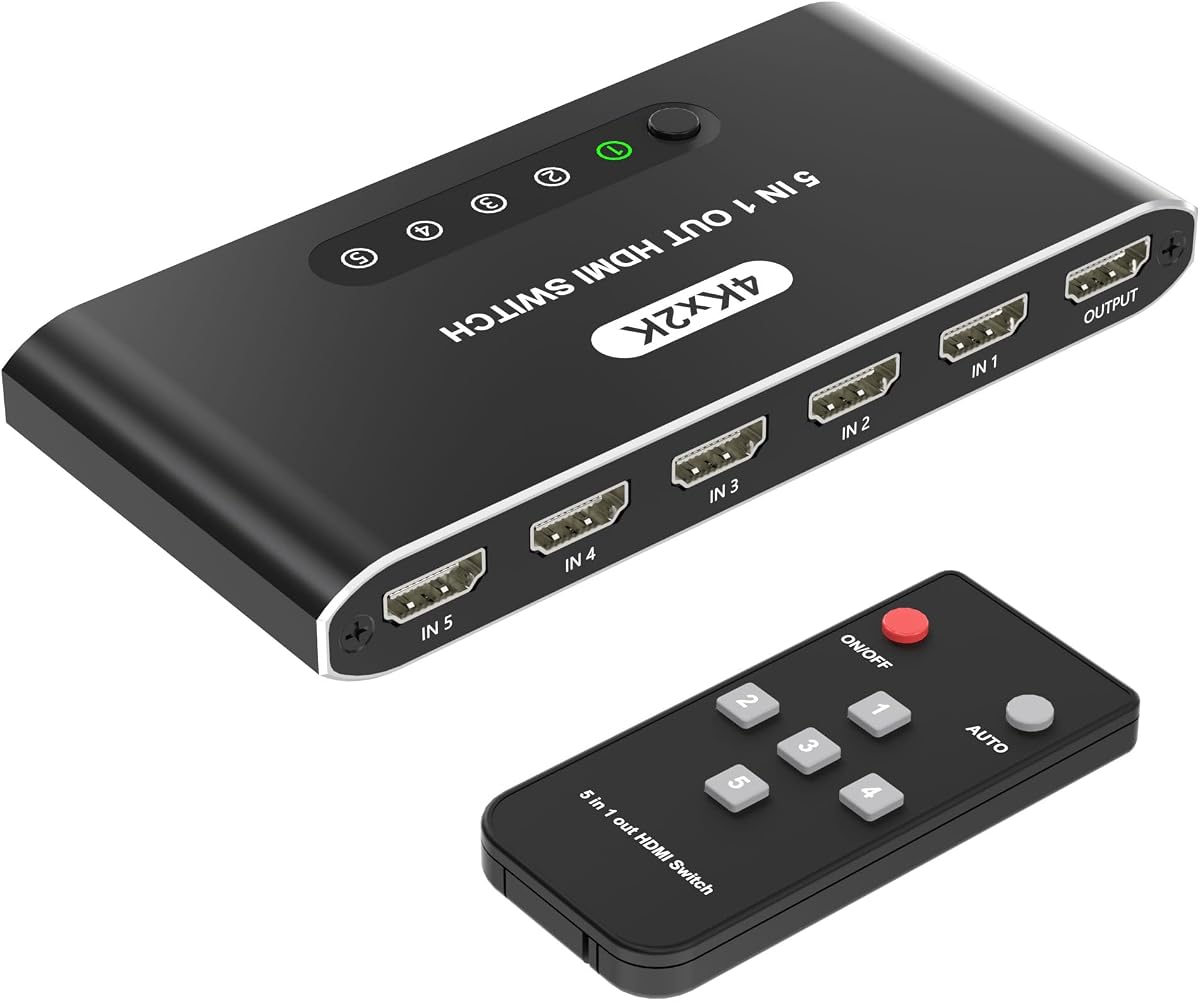
5 in 1 HDMI Switch
4.6Editor score
Five convenient HDMI inputs
Automatic source detection
Included remote control
USB-powered compact design
Explore the best 5 Port HDMI Switch options, comparing HDMI versions, resolution, refresh rates, switching modes, remote controls, device compatibility, and
A 5 Port HDMI Switch is a practical way to connect several game consoles, streaming devices, computers, Blu-ray players, and other HDMI sources to one television or monitor. The right model should provide stable signal transmission, convenient source selection, and enough bandwidth for the resolution and refresh rate used by your equipment.
We compared all ten switches by examining their HDMI generation, maximum resolution, supported gaming features, remote and manual controls, automatic switching behavior, power requirements, construction, and device compatibility. The guide also highlights important limitations involving cables, ARC, audio return, and advanced display modes so you can choose more confidently.
Each review identifies the circumstances in which its switch is most useful, from budget-friendly entertainment setups to high-bandwidth gaming installations. Specifications and product availability can change, and current prices fluctuate frequently, so readers should confirm the latest details on the linked retailer page before purchasing.
4.6Editor score

4.6Editor score

4.3Editor score
This side-by-side comparison highlights each switch's core capabilities, including maximum resolution, bandwidth, switching options, power method, and practical limitations.


The UGREEN HDMI Switch 5 in 1 Out is a well-rounded choice for households that want five source connections without paying for the highest possible bandwidth. Its 4.3 rating reflects a generally favorable user response, while support for 4K at 60Hz, HDR, VRR, 3D, and CEC gives it broad relevance for modern consoles, streaming boxes, and computers. Five LED indicators also make it easy to identify the selected input.
We may earn a commission when you buy through this link, at no additional cost to you.
The switch provides one HDMI output to a television or projector and accepts five HDMI inputs. It supports HDMI 2.0 and HDMI 1.4, HDCP 2.2 and 1.4, and a maximum data rate of 18Gbps. Its listed compatibility is extensive, covering Nintendo Switch and Switch 2, several PlayStation and Xbox models, Roku, Fire TV, Apple TV, Blu-ray players, PCs, laptops, projectors, and HDTVs. The included remote has a stated control range of up to 33 feet, while a button on the box provides a manual alternative.
There are important compromises. It does not support automatic source switching, so users must select each console or streaming device with the remote or front control. It also lacks ARC and eARC pass-through, making it less suitable for setups that return audio from a television to a soundbar or receiver. USB power is included, but the power adapter and remote batteries are not, and both input and output cables should remain within approximately 9 feet to achieve 4K at 60Hz.
Despite those limitations, this UGREEN is a strong overall recommendation for users who want dependable 4K switching, useful HDR and VRR support, and a broad device list. It is especially appropriate for a living room containing multiple consoles and streaming devices, particularly if manual source selection is acceptable. Those needing automatic switching, audio return, or advanced 8K performance should consider one of the more specialized models.
Five inputs are enough to combine a current game console, retro console, streaming stick, Blu-ray player, and laptop behind one display. The manual controls and remote make that larger source list manageable without requiring automatic detection.
VRR, HDR, 3D, and CEC support make the switch more versatile than a basic 4K selector. These features still require compatible source devices, television or monitor, cables, and source-specific game support.
We may earn a commission when you buy through this link, at no additional cost to you.
The Acer 5 in 1 Out HDMI Switch is a straightforward 4K selector designed to reduce cable swapping in homes, offices, and conference rooms. It carries a 4.1 rating and supports 4K at 60Hz through HDMI 2.0 or 1.4 connectivity. Although it lacks automatic switching, users can select among five connected sources with the included remote or the physical controls built into the enclosure.
We may earn a commission when you buy through this link, at no additional cost to you.
Its 18Gbps bandwidth accommodates 4K at 60Hz when the total connected cable length stays within 10 feet, or approximately 3 meters. The switch supports HDCP 2.3, HDR, 3D, and high-bandwidth transmission, while its compatibility list includes the PS5, Xbox, Nintendo Switch, Roku, Apple TV, laptops, HDTVs, and projectors. The supplied information also associates the switch with Dolby Atmos and DTS multi-channel audio support.
A metallic-style housing, gold-plated HDMI ports, and underside heat-dissipation vents are useful construction details for a device expected to remain connected for long periods. On the other hand, the package does not include a power adapter, remote battery, or HDMI cables. The switch must be connected to a power supply for full performance, and automatic source selection is not supported, making it less convenient when frequently changing between streaming applications.
This Acer model is a sensible option for a fixed entertainment center or presentation system where five devices need one display connection. It works particularly well for mixed media setups involving a game console, laptop, Blu-ray player, and television stick. Buyers who value automatic source detection or require HDMI 2.1 bandwidth should choose a more advanced alternative.
The combination of an IR remote and front-panel buttons offers two convenient ways to change sources. Five LED indicators reduce the need to move the switch or test cables one by one.
Its stated use cases include game rooms, home theaters, offices, and conference rooms. The broad source compatibility makes it easier to combine media players, computers, and consoles.
We may earn a commission when you buy through this link, at no additional cost to you.
The HDMI 2.1 Switch 5 in 1 Out is built for buyers who want more headroom than a conventional 4K selector provides. Its 4.3 rating is supported by an ambitious specification list that includes 8K at 60Hz, 4K at 120Hz, 2K at 240Hz, and 48Gbps bandwidth. The switch is intended for modern gaming PCs, high-end consoles, 8K televisions, projectors, and other sources that can take advantage of the additional capacity.
We may earn a commission when you buy through this link, at no additional cost to you.
Automatic source detection can make the switch convenient in everyday use, while a manual mode can prevent accidental changes during competitive gaming or presentations. The included remote offers a stated 8-meter range, and a manual lock gives users more control over source behavior. HDMI 2.1 features include VRR, ALLM, Quick Frame Transport, and HDCP 2.3, all of which can be useful with fully compatible displays and source hardware.
The supplied specifications also list HDR10+, Dolby Vision, 8K television and projector support, and compatibility with PS5, Xbox Series X, Nintendo Switch, PCs, 4K Blu-ray players, VR headsets, and capture cards. It comes with a remote, manual, power adapter, USB cable, and anti-slip mat. The remote requires two AAA batteries that are not included. Users should remember that advertised resolution and latency-related features still depend on the entire signal chain.
This is a compelling premium recommendation for enthusiasts building an 8K or high-refresh-rate system. It is particularly appropriate when automatic switching and manual lockout are both valued, as well as when a power adapter in the box simplifies installation. Buyers with ordinary 4K televisions can still use it, but may not benefit from every advertised capability.
The 48Gbps bandwidth and support for 4K at 120Hz make the switch suitable for high-end gaming displays. Real-world results depend on a compatible GPU, source device, television or monitor, and appropriate HDMI 2.1 cables.
Automatic detection is convenient when sources wake independently, while locked manual mode helps avoid accidental input changes. The combination gives the product flexibility across gaming and presentation environments.
We may earn a commission when you buy through this link, at no additional cost to you.
The Kinivo HDMI Switch 5 in 1 Out combines a 4.4 rating with a polished design and broad compatibility. It supports 4K at 60Hz, HDR10, Dolby Vision, Dolby Atmos, 2K at 120Hz, and 18Gbps transmission. That makes it a strong candidate for entertainment rooms containing several generations of consoles, television sticks, set-top boxes, and disc players rather than only a single modern gaming setup.
We may earn a commission when you buy through this link, at no additional cost to you.
Construction is a distinguishing point. The aluminum alloy shell is designed to dissipate heat, while 24K gold-plated connectors are intended to support dependable contact and signal integrity. The switch can be operated with the included IR remote or a manual button. Automatic switching is also mentioned, but the product information specifically notes that not every device supports it, including several common consoles and streaming platforms.
That compatibility caveat matters because automatic switching should not be treated as guaranteed across the entire five-input setup. The extensive device list nevertheless covers projectors, laptops, televisions, monitors, PCs, DVD and Blu-ray players, PlayStation systems, Xbox systems, Wii, Nintendo Switch 2, Apple TV, Chromecast, Raspberry Pi, and more. HDCP 2.2, VRR, and ALLM add value for compatible modern displays and game consoles.
Kinivo is a good fit for users who value material quality, flexible source selection, and broad device support at the 4K level. It is also backed by a stated two-year warranty and lifetime customer support. Those wanting dependable 8K bandwidth, guaranteed automatic behavior across every source, or next-generation 48Gbps throughput should compare it with newer HDMI 2.1 alternatives.
The aluminum enclosure and gold-plated connectors are meaningful details in a device that may remain connected behind an entertainment center. Heat dissipation helps support more stable operation over extended use.
The compatibility list spans current and legacy gaming systems, streaming products, computers, and disc players. It is especially useful for mixed households where different family members use different sources.
We may earn a commission when you buy through this link, at no additional cost to you.
The UGREEN 8K at 60Hz HDMI Switch is a forward-looking alternative for users who want 8K capability without moving to the largest 48Gbps specification in the list. It has a 4.2 rating and provides five inputs, one output, a 40Gbps data rate, and support for 8K at 60Hz. Backward compatibility includes 4K at 60Hz and 1080p at 240Hz, which gives it relevance across several display categories.
We may earn a commission when you buy through this link, at no additional cost to you.
Gaming-oriented features include VRR, Dynamic HDR 10+, Dolby Atmos, 3D, and HDCP 2.3. The switch works with HDMI 2.0 and HDMI 1.4 sources and is compatible with the Nintendo Switch and Switch 2, multiple PlayStation and Xbox generations, Roku TV, Apple TV, Fire TV, PCs, laptops, HDTVs, monitors, and projectors. An included remote operates from up to 33 feet away, and a button plus five LED indicators provide local control and clear status feedback.
Manual source selection is the main functional compromise. The switch does not automatically detect a newly active source, which may be less appealing for homes with frequent streaming changes. Its cable requirements for maximum 8K performance are also restrictive: the input cable should be within 3 feet and the output cable within 6.6 feet. It does not support ARC pass-through.
This UGREEN model suits buyers who want future-facing resolution support, VRR, and a compact aluminum enclosure but do not need automatic switching. It is a compelling option for a dedicated 8K television or advanced gaming setup where short, high-quality cables are easy to route. Its included power adapter simplifies installation.
The 40Gbps rate supports the advertised 8K at 60Hz mode, while backward compatibility preserves use with conventional 4K equipment. Actual image quality still depends on the source, display, and cable standard.
VRR is the standout feature for compatible consoles and PCs. The switch also supports 3D and Dynamic HDR 10+, giving it a broader entertainment profile than a basic selector.
We may earn a commission when you buy through this link, at no additional cost to you.
The OREI 8K at 60Hz and 4K at 120Hz HDMI 2.1 Switch is the strongest all-around choice for a technically advanced entertainment system. It has a 4.6 rating, the joint-highest score among the listed products, and delivers the full 48Gbps bandwidth associated with the premium HDMI 2.1 category. Five source inputs keep it practical for consoles, PCs, media players, and specialist equipment.
We may earn a commission when you buy through this link, at no additional cost to you.
Its headline modes include 8K at 60Hz, 4K at 120Hz in 4:4:4 12-bit, and 8K at 60Hz in 4:2:0 12-bit. It can also reach 4K at 240Hz using Display Stream Compression, although that mode requires compatible source hardware, graphics processing, display, drivers, cables, and DSC or EDID support. The unusually broad feature set includes VRR, ALLM, QMS, QFT, and SBTM for responsive gaming.
Video and audio support is equally comprehensive. HDR10+, Dolby Vision, and HLG pass-through are listed, along with Dolby Atmos, Dolby TrueHD, DTS:X, and LPCM audio. Users can switch through the included IR remote, front-panel controls, or automatic detection. This range of controls makes the switch suitable both for a living room and for a workstation with several high-refresh-rate sources.
The OREI is most justified when the connected television or monitor is a high-end 8K or high-refresh model. It also makes sense for PC gamers and console owners who intend to upgrade their display. For a basic 4K television, some advertised capabilities will remain unused, but the switch still offers the highest rating and broadest combination of modern standards in this roundup.
The 48Gbps rate supports 8K and high-refresh 4K formats, including demanding chroma and bit-depth combinations. This is valuable when every source and display in the chain can support the selected mode.
VRR, ALLM, QMS, QFT, and SBTM cover several dimensions of modern display synchronization. Pass-through support for major HDR and surround-audio formats helps it function as a central entertainment hub.
We may earn a commission when you buy through this link, at no additional cost to you.
This 5 Port HDMI Switch is aimed at practical users who value automatic source detection over high-end bandwidth. It has a 4.1 rating and supports up to 4K at 30Hz, 1080p, 720p, HDR, 3D, and HDCP. The specification is sufficient for many streaming devices, standard-definition or older home video sources, and consoles primarily used at 1080p, but it is not designed for 4K gaming at 60Hz.
We may earn a commission when you buy through this link, at no additional cost to you.
Automatic, manual, and IR remote switching methods give users three ways to select a source. That makes the box convenient in a living room, office, meeting space, or classroom where a device may become active without much warning. It also makes it possible to organize a larger collection of sources behind a single television, monitor, or projector.
The switch accepts five HDMI inputs and provides one output, and the supplied information specifically notes that it is not a one-input, five-output splitter. Its metal construction is intended to provide durability and heat dissipation, while the plug-and-play design means no software is required. Maximum input cable length is listed as 16.4 feet, and maximum output cable length is listed as 82 feet, though actual performance still depends on source and display capabilities.
This is a sensible choice for non-gaming users who mainly need convenient source selection and a 4K television connection at 30Hz. Its automatic detection is a genuine advantage over manual-only alternatives. It is not the right choice for 4K at 60Hz gaming, high-refresh computer displays, or users who need advanced HDR and audio bandwidth.
The switch can move to an active source without requiring the user to pick up the remote. Manual and remote controls remain available for situations where automatic behavior is not desired.
FourK at 30Hz can provide sharp picture quality for films, television, and many casual gaming experiences. It falls short of the 60Hz and high-refresh specifications required by contemporary gaming displays.
We may earn a commission when you buy through this link, at no additional cost to you.
The 5 in 1 HDMI Switch with Remote offers an unusually appealing combination of convenience and value. Its 4.6 rating places it alongside the OREI as the highest-rated model in this guide, while the core specification of 4K at 30Hz is appropriate for many non-gaming or casual-gaming arrangements. It accepts five sources and connects them to one display, reducing the need to reach behind a television and change cables.
We may earn a commission when you buy through this link, at no additional cost to you.
Automatic source detection is one of its most useful features. The included remote offers another way to change inputs, and its battery is included, removing a minor setup inconvenience found with several alternatives. Five clear LED indicators show the selected source. USB power keeps the box compact and avoids a bulky adapter, while a stated cable allowance of up to 16 feet for standard AWG26 connections gives some installation flexibility.
Video support includes 4K at 30Hz, 1080p at 60Hz, 3D, HD content, and HDCP 2.2. The compatibility list mentions the PS5, Xbox Series X and S, Amazon Fire TV, Apple TV, Roku, laptops, PCs, and smart televisions. These claims do not mean every connected device will produce 4K; output resolution is limited by the source, display, and selected mode.
This switch is a strong budget recommendation for users who mainly want to organize streaming devices, a game console, and other HDMI sources with automatic selection. It is less appropriate for 4K at 60Hz gamers or owners of high-refresh monitors. Even within those limits, its strong rating, included remote battery, and straightforward USB-powered design make it an attractive general-purpose hub.
The remote battery and USB power cable are included, so the basic setup is largely ready to use. LEDs provide immediate confirmation of the active source, while automatic detection reduces routine button pressing.
The device handles the five most common source types in a modern household. It is a particularly natural fit for viewers who switch among television apps, consoles, and streaming sticks rather than demanding 4K gaming bandwidth.
We may earn a commission when you buy through this link, at no additional cost to you.
The HBAVLINK HDMI Switch stands out with the highest listed rating in the roundup at 4.7. It combines five inputs with 4K at 60Hz, 18Gbps HDMI 2.0 bandwidth, HDR10, Dolby Vision, Dolby Atmos, 3D, and CEC. For buyers who want a modern 4K feature set without paying for an 8K switch, it offers a particularly complete combination of functionality.
We may earn a commission when you buy through this link, at no additional cost to you.
Source selection can be handled with the included remote, a button on the unit, or automatic switching. A memory function retains the last selected input after a power cycle, which reduces repetitive setup steps. The stated switching time of two to three seconds is important to consider when moving rapidly between a game and a streaming service, although it remains suitable for ordinary household viewing.
The device is compatible with a wide collection of sources, including PS5, PS4, PS3, Xbox Series X, S, and One, Nintendo Switch, Fire TV Stick, Apple TV, Roku, Chromecast, Blu-ray and DVD players, and other HDMI-enabled equipment. Its compact aluminum alloy body measures 5.4 by 2.5 by 0.8 inches, making it relatively easy to conceal, and LED indicators reveal the active port.
HBAVLINK is a strong recommendation for a mixed 4K gaming and home-theater system that wants automatic switching and a remembered input. It also suits users who prioritize compact construction. The lack of 8K bandwidth and the omission of remote batteries keep it below the premium HDMI 2.1 models, but for a 4K system it remains one of the most well-rounded choices here.
Automatic detection makes the unit convenient for active streaming devices, and remembering the last input reduces confusion after a restart. Manual controls remain available when users want deterministic selection.
The small aluminum housing is easy to position behind a television while helping dissipate heat. Despite its size, the switch supports 4K at 60Hz, HDR10, major surround formats, and CEC control.
We may earn a commission when you buy through this link, at no additional cost to you.
The BlueRigger 4K HDMI Switch is a capable five-input selector with a strong 4.4 rating. It provides 4K at 60Hz and 2K at 120Hz through 18Gbps high-speed transmission, along with HDR10+, HDCP 2.3, and 3D. The feature set is well matched to current 4K televisions, modern consoles, and conventional home-theater equipment that does not require 8K bandwidth.
We may earn a commission when you buy through this link, at no additional cost to you.
Switching is handled manually through the unit or with the included IR remote. That approach gives users precise control over which source is active and avoids accidental changes, though it is less convenient than the automatic detection offered by several competitors. The product data does not list automatic switching, so it should not be selected on that expectation.
The switch uses nickel-plated connectors and an advanced chipset intended to provide stable audio and video transmission. It is compatible with HDTVs, the PS5, PS4, PS3, Xbox systems, projectors, Fire TV, Apple TV, set-top boxes, DVD and Blu-ray players, Roku, and other HDMI sources. An included power adapter is required for optimal operation, reducing the chance of an underpowered setup.
BlueRigger is a good fit for a household that wants dependable 4K at 60Hz across multiple sources but prefers manual control. It is also backed by a stated two-year warranty and lifetime customer support. Buyers seeking automatic source detection, audio return functionality, or next-generation 8K capability will find better matches among the other selections.
The 18Gbps rate and 4K at 60Hz output are well suited to mainstream 4K televisions and current game consoles. HDR10+ and HDCP 2.3 support add useful modern capabilities.
The switch covers current and older consoles, streamers, disc players, projectors, and set-top boxes. Its two-year warranty adds reassurance for a permanently installed component.
We may earn a commission when you buy through this link, at no additional cost to you.
The right HDMI switch depends on your display, source devices, preferred control method, and desired gaming features. Review bandwidth and resolution first, then account for cable limits, power, audio return, and automatic-switching behavior.
Begin with the resolution and refresh rate of the television or monitor you already own. A 4K at 60Hz model is sufficient for many streaming and gaming needs, while 8K at 60Hz, 4K at 120Hz, and other high-refresh modes require a matching source, display, GPU, and cable. The advertised maximum of a switch is only the upper boundary of its capability, not a guarantee that every attached device will deliver that format.
Bandwidth determines how much uncompressed 4K or 8K data the switch can carry. The products here range from HDMI 1.4-oriented models to HDMI 2.1 options with 40Gbps or 48Gbps. Gamers should also investigate VRR, ALLM, QFT, QMS, and SBTM, while home-theater buyers may prioritize HDR10+, Dolby Vision, HLG, and surround-audio pass-through. Every advanced feature still requires compatible equipment at both ends of the connection.
A remote control is convenient when the switch is inside a cabinet, while a front-panel button remains useful during setup. Automatic detection is attractive for frequently changing streaming sources, but compatibility can vary considerably. Kinivo specifically notes that common devices such as Apple TV, older Xbox systems, PlayStation consoles, and Roku may not trigger automatic switching correctly. A manual mode can be desirable in gaming or presentation situations where an unintended source change would be disruptive.
Maximum resolution can depend on cable length as well as the devices involved. The UGREEN 4K model recommends keeping input and output cables within 9 feet for 4K at 60Hz. The 8K UGREEN limits its input cable to approximately 3 feet and output cable to 6.6 feet for 8K at 60Hz. Long runs also need appropriate cable quality, especially for 4K at 120Hz or 8K. Using the shortest practical runs and certified cables reduces the chance of instability.
Some switches draw power through USB while others include a dedicated power adapter. The Acer and budget 5 in 1 model use USB power, while the UGREEN 8K, HBAVLINK, BlueRigger, and premium HDMI 2.1 package include adapters. Remote batteries are also inconsistent: some are included, while Acer, Kinivo, UGREEN 8K, and HBAVLINK require separately purchased batteries. Check the package contents before ordering so that you are prepared for a complete installation.
An HDMI switch forwards audio through the selected source, but that does not necessarily mean it supports an audio return path. Several models explicitly do not support ARC or eARC pass-through. If your television sends sound to a soundbar or receiver, the existing audio connection must remain separate or the switch must explicitly support the required return feature. Support for Dolby Atmos and other formats is also more useful when the full source, switch, display, and audio system are compatible.
Modern console and PC gaming benefits from VRR, ALLM, and sufficient bandwidth for high-refresh output. A 4K at 30Hz switch may suit casual gaming but will restrict 4K game presentation, while 4K at 60Hz, 4K at 120Hz, and 4K at 240Hz modes demand progressively more capable hardware. DSC-based 4K at 240Hz support on the OREI specifically requires a compatible source, GPU, display, driver, cable, and DSC or EDID configuration.
A permanently installed switch should dissipate heat effectively and use connectors that remain secure. Aluminum housings, metal-style bodies, gold-plated or nickel-plated connectors, ventilation openings, and stated chipset designs can all contribute to dependable operation. Warranty terms also differ: the OREI and budget model cite 18-month coverage, HBAVLINK lists 12 months, and Kinivo and BlueRigger offer two years. The premium HDMI 2.1 model includes a stated 24-month warranty with lifetime technical support.
Position the switch where it has ventilation and is not concealed by a completely sealed shelf. Connect up to five HDMI sources to the labeled input ports, then connect the switch's single HDMI output to the television, projector, or monitor. Observe the stated cable-length limits, particularly when using 8K, 4K at 120Hz, or other high-bandwidth modes.
Connect the appropriate power source before configuring the box. If the model has both a remote and a front-panel button, test each input with the remote first, then confirm that the corresponding LED lights. For automatic models, wake only the desired source and observe whether the switch changes inputs. If automatic detection behaves inconsistently, use manual mode instead of repeatedly reconnecting cables.
For routine care, keep the unit powered and ventilated, avoid placing heavy objects on its housing, and do not leave strained cables pulled tightly behind furniture. Clean the exterior with a dry or lightly damp soft cloth, keeping liquid away from the ports. If a source fails to appear, test the display connection, confirm the selected LED, reseat the HDMI cable, and verify that the source and display support the intended resolution.
No. A 5 Port HDMI Switch has five HDMI inputs and one output, allowing you to select one source at a time. An HDMI splitter generally takes one source and duplicates that signal to multiple displays. Confirm that the product says five inputs and one output before purchasing, because similarly named splitter products can behave differently.
It depends on the resolution and refresh rate you want. A switch with 18Gbps bandwidth can support 4K at 60Hz, while HDMI 2.1 models provide the bandwidth needed for 4K at 120Hz and higher modes. Your console, graphics card, television or monitor, and cables must all support the target format as well.
The source, switch, display, and cables may be negotiating a different resolution or refresh rate. Check the display's input information, confirm that the chosen cable meets the required bandwidth, and keep cable lengths within the manufacturer's recommendations. Also verify that the source is not forcing a fallback format because of an incompatible feature such as HDR or VRR.
It depends on how the soundbar is connected. A switch can pass audio through the selected HDMI source to a television that outputs sound to the soundbar, but many switches do not support ARC or eARC pass-through. If your arrangement requires the switch to return television audio, choose a model that explicitly supports the required audio-return function.
No. Automatic detection depends on the source device's behavior and the switch's implementation. Kinivo specifically warns that devices such as Apple TV, several PlayStation and Xbox models, and Roku may not activate automatic switching. Even when automatic mode is advertised, remote and manual controls are useful backup methods.
Different designs use different power architectures. USB power can make a switch smaller and reduce cable clutter, while a dedicated adapter may provide a more consistent supply for demanding high-bandwidth operation. Whichever method is used, follow the included instructions and keep the switch connected to its specified power source during use.
The safe length depends on the switch and the selected resolution. Some products specify a combined limit of about 10 feet for 4K at 60Hz, while 8K performance may require an input of no more than 3 feet and an output of no more than 6.6 feet. Follow the exact guidance for your model and use cables suited to the signal bandwidth.
For many households, five inputs are enough for a game console, streaming device, Blu-ray player, laptop, and another console or set-top box. The most important consideration is which sources you actually use. Connecting only the necessary devices can simplify automatic switching and reduce the chance that the wrong source becomes active.
The OREI 8K HDMI Switch stands out for the highest technical ceiling, 48Gbps bandwidth, extensive gaming features, and a strong 4.6 rating. The budget 5 in 1 HDMI Switch also earned a 4.6 rating and offers automatic switching, while the premium HDMI 2.1 model provides 8K at 60Hz, flexible switching modes, and 48Gbps capacity for advanced installations.
Most buyers will get more value by matching the switch to the display they already own instead of selecting solely by advertised maximum resolution. A 4K at 60Hz model with remote and manual controls is appropriate for most mainstream setups, while 8K, 4K at 120Hz, VRR, and DSC modes make sense only with compatible consoles, PCs, displays, and cables. Automatic switching should be evaluated source by source rather than assumed to work universally.
Finally, verify the package contents, power requirements, remote-battery arrangement, and ARC or eARC needs before ordering. Product specifications and prices can change over time, so check the current retailer listing for the latest information and confirm that the selected model still fits the devices, display, and cables in your setup.