
ACEMAGIC K1 Mini PC
4.4Editor score
Ryzen 7330U eight threads
Built-in power supply
Compact VESA-mountable design
Explore the best mini PCs with AMD processors, comparing performance, memory, storage, displays, connectivity, and expansion options for every user in 2026.
Mini PCs with AMD processors combine capable desktop-class silicon with a compact enclosure that can free valuable desk space. A strong Ryzen configuration can handle office productivity, media playback, light creative work, virtual machines, and selected games while drawing less power than a conventional tower. The right model depends on processor tier, memory, graphics, storage, ports, and display needs.
We compared ten mini PCs using the specifications and feature details supplied for each model, including AMD processor generation, core and thread counts, memory, storage, display support, networking, cooling, and upgradeability. The list covers entry-level Ryzen 5 systems, more powerful Ryzen 7 and Ryzen 9 configurations, and options for basic productivity, professional multitasking, gaming, and expandable workstations.
Each numbered review identifies the strongest reason to consider a particular mini PC and the compromises worth understanding before purchasing. Ratings reflect the supplied Amazon feedback, while technical details are based on the listed product information. Prices and configurations can change over time, so shoppers should verify the current processor, memory, storage, operating system, and accessory inclusions before placing an order.
4.4Editor score

4.4Editor score

4.6Editor score
The table below provides a side-by-side view of the ten AMD-powered mini PCs, focusing on their processors, core counts, memory, storage, and display capabilities so the major differences are easy to identify.



The Beelink SER5 combines an AMD Ryzen 5 5500U processor with 16GB of dual-channel DDR4 memory and a 480GB NVMe SSD, making it a versatile all-rounder for a compact workspace. Its listed 4.4 rating reflects generally favorable customer feedback, while the six-core, twelve-thread processor provides a useful balance of responsive multitasking and manageable power consumption.
We may earn a commission when you buy through this link, at no additional cost to you.
The Ryzen 5 5500U operates from a 2.1GHz base frequency and can boost to 4.0GHz, according to the supplied specifications. Its Radeon graphics support triple 4K output through HDMI, DisplayPort, and USB-C. Connectivity includes WiFi 6, Bluetooth 5.2, 2.5G Ethernet, three USB 3.2 ports, one USB 2.0 port, a data-capable Type-C port, and a 3.5mm audio connection.
Storage and memory are the main opportunities for improvement. The included 480GB drive may fill quickly if large media libraries or applications are stored locally, although the system can accommodate a 2.5-inch SATA drive that is not included. Memory is more flexible, since the two DDR4 channels can be expanded to a total of 64GB using 32GB modules.
This is a strong recommendation for users who want a capable office computer, browsing station, media center, or light creative workstation without paying for a full-size tower. It is especially attractive for anyone connecting multiple high-resolution displays. Buyers seeking a newer processor architecture or gaming-focused graphics should look farther up the list, but for general productivity the SER5 offers an unusually balanced feature set.
Triple 4K display support makes the SER5 useful for spreadsheet analysis, document editing, research, monitoring, and other workflows that benefit from more screen space. The combination of HDMI, DisplayPort, and USB-C expands compatibility with a wider range of current monitors.
Dual-channel DDR4 memory provides a solid foundation for multiple applications and browser tabs. Although the supplied 480GB SSD is limited for large collections, the stated memory ceiling of 64GB and support for an additional 2.5-inch drive make the system easier to tailor over time.
We may earn a commission when you buy through this link, at no additional cost to you.
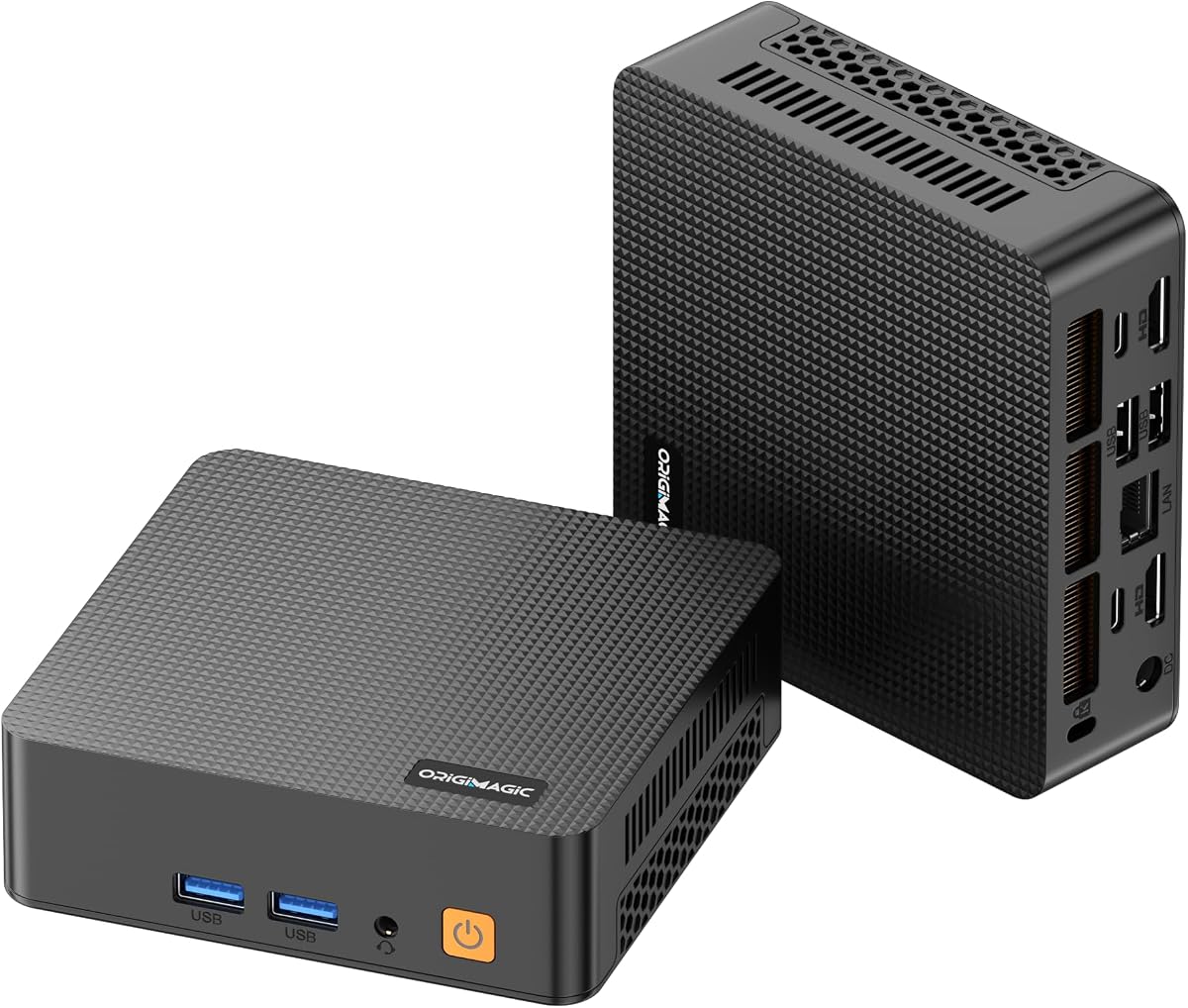
The ACEMAGIC K1 7330U is a compact Ryzen-powered mini PC designed for office work, education, family use, media consumption, and everyday research. It carries a listed 4.4 rating and pairs a four-core, eight-thread Ryzen 7330U processor with 16GB of LPDDR4 memory and a 256GB M.2 SSD.
We may earn a commission when you buy through this link, at no additional cost to you.
The processor runs at a 2.3GHz base frequency and can reach 4.3GHz. Its Radeon graphics are listed at 1400MHz with five cores, while the system supports three displays through HDMI, DisplayPort, and USB-C. Connectivity includes Gigabit Ethernet, WiFi 5, Bluetooth 4.2, six USB 3.2 Type-A ports, and one USB 3.2 Gen2 Type-C port.
A built-in power supply means the system needs only one power cable, keeping the desk cleaner than setups using an external adapter. Its 5-by-5-by-1.6-inch chassis can be carried in a bag or mounted behind a display with the included VESA bracket. The main limitations are the non-expandable 16GB memory and modest 256GB starting drive.
The K1 7330U is well suited to buyers seeking a straightforward small computer for browsing, office applications, schoolwork, and video playback. Storage can be expanded with an additional M.2 SATA or PCIe 3.0 drive up to the listed 2TB limit, so buyers who need more room should plan that upgrade. It is a sensible budget-focused option when a tidy, portable form factor matters.
Integrating the power supply into the chassis removes the bulky adapter normally associated with a mini PC. The included HDMI cable, mounting bracket, power adapter, and user manual also cover the basic setup needs listed in the product information.
Six USB 3.2 Type-A ports offer unusually generous peripheral connectivity for a system this small. USB-C with DisplayPort 1.4 adds another avenue for modern displays and accessories, while Gigabit Ethernet provides a dependable wired network option.
We may earn a commission when you buy through this link, at no additional cost to you.
The BOSGAME P3 Pro is the performance-focused selection in this guide, using an AMD Ryzen 9 7940HS processor with eight cores, sixteen threads, and boost speeds up to 5.2GHz. Its 4.6 rating is the highest supplied rating among the ten products, while 16GB of DDR5 memory and a 1TB PCIe 4.0 NVMe SSD create a strong foundation for demanding workflows.
We may earn a commission when you buy through this link, at no additional cost to you.
Integrated Radeon 780M graphics have a listed maximum frequency of 2700MHz. The mini PC supports three 4K displays at 60Hz through HDMI 2.0, DisplayPort 1.4, and USB-C, and its Oculink port opens the door to a more powerful external graphics solution for specialized gaming or workstation applications.
The system also includes a 1000Mbps Ethernet port, three USB 3.2 Type-A ports, WiFi 6E, and Bluetooth 5.2. Memory can be expanded from 16GB to 64GB, and another M.2 2280 PCIe 4.0 drive can be added. These expansion options matter because a processor of this class is likely to be used with larger projects and more demanding applications.
The P3 Pro is recommended for users who want premium Ryzen processing without moving immediately to a full-size desktop. It can serve as a compact development machine, advanced office workstation, media editor, or capable gaming system. Buyers who do not need a Ryzen 9 processor, Radeon 780M graphics, or external GPU support may find more value in a less ambitious configuration.
Eight cores and sixteen threads give the P3 Pro considerably more parallel capacity than the four-core models in this guide. That advantage is most relevant when running complex office applications, editing software, virtual environments, or several demanding applications at once.
Oculink provides a more direct route to desktop-class graphics than a conventional USB port. For users who need stronger gaming or specialized graphics performance, the feature can make this compact system useful as the center of a larger desktop setup.
We may earn a commission when you buy through this link, at no additional cost to you.
The Glorlin mini PC is centered on an AMD Ryzen 5 3500U processor with four cores, eight threads, speeds from 2.1GHz to 3.7GHz, and a listed power range of 15W to 25W. It arrives with 16GB of DDR4 memory and a 512GB NVMe SSD, making it a practical option for home-office and general business computing.
We may earn a commission when you buy through this link, at no additional cost to you.
The supplied information does not provide a numeric customer rating, so the absence of a rating should not be interpreted as either a positive or negative review history. Its feature set is nevertheless straightforward and useful, with RAM expandable to 32GB and three 4K display outputs available through two HDMI connections and one full-featured USB-C port.
Wireless connectivity includes WiFi 6 and Bluetooth 5.3. The port selection adds two USB 3.2 ports, two USB 2.0 ports, a full-featured Type-C connection, and a second Type-C 2.0 port. Windows 11 Pro is preinstalled, reducing the need to arrange operating-system installation immediately after delivery.
This model makes sense for users who value storage, multiple monitors, and modern wireless connectivity more than cutting-edge processing. It can support browsing, spreadsheets, online meetings, media playback, and light gaming. Its four-core design is less appropriate for intensive editing or advanced virtual-machine workloads, but the expandable memory and generous storage make it a flexible general-purpose mini PC.
A 512GB NVMe drive provides more starting room than the 256GB configuration used by the ACEMAGIC K1. That extra capacity can be valuable for locally stored documents, media, applications, and work files, while the 16GB memory configuration supports responsive everyday multitasking.
Two HDMI ports and a DisplayPort-capable USB-C connection support three 4K screens. This is useful for finance dashboards, control panels, research, editing timelines, or general multitasking where constantly switching between windows would be inconvenient.
We may earn a commission when you buy through this link, at no additional cost to you.
The KAMRUI Pinova P2 combines an AMD Ryzen 4300U processor with 16GB of LPDDR4 memory and a 512GB M.2 SSD. Its listed 4.4 rating and broad support for displays and connectivity make it a competitive choice for home offices, conference rooms, entertainment areas, and compact workspaces.
We may earn a commission when you buy through this link, at no additional cost to you.
The four-core, eight-thread processor reaches up to 3.7GHz, while the supplied description emphasizes its comparatively strong multicore capability and Radeon Vega 5 integrated graphics. Three 4K displays at 60Hz are supported through HDMI 2.0, DisplayPort 1.4, and a USB 3.2 Gen2 Type-C connection.
Its most distinctive feature is dual M.2 storage: one slot accepts M.2 2280 SATA or PCIe 3.0 drives, and the second accepts M.2 2280 SATA drives. The stated combined capacity reaches 4TB, although the additional drives are not included. Unlike some competing models, this makes storage expansion a central part of the design.
The 5.05-by-5.05-by-1.73-inch silver chassis can be mounted behind a monitor and is described as quiet under both light and heavier loads. It is a good fit for users who need ample storage and multiple displays. The fixed LPDDR4 memory means the 16GB configuration should be chosen carefully, especially for future-proofing.
Two M.2 slots are rare in a mini PC at this size and provide more freedom than a single-drive arrangement. Users can add a faster PCIe drive for active applications and reserve a SATA drive for a larger media archive, subject to the stated slot and capacity limits.
The revised chassis is designed to improve heat dissipation, while the listed axial fan remains fairly quiet during light operation. Its compact dimensions and VESA mounting capability make it straightforward to position near a display rather than directly on the main work surface.
We may earn a commission when you buy through this link, at no additional cost to you.
The Getorli mini PC uses an AMD Ryzen 5 3501U processor with four cores, eight threads, and speeds ranging from 2.1GHz to 3.7GHz. It is supplied with 16GB of DDR4 RAM and a 512GB NVMe SSD, a configuration designed for home-office productivity, browsing, streaming, and general business applications.
We may earn a commission when you buy through this link, at no additional cost to you.
The key display feature is support for two 4K monitors through a pair of HDMI ports. Additional connections include two USB 3.0 ports, two USB 2.0 ports, a Type-C 2.0 port, and a full-featured Type-C 3.2 port. WiFi 6 and Bluetooth 5.3 are included for modern wireless accessories and network access.
No numeric rating was provided for this product, so buyers should examine current customer feedback, warranty terms, and configuration details on the listing. The stated memory can be expanded to 32GB, while the NVMe drive offers considerably faster operation than a traditional hard disk for system files and frequently used applications.
This model is a sensible choice for users who need two screens rather than three and do not require a newer Ryzen generation. It offers a good balance of memory, storage, and connectivity for a compact office computer. Those seeking higher processing performance, more display outputs, or broader future expansion should examine the BOSGAME, ACEMAGIC gaming, or GMKtec options.
Two HDMI outputs simplify a common productivity arrangement in which one screen shows primary work and the other supports reference material or communication. At the same time, the full-featured Type-C port adds data and display flexibility beyond the two dedicated video outputs.
A 512GB NVMe SSD gives the system ample room for operating-system files, office applications, and active media. The upgrade path to 32GB of DDR4 memory also helps when additional browser tabs, communication applications, and background services are part of the normal workflow.
We may earn a commission when you buy through this link, at no additional cost to you.
The GMKtec M8 is an advanced mini PC built around the AMD Ryzen PRO 6650H, a six-core, twelve-thread processor with a 3.3GHz base speed and boost capability up to 4.5GHz. It pairs that processor with Radeon 660M integrated graphics, 16GB of LPDDR5 memory rated at 6400MT/s, and a 512GB PCIe SSD.
We may earn a commission when you buy through this link, at no additional cost to you.
Networking is a defining feature. Two 2.5GbE Ethernet ports can support advanced configurations such as link aggregation or specialized network use, while WiFi 6E provides high-speed wireless connectivity. USB 3.2 Gen2 ports, USB4, HDMI 2.0, DisplayPort 1.4, and Oculink give users a broad collection of expansion and display options.
The two M.2 2280 slots are listed as supporting up to 4TB per slot and 8TB in total. Three performance modes—Quiet at 28W, Balance at 35W, and Performance at 40W—allow users to choose between energy use and processing headroom. The system also supports automatic power-on and Wake-on-LAN according to the listed BIOS features.
The M8 is aimed at users who need serious connectivity, fast memory, storage expansion, or a path to external graphics. It could serve as a compact workstation, network-focused computer, or productivity platform with multiple screens. Since no rating was supplied, buyers should validate current customer feedback and the exact included configuration, particularly for this feature-dense model.
Dual 2.5GbE interfaces are unusual in compact computers and offer meaningful flexibility for users who need redundant networking, high-speed transfers, or more advanced local infrastructure. WiFi 6E complements the wired options for flexible office placement.
Oculink can support a direct external graphics connection, while USB4 provides high-bandwidth data, charging, and video functions. Together with dual high-capacity M.2 slots, these interfaces make the M8 feel more like a compact workstation platform than a basic desktop replacement.
We may earn a commission when you buy through this link, at no additional cost to you.
The BOSGAME E5 11 Pro pairs an AMD Ryzen 5300U processor with 16GB of DDR4 memory and a substantial 1TB M.2 PCIe SSD. It carries a 4.3 rating and is positioned for daily design work, office use, low-power games, and general computing where storage capacity is an important consideration.
We may earn a commission when you buy through this link, at no additional cost to you.
The four-core, eight-thread processor can reach 3.8GHz and uses Radeon graphics listed at a maximum frequency of 1500MHz. Triple 4K output at 60Hz is supported through HDMI 2.0, DisplayPort, and USB-C. The system includes three USB 3.2 Type-A ports, one USB 2.0 port, a 3.5mm combo audio jack, and two 1000Mbps RJ45 Ethernet ports.
The 1TB SSD is the standout specification for a compact office computer. It leaves room for a larger application and media collection without requiring an immediate storage upgrade, while the supplied information states that storage can scale to 4TB. Dual wired Ethernet connections also distinguish it from more conventional single-port mini PCs.
The E5 11 Pro is a compelling match for buyers who prioritize storage, multiple screens, and wired connectivity over the highest available processing power. It should handle productivity applications, browsing, communication, and media well. Users running heavy creative workloads or seeking modern integrated graphics will find more capable alternatives in the Ryzen 7 and Ryzen 9 models.
The included 1TB PCIe SSD is substantially roomier than the starting drives supplied with several competing models. That makes the system convenient for users who keep project files, media, and applications locally instead of relying entirely on cloud storage.
Three display outputs support more elaborate workspaces, while two Gigabit Ethernet ports offer choices between wired and multi-port network arrangements. Three USB 3.2 ports are also sufficient for common peripherals such as keyboards, mice, storage devices, and webcams.
We may earn a commission when you buy through this link, at no additional cost to you.
The C5 Mini PC offers one of the most accessible entries into AMD Ryzen-based compact computing. It uses a Ryzen 5 3500U processor with four cores, eight threads, and speeds up to 3.7GHz, paired with 8GB of DDR4-3200 memory and a 256GB PCIe 3.0 NVMe SSD. Its supplied customer rating is 4.2.
We may earn a commission when you buy through this link, at no additional cost to you.
Despite the modest starting configuration, the system supports three independent 4K displays at 60Hz through two HDMI 2.0 ports and a full-function USB-C connection. The USB-C port also provides high-speed data transfer and PD 3.0 power delivery. Additional I/O includes two USB 3.2 Gen2 ports, two USB 2.0 ports, and a 3.5mm audio jack.
Two SODIMM slots permit memory expansion to 32GB, and an additional M.2 2242 PCIe 3.0 slot supports more storage. These upgrades are important because 8GB is the most limited component of the base configuration, particularly for heavy browser use or several simultaneous applications. Wireless connectivity uses WiFi 5 and Bluetooth 5.0.
The C5 is best suited to students, light office users, and anyone seeking a capable first mini PC at a lower specification level. Its expandability prevents it from being confined permanently to the base configuration. Buyers who need a quiet study space, compact media computer, or general-purpose Windows system will find the essentials covered.
The included 8GB can be replaced with larger DDR4 modules through the two SODIMM slots, allowing buyers to match memory to their actual workload. An extra M.2 2242 slot also provides a route to increase local storage when the supplied 256GB drive is no longer sufficient.
Triple 4K support is unusual for an entry configuration and makes the C5 useful for stock monitoring, reference screens, or a home-theater setup. The full-function USB-C port is particularly helpful for modern monitor connections and compatible accessories.
We may earn a commission when you buy through this link, at no additional cost to you.
The ACEMAGIC K1 Gaming Mini PC is built around the AMD Ryzen 7 7735HS, an eight-core, sixteen-thread processor with 16MB of cache and boost speeds up to 4.75GHz. It pairs that processor with 24GB of LPDDR5-5500 memory and a 512GB M.2 SSD, with Windows 11 Pro preinstalled.
We may earn a commission when you buy through this link, at no additional cost to you.
Radeon 680M integrated graphics operate at a listed 2200MHz, making the model suitable for the casual games named in the product information, including DOTA2, as well as media and productivity tasks. The compact 5-by-5-by-1.6-inch chassis uses a dual-outlet cooling structure, large heatsink fins, and a high-speed fan designed for quiet sustained operation.
Three 4K display outputs are supported through HDMI, DisplayPort, and USB-C. Two M.2 2280 slots permit an additional NVMe drive, with total storage expansion stated up to 4TB. The included HDMI cable, power adapter, and VESA mounting bracket cover several basic setup needs.
The unusual strength of this configuration is its 24GB memory capacity, which is generous for a compact system and useful for browser-heavy workflows, office applications, media tools, and light virtual machines. Buyers primarily interested in serious gaming may need to consider the Oculink-equipped BOSGAME P3 Pro, while this model remains a strong choice for a powerful, compact productivity computer.
The Ryzen 7 7735HS offers twelve more threads than a typical four-core mini PC in this list, while 24GB of LPDDR5 provides ample capacity for multitasking. This combination is particularly attractive for users who keep many applications and browser tabs active simultaneously.
Radeon 680M graphics give the mini PC enough capability for the light gaming use described in the listing. Its triple-display support also makes it a flexible media and entertainment system for compatible 4K displays.
We may earn a commission when you buy through this link, at no additional cost to you.
A useful mini PC purchase depends on more than processor speed. Matching core count, memory, graphics, storage, networking, and physical setup to your workload prevents spending on unnecessary power or accepting a system that cannot grow with your needs.
An AMD processor with more cores and threads can handle more simultaneous work, but processor generation also affects efficiency, integrated graphics, memory support, and platform features. The Ryzen 5 5500U in the Beelink SER5 provides six cores and twelve threads, while the Ryzen 9 7940HS in the BOSGAME P3 Pro offers eight cores, sixteen threads, and a newer platform. Older Ryzen 5 3500U, 3501U, and 4300U systems remain suitable for standard productivity, while Ryzen 7 7735HS and Ryzen PRO 6650H configurations sit in higher performance tiers.
Memory determines how many applications and browser tabs can remain active without slowing down. The 8GB starting configuration in the C5 is workable for lighter use but is the first component most buyers may need to replace. Models with 16GB provide a stronger starting point, and the ACEMAGIC K1 Gaming's 24GB is especially generous. Check whether memory uses replaceable SODIMM slots or fixed LPDDR4 or LPDDR5 modules. Expandability is valuable, but fixed 16GB or 24GB configurations can still be appropriate when the intended workload is known.
NVMe SSDs are considerably faster than traditional hard drives and remain the preferred choice for a responsive mini PC. Starting capacities range from 256GB to 1TB across this list. A smaller drive may be adequate for a browser-focused system, while creative work, large application libraries, and locally stored media benefit from more room. Several systems provide M.2 expansion, and the KAMRUI Pinova P2 includes two M.2 slots, while the GMKtec M8 supports two 2280 slots. Additional drives are generally not included, so budget for the cost and installation process.
Ryzen integrated graphics vary considerably by processor and architecture. The Radeon 780M in the BOSGAME P3 Pro, Radeon 680M in the ACEMAGIC K1 Gaming, and Radeon 660M in the GMKtec M8 are designed for stronger integrated workloads and casual gaming. Older Vega-based systems can handle media, office applications, and light games. The P3 Pro and M8 also include Oculink, offering a route to an external graphics solution when integrated performance is insufficient.
The number of monitors can determine how productive a mini PC feels. Most models in this guide support three displays, while the Getorli focuses on dual 4K HDMI output. Check both resolution and refresh rate, especially for high-resolution or gaming monitors. USB-C is valuable when it supports DisplayPort and data delivery, but not every USB-C port offers the same functions. Buyers should also count USB-A ports for keyboards, mice, storage devices, and other accessories.
A mini PC may be placed far from a router, making WiFi quality important. WiFi 6 appears on several models, while the BOSGAME P3 Pro and GMKtec M8 add WiFi 6E. Wired connectivity ranges from standard Gigabit Ethernet to 2.5GbE and dual-network configurations. Consider how the computer will be used, whether a network cable is practical, and whether external adapters are necessary for specific networking tasks.
Mini PCs save desk space, but enclosure design affects cooling, noise, and port access. The ACEMAGIC models and KAMRUI Pinova P2 are described as very compact, and several include VESA mounting hardware for placement behind a monitor. Systems using high-performance Ryzen chips may need more active cooling than basic office models. Review the stated cooling approach, available performance modes, and whether vertical or horizontal placement might obstruct airflow.
Several systems arrive with Windows 11 or Windows 11 Pro preinstalled, which can simplify setup, while others may offer flexible operating-system installation. Also compare warranty duration, technical support, included power components, display cables, and VESA hardware. Longer support can add value because mini PCs are compact systems that many owners keep for several years, even when their basic office workloads are modest.
Begin by identifying the included power components, connecting the mini PC to a monitor with the appropriate HDMI, DisplayPort, or USB-C cable, and attaching a keyboard and mouse. Power on the system and follow the operating-system setup prompts. If a USB-C port is intended for display output, verify that it supports the required DisplayPort or video mode before relying on it for a monitor.
Install the applications, drivers, and security updates needed for your work, then configure displays at the intended resolution and refresh rate. Use the system's BIOS or operating-system power settings for features such as automatic power-on or Wake-on-LAN where available. When adding memory or storage, shut the system down, disconnect power, and follow the manufacturer's installation instructions.
Keep the enclosure's ventilation paths clear and avoid placing the system on soft surfaces that can block airflow. For a VESA-mounted unit, use a suitable bracket and allow space around the vents. Periodically back up important files, maintain free storage space, and use a surge protector or other appropriate power protection suited to the installation environment.
Yes, the AMD Ryzen models in this guide are well suited to browsing, email, document editing, spreadsheets, online meetings, and media playback. A 16GB memory configuration offers a stronger starting point for multitasking than 8GB. For heavy work, such as large video projects or several demanding virtual machines, favor a six-core or eight-core processor and consider more memory or storage.
DDR5 generally offers higher transfer rates and can improve performance in memory-intensive tasks when paired with a suitable processor and platform. DDR4 systems remain practical for ordinary productivity and may cost less, but they usually have a lower memory ceiling. Compare the full platform rather than judging either memory type by itself, because processor and integrated graphics performance also depend on the specific chip.
Most of the listed systems support three 4K displays, although exact resolution and refresh-rate support can depend on the output configuration and operating system. The Getorli model focuses on two 4K HDMI outputs. Check the display-port specifications for the exact model, use adapters only when they support the required video standard, and verify that monitors and cables meet the desired resolution.
A Ryzen 5 mini PC can handle casual and lighter games, but the result depends heavily on the processor generation and integrated graphics. Older Ryzen 5 3500U systems are less suited to demanding modern titles, while the Radeon 780M in the Ryzen 9 7940HS configuration offers a more capable option. Oculink-equipped models can also accept an external graphics solution for stronger gaming performance.
Mini PCs generally require less physical maintenance than large desktops because they have fewer moving parts, but storage space, memory use, temperatures, and software updates still require attention. Keep vents unobstructed, save important files regularly, maintain reasonable free space on the system drive, and install operating-system and application security updates when prompted.
A larger NVMe drive is helpful when you install demanding applications, store large media collections, or keep project files locally. The 1TB BOSGAME E5 11 Pro and the 512GB systems in this guide offer more room than 256GB alternatives. Alternatively, choose a model with accessible M.2 expansion and add a compatible drive later, accounting for the cost of the additional storage.
For productivity, web use, media playback, and many light gaming tasks, a capable AMD mini PC can replace a conventional desktop while consuming less space. Users with specialized software, intensive graphics workloads, many high-speed drives, or extensive cooling requirements may still prefer a tower. The processor, memory, and upgrade paths should be compared with the software and peripherals you already use.
Confirm the exact processor, installed memory and storage, operating-system edition, display support, network options, and included accessories. Also check warranty and support details, the dimensions of your intended workspace, and whether the memory or storage can be upgraded. Product configurations can change, so the current listing is the most important source of final purchasing information.
The Beelink SER5 is the most balanced general recommendation because it combines a six-core Ryzen 5 5500U, 16GB of dual-channel DDR4, expandable memory, 2.5G Ethernet, and triple 4K display support. The ACEMAGIC K1 7330U stands out for its tidy built-in power design and compact footprint, while the BOSGAME P3 Pro leads the premium group with Ryzen 9 processing, Radeon 780M graphics, DDR5 memory, 1TB storage, and Oculink.
Before choosing, prioritize the features your work will actually use. Memory capacity and upgradeability matter for heavy browsing and multitasking, storage space affects large local collections, and processor and graphics tiers determine the ceiling for more demanding applications. Display output, network speed, cooling, VESA support, operating-system inclusion, and warranty terms can be equally important depending on where the system will live.
Finally, check current pricing, availability, and configuration details before ordering because AMD mini-PC models, bundles, and included components can change. Confirm that the selected listing has the desired memory, storage, operating system, cables, and mounting accessories, and compare the final cost against the performance and expansion features that matter most to you.