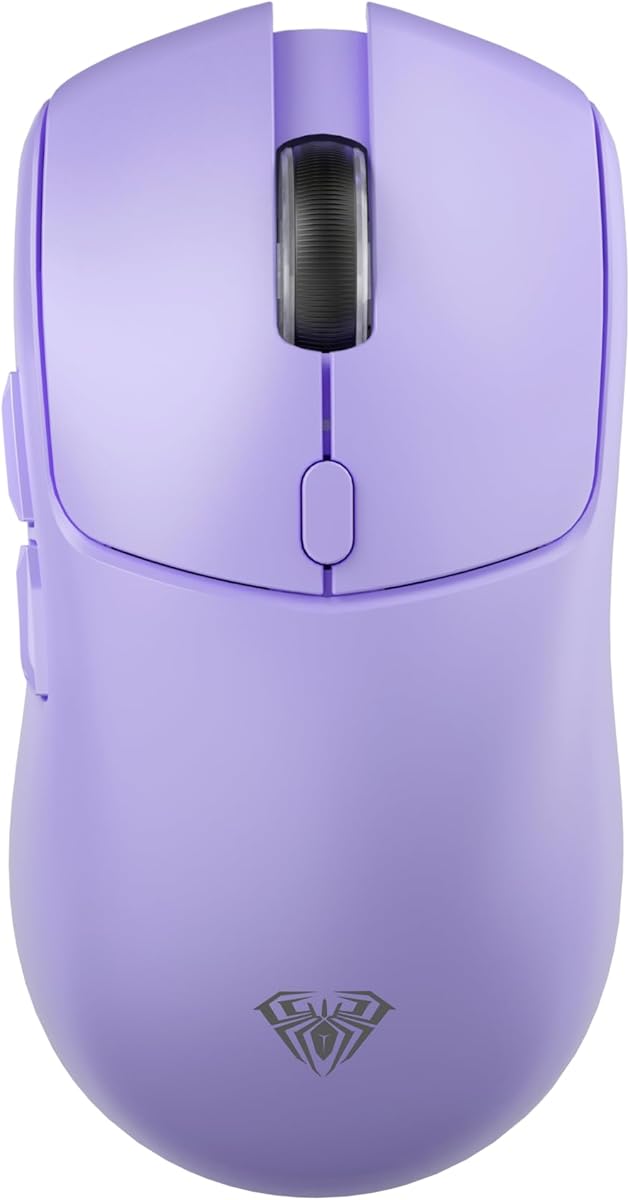
AULA SC580X
4.6Editor score
Three-mode wireless connectivity
Six adjustable DPI levels
Six programmable side buttons
This Purple Gaming Mouse guide compares wireless, wired, RGB, sensor, battery, and connectivity options to help you find the right fit.
A purple gaming mouse combines a distinctive color with the responsiveness, comfort, and connectivity needed for competitive play and everyday computing. The best choice depends on grip style, sensor performance, polling rate, battery life, and whether you prefer a wireless or wired connection.
We compared the featured mice using their stated specifications, connectivity options, dimensions, weight, battery claims, switch durability, and available customization. The list covers premium performance models, lightweight wireless designs, budget-friendly options, RGB-equipped mice, and a compact wired choice.
Each review highlights the features that set a model apart while noting practical trade-offs that may affect your purchase. Ratings reflect the supplied customer feedback, and prices and product availability can change, so compare current listings before ordering.
4.6Editor score

4.6Editor score
4.9Editor score
This side-by-side comparison organizes the featured purple and gaming-focused mice by connection type, sensor capability, polling rate, battery life, weight, and customization options. It is designed to make the differences clear before you investigate the full reviews.



The AULA SC580X combines a purple finish, three connection modes, and a generous set of gaming features in an approachable package. Its supplied rating is 4.6, placing it among the stronger-reviewed models in this roundup. The standout appeal is its flexibility: it can operate through 2.4GHz wireless, Bluetooth 5.0, or a wired USB-C connection.
We may earn a commission when you buy through this link, at no additional cost to you.
Sensor performance reaches 12,000 DPI across six selectable levels, while the stated 1000Hz polling rate is suitable for responsive everyday gaming. Six programmable buttons add genuine utility, and the included software can assign macros and adjust DPI. The built-in 500mAh battery is advertised to last approximately 10 to 14 days with five hours of daily use, and the included USB cable handles recharging.
There are two important limitations. First, the customization driver is listed as Windows-only and does not support Bluetooth mode, so users relying on Bluetooth will have a reduced configuration experience. Second, the 84g ergonomic shape is designed specifically for right-handed users, which may limit its appeal for left-handed gaming.
The SC580X is a strong recommendation for budget-conscious buyers who want more than a basic mouse without paying for the highest-tier performance specifications. It is especially useful for players who switch between a gaming PC, laptop, and Bluetooth-equipped device, although users should verify that their preferred configuration software and operating system are supported.
The ability to save up to four devices and switch among them quickly makes the SC580X particularly useful for mixed setups. Wired USB-C provides a dependable option when charging, while 2.4GHz wireless is the natural choice for competitive desktop use.
Six programmable buttons and macro editing distinguish it from simpler models, although advanced configuration is restricted to Windows and the 2.4GHz and wired modes. Check those requirements before expecting full customization through Bluetooth.
We may earn a commission when you buy through this link, at no additional cost to you.
The SteelSeries Rival 3 Wireless Gen 2 in Lavender offers a polished mix of low latency, accurate tracking, and exceptional stated battery life. Its 4.1 rating is lower than those of several competing picks, but the supplied specifications present it as a capable everyday wireless option. The lavender finish also gives it a softer, more understated purple-adjacent appearance.
We may earn a commission when you buy through this link, at no additional cost to you.
TrueMove Air supports up to 18,000 DPI and is designed to reflect precise movements, while SteelSeries advertises 1.9ms click latency. The mouse can switch between 2.4GHz wireless and Bluetooth, making it suitable for gaming and general productivity. Its battery life is listed at up to 200 hours over 2.4GHz and 450 hours over Bluetooth, with a single AAA battery.
The main trade-off is the absence of a wired mode. While that keeps the design simple and preserves the excellent wireless battery figures, it may not suit players who want a guaranteed wired fallback. Its 60-million-click durability rating is also strong but does not reach the stated longevity of models fitted with Kailh optical switches rated for 80 million clicks.
Choose the Rival 3 Gen 2 if effortless wireless switching, long battery life, and accurate tracking matter more than extensive onboard controls or a wired connection. It is a practical recommendation for a player who values convenience and dependable everyday handling over a long list of competitive specifications.
The 1.9ms advertised click latency gives the Rival 3 a credible performance foundation without requiring a cable. TrueMove Air and up to 18,000 DPI support detailed aiming and cursor control across different games.
Up to 200 hours over 2.4GHz and 450 hours over Bluetooth are among the strongest stated endurance figures in this selection. That makes the model convenient for travelers and users who do not want to recharge frequently.
We may earn a commission when you buy through this link, at no additional cost to you.
The Logitech G305 in Lilac is an excellent all-around pick for players who want proven wireless responsiveness, portability, and long battery life. Its supplied rating is 4.6, and the combination of LIGHTSPEED wireless, a 1ms report rate, and a 3.4-ounce body gives it a particularly strong balance of speed and maneuverability.
We may earn a commission when you buy through this link, at no additional cost to you.
The HERO optical sensor reaches up to 12,000 DPI and provides 400 IPS precision. Logitech advertises up to 250 hours of continuous play on one AA battery, while Endurance mode can extend battery life to as much as nine months when the mouse is not being used. Its compact dimensions and built-in nano receiver storage make it convenient for gaming laptops and travel.
Compared with more aggressively specified rivals, the G305 has a lower maximum DPI and does not offer a wired mode. It also focuses on a streamlined six-button design rather than providing a large collection of programmable controls. Those trade-offs are reasonable for buyers who value low weight, efficient wireless performance, and established brand ecosystem familiarity over maximum feature density.
The G305 is our strongest general recommendation because it performs across several common use cases without requiring difficult compromises. It suits competitive players, students, and travelers who want a dependable lilac gaming mouse for both work and play.
At only 3.4 ounces, the G305 reduces the effort required to move quickly between targets. Its compact shell and stored nano receiver make it straightforward to pack, while the HERO sensor retains ample precision for competitive gaming.
The stated 250-hour gameplay figure is particularly useful for intensive sessions, and Endurance mode can stretch that performance substantially during lighter use. A single AA battery keeps replacement straightforward.
We may earn a commission when you buy through this link, at no additional cost to you.
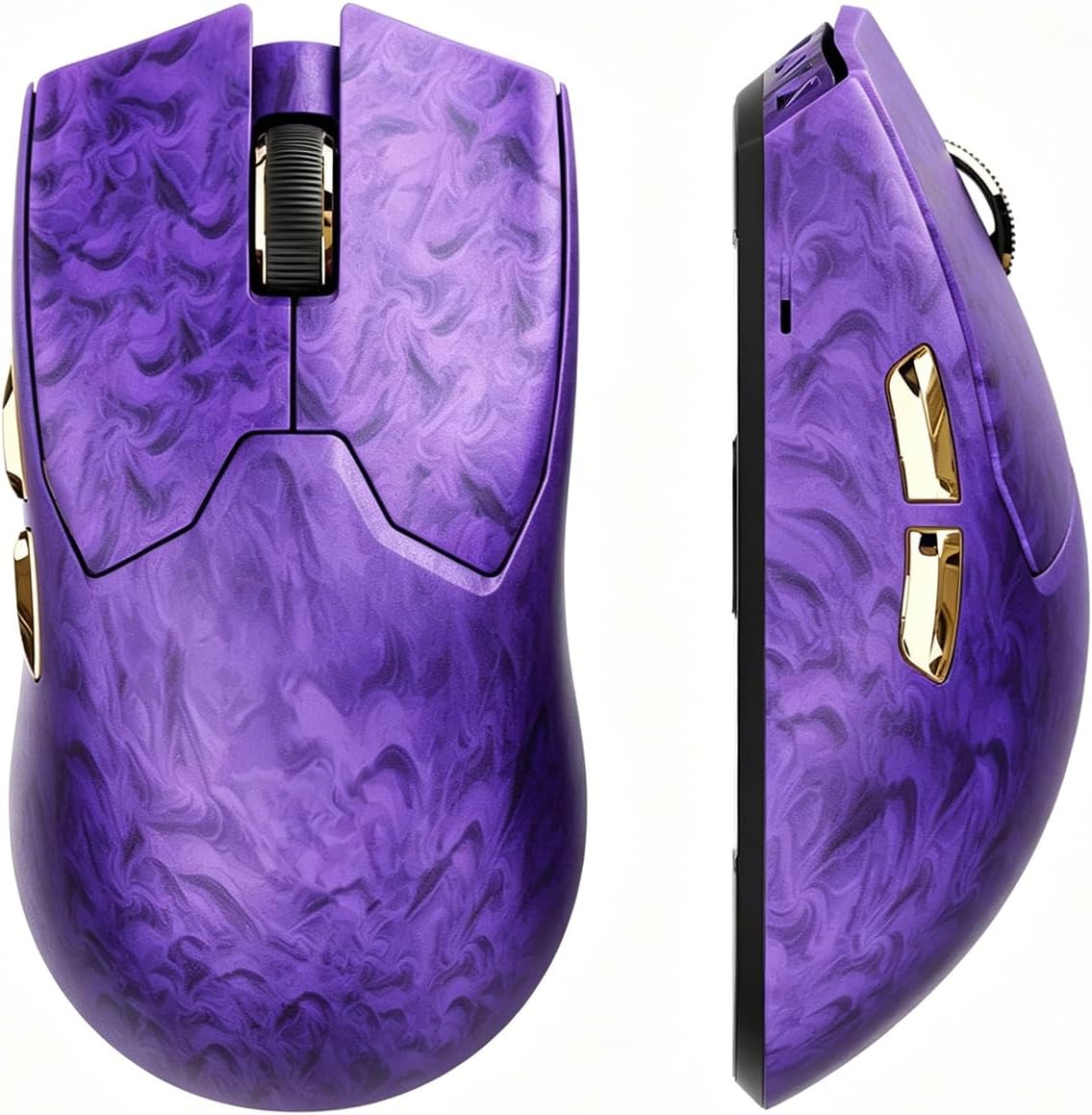
The EWEADN Z7 is the premium performance leader in this collection, combining a 4.9 supplied rating with high-end specifications. Its carbon fiber shell, 52g weight, PAW3950 sensor, true 8K polling rate, and Kailh optical switches make it the most aggressively specified model included in the roundup.
We may earn a commission when you buy through this link, at no additional cost to you.
The sensor supports up to 42,000 DPI and 20,000 frames per second tracking. Both wired and 2.4GHz modes offer true 8K polling, while EWEADN HUB allows configuration of buttons, DPI and IPS, lift distance, mappings, and macros. The 0.1ms optical switch response and stated 70-million-click lifespan are designed for fast, durable input.
Its stated 300-hour battery life is measured at a 1K polling rate, so users running the maximum 8K mode may see different results. The supplied design guidance also says the mouse is intended for small-to-medium hands. Unlike several rivals, it offers only wired and 2.4GHz connections, with no Bluetooth mode.
The Z7 is the clearest choice for performance-focused players who want the highest polling rate and extensive configuration options in a lightweight purple mouse. Buyers should confirm hand fit and decide whether the premium specifications justify the additional spending over lighter-cost alternatives.
True 8K polling in both 2.4GHz and wired modes gives the Z7 a clear advantage for players who prioritize input frequency. The 42,000 DPI maximum adds further flexibility for fast games and high-resolution displays.
The carbon fiber shell and ice-feel coating combine a distinctive appearance with a surface intended to remain comfortable during long sessions. A 52g target also keeps rapid directional changes manageable.
We may earn a commission when you buy through this link, at no additional cost to you.
The Lenovo Legion M220 in Aurora Purple is a versatile tri-mode mouse designed for gamers who want RGB lighting without requiring software for basic effects. Its 4.4 rating is supported by a clear feature set: Bluetooth, 2.4GHz wireless, wired USB-C, seven buttons, and two-zone lighting.
We may earn a commission when you buy through this link, at no additional cost to you.
The optical sensor offers up to 5,000 DPI, 80 IPS tracking speed, 30G acceleration, and a 1000Hz polling rate. Its 800mAh battery is advertised to deliver more than 100 hours of play with RGB turned off, and a full recharge takes approximately two hours. Lighting can be changed directly with button and scroll-wheel combinations.
The 5,000 DPI ceiling is modest compared with the EWEADN, ATTACK SHARK, and Razer options in this guide, and the medium-large symmetrical shape may not suit players with smaller hands. RGB also creates a visible tradeoff because the longest stated battery figure applies when the lighting is off.
The Aurora Purple M220 is best for buyers who value flexible connectivity, convenient onboard lighting controls, and a long-lasting rechargeable design. It is a sensible choice for mixed gaming and productivity setups, especially if 5,000 DPI is sufficient for the games you play.
Two-zone RGB effects can be adjusted with simple button and wheel combinations, making the M220 appealing to users who dislike configuration utilities. Its purple colorway remains part of a broader Legion aesthetic.
Bluetooth, 2.4GHz, and USB-C provide an easy path between gaming and productivity. The 800mAh battery and approximately two-hour recharge time make the mouse convenient for regular use.
We may earn a commission when you buy through this link, at no additional cost to you.
The DAREU M901X stands apart with its dream-purple design, integrated RGB light bars, and magnetic charging dock. It carries a 4.1 supplied rating and focuses on making a wireless gaming mouse visually distinctive while preserving a 12,000 DPI sensor and advertised 1ms wireless transmission.
We may earn a commission when you buy through this link, at no additional cost to you.
The magnetic dock automatically aligns with the mouse and is designed to remain attached even when the mouse and dock are lifted together. This makes charging more convenient than positioning a conventional wireless mouse over a charging pad. The symmetric claw-grip body weighs 85g and has a fingerprint- and sweat-resistant coating.
Its switch rating of 50 million clicks is durable, though it is lower than the 70-million and 80-million figures claimed by two optical-switch models. The listing also does not highlight a wired operating mode. For users who enjoy coordinated RGB hardware and want the mouse to rest on a dedicated dock, these limitations may be less important.
Choose the M901X when visual design, coordinated lighting, and effortless wireless charging are central to your setup. It is especially appealing for players who want a distinctive purple peripheral that remains ready for use without manually connecting a cable.
The strong magnetic attachment solves alignment problems commonly associated with charging pucks. Because the dock remains fixed to the mouse, the design creates a more intentional charging and storage routine.
Light bars on both the mouse and dock create a unified appearance. Multiple lighting modes add atmosphere without making the design feel like a generic RGB gaming peripheral.
We may earn a commission when you buy through this link, at no additional cost to you.
The ATTACK SHARK X3 is a 49g purple wireless gaming mouse built for players who prioritize fast movement and a light physical feel. Its 4.2 rating reflects a favorable but less emphatic customer score than the top choices, while its specifications cover three connection modes, a 26,000 DPI sensor, and extensive customization.
We may earn a commission when you buy through this link, at no additional cost to you.
The PixArt PAW3395 sensor supports up to 26,000 programmable DPI, 650 IPS tracking speed, 50G acceleration, and a 1000Hz polling rate with 1ms timing. Software supports button programming, key remaps, DPI and IPS settings, lift-off distance, polling rate, and macros. Kailh GM 8.0 switches are rated for more than 80 million cycles.
The 49g weight is the defining benefit, but ultralight mice can feel less planted to users who prefer a heavier, more substantial shell. It also does not match the true 8K polling offered by the EWEADN Z7. Nevertheless, its sensor, switch, and glide-foot specifications are competitive with many alternatives.
The X3 is a strong fit for competitive players who want a very light symmetrical mouse without giving up wireless flexibility, high sensor resolution, or wired operation. It is also a practical travel option, particularly for users who prefer a gaming mouse that does not add meaningful weight to a laptop bag.
At 49g, the X3 is among the lightest options here and can make rapid corrections easier during long sessions. Its symmetrical shape and broad PTFE feet support smooth movement and dependable stopping.
The PAW3395 sensor, Kailh GM 8.0 switches, TTC encoder, and software controls create a feature set that goes well beyond a basic lightweight mouse. Macro and remapping support adds value for productivity as well as gaming.
We may earn a commission when you buy through this link, at no additional cost to you.
The Wired RGB USB Mouse is a straightforward option for gamers who want purple styling, illuminated controls, and a dependable wired connection without paying for advanced wireless hardware. Its 4.7 supplied rating is among the highest in the list, although ratings should be considered alongside its intentionally simple specification set.
We may earn a commission when you buy through this link, at no additional cost to you.
The mouse provides four DPI levels of 1200, 1800, 2400, and 3600, along with left, right, forward, back, DPI, and scroll-wheel controls. Dynamic gradient RGB lighting adds a gaming look, while a low-light mode can be activated by holding the DPI button for three seconds. Its honeycomb-style shell is intended to reduce heat buildup.
The 3,600 DPI maximum is the clearest limitation for competitive shooters or other games that benefit from very high sensitivity ranges. The wired design also removes battery concerns but can create cable drag depending on your desk setup. The stated 21-million-click lifespan is lower than the figures quoted by several premium models.
This mouse is a sensible recommendation for casual gaming, home-office use, and buyers who prefer simple USB plug-and-play operation. It also works as a colorful everyday mouse for Windows, Mac, Linux, laptops, desktops, and Chromebooks that support USB input.
A wired USB connection avoids pairing, charging, and battery management. Seven buttons provide more direct commands than a standard three-button mouse while retaining an uncomplicated layout.
Dynamic lighting brings a gaming aesthetic to an otherwise office-friendly design. The low-light setting offers a practical alternative when a softer appearance is preferable.
We may earn a commission when you buy through this link, at no additional cost to you.
The Lenovo Legion M220 in Nebula Purple shares the core design of the Aurora Purple version but offers a different color treatment. Its 4.4 rating and familiar Legion feature set make it an appealing tri-mode option for players who prefer a slightly deeper purple aesthetic.
We may earn a commission when you buy through this link, at no additional cost to you.
Bluetooth, 2.4GHz wireless, and wired USB-C allow the mouse to move among different devices, while the 5,000 DPI optical sensor tracks at up to 80 IPS with 30G acceleration and a 1000Hz polling rate. Two-zone RGB effects can be changed with button and wheel combinations, and the seven-button layout includes practical extra controls.
Its approximate 95g weight and medium-large symmetrical shape are optimized for palm grip. That is different from the 49g ATTACK SHARK X3 and the smaller-hand guidance provided for the EWEADN Z7, so comfort depends on your preferred fit. The 5,000 DPI ceiling is another limitation relative to the higher-resolution models in the guide.
The Nebula Purple M220 is a good fit for users who want flexible connectivity, RGB, and a rechargeable battery in a recognizable gaming design. It works particularly well for mixed desktop, laptop, and Bluetooth use, although players should consider whether they need sensor resolution beyond 5,000 DPI.
Tri-mode connectivity simplifies the transition between gaming, work, and travel. Bluetooth supports everyday tasks, 2.4GHz provides the dedicated wireless link, and USB-C keeps a wired option available.
The symmetrical shell, seven buttons, and two-zone lighting provide a balanced mix of comfort and visual personality. Battery figures are most favorable with the lighting disabled, so consider the RGB setting part of your usage plan.
We may earn a commission when you buy through this link, at no additional cost to you.
The Razer Basilisk V3 is included as a gaming-focused alternative rather than a true purple-color option: the supplied title identifies it as black. Its 4.6 rating, ergonomic thumb-rest design, 11 programmable buttons, and 26,000 DPI sensor make it compelling for players who care more about control and comfort than matching a purple theme.
We may earn a commission when you buy through this link, at no additional cost to you.
The Focus Plus 26K sensor tracks with zero smoothing, while Gen 2 optical switches offer a stated 0.2ms actuation speed and durability of up to 70 million clicks. The signature HyperScroll wheel can free-spin for rapid movement or provide tactile feedback for item and skill selection. Eleven programmable buttons support macros, push-to-talk, and other secondary functions.
Razer Chroma provides 11 independently configurable lighting zones with more than 16.8 million colors and dynamic effects in supported games. The main limitations are its black finish and wired-only design. It also requires a compatible software environment for deeper control, and Windows users are advised by the manufacturer to adjust certain pointer settings and use Razer Synapse for optimization.
Choose the Basilisk V3 when a sculpted palm grip, abundant programmable controls, and precise wheel action matter more than a purple colorway. It is a strong alternative for desktop players and streamers, particularly those who assign secondary functions to nearly every button.
The thumb rest supports the hand while keeping the primary and secondary buttons within easy reach. This makes the Basilisk V3 more appropriate for command-heavy games and productivity than for players who prefer a minimal symmetrical shell.
Eleven programmable buttons, a versatile HyperScroll wheel, and 0.2ms optical actuation offer extensive control. The result is particularly useful for MMO, strategy, and productivity setups where repeated actions benefit from dedicated controls.
We may earn a commission when you buy through this link, at no additional cost to you.
The right purple gaming mouse balances response, comfort, connection options, battery management, and appearance. Use the following factors to narrow the field according to your hardware, game genre, grip preference, and tolerance for setup or charging.
Sensor resolution determines the highest available sensitivity, but it should not be treated as the only measure of tracking quality. The models here range from a 3,600 DPI ceiling on the wired RGB mouse to 42,000 DPI on the EWEADN Z7, with several options in between. The Z7 also uses a PAW3950 sensor advertised for 20,000 frames per second, while the ATTACK SHARK X3 carries the PAW3395 at up to 26,000 DPI. These specifications are most relevant to high-resolution displays, large mousepads, and games that reward quick directional changes.
Choose a higher-resolution sensor if you want broad sensitivity options or play fast first-person titles. Lower maximum DPI is less problematic for strategy games, shooters played at moderate sensitivity, and general office use. Always adjust the in-game sensitivity to match your display rather than assuming a larger DPI number automatically produces better control.
Polling rate indicates how often the mouse reports movement to the computer. A 1000Hz rate is common across many gaming mice in this list, including the AULA SC580X, Lenovo Legion M220, and ATTACK SHARK X3. The EWEADN Z7 goes further with a true 8K polling rate in both wired and 2.4GHz modes, while the SteelSeries Rival 3 advertises 1.9ms click latency and the DAREU M901X cites 1ms wireless transmission.
Faster polling can make rapid inputs feel more immediate, especially on high-refresh displays. The real-world difference is less significant in menus, office work, or games where movement is slow. Prioritize consistency and low latency if you compete, but do not ignore grip and comfort when deciding between otherwise similar models.
Wireless mice offer a cleaner desk and often support multiple devices, but they introduce radio latency, battery needs, and the possibility of interference. Wired designs remove those concerns and provide consistent power. Tri-mode models, such as the Lenovo Legion M220, are especially convenient because they combine 2.4GHz wireless, Bluetooth, and wired operation in one package.
Competitive players who want a dependable fallback may prefer the EWEADN Z7 or ATTACK SHARK X3 because both support wired and 2.4GHz modes. The Logitech G305 and SteelSeries Rival 3 prioritize wireless simplicity. The low-cost wired RGB mouse is ideal for anyone who wants to avoid charging and pairing entirely.
A mouse should fit the way you naturally move your hand. The AULA SC580X is shaped for right-handed users, while the EWEADN Z7 is described as suitable for small-to-medium hands. The DAREU M901X uses a claw-grip shape, and the Lenovo M220 adopts a medium-large symmetrical palm grip. For the lightest handling, the ATTACK SHARK X3 weighs 49g, while the Logitech G305 weighs only 3.4 ounces.
Symmetrical shapes suit people who use claw, fingertip, or relaxed palm grips and do not need a pronounced thumb rest. Sculpted ergonomic designs can be comfortable for long sessions, but they are less universally compatible. Try a mouse in a store if possible, paying particular attention to finger placement, palm support, and whether the side buttons sit under your ring or middle finger.
Battery convenience varies from disposable-cell designs to large rechargeable systems. The Logitech G305 is rated for up to 250 hours of play on one AA battery, and the SteelSeries Rival 3 claims up to 200 hours over 2.4GHz and 450 hours over Bluetooth. The Lenovo M220 uses an 800mAh rechargeable battery with a stated 100-plus-hour figure when RGB is off, while the EWEADN Z7 claims more than 300 hours at a 1K polling rate.
Rechargeable mice are convenient for regular use, but you should identify whether charging interrupts play. The DAREU M901X addresses that concern with a magnetic dock that keeps the mouse aligned and ready. Compare the actual battery conditions behind each claim because polling rate, lighting, and connection mode can materially affect endurance.
Extra buttons are useful for abilities, communication, media controls, and macros, but their value depends on software quality and operating system support. The Razer Basilisk V3 provides 11 programmable buttons, the AULA SC580X has six, and the Lenovo M220 has seven physical buttons. The EWEADN and ATTACK SHARK mice provide software control over mappings, DPI, lift distance, and macros.
Software-free adjustments can be more convenient than driver-dependent features. The Lenovo M220 allows RGB changes through button and wheel combinations, while the wired RGB mouse includes a low-light command. If you rely on advanced macros, verify that the mouse supports your operating system and the connection mode you intend to use before purchasing.
Switch ratings provide a useful indication of expected longevity, although they do not describe every aspect of build quality. The featured claims range from 20 million clicks for the Lenovo M220 and 21 million for the wired RGB mouse to 50 million for the DAREU M901X, 60 million for the SteelSeries Rival 3, 70 million for the EWEADN Z7 and Razer Basilisk V3, and more than 80 million for the ATTACK SHARK X3.
Optical switches can actuate quickly and avoid the metal-contact friction associated with conventional mechanical designs. The EWEADN Z7 states a 0.1ms optical response, the Razer Basilisk V3 states 0.2ms actuation, and the ATTACK SHARK X3 uses Kailh GM 8.0 switches. These figures are manufacturer claims, so treat them as comparative guidance rather than a guaranteed lifespan.
Purple aesthetics can range from subtle lilac or lavender to a saturated RGB treatment. The Logitech G305 and SteelSeries Rival 3 use understated lilac and lavender finishes, while the AULA SC580X, EWEADN Z7, ATTACK SHARK X3, and wired RGB mouse use more clearly purple designs. The two Lenovo M220 versions provide Aurora and Nebula color options with two-zone lighting.
If appearance is your main priority, compare the color finish under the lighting conditions in which you use your setup. RGB can create a more coordinated look but may consume additional battery. Also note that the Razer Basilisk V3 in the supplied data is black, so it belongs in the comparison as a performance and ergonomics alternative rather than a purple-color recommendation.
Begin by choosing the correct connection mode. Use 2.4GHz for latency-conscious wireless gaming, Bluetooth for compatible productivity devices when the mouse supports it, and the wired mode for a stable fallback or uninterrupted play. Install the relevant driver on a supported system, update it, and set the DPI before entering a game.
Adjust the mouse to your grip rather than forcing a new shape. Keep the main buttons under your index and middle fingers, avoid accidental side-button presses, and use the included software to map DPI, lift distance, buttons, macros, and polling settings where supported. For LED-equipped models, select a lighting profile that matches your battery needs and desktop setup.
Keep the bottom sensor and glide feet free of dust, oil, and debris, and clean the mouse on a suitable surface. Do not use harsh liquids on the shell, switches, or charging contacts. Charge according to the supplied instructions, remove and store the receiver safely when traveling, and replace disposable batteries promptly to maintain reliable wireless performance.
No. A higher maximum DPI provides more sensitivity options, but actual control depends on your display resolution, mousepad size, game settings, and preferred movement style. Many competitive players use moderate in-game sensitivity with a relatively high mouse DPI. Choose a sensor range that gives you comfortable adjustment rather than focusing only on the largest number.
Wireless offers a cleaner desk and, with modern 2.4GHz technology, excellent responsiveness. Wired modes remove charging concerns and provide a dependable fallback. A tri-mode model is ideal if you alternate among gaming, work, and travel, while a wireless-only model may be simpler for users who value long battery life and multi-device switching.
Polling rate describes how frequently the mouse reports its position to the computer, while click latency describes how quickly a physical click is registered. Both can influence responsiveness, but they are not identical measurements. Consider them alongside sensor quality, switch response, connection stability, and comfort rather than treating either number as the only sign of a good gaming mouse.
Lightweight designs can reduce the effort needed to move the mouse quickly and may suit competitive players who make frequent corrections. Comfort is subjective, however, and some users prefer the stability of a heavier shell or the support of a sculpted thumb rest. Choose based on grip style and personal preference rather than assuming lower weight is always preferable.
No. The Logitech G305, SteelSeries Rival 3, EWEADN Z7, ATTACK SHARK X3, and AULA SC580X listings do not highlight full RGB lighting in their supplied feature descriptions. The Lenovo Legion M220, DAREU M901X, wired RGB mouse, and Razer Basilisk V3 explicitly feature lighting, making them stronger choices when synchronized RGB effects are important.
Yes. Nearly every model in this roundup can handle ordinary navigation, document editing, and web browsing. Wireless and tri-mode options are especially useful when switching between a work computer and a gaming system. For macro-heavy office work, check operating system support and make sure the mouse's programmable buttons are recognized by your productivity software.
A light cleaning every few weeks is reasonable for normal use, with more frequent attention if you notice cursor stutter, reduced glide, or unusual drag. Power the mouse off before cleaning, gently remove dust from the sensor and feet, and avoid spraying cleaner directly onto the device. Always follow the manufacturer's care instructions.
It depends on the mouse and the game. Bluetooth can introduce additional latency and is generally less consistent for competitive play than a dedicated 2.4GHz receiver or wired connection. It remains useful for general computer control, travel, and devices that do not support a USB receiver. Gamers seeking the most consistent response should favor 2.4GHz or wired operation.
The Logitech G305 is the most balanced all-around choice, combining a 4.6 rating, 1ms report rate, low weight, and strong battery endurance. The AULA SC580X is the best budget-oriented option for buyers who want tri-mode connectivity, macro support, and adjustable DPI without moving to the premium tier, while the EWEADN Z7 leads performance-focused shoppers with its true 8K polling and 42,000 DPI maximum.
Prioritize the features you will actually notice during play. Competitive players may value polling rate, sensor resolution, switch response, and a comfortable grip; mixed-use buyers may prefer tri-mode connectivity and battery life; RGB-focused users may prioritize lighting effects and a coordinated charging dock. Software compatibility deserves equal attention because advanced features vary by model and operating system.
Customer ratings offer a useful snapshot, but they should not replace hands-on fit and feature evaluation. Current prices, availability, and included accessories can change, so check the latest product listing and accessory details before making a final purchase.