
DAC 3 Function Foot Pedal
5.0Editor score
Clearly labeled playback controls
Large three-button layout
Compatible footswitch software
Explore the best foot pedals for transcriptionists, comparing compatibility, pedal layouts, durability, programmability, comfort, and control features.
A transcription foot pedal lets you control audio playback without moving your hands away from the keyboard. The right model can reduce repetitive reaching, improve workflow efficiency, and support comfortable work during long dictation sessions. Important considerations include software compatibility, pedal layout, switch durability, response, configurability, and how naturally the device supports your preferred foot position.
We compared ten USB foot controls and digital transcription pedals using the supplied product specifications, customer ratings, control layouts, construction details, and stated compatibility. The list covers dedicated transcription devices, configurable professional models, general-purpose HID pedals, and specialized options for particular software. Every product is examined in rank order, with strengths and limitations considered rather than focusing on rating alone.
The recommendations show what each pick offers, including options for broad compatibility, precision configuration, low-profile operation, quiet electronic switching, and dedicated Express Scribe control. Ratings and product details can change, software requirements deserve careful confirmation, and current prices vary over time. Always verify that the selected pedal supports your computer operating system and transcription application before purchasing.
5.0Editor score

4.5Editor score

4.4Editor score
This side-by-side comparison highlights each pedal's control layout, stated compatibility, principal ergonomic feature, and most important buying consideration. The table includes dedicated transcription controls, configurable models, and programmable HID alternatives so readers can match the hardware to their software and preferred workflow.


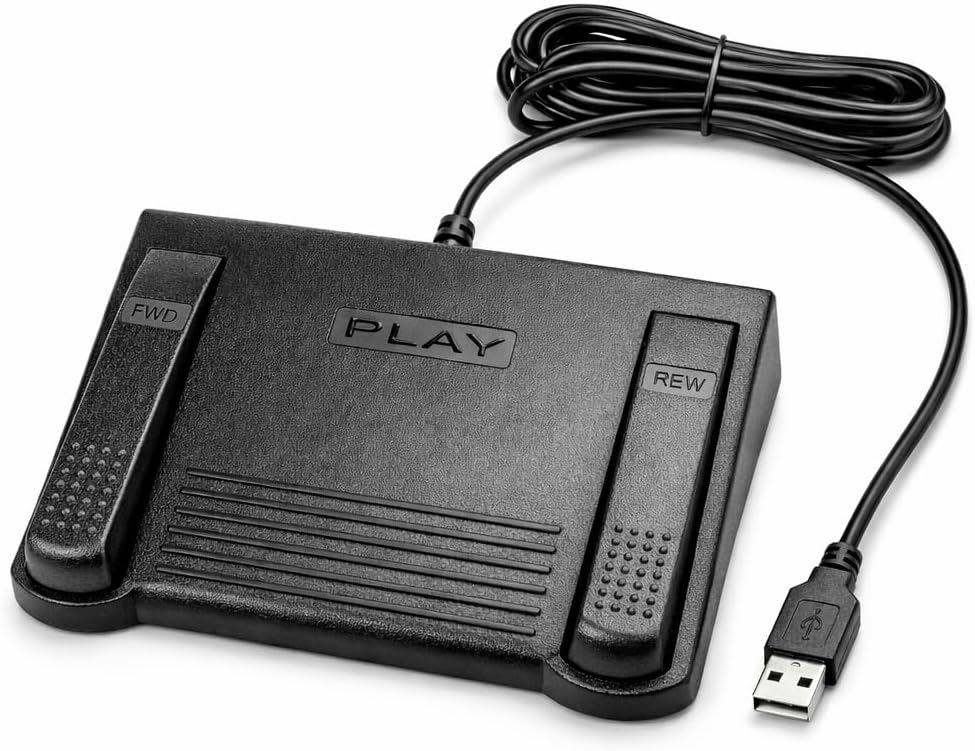


The Infinity 3 USB Foot Pedal Control with Computer Plug In earns a 4.5 customer rating and stands out as a balanced choice for transcriptionists who want conventional playback control in a compact, familiar format. Its defining characteristic is a wide, central, sloping Play pedal, flanked by controls for Fast Forward and Rewind. That arrangement makes it easy to locate the main function without staring down at the device.
We may earn a commission when you buy through this link, at no additional cost to you.
The pedal is built around ultra-heavy-duty micro switches, an appealing feature for professionals who expect repeated use throughout the working day. A large overall surface permits the foot to travel between Play, Fast Forward, and Rewind without hunting for small buttons. The sloping center also supports a natural downward press, which can make extended dictation sessions more comfortable than operating a flat collection of narrow switches.
Its main limitation is that the supplied specifications do not describe extensive configuration software or universal compatibility with every transcription platform. Some applications recognize standard USB foot-control signals, while others require proprietary hardware or their own supported device list. The physical design is compelling, but software support should be confirmed before purchase, particularly for specialized medical, legal, or court-reporting workflows.
This is a strong recommendation for anyone seeking a three-function transcription pedal with a generous, easy-to-operate surface. It balances physical accessibility, durable switch construction, and uncomplicated USB connectivity. Choose it when your software supports this Infinity control or accepts a compatible three-pedal configuration and you value a large central Play switch over extensive programmability.
The broad, sloping center gives your foot a clear landing point for the most frequently used command. The larger surface can also reduce the need for precise placement, helping sustain an efficient rhythm while you type.
The stated ultra-heavy-duty micro switches are designed for frequent operation. For a transcriptionist, dependable tactile response matters because missed or inconsistent commands interrupt concentration and increase correction work.
We may earn a commission when you buy through this link, at no additional cost to you.
The VEC in-USB-2 Infinity Digital Foot Control has a 4.4 rating and offers one of the strongest combinations of compatibility, mechanical reliability, and thoughtful safety features in this guide. It is designed to work with leading dictation and transcription products and with PCs, desktops, laptops, and portable computers equipped with USB ports. That wider ecosystem makes it a practical option when your software is not named in the product description.
We may earn a commission when you buy through this link, at no additional cost to you.
Its most unusual feature is the mechanical stop that helps prevent accidental triggering of the center pedal while a side pedal is being pressed. This can make three-function operation more predictable, particularly for users who move quickly between rewind, play, and fast-forward. The large sloping Play pedal also creates an obvious target, while the stated switch rating of two million depressions suggests a design intended for sustained professional use.
Rechargeable battery power is the main trade-off. The specification claims up to 1,000 hours of digital recording time, which is substantial, but a battery-powered design still requires charging awareness. A user who frequently moves between offices or works through long uninterrupted periods should establish a dependable charging routine and confirm how the device behaves when its power is depleted.
The VEC model is well suited to transcriptionists who cannot risk discovering a software incompatibility after setup. It is also attractive for workers who spend substantial time navigating between playback functions. Choose it when broad platform support and accidental-trigger prevention matter more than having a simple cable-only power arrangement.
The mechanical stop creates physical separation between center and side commands. This is particularly useful when your work requires rapid switching among playback functions and an accidental Play command would disrupt the audio.
The stated battery life supports long working sessions, reducing the need for frequent cable management. Keeping the control charged and checking its status before a major assignment remains sensible practice.
We may earn a commission when you buy through this link, at no additional cost to you.
The Philips ACC2330 4-Pedal Foot Control for Digital Systems provides a dedicated option for professional dictation workflows that need more command surfaces than a standard three-pedal arrangement. Its 4.1 rating reflects a solid but less universally praised history than the top-ranked models. The four-pedal format offers greater functional separation and can suit users who need to operate playback, recording, or other controls without repeatedly pressing the same switch.
We may earn a commission when you buy through this link, at no additional cost to you.
Control can be performed through the toes, while the heel can be used to swing between control areas. This approach supports different movement patterns and may be useful for professionals accustomed to a broad four-switch surface. The wider center pedal helps reduce unintended presses of adjacent controls, and the design permits the foot to relax during pauses rather than remaining rigidly positioned.
The trade-off is that a larger, more specialized pedal may demand more desk space and a learning period. Its four distinct areas are not automatically an advantage; users who only need Play, Rewind, and Fast Forward may find the Philips LFH2330 or a simpler Infinity model more direct. Software compatibility should also be confirmed because the stated digital-system focus does not guarantee support for every third-party application.
This pedal is best for medical, legal, or other professional dictation environments where multiple commands and precise foot positioning are valuable. It is less compelling for a simple home transcription setup, but its toe-touch operation, heel movement, and broad center surface make it a serious option for experienced users who value nuanced physical control.
Using the heel to swing the foot and the toes to activate individual controls offers multiple ways to navigate the pedal. This can reduce repetitive strain when your software requires several distinct commands.
The increased center-pedal width helps keep the primary action distinct from neighboring switches. It is a practical safeguard in fast-paced dictation environments where an unintended command can interrupt playback.
We may earn a commission when you buy through this link, at no additional cost to you.
The DAC 3 Function Foot Pedal FP-110-USB is the premium-oriented selection here, holding a perfect 5.0 customer rating. Its controls are explicitly labeled Next Job, Rew/Play, and Record from left to right, offering immediate clarity that many generic foot switches lack. The large buttons make the pedal intuitive once you understand the intended command sequence.
We may earn a commission when you buy through this link, at no additional cost to you.
A USB connector provides a straightforward connection to a compatible computer, while the device is designed for certain software built to work with foot controls. The combination of clear labels and a specialized three-command layout is especially relevant to professional workflows that repeatedly move between a new job, playback, and recording. Rather than presenting arbitrary generic keys, the hardware reflects a recognizable task-oriented structure.
The important qualification is that compatibility is limited to suitable foot-control software. If your transcription program does not recognize this DAC model, the attractive labels will not make it usable. Buyers should check the application provider's supported hardware list and confirm command mapping in advance. The pedal also offers less apparent flexibility than fully programmable HID units.
This is a compelling choice for users whose transcription software supports the DAC FP-110-USB and who appreciate a purpose-designed, clearly labeled control surface. The five-star rating, large buttons, and professional command labels distinguish it from basic switches. Confirm compatibility first, then choose it for an uncluttered, task-focused control experience.
Clearly marked controls for Next Job, Rew/Play, and Record make the intended sequence easier to learn. This reduces hesitation and helps new users become productive without memorizing unlabeled switch positions.
Rather than functioning only as generic keyboard input, the pedal maps common dictation tasks to three distinct switches. That specificity can be advantageous when your software natively supports the device.
We may earn a commission when you buy through this link, at no additional cost to you.
The Infinity USB Digital Foot Control IN-USB3 carries a 4.5 rating and focuses on a low-profile design with a greater non-slip surface area. Those two characteristics address common concerns in real transcription desks: a device that occupies little vertical space and remains stable when the foot moves quickly between commands.
We may earn a commission when you buy through this link, at no additional cost to you.
The low profile can make the pedal more approachable than a tall, steeply angled unit. It may also fit more comfortably beneath a desk than a larger model, and the expanded anti-slip area is intended to keep the control from shifting during use. USB connectivity removes the need to manage a separate power supply for the pedal.
The supplied information is concise, so buyers should not infer functions that are not stated. It does not describe the number of controls, a configuration wizard, supported operating systems, or named software compatibility. Those details should be confirmed with the manufacturer or retailer. Compared with the four-pedal Philips models, it may offer fewer separate actions.
This is a good option for a transcriptionist who values a compact, stable footprint and a familiar Infinity form. It is especially worth considering when desk space is limited or the current setup would benefit from a flatter control surface. Confirm the exact button functions and software support before ordering.
The stated low profile reduces the pedal's visual and physical bulk. It can be easier to position near a chair or beneath the edge of a compact workstation without altering your typing posture.
A greater non-slip surface area helps the control remain stable during repeated foot movements. That stability supports more consistent command activation on hard or smooth flooring.
We may earn a commission when you buy through this link, at no additional cost to you.
The Express Scribe Transcription Foot Pedal ECS-FPAE has a 3.8 rating and serves a very specific purpose: controlling Express Scribe transcription software from NCH Software. It supports both free and paid versions on Windows and Mac, but the product title explicitly says it is not for Case Catalyst or other transcription programs. This focused compatibility is both its strength and its most important limitation.
We may earn a commission when you buy through this link, at no additional cost to you.
The pedal uses a modified internal control board engineered for Express Scribe and arrives pre-programmed. That means a user can connect it by USB without running a foot-pedal wizard or performing manual configuration. Its oversized layout supports movement among play, fast-forward, and rewind functions, and the stated one-year mail-in parts and labor warranty adds institutional reassurance.
Because it is not a universal device, choosing it without using Express Scribe would be an expensive mismatch. The relatively modest 3.8 rating may reflect compatibility frustration among buyers whose software expectations differed from the product title. A prospective buyer should verify the current software version and recommended hardware list rather than relying on general USB expectations.
For Express Scribe users, this is a convenient and potentially efficient solution because setup is designed to be immediate. It is not a general recommendation for Case Catalyst, medical transcription suites, or proprietary legal systems. Choose it only when the application is explicitly part of your workflow.
The pre-programmed hardware is designed to work immediately after a USB connection. Avoiding a setup wizard can reduce onboarding time and remove a common source of transcription setup frustration.
The modified internal control board is tailored to Express Scribe, allowing the pedal to behave as intended within that ecosystem. The same specificity means it should not be treated as a generic multi-program control.
We may earn a commission when you buy through this link, at no additional cost to you.
The ECS-IN-USB-1 Foot Pedal is designed for hands-free audio playback in medical, legal, insurance, public safety, and general transcription environments. Its 3.5 rating is the lowest in this list, so buyers should investigate the particular implementation more carefully. The stated design nevertheless addresses the core needs of a dedicated transcription control: broad software compatibility, ergonomic positioning, and uninterrupted typing flow.
We may earn a commission when you buy through this link, at no additional cost to you.
The contoured layout is intended to support a natural foot position and reduce fatigue during extended use. The product also emphasizes compatibility with most major dictation and transcription platforms. Software is not included, which is normal for a hardware accessory, but it means the user remains responsible for confirming the application's supported-device list.
The low rating may reflect fit, response, compatibility, or other experience factors that cannot be determined from the specifications alone. This model also provides fewer stated technical details than the VEC Infinity option, including no switch-pressure or battery-life claims. Those omissions make direct feature comparisons less precise.
The pedal may be worth considering when your priority is a comfortable, contoured surface and support for a broad set of transcription applications. It is less compelling when a heavily reviewed mechanism or clearly specified switch design is important. Treat the rating as a prompt to verify fit, firmware, and application support before making a final decision.
A thoughtfully contoured layout is intended to keep the foot in a more natural position. Ergonomics can be especially valuable when the pedal is used for hours across multiple audio files.
Playback commands move to the foot, allowing both hands to remain available for typing. This can reduce reaching and help maintain concentration during repetitive transcription work.
We may earn a commission when you buy through this link, at no additional cost to you.
The iKKEGOL Upgraded USB Triple Foot Pedal provides an adaptable and budget-oriented route to hands-free control. It has a 4.4 rating and uses a standard HID configuration that can trigger programmable keyboard or mouse functions. Instead of being restricted to fixed playback commands, it can be tailored to transcription shortcuts, push-to-talk, media controls, or other workflow actions.
We may earn a commission when you buy through this link, at no additional cost to you.
Its three optical switches are described as quiet, making this model appealing in shared offices or workspaces where audible mechanical clicks could be distracting. The switches provide a sensitive response with minimal resistance, while the wide, large-size pedal is designed for comfort and durability. Four TPU rubber supports are included for use on hard floors, helping the unit stay in position.
Its generic nature is both an advantage and a drawback. Programmable commands offer flexibility, but you must configure the pedal to send the right signals. Unlike dedicated transcription hardware, it does not provide a labeled play, rewind, and record workflow. The product description also does not clearly state a required configuration program for this optical model, so compatible setup instructions should be verified before use.
This is a strong budget choice for a user who wants quiet operation, broad HID functions, and the ability to create custom shortcuts. It is particularly suitable when your transcription software permits custom keyboard commands. If you prefer out-of-box, software-specific mapping with no setup, a dedicated transcription pedal may be easier.
Optical operation can reduce the audible impact associated with mechanical footswitches. That makes the pedal easier to use near colleagues or family members during extended working periods.
Because it behaves as a programmable HID controller, the three switches can represent keyboard or mouse actions. This flexibility supports custom transcription shortcuts as well as media and communication controls.
We may earn a commission when you buy through this link, at no additional cost to you.
The Philips LFH-2330 Configurable USB Foot Control is built for users who want direct control over how four pedals behave. It has a 4.2 rating and distinguishes itself with a user-friendly wizard that can configure the pedal to suit individual workflows. Rather than accepting one fixed playback scheme, the device can be adapted as your software and habits evolve.
We may earn a commission when you buy through this link, at no additional cost to you.
Its slim design is intended to minimize foot movement and reduce physical strain during transcription. A smaller travel distance can make operation more efficient because the foot need not shift as dramatically between commands. The anti-slip bottom helps keep the unit positioned, while four separate pedals provide room for a broader command set than a three-function model.
The trade-off is that configurability adds a setup stage. You must install or use the relevant wizard, assign commands, and confirm that your transcription program responds as expected. The four-pedal design also requires more desk space and may take longer to master than a simple labeled three-switch unit.
The LFH2330 is a strong choice for experienced transcriptionists who value precise, custom control more than immediate plug-and-play operation. It is especially useful for professionals whose application supports a wide command range or whose workflow includes recording, playback, cursor movement, and other custom actions. Confirm current wizard availability and operating-system support before purchase.
The configuration wizard lets you assign different actions to the four pedals. You can align the physical layout with the commands you use most, reducing unnecessary motion and improving efficiency.
A compact shape and shorter foot movement can reduce strain over a full workday. The goal is not merely a smaller object, but a control surface that requires less effort to reach and operate.
We may earn a commission when you buy through this link, at no additional cost to you.
The iKKEGOL Upgraded USB Triple Foot Pedal is the most explicitly programmable model in this guide. It has a 4.3 rating and uses three mechanical standard HID switches to send keyboard commands, mouse clicks, or complex macros. That flexibility can streamline transcription, but it also makes programming a central part of the ownership experience.
We may earn a commission when you buy through this link, at no additional cost to you.
The ElfKey software is required for programming on Windows and macOS. Linux users can configure commands in Windows or macOS first, then use the pedal as a plug-and-play device on Linux. The stated system support includes Windows XP, Windows 10, Windows 11, Mac, and Linux. This makes the pedal unusually flexible for a cross-platform workstation, although very old or specialized operating environments may require separate verification.
Mechanical switches offer a familiar physical action and responsive touch. The stated spring-loaded lever closes an electrical circuit when pressed. Unlike the optical model, these switches may produce more audible feedback, which could be a drawback in quiet offices. The included TPU rubber supports help prevent movement on hard floors, and the broad pedal is designed for comfortable operation.
Choose this model if you want three fully programmable controls and routinely work across Windows, Mac, or Linux. It is a strong alternative to a fixed transcription pedal when you need custom macros, push-to-talk actions, media commands, or application-specific shortcuts. The trade-off is setup effort and potentially greater sound compared with an optical switch.
Each switch can represent more than a single key, allowing combinations or sequences to be assigned. This can place frequently used actions in one foot-controlled location.
The stated Windows, macOS, and Linux support broadens the pedal's usefulness. Linux commands should first be configured in Windows or macOS, then transferred through the resulting plug-and-play behavior.
We may earn a commission when you buy through this link, at no additional cost to you.
The most useful transcription pedal is one that your software recognizes, your foot can operate accurately, and your workstation can support without daily friction. Evaluate compatibility and control requirements first, then compare ergonomics, switch design, programmability, power, and physical stability.
In short, verify software support before choosing the hardware.
In short, select a layout that matches your commands without adding unnecessary complexity.
In short, favor a control surface that feels natural and minimizes repetitive movement.
In short, balance switch noise, tactile response, and stated durability around your usage pattern.
In short, choose dedicated controls for simplicity or programmable controls for flexibility.
In short, prioritize a power method that suits your mobility and working schedule.
In short, ensure the pedal remains firmly positioned without forcing an awkward posture.
In short, prefer transparent construction details and reliable after-sale coverage.
Start by confirming that the foot pedal is supported by your transcription software and connecting it to the appropriate computer USB port. If the model requires configuration, install the current utility, assign commands, and test each pedal in a short practice session. Begin with the primary Play control, then add Rewind, Fast Forward, Record, and any secondary functions. Some dedicated models are already preconfigured, while generic HID models usually need custom key assignments.
Place the control where it is easy to reach without twisting or stretching. Sit back in a neutral posture and check that the foot can operate the intended switch while the heel remains supported. A non-slip base or the supplied floor supports can improve stability on hard surfaces. Test for accidental commands, excessive travel, and comfort before beginning a long assignment, then adjust the chair or pedal position rather than compensating with awkward ankle movements.
For care, keep the device away from liquids and dust, and clean the housing with a soft, lightly dampened cloth. Avoid flooding the seams or immersing the pedal. Check the cable for sharp bends and keep the connectors free from foot pressure. Recharge a battery-powered model according to its instructions, and periodically confirm that every switch still registers. If a command becomes intermittent, test the software mapping and connection before assuming the mechanical switch has failed.
No. Some pedals provide standard HID keyboard and mouse commands, while others use dedicated internal control boards for a particular program. Check the current supported-device list from the transcription software developer before purchasing. USB connectivity is necessary but does not guarantee that Play, Rewind, and Fast Forward will work automatically.
A three-pedal model is usually sufficient for standard playback control and takes up less desk space. A four-pedal design offers more separate commands and can reduce the need to reuse one function for multiple tasks. The better choice depends on the commands supported by your software and whether you value simplicity or additional control.
Only if that software recognizes the pedal or allows custom keyboard commands. Programmable HID models offer the best chance because each switch can be assigned a shortcut. Dedicated models may work only with their named software. Test the pedal with your actual application before committing to a large assignment.
Optical switches are generally positioned as the quieter option, while mechanical switches produce a physical click and a more pronounced action. The noise difference can matter in shared offices or during calls. Individual results may vary, so consider the workspace environment rather than treating quietness as the only durability consideration.
Choose a layout that requires little travel, provides a stable base, and matches your preferred heel or toe movement. Adjust the pedal so your leg is not stretched forward or twisted, and support your back and feet in a neutral seated position. A low-profile or slim design can help, but personal comfort and placement remain more important than any shape alone.
Some models explicitly support multiple operating systems, while others are intended for Windows or a particular application. The iKKEGOL mechanical model lists Windows, Mac, and Linux support, with Linux commands configured first in Windows or macOS. Always confirm the pedal's current compatibility documentation and any configuration-software requirements.
A USB-powered model requires less charging management and is ideal for a fixed workstation. A rechargeable battery can suit mobile workflows and may provide long recording time, but you must keep it charged. Consider your schedule, location, and tolerance for checking power status before choosing between the two approaches.
First reconnect the USB cable and confirm that the computer recognizes the device. Next, open the configuration utility and verify that the affected switch still has the intended command. Test the pedal in a simple application, then restart the transcription program. If the problem persists, check the manufacturer's support guidance and warranty terms before attempting a repair.
The Infinity 3 USB Foot Pedal is the leading all-around recommendation because it combines a wide sloping Play pedal, large control surface, and heavy-duty micro switches in a familiar three-function layout. The VEC Infinity Digital Foot Control is especially compelling for broad compatibility and accidental-trigger prevention, while the DAC 3 Function Foot Pedal offers clearly labeled, task-oriented controls for supported software.
Prioritize verified software compatibility first, followed by the control layout and ergonomics that suit your work. A quiet optical or low-profile model may serve a shared workspace better, while a programmable HID pedal can serve specialized workflows that need custom shortcuts. Dedicated devices offer straightforward operation, and configurable models provide more control when your software supports it. Choose based on daily comfort and reliable command recognition rather than feature count alone.
Customer ratings are useful signals, but software updates, operating-system changes, and manufacturer revisions can affect current experiences. Verify the latest compatibility documentation, configuration requirements, warranty terms, and available seller information before purchasing. As with any piece of transcription equipment, current prices and product details can change, so compare the final listing carefully when you are ready to buy.