30 Inch Webcam Stand Camera Mount
4.1Editor score
Thirty-inch flexible gooseneck
Wide 1/4-inch device compatibility
Protective non-slip clamp cushion
Low 0.7kg stated capacity
A clamp on webcam arm can transform a fixed webcam into a flexible setup for calls, streaming, teaching, demonstrations, and hands-free recording. The right model should remain stable under a camera’s weight, reach above or beside a desk, hold a useful angle, and clamp securely without damaging the furniture.
This guide compares ten arms based on stated reach, load capacity, clamp range, adjustment mechanisms, mounting hardware, and device compatibility. It covers both simple gooseneck stands and articulated magic arms, helping readers distinguish basic webcam positioning from more adaptable rigs for phones, lights, microphones, and action cameras.
Each review explains the product’s most useful features, limitations, and ideal setup. The first three entries earn the guide’s featured awards, while the remaining models provide alternatives for shorter reach, greater portability, narrower clamp openings, or specific equipment combinations. Prices and availability can change, so confirm current details before buying.
4.1Editor score

4.6Editor score

4.3Editor score
As an Amazon Associate we earn from qualifying purchases.
The comparison below highlights each arm’s reach, load rating, mounting system, and clamp versatility so you can match a mount to your device, furniture, and recording setup.




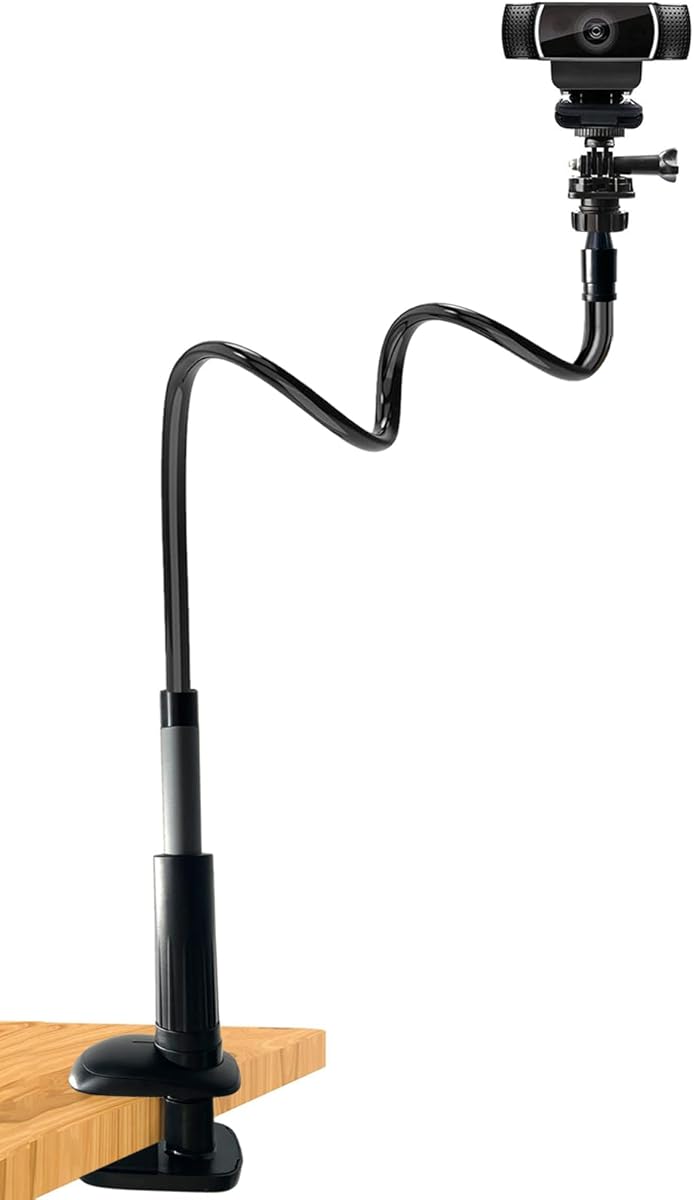
The 30 Inch Webcam Stand Camera Mount is a straightforward clamp on webcam arm built around a flexible gooseneck and an upgraded thick base. It holds a 4.1 rating and stands out for its substantial reach, simple adjustment, and unusually broad opening of up to 2.7 inches. That makes it useful for webcam positioning above a monitor, beside a laptop, or on a thick desk edge.
We may earn a commission when you buy through this link, at no additional cost to you.
The arm can extend to 30 inches and uses a 360-degree rotating ball joint for changing the viewing angle. Its standard 1/4-inch mounting interface accepts webcams, action cameras, projectors, and DSLRs according to the product information, with several Logitech models specifically listed. A non-slip cushion reduces scratching at the contact point, while the thick clamp is designed to resist unnecessary tightening and movement.
The main limitation is its 0.7-kilogram maximum load, which makes it unsuitable for a heavier camera rig. A flexible gooseneck can also move more under pressure than a rigid articulated arm. The listing advises bending the tube into an S- or Z-shape for stability and warns that over-tightening the clamp may cause cracking, so careful setup is important.
This is a strong choice for video calls, online classes, light streaming, and general content creation with a standard webcam. It offers more reach than a small desktop stand without requiring the complexity of a full magic arm, making it a practical overall recommendation for most home-office users.
The long gooseneck can place a webcam above a monitor or pull it closer to the subject without a separate riser. Forming a broad curve also improves resistance to movement and reduces unwanted vibration during a call.
The wide jaw opening accommodates more furniture than many compact alternatives, while the 1/4-inch interface expands compatibility beyond dedicated webcams. The protected contact area also helps preserve the appearance of a finished desk.
We may earn a commission when you buy through this link, at no additional cost to you.
The SMALLRIG 22" Magic Arm Clamp is an articulated mounting solution for users who need more control than a single flexible neck can offer. Its 4.4 rating reflects a balance of useful reach, sturdy construction, and multiple included adapters. The aluminum arm extends to 22 inches and is rated for loads up to 600 grams.
We may earn a commission when you buy through this link, at no additional cost to you.
Double-ball clamps at the joints allow independent angle changes, making it easier to move a webcam or phone into an overhead position. An anti-deflection 1/4-inch interface adds security at the connection, while silicone pads and rubber rings improve grip and protect equipment and clamp surfaces. The crab-style jaw opens as far as 63.5 millimeters and can attach to a desktop, round tube, tripod, or stabilizer handle.
The supplied package includes two standard 1/4-inch screws, a 1/4-to-3/8-inch adapter, and a phone clamp for devices between 5.5 and 8.5 centimeters wide. This makes the kit broader than a webcam-only mount, although buyers should not expect every specialized camera adapter to be included. The product note advises changing the arm’s extension if a relatively heavy phone places too much force on a ball joint.
This arm is well suited to overhead demonstrations, video conferencing, vlogging, stop-motion work, and live production. It is a strong premium choice for creators who value independently controlled joints and broad accessory support more than a minimal desktop footprint.
Each double-ball joint can move independently, letting the user build a deliberate overhead or side-positioned camera angle. Once the desired composition is reached, the clamping knobs can secure the arm for a static scene.
The included screws, adapter, and phone holder allow the same support to serve webcams, action cameras, lights, microphones, and compatible phones. That versatility reduces the need for separate supports in a compact production setup.
We may earn a commission when you buy through this link, at no additional cost to you.
The Smatree Flexible Jaws Flex Clamp is a compact gooseneck option aimed at light cameras and compatible webcams. It carries a 4.5 rating, which is among the strongest results in this group. Its 11.6-inch extension, 1.8-inch clamp opening, and rotating mini tripod head make it more specialized than the long clamp-on webcam arms in the guide.
We may earn a commission when you buy through this link, at no additional cost to you.
A flexible neck provides the primary positioning control, while the tripod head rotates through 360 degrees for changing the final camera angle. The mounting system can also attach to light stands, tripods, pipes, and boards. Compatibility information includes the DJI OSMO 360, several Logitech webcam models, and a wide range of GoPro Hero action cameras, as well as other listed devices.
Its main constraints are the jaw width and load rating. The clamp supports less than 500 grams and cannot attach directly to a phone or computer screen. The manufacturer also recommends mounting it to a stable, nonmoving object because a vibrating base can compromise the quality of recorded footage.
Choose this model when compact storage, 360-camera use, or a compact action-camera setup matters more than maximum reach. It is less suitable for a heavy webcam rig or a thick modern desktop, but it offers an appealing balance of portability, flexibility, and a strong customer rating.
At just over 11 inches, the arm is easier to carry and less conspicuous than a long overhead support. It can still lift a light camera away from a crowded desktop or provide a simple side angle.
The tripod-style head and flexible clamp can be attached to a light stand or stable desk edge. The low weight limit reinforces that this is intended for compact cameras rather than a full production rig.
We may earn a commission when you buy through this link, at no additional cost to you.
The K&F CONCEPT 27.5" Gooseneck Arm combines long reach with a desk-focused clamp and a rigid aluminum core. Its 4.4 rating makes it a strong all-around option for people who prefer continuous bendable positioning over rigid articulated arms. The 27.5-inch arm can move a webcam above a monitor, over a drafting setup, or into a high corner for a presentation.
We may earn a commission when you buy through this link, at no additional cost to you.
The listing specifically recommends forming the gooseneck into an S-shape for stability. That configuration helps the support resist bending and minimizes movement, which is particularly useful during calls or live video. The arm surface is covered in silicone, creating a smooth finish and helping keep debris from collecting on the metal.
The upgraded desk clamp is intended for flat surfaces between 5 and 45 millimeters thick. Soft pads increase friction and protect the tabletop from scratches. On the camera side, the included 1/4-inch screw supports webcams, fill lights, and action cameras. The clamp also has 1/4- and 3/8-inch threaded holes for expansion with other photographic accessories.
Compatibility information names Insta360 X4 and X3, several GoPro Hero models, OSMO 360 cameras, and a broad group of Logitech webcams. This is an excellent choice for educators, remote workers, gamers, streamers, and craft or product demonstrators who value height and reach over a very small footprint.
The long arm provides enough extension to raise a camera above a typical monitor without requiring a separate overhead frame. It also allows the lens to be brought closer to a work surface when demonstrating small objects.
The desk-oriented jaw grips a broad range of tabletop thicknesses, while silicone pads help prevent slipping and scratching. A measured installation is important because excessive tightening could leave marks on delicate surfaces.
We may earn a commission when you buy through this link, at no additional cost to you.
The K&F CONCEPT 9.8" Magic Arm is a compact articulated clamp for users who need precise positioning more than maximum reach. It has a 4.2 rating and an all-metal design, with a 360-degree dual-ball head and a stated maximum load of 2 kilograms. Its short profile makes it easier to store and less likely to dominate a compact workspace.
We may earn a commission when you buy through this link, at no additional cost to you.
Both ends of the arm use standard 1/4-inch screws, allowing cameras, webcams, action cameras, microphones, flashes, and monitors to connect without a single-device-specific design. The central knob simultaneously controls tension and joint locking, so a user can reposition the ball head and then secure it. Cushion pads at the clamp and a circular rubber pad on the arm improve friction and protect contact surfaces.
The super clamp accommodates objects between 15 and 55 millimeters and can be mounted on tables, poles, posts, and tripods. The product information specifies static-scene use, which is important because the high 2-kilogram rating should not be interpreted as permission for vigorous movement or heavy equipment during dynamic activity.
This is a strong pick for desk-top demonstrations, compact livestream rigs, monitor positioning, and mounting lights or microphones near a camera. Buyers who need to reach over a large desk or hold a phone directly above a work surface may prefer a longer articulated model.
The dual ball head offers broad angular freedom while the short arm keeps the setup close to the clamp point. This makes the support practical for a crowded desk where a large overhead structure would be inconvenient.
The stated 2-kilogram maximum is notably higher than many webcam-focused supports. Still, the manufacturer limits the arm to static or stationary use, so it should not be used with a heavy camera during vigorous movement.
We may earn a commission when you buy through this link, at no additional cost to you.
The NEEWER 22" Magic Arm UA057 is a polished desktop and overhead support with a 4.5 rating. Its 55-centimeter arm combines three sets of 360-degree dual-ball heads, providing several points for changing height, orientation, and camera angle. The low-profile aluminum construction suits home offices without requiring a separate overhead boom stand.
We may earn a commission when you buy through this link, at no additional cost to you.
The super clamp accommodates flat surfaces up to 50 millimeters thick and cylindrical objects up to 40 millimeters in diameter. This makes it suitable for a desk, tripod, light stand, pole, shoulder rig, or compatible stabilizer rod. Nonslip pads help protect the mounting area, while anti-twist pins at the interfaces help prevent connected devices from rotating unintentionally.
The arm is listed for webcams, DSLRs, action cameras, microphones, and phones up to 500 grams. Compatibility information includes a wide range of DJI OSMO and Insta360 cameras, GoPro Hero models, and several recent iPhone and Samsung Galaxy families. The listing focuses on device compatibility rather than including a dedicated phone holder, so the exact attachment method should be checked before purchase.
This model is well matched to calls, streaming, podcasts, gaming, and overhead photography. The 500-gram limit keeps it in the lightweight-device category, but the three adjustable joints offer more shaping freedom than a standard gooseneck. It is a particularly balanced choice for users who want one arm to support several kinds of compact equipment.
Three ball-head positions let the arm form a deliberate shape rather than relying on a single bend. This is useful when a camera must look down at a desk while the clamp remains attached to a side edge.
Anti-twist pins and padded rings improve the connection between the arm and attached equipment. They also reduce unwanted movement, which is valuable for overhead demonstrations and live video.
We may earn a commission when you buy through this link, at no additional cost to you.
The K&F CONCEPT 22" Magic Arm Kit is the most complete premium bundle in this guide, with a 4.3 rating. It includes a phone holder and an action-camera adapter in addition to a 22-inch arm and super clamp. That package gives a creator more options for combining a webcam, phone, action camera, microphone, or LED light around one support.
We may earn a commission when you buy through this link, at no additional cost to you.
Three 360-degree ball heads allow the arm to be shaped into an overhead, level, or multi-angle arrangement. The clamp uses two rotatable blocks to grip flat surfaces up to 50 millimeters or cylindrical objects between 20 and 60 millimeters. Anti-twist pins and nonslip silicone pads strengthen the connection and protect equipment and clamp surfaces.
The all-metal arm is covered with foam padding, and its stated load capacity is 1 kilogram. The manufacturer explicitly limits the kit to static scenes, so it should not be used during dynamic outdoor activities. A phone accessory may also sit farther from the clamp than a small webcam, making careful tightening important to prevent torque at the ball head.
For a creator who wants a broad kit rather than a single-purpose arm, this is a premium option with flexible reach and useful protection. It is particularly suitable for indoor streaming, overhead product demonstrations, remote teaching, and compact production arrangements where different devices may be used over time.
The included phone holder and camera adapter reduce the need to buy separate brackets for common content-creation tools. The arm can also accept microphones, lights, and other appropriately threaded accessories.
Metal construction, anti-twist pins, silicone contact pads, and foam-covered arms work together to improve stability and protect surfaces. These details are especially helpful when the arm is repositioned around a crowded desk.
We may earn a commission when you buy through this link, at no additional cost to you.
The Webcam Stand Camera Desk Mount with Phone Holder is a long, foldable gooseneck with the highest listed rating in the selection at 5.0. Its 36.6-inch arm offers exceptional reach, allowing a camera to move from a low laptop position to well above a monitor or out toward the side of a desk. A 360-degree swivel ball joint handles final angle changes.
We may earn a commission when you buy through this link, at no additional cost to you.
The arm uses an aluminum-magnesium core covered by a flexible exterior. The product information recommends shaping it into an S- or Z-curve for better stability, allowing the geometry of the arm to resist movement without requiring a rigid multi-joint frame. The 1/4-inch interface supports webcams, action cameras, smartphones, ring lights, and other standard-threaded devices.
A thickened ABS clamp base opens to 2.56 inches and includes silicone padding to protect furniture. It can attach to a desk, bed frame, headboard, nightstand, side table, or kitchen counter. The included phone holder broadens its use for calls, tutorials, and short-form video. The foldable design is a useful feature for users who want to store the support behind a monitor or in another compact space.
No numeric load capacity is stated, so buyers should treat it as a light-to-moderate device support and use reasonable judgment. Its combination of reach, portability, device versatility, and a 5.0 rating makes it an excellent choice for a flexible home setup.
The long gooseneck can place a camera high above a desk or closer to the person speaking. Because it folds, much of that reach can be compressed when the support is not in use.
The standard 1/4-inch connection and included phone holder let the same arm serve a webcam, action camera, phone, or light. It is particularly convenient for creators who switch between device types during a work session.
We may earn a commission when you buy through this link, at no additional cost to you.
The Overhead Camera Mount Desk Stand is a modular desktop rig with a 4.4 rating. Unlike a single-arm design, it includes a C-clamp, desktop mount stand, overhead holding arm, adapter, phone holder, and 360-degree ballhead. These components can be combined to create a taller or more compact configuration depending on the task.
We may earn a commission when you buy through this link, at no additional cost to you.
The holding arm reaches 13 inches, while the desktop stand adjusts from 32.5 to 55 centimeters in height. A 1/4-inch hole at the bottom of the holding arm allows it to connect to the stand and gain additional elevation. The included ballhead and adapter can be adjusted independently, helping the user obtain a better angle over a tabletop or in front of a monitor.
The C-clamp opens up to 4.5 centimeters and the complete stand has a maximum load of 0.5 kilogram. That makes it suitable for webcams, phones, lights, and microphones rather than a heavy camera. The multi-piece construction also requires more assembly than a conventional gooseneck, although the individual parts can be rearranged as needed.
This setup works well for web conferences, makeup, online classes, drawing, calligraphy, baking, cooking, crafting, and general video recording. It is a good option for a user who values a complete modular system over a single minimalist arm.
The separable arm, desktop stand, adapter, and ballhead can be assembled in several ways. This flexibility lets the user start compact and add height as the camera needs a broader view.
A camera positioned above the work surface is valuable for crafts, cooking, drawing, and product demonstrations. The 360-degree ballhead helps refine the angle without replacing the entire stand.
We may earn a commission when you buy through this link, at no additional cost to you.
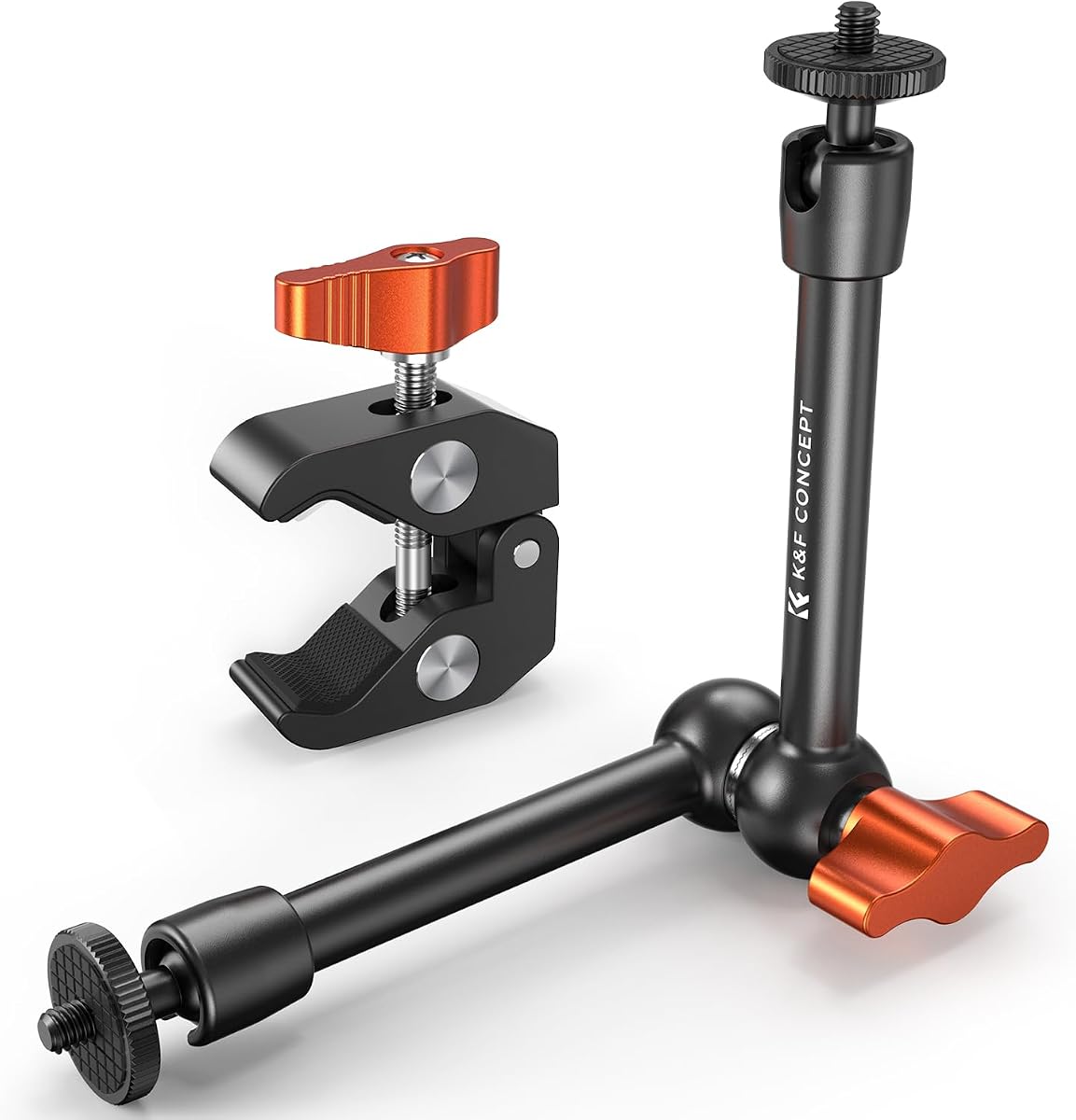
The K&F CONCEPT 11" Magic Arm Clamp earns the highest customer rating among the products reviewed, at 4.6. It combines an 11-inch articulated arm, a 360-degree dual ball head, and a versatile super clamp in a compact package. The 2-kilogram load rating is among the strongest stated capacities in the guide.
We may earn a commission when you buy through this link, at no additional cost to you.
Both ends of the arm feature 1/4-inch screws, giving the user a straightforward way to connect a webcam, camera, action camera, monitor, flash, or microphone. The main knob loosens tension to permit ball-head movement and tightens to lock the chosen position. The super clamp can attach to a table, desk, pole, post, or tripod and opens between 15 and 55 millimeters.
Two cushions at the clamp and a circular rubber pad at the top of the arm increase friction and protect the clamping area from wear. The product information limits the arm to static or mildly dynamic situations and warns against using it with heavy cameras during vigorous movement. The stated capacity should therefore be treated as a ceiling, not a suggestion to load the arm to its limit.
This arm is a strong all-around choice for compact studios, desk-based video calls, overhead demonstrations, and accessory positioning. Its short reach makes it less dramatic than a 22- or 30-inch arm, but the multiple joints, high stated capacity, and protective construction create an excellent balance of control and durability.
The dual ball head allows the arm to bend around obstacles and place a camera at an exact height and angle. Eleven inches is enough for many desktop tasks while remaining easier to store and manage.
The metal construction, 2-kilogram rating, and dual mounting screws make the arm useful for more than a basic webcam. Cushions protect both the mounted equipment and the furniture while helping maintain a firm connection.
We may earn a commission when you buy through this link, at no additional cost to you.
The right clamp on webcam arm depends on where it will be attached, how far the camera must reach, what device it carries, and how precisely the angle needs to change. Review the following factors together rather than choosing on reach alone.
Arm length determines whether the camera can sit above a monitor, extend over a work surface, or reach beyond the edge of a desk. Long goosenecks between 27.5 and 36.6 inches provide generous height and lateral movement, while 20-to-22-inch articulated arms offer more control and shape. Shorter 9.8-to-13-inch models are easier to store and work well for compact desktop arrangements.
Choose enough reach for the intended camera position, but avoid buying an excessive length if the arm will frequently be moved. A flexible or articulated arm that extends too far can place more torque on the clamp and attached device.
Check the maximum jaw opening against the thickness of the intended furniture. Some arms open only to 1.77 inches, while others accommodate 2.56 inches or more. Flat-surface models are designed for desks, while some articulated clamps also grip cylindrical poles, tripods, and light stands.
Match the jaw to the furniture and use the provided cushions. Do not force a narrow clamp onto a thick surface, and tighten only until the arm is secure. A properly matched clamp protects both the desk finish and the mounted equipment.
The manufacturer’s maximum load is the clearest guide to whether an arm can safely carry a particular setup. Ratings in this selection range from 0.5 kilograms to 2 kilograms, and the lower limits generally correspond with lighter webcams, phones, and accessories. Account for the complete rig, including a phone holder, camera adapter, light, or microphone where relevant.
Choose a limit comfortably above the expected load rather than matching the rating exactly. A stiff gooseneck and articulated arm also behave differently under pressure, so the listed maximum is a safety guideline rather than a reason to operate at full capacity.
A flexible gooseneck is easy to bend and can be shaped into an S- or Z-shape for stability. It works well for a webcam that needs occasional repositioning, but it can move more than a rigid arm. Articulated magic arms use several joints and locking knobs, offering exact repeatable angles at the cost of more bulk.
Choose based on how often the camera changes position. A gooseneck suits routine calls, while a multi-joint arm is better for overhead demonstrations, product filming, and changing shooting directions. Tighten all joints before recording and move the arm by its support rather than by the attached device.
Most webcams use a standard 1/4-inch connection, but the shape of the mount and included adapter still matter. A dedicated 1/4-inch screw is versatile enough for many action cameras, lights, and compact microphones. Some kits add 1/4-to-3/8 adapters, phone holders, or action-camera brackets for broader use.
Confirm the exact connection supplied with the arm and inspect any manufacturer-specific compatibility list. Do not assume a listed device works if its mounting thread or required adapter differs from the one included.
Aluminum arms tend to resist bending and hold their shape, while thicker bases and dual-ball joints help reduce unwanted sway. ABS is often used for a lighter, foldable clamp base. Silicone, rubber, or foam pads protect surfaces and increase friction where the arm contacts equipment or furniture.
Prioritize a rigid core, secure knobs, and padded contact areas. Metal construction is useful for heavier accessories, but compact plastic bases may be more appropriate when portability and easy folding matter more than maximum load.
Long goosenecks can fold down, while articulated arms usually separate into sections or collapse into a compact bundle. A short arm with a small clamp is easiest to move between rooms or pack for remote work. A wider clamp base can also add stability but may take up more space behind a desk.
Consider how often you will relocate the setup. Frequent travelers benefit from a foldable, lightweight design, whereas a permanent recording station can prioritize reach, rigidity, and accessory compatibility instead.
Video calls usually need only enough height to frame a person naturally, while overhead demonstrations require the camera to look down at a work surface. Streaming and product creation may also need space for a light, microphone, or phone. An arm that supports several accessories offers more value if the setup will evolve.
Match the arm to the final composition rather than the largest possible device. Consider camera angle, available desk space, lighting, cable reach, and whether anyone might bump the arm during a live session. Stability and clean framing should take priority over unnecessary reach.
Begin by choosing a stable, flat edge that can support the arm without blocking drawers, cables, or legroom. Open the clamp just enough to fit the furniture, place the padded jaw against the surface, and tighten the knob gradually. Check that the base cannot rotate or slide before adding a camera. A long gooseneck works best in an S- or Z-shape, while an articulated arm should form a balanced, controlled curve.
Attach the device using the correct 1/4-inch screw or included adapter, then tighten the connection without forcing the camera body. Shape the arm until the lens is at the desired height and angle, and lock every ball joint or gooseneck position. Move the support from its arm or base rather than pulling on the camera, phone, or attached accessory. Perform a short recording to check framing and unwanted movement before starting a call or stream.
For care, wipe the metal arm and padded contact areas with a soft, slightly damp cloth and avoid harsh cleaners that could damage the coating or rubber. Do not exceed the stated load limit, and avoid dynamic movement with a heavy camera. Check the clamp and joints periodically, especially after moving the setup. If the base slips, the arm sags, or a screw shows looseness, retighten or reposition it before use.
Most webcams use a standard 1/4-inch mounting thread, but you should confirm the attachment included with the arm. The products in this guide commonly support that standard, with several also offering 1/4-to-3/8 adapters or device-specific brackets. Check the camera’s mounting pattern and the arm’s weight limit before connecting it.
A longer arm provides more reach but can place greater leverage on the clamp and camera connection. A flexible gooseneck should be bent into a broad S- or Z-shape to resist movement, while an articulated arm should use multiple joints in a balanced arrangement. Stability depends on the complete geometry, not length alone.
It depends on the selected product. The available maximum openings range from about 1.77 inches to 2.7 inches, and some clamps also grip round objects. Measure the thickest part of the intended edge and choose a model with a slightly larger opening, then use the supplied pads to protect the surface.
Yes, if the arm has a compatible phone holder and bracket. Several products in the guide include one, while others list phones as compatible without clearly including the holder. Confirm that the clamp opens wide enough for the device and that the phone can be attached to a standard 1/4-inch thread.
The longer and articulated models are the most appropriate for overhead work. A 20-to-22-inch magic arm can be clamped to a desk edge and angled over a work surface, while the modular desktop stand offers additional height. Make sure the camera remains within the stated load limit and that the arm is intended for static shooting.
They can if the clamp is overtightened, slid without padding, or used on a fragile finish. The products here include rubber, silicone, or foam contact surfaces to reduce scratches and improve grip. Tighten only until secure, avoid moving the base along the furniture, and check for marks after installation.
Yes, when the accessory uses a compatible 1/4-inch thread and remains within the arm’s load limit. Several kits are designed for webcams, phones, microphones, LED lights, monitors, and action cameras. Use a proper adapter where needed and balance the accessory close to the arm to minimize leverage.
A gooseneck is simpler, lighter, and easy to bend into different positions, making it suitable for a webcam that is repositioned occasionally. A magic arm uses multiple locking joints and is better when exact angles, overhead placement, or several accessories matter. The more complex arm generally offers finer control but occupies more space.
The K&F CONCEPT 11" Magic Arm Clamp stands out as the most balanced overall option, combining a high stated load rating, precise ball-joint control, broad thread compatibility, and protective padding. The 30 Inch Webcam Stand Camera Mount is a practical choice for basic webcam positioning, while the K&F CONCEPT 22" Magic Arm Kit offers the most complete premium accessory bundle.
For most video calls, prioritize a base that fits the desk securely and an arm that can hold the camera at a natural angle. Creators should look for stronger load ratings, multiple ball heads, and included adapters, while anyone working overhead should choose enough reach without creating excessive leverage. Stable geometry and careful tightening matter more than maximum advertised extension.
Check the current specifications, included hardware, device compatibility, and price before purchasing, since product details and marketplace availability can change. With the right arm, a webcam can leave the monitor surface, improve camera placement, and support a much broader range of recording and communication tasks.