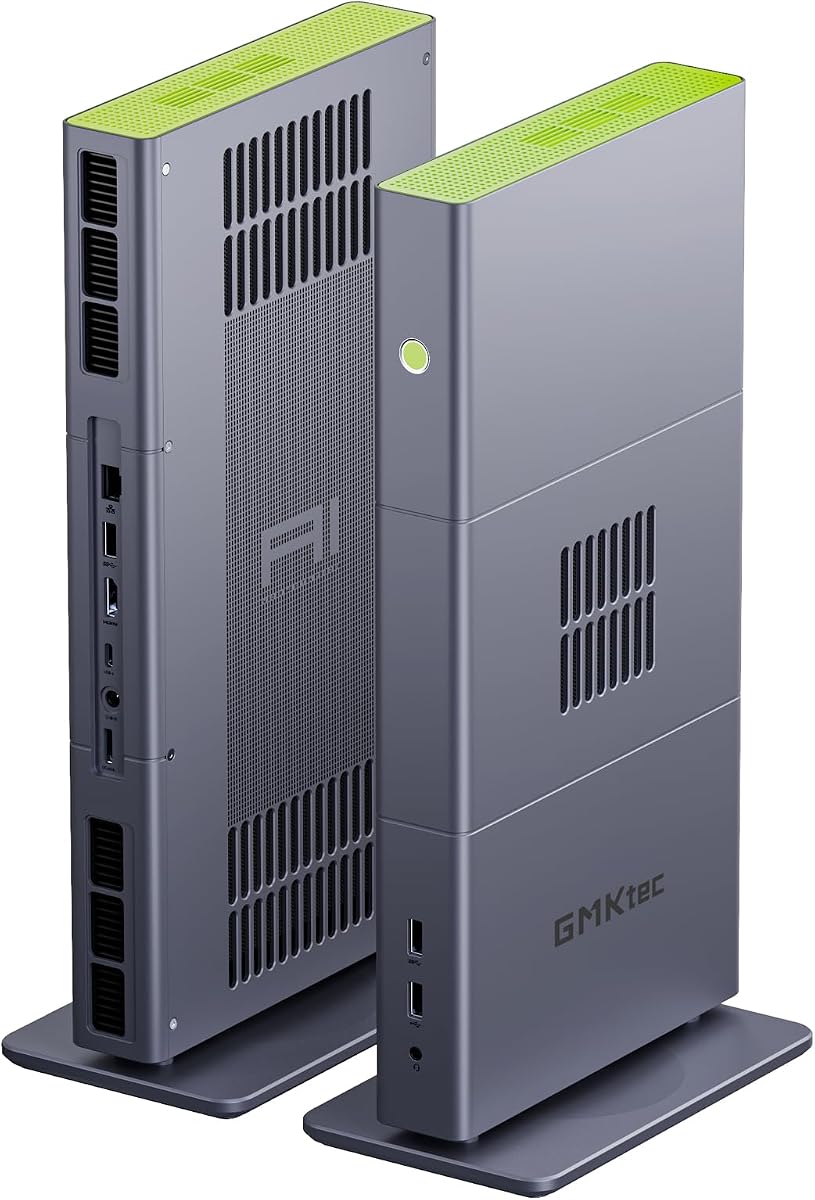
GMKtec X3 AI Mini PC
4.1Editor score
Ryzen AI Max+ 395 processor
128GB LPDDR5X unified memory
OCuLink external GPU support
2TB PCIe 4.0 storage
Mini PC for World of Warcraft guide compares 10 compact gaming PCs for performance, memory, graphics, connectivity, and computing needs in 2026.
A Mini PC for World of Warcraft needs more than a compact enclosure and an impressive processor. It must maintain playable frame rates, keep online play responsive, provide enough memory for the game and background applications, and remain comfortable beside a monitor. The strongest choices balance dedicated or capable integrated graphics with efficient cooling and practical connectivity.
This guide compares ten mini PCs using the supplied processor, memory, storage, graphics, networking, display, cooling, and warranty information. It includes models designed for high-end gaming, more affordable integrated-graphics systems, compact productivity machines, and an external-GPU platform. The list is arranged by overall suitability rather than by processor specifications alone.
Each numbered review explains who the system suits, where it has a meaningful advantage, and where its limitations matter. The Sinbun RTX 4070 model is the clearest high-performance option, while the GMKtec X3 stands apart for expansion and advanced workloads. Ratings, configurations, and prices can change, so confirm the current listing and hardware before purchasing.
4.1Editor score

5.0Editor score

4.8Editor score
The comparison covers processor class, graphics capability, memory, storage, networking, displays, cooling, and warranty support so buyers can distinguish a dedicated gaming system from a compact PC better suited to World of Warcraft on modest settings or with an external GPU.


The Sinbun Mini Gaming PC is the most direct answer for a buyer who wants World of Warcraft performance without assembling a full-size tower. It pairs a Core i9-13900HX with a dedicated GeForce RTX 4070 8GB, and its 5.0 rating is the highest in this group. That dedicated graphics hardware is the defining advantage because it separates gaming capability from the limits of integrated graphics.
We may earn a commission when you buy through this link, at no additional cost to you.
The processor provides 24 cores, 32 threads, 36MB of cache, and boost speeds up to 5.4GHz. Its 32GB of dual-channel DDR4 memory is generous for the game, addons, voice chat, browsers, and streaming applications. The 1TB NVMe drive provides useful game-library space and fast loading, while dual M.2 capability and a 2.5-inch SATA bay allow additional storage without replacing the whole system.
The RTX 4070 includes 4,608 CUDA cores and supports ray tracing, DLSS 3, and AI rendering. Those features are more relevant to modern AAA games than they are to World of Warcraft itself, but they establish a strong graphics foundation for a compact gaming machine. A dual-turbo fan, copper heat spreader, and stated operation below 38dB address the thermal and acoustic demands of a powerful desktop processor in a small enclosure.
This is the system to choose when frame-rate headroom, future gaming potential, and one-box desktop convenience matter more than minimizing the purchase. It also supports three displays through HDMI, DisplayPort, and Type-C, includes WiFi 6E and 2.5G Ethernet, and arrives with Windows 11 Pro. Buyers should verify the installed operating system and warranty terms, but the hardware is the most convincingly gaming-oriented configuration here.
The RTX 4070 8GB gives this mini PC a much stronger foundation for gaming than integrated graphics. It also creates headroom for demanding settings, high-resolution output, and other visually intensive applications without asking the processor's integrated graphics to do all the work.
Thirty-two gigabytes of RAM and a 1TB NVMe drive form a generous starting configuration. Additional M.2 and 2.5-inch SATA options make it straightforward to expand storage as the operating system, addons, recordings, and other games accumulate.
We may earn a commission when you buy through this link, at no additional cost to you.
The KAMRUI E3B pairs the Ryzen 7 7730U with 16GB of LPDDR4X and a 1TB M.2 SSD. Its 4.4 rating reflects a practical balance of productivity, compactness, and light gaming. The eight-core, 16-thread processor can handle World of Warcraft, background applications, browsing, and office work efficiently, although the integrated Radeon graphics will be the limiting factor for demanding visual settings.
We may earn a commission when you buy through this link, at no additional cost to you.
One useful detail is the storage arrangement. The installed 1TB M.2 2280 drive is joined by two M.2 slots with support for SATA and PCIe storage, creating room to expand the game library without replacing the primary drive. The processor can operate in a quiet, 2.0GHz power-saving mode or boost to 4.5GHz in performance mode, giving users a way to balance responsiveness and noise.
Connectivity is also thoughtfully arranged for a compact PC. HDMI, DisplayPort, and USB 3.2 Gen2 Type-C support three displays, including 4K output, while the RJ45 connection and WiFi 6 cover wired and wireless networking. Bluetooth 5.2 allows convenient attachment of headsets, keyboards, and mice. The system is better framed as an efficient hybrid office-and-gaming mini PC than a dedicated gaming rig.
Choose the E3B if you want a quiet, storage-rich system for World of Warcraft on typical settings and value the processor's multitasking ability. It is a sensible option for users who also browse, work, and stream. A dedicated GPU or a more powerful integrated graphics option would be preferable when high settings and maximum visual quality are non-negotiable.
The Zen 3+ processor combines eight cores with a boost clock of up to 4.5GHz. Its configurable power modes make it practical to use lower power during routine work and higher clocks when entering busy areas or running demanding applications.
The 1TB starting drive is useful for World of Warcraft and other installed software, while the two M.2 positions provide room for later expansion. That makes the E3B more adaptable than a sealed mini PC with a single storage slot.
We may earn a commission when you buy through this link, at no additional cost to you.
The Glorlin Ryzen 7 6800H is a strong budget-oriented choice for World of Warcraft because its Radeon 680M integrated graphics are more capable than the graphics found in many compact office PCs. It carries a 4.8 rating, pairs the eight-core, 16-thread processor with 16GB of dual-channel LPDDR5, and includes a 512GB NVMe drive. The result is a balanced platform for gaming and general home use.
We may earn a commission when you buy through this link, at no additional cost to you.
Its memory runs at 6400MT/s, which helps responsiveness and multitasking, and dual M.2 expansion provides a route to more storage. The Radeon 680M supports smooth media playback, photo editing, and light gaming. World of Warcraft is comparatively forgiving, so the system can be a practical choice for a 1080p-oriented setup, although exact settings and frame rates will depend on the game build, display resolution, and operating conditions.
The Glorlin stands out for productivity flexibility. It can drive up to three 4K displays through HDMI, DisplayPort, and Type-C, giving users a way to run World of Warcraft on one screen while keeping chat, addons, maps, or other applications on others. Dual LAN ports, WiFi 6, and Bluetooth 5.3 offer more networking choices than a typical entry-level compact computer.
This is the best budget pick in the list for a buyer who wants credible gaming performance without moving directly to a dedicated graphics mini PC. Its main compromises are the initial 512GB capacity and the ceiling imposed by integrated graphics. Add storage for a larger library, and it can serve as a capable everyday desktop with the game as one important part of its workload.
The Radeon 680M gives the Glorlin a more useful gaming foundation than basic integrated graphics. It is well suited to World of Warcraft at common resolutions and settings, while remaining balanced for the office, media, and browsing tasks expected of a compact home PC.
Three simultaneous 4K displays make this system particularly practical for players who like to separate the game from addons and communication tools. The abundant display and network ports also improve its usefulness beyond gaming.
We may earn a commission when you buy through this link, at no additional cost to you.
The Glorlin Ryzen 5 3501U is primarily a work, study, and multitasking mini PC, but it can also serve a player who wants to run World of Warcraft without investing in a large desktop. It has four cores, eight threads, a maximum listed clock of 3.7GHz, 16GB of DDR4 memory, and a 512GB SSD. Its 4.2 rating reflects solid utility for everyday tasks rather than enthusiast gaming performance.
We may earn a commission when you buy through this link, at no additional cost to you.
The strongest gaming-related feature is the generous 16GB of memory, which helps when the game is running alongside chat clients, browsers, music, addons, or remote desktop tools. Storage starts at 512GB, enough for the operating system and World of Warcraft, although users may eventually need more room for other software and media. The system also supports up to three displays through HDMI and USB-C connections.
WiFi 6 and Bluetooth 5.3 provide modern wireless connectivity, while Ethernet and multiple USB ports make it straightforward to use peripherals such as a keyboard, mouse, headset, printer, and external storage. The central limitation is integrated graphics combined with a four-core processor. It is better suited to standard settings and lower resolutions than to high-fidelity, high-frame-rate play.
Buyers should choose this model for a space-efficient secondary computer, office setup, study desk, or relatively casual gaming installation. It offers enough capability to handle the game while preserving room for everyday tasks. Players seeking consistent performance in crowded areas, high resolutions, or maximum settings should move to a system with stronger graphics and more processor headroom.
The 16GB allocation is valuable for a working mini PC and gives World of Warcraft more breathing room alongside background applications. It also makes the system better suited to browsing, office work, and study than comparable machines with only 8GB.
Its small size and multiple-display support make it useful as a dedicated secondary system. World of Warcraft can share that machine with lighter tasks, provided the user accepts lower graphics settings and avoids demanding competitive frame-rate targets.
We may earn a commission when you buy through this link, at no additional cost to you.
The Sarmoth Common is not a Mini PC for World of Warcraft; it is a World of Warcraft miniature collectible. It appears in this comparison because it matches the product name and is a genuine gaming-related item, but it should never be mistaken for hardware. Its 4.8 rating applies to the collectible rather than to a computer system.
We may earn a commission when you buy through this link, at no additional cost to you.
The listing describes a toy representing the Sarmoth Common from World of Warcraft. It is intended for display, collection, or gifting, not for computing. There is no processor, graphics capability, memory, storage, operating system, networking hardware, or display output. It therefore cannot launch the game or serve as a compact gaming desktop.
Its value comes from the character it depicts and the physical display experience it provides. A collector may pair it with other World of Warcraft miniatures, while a player may use it as a small reminder of the game. None of the buying considerations for a true Mini PC apply, including graphics settings, memory capacity, storage expansion, cooling, or network latency.
This listing is included to keep the roundup complete and to make the distinction unmistakable. Do not purchase it expecting gaming hardware. If the goal is to play World of Warcraft, choose one of the actual computer systems reviewed here. If the goal is to display a miniature from the game world, this collectible is the appropriate choice within the list.
The miniature's appeal lies in its representation of a World of Warcraft character. It is designed as a display collectible for fans rather than as a functional computer or accessory.
The cleanest buying decision is based on purpose. Players need one of the mini PCs in this guide, while collectors can consider the Sarmoth Common as a display piece associated with the game.
We may earn a commission when you buy through this link, at no additional cost to you.
The GMKtec M6 Ultra combines a Ryzen 5 7640HS with 32GB of dual-channel DDR5 memory and a 1TB PCIe SSD. That is a generous specification for World of Warcraft and multitasking, and the Zen 4 processor's six cores and 12 threads can rise to 5.0GHz. The system holds a 4.2 rating and is positioned as a compact desktop for gaming and productivity.
We may earn a commission when you buy through this link, at no additional cost to you.
Its Radeon 760M integrated graphics have 512 shader units and a listed clock up to 2,600MHz. The supplied information describes moderate gaming at a steady frame rate, which is the correct level of expectation for an integrated-graphics mini PC. World of Warcraft is well suited to this approach because the game can perform adequately without the graphics demands of the most demanding modern releases.
The M6 Ultra is unusually flexible for a compact system. Its two 16GB memory modules can be expanded to a listed maximum of 128GB, and its storage supports an additional PCIe 4.0 drive. Three-display support includes 8K at 60Hz through USB4 plus 4K at 60Hz through HDMI and DisplayPort. Dual 2.5G RJ45 connectivity, WiFi 6, and Bluetooth 5.2 further improve its desk-ready feature set.
This is a good choice for a player who wants fast memory, abundant storage, flexible networking, and a multi-screen workspace without using a full tower. It may also serve creators and office users who need a compact all-rounder. It is not the right pick for high-end gaming at maximum settings, but for World of Warcraft and mixed productivity it offers a particularly balanced foundation.
Thirty-two gigabytes of dual-channel DDR5 leaves ample room for the game, addons, chat applications, browsers, and background work. The socketed memory also makes a later capacity increase possible.
Triple-display output, USB4, dual 2.5G Ethernet, and modern wireless connectivity make the M6 Ultra useful beyond a single-screen gaming station. It can support separate displays for game information, communication, and other tasks.
We may earn a commission when you buy through this link, at no additional cost to you.
The ACEMAGICIAN S3A is built around the Ryzen 7 H 255, an eight-core, 16-thread processor that can boost to 4.9GHz. Its Radeon 780M graphics use 12 compute units at 2,600MHz, giving it a strong integrated-graphics foundation. With a 4.6 rating, 16GB of LPDDR5 memory, and 512GB of PCIe 4.0 storage, it is a capable compact system for World of Warcraft and mixed workloads.
We may earn a commission when you buy through this link, at no additional cost to you.
A particularly useful feature is the choice of three performance modes. Silent Mode operates within a 20–35W range for quiet work, Auto Mode balances power and performance, and Performance Mode uses 40–54W for demanding applications. Dual-fan cooling and a listed noise level as low as 35dB in Silent Mode help the S3A fit into a quieter workspace.
The S3A supports three 4K displays through HDMI 2.0, DisplayPort 2.0, and full-function USB4 Type-C. This is useful for players who want the main game on one display and addons, chat, or browser tools on others. Its port selection includes USB 3.2, LAN, and the display outputs, while removable storage is designed to expand up to 4TB.
Choose the ACEMAGICIAN when integrated graphics, efficient operation, and warranty support are priorities. It is more compelling for World of Warcraft than basic office mini PCs because the Radeon 780M provides a better graphics foundation, while the processor and memory are well suited to background applications. A dedicated graphics mini PC remains preferable for demanding settings.
The 12-core Radeon 780M is a meaningful upgrade from entry-level integrated graphics. It gives the S3A enough graphics capability for World of Warcraft and other moderately demanding titles while keeping the system compact.
The ability to move among silent, automatic, and performance profiles lets users tune the machine for meetings, browsing, or gaming. It is a practical feature in a small PC that may serve several roles throughout the day.
We may earn a commission when you buy through this link, at no additional cost to you.
The GMKtec X3 is a premium platform that goes far beyond the basic needs of World of Warcraft. Its Ryzen AI Max+ 395 processor offers 16 cores, 32 threads, a boost clock up to 5.1GHz, a 50-plus TOPS XDNA 2 NPU, and integrated Radeon 8060S graphics with 40 RDNA 3.5 compute units. The 4.1 rating does not fully convey how unconventional and expandable the configuration is.
We may earn a commission when you buy through this link, at no additional cost to you.
Its major strength is 128GB of LPDDR5X unified memory capable of operating at speeds up to 8,000MT/s. The Radeon graphics can access the full memory pool, which is unusual in a compact PC and makes the system attractive for AI models, content creation, and other demanding tasks. A 2TB PCIe 4.0 SSD provides a large and fast storage foundation for a game library and applications.
For gaming, the decisive feature is OCuLink. The PCIe 4.0 x4 interface allows a compatible external graphics dock and desktop-class GPU to be connected, turning the X3 into a substantially more powerful gaming machine. Even without that expansion, the supplied information describes the Radeon 8060S as positioned between RTX 4060 and 4070 laptop graphics and capable of FHD gaming at maximum details in many demanding titles.
This is the premium selection for a buyer who wants a compact workstation that can also play World of Warcraft. It makes sense for AI development, 8K video work, programming, and advanced creative tasks, and it can serve as a serious gaming system when paired with external graphics. For a dedicated desktop with the goal of playing at maximum settings, the Sinbun RTX 4070 is simpler, while the X3 is more versatile.
OCuLink support is the X3's most important gaming feature. Rather than being confined to integrated graphics, it can accept a dedicated desktop GPU through a compatible expansion dock, creating a path to substantially higher gaming performance.
The 128GB LPDDR5X pool is unusually large for a mini PC and can support demanding local AI, creative software, and memory-heavy tasks. The same capacity gives the integrated graphics a large pool to work with.
We may earn a commission when you buy through this link, at no additional cost to you.
The KAMRUI Ryzen 7 7730U is a compact 5.04 by 5.04 by 1.63-inch mini PC that can sit on a desk or mount behind a monitor. It uses the familiar eight-core, 16-thread Ryzen 7 7730U with a maximum boost of 4.5GHz, paired with 16GB of LPDDR4X and a 512GB NVMe drive. Its 4.5 rating makes it a solid choice for mixed office and light-gaming use.
We may earn a commission when you buy through this link, at no additional cost to you.
Its Radeon graphics run at 2GHz across eight graphics cores and support 4K output at 60Hz. Three displays can be connected through HDMI 2.0, DisplayPort 1.4, and Type-C. For a player, that flexibility is useful: the main game can occupy one screen while an addon guide, raid planner, or communication program runs on another.
The port selection is comprehensive for such a small enclosure. It includes 2.5G auto-negotiating RJ45 Ethernet, WiFi 6, Bluetooth 5.2, several USB 3.2 ports, an audio jack, and a DC input. A built-in cooling fan is designed to control heat and noise during multitasking. Storage can be expanded to a listed 4TB using the additional M.2 positions.
Choose this model when desk space, monitor mounting, and practical connectivity matter. It can run World of Warcraft and ordinary applications in a compact form, and its processor is better suited to multitasking than the four-core alternatives. It is not a high-settings gaming champion, but it is a convincing small-footprint companion with enough capability for the game and other work.
The included VESA bracket and square dimensions make the KAMRUI easy to place behind a monitor. That keeps the desk uncluttered while retaining access to a full complement of ports.
The 2.5G auto-negotiating Ethernet port provides a strong wired option for online gaming. WiFi 6 and Bluetooth 5.2 provide flexible alternatives when cable routing is inconvenient.
We may earn a commission when you buy through this link, at no additional cost to you.
The Getorli Ryzen 5 3501U is a budget compact computer designed for home-office tasks, browsing, media streaming, and light gaming. It has four cores, eight threads, a clock range from 2.1GHz to 3.7GHz, 16GB of expandable DDR4 memory, and a 512GB NVMe SSD. The supplied listing does not include a customer rating, so its evaluation here is based on the documented configuration rather than a numerical review score.
We may earn a commission when you buy through this link, at no additional cost to you.
The 16GB memory is a useful starting point for World of Warcraft, particularly when the player keeps chat, addons, and a browser open. Its NVMe storage should provide quicker startup and application loading than a traditional hard drive. Memory can be expanded to 32GB, although the base system's four-core processor remains the main constraint on sustained performance.
Two HDMI ports can drive one or two 4K displays, while USB 2.0, USB 3.0, and two Type-C ports cover many peripheral needs. WiFi 6 and Bluetooth 5.3 make it convenient to connect wireless accessories, and the listed 15–25W processor power range suits a small, potentially quiet system. It is presented with a prebuilt operating system, but the precise edition and included software should be confirmed.
This is a sensible entry point for a player who wants a small office or secondary computer that can also run World of Warcraft. It is best suited to standard graphics settings, 1080p-oriented use, and players who do not seek high frame rates. Those wanting better performance should consider the Glorlin Ryzen 7 6800H, while the Sinbun system serves those who want dedicated gaming graphics.
Sixteen gigabytes of memory and NVMe storage give the Getorli a more useful foundation than a basic 8GB or hard-drive configuration. Those features help the game and everyday applications start and respond smoothly.
The two HDMI outputs provide flexibility for a single gaming monitor or a two-screen arrangement. It can be useful to keep game documentation or communication visible without using a large tower.
We may earn a commission when you buy through this link, at no additional cost to you.
Choosing a compact PC for World of Warcraft means balancing graphics, processor power, memory, storage, cooling, and connectivity against the size of the system. The most important decision is how much visual performance you expect the game to deliver.
Graphics hardware is the first consideration because rendering the game, interface, and visual effects depends much more heavily on the GPU than on general office tasks. A dedicated RTX 4070 provides the strongest and most predictable gaming foundation in this group, while the Radeon 8060S, Radeon 780M, Radeon 760M, and Radeon 680M represent increasingly capable integrated alternatives. World of Warcraft can run on integrated graphics, but the usable resolution, visual quality, and frame rate will vary. Check the graphics type before placing two similarly named processors side by side.
The game itself does not require every core in a modern processor, but World of Warcraft includes background systems, addons, combat encounters, and often several other applications. A higher core count and strong boost clock provide more room for smooth multitasking. The Core i9-13900HX and Ryzen AI Max+ 395 lead in processor capability, while the eight-core Ryzen 7 systems provide a practical middle ground. The four-core Ryzen 5 models remain useful for basic play but offer less headroom when the game, voice chat, and browser operate together.
World of Warcraft itself is not unusually memory-intensive, but addons, background applications, high-resolution textures, voice chat, and streaming can increase demand. Sixteen gigabytes should be treated as the practical minimum for a new general-purpose system. Thirty-two gigabytes provides more comfortable multitasking, while the X3's 128GB unified memory serves specialized AI and creative workloads. Prefer dual-channel configurations where possible, and consider whether the memory is conventional and upgradeable or soldered LPDDR memory.
A solid-state drive improves startup time, application loading, and game installation behavior, making it preferable to a mechanical hard drive. The included capacities range from 512GB to 2TB. World of Warcraft can require substantial space over time, especially when expansions, addons, logs, and recordings are stored locally. Look for multiple M.2 slots, SATA support, or removable storage if you expect a larger library. A secondary external drive can hold less frequently used media, but keeping the operating system and active game on fast internal storage is preferable.
Compact systems have less room for heat dissipation than full-size desktops, so cooling quality is essential. High-performance components generate more heat, and a constrained enclosure can become noisy or throttle under sustained load. The Sinbun uses twin turbo smart fans and a copper heat spreader, while the ACEMAGICIAN offers dual-fan cooling and three power modes. The lower-power Ryzen systems are naturally easier to cool. For long gaming sessions, adjustable power profiles and effective airflow deserve more attention than decorative lighting.
A gaming PC should connect cleanly to a monitor and the accessories used during play. Look for the display outputs you need, sufficient USB ports, an audio jack, and wired Ethernet where possible. Triple-display support is valuable for separating the game from addons, chat, and browser windows. WiFi 6 or newer is convenient, although a stable wired connection remains preferable for competitive online sessions. Check the exact port count and the capabilities of each USB-C port because not all Type-C connectors carry video or full data transfer.
A mini PC is attractive because it can replace a large desktop while using less desk space and often consuming less power. The KAMRUI E3B is only 5.04 inches square and includes a VESA bracket, making it particularly easy to mount. Larger systems with powerful GPUs and cooling may still need more clearance than expected. Measure the available space, consider how cables will be routed, and check whether the mini PC can sit behind the monitor. Compactness should not come at the expense of inaccessible ports or difficult ventilation.
A preinstalled operating system can simplify setup, but buyers should confirm its edition, activation, and included software. World of Warcraft may require an account, launcher, and compatible graphics driver regardless of the hardware. Warranty length varies across the selected products, from one year for several models to two years for the ACEMAGICIAN and a stated three-year GMKtec policy on the M6 Ultra. Warranty language can change, so read the current listing carefully. Local technical support and replacement terms can be as important as the initial hardware when a compact system is used every day.
Begin by placing the mini PC on a stable, hard surface with clearance around its vents, or mounting it behind a monitor with the supplied bracket where appropriate. Connect the power supply, monitor, keyboard, mouse, network cable if desired, and audio accessories. Power the system on, confirm that the operating system activates, and install the latest available chipset, network, and graphics drivers before adding the game and its launcher.
Install World of Warcraft and allow the launcher to complete its initial file verification. Select a resolution and graphics preset that matches the display and hardware, then adjust individual settings based on whether smooth frame rate or visual fidelity is the priority. In crowded areas, test city environments, raid encounters, and large combat effects, since those are more demanding than menus or quiet zones. Keep the game and operating-system drive on NVMe storage and maintain free space for updates and temporary files.
For routine care, clean dust from external vents with compressed air while the system is shut down and disconnected from power. Do not block airflow with decorative covers or place the system on soft fabric. Use a suitable power profile during long sessions, monitor temperatures and frame rates, and update software regularly. Back up important addons, configuration files, and game settings before major changes, especially if the system also handles work or creative files.
Yes, especially with a modern processor and either a capable integrated GPU or a dedicated graphics card. Performance depends on resolution, graphics settings, addons, background applications, and the particular game build. The Ryzen AI Max+ 395 and Core i9 systems offer the greatest headroom, while entry-level four-core models are better treated as light-gaming or secondary-computer options.
A dedicated GPU is not strictly necessary because the game can run on integrated graphics, but it provides much more room for higher settings, resolutions, and frame rates. The Radeon 8060S, Radeon 780M, and Radeon 680M are stronger integrated options, while the RTX 4070 configuration in the Sinbun is the clearest dedicated gaming choice.
Sixteen gigabytes is a sensible minimum for general use, the game, and several background applications. Thirty-two gigabytes offers a better experience when running addons, browsers, voice chat, and streaming tools together. The GMKtec X3's 128GB unified memory is designed for much more specialized workloads and is not required merely to play the game.
Many of them can. Depending on the model, HDMI, DisplayPort, and USB-C outputs support two or three simultaneous displays, with several supporting 4K output. A multi-screen arrangement is useful for keeping the game, addon tools, chat, and system information visible. Verify the exact display specifications because USB-C video support depends on the port's full functionality.
An expandable system gives you more control over future memory needs, while soldered LPDDR memory makes the enclosure smaller and can still provide excellent performance. The GMKtec M6 Ultra and Getorli list conventional memory expansion, whereas the KAMRUI E3B, Glorlin 6800H, ACEMAGICIAN S3A, and GMKtec X3 use onboard LPDDR memory. Select based on your expected workload rather than upgradeability alone.
It can be, provided the mini PC has a suitable high-bandwidth expansion interface and you have a compatible enclosure, power supply, and graphics card. The GMKtec X3 supports OCuLink, making it a distinctive choice for eventual gaming expansion. Other systems in this roundup are primarily designed around integrated or dedicated laptop-class graphics.
Both can provide fast wireless performance, but latency, signal strength, router quality, and network congestion matter as much as the advertised generation. The GMKtec X3 includes WiFi 7, while several other systems support WiFi 6. A stable wired Ethernet connection remains a simple way to reduce variability during online play.
Confirm the exact processor, graphics model, installed memory, storage type, operating system, and warranty before purchasing. Product listings can contain several configurations under the same model name, and integrated graphics can differ substantially between otherwise similar processors. Also check display outputs, Ethernet speed, cooling, physical dimensions, and whether memory or storage can be upgraded.
The Sinbun RTX 4070 model is the strongest all-around recommendation because its dedicated graphics, Core i9 processor, 32GB of memory, and 1TB NVMe drive provide the most convincing gaming foundation. The Glorlin Ryzen 7 6800H is the best budget-oriented balance, offering strong integrated graphics and flexible triple-display support. The GMKtec X3 is the premium choice for buyers who value 128GB unified memory, advanced Radeon graphics, and OCuLink expansion.
Prioritize the GPU first when World of Warcraft performance is the main objective, then choose enough memory for the game and your background applications. A 512GB SSD can work, but expansion is valuable for a growing library. Cooling, Ethernet, display outputs, and physical size are equally important when the mini PC will serve as a permanent workstation rather than a temporary gaming machine.
Finally, check the current listing, configuration, operating system, and warranty before ordering, especially when a product family has several hardware variants. Ratings and prices can change over time, and the supplied information is a guide rather than a guarantee of present availability. Select the system whose graphics level and expansion path best match the settings, resolution, and workload you actually intend to run.