
Epson Workforce ES-60W Wireless Compact Mobile Document Scanner
4.1Editor score
Wireless iOS workflow
Four-second page scanning
Searchable PDF creation
Discover the best Document Scanner for iPhone 18, with ten portable, wireless, flatbed, and mobile options compared for speed, OCR, and convenience.
A document scanner can turn paper receipts, reports, cards, and handwritten notes into useful files on an iPhone 18, but the right device depends on how you work. Some scanners connect to a computer, some send files wirelessly, and others capture pages directly. Portability, OCR quality, page handling, and ease of setup should guide your choice.
We compared ten scanners across important features such as mobile connectivity, duplex scanning, document capacity, OCR, resolution, software, and supported destinations. The list includes compact sheet-fed models, a wireless flatbed, a camera-style book scanner, and handheld scanning wands. It also distinguishes scanners designed to reach an iPhone from those intended for computer-based workflows.
Each review explains the product's strongest benefits, practical limitations, and ideal user. The ScanSnap iX2500 stands out for advanced workflow features, the Brother DS-640 offers compact duplex scanning, and the Epson ES-60W provides the clearest stated mobile-device workflow. Product availability and prices can change, so compare current listings and confirm compatibility before buying.
4.1Editor score
4.4Editor score

4.3Editor score
The table below compares all ten scanners by their most important practical distinctions, including connectivity, page handling, output methods, and the environments in which each device is most comfortable.


The Epson Workforce ES-50 is a compact, lightweight document scanner with a 4.3 rating. It is built for users who need to digitize loose documents, receipts, and identification cards without carrying a full-size office machine. Its single-sheet format makes it especially convenient for travel, home offices, and temporary workspaces.
We may earn a commission when you buy through this link, at no additional cost to you.
Its standout benefit is efficient feeding. Epson states that a page can be scanned in as quickly as 5.5 seconds, while the automatic feeding mode can combine multiple inserted sheets into one file. Documents up to 8.5 by 72 inches can be handled, and Nuance OCR supports searchable PDFs and editable Word and Excel files. USB 2.0 provides power and data through the connected computer, eliminating the need for batteries.
The primary limitation is that this is a computer-connected scanner rather than a direct iPhone scanner. Files must reach the iPhone through a computer-based workflow, and the single-sheet mechanism is less suitable for large batches than an automatic feeder. It also does not scan both sides of a sheet in one pass.
This model is a strong choice for mobile workers who want a dependable sheet-fed scanner to pair with a laptop. It suits users who value OCR, compact construction, and fast handling of individual pages more than wireless transfer or high-volume duplex scanning.
The ES-50 draws power from its USB connection, so users do not need to manage batteries or an external supply. Its small size and low weight make it easier to place in a bag and use at a temporary desk.
Included OCR tools can turn printed pages into searchable PDFs and editable Office documents. Cloud scanning expands the available destinations, while automatic multi-page grouping reduces repetitive file handling.
We may earn a commission when you buy through this link, at no additional cost to you.
The Brother DS-640 is a compact mobile document scanner that earns a 4.3 rating. It combines fast processing with a body under one foot long and a weight of about 1.5 pounds. That balance makes it appealing for students, field workers, and anyone who needs a small scanner rather than a desktop model.
We may earn a commission when you buy through this link, at no additional cost to you.
Brother lists color and black-and-white scanning speeds of up to 16 pages per minute, with color scanning operating at the same speed as monochrome. Automatic color detection, rotation, bleed-through prevention, background removal, and text enhancement help improve output. The included iPrint&Scan app supports destinations including a computer, network location, cloud services, email, and OCR.
Its limitations are important for shoppers focused specifically on an iPhone 18. The scanner uses a micro USB 3.0 connection to a PC or laptop, and its listed connectivity does not include built-in Wi-Fi. It is also a single-sheet-fed model, so it handles individual pages rather than a stack through an automatic feeder.
The DS-640 is a sensible choice when portability, fast color capture, and compact storage matter most. Users who can scan on a computer and transfer the resulting files to an iPhone will find it especially useful, while those requiring a direct wireless iPhone workflow should choose a wireless model.
The stated 16-page-per-minute rate applies to both color and black-and-white work. Automatic adjustments reduce the need for manual correction on receipts, forms, and mixed-color reports.
At less than one foot long and about 1.5 pounds, the DS-640 is easy to place in a bag or carry between locations. It offers a practical alternative to a large office scanner when only a few pages need digitizing.
We may earn a commission when you buy through this link, at no additional cost to you.
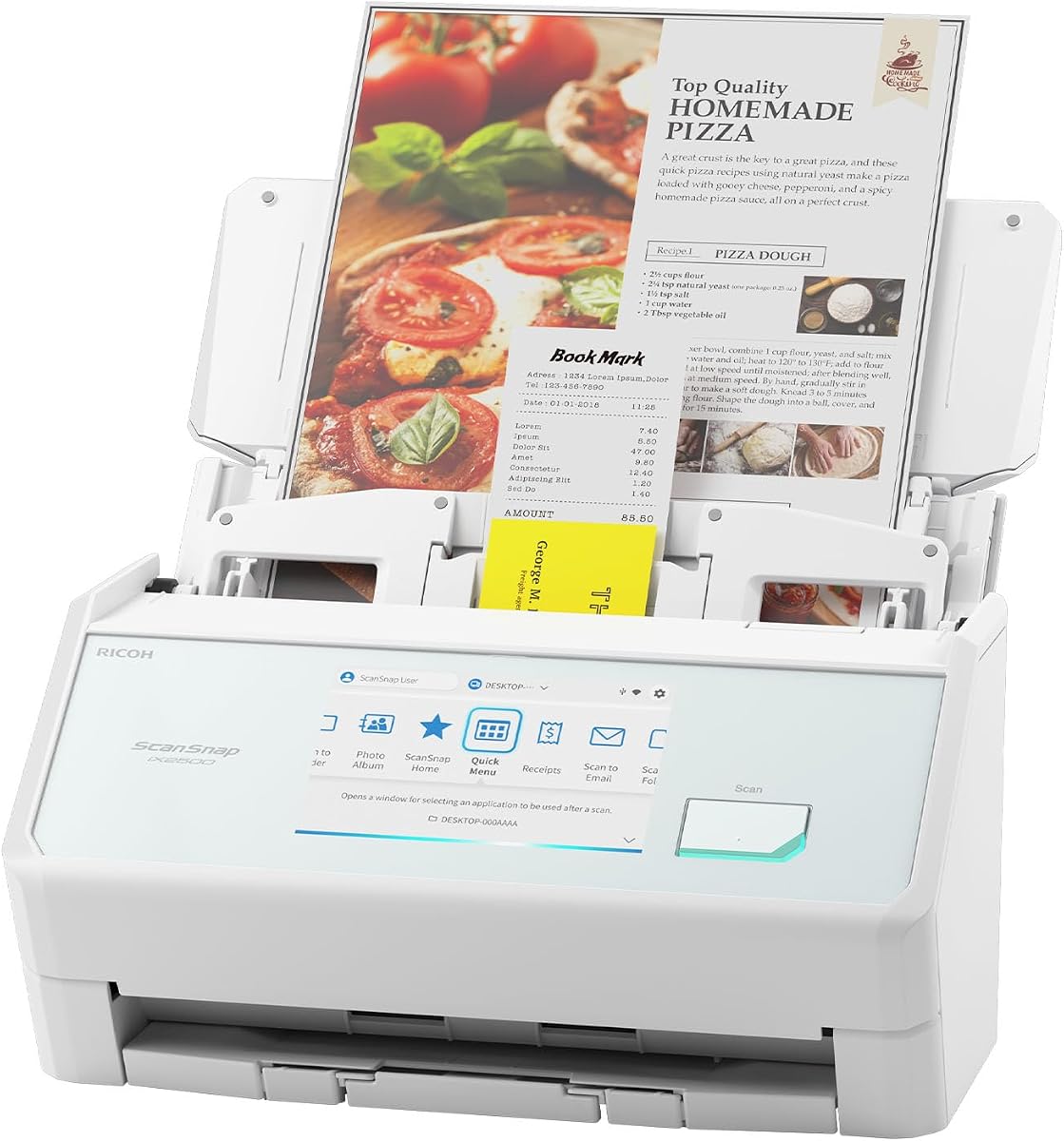
The ScanSnap iX2500 is the most feature-rich model in this guide and carries a 4.4 rating. It is designed for users who want to scan continuously, organize files automatically, and send documents directly to computers, mobile devices, or cloud services. Its touchscreen and customizable profiles make it well suited to a busy personal or small-office workflow.
We may earn a commission when you buy through this link, at no additional cost to you.
ScanSnap states a duplex speed of up to 45 pages per minute and includes a 100-sheet automatic feeder. Built-in Wi-Fi 6 permits connections to smart devices or cloud services without a computer, while USB-C offers a wired alternative. Quick Menu profiles can automate naming, sorting, and delivery to favorite computer applications, and automatic optimization helps reduce manual file cleanup.
The main trade-off is size. A 100-sheet feeder, touchscreen, and comprehensive connectivity make this less compact than the Epson ES-50, Brother DS-640, or Epson ES-60W. The product's advanced features are also unnecessary for someone who only occasionally scans a receipt or a handful of pages.
The iX2500 is the leading choice for a high-volume digital workflow involving an iPhone 18, particularly when wireless transfer, duplex capture, and automatic organization are priorities. It is less compelling for travel, but its flexibility makes it the strongest general-purpose scanner here.
Built-in Wi-Fi 6 allows the scanner to connect to smart devices or cloud services without routing files through a computer. This makes it the clearest choice in the group for users who want scans to reach an iPhone directly.
The 100-sheet feeder and 45-page-per-minute duplex processing handle batches efficiently. A multi-feed sensor, brake roller, and skew detection help reduce jams, stuck pages, and damaged originals.
We may earn a commission when you buy through this link, at no additional cost to you.
The CZUR Shine Ultra is a smart portable scanner with a 4.2 rating. Instead of pulling paper through a feeder, it uses a 13-megapixel CMOS camera to capture flat pages and thin books. It also functions as a document camera, giving it broader uses than a conventional sheet-fed scanner.
We may earn a commission when you buy through this link, at no additional cost to you.
The product is designed for Windows and macOS, but the supplied information explicitly says it is not compatible with Android or iOS. That makes it unsuitable as a direct scanner for an iPhone 18 without a computer-based intermediary. Its advantages are rapid capture, patented page-flattening technology for thinner books, smart paging, auto cropping, and OCR support for more than 180 languages.
Image quality is a core strength. The stated resolution is approximately 340 dpi for A4 and 245 dpi for A3, with multiple color modes available. A two-level adjustable neck and foldable design support different working positions, while the included foot pedal can simplify repeated captures.
Choose the Shine Ultra for teaching, remote presentations, scanning thin books, or creating visual records of flat documents. It is an excellent visual-capture tool, but iPhone users seeking native mobile compatibility should favor the ES-60W or iX2500.
The camera-based design scans flat sheets without pulling them through rollers. It is particularly useful for artwork, display pages, handwritten material, and thin books that would be awkward in a narrow feeder.
The Shine Ultra can operate as a document camera for remote teaching and learning, including stated compatibility with Zoom and Google Meet. This turns it into a visual presentation tool as well as a scanning device.
We may earn a commission when you buy through this link, at no additional cost to you.
The Brother DS-740D is a compact duplex scanner with a 4.3 rating. It offers the same stated 16-page-per-minute processing as the DS-640 but can scan single- and double-sided documents in a single pass. That makes it a more efficient option for forms, contracts, and two-sided records.
We may earn a commission when you buy through this link, at no additional cost to you.
Its Desk Saving Design reduces the amount of desk space needed by 11 inches, while the body remains under one foot long. A micro USB 3.0 connection supplies power and data. The included iPrint&Scan app supports PC, network, cloud, email, and OCR destinations, with automatic color detection, rotation, background removal, and text enhancement.
It does not provide a direct wireless path to an iPhone 18. Scanning occurs through a connected PC or laptop, and the compact format centers on individual sheets rather than automatic batch feeding. Users who need native iPhone transfer may find the Epson ES-60W more aligned with their needs.
The DS-740D is best for mobile professionals who frequently handle two-sided documents but need to keep their equipment small. It provides a compelling combination of duplex efficiency, compact storage, and software-assisted image correction without the bulk of a conventional office scanner.
Automatic duplex capture processes both sides in one pass, reducing page turns and the need to reinsert documents. It is especially useful for invoices, reports, and forms printed on both sides.
The stated Desk Saving Design can reduce the required workspace by 11 inches. Combined with the under-one-foot length, this helps the scanner fit into compact offices, shared workspaces, and temporary setups.
We may earn a commission when you buy through this link, at no additional cost to you.
The Canon imageFORMULA R10 is a portable USB-powered document scanner with a 4.1 rating. It focuses on convenient batch processing, offering a 20-sheet automatic feeder and scanning both sides of a document at up to 12 pages per minute. Those characteristics position it as a practical choice for recurring office tasks.
We may earn a commission when you buy through this link, at no additional cost to you.
The scanner can digitize receipts, business cards, plastic or embossed cards, reports, and legal documents. Its built-in software is designed to work without a separate installation and is stated to update automatically. Users can preview scans, straighten and trim files, organize images, and create buttons for custom settings and destinations.
It is powered through USB and works with Windows and Mac computers. There is no listed native wireless connection for sending files directly to an iPhone 18. Canon also states that the R10 is not intended for scanning photographs on photo paper or other photographic media.
The R10 suits people who want automatic feeding and duplex capture without a large desktop footprint. It is a good fit for receipts and mixed document batches, though the iX2500 offers greater connectivity and the ES-60W better aligns with direct mobile-device workflows.
The scanning software requires no separate installation and updates automatically, reducing configuration work. Custom buttons and preview editing help users standardize recurring scan tasks.
The R10 handles receipts, cards, reports, and legal documents, with duplex capture for two-sided material. Its 20-sheet feeder makes it more convenient than a single-sheet model when a modest batch needs digitizing.
We may earn a commission when you buy through this link, at no additional cost to you.
The Epson Perfection V19 II is a flatbed scanner with a 3.9 rating. Its defining feature is a 4800-dpi optical resolution, making it particularly appropriate for photographs, artwork, illustrations, and detailed pages. It can also handle everyday documents, books, and photo albums through its removable-lid design.
We may earn a commission when you buy through this link, at no additional cost to you.
Epson ScanSmart supports searchable PDF generation and OCR-based Word, Excel, and PowerPoint creation. Easy Photo Fix can restore color to faded photos with one click, while one-touch controls reduce the number of steps. A letter-sized document can be scanned in as fast as 10 seconds, and USB power eliminates a separate supply.
This is not a mobile-first scanner for an iPhone 18. It requires a USB-connected computer, and the flatbed process depends on placing originals directly on the glass. It also lacks the automatic feeders, duplex modes, and wireless transfer found in several competing models.
The V19 II is best for people who need excellent still-image quality and also want to digitize documents. A home user, student, artist, or photo enthusiast may appreciate it more than a traveler who needs automatic page feeding and direct mobile delivery.
The 4800-dpi optical resolution captures fine detail for enlargements and preserves visual information in artwork and illustrations. Easy Photo Fix also provides a simple way to improve faded color images.
The removable high-rise lid makes it possible to scan books and albums without forcing the binding flat. One-touch controls, searchable PDF output, and Office document creation make the flatbed useful for mixed paper workflows.
We may earn a commission when you buy through this link, at no additional cost to you.
The Epson Workforce ES-60W is a wireless compact document scanner with a 4.1 rating. It is the strongest match in this guide for a stated mobile-device workflow, offering wireless scanning to a PC, Mac, iOS device, or Android device. That makes it a particularly relevant choice for owners of an iPhone 18 who want files delivered without a computer.
We may earn a commission when you buy through this link, at no additional cost to you.
A page can be scanned in as quickly as four seconds, and the scanner can handle documents up to 8.5 by 72 inches, receipts, and ID cards. It automatically detects connectivity and switches between USB and battery-powered wireless operation. An LCD displays wireless and battery status, while the included TWAIN driver broadens compatibility with imaging software.
Automatic Feeding Mode combines multiple inserted pages into one file, and Nuance OCR creates searchable PDFs and editable Word and Excel files. Cloud scanning can send documents to supported online storage. As with other sheet-fed models, the process involves feeding one page at a time, and the device does not scan both sides automatically.
The ES-60W is the best fit for a user who prioritizes direct wireless access to an iPhone or tablet alongside genuine portability. It is less suitable for large batches than the iX2500, but its stated mobile compatibility and rapid page capture make it especially relevant to this guide's central use case.
The ability to scan wirelessly to iOS is the ES-60W's defining advantage. Users can send completed files to an iPhone without relying on a wired computer transfer, provided their software and network environment support the workflow.
The scanner identifies its connection and changes between USB and battery-powered wireless operation without user intervention. Status information on the LCD helps users understand the current mode and battery condition.
We may earn a commission when you buy through this link, at no additional cost to you.
The blue handheld scanner wand is a lightweight alternative to larger document scanners and has a 3.9 rating. It uses a color optical sensor to capture A4-sized pages and stores the results as JPEG or PDF files on a MicroSD or TF card. At about 0.31 pounds, it is among the most portable products in the guide.
We may earn a commission when you buy through this link, at no additional cost to you.
Users can select 300-, 600-, or 900-dpi resolution. The stated 900-dpi mode can scan a page in about 10 seconds, and the included product information describes the device as a plug-and-play option requiring no preinstalled software. The supplied 16 GB card provides initial storage, while the scanner supports cards up to 32 GB.
Its simplicity also limits its sophistication. The listed operating-system compatibility includes Windows 2000, ME, and XP, and it operates with Windows imaging and OCR software rather than presenting a clearly stated iPhone 18 workflow. Two AA batteries are required but not included, and the product relies on card-based file storage rather than direct wireless transfer.
Choose this wand for lightweight, occasional capture of basic documents and images when a full scanner would be excessive. Transfer the stored files to an iPhone 18 using a compatible card reader or computer workflow, and confirm that your required software can read the resulting JPEG or PDF files.
The 300-, 600-, and 900-dpi options let users balance detail and file size. The highest mode is intended for the clearest text and images, while lower modes can be convenient for routine records.
Scans are saved directly to a MicroSD or TF card as JPEG or PDF files. The included 16 GB card offers immediate storage capacity, and the device supports larger cards for extended travel or archiving.
We may earn a commission when you buy through this link, at no additional cost to you.
The silver handheld scanner wand shares the same 3.9 rating and core capabilities as the blue version, including a 900-dpi maximum resolution, A4 color capture, and storage on a MicroSD card. Its simple design makes it approachable for users who need to digitize paper while traveling or working away from a desk.
We may earn a commission when you buy through this link, at no additional cost to you.
Operation is based on powering the device, selecting a color mode and resolution, and moving the scanner over the document. A green indicator signals completion, and the unit stops automatically after three minutes without operation. Files can be saved in JPEG or PDF formats, while a 16 GB card is included and storage can be expanded to 32 GB.
The product is less integrated with modern mobile devices than the Epson ES-60W or ScanSnap iX2500. It requires two AA batteries that are not included, and the supplied compatibility list is focused on older Windows environments and Windows imaging or OCR software. Users will need a separate method to move files to an iPhone 18.
This model is a practical secondary scanner for basic travel, study, or quick-reference tasks. It works best for people who already understand how to transfer files from removable storage and want a lightweight device for occasional images rather than a sophisticated office document workflow.
The operating sequence is straightforward: power on, choose the color and resolution, and scan until the green light indicates completion. This makes the wand approachable without the setup of a conventional desktop scanner.
JPEG is useful for image-oriented material, while PDF provides a common format for document collections. Saving to a removable card keeps the workflow independent of a continuously connected computer.
We may earn a commission when you buy through this link, at no additional cost to you.
The most important decision is how scanned files will reach your iPhone 18. After that, consider speed, feeder capacity, duplex support, OCR, image quality, power requirements, and the types of originals you need to digitize.
A scanner that states it can send files to iOS gives you the most direct mobile workflow. The Epson ES-60W explicitly supports scanning to an iOS device, while the ScanSnap iX2500 can send scans to mobile devices over its built-in Wi-Fi 6. Most other products in this guide are computer-connected scanners whose files may need to be transferred to an iPhone later.
Single-sheet scanners suit receipts, identity cards, and a few loose pages. Automatic document feeders are better for records, reports, and multi-page archives. The ScanSnap iX2500 holds 100 sheets, the Canon R10 holds 20, and the ES-50, DS-640, DS-740D, and ES-60W feed sheets individually.
Duplex scanning captures both sides of a sheet in one pass, saving time and reducing reinsertion. The ScanSnap iX2500, Brother DS-740D, and Canon R10 support this feature. The Brother DS-640, Epson sheet-fed models, flatbed V19 II, camera-based Shine Ultra, and handheld wands do not offer stated automatic duplex capture.
OCR converts visible text into searchable and editable content, which is valuable for long-term records on an iPhone. Epson's ES-50 and ES-60W include Nuance OCR for searchable PDFs and editable Office files. The V19 II also supports searchable PDFs and editable Office documents, while Brother's software includes OCR-related functions.
The listed devices range from the handheld wand's approximate 10-second high-resolution page to the ScanSnap iX2500's 45-page-per-minute duplex rate. The Epson ES-60W can scan a page in four seconds, while the ES-50 is stated at 5.5 seconds. Real-world results also depend on resolution, correction settings, and file destinations.
Sheet-fed devices work best with ordinary loose paper, receipts, and cards. The Epson V19 II offers a flatbed and 4800-dpi resolution for photos, artwork, books, and albums, although it is not designed for high-volume stacks. The CZUR Shine Ultra captures flat objects and thin books through a camera, while the handheld wands are aimed at basic documents and images.
The Brother DS-640 weighs about 1.5 pounds, the Epson V19 II weighs 3.1 pounds, and the handheld wands weigh about 0.31 pounds. The ES-50, DS-640, DS-740D, and R10 draw power through USB, while the ES-60W supports battery-powered wireless use. The handheld wands require two AA batteries that are not included.
Automatic feeders can be convenient but may also create jams or damage fragile documents. The ScanSnap iX2500 includes a brake roller, a multi-feed sensor for stuck pages, and skew detection. The flatbed V19 II and camera-based Shine Ultra avoid roller feeding, making them more forgiving for unusual, curved, or delicate originals.
Begin by deciding whether your workflow requires direct mobile delivery or computer-assisted scanning. For a wireless model, install the stated software, connect the scanner to the intended network, and confirm that the iPhone or computer appears as an available destination. For a USB scanner, connect it to the supported computer first and install the supplied driver or application before capturing pages.
Choose an appropriate resolution and file type, then scan a representative page before processing an entire batch. For OCR workflows, verify that the text is selectable and that the document is oriented correctly. Clean the scan bed or camera area, remove debris, straighten each sheet, and use the feeder's guides so pages feed evenly. Hold wands on a flat surface and move them at a consistent pace.
After scanning, organize files into clearly named folders and confirm that images are complete, readable, and stored in the intended location on the iPhone 18. Keep scanner rollers and sensors clean with the methods approved by the manufacturer, protect cables from sharp bends, and store the device in a dry environment. If a page jams, stop the feed and remove the sheet carefully rather than pulling forcefully.
The Epson Workforce ES-60W explicitly states that it can scan wirelessly to an iOS device. The ScanSnap iX2500 also supports sending scans to mobile devices through its wireless connection. The remaining scanners primarily require a compatible computer, so their files would normally be transferred to an iPhone afterward.
Wireless is generally more convenient when the goal is to move scans directly to an iPhone without a computer. USB models may still be preferable for their lower setup complexity, dedicated drivers, or lower-cost compact design. The best choice depends on whether direct delivery or a computer-centered workflow matters more.
Not usually. A single-sided scanner is sufficient when most originals are receipts, notes, or one-sided forms. Duplex scanning is more valuable for contracts, reports, records, and other pages printed on both sides because it eliminates manual flipping and reinsertion.
A sheet-fed scanner draws individual pages through a narrow mechanism, making it efficient for ordinary paper and compact mobile use. A flatbed places the original beneath a fixed imaging surface and is more flexible for books, albums, artwork, photographs, and delicate or unusually shaped items. The Epson V19 II is the flatbed option in this guide.
Several products in this guide can create searchable PDFs, including the Epson ES-50, ES-60W, and Perfection V19 II. The resulting file can then be stored or opened on an iPhone. OCR quality varies with the original, so checking one page before scanning a large document is advisable.
The Epson Perfection V19 II is the most clearly specified option for detailed visual work because it offers 4800-dpi optical resolution and a flatbed scanning surface. The CZUR Shine Ultra is also useful for flat visual material and thin books, but its stated software compatibility excludes iOS and Windows, as well as macOS. Your choice depends on whether you need still-image detail or fast visual capture.
They can be useful for basic capture because they save JPEG or PDF files to a MicroSD card. However, the two wand products do not state native iPhone transfer, and the supplied information lists Windows compatibility rather than a modern iOS workflow. Users should plan to transfer files through a compatible card reader or computer.
The ScanSnap iX2500 is the strongest high-volume option listed, with a 100-sheet feeder, 45-page-per-minute duplex scanning, and features intended to reduce jams and paper damage. The Canon R10 is a smaller-batch alternative with a 20-sheet feeder. Sheet-fed mobile scanners and handheld wands are better for occasional individual pages.
The ScanSnap iX2500 leads for advanced document automation, high-volume duplex capture, and direct wireless delivery to mobile devices. The Epson ES-60W is the most focused choice for a genuinely mobile workflow, while the Brother DS-640 provides a compact and capable option for users who can work through a computer.
Prioritize the connection method first, then choose based on your originals. Direct iPhone delivery favors the ES-60W or iX2500, two-sided batches favor automatic duplex feeders, and books, photos, or artwork call for the V19 II or Shine Ultra. For travel, weigh size, power access, and whether direct mobile transfer is essential.
Before purchasing, confirm that the scanner's current software supports your iPhone 18 workflow, review the included accessories, and compare the latest product listing. Prices, availability, software behavior, and product configurations can change, so current information should guide the final purchase decision.