
EasySMX D10 Wireless Game Controller, TMR Anti-Drift Joysticks, Black
4.5Editor score
1000Hz wired and wireless polling
TMR anti-drift joystick system
Charging dock included
Our gaming controller for Cyberpunk guide compares 10 options across latency, stick drift, trigger response, remapping, haptics, and PC platform support.
A good controller for Cyberpunk 2077 can make gunfights, driving, and dense urban exploration feel far more precise, but the most important feature depends on how you play. Key priorities include responsive sticks, dependable triggers, useful remapping, stable wireless performance, and comfortable controls for long sessions.
This guide compares ten controllers using their published specifications, stated platform support, connectivity options, customization features, and customer ratings. The list covers premium PC-focused models, official console controllers, wireless options, and more affordable multi-platform choices without assuming that every model suits every setup.
Each review explains where a controller stands out, where its compromises matter, and which kinds of Cyberpunk 2077 players may find it most suitable. Ratings and specifications can change, while prices fluctuate frequently, so readers should verify current listings and software compatibility before purchasing.
4.5Editor score

4.2Editor score

4.3Editor score
The comparison below highlights connection modes, stick technology, polling rates, trigger options, and customization features. These distinctions matter most in Cyberpunk 2077, where precise aiming, rapid inputs, and comfortable remapping can shape the entire experience.


The GameSir G7 Pro 8K PC Wireless Gaming Controller is the most feature-complete PC option in this guide, combining an advertised 8000Hz polling rate with Gen 2 TMR sticks, dual-mode trigger stops, programmable macros, and a built-in gyroscope. Its 4.2 rating reflects strong interest, although it sits modestly below several alternatives in customer feedback. For Cyberpunk 2077, the combination of fast polling and extensive remapping tools gives it a particularly compelling feature set.
We may earn a commission when you buy through this link, at no additional cost to you.
Its Gen 2 TMR sticks are designed to reduce physical contact and resist drift while retaining smooth, linear movement. The controller supports up to 8000Hz polling in both wired and 2.4GHz modes, making it appealing for players who want rapid input registration during close-range combat. Optical ABXY buttons, a mechanical D-pad, and four additional programmable controls add further flexibility for crouching, aiming, quick melee, or vehicle actions.
The most involved feature set is GameSir Connect, through which button mapping, stick behavior, macros, trigger configuration, and gyro mapping can be adjusted. That flexibility is valuable for Cyberpunk 2077, although new players may need to experiment before finding the ideal configuration. The controller also supports a 3.5mm headset connection, dual asymmetric rumble motors, and a rechargeable battery with a dedicated charging dock.
This is a strong recommendation for PC players who want very high polling rates, extensive control over every input, and a wireless option without giving up wired performance. It is less appropriate for someone who wants effortless console compatibility, because this model is specifically designed for Windows PC use. Even so, its combination of anti-drift sticks, macro controls, gyro support, and dual connection methods gives it the broadest appeal for dedicated PC play.
The 8000Hz polling specification is the centerpiece for competitive-minded players, while the Gen 2 TMR sticks help maintain centered and consistent aim. Together, they target the two inputs that matter most during Cyberpunk 2077 firefights.
Four macro-capable back controls, configurable trigger stops, and gyro mapping make it possible to adapt the controller to combat, driving, and exploration. The included dock also helps keep a wireless setup organized and charged.
We may earn a commission when you buy through this link, at no additional cost to you.
The AceGamer Aurora II is a versatile wireless controller aimed at players who do not want their setup tied to a single gaming platform. Its 4.2 rating reflects a favorable general response, and its combination of 2.4GHz wireless, Bluetooth, Hall Effect joysticks, and programmable rear buttons makes it a practical option for Cyberpunk 2077 on PC alongside play on supported mobile, Switch, iOS, and Steam Deck systems.
We may earn a commission when you buy through this link, at no additional cost to you.
The upgraded receiver and encryption dongle are intended to provide a more stable connection, while reduced Hall Stick drift focuses on consistent aiming. Two extra programmable buttons can be assigned to trigger combinations or other actions, and the two rear switches offer quick physical access. A 1000mAh battery is included, and the controller automatically enters sleep mode after five minutes of inactivity to conserve power.
Connection setup is straightforward, but the 2.4GHz process requires holding the A and Home buttons, while Bluetooth pairing involves holding Home and selecting the controller from the PC's Bluetooth menu. The controller is not compatible with Xbox systems, and it does not publish an 8000Hz or 1000Hz polling specification. Those omissions make it less compelling for competitive players who obsess over measurable input rates.
The Aurora II is a sensible pick for a broad gaming household or a player who alternates between Cyberpunk 2077 and other PC or portable games. Its broad compatibility, low-drift sticks, programmable rear controls, and simple wireless connection are more meaningful for most users than an extreme polling claim. It is not the ideal first choice for Xbox console play or enthusiasts seeking maximum esports specifications.
Support for PC, Android, Switch, iOS, Switch 2, and Steam Deck makes the Aurora II especially useful to travelers and multi-platform players. Bluetooth and 2.4GHz options also provide more ways to connect than a basic wired gamepad.
Hall Effect joysticks help limit drift during extended play, while the two programmable back buttons provide additional shortcuts. These are useful qualities for Cyberpunk 2077, where cover, aiming, and quick abilities can benefit from remapping.
We may earn a commission when you buy through this link, at no additional cost to you.
The Razer Wolverine V3 Pro 8K PC Wireless Gaming Controller is a specialized PC controller designed around competitive input speed. It has a 4.1 rating and offers an 8000Hz polling rate, TMR thumbsticks with swappable caps, four mouse-click back buttons, and Pro HyperTriggers. Those qualities make it a compelling match for Cyberpunk 2077 players who spend substantial time adjusting aim and trigger behavior.
We may earn a commission when you buy through this link, at no additional cost to you.
The Pro HyperTriggers can deliver fast digital clicks or full analog control, depending on the desired response. Four rear buttons use mouse-click actuation, while two claw-style grip bumpers offer additional inputs. Players can save up to four onboard profiles, adjust thumbstick sensitivity, and map keyboard keys to the controller's six programmable buttons, providing useful flexibility for MMO combat, driving, and general PC navigation.
Mecha-tactile PBT action buttons and an eight-way floating D-pad are designed for crisp feedback and consistent directional input. A carrying case, two replaceable thumbstick caps, and a two-meter braided cable round out the package. The trade-off is platform focus: the controller is made exclusively for Windows 11 PCs with USB-A and does not support Xbox consoles, PlayStation, macOS, or mobile devices.
Buy this controller if you want an esports-style, PC-only setup and value fast polling, swappable stick shapes, trigger modes, and granular remapping. Its lighter construction may also appeal to long sessions. If you need one controller to move between a console, PC, and mobile device, this model is not the flexible choice, and its specialized feature set is best appreciated by players willing to fine-tune their setup.
The 8000Hz polling rate and selectable Pro HyperTrigger modes are designed to minimize perceived input delay. Four mouse-click back buttons add another layer of fast actions that can be mapped for combat or movement.
The lightweight form factor, rubberized grips, swappable thumbstick caps, and included carrying case favor repeat use. Four onboard profiles allow players to carry distinct configurations for different Cyberpunk 2077 play styles.
We may earn a commission when you buy through this link, at no additional cost to you.
The Xbox Wireless Gaming Controller Fallout Pip-Boy Edition combines a distinctive visual design with broad cross-platform support. Its 4.5 rating is among the highest in this guide, and the controller's textured grips, hybrid D-pad, 3.5mm headset connection, and compatibility with consoles, PCs, mobile devices, TVs, and supported cloud services make it a comfortable general-purpose option for Cyberpunk 2077.
We may earn a commission when you buy through this link, at no additional cost to you.
The black top shell features Pip-Boy casing details, Vault Boy iconography, green tones, and HUD-inspired elements that complement the post-apocalyptic atmosphere of Cyberpunk 2077. Textured surfaces on the triggers, bumpers, and back case improve grip, while the hybrid D-pad offers a practical balance between directional precision and easy navigation through menus.
Its main strengths are convenience rather than competitive specifications. The controller supports Bluetooth, a USB-C connection, and Xbox wireless options, and its advertised battery life reaches up to 40 hours. The Xbox Accessories app supports button remapping and custom profiles, although the product data does not list advanced stick technology, gyro controls, macro recording, or a high polling rate.
This is an attractive recommendation for Cyberpunk 2077 players who appreciate themed hardware and want a familiar official-style layout without sacrificing PC support. It is especially suitable for console owners who also play the game on Windows. Players who need adjustable tension, hair trigger stops, or detailed PC tuning should look toward the Elite Series 2 or more specialized gaming controllers instead.
Pip-Boy styling, Vault Boy iconography, and green HUD accents complement Cyberpunk 2077's visual identity. The controller also provides textured surfaces where hands commonly rest during extended play.
Bluetooth and USB-C connectivity allow quick movement between PC and other supported devices. The hybrid D-pad, headset jack, and custom profile support cover the essentials without a complicated setup.
We may earn a commission when you buy through this link, at no additional cost to you.
The GameSir G7 Pro Wireless Gaming Controller Wuchang: Fallen Feathers Edition is positioned as an official-style wireless Xbox controller that also supports PC and Android. Its 4.4 rating is among the strongest results in the list, while tri-mode connectivity, a 1000Hz polling rate, Mag-Res TMR sticks, and Hall Effect analog triggers make it a versatile option for playing Cyberpunk 2077.
We may earn a commission when you buy through this link, at no additional cost to you.
For Xbox and PC, it supports a 2.4GHz wireless receiver or USB-C connection, while Bluetooth 5.3 serves Android devices. The physical mode switch makes it easy to move between systems. Its TMR sticks seek the durability of Hall Effect designs while preserving the feel of traditional potentiometer sticks, and the Hall Effect triggers provide linear control alongside a Hair Trigger mode activated through the M and LT/RT buttons.
The included smart charging station begins charging when the controller is placed on it and stops when removed. A built-in storage compartment holds the wireless receiver, while the 1200mAh battery is intended to support extended play. The main limitation is that the 1000Hz polling specification is below the headline rates offered by the two 8000Hz GameSir models in this guide.
This controller is a good recommendation for Xbox Series X|S or Xbox One owners who also want PC support and advanced stick and trigger technology. The charging dock adds value for a permanent desk setup, and the broad connectivity makes it useful beyond a single console. Players focused strictly on competitive PC input speed may prefer the GameSir G7 Pro 8K PC model, while traditionalists may still favor Microsoft's own ecosystem.
Mag-Res TMR sticks target stable, low-drift movement, while Hall Effect analog triggers support both linear travel and a faster Hair Trigger setting. Together they offer useful control over aiming and shooting speed.
The auto start-stop station simplifies charging and stores the receiver. A 1200mAh battery and multi-device switching make the controller well suited to mixed console and PC sessions.
We may earn a commission when you buy through this link, at no additional cost to you.
The GameSir G7 Pro Wired Controller blends a 1000Hz PC polling rate with TMR sticks, Hall Effect analog triggers, and a broad selection of connection modes. Its 4.3 rating indicates a solid customer reception. Although the title emphasizes wired use, the controller can also connect through 2.4GHz for PC and Bluetooth for Android, making it more flexible than a purely cable-bound gamepad.
We may earn a commission when you buy through this link, at no additional cost to you.
The physical mode switch separates Xbox, PC, and Android connections. On PC, both wired and 2.4GHz modes support the advertised polling rate, giving players the option to prioritize simplicity or cable-free play. Mag-Res TMR sticks seek smooth, stable movement with lower power consumption, and the Hall Effect triggers can switch between linear analog behavior and clicky micro-switch stops for a quicker response.
The GameSir Nexus app expands the controller's potential with gyro settings, stick curve adjustment, and button-to-mouse mapping. A built-in gyroscope operates as a PC-only feature and can be mapped to sticks, buttons, or mouse controls. Four customizable buttons, including lockable rear buttons and L5/R5 bumpers, support macros and quick actions. A 3.5mm audio jack and charging station complete the practical package.
The recommendation is strongest for players who want reliable PC input but also value Xbox and Android support. A 1000Hz polling rate and wired option are excellent for Cyberpunk 2077, while the additional wireless and Bluetooth modes add flexibility. Its only notable limitation is that its headline rate does not reach the 8000Hz level of GameSir's dedicated PC-focused models, making it a balanced rather than extreme esports choice.
A wired 1000Hz PC mode delivers consistent registration without wireless complexity. The alternate 2.4GHz mode preserves the same stated polling rate for players who prefer to sit farther from the desk.
GameSir Nexus support includes stick curves, gyro settings, mouse mapping, and button assignments. These options allow a player to tailor cover, aiming, melee, and movement inputs to a preferred Cyberpunk 2077 setup.
We may earn a commission when you buy through this link, at no additional cost to you.
The PlayStation DualSense Wireless Controller in Cosmic Red is the highest-rated controller in this guide at 4.6. Its defining strengths for Cyberpunk 2077 are immersive feedback: adaptive triggers vary resistance and tension under the fingertips, while haptic feedback communicates in-game actions physically. It also supports Windows PC, Mac, Android, and iOS through Bluetooth or USB Type-C.
We may earn a commission when you buy through this link, at no additional cost to you.
Adaptive triggers can make firing, acceleration, and resistance feel more meaningful, although actual behavior depends on how a PC game interprets the controller. The haptic system adds another layer of immersion in combat, driving, and exploration. A built-in microphone supports voice communication, a dedicated mute control controls voice capture, and a 3.5mm jack allows a compatible wired headset to be connected directly.
The lack of a published polling rate is the main technical point to consider for competitive PC players. The product data also does not list adjustable stick tension, TMR or Hall Effect sensors, programmable rear buttons, or onboard macro profiles. That means the DualSense prioritizes its established form factor and feedback features over esports-oriented specifications and deep hardware customization.
This is an excellent recommendation for someone who values physical feedback, wants a recognizable premium feel, or already uses PlayStation hardware. Its broad device support also makes it convenient for Cyberpunk 2077 on PC and mobile. Players who want remappable back buttons, exotic stick materials, or measurable high-frequency polling should choose a more specialized PC controller, while most mainstream users will appreciate the DualSense's balanced, immersive design.
Adaptive triggers and haptic feedback can give shooting and physical actions greater texture. These features are especially engaging in a game where fast firearms, vehicles, and environmental interactions dominate the experience.
Bluetooth and USB Type-C connectivity make the controller suitable for PC, Mac, and mobile use. Its built-in microphone, mute switch, and 3.5mm headset jack cover common communication needs.
We may earn a commission when you buy through this link, at no additional cost to you.
The GameSir Tarantula 8K PC Wired Esports Controller pairs a 4.6 customer rating with a deliberately focused PC design. Its headline features are an 8000Hz wired polling rate, Gen 2 TMR sticks, dual-mode trigger stops, and a six-axis gyroscope. For Cyberpunk 2077 players who want the lowest-latency path to a Windows PC, it offers a particularly compelling specification set.
We may earn a commission when you buy through this link, at no additional cost to you.
The magnetic TMR stick design eliminates physical contact to reduce drift and supports smoother, more linear control. Trigger stops can switch between Hall Effect analog behavior and clicky micro-switch response, letting players choose between fine trigger travel and immediate actuation. The built-in gyroscope adds optional motion input that can improve aiming flexibility or support additional mappings.
Customization is extensive. Two lockable rear buttons, two mini bumpers, and five extra front buttons each support macro recording of up to 32 steps. GameSir Connect handles performance settings, button mapping, and macro behavior. The important trade-off is the wired-only Windows focus: there is no wireless mode, console support, or mobile platform compatibility listed.
The Tarantula 8K PC is an excellent choice for a stationary gaming setup where input speed and anti-drift performance matter more than portability. Its high rating, extensive programmable controls, and high polling rate make it well suited to players who spend long periods in Cyberpunk 2077 combat. It is less suitable for anyone seeking a console-compatible or wireless controller for travel.
The 8000Hz wired polling rate is intended to register movement and button changes with exceptional frequency. That focus makes the Tarantula appealing to PC players who favor a stationary, cable-connected setup.
Multiple auxiliary buttons can store up to 32-step macros, while GameSir Connect expands mapping options. This flexibility can simplify cover movement, aiming, and repeated combat actions.
We may earn a commission when you buy through this link, at no additional cost to you.
The EasySMX D10 Wireless Game Controller delivers an unusually complete feature set for buyers seeking value. Its 4.5 rating matches the Xbox Fallout controller and places it among the most well-regarded products here. TMR anti-drift joysticks, a 1000Hz polling rate, dual-mode triggers, mechanical buttons, RGB lighting, a gyroscope, and an included magnetic charging dock make it a well-equipped option for Cyberpunk 2077.
We may earn a commission when you buy through this link, at no additional cost to you.
The TMR sticks are advertised to offer precise movement, resistance to drift, and a rated lifespan of more than five million cycles. Dual-mode triggers accommodate linear Hall Effect travel for racing or shooters and clicky micro-switch stops for action games. The EasyPos D-pad supports eight-way movement, while 1.0mm mechanical face buttons are specified to provide crisp, keyboard-like feedback.
Compatibility includes Windows PC, Android, Switch, Switch 2, and iOS, with 1000Hz operation through wired and 2.4GHz connections. The controller does not support Xbox, PlayStation, Amazon Luna, or GeForce Now. Its six-axis gyroscope is Switch-only, and the included magnetic dock supports USB-C charging, auto-reconnect behavior, and storage for the 2.4GHz dongle.
The D10 is a strong recommendation for budget-conscious PC and portable gaming players who want premium-style features without focusing on one console. It offers a convincing balance of anti-drift control, response speed, charging convenience, and multi-device use. Its exclusions are important, however, so Xbox or PlayStation owners should choose a compatible official or third-party controller instead.
TMR sticks, selectable trigger modes, mechanical buttons, and a 1000Hz polling rate cover the most important performance considerations. RGB lighting and gyro support further improve the controller's appeal for PC and Switch play.
The magnetic intelligent dock charges through USB-C, supports automatic reconnection, and stores the 2.4GHz receiver. It is a practical addition for keeping a wireless controller ready between Cyberpunk 2077 sessions.
We may earn a commission when you buy through this link, at no additional cost to you.
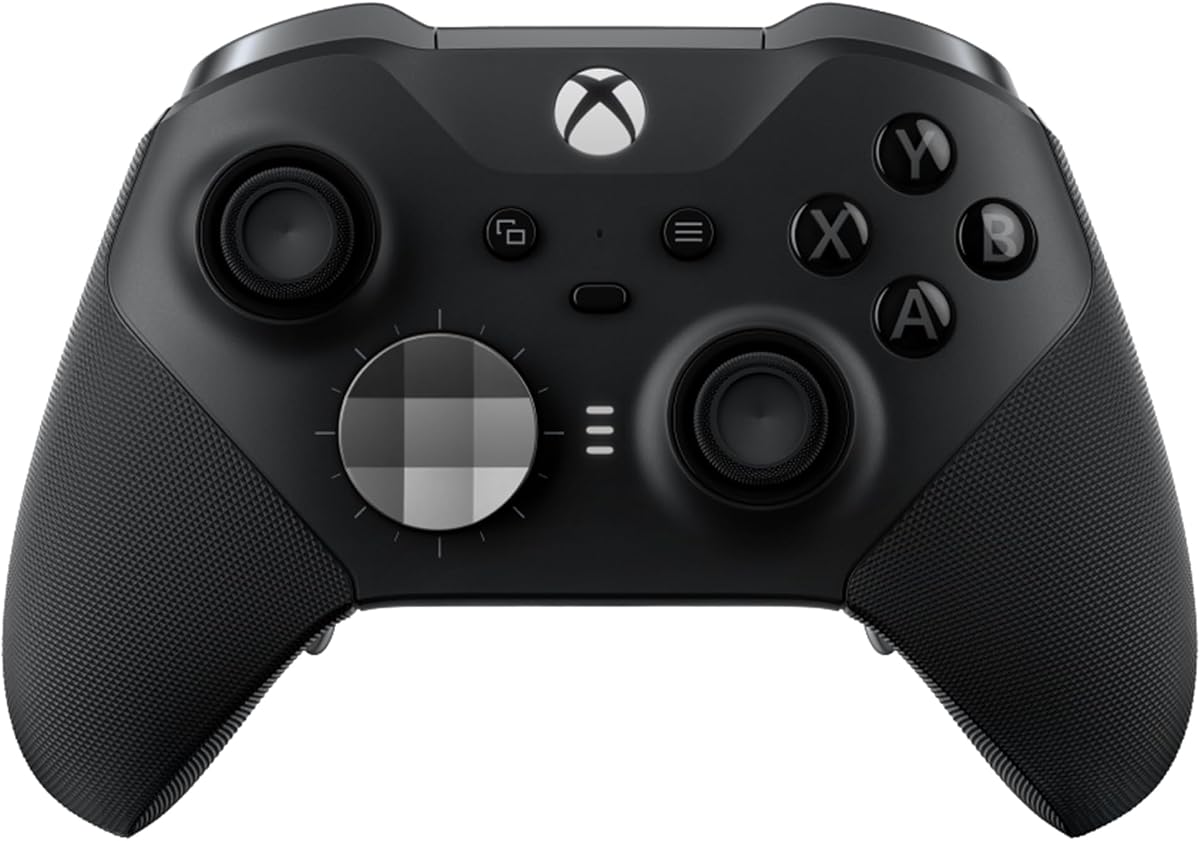
The Xbox Wireless Controller Elite Series 2 is the most physically customizable controller in this guide. Its 4.3 rating reflects a strong reception, while adjustable stick tension, three-step hair trigger locks, swappable thumbstick tops, interchangeable D-pads, and rear paddles allow players to build a controller around their preferred control style for Cyberpunk 2077.
We may earn a commission when you buy through this link, at no additional cost to you.
Adjustable thumbstick resistance is especially useful for players who want fine control without sacrificing a physical analog feel. The three-step trigger locks reduce trigger pull distance, helping rapid actions feel more immediate. The package includes six thumbsticks, four paddles, two D-pads, a carrying case, and a charging dock, offering several starting points for personalizing the controller.
Three onboard profiles can be switched using a dedicated button, and the Xbox Accessories app supports button mapping, dead-zone adjustment, and remapping to keyboard keys for supported games. Connectivity covers Xbox Series X|S, Xbox One, Windows PC, and cloud services through Xbox Wireless, Bluetooth, or USB-C. The advertised battery life reaches up to 40 hours, and a 3.5mm headset jack is included.
This is the ideal premium recommendation for a player who changes control styles or wants to fine-tune the feel of a controller physically. It also works comfortably across console and PC ecosystems. The main limitation is the lack of a published high polling rate, so a competitive PC player focused on raw input frequency may prefer an 8000Hz gaming controller. For customization and versatility, however, the Elite Series 2 remains the standout.
Interchangeable thumbstick tops, D-pads, and paddles let users alter the controller's shape and feel. Adjustable stick resistance provides a more hands-on way to refine aiming than software-only configuration.
Three-step hair trigger locks reduce pull distance for quick firing and other actions. Three onboard profiles make it easy to move between combat, driving, and exploration configurations without rebuilding every setting.
We may earn a commission when you buy through this link, at no additional cost to you.
The most effective Cyberpunk 2077 controller balances stick accuracy, trigger control, connectivity, customization, and comfort. The game's mix of shooting, driving, exploration, and interface navigation means that no single feature matters equally to every player, so compatibility and personal control preferences should be considered before advanced specifications.
Start with the device on which you actually play Cyberpunk 2077. Windows PC accepts a wide range of PC-oriented controllers, but official Xbox and PlayStation products can also work depending on their supported connection methods. Some third-party models explicitly exclude Xbox, PlayStation, cloud platforms, or specific handheld systems. The EasySMX D10, for example, works with PC, Switch, Android, and iOS but not Xbox, PlayStation, Amazon Luna, or GeForce Now.
Long sessions can reveal small changes in how a stick centers or moves, so anti-drift technology deserves close attention. Hall Effect sensors reduce dependence on physical contact, while TMR sticks seek to combine that durability with a more traditional potentiometer feel. The GameSir G7 Pro 8K, GameSir Tarantula 8K, and EasySMX D10 all use TMR systems, whereas the AceGamer Aurora II uses Hall Effect joysticks. Whichever technology you choose, a comfortable dead zone and linear movement are more important than a marketing label alone.
Polling rate indicates how frequently a connected controller reports input to the PC. The two GameSir 8000Hz models target exceptionally fast registration, while several other products use a 1000Hz rate. Higher figures can be attractive for competitive shooters, although actual perceived performance also depends on the game, PC, display, connection method, and system settings. Wired connections remove wireless variability, making them a straightforward choice for a fixed desk.
Cyberpunk 2077 benefits from triggers that offer a comfortable resting position and predictable pull. Analog travel matters when the game uses gradual input, while a short digital pull or hair trigger can suit players who want rapid shooting. The Razer Wolverine V3 Pro offers selectable Pro HyperTriggers, and the GameSir G7 Pro family supports switchable Hall Effect analog and micro-switch trigger stops. The Xbox Elite Series 2 provides three-step hair trigger locks without requiring a mode switch.
Remapping can move cover, crouch, aiming, quick melee, and other actions onto more comfortable inputs. The GameSir G7 Pro 8K and Tarantula 8K support programmable macros, while the Razer Wolverine V3 Pro can save four onboard profiles and map keyboard keys. The Xbox Elite Series 2 stores three profiles and supports app-based button and dead-zone adjustments. Software compatibility should be checked for your exact Windows and Cyberpunk 2077 configuration.
Wireless freedom is valuable when relaxing on a couch, but a stable receiver, practical pairing procedure, and dependable battery are essential. The GameSir G7 Pro 8K supports wired and 2.4GHz PC connections and includes a charging dock. The Aurora II adds Bluetooth, while the Fallout Pip-Boy and DualSense use wireless connectivity with familiar pairing. The EasySMX D10 includes a magnetic dock with dongle storage and automatic reconnection, which is particularly convenient for repeat use.
Haptics, rumble motors, and adaptive triggers can make weapon fire, impacts, and vehicle movement more tangible. The DualSense is built around adaptive triggers and haptic feedback, while the GameSir G7 Pro 8K includes dual asymmetric rumble motors. Feedback quality is subjective, so a controller's physical design and comfort should ideally be assessed in person when possible. Wired headset support is another useful feature for private voice chat.
A controller that performs well on paper can still become uncomfortable after a long Cyberpunk 2077 session. Grip texture, button placement, stick shape, weight, and trigger travel all affect fatigue and control. The Razer Wolverine V3 Pro emphasizes a lightweight esports-oriented form, while the Xbox Elite Series 2 provides interchangeable components. For a personalized fit, the Elite's adjustable tension and swappable parts are the strongest tools in this group.
Begin by fully charging the controller and installing its wireless receiver, if supplied, before opening Cyberpunk 2077. For a 2.4GHz connection, attach the receiver to an available USB port and follow the controller's pairing sequence. Bluetooth controllers should be paired through the PC's device settings. Wired PC models can generally be connected directly, although players should confirm the game's input mode and assign the controller to the correct slot in the game.
Enter the controller's settings or companion software before beginning a long session. Calibrate dead zones, choose the stick response curve, test trigger modes, and remap awkward actions. Save the configuration as a named profile, then test it in the game's menus and a low-risk area. In Cyberpunk 2077, movement, cover, aiming, vehicle controls, and quick actions are useful functions to test, but settings should always reflect the player's preferred control style.
Yes, many Xbox Wireless Controllers support Windows PC through Bluetooth or a USB connection. The Xbox Fallout Pip-Boy Edition, Xbox Elite Series 2, and GameSir G7 Pro models listed here include Xbox and PC support. Check the exact compatibility notes for your chosen model, especially when using wireless pairing, cloud gaming, or features that depend on the Xbox Accessories app.
The best choice depends on whether you prioritize analog control or rapid trigger response. Analog sticks and adjustable trigger tension suit deliberate aiming, while switchable digital trigger stops and hair trigger locks favor faster inputs. A high polling rate can also appeal to competitive players, although the game's real-time action is not exclusively based on shooting precision.
TMR sticks are designed to combine a traditional potentiometer-style feel with the durability associated with magnetic sensing, while Hall Effect sticks avoid physical contact around the sensing mechanism. Neither is automatically better for every player. Consider stick centering, dead-zone behavior, comfort, and whether you prefer a more traditional or consistent magnetic feel.
A wired connection can provide a direct and consistent input path, but modern wireless controllers can also perform well when their receiver and environment are stable. The GameSir G7 Pro 8K supports both wired and 2.4GHz modes at an advertised 8000Hz polling rate, while the Tarantula 8K is wired-only. Your choice depends on your setup, desk space, and sensitivity to wireless variability.
Mouse and keyboard remain a familiar option for precise aiming and extensive keybinding, but a controller can provide a more comfortable way to explore, drive, and manage cover. Many players use both, switching depending on whether they are exploring Night City or concentrating on combat. A controller with remappable buttons can also recreate familiar keyboard layouts.
The Xbox Elite Series 2, Xbox Fallout Pip-Boy controller, and GameSir G7 Pro Wuchang Edition all list console and PC support. The Razer Wolverine V3 Pro and several dedicated PC models do not support Xbox consoles. Verify the stated USB and wireless requirements for the exact game and platform, particularly if you plan to use cloud or mobile play.
Remapping can make cover and movement more comfortable if the default placement does not suit your hands. Test the original layout first, then move one or two actions rather than changing many controls at once. The GameSir models, Razer Wolverine, and Xbox Elite support varying levels of remapping, so confirm that your chosen software can map the actions you want.
Begin with a controller that uses Hall Effect or TMR sensing if drift is a recurring concern. Then update its firmware, open the dead-zone settings, and test the stick at different positions before and after a long session. Small adjustments are usually better than extreme dead zones because overly large values can create unwanted resistance or limit precise aiming.
The GameSir G7 Pro 8K PC stands out as the most complete overall option, combining 8000Hz polling, Gen 2 TMR sticks, trigger modes, macros, gyro support, and wired or wireless operation. The EasySMX D10 is the strongest value-oriented choice with TMR sticks, a 1000Hz rate, a charging dock, and broad platform support, while the Xbox Elite Series 2 offers the deepest physical customization.
Before purchasing, prioritize the platform you use, the stick feel you prefer, and the features that solve a real problem in your sessions. Competitive PC players may favor high polling and extensive remapping, while console owners may value cross-device support, charging convenience, familiar layouts, or adjustable trigger and stick hardware. A controller that fits your hands and control habits is more valuable than a long feature list.
Check the current product listing, platform notes, warranty information, and required software immediately before buying. Ratings, firmware, compatibility details, and prices can change, and a controller that appears ideal on paper should still fit your preferred layout and Cyberpunk 2077 play style.

