
VSD Mini Macro Pad Shortcut Keypad
4.1Editor score
Six customizable LCD keys
Compact USB-powered design
Custom dual RGB light bars
Windows and macOS support
Compare 10 macro keypad controller decks for streaming, evaluating programmable keys, app compatibility, LCD displays, macros, audio controls, and build
A macro keypad controller deck places frequently used streaming commands within immediate reach, reducing the need to search for hotkeys, switch windows, or interrupt a live broadcast. The best models combine customizable LCD keys, flexible multi-step macros, broad software support, and controls that remain easy to understand during production.
This guide compares ten streaming decks across programmable key count, display options, rotary controls, macro capabilities, compatibility, lighting, and productivity features. It covers models designed for compact gaming setups, larger production desks, audio workflows, and general-purpose shortcuts so streamers can identify a practical match for their own routine.
Each recommendation explains the product's strongest benefits, useful limitations, and ideal user profile. Ratings and product details reflect the supplied information, while availability, configurations, and prices can change, so readers should confirm the current listing and software requirements before purchasing.
4.1Editor score

4.4Editor score
4.4Editor score
The comparison below highlights the defining controls and capabilities of each streaming deck, including LCD key counts, rotary inputs, macro support, operating-system compatibility, and specialized production features.


The VSD M18 Macro Pad combines 18 programmable controls, including 15 visual LCD keys and 3 physical buttons, in a format intended for streaming, gaming, and general productivity. Its 4.4 rating reflects a versatile device that balances extensive shortcut access with a relatively straightforward control layout. The most notable feature is the generous number of keys, which leaves room for scenes, applications, media controls, and text macros without forcing extensive consolidation.
We may earn a commission when you buy through this link, at no additional cost to you.
Each LCD key can display JPG, PNG, or GIF images, helping creators establish visual associations between commands. Single commands can trigger a macro, insert text, open a file or website, adjust media, or change an OBS scene. The Operation Follow function adds more depth by running several macro steps in a custom order or simultaneously, making the deck useful for both one-touch shortcuts and longer editing or application sequences.
The surrounding RGB light ring adds an adjustable ambient effect, with automatic cycling and custom tones available through a firmware upgrade. That visual feature is less functionally important than the macro system, but it helps the deck fit a gaming or late-night production environment. Built-in utilities such as reminders, a clock, stopwatch, weather, and calendar show that the M18 is intended to function as a broader desktop controller rather than only an OBS switcher.
Compatibility covers Windows 11 and newer and macOS 11.0 and newer, with USB-C connectivity and support for major applications including OBS, Streamlabs, YouTube, Discord, Excel, Word, and Photoshop. Native Linux plug-and-play support is absent, although SDK documentation is provided for custom development. For a streamer wanting extensive keys, custom imagery, sequential macros, and broad desktop utility without moving to a large premium console, this is the most balanced recommendation in the list.
Eighteen controls provide enough room to separate scene changes, alerts, audio actions, applications, and editing shortcuts. This reduces the need to overload individual keys with unrelated commands, which can make a production setup faster to understand and adjust.
Custom JPG, PNG, and GIF key images improve recognition, while Operation Follow handles repeated sequences in a selected order or at the same time. Together, these features make the deck useful beyond a simple collection of hotkeys.
We may earn a commission when you buy through this link, at no additional cost to you.
The VSD M18 Stream Controller is another 18-key option, pairing 15 LCD visual keys with 3 conventional buttons. Its 4.5 rating makes it one of the stronger entries in the comparison, particularly for users who want one device to cover streaming, gaming, editing, and office tasks. The arrangement is practical because it provides enough dedicated controls for complex workflows while retaining physical buttons for frequently pressed actions.
We may earn a commission when you buy through this link, at no additional cost to you.
Creators can assign individual commands or longer sequences to any key, and each LCD button accepts JPG, PNG, or GIF content. Its one-touch operation can launch macros, enter text, open files and websites, manage media, and change OBS scenes. The Operation Follow function can execute multiple macro steps in a defined sequence or simultaneously, offering a convenient way to automate repeated editing and production routines.
The RGB surround adds automatic color cycling and custom color choices, while the built-in plugin set covers practical functions such as reminders, clock displays, stopwatches, weather, and calendars. It also lists long-term support, free software updates, and compatibility with applications including OBS, Streamlabs, YouTube, Twitter, Discord, Excel, Word, and Photoshop.
The main compromise is that it does not offer native Linux support. Windows users need Windows 11 or newer, while Mac users need macOS 11.0 or newer. It is also very similar in concept to the first-ranked M18. Buyers should therefore compare the two listings for current configuration and software details. Subject to those points, this version is an attractive all-around deck with strong macro flexibility, broad app support, and useful desktop functions.
Support for Office, Photoshop, media tools, and other everyday applications makes the controller useful during planning, editing, and administrative work. The same key layout can therefore serve multiple parts of a creator's routine rather than only a live show.
The Operation Follow feature allows users to turn several familiar actions into a single trigger. It is particularly helpful when a broadcaster repeatedly performs the same sequence before a scene change, after a recording, or during a post-production session.
We may earn a commission when you buy through this link, at no additional cost to you.
The VSD Mini Macro Pad is designed for creators who want dedicated streaming shortcuts without occupying a large portion of the desk. It offers 6 fully customizable LCD keys, a compact enclosure, and dual RGB light bars along its sides. Its 4.1 rating is the lowest among the featured products, but the core feature set remains focused: fast access to scenes, applications, websites, text, media, and game combinations.
We may earn a commission when you buy through this link, at no additional cost to you.
Every key can carry a custom JPG, PNG, or GIF image, which makes the small number of physical controls easier to identify. Users can assign individual or serial shortcut commands, allowing a single press to complete a multi-step task. The deck is compatible with OBS, Streamlabs, YouTube, Twitch, Discord, Office, Photoshop, and other mainstream software, while built-in clock, weather, calendar, and stopwatch functions add practical value between broadcasts.
The side lighting supports automatic cycling and personalized RGB settings, bringing more visual character than a plain macro keypad. USB power keeps the device running during extended sessions without a battery, and its portable size makes it easier to move between a streaming desk, gaming setup, and editing workspace.
Unlike the larger VSD models, the Mini requires the dedicated VSD Craft software for full configuration rather than offering complete plug-and-play behavior. Linux users are directed toward official open-source SDK files for personalized adaptation. The limited six-key count means users must prioritize their most valuable commands, but that constraint is exactly what makes this one of the most approachable options. It is best for a streamer who values compact size, clear visuals, and a short list of essential shortcuts.
Six LCD keys encourage users to identify the commands that matter most. This makes the Mini easier to learn than a crowded controller and allows it to fit beside a compact keyboard without taking over the working area.
Because the pad draws power directly from the connected computer, it remains ready for long streaming or gaming sessions. Its compact enclosure can also move more easily between desks than a larger production console.
We may earn a commission when you buy through this link, at no additional cost to you.
The Stream Dock N1 takes a distinctive approach with a vertical layout designed to preserve desk space. It combines 15 LCD shortcut keys with left-hand operation, calculator mode, and numeric keypad mode, all selected through three practical configurations. Its 4.7 rating is among the strongest in the group and reflects a feature set that extends well beyond ordinary streaming controls.
We may earn a commission when you buy through this link, at no additional cost to you.
Users can drag files, browsers, applications, images, and videos onto the LCD keys, reducing the need to search for commonly used material. Each key can also be personalized with images, screenshots, or GIFs. This makes the N1 especially useful for creators who jump between OBS, editing applications, media browsers, and project folders during a working session.
The controller supports Windows and macOS and integrates with OBS, PowerPoint, YouTube, Twitter, Discord, Excel, Word, Photoshop, and Adobe Premiere Pro. Its plugin market includes utilities such as schedules, weather, and calendars, along with 60 icon packs. The product also includes a 24-month warranty, and support is available through product-page tutorials and the listing's question option.
There are no listed rotary encoders, and switching among calculator, numeric, and streaming roles takes planning rather than treating every key as a dedicated broadcast control. Even so, the vertical footprint and three-mode design distinguish it from ordinary horizontal pads. It is a strong match for a creator with a compact desk, a tenkeyless keyboard, or a workflow that requires both numeric entry and streaming shortcuts.
The upright enclosure is particularly useful when horizontal desk space is limited. It can sit near the left hand without occupying the same broad area as a conventional keypad, while still presenting 15 visually labeled commands.
The ability to move between streaming, calculator, and numeric operation broadens the device's usefulness. Creators can retain direct shortcut access while still handling calculations or complementing a tenkeyless keyboard.
We may earn a commission when you buy through this link, at no additional cost to you.
The ActionRing Stream Controller combines 6 customizable LCD keys with 3 rotary dials, giving it a practical mix of digital commands and physical adjustment. Its 4.6 rating places it among the better-rated options, and the dials make it especially relevant for live audio work. The overall format is compact enough for a gaming desk while still offering the control types often missing from basic macro pads.
We may earn a commission when you buy through this link, at no additional cost to you.
Actions are assigned through drag-and-drop configuration, allowing a key to perform a single operation or multiple actions. Users can launch applications, execute game combinations, manage media, enter text, open files and websites, or switch OBS scenes with one press. The Action Flow function adds ordered multi-step automation for workflows that require more than a basic hotkey.
The three dials can adjust functions such as volume, fast-forward, and rewind. That makes them useful for monitoring playback or controlling audio during a broadcast, although the listing does not provide a complete map of every available dial assignment. Custom JPG, PNG, and GIF images on the LCD keys improve recognition and allow the controller to fit a particular stream identity.
Windows and macOS are supported, with listed compatibility for OBS, PowerPoint, YouTube, Twitter, Discord, Excel, Word, Photoshop, and Adobe Premiere Pro. Hundreds of plugins, utility functions, and 60 icon packs add further customization. The 24-month warranty improves confidence for regular use. This is a good choice for streamers who want physical dials for volume or playback alongside programmable scene and application controls.
Rotary dials are easier to adjust continuously than repeated key presses, particularly for volume or playback. Their presence makes this controller more attractive for production work that involves gradual real-time changes.
The six-key layout remains approachable while Action Flow adds multi-command sequences. Users can begin with a simple shortcut and gradually build more advanced routines as their production workflow becomes established.
We may earn a commission when you buy through this link, at no additional cost to you.
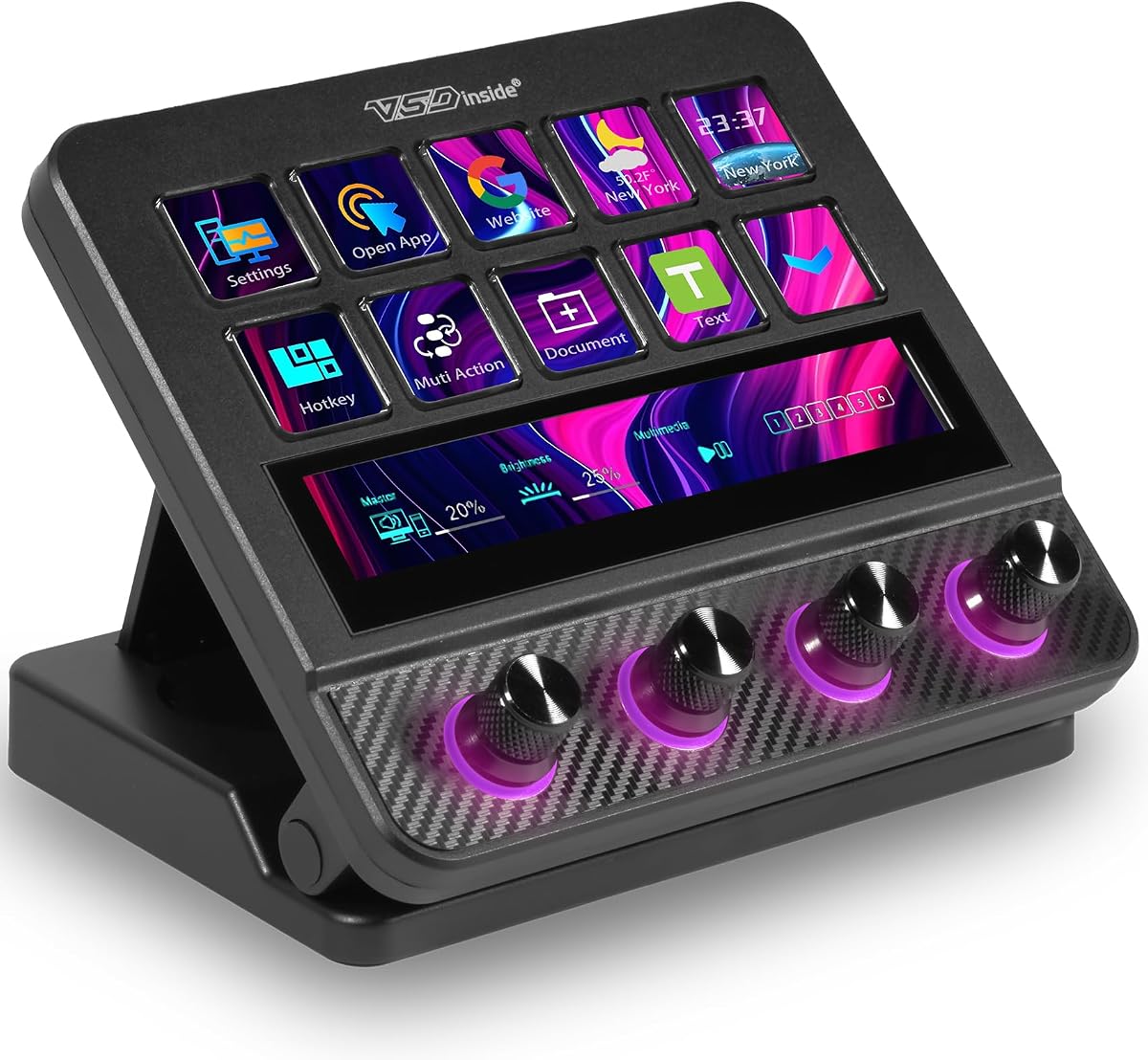
The VSD N4 Pro is a substantial studio controller with 10 customizable LCD keys, 4 RGB knobs, and an interactive touch bar. Its 4.4 rating reflects a broad feature set aimed at streamers, editors, gamers, and production professionals. Unlike a basic macro pad, it can store independent scene presets for live production, post-production, gaming, and general office work.
We may earn a commission when you buy through this link, at no additional cost to you.
Each LCD key supports configurable hotkeys, chained multi-step operations, and custom PNG, JPG, or GIF icons. Users can launch apps, open webpages, insert text, and automate editing actions without writing code. The four knobs and touch bar add precision controls, while the integrated USB sound-deck function can trigger supported play and pause commands for sound effects and background audio.
The plugin ecosystem is a major strength, offering more than 500 official downloadable plugins and preloaded widgets. Dynamic RGB lighting can synchronize with audio and accept GIF, MP4, and MOV media. Carbon-fiber panels, switchable haptic keys, and a foldable 60-degree stand add a premium desk-presence, while the built-in passive USB dock provides extra ports for a mouse, keyboard, or storage drive.
There is an important distinction in the soundboard feature: it sends control commands to the computer rather than providing built-in speakers for audio output. It also requires a more involved configuration than a six-key pad, so beginners should assess the learning curve. For creators who want a single surface combining commands, analog adjustments, visual feedback, plugins, and connectivity, however, it is the most complete premium option here.
LCD keys, rotary knobs, and a touch bar provide different interaction methods for different tasks. A scene switch can sit beside the keys, while a knob handles volume and the touch bar provides a separate interactive area.
More than 500 downloadable plugins broaden the deck beyond static shortcuts. Audio-synced RGB lighting and support for multiple media formats also make it easy to give a production station a distinctive visual identity.
The passive USB dock adds convenient access to ports for peripherals and storage. Combined with the adjustable stand, it reduces cable clutter around the main streaming keyboard and keeps the controller within comfortable reach.
We may earn a commission when you buy through this link, at no additional cost to you.
The Elgato Stream Deck MK.2 is a 15-key studio controller built around a clean, recognizable design. Its 4.8 rating is the second-highest figure in this group and reflects a controller with an established place in streaming and creative production. Every LCD key can control an application, tool, or platform, while visual feedback confirms that a command has been executed.
We may earn a commission when you buy through this link, at no additional cost to you.
The central strength is straightforward one-touch automation. A key can trigger one action or several actions together, allowing streamers to launch social posts, adjust audio, mute a microphone, control lights, and complete other routine tasks. The listed plugin support includes Elgato 4KCU, OBS, Twitch, YouTube, Twitter, Discord, Spotify, and Philips Hue, giving users access to a recognizable collection of streaming and smart-device integrations.
Hotkey actions also support film editing, music production, and photography workflows, so the device can remain useful away from a live broadcast. Its 15-key arrangement offers enough capacity for scene changes, applications, media controls, and production utilities without approaching the density of a 32-key console. The visual feedback is particularly helpful for preventing uncertainty about whether a command registered during a busy show.
The controller has no listed rotary dials, so creators who need precise analog adjustment may prefer a model with knobs. Some plugin experiences may also depend on the quality of third-party integrations, but the core platform and named services provide a strong foundation. For a streamer seeking a conventional 15-key deck, immediate visual confirmation, and a well-known integration ecosystem, it remains one of the most compelling choices in the comparison.
Visual feedback reduces uncertainty by showing that a command has registered. This is useful when several controls perform related actions and a creator needs confirmation without interrupting to inspect software.
Named support for OBS, Twitch, YouTube, Discord, Spotify, Philips Hue, and other services gives the deck immediate relevance. It can also extend into editing and music workflows through general hotkey actions.
We may earn a commission when you buy through this link, at no additional cost to you.
The VSD XL Streaming Deck is the largest key-focused model in this comparison, offering 32 programmable LCD keys and a 4.9 rating. It is intended for creators who have outgrown a small shortcut pad and need a dedicated command center for streaming, editing, design, gaming, music production, and office work. Its two side scroll wheels offer an additional way to navigate scenes, pages, playback, and spreadsheets.
We may earn a commission when you buy through this link, at no additional cost to you.
Unlike basic macro keyboards, the XL supports full-screen backgrounds and semi-transparent animated icons. Users can create a visual interface that reflects a brand, mood, or current project. Each key can display custom images, GIFs, or dynamic badges, while instant visual feedback confirms that a command has executed.
Application-specific profiles allow separate layouts for OBS, Photoshop, Premiere Pro, Excel, Zoom, Spotify, and other tools. A drag-and-drop interface and no-coding approach keep the basic setup approachable, while a multi-action executor supports more complex command chains. The device is compatible with Windows 11 and newer and macOS 14.0 and newer, and works with major streaming, editing, design, productivity, and collaboration applications.
The wraparound RGB ring supports automatic cycling and custom colors, making the XL visually prominent as well as functional. The trade-off is complexity: 32 keys, profiles, backgrounds, badges, and a multi-action system require more deliberate organization than a six-key pad. It also excludes older operating-system versions. Even so, for a high-output creator who wants abundant dedicated controls, scroll-wheel navigation, and comprehensive visual customization, the XL offers the strongest combination of capacity and flexibility.
Thirty-two keys allow different categories of actions to remain visible at once. This can reduce reliance on small utility panels and prevent a creator from constantly opening the same menu just to reach a frequently used command.
The dual side wheels can navigate scenes, pages, playback, and spreadsheet views without consuming additional LCD keys. They are particularly useful for continuous or directional actions that do not map neatly to a single press.
Separate application profiles let a creator change the control surface when moving between OBS and a video editor. This is more adaptable than maintaining one crowded layout for every program.
We may earn a commission when you buy through this link, at no additional cost to you.
The Streonor S10 combines 10 customizable LCD keys, an integrated touchscreen, and 4 programmable rotary knobs in one creator-focused console. Its 4.9 rating places it alongside the XL at the top of the supplied rating range. The touchscreen is the distinguishing element, providing a separate interactive area for supported information and controls rather than making every function compete for a physical key.
We may earn a commission when you buy through this link, at no additional cost to you.
The LCD keys handle shortcuts, hotkeys, macros, and application actions, while the knobs can be assigned to volume, microphone levels, media playback, scrolling, zooming, or timeline adjustments. This division of labor makes the console well suited to productions that require both discrete commands and continuous adjustments. Multi-action keys can execute supported operations in sequence, reducing repetitive steps across complex projects.
Dedicated profiles can be created for OBS Studio, Twitch, YouTube, Streamlabs, video editing, music control, office tasks, and gaming. The STREONOR software store and Space forum provide more than 100 plugins, icon packs, GIF icons, scenes, tutorials, and customizable layouts. Compatibility covers Windows 10 64-bit or later and macOS Big Sur 11.0 or later.
Linux is unsupported, and similar controller software should be uninstalled before setup. Some third-party services may also require active accounts or subscriptions, so the full usefulness of a particular integration should be confirmed before setup. For creators who want a touchscreen, four knobs, and a broad software store in one production surface, the S10 is a highly attractive and unusually flexible alternative to conventional key-only decks.
The integrated touchscreen can present supported information and controls in a separate interactive area. This makes the console more versatile when a workflow includes both stable hardware actions and context-sensitive options.
Assigning the four knobs to audio, timeline, zoom, or scrolling functions provides continuous control where a button would be less precise. That makes the S10 particularly suitable for editing and live audio workflows.
We may earn a commission when you buy through this link, at no additional cost to you.
The TreasLin VSDinside N1 combines 18 customizable macro keys with three operating modes selected through its rotary knob. The layout includes 15 visual LCD buttons, 2 tap buttons, and 1 rotary button, giving it a versatile mix of programmable and physical controls. Its 4.4 rating reflects a capable deck that can move between streaming, numeric entry, and calculator operation.
We may earn a commission when you buy through this link, at no additional cost to you.
In streaming-controller mode, one press can launch a macro, insert text, open a file or website, control media, change an OBS scene, launch a social post, adjust audio, mute a microphone, or control lights. Commands can be single actions or grouped into multiple actions, making the device useful for both immediate reactions and longer repetitive routines.
Dynamic icons are a notable strength. Rather than restricting creators to static images, the N1 supports animated icon scenes for a more dynamic and personalized control surface. Its marketplace includes more than 200 plugins, icon profiles, and scenes, while the device is compatible with OBS Studio, Streamlabs, Twitch, YouTube, Twitter, Discord, Spotify, Voicemod, Excel, Word, and Photoshop.
Windows and macOS are supported through USB-C, and the included software is described as straightforward to install. Spotify integration requires an active Premium account, which users should consider if music control is central to the planned setup. There are no listed scroll wheels, but the rotary selector and numeric mode compensate by adding a different kind of physical control. This N1 is best for creators who want substantial macro capacity, animated personalization, and three distinct operating roles.
The rotary selector changes the controller among streaming, calculator, and numeric modes. This makes it possible to keep a streaming command surface and a numeric entry tool in one compact device.
Support for dynamic icon scenes lets the interface communicate more information visually. Creators can build animated layouts that feel more integrated with a broadcast than basic monochrome shortcut keys.
More than 200 plugins, profiles, and scenes expand the deck beyond the commands available immediately after setup. The marketplace is especially relevant for creators who want specialized control for different streaming applications.
We may earn a commission when you buy through this link, at no additional cost to you.
The right streaming controller depends on the number of commands you need, the kinds of adjustments you make, the software in your workflow, and how much desk space you can devote to the device. These factors help separate a focused shortcut pad from a full production console.
Key count should reflect the number of commands you expect to use during a live session. Six-key decks are ideal for a carefully chosen set of scene, mute, and launch commands, while 10 to 15 keys provide room for separate application and media actions. Models with 18, 32, or more keys suit creators who maintain several profiles or want dedicated controls for complex editing and production routines.
LCD keys are more useful when creators can recognize each command quickly. Basic models accept JPG, PNG, and GIF images, while advanced decks can add animated icons, semi-transparent overlays, dynamic badges, and full-screen backgrounds. Consider whether your workflow benefits from detailed visual profiles or whether a small number of clear icons would be sufficient.
Single-command macros are straightforward, but multi-step features are more valuable during repetitive production work. Look for ordered or simultaneous execution, chaining, and text entry. Also consider whether the software makes complex sequences easy to build and whether each action is supported by the applications and operating system you use.
Rotary knobs are valuable for volume, microphone levels, playback, zoom, and timeline adjustments because they support gradual changes. A touchscreen adds a flexible interactive area for supported information and controls, but it may require more configuration. Compare the type and quantity of non-key inputs rather than treating every controller as a simple keypad.
Compatibility with OBS is only the beginning; a useful controller should also support the editing, communication, productivity, and audio tools in your routine. Examine the plugin marketplace, community resources, update history, and integration quality. Some services may require their own active account or subscription, while native Linux support is uncommon across these products.
Horizontal decks provide broad shortcut layouts but consume more desk space. Vertical designs preserve room for a full-size keyboard, while mini pads suit travel and compact setups. Premium controllers may add adjustable stands, while larger faces and many keys can require more reach and careful organization. Measure the available area and consider how the deck will sit beside other controls.
Some macro decks can send play, pause, and similar commands to computer audio software, while others include broader soundboard or mixer functions. A command-based soundboard is not the same as a device with built-in speakers or a complete hardware audio mixer. Review exactly what the product controls and whether a separate audio application remains necessary.
Look for sturdy construction, reliable buttons, stable USB power, and a warranty that matches the intended frequency of use. Community support, tutorials, free software updates, and responsive technical assistance can be just as important as the physical enclosure. For a professional setup, consider how easily the device can be stored, updated, and maintained between production sessions.
Begin by identifying the commands that must remain immediately available during a broadcast. Set aside a small group for essential scene changes, microphone or camera control, and audio adjustment, then connect the controller by USB and install the manufacturer's compatible software. Read the quick-start guide before importing a complex layout so that basic device recognition and control functions are working correctly.
Create a dedicated profile for your most frequently used application. Assign one action to simple keys and reserve multi-step macros for predictable sequences. Use custom icons with short, legible labels, and group related commands by color or position. Test each button in a rehearsal environment before going live, including the actions that switch scenes, open media, mute audio, and launch applications.
For care, keep the device away from liquids, excessive dust, and forceful impacts, and clean the surface with a soft dry or lightly damp cloth. Avoid pushing controls excessively or pulling the USB cable sideways. Review software updates, back up useful profiles when the manufacturer provides an export method, and periodically verify that every key still performs its assigned action before an important broadcast.
It is a desktop controller that places programmable buttons, LCD displays, and sometimes rotary dials near the user. The keys can trigger OBS scene changes, media controls, applications, text, audio commands, and multi-step sequences. A good deck reduces repetitive keyboard shortcuts and makes important production actions easier to identify.
No. A compact model with six to ten keys may be sufficient for a simple show, especially if each key handles one important command. A larger controller becomes more useful when you also edit video, manage audio, switch among several applications, maintain separate profiles, or want more visual customization.
The listed models support OBS, and many also list Streamlabs, Twitch, YouTube, Discord, and related tools. Exact behavior depends on the controller's software and the integration available from its plugin marketplace. Confirm operating-system and application requirements before setting up the device.
Rotary knobs are better when you need gradual or continuous adjustment, such as changing volume, microphone level, zoom, or playback position. Buttons remain more suitable for discrete actions like changing scenes or muting a microphone. Controllers that combine both offer more flexibility for live and editing workflows.
Support varies. The VSD Mini describes an open-source SDK route for personalized Linux adaptation, while the VSD M18 lacks native Linux plug-and-play support, and the Streonor S10 does not support Linux. The other models do not clearly state Linux compatibility, so users should confirm the current manufacturer documentation rather than assume it.
Start with a small, tested set covering the actions you cannot afford to miss, such as scene switching, microphone mute, and audio adjustment. Add secondary commands only after the basic layout feels familiar. Rehearse the full order of multi-step actions, because a complex macro is less useful if it triggers the wrong sequence under pressure.
Most of the featured models support JPG, PNG, and GIF images, with some supporting animated icons, badges, or full backgrounds. Use clear icons and short labels so each command can be understood at a glance. Confirm the image format and size recommended for the specific device before importing a large collection.
Most products in this category require their associated configuration application, even if the USB connection is recognized automatically. Some are described as plug-and-play for everyday use, while the VSD Mini explicitly requires VSD Craft for full setup. Install the correct software, review permissions, and test a basic command before importing a full production profile.
The VSD M18 stands out as the most balanced overall recommendation, offering 18 programmable controls, visual icons, ordered macros, an RGB ring, and broad desktop utility. The compact VSD Mini suits a streamlined setup, while the VSD N4 Pro is the strongest premium choice for creators who need rotary knobs, a touch bar, extensive plugins, and additional USB connectivity.
Prioritize the controls that match your actual work. Choose a small key count for essential shortcuts, a vertical layout for limited desk space, knobs or a touchscreen for precise production work, and profiles if you regularly alternate between streaming, editing, gaming, and office applications. The best controller is not necessarily the one with the most features, but the one you can configure clearly and operate reliably under pressure.
Before purchasing, confirm current software requirements, operating-system support, plugin availability, account restrictions, and warranty details. Availability, configurations, and prices can change, so checking the current product listing will help ensure that the chosen macro keypad controller deck still matches the needs that informed your decision.