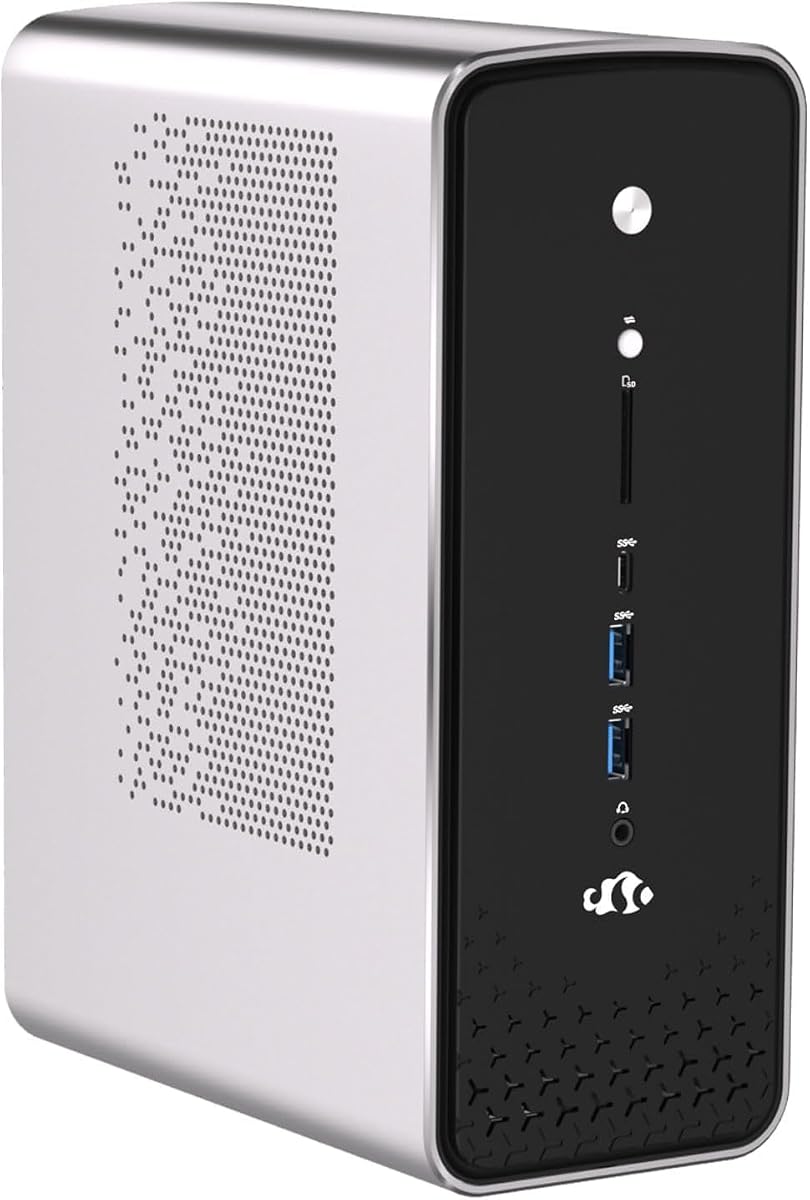
NIMO Ryzen AI Max+ 395 Mini PC
5.0Editor score
Ryzen AI Max+ 395 processor
Pre-installed Windows and Ubuntu
Triple 4K display support
Our expert guide compares 10 desktop PCs with Ubuntu pre installed, covering processors, memory, displays, connectivity, storage, and expandability for buyers.
A desktop PC with Ubuntu pre installed offers an appealing combination of open-source software, useful business hardware, and freedom from operating-system setup. The strongest choices suit different needs, from compact mini PCs for developers to expandable business towers for professional workspaces. A good system balances processor power, memory, graphics, storage, connectivity, and the availability of ports.
This guide compares ten systems using their supplied specifications, operating-system details, physical formats, ports, and stated capabilities. It includes dedicated Ubuntu mini PCs, dual-OS machines, and business desktops that may require additional configuration, making clear which options arrive ready for Linux work and which demand a little more setup. Renewed Dell models are also evaluated on their specifications and stated condition.
Each placement highlights a distinct use case rather than claiming that one computer is ideal for everyone. The leading recommendations cover premium Ubuntu performance, a practical business tower, and a compact Ubuntu desktop, while the remaining reviews explain the trade-offs of each alternative. Product availability and pricing can change, so readers should verify the current listing and configuration before purchasing.
5.0Editor score

The table below compares all ten systems by operating system, processor, memory, storage, and practical form factor, helping buyers separate purpose-built Linux machines from Windows systems that could require a fresh Ubuntu installation.






The Beelink SER9 Pro combines an AMD Ryzen 7 255 processor, Radeon 780M graphics, 24GB of LPDDR5X memory, and a 1TB PCIe 4.0 SSD in a compact enclosure with Ubuntu and OpenClaw already installed. Its supplied rating is 4.0, but the more important attraction for this category is the combination of immediate Linux readiness, strong integrated graphics, and a broad collection of ports.
We may earn a commission when you buy through this link, at no additional cost to you.
The Ryzen 7 255 has eight cores and 16 threads, with clock speeds listed from 3.8GHz to 4.9GHz. Its Zen 4 CPU architecture and Radeon 780M graphics with 12 graphics cores at 2600MHz position the SER9 Pro for demanding productivity, development, media, and gaming tasks. The 24GB LPDDR5X memory runs at 6400MT/s, while the included 1TB PCIe 4.0 drive provides a modern storage foundation.
Storage expansion is one of the mini PC's strongest practical features because the system includes dual M.2 PCIe 4.0 x4 slots and supports storage capacity up to 8TB. Connectivity is also stronger than many similarly compact computers: a 2.5Gbps Ethernet port, Wi-Fi 6, Bluetooth 5.2, HDMI 2.1, DisplayPort 1.4, USB4, USB-C, USB-A, and audio connections are all listed. The included MSC2.0 cooling system is said to operate at 32dB.
This is a compelling recommendation for a user who wants a relatively small Ubuntu desktop without sacrificing modern expansion options. It may not be the first choice for a buyer who needs a specified Ubuntu release, extensive repairable desktop components, or more than 24GB of memory, but the combination of preinstalled software and capable hardware makes it especially convenient for a first Linux deployment, a development station, or a compact productivity system.
The preinstalled Ubuntu system and OpenClaw environment remove much of the inconvenience of building a Linux workstation from generic mini-PC components. Buyers can focus on their software and peripherals while still having access to the full Ubuntu desktop.
Dual PCIe 4.0 M.2 slots and triple-display output make this more versatile than a simple appliance. The selection also includes USB4 and 2.5Gb Ethernet, useful for fast external storage, development workflows, and high-speed wired networking.
We may earn a commission when you buy through this link, at no additional cost to you.
The Dell OptiPlex 7070 SFF is a renewed business desktop built around the nine-generation Intel Core i7-9700, 32GB of DDR4 memory, and a 1TB NVMe M.2 SSD. It carries a 4.1 rating and arrives with Windows 11 Pro, a wireless keyboard, and a wireless mouse. It is not a ready-to-use Ubuntu purchase unless the seller supplies Ubuntu rather than the stated operating system.
We may earn a commission when you buy through this link, at no additional cost to you.
The eight-core i7-9700 operates at 3.0GHz and can boost as high as 4.70GHz, providing ample performance for office work, web applications, file management, and general multitasking. The 32GB of RAM is particularly useful for running browsers with many tabs, lightweight virtual machines, and multiple professional applications without relying on swap memory.
Its small-form-factor Dell enclosure is more serviceable than a sealed mini PC, and the product description specifically notes room for future expansion. Port selection includes five USB 3.1 ports, four USB 2.0 ports, and two display outputs, while built-in AX210 Wi-Fi 6E and Bluetooth support reduce the need for additional adapters. The NVMe SSD should also provide a noticeably more responsive experience than a traditional hard drive.
The trade-off is obvious for this keyword: Ubuntu is not listed as preinstalled, so prospective buyers must confirm the exact OS state or install Ubuntu themselves. Even so, the OptiPlex 7070 SFF is a good choice for an IT-literate buyer who values memory, storage, ports, and expandability more than a compact footprint or a turnkey Linux image.
The ninth-generation processor and 32GB of memory remain useful for a Linux installation, particularly for development and office productivity. Prospective Ubuntu buyers should verify device support, driver availability, and the current operating-system configuration before ordering.
The SFF case offers more internal room than a typical mini PC and includes a generous number of external ports. It is easier to expand, service, and connect than many compact alternatives.
We may earn a commission when you buy through this link, at no additional cost to you.
The NIMO Ryzen AI Max+ 395 is the most ambitious premium entry in this roundup, with a Ryzen AI Max+ 395 processor, integrated Ryzen AI NPU, dual preloaded operating systems, and support for simultaneous 4K output across three displays. Its supplied 5.0 rating is the highest among these products, and the pre-installed combination of Windows 11 Pro and Ubuntu gives it unusual flexibility.
We may earn a commission when you buy through this link, at no additional cost to you.
The processor uses advanced Zen 5 architecture and is designed for demanding multitasking, AI deployment, and computationally intensive work. Its integrated Radeon graphics are stated to support 3D rendering, video editing, multi-track content creation, and gaming, while the NPU accelerates local AI workloads such as language models, image generation, data modeling, and assisted code completion without depending entirely on cloud services.
Connectivity and expansion are equally important to the premium positioning. The system offers HDMI, DisplayPort, full-featured USB4, Wi-Fi 7, Bluetooth 5.4, and dual 2.5Gbps RJ45 Ethernet. Two M.2 NVMe PCIe 4.0 SSD slots provide storage flexibility, and USB4 can support external GPU expansion and charging. A copper cooling module and silent high-airflow fan are intended to sustain performance under demanding workloads.
This is the leading choice for buyers who need a powerful Linux machine and want the option to run Windows without reinstalling either operating system. It is particularly relevant for programmers, engineers, AI developers, and advanced content creators. The main caveat is that the supplied listing does not state a precise memory capacity, so buyers should confirm the final configuration, included accessories, warranty, and operating-system details before ordering.
Preloading both Ubuntu and Windows 11 Pro allows a user to separate development work from business applications or test software in a distinct environment. That flexibility can reduce configuration time and eliminate the need for immediate reinstallation.
The integrated Ryzen AI NPU is a meaningful distinction for local AI inference, assisted programming, and data-oriented tasks. It can provide a dedicated route for supported workloads while the CPU and integrated graphics handle broader computing.
We may earn a commission when you buy through this link, at no additional cost to you.
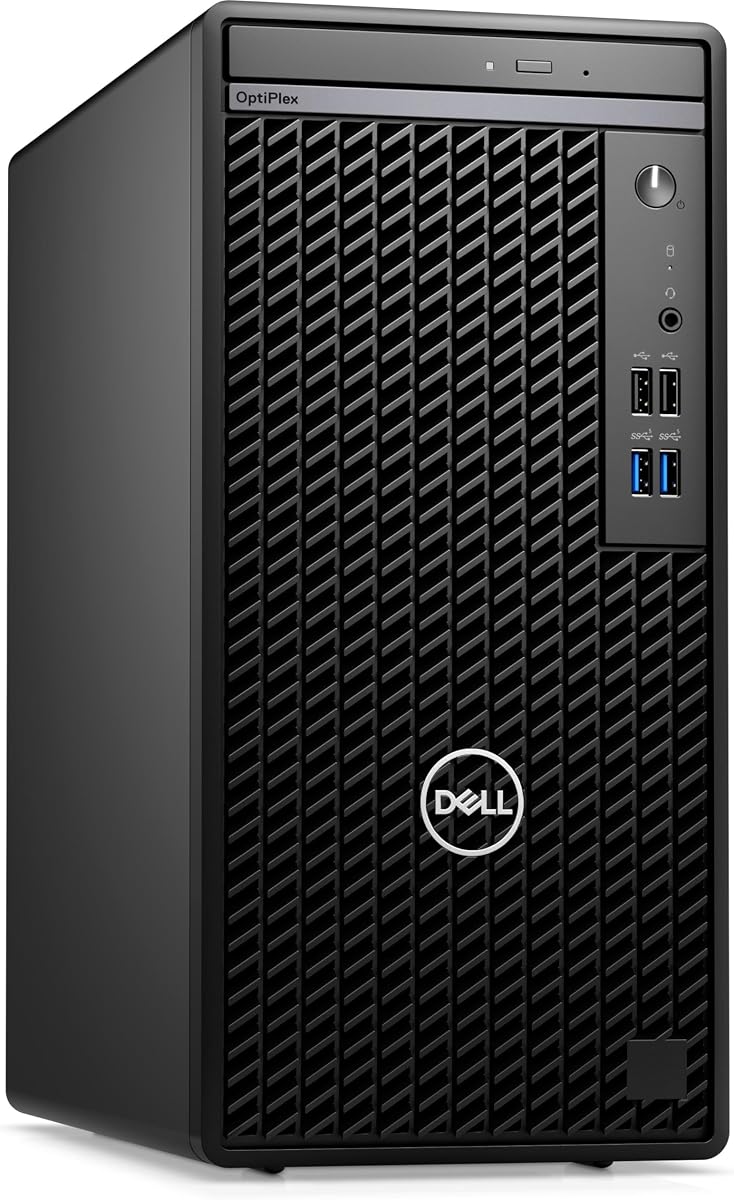
The Dell OptiPlex 7010 Business Mini Tower stands out because it explicitly arrives with Ubuntu Linux 22.04-64. Its Intel i5-13500 offers 14 cores and 20 threads, including six performance cores, while the business enclosure includes practical expansion room, multiple display connections, an optical drive, and a 180W power supply.
We may earn a commission when you buy through this link, at no additional cost to you.
The 13th-generation processor runs at 2.50GHz, can boost to 4.8GHz, and includes 24MB of cache. That level of processor capability is useful for office productivity, browser-heavy work, development tools, and multitasking. Integrated Intel UHD graphics make the system suitable for ordinary displays and standard desktop applications without requiring a separate graphics card.
The supplied configuration includes 8GB of DDR4 DIMM memory and a 256GB PCIe NVMe SSD. These are adequate entry-level specifications, but they are modest compared with several other computers in this guide. The mini-tower format, however, offers more physical flexibility than a tiny mini PC, and the listed equipment includes an RJ-45 port, four USB 2.0 ports, HDMI, DisplayPort, a DVD drive, and a combined headphone and microphone jack.
For a buyer who specifically wants a familiar Dell business desktop with Ubuntu already present, this is the most straightforward recommendation. It is well suited to offices, schools, and general Linux productivity. Upgrading the memory and storage would make it a more flexible long-term system, but the stated configuration is a sensible starting point for lightweight tasks and organizations already accustomed to Dell OptiPlex hardware.
Having Ubuntu Linux 22.04-64 preinstalled is the defining advantage for this search. It allows a user with a standard USB keyboard and mouse to connect the system and begin working without first creating installation media.
The i5-13500 provides a modern balance of efficiency and performance, while the mini-tower case is easier to service than many sealed mini PCs. Its display and network ports also suit a conventional office setup.
We may earn a commission when you buy through this link, at no additional cost to you.
The Dell OptiPlex 7050 SFF is a renewed small-form-factor desktop with an Intel Core i7-7700, 32GB of DDR4 memory, and a 1TB solid-state drive. Its 3.9 rating reflects an older platform, but the generous memory and fast storage remain useful for office computing, browsing, virtualization, and an eventual Ubuntu installation.
We may earn a commission when you buy through this link, at no additional cost to you.
The fourth-generation Intel Core i7-7700 has four cores at 3.60GHz. While this is less capable than the newer processors elsewhere in the guide, it is a recognizable desktop processor with sufficient performance for document work, web applications, communication tools, and light development tasks. The 32GB memory capacity is the more notable specification and offers plenty of headroom for numerous browser tabs or multiple productivity applications.
The product is listed as professionally renewed, tested, and certified, with a 90-day seller warranty. The package includes a wired keyboard, mouse, power cord, and wireless USB Wi-Fi adapter. Connections include USB 3.0, USB 2.0, HDMI, DisplayPort, Ethernet, and audio I/O, with support for dual monitors.
Because the system ships with Windows 11 Pro rather than Ubuntu, it is not a turnkey answer to the exact keyword. It is most attractive to buyers who want a well-specified renewed Dell and are comfortable installing Linux. The older processor limits its appeal for demanding compilation, intensive rendering, and other modern multi-core workloads, but the memory, SSD, serviceability, and included peripherals remain useful.
A 1TB SSD and 32GB of memory make this configuration more future-facing than many renewed office desktops with older hard drives and smaller memory allocations. That balance can be especially valuable for browser-heavy work.
Ubuntu buyers should treat this as a hardware platform rather than a ready-installed system. Linux compatibility should be confirmed for the exact components, and installation media and any needed driver work should be planned before setup.
We may earn a commission when you buy through this link, at no additional cost to you.
The Dell OptiPlex 7060 SFF pairs an eighth-generation Intel Core i7-8700 with 32GB of DDR4 memory and a 512GB M.2 NVMe SSD. It has a supplied rating of 4.0 and is sold as a renewed system with Windows 11 Pro, built-in Wi-Fi and Bluetooth, and a wireless keyboard and mouse.
We may earn a commission when you buy through this link, at no additional cost to you.
The six-core i7-8700 can boost to 4.60GHz, giving it more parallel processing capability than the quad-core chips in several other renewed OptiPlex choices. It remains a strong option for office work, browser-based workflows, email, communications, and moderate development activity. The 32GB of RAM helps sustain several applications at once without immediate memory pressure.
Storage is handled by a 512GB NVMe drive, which supports fast boot and responsive application access. The roomy SFF case is described as suitable for home and business use and as offering future expansion. External connectivity includes five USB 3.0 ports, two USB 2.0 ports, and two DisplayPort connections for dual-monitor arrangements.
This is a sensible Ubuntu conversion candidate rather than a preinstalled Ubuntu recommendation. An experienced Linux user could install Ubuntu after confirming driver support, while an organization might deploy it as a general-purpose Linux endpoint with standardized imaging. The six-core processor and 32GB memory offer a more balanced specification than many entry-level office PCs, although Windows remains the stated factory operating system.
Compared with a four-core desktop from the same general business era, the i7-8700 provides more threads for multitasking and parallel command-line work. It is a better foundation for developers than the similarly old quad-core alternatives.
The SFF enclosure includes multiple USB ports and room for expansion, making it convenient to connect existing accessories. A Linux installation is straightforward for buyers prepared to perform the setup.
We may earn a commission when you buy through this link, at no additional cost to you.
The Dell OptiPlex 5050 SFF is a renewed compact business desktop with an Intel Core i7-7700, 16GB of DDR4 memory, a 512GB NVMe SSD, and Intel HD Graphics 630. Its 4.2 supplied rating is the strongest among the renewed OptiPlex desktops, although the system is listed with Windows 11 Pro rather than Ubuntu.
We may earn a commission when you buy through this link, at no additional cost to you.
The processor has four cores, runs at 3.6GHz, and can turbo up to 4.2GHz. It is well suited to document editing, spreadsheet work, browsing, video communication, and other routine office tasks. Sixteen gigabytes of memory is a competent amount for a business desktop, while the NVMe drive improves startup and file-access times compared with a mechanical hard disk.
Its small-form-factor design helps conserve desk space, and the package includes a wired black keyboard and mouse. Intel HD Graphics 630 provides enough capability for normal productivity applications and standard displays. The primary limitation is the age of the platform: newer multi-core processors and hardware-accelerated AI features are outside its scope.
For Ubuntu, this computer can serve as an inexpensive and compact Linux conversion if the buyer installs the operating system and checks hardware compatibility. It is less suitable for a buyer seeking a new, fully configured Linux experience. Its strengths remain the fast SSD, useful memory, familiar Dell form factor, and solid suitability for everyday office use.
The combination of 16GB of memory and a 512GB NVMe SSD is well matched to office tasks that involve frequent application switching. The compact enclosure is also easier to position beside a monitor than a full tower.
Ubuntu users should plan for an installation process and may want to research wireless, graphics, and other device support beforehand. The included keyboard and mouse help reduce the number of accessories required for a basic setup.
We may earn a commission when you buy through this link, at no additional cost to you.
The Dell Pro Micro QCM1250 is an especially compact business desktop that includes Ubuntu Linux 18.04-64. Its supplied specification combines a 15th-generation Intel Core Ultra 5-235T processor, 8GB of DDR5 SODIMM memory, and a 512GB PCIe NVMe SSD, all in a micro desktop powered by a 90W supply.
We may earn a commission when you buy through this link, at no additional cost to you.
The Ultra 5-235T has 14 cores and 14 threads, including six performance cores, with a listed base speed of 2.20GHz and boost speed up to 5GHz. Integrated graphics support standard display needs, and the processor is well suited to office productivity, browser workloads, and general business applications. DDR5 and NVMe storage provide a modern foundation despite the relatively small memory allocation.
Connectivity includes Wi-Fi 6E through an AX211 adapter, Bluetooth 5.4, RJ-45 Ethernet, HDMI 2.1, DisplayPort, USB 3.2 Type-C, two USB 2.0 ports, and a combined headphone and microphone jack. A USB keyboard and mouse are included. This port mix suits a tidy office installation where the computer can sit near the display while peripherals connect to the available inputs.
The biggest consideration is Ubuntu 18.04. It provides a preinstalled Linux starting point, but it is an older release that may require an upgrade for current applications, kernel support, or security expectations. Buyers who explicitly need that version may find the system ideal; others should consider whether the listed OS version meets their requirements before buying.
This system is attractive for workspace-conscious buyers who want a ready Linux environment without a large tower. Its small dimensions make it suitable for reception areas, compact offices, and monitor-adjacent placement.
The Core Ultra 5-235T provides capable processing for routine business work, but 8GB of RAM is the limiting specification. A memory upgrade may be worthwhile for intensive browser use, development tools, or several simultaneous applications.
We may earn a commission when you buy through this link, at no additional cost to you.
The ASUS NUC 14 Pro is a feature-rich mini PC supplied with Linux Mint rather than Ubuntu. It uses an Intel Core Ultra 7 155H processor with 16 cores and 22 threads, 16GB of DDR5 memory, a 512GB PCIe SSD, and Intel Arc graphics. Its supplied rating of 1.0 warrants caution, but the hardware specification is capable and well aligned with Linux-oriented work.
We may earn a commission when you buy through this link, at no additional cost to you.
The Core Ultra 7 platform provides substantial multicore capability for programming, virtualization, cloud-native development, and general productivity. Intel Arc graphics add a stronger multimedia and compute foundation than basic integrated graphics. The listing also describes AI-related capabilities through Intel's GC, AI Boost, and AI Ready features, although exact application performance depends on software support and the installed configuration.
Its most notable connections are two USB 3.2 Gen2 Type-C ports, two USB 3.2 Gen2 Type-A ports, HDMI 2.1, Thunderbolt 4, and 2.5Gbps Ethernet. It is stated to support up to four 4K HDR displays, and Wi-Fi 6E and Bluetooth 5.3 provide wireless connectivity. A VESA mount supports placement behind a monitor, while the cooling system uses an aluminum fin design, dual copper heat pipes, and optimized airflow for sustained workloads.
This is worth considering when the priority is a polished Linux mini PC rather than a literal Ubuntu installation. Linux Mint provides a user-friendly open-source desktop that is suitable for many developers and general users, but buyers who require Ubuntu for support, software, or compatibility reasons should verify whether an in-place Ubuntu installation fits their needs. The low rating and unspecified warranty details make checking recent customer feedback especially important.
Linux Mint offers a familiar desktop experience centered on open-source software. The preinstalled system can be productive immediately for users whose applications and workflows are already compatible with Linux.
Thunderbolt 4, dual 2.5Gb Ethernet, and support for four high-resolution displays create unusual flexibility for such a compact system. These features suit advanced desks, external storage, and multi-monitor creative workflows.
We may earn a commission when you buy through this link, at no additional cost to you.
The ASUS PB64 is a compact business system built around the Series 2 Intel Core Ultra 7 265 processor, 16GB of DDR5 memory, and a 512GB NVMe SSD. It arrives with Windows 11 Pro, so it is not a ready-installed Ubuntu option, but its toolless chassis, strong security features, and multi-display support make it an interesting platform for a custom Linux deployment.
We may earn a commission when you buy through this link, at no additional cost to you.
The processor provides modern performance for productivity, business applications, and development, while the system also includes Intel Wi-Fi 6E and Bluetooth 5.4. Its 16GB of DDR5 memory is a sensible starting point, and the NVMe drive enables fast startup and responsive application loading. The inclusion of a VESA mount and a 1.35-liter enclosure makes the hardware appropriate for discreet installation behind a monitor.
The tool-free chassis is a standout for a compact PC because it makes internal access and upgrades more convenient. Security features include dTPM 2.0 for authentication, encryption, and identity concealment, along with a Control Center. Display flexibility is another strength: the system supports up to four 4K displays through dual DisplayPort, a configuration port, and USB4.
Ubuntu users should consider this when they value a small, modern, serviceable design and are prepared to replace or supplement the stated Windows installation. The current memory capacity may need expansion for heavier virtual machines or development environments, and Linux support should be confirmed for the exact configuration. It is best viewed as a capable blank canvas rather than a turnkey Ubuntu desktop.
Toolless chassis access can make routine maintenance or component upgrades less intimidating than on systems requiring a screwdriver. That advantage is valuable for IT departments and technically confident users.
The hardware TPM and Control Center add a professional focus, while support for four 4K displays makes the PB64 suitable for analytical, financial, engineering, or creative workspaces. The Linux version and driver situation should be verified before deployment.
We may earn a commission when you buy through this link, at no additional cost to you.
Choosing a desktop PC with Ubuntu pre installed requires balancing the readiness of the operating system with processor capability, memory, storage, expansion, ports, and physical design. The most important first step is confirming that the listed Linux system matches the version and software requirements of the intended user.
In short, verify the edition, architecture, and release before buying, and confirm support for every essential application.
Choose processing power based on the applications that will run continuously, not only on advertised operating speed.
For long-term flexibility, 16GB is the practical floor and 32GB is preferable for intensive Linux multitasking.
Select NVMe storage, enough capacity for current and planned files, and at least one practical route for expansion.
Match the number and resolution of supported displays to your monitors, then check whether the graphics platform meets your visual workload.
List your required peripherals first, then ensure the computer includes the right connector types and sufficient network speed.
Choose the smallest chassis that comfortably supports your cooling, expansion, storage, and servicing requirements.
Weigh warranty and after-sales support against the specifications, and investigate return terms carefully for renewed equipment.
Begin by connecting the monitor, keyboard, mouse, and network before powering on the system. Linux may automatically detect wired Ethernet, while Wi-Fi can usually be selected from the system menu or login screen. Open the system information panel to confirm the Ubuntu version, processor, memory, storage capacity, and display resolution before installing important applications or moving data onto the computer.
Create a current backup of important files and keep the operating system and applications updated through Ubuntu's software update tools. On systems preloaded with OpenClaw, review permissions, integrations, and network access before enabling any connected service. For dual-OS models, keep personal files in a clearly organized shared partition or separate user folders, and confirm which operating system is active before installing software.
To care for the hardware, maintain airflow around vents and avoid placing the unit against a wall or inside a closed cabinet. Clean external vents with compressed air while the computer is powered off, and use a soft dry cloth for the case and display. Periodically check storage health, memory use, system temperatures, and available disk space, particularly on systems used for development, rendering, or long-running Linux services.
Usually, yes. A preinstalled system saves the buyer from creating installation media or completing the initial Ubuntu setup, although the account-creation screen and some basic preferences may still require attention. Buyers should verify that all hardware, including Wi-Fi, audio, graphics, and peripherals, works as expected. Checking the exact Ubuntu release before purchase remains important.
Linux Mint is based on Ubuntu and provides a familiar, user-friendly Linux desktop, but it is a separate distribution with its own tools and package management approach. It may be perfectly suitable for general Linux use, yet it does not satisfy a requirement for a formally specified Ubuntu installation. Users with organizational mandates or exact software-support requirements should choose the requested distribution.
Usually, yes, provided the hardware is compatible and the installation method is chosen carefully. The process may involve creating a bootable USB drive, changing the boot order, and installing or replacing the existing operating system. Backing up data, checking driver support, and deciding whether to keep Windows in a separate partition are essential first steps.
It depends on the tools and workload. Sixteen gigabytes is a sensible starting point for code editing, containers, and typical office applications, while 32GB provides more room for multiple virtual machines, large projects, and intensive browser use. A system with 8GB can work for light tasks, but memory expansion or a larger allocation may be needed for demanding workflows.
They can be, because Linux often supports common business components well. The key is to research compatibility for the exact wireless adapter, graphics, audio hardware, and other devices. Renewed systems also require attention to condition, included accessories, warranty coverage, and storage health.
The Dell Pro Micro QCM1250 is the clearest compact preinstalled option in this guide, while the Beelink SER9 Pro offers a smaller system with more memory and stronger integrated graphics. The NIMO Ryzen AI Max+ 395 is also compact but aimed at premium performance. The best choice depends on whether desk space, processing capability, memory, or upgrade flexibility matters most.
Most office, development, and general desktop tasks work with integrated graphics. A discrete or external GPU becomes more relevant for demanding games, 3D rendering, intensive video processing, and some local AI workloads. The NIMO system lists support for external GPU expansion through USB4, while the Beelink SER9 Pro provides Radeon 780M graphics for more demanding visual tasks.
Check the Ubuntu edition, release, 32-bit or 64-bit architecture, included software, warranty, and whether the listing shows a complete desktop system. Also verify processor, memory, storage, display outputs, networking, and included accessories. Reading current customer feedback and the return policy is particularly helpful when no rating is supplied or the computer is renewed.
The NIMO Ryzen AI Max+ 395 is the standout premium option because it combines a preinstalled Ubuntu and Windows environment with high-end processing, AI acceleration, triple 4K output, and modern connectivity. The Dell OptiPlex 7010 Mini Tower is the most straightforward Ubuntu-first business recommendation, while the compact Dell Pro Micro QCM1250 offers an efficient preinstalled Linux desktop with a modern Core Ultra platform.
Prioritize the operating-system version, processor class, memory, and expansion path over form factor alone. Ubuntu 22.04 may provide a more current base than Ubuntu 18.04 for many buyers, while 16GB or more of memory is advisable for sustained multitasking. Ensure the ports, graphics, and monitor support match the intended workspace, and remember that a Windows mini PC can still become an excellent Ubuntu system if the buyer is comfortable installing Linux.
Product configurations, seller offers, and pricing can change, so the final Amazon listing should be checked before ordering. Confirm the included components and warranty, especially for renewed systems, and avoid choosing solely by processor headline or storage capacity. A balanced system with the right Linux release and enough memory is more likely to remain productive than an inexpensive model whose specifications do not match the intended workload.