
Tapo 2K Pan Tilt C210
4.5Editor score
2K high-definition video
360-degree horizontal coverage
Local microSD storage
A nanny CAM for elderly parents must do more than record ordinary movement. It should make checking in simple for both the older adult and the family member providing care, while offering a useful view of the room, responsive alerts, and dependable communication when a question or concern arises.
The cameras in this guide were compared using the published specifications and customer ratings, with particular attention to two-way communication, screen size, pan and tilt coverage, motion detection, night vision, wireless compatibility, storage options, and battery life. The list includes screen-equipped devices, dedicated monitors, and phone-connected indoor cameras.
Each review identifies the most useful feature for aging adults and explains the practical trade-offs. The top selections provide the strongest combinations of communication, coverage, and accessibility, although current prices, feature availability, and account requirements can change without notice.
4.5Editor score

4.3Editor score

4.5Editor score
As an Amazon Associate we earn from qualifying purchases.
The comparison highlights the key differences in communication style, image quality, room coverage, connectivity, storage, and power, helping families select a camera around the specific needs of an older adult.




This indoor video-call camera is the strongest overall choice in the guide because it combines a visible 4.3-inch display with device-initiated two-way calls. Its 4.3 customer rating reflects a generally positive reception, while the standout feature is the ability for an older adult to press a button and contact a family member on a smartphone.
We may earn a commission when you buy through this link, at no additional cost to you.
The camera supports both 2.4GHz and 5GHz wireless networks, uses a wide-angle view, and provides motion detection with night vision. Access can be shared with up to 10 family members, making it useful for siblings and other relatives who want a shared view of the home without each purchasing separate equipment.
There are some practical limitations. The supplied information does not specify the exact viewing resolution, storage method, or supported recording formats, and the connection guidance includes several troubleshooting steps. Those details make advance research important, particularly for anyone who is not comfortable with app-based setup.
Families seeking the best balance between familiar communication and modern remote monitoring should give this model strong consideration. The built-in screen removes much of the friction associated with requiring an older adult to open an app, while the camera still provides familiar motion alerts and live viewing for relatives who are away.
The device-initiated call workflow is especially valuable because it does not require the older adult to find contacts or navigate a smartphone interface. Once a call is connected, the family member can hear, see, and speak directly with the person in the room.
Shared access for up to 10 family members gives relatives a coordinated way to check in. It is useful for families spread across different households who want a shared view without installing separate cameras in every room.
We may earn a commission when you buy through this link, at no additional cost to you.
The Anona Pano 4K UHD camera is a strong choice for families seeking image detail and intelligent monitoring rather than a dedicated screen for the older adult. It holds a 4.5 rating and records in 4K, with an 8x zoom intended to bring distant details into clearer focus.
We may earn a commission when you buy through this link, at no additional cost to you.
Its person, pet, and baby-crying detection can send immediate app notifications, while automatic tracking follows a moving subject. A 360-degree pan and 110-degree tilt allow one unit to cover a broad room, and dual-band WiFi 6 supports more stable wireless transmission.
Recordings can be saved locally on an up-to-512GB microSD card, which is not included, or through AES-128 encrypted cloud storage. The absence of a built-in screen means the older adult cannot simply glance at the display or initiate a call from the camera itself, so this model is better suited to family members who check in by phone.
It is a good pick for a bedroom, living room, or other space where visual detail and movement tracking matter most. It is less suitable when the primary requirement is an easy, screen-based check-in that a parent can use without assistance.
The combination of 4K recording, 8x zoom, and auto-tracking helps preserve useful visual information when an older adult moves through the room. Automated tracking also reduces the need for a family member to manually reposition the camera constantly.
Local microSD storage offers a subscription-free option for users who want to manage recordings themselves, while cloud storage provides remote access. Families should also account for the cost of a memory card or the applicable cloud service.
We may earn a commission when you buy through this link, at no additional cost to you.
The Funstorm 4K Mini Camera is differentiated by its rechargeable 2600mAh battery and advertised standby life of up to 100 days. Its 4.2 rating is slightly lower than the leaders in this list, but the flexible placement and low-light performance make it worth considering for temporary or remote monitoring.
We may earn a commission when you buy through this link, at no additional cost to you.
It records in 4K, uses a 110-degree wide-angle lens, and provides night vision for checking on a parent after dark. Motion detection produces real-time phone notifications, while the app provides live viewing after a straightforward setup process.
The product includes a USB charging cable, mounting accessories, and the camera, but no power adapter. Buyers should confirm that they have a suitable adapter available and interpret battery-life claims with care, since actual use depends on activity, connection quality, and settings.
This camera is a practical option for an adult parent's room, temporary caregiver arrangement, or any location where running a cable is inconvenient. It is less appropriate for a senior who wants to initiate calls or use a visible screen without a phone.
The rechargeable battery makes the camera easier to position in a bedroom, hallway, or temporary care location. It can also serve as a backup monitoring option when a parent does not want a permanently connected device in the room.
The 4K sensor and included night vision support checks during both daylight and darkness. The 110-degree field provides a broad view, although it does not offer the motorized room coverage of a pan-and-tilt model.
We may earn a commission when you buy through this link, at no additional cost to you.
This screen-equipped camera focuses on making communication exceptionally straightforward for older adults. Its 4.0 rating is the lowest in the group, but the dedicated one-button calling function directly addresses a common difficulty with app-based monitoring devices.
We may earn a commission when you buy through this link, at no additional cost to you.
A 4.3-inch screen supports two-way video calls, and the physical button lets an elderly parent initiate contact without navigating a phone. Device-to-device calling is also supported, while 1080P resolution, a 350-degree wide-angle lens, and night vision provide the underlying monitoring view.
The screen can be disabled in the app settings, and local storage is available through a microSD card, although the card is not supplied. The camera currently supports only 2.4GHz WiFi, which can be limiting in homes with crowded wireless networks or without a 2.4GHz option.
This is a good option for a parent who values simple initiation of calls over advanced AI detection or high-resolution zoom. Families should confirm that their network supports the required band and that the relatives who will receive calls have compatible smartphones.
The one-button call layout is the defining benefit for users who are uncomfortable with small touchscreens. The older adult can request contact without learning where a familiar contact appears or how to launch a video-call application.
Turning off the display through the app can make the camera less obtrusive during the day while preserving remote access. The wide-angle lens and night vision help the camera remain useful when the screen is not actively being viewed.
We may earn a commission when you buy through this link, at no additional cost to you.
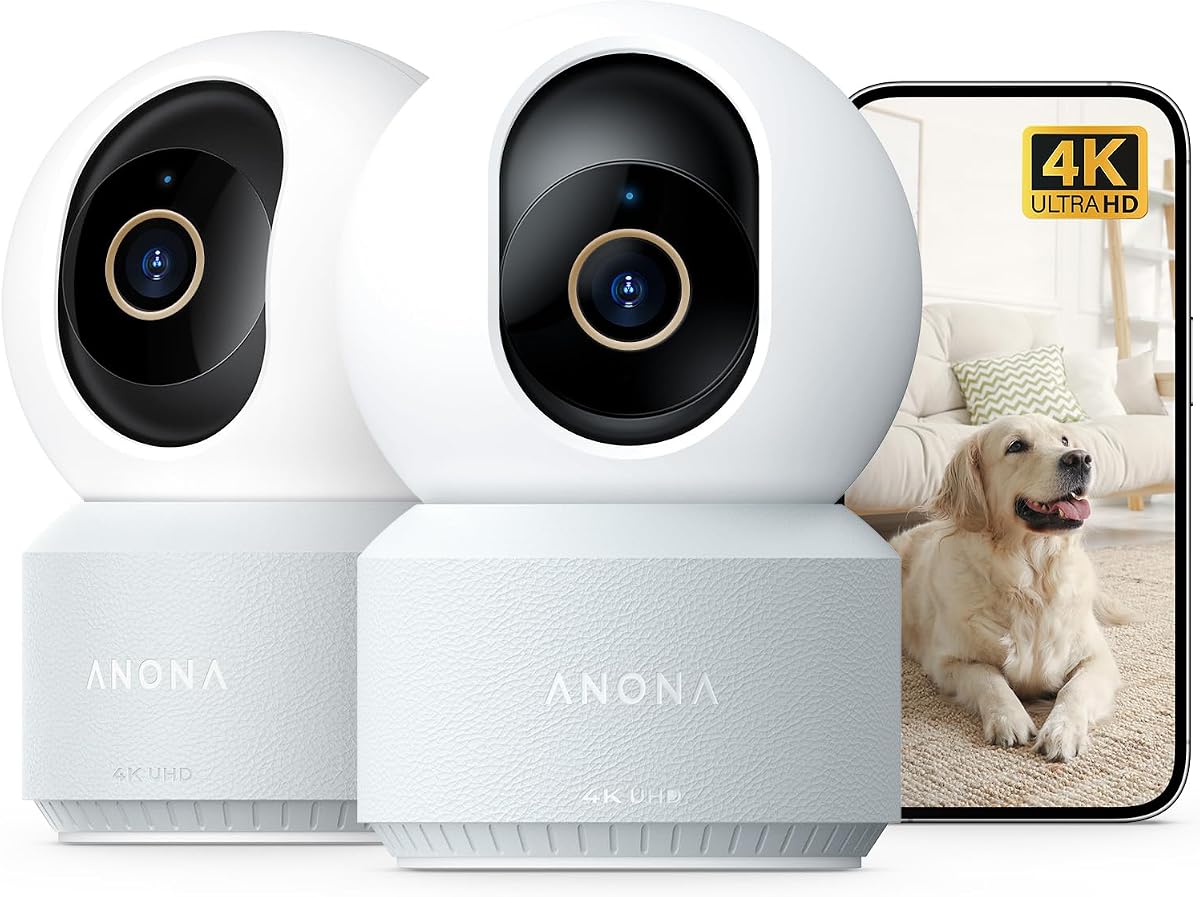
The two-camera Anona package is a strong choice for monitoring more than one area, such as a parent's bedroom and a nearby living space. Each camera provides 4K UHD video, 8x zoom, 360-degree pan, 110-degree tilt, and automatic subject tracking.
We may earn a commission when you buy through this link, at no additional cost to you.
The cameras use dual-band WiFi 6 and provide AI detection for people, pets, and crying, with notifications sent through the phone app. Two-way audio adds another layer of communication, and privacy mode can help limit unwanted viewing during private moments.
Users can choose encrypted cloud storage or local microSD recording with cards up to 512GB. The cards are not included, and there is no built-in display for the older adult, so most daily interaction will still take place through a family member's smartphone.
This set is especially useful for families that want broad coverage in two rooms. It is a better fit than a single-camera bundle when the additional coverage matters, but users who mainly need a simple screen for one parent should consider a screen-equipped alternative.
Two cameras make it possible to watch a sleeping parent and a common living area without relying on two unrelated systems. The matching feature set also makes setup and app navigation more consistent.
Privacy mode is an important advantage in a bedroom or private care setting. Caregivers can use it alongside their own communication habits to make monitoring feel less intrusive while still retaining movement alerts.
We may earn a commission when you buy through this link, at no additional cost to you.
The HelloBaby 6-inch No WiFi Monitor stands out with a large IPS display, dedicated camera-to-handset connection, and a battery rated for 18 to 33 hours. Its 4.5 rating and room-focused features make it a premium option for a caregiver who wants a dedicated viewing device.
We may earn a commission when you buy through this link, at no additional cost to you.
The camera pans 355 degrees and tilts 120 degrees, while the wide-angle lens expands the room coverage. Infrared night vision supports low-light viewing, and two-way audio allows the person watching the display to speak with the older adult.
Unlike cloud-connected cameras, this monitor does not require an app or household WiFi. The connection uses 2.4GHz FHSS with digital encryption, which reduces internet-account dependence. However, the viewing screen must remain with the person responsible for monitoring, so it does not offer the same remote phone access as a WiFi camera.
This is the leading premium pick for nighttime checks, travel, or homes with unreliable internet. It is also a strong option for an adult who benefits from a large, obvious display, provided the caregiver can keep the handheld monitor nearby.
The 6-inch IPS panel is easier to read than a small phone screen and can be useful during overnight or daytime checks. Its larger viewing area also reduces the need to pan the camera repeatedly to follow activity.
Operating without WiFi or an app means the camera does not depend on a cloud account or the home's internet connection. Digital encryption adds a layer of protection for the direct camera-to-monitor link.
We may earn a commission when you buy through this link, at no additional cost to you.
The Smart Clock 2K Camera combines monitoring, a visible clock, an alarm, and a night light in one indoor device. Its 4.4 rating and discreet design make it especially appropriate for a parent's bedroom, where a conventional camera might feel more conspicuous.
We may earn a commission when you buy through this link, at no additional cost to you.
The camera supports 2.4GHz and 5GHz WiFi, AI human detection, and motion tracking. Color night vision uses low-light imaging to preserve visible color, while the clock indicator and night light offer three adjustable brightness levels for nighttime navigation.
It provides local TF-card recording from 8GB to 256GB and optional cloud storage for remote access. The 5200mAh battery is advertised to operate for at least 12 hours, and the camera can be connected to continuous power for a more permanent arrangement.
The clock and gentle night illumination improve its suitability for a senior bedroom, but it does not provide a screen on which the parent can initiate a call. It is therefore best for family members who monitor remotely and want the camera to blend into the room.
Combining the camera with a clock and night light reduces the need for separate bedside devices. The adjustable illumination can help an older adult orient the room at night while the camera remains active.
Color night vision can make it easier to identify clothing, room conditions, and general activity than a conventional monochrome infrared image. The 2K resolution also provides a useful balance between detail and everyday network use.
We may earn a commission when you buy through this link, at no additional cost to you.
The Tapo 2K Pan Tilt C210 combines a strong 4.5 rating with broad room coverage, two-way audio, and flexible local storage. It is a highly practical phone-connected option for families that want dependable remote monitoring without paying for cloud storage as a requirement.
We may earn a commission when you buy through this link, at no additional cost to you.
Its 360-degree horizontal and 114-degree vertical movement cover most indoor spaces, while 2K resolution captures clear details. Motion, person, and baby-crying detection can trigger notifications, and smart detection is designed to distinguish pets from people.
Recordings can be stored on a microSD card of up to 512GB, while Tapo Care remains available as an optional cloud subscription. The camera works with Alexa and Google Assistant ecosystems, although Google streaming is limited to compatible Chromecast and Nest displays.
This is the best budget-oriented phone-connected option in the guide, though it requires 2.4GHz WiFi. Families with a senior who dislikes smartphone apps may find a screen-equipped model easier, but the C210 is a strong general-purpose choice.
The nearly complete horizontal pan and generous vertical tilt make it easy to cover a bedroom or living room without installing multiple fixed cameras. Motorized movement also helps a family inspect different areas during a live check.
Person, motion, and crying notifications work without a recurring monitoring fee. Local card storage gives families a way to retain recordings while controlling the ongoing cost and availability of cloud access.
We may earn a commission when you buy through this link, at no additional cost to you.
The four-camera Anona bundle is the most comprehensive option in this guide, providing 4K UHD monitoring across several areas. Its 4.5 rating and consistent feature set make it well suited to larger homes, multiple generations, or a parent moving between rooms.
We may earn a commission when you buy through this link, at no additional cost to you.
Every camera supports 8x zoom, 360-degree pan, 110-degree tilt, and auto-tracking. AI detection identifies people, pets, and crying, while dual-band WiFi 6 helps maintain stable connectivity. Two-way audio and privacy mode add communication and control options that are valuable in a caregiving context.
Users can retain footage on microSD cards of up to 512GB or use AES-128 encrypted cloud storage. The cards are not included, and four cameras create more installation, charging, and privacy-management responsibilities than a single unit.
This package is best for families who want monitoring in several rooms and can manage the setup intelligently. It is less attractive for one parent who needs a simple display because the older adult would still interact with the cameras through a family member's phone.
A four-camera package can cover a bedroom, hallway, kitchen, and living room without relying on one camera with a limited field of view. Consistent specifications make the cameras easier to operate as a coordinated system.
The combination of 4K capture, 8x zoom, and optional auto-tracking adds context to a room check. Local and cloud choices let families decide where recordings live and how they are accessed.
We may earn a commission when you buy through this link, at no additional cost to you.
The HelloBaby HB6550 is a proven-style dedicated monitor with a 5-inch color display, remote camera movement, and a 4.5 customer rating. Although designed around baby monitoring, its screen, night vision, and two-way audio translate well to checking on an elderly parent.
We may earn a commission when you buy through this link, at no additional cost to you.
The camera rotates 355 degrees horizontally and 120 degrees vertically, with 2x zoom for closer inspection. Infrared night vision supports low-light viewing, and the monitor permits two-way conversations. A dedicated 2.4GHz FHSS connection with digital encryption removes the need for an app or household internet service.
Additional features include a room-temperature monitor, eight lullabies, a sound-level indicator, an audio-only power-saving mode, and tabletop or wall mounting. It can expand to as many as four cameras, allowing a family to monitor several rooms, although the handheld display must stay with the caregiver.
This is an attractive option for families seeking a dedicated, expandable, internet-free monitoring setup. It is less suitable for relatives who need to check in from work or travel, since live access is limited to the monitor paired with the cameras.
Support for up to four cameras makes the system more flexible than a single-camera unit. It can be useful in a home where an older adult moves among a bedroom, hallway, and living room.
The encrypted direct connection is useful when WiFi service is unreliable or the family prefers not to route camera access through an internet account. The handheld design remains dependent on the display being nearby.
We may earn a commission when you buy through this link, at no additional cost to you.
The most useful camera is the one an older adult can understand and a caregiver can rely on. Compare communication methods, field of view, nighttime visibility, storage, connectivity, power, and privacy controls before making a selection.
An elderly parent should not need to unlock a phone, open an app, locate a contact, and learn where to start a video call. A screen-equipped camera with a physical call button can provide a much more familiar interaction, allowing the older adult to request a conversation directly from the room.
Prioritize one-button calling, a large display, clear speaker volume, and two-way audio. Confirm that the intended family members can receive calls through compatible smartphones or another camera unit.
Resolution alone does not guarantee a useful image, but higher formats such as 2K and 4K can make a parent's movements, room conditions, and everyday activity easier to distinguish. A wide-angle lens also reduces the number of blind spots, while zoom is useful for checking a distant table, chair, or doorway.
Choose the lowest setting that provides the detail you actually need while considering nighttime performance. Higher resolution can also require more storage and bandwidth than lower-resolution alternatives.
A fixed camera works best in a small, predictable space, but motorized pan and tilt models can cover a larger bedroom or living room. Look for a broad horizontal range, useful vertical tilt, and auto-tracking if the parent moves frequently during the day.
Check the stated viewing angles before installation. A camera positioned too close to a wall may achieve less effective coverage than the advertised range suggests.
Many check-ins occur at night, so infrared night vision is essential. Color night vision can add useful context, while a separate night light may help an older adult navigate safely after getting out of bed.
Consider the room's darkness, the distance from the camera, and whether visible illumination would be disruptive. A screen on the monitor may also need brightness adjustments for nighttime viewing.
Basic motion alerts notify a caregiver of any movement, while person detection can reduce irrelevant alerts. Crying detection may prove useful in family homes with infants, and auto-tracking can keep a moving subject in frame.
Decide which notifications should be active to avoid alert fatigue. A camera intended for one parent may need person detection, while a busy shared home may benefit from specialized sound or subject categories.
Local microSD storage allows a family to manage recordings without requiring cloud service, while cloud storage makes remote access and organization more convenient. The Anona models support local cards up to 512GB, and the Tapo C210 also supports cards up to 512GB.
Check whether the card is included, what recording modes are available, and whether continuous recording is supported. Consider where footage will be stored, who can access it, and whether cloud service is optional or necessary.
WiFi cameras need a reliable home network, and some support both 2.4GHz and 5GHz while others are limited to 2.4GHz. Dedicated monitors avoid internet dependence but require the display to remain near the caregiver. Battery-powered cameras offer flexible placement, while corded units provide continuous operation.
Match the power plan to the location. A bedroom with a nearby outlet may favor continuous power, while a temporary care location or hallway without power can benefit from a rechargeable battery.
A camera in a bedroom or bathroom requires careful placement, consent, and privacy controls. Look for a physical or app-based privacy mode, a screen that can be turned off, encrypted storage, and a dedicated connection that does not depend on a cloud account.
Accessibility is equally important. Favor a large display, straightforward controls, two-way audio, and a process that lets the older adult initiate contact. Explain the camera's purpose and establish which alerts the family will monitor.
Begin by discussing the camera with the older adult and explaining what it records, when it alerts, and who can view the feed. Place it in a private but common area, frame the bed or main walkway, and avoid positioning it where the image is intrusive. For screen-equipped devices, demonstrate the call button and have the parent make a test call before relying on it during an urgent situation.
Connect the camera to the app or dedicated monitor, update its firmware, confirm the date and time, and test live viewing, motion notifications, night vision, and two-way audio. Place alerts on the family member's phone, create a strong and unique wireless password, and enable available privacy modes. If local storage is selected, use a compatible high-speed card and verify that recordings appear as expected.
For maintenance, follow the manufacturer's charging and cleaning instructions, keep the lens free of dust, and check the connection after a router or network change. Review notification settings regularly so that the system remains informative rather than overwhelming. Families should also revisit placement as mobility, lighting, and care routines change.
A camera with a built-in screen and a physical one-button call function is generally the most accessible. The older adult can request a video call without navigating a smartphone, while the camera also provides motion monitoring for relatives. A dedicated monitor can also be easy to operate, but the caregiver must keep its display nearby.
Two-way audio is useful because it allows a family member to speak with the parent rather than only watching silently. It is especially helpful for reassurance, medication reminders, or short check-ins. The parent should first be shown how to use the microphone and adjust the speaker volume so both sides can be heard clearly.
A no-WiFi monitor can be preferable when privacy, reliable connectivity, or simplicity is a priority. The camera connects directly to the included display, so there is no app or home internet requirement. Its main limitation is that the display cannot generally provide live viewing to relatives working or traveling away from the home.
At least 2K is a strong starting point for a room where you want to distinguish movement and inspect details, while 4K offers additional refinement. Resolution should be considered alongside night vision, field of view, motion controls, and storage. A well-positioned 2K camera may be more useful than a high-resolution camera aimed in the wrong direction.
Place it where it can capture the bed, doorway, and usual walking route without obstructing the space. A high shelf or corner can provide a broad view, but check the image from the app to eliminate glare, backlighting, and blind spots. Avoid installing it in a bathroom or private location without the older adult's informed consent.
For several cameras in this guide, local microSD storage provides a way to save recordings without relying on cloud service. You will still need a compatible card, which is not included with some products, and remote access depends on the camera and its app rather than a browser-based cloud viewer. Always verify the manufacturer's current storage requirements.
Battery power is useful where outlets are inconvenient, during temporary care arrangements, or as a flexible backup. The Funstorm camera emphasizes a long advertised standby period, while the Smart Clock model includes a rechargeable battery. For continuous everyday monitoring, a reliable power connection may be more dependable, and the Funstorm package does not include a power adapter.
Use person detection, define useful motion zones if the app provides them, and adjust notification sensitivity for the room. Position the camera to capture the main care area rather than a frequently disturbed window or hallway. Reviewing the live view periodically can also reveal sources of irrelevant movement that should be corrected.
The Two Way Video Camera is the most complete choice for families that want a visible screen and simple device-initiated calls, while the Tapo 2K Pan Tilt C210 offers the most approachable phone-connected monitoring package. The HelloBaby 6-Inch Monitor is the premium dedicated option for caregivers who value a large display and a connection that does not depend on internet service.
Prioritize the features your parent will actually use. A one-button interface matters more than a long feature list when communication is difficult, while a 2K or 4K image, useful night vision, broad coverage, and dependable alerts matter more for a family member monitoring remotely. Storage, privacy modes, network compatibility, and power should be checked before installation.
Current prices, promotions, app capabilities, and cloud terms can change, so review the latest listing and manufacturer instructions before purchasing. The right nanny cam for elderly parents balances technical capability with a setup that feels understandable, respectful, and dependable to the older adult.