
CyberPower ST625U
4.5Editor score
625VA standby power capacity
Eight protected NEMA outlets
Two shared USB charging ports
This guide compares 10 Cyberpower UPS Battery Backup models for capacity, outlets, protection, displays, and everyday use.
A UPS battery backup helps computers, networking equipment, and other sensitive electronics remain powered during outages and voltage fluctuations. A useful CyberPower model should offer enough capacity, suitable outlets, dependable surge protection, and clear battery information without adding unnecessary complexity to a home or office setup.
The products in this guide are compared using their stated capacity, power output, outlet configuration, battery protection, display capabilities, connectivity, warranty, and management features. The list covers compact standby units, intelligent LCD systems, pure sine wave models, and options designed for higher-capacity servers, storage, and telecom equipment.
Each review explains the product's strongest qualities, practical limitations, and likely users. The CyberPower CP1500PFCLCD leads as a well-rounded pure sine wave option, while other models stand out for economy, runtime, outlet availability, or advanced monitoring. Product availability and pricing can change, so check current listings before buying.
4.5Editor score

4.5Editor score

4.6Editor score
This side-by-side comparison highlights the major differences among the ten CyberPower UPS models, including power capacity, waveform type, outlet count, monitoring features, and connectivity. It is designed to make it easier to identify the right balance of protection, capacity, and functionality for your equipment.




The CyberPower CP1500PFCLCD combines a 1500VA power capacity with pure sine wave output and a 1000-watt maximum, earning it a 4.5 customer rating in the supplied product data. It is particularly well suited to computers with Active PFC or conventional power supplies, as well as workstations, network devices, and telecom equipment. The color LCD and extensive outlet arrangement make it a versatile choice for a home office or professional equipment area.
We may earn a commission when you buy through this link, at no additional cost to you.
One of the model's defining advantages is its pure sine wave output. Rather than relying on the stepped or modified waveform found in many budget-oriented UPS systems, it produces smoother power that pairs well with modern computers and sensitive electronics. Automatic voltage regulation corrects minor fluctuations without needlessly moving the system to battery power, helping preserve runtime and reduce unnecessary battery cycling. Twelve NEMA 5-15R outlets split evenly between six battery-backed positions and six surge-only positions.
The display adds practical value by reporting detailed battery and power conditions. It tilts up to 22 degrees for easier viewing, while its color alerts can flag potential issues before they affect connected equipment. The right-angle input plug and five-foot cord help the unit fit into tighter spaces, and one Type-A and one Type-C USB port allow phones and tablets to charge directly. The three-year warranty includes the battery, and the stated connected equipment guarantee is $500,000.
The trade-off is size and cost relative to compact standby models, along with the need to ensure connected equipment remains within the 1000-watt limit. Nevertheless, this is an ideal general-purpose model for buyers who want pure wave output, extensive protection, abundant outlets, and informative monitoring in one unit. It is our strongest all-around recommendation for a desktop, network, or mixed electronics installation.
The pure sine wave output is the CP1500PFCLCD's most important technical distinction. It is especially appropriate for Active PFC and conventional computer power supplies, providing smoother output than a simulated sine wave model.
The color LCD presents battery status and power conditions at a glance, while the tilt-up screen improves visibility. Type-A and Type-C USB ports add convenient charging for compatible mobile devices without occupying the AC outlets.
We may earn a commission when you buy through this link, at no additional cost to you.
The CyberPower EC850LCD is an 850VA Ecologic UPS with a 4.4 customer rating in the supplied data. It offers six battery-backed and surge-protected outlets plus six additional surge-protected outlets, including three controlled by ECO mode. This configuration makes it useful for home offices and entertainment areas where a computer, monitor, router, and several peripherals need protection.
We may earn a commission when you buy through this link, at no additional cost to you.
Its standout feature is automatic ECO mode. When the connected computer is turned off or enters sleep mode, the UPS can shut off power to compatible peripherals on the ECO-controlled outlets. This reduces unnecessary standby consumption and can lower energy use over time. A multifunction LCD provides immediate information about battery and power conditions, allowing users to check the system without interpreting a collection of separate indicator lights.
The right-angle NEMA 5-15P plug, offset by 45 degrees, and five-foot power cord can make installation easier in places where a straight plug would prevent the unit from sitting flush against a wall. The UPS also includes PowerPanel Personal Edition management software for download. Its three-year warranty includes the battery, and it carries a stated $100,000 connected equipment guarantee.
Its limitations are meaningful for some shoppers. There are no built-in USB charging ports, and 850VA provides less headroom than the 1350VA or 1500VA models in this list. The output type is not described as pure sine wave in the supplied information, making it less compelling for setups specifically requiring smoother battery output. For users who value automatic peripheral control, abundant AC outlets, and straightforward monitoring, it remains a practical choice.
Three outlets can be assigned to peripherals that do not need to remain active when the main computer is off or sleeping. Automatic shutdown helps eliminate unnecessary standby power draw.
With six battery-backed outlets and six surge-only outlets, the EC850LCD provides more connection choices than many compact UPS units. The arrangement allows essential equipment to remain on backup while less critical accessories receive surge protection only.
We may earn a commission when you buy through this link, at no additional cost to you.
The CyberPower CP1500AVRLCD3 combines 1500VA and 900 watts of capacity with an intelligent color LCD and 12 AC outlets. Its 4.5 customer rating reflects a balanced feature set for workstations, networking devices, and home entertainment equipment. It is a natural choice for users who want more headroom and outlets than the EC850LCD without moving to a pure sine wave model.
We may earn a commission when you buy through this link, at no additional cost to you.
Six outlets provide battery backup and surge protection, while the other six provide surge protection. The display gives detailed power and battery information and uses color alerts to warn users about developing problems. Automatic voltage regulation corrects minor fluctuations without switching to battery operation, which helps avoid unnecessary battery use. A Type-A and Type-C USB port are included for charging compatible phones and tablets.
The product uses simulated sine wave technology, so buyers with equipment that specifically requires pure sine wave output should choose the CP1500PFCLCD or PR1500LCD instead. The CP1500AVRLCD3 also has a right-angle input plug and a six-foot cord, making it easier to place near furniture or in a workstation area. Its three-year warranty includes the battery, and the connected equipment guarantee is stated at $500,000.
Overall, this model delivers strong capacity, plentiful outlets, convenient charging, and clear monitoring in a general-purpose desktop UPS. It is a particularly good fit for an office where several computers, displays, and network accessories need surge protection, provided the connected load remains within 900 watts and simulated sine wave output is acceptable.
The multifunction color LCD reports immediate battery and power conditions. Its alerts are intended to identify potential issues before they interrupt a workstation or cause avoidable downtime.
The 1500VA/900W rating provides useful capacity for a multi-device desktop setup. Automatic voltage regulation also helps manage minor line fluctuations without draining the battery unnecessarily.
We may earn a commission when you buy through this link, at no additional cost to you.
The CyberPower AVRG900LCD is a 900VA, 480-watt intelligent UPS with a 4.6 customer rating in the supplied product information. It is designed for desktop computers, workstations, networking devices, and home entertainment components. Its combination of 12 outlets and a detailed display makes it especially useful where several low-to-moderate power devices need surge protection.
We may earn a commission when you buy through this link, at no additional cost to you.
Six outlets supply battery backup and surge protection, and six additional outlets are surge protected. Data line protection helps stop surges traveling through telephone lines from damaging connected electronics. Automatic voltage regulation corrects small fluctuations without moving the system to battery power, while the intelligent LCD gives users detailed information about operating conditions.
The 480-watt maximum output is the main constraint. It is less suitable for power-hungry desktop systems or numerous high-draw entertainment devices, and the product uses simulated sine wave output. There are also no USB charging ports. On the positive side, the right-angle NEMA 5-15P plug, offset 45 degrees, and five-foot cord support flexible placement in home offices and entertainment areas.
This model is best for buyers protecting a modest collection of essential electronics, particularly when telephone or network-related surge protection matters. The three-year warranty includes the battery, and the stated connected equipment guarantee is $200,000. For that audience, the abundant outlet count and easy-to-read monitoring make it a straightforward and dependable choice.
Data line protection guards against surges entering through telephone lines. This is particularly relevant for network-connected equipment and communications hardware located near the same wiring paths.
The intelligent LCD reports detailed battery and power conditions, helping users understand the unit's status without relying on separate software or a collection of indicator lights. The included management software adds further visibility.
We may earn a commission when you buy through this link, at no additional cost to you.
The CyberPower ST625U is a 625VA, 360-watt standby UPS that carries a 4.5 customer rating in the supplied data. It is aimed at home offices and home entertainment systems, including computers, gaming consoles, and broadband routers. The model is a straightforward way to add outage protection and surge suppression without the larger footprint or feature set of a 1500VA unit.
We may earn a commission when you buy through this link, at no additional cost to you.
It has eight NEMA 5-15R outlets, divided between four battery-backed and surge-protected positions and four surge-only positions. Two USB charging ports share 2.1 amps for phones, tablets, MP3 players, and other mobile devices. LED indicators communicate power-on and wiring-fault status, providing essential feedback without a detailed LCD screen.
The GreenPower UPS high-efficiency design uses a compact charger and power inverter to reduce power consumption. Output is simulated sine wave, and the relatively modest 360-watt limit means the total connected load must be carefully managed. The five-foot input cord and standard NEMA 5-15P plug make installation familiar, while the three-year warranty includes the battery.
This is a sensible option for a single computer and networking setup, or for a smaller entertainment system where surge protection matters as much as extended runtime. Its strengths are simplicity, efficient standby operation, and useful USB charging. Users needing more runtime, more outlets, or detailed monitoring should step up to one of the LCD-equipped models.
GreenPower UPS high-efficiency technology is intended to reduce standby power consumption. That makes the ST625U a practical option for users who want basic protection without a feature-heavy unit.
Four outlets provide battery backup for essential equipment, while four more offer surge protection. Two shared USB ports add mobile-device charging and keep charging cables from occupying AC sockets.
We may earn a commission when you buy through this link, at no additional cost to you.
The CyberPower PR1500LCD is a 1500VA pure sine wave UPS with a 1500-watt maximum output and a 4.6 customer rating in the supplied data. It targets corporate servers, department servers, storage appliances, network devices, and telecom installations. Compared with many 1500VA models, its unusually high watt rating makes it particularly compelling for equipment with a substantial power draw.
We may earn a commission when you buy through this link, at no additional cost to you.
Eight NEMA 5-15R outlets provide battery backup and surge protection, with a six-foot cord and straight input plug. The output is designed for Active PFC and conventional power supplies, offering smooth pure sine wave power during an outage. Automatic voltage regulation corrects minor fluctuations without switching to battery mode, helping preserve the battery and maintain normal operation.
Its most unusual convenience is the removable, extendable LCD panel. A four-and-a-half-foot attached cable allows the screen to be relocated from a rack or hard-to-reach installation, while the main unit displays detailed power and battery conditions. Remote management is possible when a compatible RMCARD205 is installed, although that card is sold separately. The stated connected equipment guarantee is $375,000, and the three-year warranty covers the battery.
The main drawback is that eight outlets are fewer than the twelve offered by several 1500VA rivals, so careful outlet allocation may be necessary in a crowded server area. Optional remote management also means additional planning and a separate purchase for network administration. Even so, the combination of 1500 watts, pure sine wave output, and a repositionable display makes this a premium choice for demanding professional equipment.
The attached 4.5-foot cable allows the multifunction LCD to be placed where it is easier to see and operate. This is useful in server rooms, cabinets, and other installations where the UPS body may be difficult to access.
The 1500-watt maximum provides more usable power than the 900-watt and 810-watt models in this list. Pure sine wave output also makes it well matched to modern computer and network power supplies.
We may earn a commission when you buy through this link, at no additional cost to you.
The CyberPower CP1500AVRLCD is a 1500VA, 900-watt intelligent LCD UPS with a 4.5 customer rating. It provides simulated sine wave backup for workstations, networking devices, and home entertainment equipment. The model's defining advantage is its 12-outlet layout, which gives users plenty of places to connect a computer, display, network gear, and other protected devices.
We may earn a commission when you buy through this link, at no additional cost to you.
Six outlets deliver battery backup and surge protection, while the remaining six are surge protected. The multifunction LCD shows estimated runtime, battery capacity, load capacity, and other operating details. This is especially helpful when deciding which devices can remain connected or how much runtime is likely to be available under the current load.
Automatic voltage regulation corrects minor fluctuations without moving to battery power, and the stated purpose includes extending battery life by avoiding unnecessary transfers. The right-angle NEMA 5-15P input plug is offset by 45 degrees, making it easier to position the unit against a wall or beside other equipment. A six-foot power cord offers additional placement flexibility.
Compared with the newer CP1500AVRLCD3, this model lacks color alerts and USB charging ports, but its core capacity, outlet count, intelligent display, and protection remain strong. The product uses simulated rather than pure sine wave output, so it is not the first choice for equipment with strict waveform requirements. It remains a solid pick for a high-outlet desktop installation, with a three-year battery warranty and stated $500,000 connected equipment guarantee.
Twelve NEMA outlets are useful when several peripherals need surge protection and multiple core devices require actual battery backup. The split configuration gives buyers control over which equipment receives runtime.
The intelligent display estimates runtime and reports load and battery capacity. These readouts help users make better decisions about connected loads and remaining backup time.
We may earn a commission when you buy through this link, at no additional cost to you.
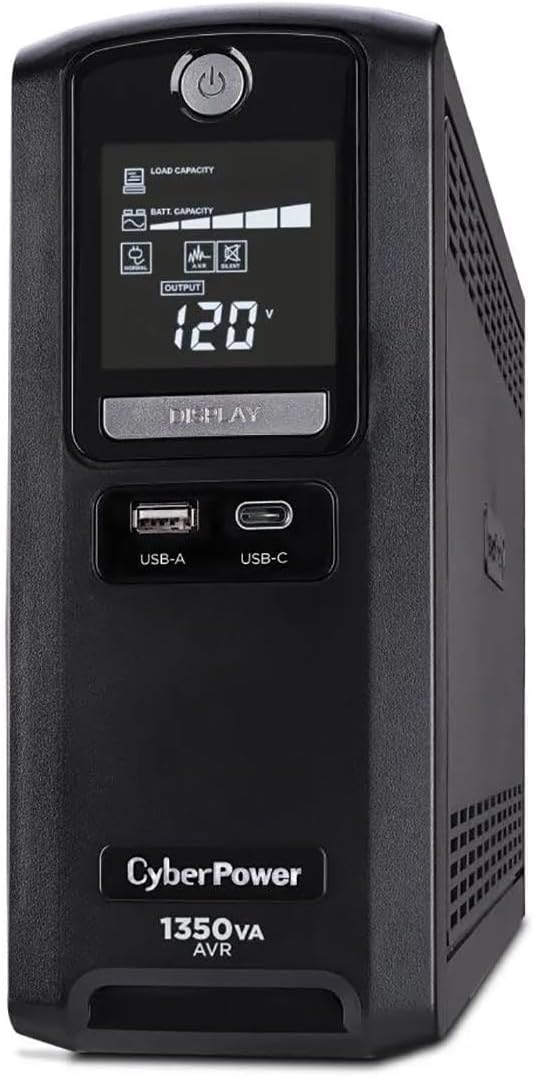
The CyberPower CST135UC stands out with a 4.9 customer rating, the highest rating among the products in the supplied data. Its 1350VA/810W capacity, multifunction LCD, and ten AC outlets make it a strong general-purpose option. The unit is also notable for combining extensive surge protection, data-line protection, USB charging, and energy-efficient operation.
We may earn a commission when you buy through this link, at no additional cost to you.
Five outlets provide battery and surge protection, while five additional outlets provide surge protection. Dual Type-A and Type-C USB ports share 4 amps of charging capacity. The advanced protection package includes 1500 joules of surge suppression, EMI/RFI filtration, and network and coaxial data-line protection. A multifunction LCD, HID-compliant USB port, and PowerPanel Personal software provide monitoring and control.
Runtime is the principal limitation. The stated figures are approximately two minutes at full load and ten minutes at half load, making this more appropriate for brief power interruptions, graceful shutdowns, and surge protection than for prolonged operation of every connected device. GreenPower UPS Bypass Technology and ENERGY STAR certification indicate an emphasis on reducing energy consumption and environmental impact.
The simulated sine wave output also places it below pure wave models for certain modern or sensitive loads. Even so, the CST135UC is an attractive option for a mixed desktop installation where users want a detailed display, strong surge suppression, connectivity protection, and convenient charging. Buyers who need extended runtime should evaluate their load carefully and compare it with systems offering greater endurance.
The stated 1500-joule suppression, EMI/RFI filtration, and network/coax protection create a broad defensive layer. These features help protect connected systems from both large surges and line noise.
The LCD, HID-compliant USB connection, and downloadable PowerPanel Personal software give users several ways to monitor the unit. GreenPower bypass technology and ENERGY STAR certification support lower standby consumption.
We may earn a commission when you buy through this link, at no additional cost to you.
The CyberPower BRG1500AVRLCD2 combines 1500VA/900W capacity, a color LCD, and 12 outlets, earning a 4.7 customer rating in the supplied data. It is designed for workstations, networking devices, and home entertainment systems. Its generous outlet count and long warranty make it especially compelling for buyers who want a well-equipped, high-capacity unit.
We may earn a commission when you buy through this link, at no additional cost to you.
Six outlets deliver battery backup and surge protection, and six provide surge protection. The color multifunction LCD shows detailed operating information and can alert users to potential issues. A Type-A and Type-C USB port are included for mobile-device charging, while automatic voltage regulation corrects minor fluctuations without switching to battery power and helps extend battery life.
Remote management can be added with a compatible RMCARD205, RCCARD100, or RWCCARD100 card, but none is included. The five-year warranty includes the battery, exceeding the three-year coverage listed for several other 1500VA models, and the stated connected equipment guarantee is $500,000. Downloadable PowerPanel management software supports system visibility.
Its simulated sine wave output means it is less appropriate for setups that require pure sine wave power. Beyond that, the BRG1500AVRLCD2 is a flexible, well-protected general-purpose choice. It works particularly well for a desk with several computers, displays, network devices, and charging needs, provided optional remote monitoring is not required immediately.
The included five-year warranty is a meaningful advantage in this category. It provides a longer stated coverage period than the three-year protection offered by many competing models in the list.
Compatible optional management cards can add remote visibility for installations that need centralized oversight. The base unit remains suitable for local monitoring through its color LCD and PowerPanel software.
We may earn a commission when you buy through this link, at no additional cost to you.
The CyberPower OR1500LCDRT2U is a 1500VA smart app LCD UPS with a 4.5 customer rating in the supplied data. It is designed for users who want app-oriented remote monitoring and detailed local status information. The multifunction screen displays runtime in minutes, battery status, and power conditions, giving operators a quick view of possible problems.
We may earn a commission when you buy through this link, at no additional cost to you.
Remote management requires an optional remote management card. Once the appropriate hardware is installed, the smart app approach can offer more convenient oversight than checking the unit physically. Local monitoring remains available through the LCD, and the included PowerPanel Business Edition software provides downloadable management support for the intended professional environment.
Automatic voltage regulation corrects minor power fluctuations without transferring to battery power, helping preserve runtime and extend battery life. The product includes a three-year warranty covering the batteries and a stated $300,000 connected equipment guarantee. These features make it relevant to offices and equipment areas where monitoring and support coverage are priorities.
The supplied information is comparatively limited, so buyers should verify the exact outlet count, watt rating, and connection requirements on the current listing. A separate remote card is necessary for remote management, adding an extra component to the setup. Despite that, the OR1500LCDRT2U is a compelling choice for a professional installation that values app-based oversight, clear battery reporting, and AVR protection.
Runtime, battery state, and current power conditions are shown on the multifunction LCD. These details can help users recognize deterioration or changing demand before connected equipment is disrupted.
The smart app capability depends on an optional remote management card. Users should account for that extra card when planning a remotely monitored installation rather than assuming remote access is included.
We may earn a commission when you buy through this link, at no additional cost to you.
Selecting a CyberPower UPS requires balancing runtime, electrical compatibility, outlet availability, protection features, and monitoring needs. The most important starting point is the combined load of the devices you expect to connect, followed by a careful review of waveform and connection requirements.
Begin by estimating the combined running wattage of the computer, monitor, router, external storage, and any other equipment that will receive battery backup. Compare that estimate with the UPS's maximum watt rating, not just its VA figure. The list includes units rated from 360 to 1500 watts, so the difference can determine whether a small setup or a larger workstation is supported. High-draw gaming equipment, multiple displays, and storage systems can consume power quickly during an outage.
VA describes the unit's apparent power capacity, while watts represent real power output. A 1500VA model does not necessarily provide 1500 watts of usable real power because power factor and load characteristics affect the relationship. The PR1500LCD is the exception within this group that is explicitly rated for 1500 watts, while other 1500VA units are listed at 900 watts. Review both numbers before connecting a system with power-hungry components.
Pure sine wave output provides smoother AC power and is explicitly designed for Active PFC and conventional computer power supplies. The CP1500PFCLCD and PR1500LCD both use this approach. Simulated sine wave models are common throughout the list and are listed for workstations, networking equipment, home entertainment, and other supported applications. If you are unsure about compatibility, check the power requirements of the device and select pure sine wave for the broadest fit.
Not every outlet necessarily provides battery runtime. Most models divide their NEMA 5-15R outlets between battery-backed and surge-only positions, so count the number of devices that need to remain operational during an outage. Six battery-backed outlets are common on the larger 1500VA units, while the ST625U offers four and the EC850LCD also includes ECO-controlled outlets. A standard plug and cord length are useful for placement near a wall, desk, or entertainment unit.
A detailed LCD can reveal estimated runtime, battery capacity, load capacity, and current power conditions, making it easier to manage connected equipment. The CP1500PFCLCD, CP1500AVRLCD3, and BRG1500AVRLCD2 use color displays, while the EC850LCD, AVRG900LCD, CP1500AVRLCD, CST135UC, and OR1500LCDRT2U provide multifunction status information. For remote installations, downloadable management software and optional cards expand oversight, though compatible hardware may need to be purchased separately.
A UPS also functions as a surge protector, but the models differ in the level of protection detailed. The CST135UC specifies 1500 joules of surge suppression, EMI/RFI filtration, and network and coaxial protection. The AVRG900LCD includes telephone-line data protection, and other systems emphasize surge protection across their AC outlets. Consider the types of lines entering your equipment, especially network, telephone, and coaxial connections, rather than assuming outlet protection covers every connection.
Runtime depends on how much power the connected equipment uses and how quickly the UPS transfers to battery operation. The CST135UC states approximately two minutes at full load and ten minutes at half load, illustrating why a lower load can materially extend runtime. For an important desktop, add your computer, displays, and network equipment to the same battery-backed group so the available reserve is not consumed by optional peripherals.
CyberPower's listed products generally include a three-year warranty covering the battery, while the BRG1500AVRLCD2 states five years of coverage. Connected equipment guarantees vary, ranging from $100,000 on the EC850LCD and ST625U to $500,000 on several 1500VA models. Review the current product documentation and policy terms because coverage details can change, and confirm that your equipment and installation fall within the applicable requirements.
Place the UPS on a stable, dry surface with adequate ventilation and leave space around it according to the current product documentation. Connect the right-angle or straight NEMA input plug to a grounded wall outlet, then use the LCD or indicator lights to confirm normal operation. Connect only essential equipment to battery-backed outlets, keeping less critical devices on surge-only or ECO-controlled outlets.
Install the relevant PowerPanel software if you want local or remote monitoring, and configure any optional management card required for your CyberPower model. Test the system by briefly transferring it to battery operation using the controls described in the manual. Confirm that connected equipment receives uninterrupted power, that the display reports an appropriate battery state, and that any firmware or software updates are completed through the official process.
For maintenance, keep the unit plugged in and the battery compartment accessible, and follow the recommended battery-testing and replacement schedule. Clean exterior vents without opening the housing, and avoid placing liquids or combustible materials near the unit. If the UPS reports a battery or wiring fault, check the installation first and contact CyberPower support when the issue persists. Never overload the unit beyond its rated output, and use only compatible equipment and accessories.
Runtime depends on the UPS capacity and the power drawn by connected equipment. A heavily loaded unit may provide only a few minutes, while a lighter load can last longer. Check the displayed runtime estimate after setup and use the most recent reading rather than relying on a generic duration. For maximum availability, connect only critical devices to battery-backed outlets.
Pure sine wave output is smoother and is explicitly suited to Active PFC and conventional power supplies. Simulated sine wave models use a modified waveform and are listed for many common computer, networking, and home entertainment applications. If you are unsure whether your device requires a smooth waveform, check its manual or select a pure sine wave model for broader compatibility.
No. The products in this guide generally divide their NEMA outlets between battery-backed and surge-only positions. The EC850LCD also includes three ECO-controlled outlets that can turn off compatible peripherals when the computer is off or asleep. Counting each type before connecting equipment helps preserve runtime and avoids unexpected shutdowns.
Yes, as long as the combined equipment load remains within the unit's maximum watt rating and all devices are compatible with its output type. Placing the monitor and router on battery-backed outlets can keep the core setup operating during an outage. Disconnect nonessential accessories when you need to extend runtime.
Battery life is finite, and replacement or service may eventually be necessary. The listed products carry warranties that include the battery for three years, with the BRG1500AVRLCD2 stating a five-year warranty. Follow the battery-testing and replacement guidance in the manual, and consult CyberPower support when runtime declines unexpectedly or the display reports a battery problem.
A UPS provides surge protection, but it also supplies battery power and regulates voltage when normal utility power is interrupted. A conventional surge protector only diverts or suppresses surge energy and cannot keep equipment running during an outage. The CyberPower units in this guide combine both functions, with varying numbers of protected outlets and battery-backed positions.
It is usually optional for a small home office where the LCD can be checked directly. Remote management becomes more useful when the UPS is located in a closet, server room, or another inaccessible area. The PR1500LCD and OR1500LCDRT2U support optional management hardware, while the BRG1500AVRLCD2 accepts several compatible card types.
Add the wattage of every device connected to battery-backed outlets and compare the total with the UPS's maximum output rating. Do not rely on the VA number alone because real power use can differ. Leave reasonable headroom for startup behavior and future equipment, especially when connecting gaming systems, multiple displays, or storage devices.
The CyberPower CP1500PFCLCD is the most well-rounded selection because it combines pure sine wave output, 1000 watts of capacity, 12 outlets, a color LCD, and USB charging. The ST625U serves buyers seeking a smaller and more economical standby unit, while the PR1500LCD stands out for professional equipment with its 1500-watt output, pure wave power, and relocatable display.
Prioritize wattage, waveform, and the number of battery-backed outlets before considering secondary features. A detailed screen and management software improve control, but they cannot compensate for insufficient capacity. Match the UPS to the devices that truly need to remain online, and use surge-only or ECO-controlled outlets for accessories that do not need to remain on battery power.
Before purchasing, verify the current listing, available outlets, optional accessories, warranty details, and compatibility with your equipment. Prices and configurations can change, and the best choice ultimately depends on your load, runtime needs, and operating environment rather than on a single specification.