
Deco S4 AC1900
4.5Editor score
Three included mesh units
Single-name seamless roaming
Gigabit wired backhaul support
Our Tp Link Mesh WiFi System guide compares coverage, Wi-Fi generations, wired backhaul, ports, roaming, security, and ideal home use for every household.
A TP-Link mesh Wi-Fi system can remove weak-signal rooms, simplify network control, and keep laptops, televisions, phones, consoles, and smart-home devices connected as you move through your home. The right model depends on floor-plan size, device count, internet speed, available wiring, and whether your household needs Wi-Fi 6, Wi-Fi 6E, or Wi-Fi 7.
We compared the ten systems in this guide by examining stated wireless speeds, coverage potential, supported device counts, backhaul options, Ethernet and high-speed ports, roaming technology, management features, security tools, and expandability. The list includes a budget-friendly AC1900 option, several Wi-Fi 6 systems, Wi-Fi 6E, dual-band Wi-Fi 7, and premium tri-band models.
Each review explains who the system suits, where its specifications stand out, and where practical limitations may apply. Ratings reflect the supplied customer feedback, while coverage and speed figures are manufacturer-stated maximums that can vary with layout, interference, device capabilities, and connections. Product selection, features, and pricing can change, so confirm current details before buying.
4.5Editor score

4.2Editor score

3.9Editor score
This side-by-side comparison highlights the major differences in wireless generation, aggregate speed class, coverage, backhaul, and Ethernet connectivity. It is designed to help you match a TP-Link Deco system to your home layout, internet service, device mix, and preferred balance of performance and simplicity.




The Deco 7 Pro BE10000 is a tri-band Wi-Fi 7 mesh system rated 4.2 by customers, and it stands out as the most balanced premium option in this guide. Its stated aggregate capability reaches 10 Gbps, while the three-band configuration provides room for modern clients, high-bandwidth applications, and demanding homes that want more headroom than a conventional dual-band system.
We may earn a commission when you buy through this link, at no additional cost to you.
Coverage is listed at up to 7,600 square feet for over 200 devices, making the package appropriate for large homes filled with televisions, computers, consoles, cameras, appliances, and other connected equipment. Each unit includes four 2.5G WAN/LAN ports and a USB 3.0 port, so wired installations can support faster local transfers and flexible connections. Simultaneous wired and wireless backhaul also gives administrators more ways to balance traffic among Deco units.
The mesh uses one network name and AI-driven roaming, while TP-Link HomeShield supplies network protection, parental controls, and real-time IoT security. VPN functionality can let home devices use a remote VPN server without installing individual VPN applications. These are meaningful advantages for households that want centralized management, but the system's capabilities go beyond what many apartments and smaller homes will actually use.
This is the recommendation for a large, active household that wants Wi-Fi 7, high-capacity ports, and expandable coverage without moving directly to the most specialized connectivity in the range. It is less compelling when internet access is modest or the connected clients are mostly older Wi-Fi 5 and Wi-Fi 6 equipment. Even in that case, the system remains a capable and forward-looking way to organize a home network.
The 6 GHz, 5 GHz, and 2.4 GHz radios give the Deco 7 Pro BE10000 an efficient way to separate traffic across bands. A dedicated high-capacity path can also support wireless backhaul, helping preserve throughput when a node is farther from the main unit.
Four 2.5G ports on each node make it easier to connect a desktop, game console, switch, or access point to a fast wired link. The USB 3.0 port and 10G-capable WAN/LAN design also provide useful infrastructure for a home that expects faster broadband or local storage in the future.
We may earn a commission when you buy through this link, at no additional cost to you.
The Deco 7 BE5000 carries a 4.3 rating and offers a streamlined path into Wi-Fi 7 mesh networking. Its four-stream dual-band design is listed at up to 4,324 Mbps on 5 GHz and 688 Mbps on 2.4 GHz, giving households a substantial theoretical ceiling without the complexity of a three-band system.
We may earn a commission when you buy through this link, at no additional cost to you.
The stated coverage area reaches 6,600 square feet for more than 150 devices, which fits a medium or large home with a broad collection of smart-home products. Support for both wireless and 2.5G Ethernet backhaul lets you use the configuration that best suits the building. If Ethernet can be run between nodes, wired backhaul is generally the more consistent way to carry traffic throughout the home.
The system includes AI-driven roaming, a single network name, VPN client and server support, and TP-Link HomeShield tools such as security scans, IoT device identification, basic parental controls, quality of service, and usage reports. A separate modem remains necessary for most internet connections, and adding another compatible Deco unit can expand the network when needed.
Choose the Deco 7 BE5000 if you want modern Wi-Fi 7 and 2.5G networking without paying for the highest possible aggregate class. It is a strong fit for families wanting a future-oriented upgrade from Wi-Fi 6, particularly when the home can use 2.5G wired backhaul between strategically placed units.
The system offers a clear move into Wi-Fi 7 while preserving the familiar two-band arrangement used by many mainstream mesh products. It is especially relevant to homes with newer laptops, phones, televisions, and other clients capable of taking advantage of faster wireless links.
The claimed 6,600-square-foot reach and support for more than 150 devices make this a flexible starting point. Additional compatible Deco hardware can be added when a new wing, office, or renovation creates a coverage gap.
We may earn a commission when you buy through this link, at no additional cost to you.
The Deco XE75 is a three-pack tri-band Wi-Fi 6E system with a 4.4 rating, making it one of the strongest customer-rated options here. It combines the familiar utility of Wi-Fi 6 with the cleaner 6 GHz band, and its stated aggregate speed of 5,400 Mbps provides considerable capacity for compatible modern devices.
We may earn a commission when you buy through this link, at no additional cost to you.
TP-Link lists coverage of up to 7,200 square feet and support for as many as 200 devices. The 6 GHz band can serve as backhaul by default, helping the nodes communicate without competing directly with ordinary client traffic on the 5 GHz and 2.4 GHz radios. It can also be configured as a client network for Wi-Fi 6E-compatible hardware when appropriate.
AI-driven mesh roaming, visual setup guidance, the Deco app, and Alexa support make administration approachable. HomeShield features include network scanning, IoT device identification, parental controls, quality of service, and reports. A modem is required for most internet providers, and the complete three-unit package is aimed primarily at homes that want broad coverage from the start.
The Deco XE75 is an attractive option for buyers who value tri-band design, reliable roaming, and strong feedback without requiring Wi-Fi 7. It remains particularly suitable for homes with 6 GHz-capable devices and for consumers who plan to use the 6 GHz radio for mesh backhaul. Those willing to adopt the newest standard should compare it with the Deco 7 family.
A 6 GHz radio can reduce competition from legacy devices and provide a dedicated path between mesh nodes. That separation is one of the main reasons to favor the XE75 over a similarly positioned dual-band system.
The included three-pack can be placed across a main floor, upper floor, and troublesome rear area. Its stated capacity for 200 devices suits busy homes in which many background connections must coexist with streaming and gaming.
We may earn a commission when you buy through this link, at no additional cost to you.
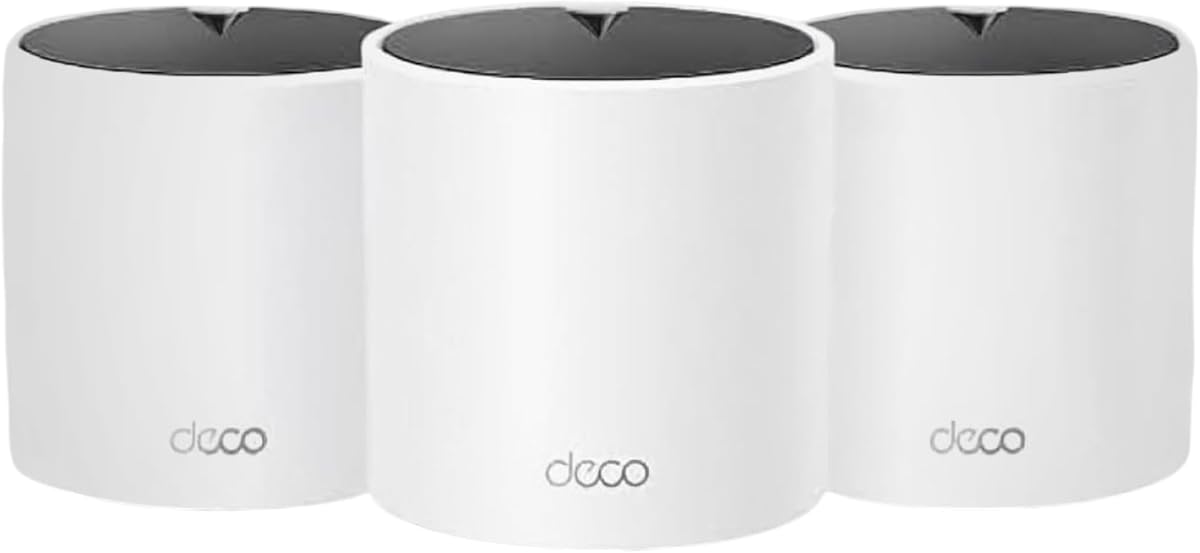
The Deco S4 AC1900 is a three-pack Wi-Fi 5 mesh system with a strong 4.5 rating. It offers a practical way to replace a main router and multiple range extenders with one coordinated network, and it remains especially compelling for buyers whose real requirement is dependable whole-home coverage rather than a new wireless standard.
We may earn a commission when you buy through this link, at no additional cost to you.
Each unit provides 2.4 GHz and 5 GHz connectivity, while the three-node system is stated to cover up to 5,500 square feet and support as many as 100 devices. Devices can roam under one network name and password, automatically moving between Deco units as the user travels through the home. Each node includes two Gigabit Ethernet ports, allowing wired backhaul for more stable node-to-node communication.
The Deco app provides guided setup, while robust parental controls let administrators create individual profiles, limit online time, and block inappropriate websites. Any of the units can operate as the router, which makes placement and troubleshooting more flexible. As with the other systems in this guide, a separate modem is generally needed to connect the network to an internet service.
The Deco S4 is recommended for cost-conscious households covering a medium home with common Wi-Fi 5 devices. It is not the right choice for households seeking Wi-Fi 6E, Wi-Fi 7, multi-gigabit ports, or the throughput of newer clients. Even so, its three included nodes, Gigabit backhaul, and straightforward roaming provide a mature and easy-to-maintain foundation.
For apartments and houses up to the stated 5,500-square-foot range, three nodes can eliminate many of the dead zones caused by a single router. The included hardware also removes the need to determine which additional extenders will interoperate reliably.
If Ethernet is available, connecting the units by cable can make roaming and multi-node performance more consistent. The two Gigabit ports on each S4 provide enough flexibility for a main internet connection, a wired client, or a backhaul link.
We may earn a commission when you buy through this link, at no additional cost to you.
The Deco 7 Pro BE14000 is a tri-band Wi-Fi 7 system with a 4.0 rating and a substantial hardware specification set. It targets large homes, high-speed broadband, and households seeking a direct upgrade path to newer wireless clients such as recent flagship phones, laptops, and game consoles.
We may earn a commission when you buy through this link, at no additional cost to you.
The system lists speeds of 8,647 Mbps on 6 GHz, 4,324 Mbps on 5 GHz, and 688 Mbps on 2.4 GHz, using eight streams across the available bands. Its claimed coverage reaches 8,100 square feet for more than 200 devices. Multi-Link Operation, Multi-RUs, and 4K-QAM are among the Wi-Fi 7 technologies associated with the platform, though benefits depend on compatible client hardware and network conditions.
Each unit includes 10 Gbps, 2.5 Gbps, and 1 Gbps WAN/LAN ports, plus USB 3.0. That is a substantial interface selection for a mesh node, and it supports multi-gig internet plans or fast local connections. The tri-band radio system can work alongside a 10 Gbps wired backhaul, giving administrators a strong path for reducing wireless-node bottlenecks.
This system is most convincing for an owner with a very large floor plan, a multi-gig service, and several recent Wi-Fi 7 devices. Its lower customer rating compared with several alternatives suggests buyers should examine feedback carefully, although the supplied information does not identify a specific hardware or reliability issue. For a less demanding home, the BE10000 model may deliver a more balanced configuration.
The inclusion of a 10 Gbps port on every unit removes a common bottleneck in premium mesh systems. It can serve a high-speed internet connection, a network bridge, or a particularly demanding wired device.
The BE14000 class offers considerable theoretical capacity, which can be valuable in homes with high-resolution media, cloud services, large downloads, and connected appliances. Real-world results remain tied to client radio support, application demand, signal conditions, and the quality of the backhaul path.
We may earn a commission when you buy through this link, at no additional cost to you.
The Deco X15 AX1500 is a three-pack Wi-Fi 6 mesh system with a 4.4 rating. It offers a balanced combination of modern wireless efficiency, broad stated coverage, and easy centralized management, making it a compelling general-purpose option for homes that are not yet ready to depend on Wi-Fi 7 equipment.
We may earn a commission when you buy through this link, at no additional cost to you.
The dual-band system is listed at 1,201 Mbps on 5 GHz and 300 Mbps on 2.4 GHz, with coverage up to 5,600 square feet. TP-Link states that its dynamic backhaul can support as many as 120 devices. Two Gigabit Ethernet ports on each unit provide options for wired clients and wired Ethernet backhaul, giving administrators a way to reduce reliance on the wireless path between nodes.
AI roaming helps the system maintain a unified name while adapting to network conditions, and the Deco app handles setup, security, and remote management. HomeShield tools include a security scan, IoT device identification, basic parental controls, quality of service, and scheduled reports. Voice assistants can be used for tasks such as enabling guest Wi-Fi or restarting the router.
The Deco X15 suits a household that wants to move beyond Wi-Fi 5 without paying for a tri-band platform. It is particularly useful for mixed device populations, where many clients use Wi-Fi 6 while others remain on older standards. Buyers seeking greater bandwidth, newer Wi-Fi 7 features, or faster Ethernet should move up to a higher-tier model.
Wi-Fi 6 improves network efficiency in busy environments where many devices compete for available airtime. The X15 can coordinate those connections under one network while retaining support for older wireless generations.
Dynamic backhaul allows the mesh to use its available bands intelligently when a wired connection is not in place. For homes with Ethernet, the Gigabit ports provide a preferable alternative for linking the three units and reducing unnecessary wireless traffic.
We may earn a commission when you buy through this link, at no additional cost to you.
The Deco 7 BE25 is a dual-band Wi-Fi 7 mesh system with a 4.2 rating. Its coverage target of up to 4,600 square feet makes it most appropriate for medium homes, apartments, and smaller floor plans where a three-node configuration can be placed more deliberately without unnecessary overlap.
We may earn a commission when you buy through this link, at no additional cost to you.
Its stated speeds reach 4,324 Mbps on 5 GHz and 688 Mbps on 2.4 GHz. The system supports more than 150 devices and can expand when another compatible Deco router is added. Wi-Fi 7 combined with 2.5G Ethernet backhaul provides an effective foundation for homes that want modern client compatibility and a reliable wired path between nearby nodes.
AI-driven roaming keeps the system under one network name, while HomeShield adds security scanning, IoT identification, parental controls, quality of service, and reports. VPN client and server support allows compatible home devices to use a remote VPN server while the system continues to support ordinary internet access. The free Deco app assists with setup, firmware updates, and management.
This is a sensible recommendation for buyers who want Wi-Fi 7 in a more compact coverage class. It may be less attractive if the home has several floors, many thick walls, extensive outdoor areas, or a long distance between nodes. In those situations, a larger tri-band package or a wired-backhaul plan will usually serve the layout better.
The BE25's stated 4,600-square-foot range is appropriate for homes where full-home coverage can be achieved with two or three thoughtfully placed units. It provides modern wireless standards without requiring the extensive hardware of a premium tri-band system.
Compatibility with additional Deco routers lets a household begin with a smaller network and extend it later. That makes the system practical for homes that may add space, change service, or develop new wireless dead zones over time.
We may earn a commission when you buy through this link, at no additional cost to you.
The Deco X55 AX3000 is a two-pack Wi-Fi 6 mesh system with a 4.3 rating. It combines a high aggregate speed class with three Gigabit Ethernet ports per node, offering more interface flexibility than many similarly priced mainstream alternatives without moving into tri-band territory.
We may earn a commission when you buy through this link, at no additional cost to you.
The system provides up to 2,402 Mbps on 5 GHz and 574 Mbps on 2.4 GHz. TP-Link lists coverage of up to 4,500 square feet and support for as many as 150 devices. Its two included units are designed for homes that can be covered effectively with a main floor and an upper floor, a main area and office, or another two-zone arrangement.
AI-driven mesh technology adapts to the home environment, and the Deco app provides guided installation and remote control. The units can use wired Ethernet backhaul for more consistent performance, while any node can function as the router. HomeShield includes basic network security, quality of service, and parental controls, along with the broader device-protection tools described in the supplied product information.
The Deco X55 is a balanced recommendation for buyers who want more speed than an entry-level dual-band system without the added complexity of a 6 GHz radio. Its major limitation is package size: only two units are included, so unusually large homes may need an additional compatible node. For smaller layouts, however, the combination of AX3000 performance and three Gigabit ports per unit is highly useful.
Each Deco X55 offers more Gigabit Ethernet connectivity than many two-band competitors. This provides useful options for a main internet connection, a backhaul cable, and a wired entertainment or office device at the same time.
A two-node package is often easier to place than a larger set because fewer overlapping radios can reduce unnecessary contention. It works well when one unit sits near the internet source and another covers the most problematic area.
We may earn a commission when you buy through this link, at no additional cost to you.
The Deco M5 AC1200 earns the highest customer rating in this selection, at 4.6, while offering an established three-node Wi-Fi 5 design. It remains a practical option for households that need dependable roaming and broad coverage more than they need the newest radio standard or high-speed multi-gigabit interfaces.
We may earn a commission when you buy through this link, at no additional cost to you.
The three M5 units are stated to cover up to 5,500 square feet. Adaptive routing automatically selects a favorable path for connected devices, while one network name and password allow clients to move between units without manually switching between extender networks. Each unit includes two Gigabit Ethernet ports, and any node can serve as the main router, giving the system useful placement flexibility.
Built-in network security and parental controls include antivirus protection, family scheduling tools, and quality of service features. The supplied product information also identifies a free lifetime HomeCare subscription, which adds confidence that core management tools will not disappear from the basic feature set. Setup is handled through the TP-Link Deco app, and Alexa compatibility adds another control option.
The Deco M5 is recommended for budget-minded families that need to eliminate dead zones across a medium home and prefer a proven mesh platform. It cannot offer the efficiency improvements, wider channels, or faster client links associated with Wi-Fi 6 and newer standards. If most connected devices already support Wi-Fi 6, choosing a current model may deliver a more future-proof result.
The M5 focuses on the central promise of mesh networking: one coordinated network that removes the need for separate extender names and passwords. Its high customer rating is reassuring for buyers prioritizing a mature experience.
Adaptive routing automatically selects the best available path for each connected device. This is especially useful in a three-node arrangement where radio congestion and distance can affect which path provides the most consistent result.
We may earn a commission when you buy through this link, at no additional cost to you.
The Deco 7 Elite BE85 is a tri-band Wi-Fi 7 mesh system with a 3.9 rating. It is the most specialized model in the guide, combining a BE22000 aggregate class, 320 MHz channels, multiple 10G connections, and fiber-compatible networking for households that want a high-end infrastructure platform.
We may earn a commission when you buy through this link, at no additional cost to you.
The stated band speeds are 11,520 Mbps on 6 GHz, 8,640 Mbps on 5 GHz, and 1,376 Mbps on 2.4 GHz. The two-pack is described as supporting more than 200 connected devices. Wi-Fi 7 features include Multi-Link Operation, Multi-RUs, and 4K-QAM, which can benefit compatible clients and demanding multi-device households.
Two 10G WAN/LAN ports are provided on each unit: one RJ45 connection and one SFPplus Fiber/RJ45 combo. Additional 2.5G ports and USB 3.0 expand the wired options. The system can operate wired and wireless backhaul simultaneously, helping combine high-capacity Ethernet with the flexibility of Wi-Fi 7 throughout the home.
This model is recommended for advanced users with multi-gig service, a fiber plan, extensive local storage, or enterprise-style network ambitions. Its 3.9 rating is the lowest among the ten systems, so careful evaluation of current customer feedback is warranted. Most households will not need this level of connectivity, making the BE10000 or BE14000 a more practical starting point.
The combination of RJ45, SFPplus, 2.5G, and USB connectivity gives the system unusual deployment flexibility. It can support conventional copper networks, compatible fiber arrangements, fast local storage, and multiple wired services without relying on a single-port approach.
The BE22000 class and 320 MHz channels provide exceptional theoretical capacity. That capacity is most meaningful when paired with recent Wi-Fi 7 clients, a fast internet service, a high-quality backhaul path, and an environment where many devices use the network simultaneously.
We may earn a commission when you buy through this link, at no additional cost to you.
Choosing a TP-Link Deco system involves balancing coverage, wireless generation, client capabilities, backhaul, and wired connectivity. A higher speed class is not automatically the right answer; the best configuration is the one that eliminates weak areas while supporting your devices, internet plan, and tolerance for setup complexity.
Begin by identifying the rooms that need reliable coverage, the number of floors, and the location of thick walls or other obstacles. Manufacturer coverage figures are maximum estimates, so they should be treated as a planning guide rather than a promise that every device will perform identically throughout the advertised area. A compact home may be served by two well-placed nodes, while a long or multistory property can benefit from three or more units. Placement matters more than adding redundant equipment: each node should have a clear line to the internet connection and enough separation to cover a distinct zone.
Choose a package that covers the entire property without forcing weak or excessively distant units to bridge large gaps. If the layout is unusually complex, plan for a wired-backhaul installation or consider a model with more advanced multi-band capacity.
The newest router standard cannot improve devices that lack the necessary radio support. Wi-Fi 5 systems remain useful for basic coverage, while Wi-Fi 6 improves efficiency in crowded environments. Wi-Fi 6E adds the 6 GHz band, which can provide cleaner spectrum or a dedicated backhaul path. Wi-Fi 7 introduces further capabilities for compatible high-end clients, including wider channels and multi-link features. Compare the computers, phones, televisions, consoles, and smart-home devices already in your home before committing to a platform.
Prioritize a current standard when devices are also current. A Wi-Fi 6 or 6E system offers a sensible balance for mixed households, while Wi-Fi 7 makes the most sense when several recent clients can benefit from its added performance.
Backhaul carries data between mesh units, so it strongly influences whole-home performance. Wired Ethernet backhaul is usually the most consistent option and is especially useful in homes where the internet source is far from the main coverage area. Wireless backhaul is easier to install and can work well with a tri-band system that dedicates a high-frequency radio to the task. Systems with 2.5G or 10G ports offer more bandwidth for demanding wired links, although the actual benefit depends on the clients and the service connected to the network.
Use Ethernet wherever practical, particularly between floors, through long corridors, or near high-bandwidth entertainment areas. If running cable is not feasible, favor a tri-band design and position nodes to maintain a strong wireless path.
Count the wired devices that will remain connected and consider future upgrades. Two Gigabit Ethernet ports per node are enough for a common main-router and backhaul arrangement, while three ports provide more freedom. Systems with 2.5G ports can support faster local networks, modern laptops, and certain storage or gaming devices. A 10G port can remove the bottleneck created by a multi-gig internet plan, and SFPplus connectivity may matter to buyers with compatible fiber service. Do not pay for advanced ports you will never use, but avoid a system that will need immediate replacement after a service upgrade.
Choose enough ports for both the internet source and wired backhaul, with one or two spare connections for stationary devices. High-speed ports are most valuable when the service, switch, and client can all take advantage of them.
Smart televisions, cameras, appliances, phones, computers, and consoles all create network demand, but they do not consume resources in exactly the same way. A modest household with many dormant sensors has different needs from a family streaming high-resolution video, playing online games, downloading large files, and working from several computers. Review the stated device capacity as a guide, then consider the aggregate speed class and backhaul quality for busy periods. The largest households benefit from systems that can support over 200 devices without compromising the connections that matter most.
For ordinary streaming and browsing, a Wi-Fi 6 dual-band system is often sufficient. High-volume homes, gamers, and users of local storage should favor faster backhaul, tri-band capacity, or 2.5G and 10G connectivity.
A mesh system should make the network easier to manage, not create more complexity. TP-Link's Deco app provides guided setup and central control, while HomeShield features include security scans, IoT device identification, parental controls, quality of service, and reporting on several models. Review capabilities such as guest networks, VPN client or server support, remote management, and voice-assistant integration. These features can be valuable, but basic setup quality and reliable roaming remain more important than a long collection of optional tools.
Prioritize a clear mobile interface, understandable profiles, and controls you will actually use. Families with young children may focus on scheduling and filtering, while privacy-focused users may look more closely at VPN support and IoT visibility.
A three-node package may be ideal initially, while a two-node package can be more appropriate for a smaller home. Deco systems are designed to work together and expand as coverage needs change, but buyers should verify the pack size and understand which units they are adding. Future renovations, new wings, offices, and outdoor access points can all justify keeping the mesh platform rather than replacing it. Expansion is most valuable if the added nodes provide clear coverage gains instead of creating excessive overlap in a compact area.
Start with the smallest practical number of nodes and add capacity where a real dead zone appears. This can create a cleaner network than placing every included unit in close proximity.
Customer ratings can reveal broad satisfaction, but they do not explain every installation issue. The ratings in this guide range from 3.9 to 4.6, and factors such as home construction, placement, expectations, and service quality can influence individual experiences. Read detailed feedback for recurring themes rather than treating the number as a performance test. Similarly, advertised wireless speeds are laboratory-style ceilings, not guaranteed application throughput. Real results depend on client capabilities, interference, distance, obstacles, backhaul, and the websites or services being accessed.
Use ratings as one signal and specifications as another. The strongest choice balances positive feedback with the exact features and capacity your home actually needs.
Begin by identifying the node that will connect to the modem or internet gateway. Place that unit in a central, open location rather than beside televisions, entertainment cabinets, thick walls, or enclosed utility spaces. Position the remaining nodes where they can extend coverage into separate zones, and avoid placing them so far apart that the wireless backhaul becomes weak. If Ethernet is available, connect the nodes with a wired link for more consistent performance.
Use the Deco app to create the network, set the main router node, and configure the remaining units as mesh nodes. Give the wireless network a strong password, update the firmware, and create a separate guest network for visitors or isolated devices. After setup, test important rooms, examine roaming between nodes, and check whether applications experience buffering or delay. If a node performs poorly, move it a few feet, raise it off the floor, and retest before making permanent changes.
For long-term care, keep the Deco app and firmware current, review connected devices periodically, and adjust parental controls as household needs change. Do not place units in direct sunlight, enclosed cabinets, or areas with excessive heat. Clean the vents gently with dry air, avoid moisture, and do not open the hardware. Periodically verify backhaul connections and reboot the main node during a quiet period if performance becomes inconsistent.
A Deco system can replace a standalone Wi-Fi router, but most internet service providers still require a compatible modem or gateway to deliver the connection. Connect the modem's Ethernet output to a WAN/LAN port on the main Deco unit. Some providers supply equipment that already combines modem and router functions, in which case that gateway may only need to be placed in bridge mode.
Wired Ethernet backhaul is generally the most consistent option because traffic between nodes does not compete with wireless client traffic. It also helps preserve the system's high-speed potential. Wireless backhaul is much easier to install and can perform well with tri-band hardware, particularly when nodes are placed close enough to maintain a strong link.
Wi-Fi 6 improves efficiency and performance in busy wireless environments, while Wi-Fi 6E adds the 6 GHz band for wider channels and cleaner spectrum. Wi-Fi 7 advances the platform with features such as wider 320 MHz channels, Multi-Link Operation, Multi-RUs, and 4K-QAM. Your actual improvement depends on whether the connected client devices support the newer standards.
The correct number depends on the building rather than a universal square-foot formula. A two-node system can work well in a medium home, while a three-node package often suits larger or multistory layouts. Start with enough units to create distinct coverage zones and avoid placing them so far apart that wireless backhaul becomes a bottleneck.
The supplied product information states that TP-Link Deco products are broadly compatible and can work together to form a mesh Wi-Fi network. Different models may have different radio classes and backhaul capabilities, however, so the fastest model and weakest model can influence network performance. Confirm compatibility and ensure every node supports the intended wireless generation before combining systems.
A mesh system primarily improves coverage and consistency, which can remove weak-signal bottlenecks in rooms that previously relied on a distant router. It cannot exceed the maximum speed delivered by the internet service or modem. Its highest benefits usually appear in areas that previously suffered from interference, congestion, or weak signals.
The listed systems provide access to tools such as security scans, IoT device identification, basic parental controls, quality of service, and weekly or monthly reports. Several Deco models also support remote VPN server access for home devices. Exact features can vary by model and current service terms, so review the in-app options after setup.
Place the main node near the modem in an open, central location with unobstructed access to the internet connection. Additional nodes should sit in the areas they need to cover, usually halfway between the main node and the weak zone. Keep units off the floor, away from enclosed cabinets, and positioned where radio signals can travel through the home naturally.
The Deco 7 Pro BE10000 is the strongest all-around recommendation for a large household seeking Wi-Fi 7, high-capacity backhaul, and useful multi-gigabit connectivity. The Deco S4 AC1900 delivers the most approachable mesh coverage experience, while the Deco 7 Elite BE85 serves buyers who need specialized 10G, fiber-compatible, and high-end Wi-Fi 7 infrastructure.
Prioritize the features your home will actually use: adequate node placement, a backhaul path that suits the building, compatible client devices, and enough Ethernet ports for wired equipment. A lower-tier system can outperform an expensive one when it is matched correctly, while a premium model becomes worthwhile when the service, devices, and layout can genuinely use its additional capacity.
Before making a final decision, verify the current package size, specifications, compatibility, and pricing for the exact product. Product details and market conditions can change, and the best choice is ultimately the one that gives every occupied area a stable connection without unnecessary complexity.