
Steelcase Series 1 Ergonomic Office Chair, Carpet Floors, Licorice
4.2Editor score
Weight-activated seat controls
Tool-free under-two-minute assembly
Flexible-edge padded seat
Carpet-floor wheel configuration
Discover the best Steelcase office chair options by comparing ergonomic support, adjustability, upholstery, floor compatibility, assembly, and key features.
A Steelcase office chair can improve focus, posture, and comfort during long workdays, but the most suitable model depends on your body, workspace, flooring, and preferred range of movement. The Series 1 emphasizes efficient everyday use, while Amia focuses on responsive lumbar support and the Gesture line offers extensive adjustment for varied postures.
This guide compares ten Steelcase office chairs across ergonomic design, seat and back support, arm adjustment, recline options, floor compatibility, assembly, upholstery, and practical features. The selections include carpet-floor and hard-floor configurations, multiple finish colors, fabric choices, and both standard and headrest-equipped designs.
Each review highlights the strongest reasons to consider a particular chair, along with trade-offs that may matter to different users. Ratings and product details reflect the supplied listings, while current pricing, availability, configurations, and shipping options can change, so check the latest listing details before making a purchase.
4.2Editor score

4.1Editor score

4.4Editor score
The comparison highlights each chair's main ergonomic systems, adjustment range, upholstery and floor setup, helping you distinguish efficient everyday seating from highly adjustable premium models.


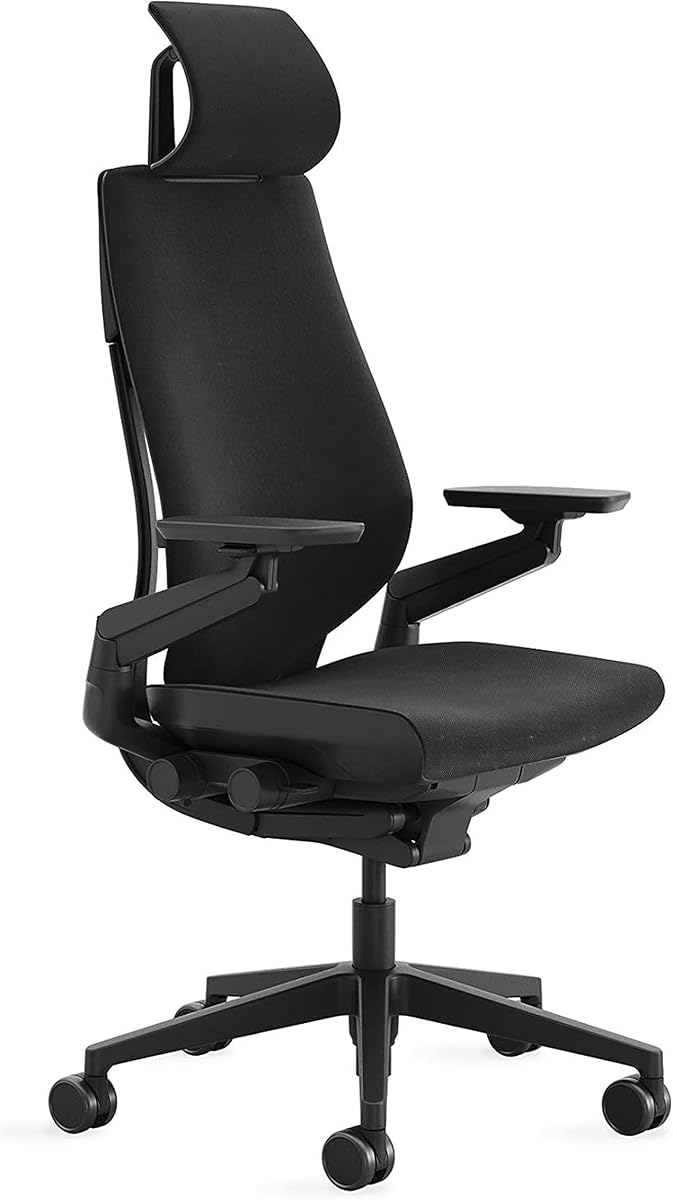


The Steelcase Series 1 in Licorice is a practical entry point for buyers who want recognizable Steelcase ergonomics without beginning with the Gesture line's extensive adjustment hardware. It carries a 4.2 customer rating, matching several of the strongest Series 1 variants in this roundup. Its streamlined design is particularly appealing for offices, studios, study rooms, and home workspaces where dependable support matters more than an oversized silhouette.
We may earn a commission when you buy through this link, at no additional cost to you.
The chair's most interesting feature is its weight-activated control system. Rather than requiring a user to remember several levers, the controls respond when weight is applied, helping the seating mechanism settle into the occupant's position. The seat also incorporates flexible edges and adaptive forearm bolstering, which can soften contact around the legs and arms. Optional four-dimensional arm support and an adjustable headrest are listed as available options, so the exact configuration should be verified on the product page.
The trade-off is that this model is designed for carpet floors, making the wheel choice a significant consideration. Buyers working over hard surfaces should not assume the wheels can be transferred or substituted without confirming compatibility. It also represents a more focused feature set than the Gesture, which provides multiple recline settings and notably mobile arms. Those omissions are reasonable if quick assembly, efficient proportions, and intuitive operation are the priorities.
This Licorice Series 1 is best for a straightforward office-chair upgrade, a student or remote worker seeking Steelcase support, and anyone who values simple setup. It is particularly persuasive as the budget-focused selection because it combines a favorable rating with quick, tool-free assembly and a space-conscious frame. Confirm the selected arm, headrest, upholstery, and floor-wheel configuration before ordering.
Weight-activated controls reduce the learning curve associated with a new task chair. The chair responds as the user settles in, making it easier to find a comfortable starting position before adjusting more specific features.
The Series 1's space-efficient construction works well where every foot of floor area matters. It offers a practical balance of ergonomic support and a relatively streamlined footprint for desks, shared offices, and study areas.
We may earn a commission when you buy through this link, at no additional cost to you.
The Graphite Series 1 offers the same core ergonomic philosophy as the top-ranked Licorice model but presents a more neutral, understated finish for a professional office. Its 4.2 customer rating places it among the stronger performers in the supplied product group. The chair combines Steelcase's weight-activated controls, flexible-edge seat, and adaptive forearm support in a format intended for practical, everyday work.
We may earn a commission when you buy through this link, at no additional cost to you.
Its strongest attraction is flexibility within a familiar design. The listing mentions optional four-dimensional arm support, allowing users to consider changes in arm height, width, pivot, and depth, as well as an adjustable headrest for additional upper-back support. These options can make the chair more accommodating in a shared workplace where users have different arm lengths and sitting preferences. Assembly is advertised as requiring no tools and taking less than two minutes.
Those benefits come with a comparatively restrained recline feature set. The supplied information does not describe the Gesture's three-position full recline or upright back lock, so buyers who frequently alternate between focused and relaxed positions may find the Gesture a more natural match. The Graphite version is also configured for carpet floors, which narrows its suitability for users on wood, tile, or other hard surfaces.
Choose this Series 1 for a conventional, adaptable office chair with a restrained appearance and solid customer feedback. It suits professionals, students, and home-office users who spend substantial time seated and want Steelcase ergonomics without the bulkier feature set of the premium Gesture options. Review the exact configuration carefully because available arm, headrest, and material options can change between listings.
Optional four-dimensional arms can help reduce shoulder and forearm strain by accommodating more than simple vertical movement. Users sharing a chair can also benefit from the adjustable headrest and lumbar-focused back support.
Tool-free assembly in less than two minutes simplifies setup in home offices and shared workplaces. It also limits the need to hire assembly help for an otherwise straightforward task-chair configuration.
We may earn a commission when you buy through this link, at no additional cost to you.
The Steelcase Amia in Buzz2 Black is selected as the Editor's Choice because it balances several forms of support without the extreme adjustment emphasis of the Gesture. Its 4.1 customer rating indicates broadly positive feedback, while the hidden LiveLumbar system is the defining feature. It is designed for people who need meaningful lower-back support during extended computer work but do not necessarily want to operate a highly complex premium chair.
We may earn a commission when you buy through this link, at no additional cost to you.
LiveLumbar is intended to respond to movement rather than remain in one fixed position. That dynamic approach can be useful as a user shifts, reaches, or reclines. The seat adds flexible edges and extra cushioning, and the listing describes pressure-free sitting for long work periods. Armrests adjust in height, width, pivot, and depth, giving users more ways to position their forearms than a basic office chair offers.
The Amia also supports a full recline range that can be locked upright, creating a useful transition between focused and relaxed positions. That flexibility comes with a more substantial design than the Series 1, and the Buzz2 fabric may be less appropriate if you prefer a smooth, easy-clean performance surface. The listing also notes Carbon Neutral availability, adding an environmental consideration without replacing the importance of physical comfort.
This is a strong all-around recommendation for office professionals, students, and remote workers who spend long periods seated. It is especially suitable for users who prioritize lumbar responsiveness and arm flexibility over the Gesture's multiple recline settings and 360-degree arms. Before ordering, verify upholstery, floor-wheel configuration, arm design, and sustainability designation in the current listing.
The concealed LiveLumbar system is designed to adapt as the user moves, providing dynamic support without a bulky external lumbar mechanism. It is a central reason to consider the Amia for long working sessions.
Flexible seat edges, extra cushioning, and four-dimensional armrests make it easier to change posture without repeatedly leaving the chair. The lockable upright position also supports focused work when the user wants a more vertical posture.
We may earn a commission when you buy through this link, at no additional cost to you.
The Buzz2 Blue Amia provides the same core ergonomic platform as the black version but adds a more noticeable color to the workspace. It holds a 4.1 customer rating and retains the hidden LiveLumbar system, making responsive lower-back support its strongest selling point. The result is a chair suited to both conservative offices and creative studios where seating can contribute to the room's visual character.
We may earn a commission when you buy through this link, at no additional cost to you.
The seat uses flexible edges, extra cushioning, and adjustable lumbar support to distribute contact more comfortably during extended use. Four-dimensional arms allow adjustment in height, width, pivot, and depth, which is particularly helpful for users who switch between keyboard work, mouse use, and more relaxed postures. Its full recline range can also be locked in the upright position, preserving a stable option for focused tasks.
As with the black Amia, this chair carries a fuller feature set than the Series 1 and may occupy more visual and physical space. Users who need only basic adjustability might find its support systems excessive, while those who work for long periods may appreciate the added versatility. Fabric is another personal consideration: the blue Buzz2 surface should suit your color preferences, but buyers focused on cleaning convenience may want to examine the material closely.
The Blue Amia is best for someone who wants proven Steelcase lumbar support and broad arm adjustment with a distinctive finish. It can work in a home office, corporate studio, collaborative workspace, or academic setting. Confirm the current wheel type, arm configuration, and product details on the listing, especially if floor protection is important.
The concealed support system keeps the Amia's silhouette sleek while preserving a responsive lumbar experience. The fabric color gives a more personal appearance than many neutral task chairs without compromising the core ergonomic design.
Height, width, pivot, and depth adjustments help bring the armrests into alignment with different users and desk activities. This reduces the need to compromise between mouse work, typing, and leaning back.
We may earn a commission when you buy through this link, at no additional cost to you.
This Series 1 Onyx Era configuration combines the established task-chair platform with a distinctive upholstery treatment. Its 4.2 customer rating matches the other well-reviewed Series 1 variants. The result is an efficient option for a carpeted office or home workspace where a refined appearance and straightforward setup matter as much as detailed recline adjustment.
We may earn a commission when you buy through this link, at no additional cost to you.
The chair retains Steelcase's weight-activated controls, space-efficient proportions, flexible-edge seat, and adaptive forearm bolstering. Those features help the chair accommodate the occupant and reduce pressure around common contact areas. Optional four-dimensional arm support and an adjustable headrest are also mentioned, giving the underlying platform some configurability when the selected listing includes those elements.
This version does not overcome the principal Series 1 trade-offs. Its wheels are intended for carpet floors, so hard-floor users should investigate a different configuration. It also lacks the specifically documented three-position recline system and freely moving 360-degree arms of the Gesture. The Onyx Era material may be visually refined, though the practical cleaning properties should be evaluated against the user's routine and any workplace requirements.
Choose this model for a buyer who values the Series 1's efficient, intuitive operation but prefers a more distinctive finish. It is well suited to professional home offices, design studios, and carpeted corporate spaces. Because optional components can affect the final setup, review the current listing for arm style, headrest availability, wheel type, and upholstery details before purchasing.
Onyx Era gives the familiar Series 1 a different visual character from basic black or neutral office seating. It can help a workstation feel more considered while retaining the proven underlying ergonomic structure.
The weight-activated mechanism makes the chair approachable for occasional users and shared workspaces. Once seated, users can understand how their body activates the controls before adding optional head or arm adjustments.
We may earn a commission when you buy through this link, at no additional cost to you.
The Steelcase Gesture in Coconut Yellow is the premium selection in this guide, and its 4.4 customer rating is the highest among the supplied products. It is designed for users who want a chair to adapt across many work postures rather than settle into a single fixed position. The Gesture's combination of responsive body support, mobile arms, accessible controls, and multiple recline settings gives it a clear advantage for intensive desk work.
We may earn a commission when you buy through this link, at no additional cost to you.
Its 360-degree arms stand out because they can move around the user instead of remaining fixed in one plane. Combined with a contoured back designed around the spine's natural shape, this makes the chair useful for reaching, leaning, switching tasks, or changing direction. A full recline range offers three settings, while an upright back lock supports straight, concentrated work. The adjustment mechanisms are conveniently grouped on the right side within arm's reach.
The premium complexity is the main trade-off. People who work in a fixed upright position and do not change posture frequently may not use every control, and the full-size design can be more visually substantial than the Series 1. The supplied listing is also configured for carpet floors. A buyer on hard flooring should select a compatible wheel option rather than assuming this configuration is appropriate.
This Gesture is best for professionals, designers, analysts, and other users who spend long hours at a desk and value extensive fit adjustment. It also suits people who alternate between focused typing, meetings, reading, and reclined breaks. Check the current configuration carefully, but among the listed carpet-floor models, its 4.4 rating and comprehensive adjustment system make it an especially compelling premium choice.
Three recline settings allow the user to select an appropriate balance between upright focus and relaxed support. The upright lock provides a stable alternative when concentration or a more vertical posture is required.
The 360-degree arms offer unusual freedom for a task chair. They can move out of the way during reaching or repositioning while remaining available for forearm support during desk tasks.
We may earn a commission when you buy through this link, at no additional cost to you.
The Nickel Series 1 is a bright, space-conscious option for carpeted workspaces that want Steelcase ergonomics without the expansive adjustment package of the Gesture. It has a 4.2 customer rating and follows the Series 1 formula of weight-activated controls, flexible-edge comfort, adaptive forearm bolstering, and efficient assembly.
We may earn a commission when you buy through this link, at no additional cost to you.
The chair's appeal lies in its adaptable core rather than a dramatic feature. Optional four-dimensional arms and an adjustable headrest allow the configuration to suit users who need more upper-body support. The lightweight-feeling setup process—described as requiring no tools and less than two minutes—also makes the model convenient for relocation, temporary workstations, and home offices.
The limitation is the simpler movement and recline system compared with premium alternatives. The supplied details do not indicate the Gesture's three-position full recline, upright lock, or 360-degree arms. It is also specified for carpet floors, so a hard-floor installation requires a different version. Buyers should not choose solely by finish when the floor and intended movement range are important functional considerations.
This Series 1 is a sensible recommendation for users who want a bright, compact-looking task chair with intuitive controls. It works especially well for a home office, study space, or carpeted shared workstation where setup convenience and efficient proportions matter. Confirm the included arm and headrest options, and verify that the selected wheel configuration matches the floor.
The Series 1 offers useful ergonomic shaping while remaining relatively space efficient. Nickel provides a brighter appearance that can keep a compact office from feeling overly utilitarian.
Four-dimensional arms and an adjustable headrest give the user additional ways to tailor the chair. These options are valuable for a shared office where different occupants need different levels of support.
We may earn a commission when you buy through this link, at no additional cost to you.
This Gesture with Headrest is the important hard-floor option in the roundup. Its title identifies a chair designed for hard floors, while the rest of the Gesture platform provides a contoured back, broad recline range, 360-degree arms, and right-side adjustment controls. The 4.1 customer rating suggests solid overall satisfaction, and the headrest gives it an additional layer of upper-body support.
We may earn a commission when you buy through this link, at no additional cost to you.
The integrated headrest is particularly useful for users who recline or who want additional support during long sessions. The Gesture's body-responsive approach is intended to accommodate different users and work postures, while its full recline range offers more relaxation options than the Series 1. Controls placed on the right side reduce the need to search around the chair when making frequent adjustments.
There are two important qualifications. First, not every user wants a headrest; a fixed or unwanted head support can interfere with a preferred posture, particularly if the user is shorter or does not recline. Second, the Gesture remains a substantial premium design with a more expansive adjustment system. Those features may be unnecessary in a small workstation, but they benefit users who regularly change posture.
Choose this chair for a hard-floor office or home workspace where a headrest and extensive adjustment are priorities. It is a strong match for users who want to alternate between upright work and reclined breaks without sacrificing access to controls. Verify the final wheel, upholstery, and headrest details in the listing, as configurations can vary.
The headrest supports the head and upper neck when the chair is reclined or when a user prefers additional upper-body contact. It makes the Gesture especially suitable for long periods of variable posture.
Choosing a configuration explicitly designed for hard floors can help avoid unnecessary rolling resistance and floor wear. Wheel compatibility should always be matched to the surface where the chair will be used.
We may earn a commission when you buy through this link, at no additional cost to you.
The Tangerine Orange Gesture combines the same extensive ergonomic platform as the Coconut Yellow version with an energetic finish. Its 4.4 customer rating ties for the strongest rating in this list. It is well suited to creative offices, studios, and modern workspaces where a highly adjustable chair can become a deliberate part of the room rather than a hidden utilitarian object.
We may earn a commission when you buy through this link, at no additional cost to you.
Three recline settings, 360-degree arms, and a contoured back make the Gesture particularly adaptable. Users can move through upright work, intermediate recline, and a more relaxed position while retaining support that follows the spine's natural shape. The right-side controls are positioned within reach, which is a practical detail when adjustments are needed frequently during a workday.
Its complexity may exceed what a user needs. Someone who sits in one upright position for short periods might find a simpler Series 1 more than sufficient. The carpet-floor wheel configuration is another essential consideration. The bright Tangerine finish also creates a strong visual statement and may not coordinate with a conservative office or fit a user's existing decor.
This Gesture is best for someone who wants both expressive styling and a broad range of posture changes. Its combination of high customer feedback and premium adjustability makes it one of the most complete chairs in the roundup. Check the listing for exact upholstery, arm, and recline configuration, and select a compatible wheel if the chair will be used on hard flooring.
Tangerine Orange brings energy to a chair category often dominated by black, gray, and blue. It can help creative and collaborative spaces feel welcoming while delivering the same Gesture adjustment system.
Distinct recline settings let the user match support to the task rather than treating recline as a single fixed feature. The upright lock is useful for maintaining a focused working position.
We may earn a commission when you buy through this link, at no additional cost to you.
The Graphite Light Series 1 rounds out the roundup as a versatile, traditional task chair with a strong 4.2 customer rating. It follows the familiar Series 1 strengths: weight-activated controls, space-efficient proportions, adaptive forearm bolstering, flexible-edge seat comfort, and tool-free assembly in less than two minutes.
We may earn a commission when you buy through this link, at no additional cost to you.
This version is especially relevant to shared offices because optional four-dimensional arm support and an adjustable headrest can help the chair accommodate different occupants. A lighter Graphite appearance may also blend more readily with a range of professional interiors than a highly saturated color. The chair remains designed for carpet floors, which should be confirmed before purchase.
Compared with the Amia and Gesture, the Series 1 offers a more focused set of adjustments. The supplied listing does not identify a multi-position full recline, upright lock, or 360-degree arm movement. Users who frequently alternate between aggressive recline and varied reaching positions may find those more specialized models worthwhile, while users seeking efficient daily ergonomics may prefer the simpler approach.
The Graphite Light is best for workrooms, carpeted home offices, and professional environments that want Steelcase support with quick installation and a restrained appearance. It combines useful adjustability with a manageable feature set, making it a practical endpoint to the list. Confirm whether the desired arm and headrest components are included in the selected configuration.
The Series 1's space-efficient profile is useful where several workers share a room. It provides task-chair ergonomics without the broader physical footprint associated with highly reclined premium seating.
No-tool assembly can be valuable when furniture delivery, room access, or time is limited. Weight-activated controls also make the chair easy for occasional users to adjust.
We may earn a commission when you buy through this link, at no additional cost to you.
The right Steelcase chair depends less on model prestige than on fit, adjustability, movement habits, upholstery preferences, floor type, and the amount of space available. Use the features below to identify which platform best matches your workday.
Back support should keep the spine in a comfortable, natural position while adapting to changes in posture. The Amia stands out for its concealed LiveLumbar system, which is designed to respond to movement, while the Gesture uses a contoured back that follows the spine's natural shape. Series 1 chairs emphasize practical, space-efficient support and include options for added back support rather than describing a single prominent lumbar mechanism. Consider whether you need dynamic support, a more sculpted fixed contour, or simple everyday support with optional head and arm adjustments.
Choose based on how you work. Dynamic support may be valuable during long or frequently changing sessions, while a contoured premium back may suit users who regularly recline. Check optional headrest and lumbar features carefully because availability varies by configuration.
Armrests affect shoulder, neck, and forearm comfort more than many buyers initially expect. The Amia and the optional Series 1 arm support offer four-dimensional movement, including height, width, pivot, and depth. The Gesture goes further with 360-degree arms that can move around the user during reaching or posture changes. More adjustment can improve fit across multiple users, but it also increases the chair's complexity and potentially its bulk.
For a shared office, four-dimensional arms are a practical middle ground. Choose 360-degree arms if you often reach sideways, work at irregular angles, or want the armrests to move out of the way. Users who need only a straightforward resting position may find a less complex option sufficient.
Recline is more than a comfort feature; it changes how you distribute pressure and alternate between focused and relaxed work. The Gesture has the most clearly documented range in this group, with a full recline, three settings, and an upright lock. The Amia also offers a full recline range that can be locked upright. The supplied Series 1 information focuses on weight activation, flexible edges, and adaptive bolstering rather than a comparable multi-position recline specification.
Frequent recliners should prioritize the Gesture or Amia. If you work predominantly upright and value a compact footprint, the Series 1 may be more appropriate. Locking the back upright is useful when you want movement without drifting into a relaxed angle during focused work.
Caster selection directly affects rolling performance and the appearance of the flooring. Most of the supplied chairs are specifically identified for carpet floors, while the Gesture with Headrest in Licorice is identified for hard floors. Using a carpet-floor configuration on a hard surface can produce additional rolling resistance, while a hard-floor caster on carpet may behave differently from the manufacturer's intended setup.
Identify whether you will use the chair on carpet, wood, tile, or another surface and select the matching configuration. If the floor changes, use a suitable chair mat and confirm caster compatibility. Do not assume all variants of the same model include the same wheels.
The Series 1 and Amia both highlight flexible edges, adaptive bolstering, and cushioning intended to reduce pressure around the legs and forearms. The Amia description specifically emphasizes extra cushioning and a pressure-free sitting experience for extended periods. The Series 1 presents a leaner, space-efficient design, while the Gesture focuses more heavily on posture, recline, and arm mobility.
Choose a flexible-edge seat if you dislike hard contact at the front of the thighs. If you sit for many hours, the Amia's additional cushioning and lumbar system may be a priority. If you change posture frequently, the Gesture's recline and arm movement may be more important than initial seat softness.
Upholstery affects both the visual character and everyday care. The roundup includes Licorice, Graphite, Nickel, Onyx Era, Buzz2 Black, Buzz2 Blue, Coconut Yellow, Tangerine Orange, and a Graphite Light configuration. Dark neutral finishes tend to blend into professional offices, while blue and the two bright Gesture colors can give a workspace more personality. Before committing, consider whether the material suits your cleaning routine and workplace requirements.
Choose a neutral finish for broad office compatibility and a brighter option for a creative environment. Inspect the fabric description and care guidance in the current listing. Appearance should be considered alongside adjustability rather than treated as the sole reason to choose one model.
A chair that feels comfortable in a showroom can be awkward beneath a compact desk or in a crowded room. The Series 1 is explicitly space efficient and assembles quickly, making it useful for smaller work areas and shared installations. The Gesture's mobile 360-degree arms, larger recline movement, and extensive adjustment hardware create a more expansive setup. Measure the available floor area, desk clearance, and intended recline path before ordering.
Choose the Series 1 when maneuvering space matters and your posture needs are moderate. Choose the Amia for a middle ground, or the Gesture when extensive movement and a premium footprint are acceptable. Leave enough space for the chair to recline without contacting walls, desks, or cables.
Ease of use can be as important as the number of features. Weight-activated controls make the Series 1 approachable, and its tool-free assembly in less than two minutes simplifies setup. The Gesture places intuitive adjustments on the right side within reach, while the Amia's LiveLumbar and four-dimensional arms are designed to respond and adapt with minimal conscious adjustment. A chair that is easy to operate is particularly valuable in shared offices.
For occasional users, favor intuitive controls and quick assembly. For daily long-session users, the Amia or Gesture can provide more active support. If a chair will be shared, test or review the available arm, headrest, and lumbar adjustments to ensure the chosen configuration can accommodate different bodies.
Begin by matching the chair to the floor and confirming that the included wheels, armrests, headrest, and other components match the selected listing. Place the chair on a clear, level surface, assemble it according to the included instructions, and allow the moving parts to settle before adjusting them. Sit back fully so the weight-activated controls can respond naturally.
Set seat height with your feet flat on the floor and thighs approximately parallel to it. Position the back and any lumbar support for a neutral spine, then adjust arm height, width, pivot, or depth so shoulders can remain relaxed and forearms can rest naturally. Set the recline and upright lock to match your work, and use the chair's movement rather than holding one rigid position for the entire day.
For care, follow the upholstery manufacturer's cleaning instructions and use a soft, slightly damp cloth for routine dust or marks. Avoid saturating fabric, harsh cleaners, and abrasive tools. Check caster movement, tighten loose fasteners only as directed, and rotate the chair periodically to reduce uneven wear. If comfort changes, recheck the adjustments before assuming the seat itself has deteriorated.
The Amia is a strong middle-ground choice because it combines dynamic LiveLumbar support, extra cushioning, four-dimensional arms, and a lockable upright recline. The Gesture offers an even broader adjustment range, including 360-degree arms and three recline settings, so highly variable work styles may favor it. Your floor type and the need for a headrest should also guide the final selection.
The Series 1 prioritizes an efficient footprint, weight-activated controls, flexible-edge comfort, and quick tool-free assembly. The Gesture places more emphasis on extensive adjustment, including 360-degree arms, a contoured back, multiple recline settings, and an upright lock. Series 1 is generally the simpler everyday option, while Gesture is built for users who actively change posture.
Choose the configuration made for your actual flooring. Most products in this roundup are identified for carpet floors, while the Gesture with Headrest in Licorice is listed for hard floors. The right caster helps with rolling performance, floor protection, and noise, so do not assume every wheel set is interchangeable.
LiveLumbar is a concealed support system designed to respond to the user's movement and provide dynamic lower-back support. Because it is integrated into the chair, it preserves a relatively sleek appearance. The Amia also combines the system with adjustable lumbar support, flexible seat edges, extra cushioning, and four-dimensional arms.
A headrest is most useful for people who recline or want extra upper-neck and head support. It is not essential for every user, and the right headrest height depends on body proportions and posture. The Gesture with Headrest is worth considering if you use the recline frequently; other users may prioritize arm and lumbar adjustment instead.
The supplied Series 1 listings state that no tools are required and that assembly can be completed in less than two minutes. Instructions for the Gesture and Amia may differ, so buyers should follow the guidance included with the specific model. Keeping the parts organized during assembly also makes the process easier.
A chair with four-dimensional arms and adjustable back or head support is well suited to multiple users because it can accommodate different dimensions. The Amia and Series 1 offer relevant options, while the Gesture provides the widest documented arm and recline movement. Confirm that the desired adjustment components are included in the exact listing.
Review height, lumbar, arm, and recline settings whenever you begin a new work arrangement, move desks, or notice that the chair no longer feels supportive. Periodic checks also help identify loose hardware or obstructed controls. Follow the manufacturer's instructions for tightening or servicing components.
The Steelcase Series 1 in Licorice is the budget-focused choice, combining a 4.2 rating with intuitive weight activation, flexible-edge comfort, and exceptionally quick tool-free assembly. The Amia in Buzz2 Black is the best-balanced option for users who prioritize dynamic lumbar support, four-dimensional arms, and a lockable recline, while the Gesture in Coconut Yellow is the premium selection for extensive adjustment and a 4.4 customer rating.
Before choosing, prioritize the features you will actually use. Choose the Series 1 for efficient everyday support, the Amia for responsive lower-back comfort, and the Gesture for multiple recline positions and highly mobile arms. Also verify floor compatibility, headrest availability, upholstery, desk clearance, and any optional components before placing an order.
Ratings and product configurations can change, as can current pricing and availability. Review the latest Amazon listing for the exact model, included accessories, selected finish, and delivery information. Comparing those final details against your body, work habits, flooring, and space will lead to the most suitable Steelcase office chair.