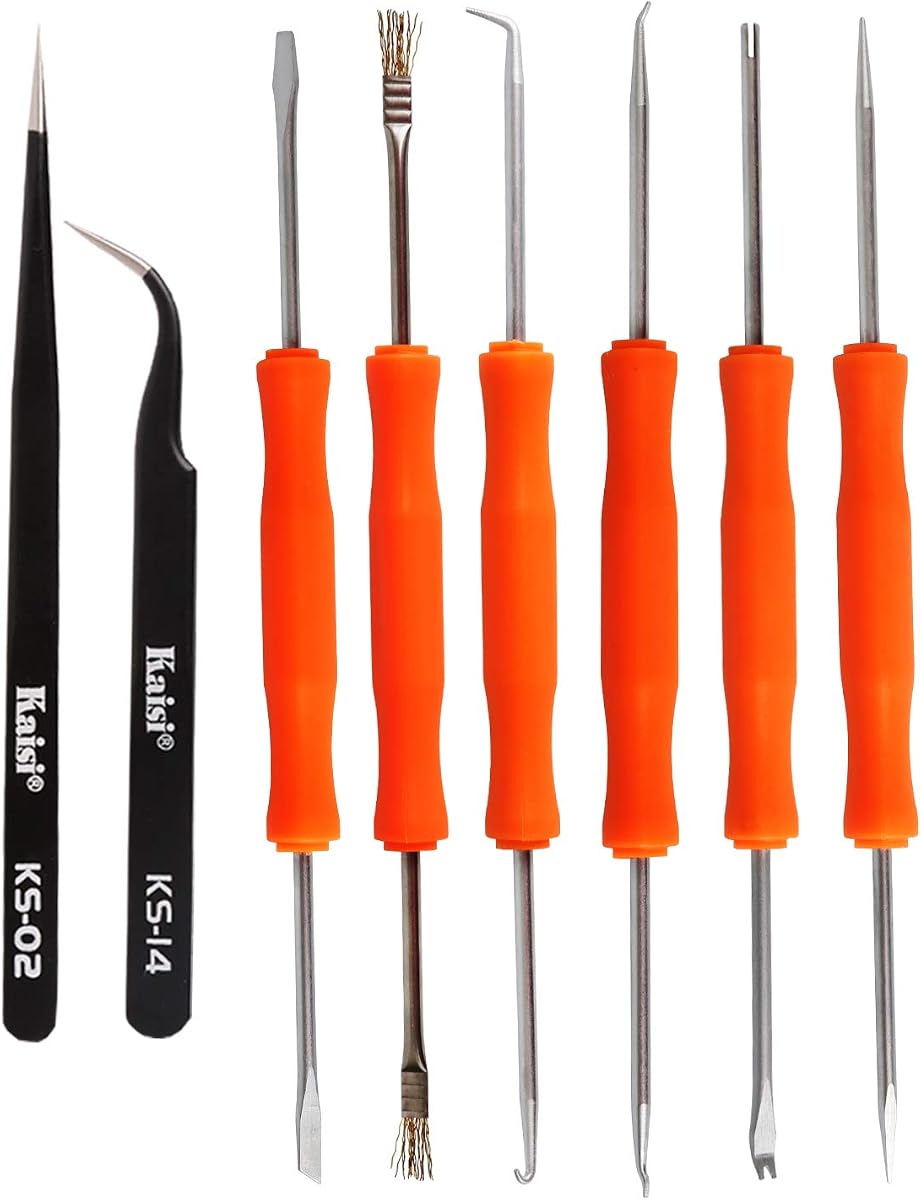
Kaisiking 6 Pcs Double Sided Soldering Assist Aid Repair Tool
4.7Editor score
Six double-sided assist tools
Two precision tweezers included
Hardened working tips
Multiple soldering and repair functions
Our soldering assist tools guide compares 10 double-sided repair picks, tweezers, magnifiers, and helping-hands stations for PCB work, jewelry, and fine crafts.
Soldering assist tools make delicate electronics work more controlled by helping position components, lift solder joints, clean residue, and hold a workpiece while your hands remain occupied. The right tool depends on whether you need compact PCB implements, precision tweezers, magnification, or adjustable alligator-clip stands for larger projects.
We compared all ten products by examining their stated construction, included accessories, working-end designs, versatility, and suitability for soldering, desoldering, cleaning, inspection, and crafts. The list covers double-sided implement sets, precision tweezers, weighted helping-hands stations, and magnifiers with flexible arms.
Each pick reveals a different way to improve bench work, from inexpensive all-purpose repair kits to feature-rich magnifying stations. Ratings and availability can change over time, so compare the current product details and check current prices before making a final purchasing decision.
4.7Editor score

4.5Editor score

4.5Editor score
This side-by-side comparison evaluates ten soldering aids across tool configuration, included accessories, magnification, holding capacity, and repair applications, helping readers distinguish between compact implements and bench-mounted assistance stations.


The Kaisiking 6 Pcs Double Sided Soldering Assist Aid Repair Tool combines six double-sided implements with two precision tweezers. Its 4.7 rating reflects a well-rounded package for hobbyists and technicians who want several common functions without relying on a large, specialized station.
We may earn a commission when you buy through this link, at no additional cost to you.
The implements cover pressing, cutting, scraping, hooking, and brushing, with hardened tips intended to control hot solder and manipulate small components. The stainless steel tweezers are described as anti-acid, anti-corrosion, non-magnetic, and non-sticky, while their machined tips are intended to align accurately around tiny parts.
The main limitation is that this is a hand-tool kit rather than a complete bench setup. It does not provide magnification, flexible holding arms, or a weighted base, so users must still position the work and hold the solder manually. Even so, the range of functions makes the set more versatile than a single-purpose pick.
Choose this kit when you want an affordable, portable collection for PCB assembly, desoldering, general electronics repair, jewelry making, and detailed crafts. It is our best overall pick because the eight-piece combination balances implement variety, tweezer precision, and compact storage.
Instead of changing between isolated implements, the user can press, cut, scrape, hook, and brush with differently shaped ends. That variety is particularly useful when a repair involves moving between component placement, joint cleanup, and general board maintenance.
The included tweezers add value for picking up small parts, aligning leads, and holding components while the solder is worked. Their precision-machined tips should appeal to anyone handling mobile-phone boards, headphones, radios, and other compact assemblies.
We may earn a commission when you buy through this link, at no additional cost to you.
The Professional Solder Assist Tool kit combines six double-sided soldering aids, five precision tweezers, and a blue wire cutter. Its 4.5 rating and broad component selection make it the most complete hand-operated toolkit in this comparison.
We may earn a commission when you buy through this link, at no additional cost to you.
Hardened working ends help control hot solder, while the flush cutter uses hardened stainless steel to maintain a sharp cutting edge. The tweezers feature an ergonomic, high-elasticity design and an anti-static surface treatment intended to improve handling and strength.
This package contains more tweezers than the other implement sets, which may be beneficial for users who handle several sizes of components. The trade-off is extra bulk compared with smaller kits, and it still lacks the magnification, flexible arms, and stable base found in helping-hands stations.
This is the best choice for electronics maintenance, precision component work, jewelry making, crafts, stamping, soldering, and desoldering. Pick it when having several tweezers and a dedicated cutter ready at the bench provides more value than owning a magnifying stand.
Five precision tweezers give the user more selection than the competing six- and eight-piece implement kits. This can be helpful when different tip shapes, sizes, or grip styles suit different board components and craft pieces.
The included hardened wire cutter expands the package beyond soldering assistance alone. It is useful for preparing small leads and trimming metal wire before those pieces are positioned on a circuit board.
We may earn a commission when you buy through this link, at no additional cost to you.
The 6Pcs Double Sided Soldering Assist Aid Repair Tool Welding Auxiliary includes six dual-function implements and two precision tweezers. No customer rating is supplied in the available product data, so its assessment here rests on the documented functions, materials, and intended applications.
We may earn a commission when you buy through this link, at no additional cost to you.
Its dual-ended design supports pressing, cutting, scraping, hooking, and brushing without requiring the user to swap between separate single-ended implements. Hardened tips, an orange-and-black ergonomic handle, and a lightweight package make it suitable for mobile-phone, radio, television, and headphone work.
Compared with larger kits, it does not include a wire cutter or multiple tweezers, and it provides no magnification or stable holder. Those omissions make it less suitable for extended inspection or tasks where a workpiece must be secured in both hands.
Choose it for portable PCB assembly, desoldering, jewelry making, and general DIY repair. It is a practical alternative for users who prioritize compact dual-function implements and a simple eight-piece package over bench-mounted features.
Each implement offers two working ends, allowing rapid transitions between pressing, scraping, cutting, hooking, and brushing. This design keeps frequently used actions within a single tool during a repair session.
The lightweight set can be packed into a small repair kit without adding a large stand. That portability is useful for technicians who move between a workbench, classroom, or mobile-device repair setting.
We may earn a commission when you buy through this link, at no additional cost to you.
The 6PCS Soldering Assist Tool Set uses six double-sided implements constructed from carbon steel with a black coated finish. Its 4.4 rating reflects a focused electronics kit designed for assembly, rework, cleaning, and small-part positioning.
We may earn a commission when you buy through this link, at no additional cost to you.
The listed working functions include pressing, drilling, prying, cutting, scraping, hooking, pulling, and brushing. Different shapes on each end let the user move between component placement, dismounting, board cleaning, hole processing, and desoldering without changing tools.
Its focused configuration is also its main limitation. Unlike several competing kits, it does not include precision tweezers, and it offers no magnifier or flexible arms for holding a board. The carbon steel construction also makes tip care more important than it would be with less reactive materials.
This set suits users focused on PCB assembly, desoldering, component dismounting, and general electronics repair. Select it when a compact set of clearly differentiated working ends matters more than having a complete station or several specialized accessories.
The range of tips directly supports common rework stages, from placing and lifting parts to cleaning residue and opening or processing holes. That focus makes the set easier to coordinate around electronics tasks.
Carbon steel provides the hardness needed for repeated bench use, while the black coating gives the tools a uniform finish. Users should keep the tips clean and dry to preserve their working condition.
We may earn a commission when you buy through this link, at no additional cost to you.
The 12Pcs Double Head Soldering Assist Tool is the largest hand-implement package in the list, with twelve double-head tools covering scraper, awl, brush, fork, hook, and presser-bar functions. No customer rating is supplied, so the documented package and functions are the main basis for this review.
We may earn a commission when you buy through this link, at no additional cost to you.
Most of the listed implements measure 165 millimeters, or 6.5 inches, while the brush measures 185 millimeters, or 7.28 inches. The longer brush can reach into confined areas, and the separate ends allow the user to position, lift, or adjust components during soldering and board welding.
The trade-offs are that this kit does not include tweezers, magnification, a wire cutter, or a bench holder. Its larger number of tools also demands more storage space and can make it harder to select the correct implement quickly if the kit is not organized.
Choose this set for home workshops, hobby electronics, small-device repair, and circuit-board work where several specialized shapes are important. It is especially useful for users who prefer manual picks over a magnifier-equipped helping-hands station.
The twelve-piece count provides more duplicate-style implements than any other manual kit here. Having several pick shapes on hand reduces the need to interrupt a repair to search for a single alternative.
A scraper, awl, brush, fork, hook, and presser bar cover distinctly different handling needs. The fork and hook can manage tiny parts, while the awl and scraper suit probing and cleaning operations.
We may earn a commission when you buy through this link, at no additional cost to you.
The Professional welding auxiliary tools set combines six double-sided soldering aids with two stainless steel ESD tweezers. Its 4.5 rating and compact configuration position it as a straightforward choice for electronics maintenance, precision components, and detailed craft work.
We may earn a commission when you buy through this link, at no additional cost to you.
The implements handle stamping, cutting, scraping, hooking, and brushing, all common requirements around soldering and desoldering. The tweezers are described as anti-static and non-sticky, making them suitable for picking up small objects on circuit boards without claiming that every tip is inherently immune to sticking.
Compared with the larger 12-piece manual set, this kit offers fewer tweezers and no dedicated cutter. It also lacks the magnification and adjustable holding structure of the station-style products, so it is best used with a separate light or magnifier when tiny joints require close inspection.
Choose it for mobile-phone motherboards, headphones, radios, televisions, stereos, toys, jewelry, and delicate crafts. It works particularly well for users who want anti-static tweezers and several common assist implements without carrying a full bench station.
The stainless steel tweezers feature an anti-static treatment suited to sensitive electronic work. Their role is to hold and reposition small parts while the user concentrates on the soldering iron.
The stated applications range from motherboards and audio equipment to jewelry and fine crafts. This breadth makes the set a practical general-purpose choice for mixed repair benches.
We may earn a commission when you buy through this link, at no additional cost to you.
The E-outstanding Heating Assist Repair Tool set consists of six double-sided soldering aids made from carbon steel with a black finish. Its 4.7 rating makes it one of the highest-rated manual kits in the comparison.
We may earn a commission when you buy through this link, at no additional cost to you.
The six implements consolidate twelve common operations: pressing, drilling, prying, cutting, scraping, hooking, pulling, lifting, and brushing. Their different end shapes support component positioning, board cleaning, repair, scrubbing, hole-surface preparation, and removal or fixation of electronic parts.
As with other six-piece manual sets, it does not include tweezers, magnification, or a work holder. Users inspecting solder joints under a magnifier will still need separate equipment, and the carbon-steel tips require reasonable care to resist moisture-related deterioration.
Choose this set for printed-circuit-board assembly, maintenance, precision component replacement, and detailed cleaning. Its strong rating, dual-ended design, and function range make it an appealing manual alternative when a full helping-hands station would be unnecessary.
The concentrated set of twelve operations gives the user a broad range of actions without doubling the number of physical implements. It is a practical middle ground between a single specialized pick and a large workshop assortment.
The listed capabilities closely follow real PCB tasks, including lifting, removing, cleaning, and fixing parts. That makes the kit most relevant to users who regularly perform electronics rework.
We may earn a commission when you buy through this link, at no additional cost to you.
The Kaisiking Helping Hands Soldering Station combines a 2.5X magnifier, four alligator clips, and five flexible arms on a weighted steel base. Its 4.5 rating makes it a strong choice for detailed electronics and jewelry work requiring both visual assistance and secure holding.
We may earn a commission when you buy through this link, at no additional cost to you.
Each 8.34-inch gooseneck arm is secured to the base, while the clips rotate 360 degrees for positioning. Rubber boots help avoid scratching polished jewelry or creating an unintended electrical bridge. The 7.87-by-5.51-inch base and five non-slip pads help prevent movement and surface scuffing.
One important consideration is arm adjustment. The product guidance advises turning the rotating arm counterclockwise when changing its angle, because tightening in the opposite direction can cause the arm to loosen. Users should follow that direction rather than interpreting unexpected resistance as a defect.
Choose this station when a magnifying lens, several holding positions, and a stable weighted base will materially improve your workflow. It is a strong premium pick for soldering, jewelry, electronics, and craft assembly, although a separate task light may be needed for strong illumination.
The 2.5X lens enlarges the working area around small components and solder joints. It is a meaningful improvement for users who struggle to inspect fine details under a general overhead lamp.
Four rubber-booted alligator clips can hold components, wires, or craft pieces at different angles. Five flexible arms give the user more options than a simple two-clip holder without requiring a separate stand for every task.
We may earn a commission when you buy through this link, at no additional cost to you.
The AORAEM Helping Hands Magnifier offers a compact alternative to the multi-arm stations. It combines a 2.5X glass lens, two alligator clips on four-way swivels, an adjustable magnifier arm, and a cast iron base, earning a 4.4 rating.
We may earn a commission when you buy through this link, at no additional cost to you.
The 63-millimeter lens rotates through 360 degrees so it can be placed over the work rather than fixed in one viewing position. The cast iron base helps prevent movement, while the adjustable clips accommodate small-to-medium objects, circuit boards, craft pieces, and jewelry work.
Compared with the four-clip station options, it has a smaller footprint and fewer holding points. It also does not include an integrated lamp, so close work may benefit from separate directional lighting. Its two-clip arrangement is nevertheless easier to organize and can be sufficient for one-board jobs.
Choose it for soldering, circuit-board repair, inspection, jewelry design, sewing, reading, and detailed crafts. It is a practical middle ground for users who want magnification and a stable holder without the larger footprint or expense of a fully equipped premium station.
The rotating lens and adjustable arm allow the user to bring the magnified area over different portions of a project. That flexibility supports detailed inspection without forcing the workpiece into one fixed position.
The dual alligator clips can hold a board, wire, or small craft object while the user works. Their four-way swivel movement allows changes in orientation, and the heavy base helps reduce movement on the bench.
We may earn a commission when you buy through this link, at no additional cost to you.
The OBDMONSTER Helping Hands Soldering Station is the most feature-rich option listed, combining a 5X illuminated magnifier with four flexible arms and a weighted steel base. Its 4.5 rating reflects a station-oriented approach to precision, illuminated soldering work.
We may earn a commission when you buy through this link, at no additional cost to you.
The magnifying lamp offers ten brightness levels and three color options: white, warm, and yellow. Four screw-locked gooseneck arms carry alligator clips that rotate 360 degrees, while the 9.76-by-8.07-inch painted steel base uses a counterweighted design and four non-slip pads for stability.
The extra magnification and lighting are valuable for tiny components, but the station occupies more bench space than the compact AORAEM model. Its larger hardware may also be unnecessary for simple through-hole soldering or routine work that does not require close visual inspection.
Choose it for advanced electronics repair, fine jewelry, modeling, assembly, and maintenance where magnification, lighting, and multiple gripping points justify the larger setup. It is our best premium recommendation for users building a dedicated soldering workstation.
The five-times lens and integrated lamp solve two inspection problems at once: enlarging the work area and illuminating it. Ten brightness levels and three color choices make the setup adaptable to changing detail and contrast needs.
Four independently adjustable arms let multiple board leads, wires, or craft pieces be held in place. The wide weighted base is designed to resist tipping, and the included rubber covers help protect both the workpiece and the clips.
We may earn a commission when you buy through this link, at no additional cost to you.
The right soldering aid depends on the task, workpiece size, and level of visual control required. Compare implement shapes, included accessories, magnification, arm count, stability, and storage needs rather than treating every type of assistance as interchangeable.
Manual assist implements are most useful when they cover several actions encountered during one repair. Common tip functions include pressing, scraping, cutting, hooking, pulling, prying, drilling, lifting, and brushing. Double-sided tools reduce the need to swap between separate implements, while larger kits may provide more specialized profiles for fine component positioning or board cleaning.
Match the listed functions to your normal work. PCB rework benefits from lifting, scraping, and cleaning ends, while jewelry and craft work may benefit more from hooks, forks, brushes, and precision tweezers. Select a focused set rather than a larger bundle of functions you are unlikely to use.
Working tips need enough hardness to press, scrape, cut, or manipulate components without deforming quickly. Several sets in this comparison use hardened carbon steel, while the Kaisiking set specifically describes hardened soldering-aid tips. The tweezers in the larger manual kits are made from stainless steel and feature anti-static treatment in several configurations.
Look for a tip material and coating that suit your storage conditions and cleaning routine. Keep steel implements dry, clean residue promptly, and avoid unnecessary moisture exposure. The goal is a workable balance of hardness, tip precision, corrosion resistance, and ease of maintenance.
Precision tweezers can be as important as the soldering implement itself when handling small components, leads, or jewelry findings. The Kaisiking kit includes two tweezers, the professional 12-piece kit includes five, and the welding auxiliary set includes two anti-static stainless steel tweezers. Other implement-only sets do not include any tweezers.
Consider whether you work with loose surface-mount parts, tiny wire, or detailed craft components. Multiple tweezers can provide different grip or tip options, but a smaller kit may already meet your needs. Check the stated non-sticking, anti-static, and precision-machined features against the kinds of materials you handle.
Magnification is most useful when solder joints, component markings, or board traces are difficult to inspect under ordinary lighting. The Kaisiking station provides 2.5X magnification, the AORAEM holder also uses a 2.5X glass lens, and the OBDMONSTER station offers 5X magnification with an integrated lamp. Higher magnification can make very small details easier to see but does not replace proper lighting.
Choose a station with built-in illumination when your existing workspace is dim or shadows frequently obscure the joint. A plain magnifier may be sufficient if you already have a bright, adjustable task light and need only occasional close inspection.
A third hand is valuable when the soldering iron, solder wire, and workpiece would otherwise require more hands than the user has. Alligator clips can hold a board, component lead, wire, or jewelry piece at a chosen angle. The AORAEM model offers two clips, while the Kaisiking and OBDMONSTER stations provide four.
More clips increase flexibility for larger assemblies, but they also require more space and adjustment. A dual-clip stand may be simpler for one small board, whereas four arms are useful for securing several leads or supporting larger, irregular projects. Select according to the scale of your typical work.
A helping-hands station is only useful if it remains stable while the workpiece is heated. The AORAEM product uses a cast iron base, while the two Kaisiking and OBDMONSTER stations use rectangular painted steel bases with non-slip pads. Larger bases can resist tipping but require more bench space, particularly for the OBDMONSTER model.
Consider the size and weight of your typical projects and the amount of free space on your workbench. Check the stated base dimensions, arm locks, clip rotation, and protective feet. Stable support helps reduce accidental contact and makes delicate positioning more consistent.
Lighting quality and adjustment mechanisms can be as important as magnification. The OBDMONSTER station includes an LED magnifier with ten brightness levels and three color choices. The two 2.5X magnifiers do not include built-in lighting, so buyers should plan to add a task lamp if their workspace is not already bright.
For flexible arms, note the direction of adjustment. The Kaisiking station specifically advises loosening the rotating arm counterclockwise to avoid loosening it further. Check whether clips rotate freely, whether arm locks hold their position, and whether the lens can be moved over the work area.
Manual implement kits are easy to carry and store, while bench-mounted helping-hands stations require dedicated workspace. The two Kaisiking and OBDMONSTER packages include multiple screws, feet, and other assembly parts that should remain together for future adjustments. Portable kits are preferable for field repair, while fixed stations suit a permanent bench.
Before purchasing, consider how often the tools will be transported and how much space your work area provides. A compact eight-piece kit may be more convenient for occasional projects, while a larger station becomes more practical if it remains set up and serves multiple types of work.
Before starting, organize the implements by working-end shape and place them where they cannot roll off the bench. Inspect the tips for bending, burrs, residue, or corrosion, and clean them while the station is cool. If using a helping-hands stand, tighten the base fasteners, set the arms at a comfortable angle, and position the workpiece before heating the iron.
Use the implement suited to the current stage of the repair. Hold the handle lightly but steadily, rest the tip against the component or joint, and avoid applying unnecessary sideways force. Tweezers should grip the smallest practical point without crushing delicate parts, while alligator clips should hold the workpiece without obstructing the solder joint or contacting sensitive conductors.
After use, switch off and allow the iron to cool, then wipe flux and solder residue from metal tips with an appropriate tool or cloth. Keep steel implements dry, store the manual set in its case or a divided container, and loosen or adjust station arms only as directed. Periodically check the screws, feet, magnifier attachment, and clip joints so the setup remains stable.
A soldering assist tool helps a user control a component, clean a joint, move solder, or hold a workpiece while the soldering iron is in use. The category includes double-sided metal picks, precision tweezers, brushes, scrapers, hooks, helping-hands stations, and magnifying benches. The best choice depends on whether your priority is component placement, inspection, or keeping both hands free.
Double-sided picks are convenient because different working ends are available without carrying separate implements for each function. They are especially useful for scraping, pressing, hooking, cutting, and cleaning around small circuit-board parts. However, their tips may not be as specialized as dedicated precision instruments, so high-detail work may still benefit from purpose-built tweezers or other tools.
Anti-static tweezers are useful for handling small electronic components because their treatment is intended to reduce electrostatic concerns during handling. They can also offer precise tips for placing leads and picking up loose parts. For particularly sensitive work, combine suitable tweezers with proper grounding and established electrostatic-discharge procedures at the bench.
A helping-hands station is not essential for every repair, but it becomes valuable when one hand must hold the iron, another feeds solder, and the workpiece also needs support. Magnifying versions add close inspection, while illuminated versions help with shadows and tiny joints. If you mostly work on small handheld projects, a compact manual kit may be more convenient.
The products in this comparison provide either 2.5X or 5X magnification. A 2.5X glass lens can provide a useful wider view of a board or jewelry piece, while 5X offers closer inspection of minute details. Lens quality, lighting, eye comfort, and the size of the working area matter as much as the printed magnification figure.
A weighted base is strongly preferable when the station holds a board or component while you apply heat. Weight helps resist tipping, while non-slip feet reduce sliding and protect the bench surface. The best base is broad enough for the project and stable enough that the user does not need to keep one hand on the holder.
Yes. Hooks, forks, brushes, hooks, and precision tweezers can support bead placement, wire handling, scraping, and other detailed craft tasks. Helping-hands stations are especially useful for holding jewelry securely while a connection is made. Choose tips that will not scratch or contaminate the material, and avoid using abrasive ends on polished surfaces.
Keep the working ends clean and dry, remove solder and flux residue after use, and store the implements where they cannot contact damp or corrosive materials. Inspect them for rust, rough edges, or bent tips before the next repair. Occasional light oiling of suitable non-working surfaces may help protect carbon steel, but the functional tips should remain clean.
The Kaisiking 6-Piece Assist Kit is the strongest all-around budget choice, combining six double-sided implements, two precision tweezers, and a broad range of repair functions. The Professional 12-Piece Assist Kit earns the editor's choice for users who want more tweezers and a dedicated wire cutter, while the OBDMONSTER Illuminated Helping Hands is the best premium station for magnification, built-in lighting, and four flexible arms.
Prioritize the capability that solves your recurring frustration. Choose implement variety for hands-on PCB work, anti-static tweezers for tiny component handling, a compact two-clip magnifier for occasional detailed projects, or a weighted multi-arm station when the workpiece must remain securely positioned. Additional features are useful only when they match your actual bench and project requirements.
Ratings, product configurations, and availability can change, so review the latest listing details before purchasing. Check current prices, confirm the included accessories, and compare the station footprint or implement count with your available workspace to make the most informed final choice.