
Garmin DriveSmart 86
4.2Editor score
Large 8-inch display
Smartphone app connectivity
Live traffic and weather
Hands-free calling support
Using a smartphone for GPS navigation is convenient because the device you already carry can provide maps, route guidance, traffic information, and hands-free controls. However, dedicated navigation systems and purpose-built GPS devices can offer larger displays, stronger positioning, specialized vehicle routing, and less dependence on cellular service.
This guide compares ten products that can complement or replace smartphone navigation, including Garmin car navigators, rugged handheld receivers, a motorcycle CarPlay and Android Auto display, and GPS systems designed for commercial vehicles. The comparison emphasizes screen size, routing capabilities, connectivity, alert features, mounting options, and intended users.
Each review explains the strongest reason to choose the device, along with its limitations and ideal audience. Ratings and product details reflect the supplied listings, while features can vary by region, vehicle, phone, app compatibility, and subscription requirements. Product availability and prices change, so confirm the current listing before buying.
4.2Editor score

4.2Editor score

4.8Editor score
As an Amazon Associate we earn from qualifying purchases.
The table below compares display format, positioning, connectivity, routing focus, and the most practical use case for each product, helping you identify whether your priorities are smartphone integration, larger in-car visibility, rugged exploration, or commercial routing.




The Garmin Drive 53 is a straightforward dedicated navigator for drivers who want clear guidance without managing a phone at the wheel. Its 4.2 rating reflects a generally well-received approach built around a bright, high-resolution 5-inch glass capacitive touchscreen, North American mapping, spoken directions, and useful driver alerts. It is especially appealing as a simple alternative to smartphone navigation for routine commuting and road trips.
We may earn a commission when you buy through this link, at no additional cost to you.
The device highlights upcoming school zones, speed changes, and sharp curves, giving drivers information that extends beyond the next turn. Its search and route interface can also show fuel, food, rest areas, cities, and milestones along the active route. Landmark-oriented Real Directions provide more contextual cues, while Tripadvisor ratings and a U.S. national parks directory add value for travelers exploring unfamiliar areas.
The main limitation is that this model is focused on core navigation rather than a broad connected-device ecosystem. Unlike the DriveSmart models in the list, its supplied features do not include live traffic, weather, parking, smart notifications, hands-free calling, or Wi-Fi updates. You will also need to keep your phone charged and mounted separately if you want calls, messaging, or music available.
This is a strong choice for drivers who want a dedicated five-inch screen, clear physical guidance, and a limited feature set that is easy to understand. It is especially suitable for anyone moving between phone-based and built-in navigation. Choose it when dependable turn-by-turn guidance, prominent safety alerts, and a moderate display size matter more than app-based extras.
Spoken landmark guidance helps distinguish one turn from another by referring to recognizable features rather than relying only on street names. Combined with the 5-inch display, it gives drivers a larger target for reviewing the next maneuver without looking away from the road for long.
Fuel, food, rest areas, and milestone previews help make longer journeys more manageable. The national parks directory and Tripadvisor information are particularly useful when a route combines everyday driving with sightseeing.
We may earn a commission when you buy through this link, at no additional cost to you.
The Garmin DriveSmart 76 combines a roomy 7-inch display with connected navigation features, making it one of the most complete conventional car navigators in this guide. Its 4.2 rating is supported by a strong feature set that includes North American maps, voice assist, hands-free calling, live traffic, weather, parking, traffic cameras, and smart notifications when paired through the Garmin Drive app.
We may earn a commission when you buy through this link, at no additional cost to you.
It is particularly effective when you want smartphone convenience without relying on the phone's small screen. Bluetooth supports hands-free calling and voice-assisted searches, while the app connection provides traffic, fuel prices, parking, weather, and notifications. Alexa Built-in can handle requests for music, audiobooks, and news, although Garmin advises using it only when safe to do so.
The device includes built-in Wi-Fi for map and software updates without a computer, which removes a recurring setup chore. Its dual USB charger also supplies an extra charging location for a phone or other device. Conversely, several of the most useful connected functions still depend on a compatible smartphone, the Garmin Drive app, and in some cases an active or account-based service.
The DriveSmart 76 is ideal for drivers who want a premium dashboard navigator with an expansive screen. It works particularly well for long road trips, family travel, and commuters who appreciate traffic and weather information. Choose it when the convenience of smartphone services and a large dedicated display are worth the additional complexity.
Traffic, weather, parking, fuel prices, and notifications appear within a purpose-built driving interface, reducing the need to repeatedly pick up a phone. The 7-inch screen is especially helpful when routes, upcoming turns, and nearby options need to be viewed quickly.
Built-in Wi-Fi streamlines map and software maintenance without a computer. The included dual USB charger helps keep the connected phone or another travel device powered without requiring an additional accessory.
We may earn a commission when you buy through this link, at no additional cost to you.
This 7-inch HD GPS system is a flexible option for drivers who move among cars, trucks, buses, taxis, bicycles, ambulances, and pedestrian routes. Its 3.7 rating reflects a less strongly reviewed listing, but the feature set is extensive. Seven selectable vehicle modes, customizable units, 2D and 3D views, and address, postal-code, point-of-interest, and coordinate searches make it unusually versatile.
We may earn a commission when you buy through this link, at no additional cost to you.
Commercial users can enter vehicle length, width, height, and weight so routing can account for restrictions. The system also offers lane assistance, road names, speed reminders, camera warnings, distance-to-destination information, and estimated arrival time. A 12-satellite receiver is designed to maintain positioning with three locked signals, including in urban canyons or remote areas.
Lifetime updates for maps covering the United States, Canada, and Mexico are a major practical advantage because the listing states there are no hidden update fees. Map refreshes are performed through a computer using the included USB cable, though, so Wi-Fi updates are not available. The included mounting accessories and FM transmitter make it a complete general-purpose installation kit.
This product makes sense for users who want one navigator across several vehicle types or need more explicit truck-profile controls than a standard phone supplies. Its lower rating warrants checking recent customer feedback before committing, but its customizable routing and update policy are appealing for high-mileage and multi-vehicle users.
The vehicle-profile system is the defining feature. Commercial drivers can enter physical dimensions and weight, while everyday car users can select an optimized city and highway profile without navigating the same complex menus.
The stated lifetime update policy covers the United States, Canada, and Mexico, including new roads and updated points of interest. Updating still requires a USB connection to a computer, so plan updates during downtime rather than immediately before a trip.
We may earn a commission when you buy through this link, at no additional cost to you.
The Garmin DriveSmart 66 offers a middle-ground balance between display size and dashboard practicality. Its 6-inch high-resolution screen is large enough for clear route previews and driver alerts without taking up as much space as the DriveSmart 76 or 86. The 4.2 rating also aligns with the established Garmin DriveSmart feature set.
We may earn a commission when you buy through this link, at no additional cost to you.
Bluetooth enables hands-free calling, and Garmin voice assist allows natural requests for directions. Through the Garmin Drive app on a compatible phone, the navigator can show live traffic, fuel prices, parking, weather, and smart notifications. Road-trip tools include the HISTORY database, national parks directory, Tripadvisor ratings, and millions of Foursquare points of interest.
Wi-Fi supports map and software updates without a computer, while the included dual USB charger offers an additional charging port. Alexa functionality is available after pairing the Garmin Drive app and should be used only when it does not distract from driving. Those connection requirements are the primary trade-off for buyers who expect every feature to work independently.
The DriveSmart 66 is a good choice for people who want connected guidance but do not need the very large screens found in premium models. It suits daily commuting, family trips, and vehicles where a six-inch unit is easier to position securely. Choose it for the balance of everyday usability, road-trip features, and dashboard footprint.
The 6-inch format preserves useful visibility while leaving more dashboard space than larger navigators. Live traffic, parking, weather, and notifications remain available through the Garmin Drive app, making it a practical middle ground.
Garmin voice assist supports hands-free requests, while the HISTORY database and Tripadvisor information help uncover notable sites and well-rated stops. Driver alerts add context around school zones, curves, and speed changes.
We may earn a commission when you buy through this link, at no additional cost to you.
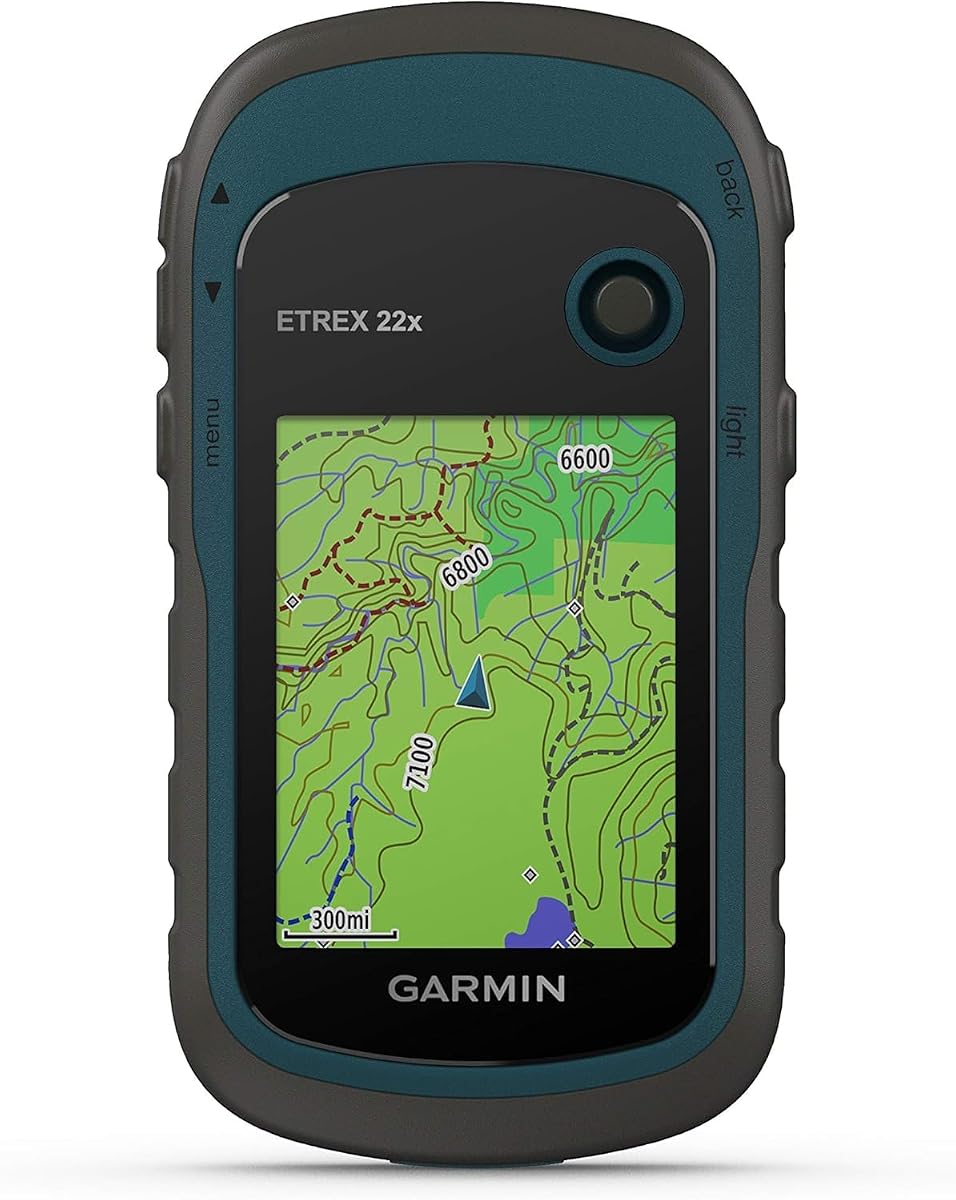
The Garmin eTrex 22x is built for people who need dependable positioning away from a paved road or a reliable cellular signal. Its 4.3 rating is the highest among the dedicated handheld entries, and its sunlight-readable 2.2-inch color display, dual satellite support, and long AA battery life make it a natural choice for hiking, cycling, and backcountry travel.
We may earn a commission when you buy through this link, at no additional cost to you.
Topo Active maps are preloaded with routable roads and trails, allowing navigation to begin without setting up a mobile data connection. Support for both GPS and GLONASS can improve tracking in challenging terrain. Internally, 8 GB of storage provides room for map downloads, and a microSD card slot adds flexibility for additional storage.
Battery life reaches up to 25 hours in GPS mode with two AA batteries. That endurance is a decisive advantage over frequently charging a smartphone during a multi-day journey. The trade-off is a compact screen and simpler interface that would offer less visual detail than a phone or modern automotive navigator, particularly during complicated route changes.
The eTrex 22x is ideal for hikers, backpackers, cyclists, and travelers who prioritize offline mapping and battery endurance over automotive entertainment. It also works as a backup navigator for camping or remote travel. Choose it when a phone's screen, charging demands, or reliance on connectivity could become a problem.
Combining GPS and GLONASS gives the receiver more satellite options than a GPS-only setup. That can be valuable beneath dense tree cover, around steep canyons, or in other places where sky visibility is inconsistent.
Preloaded Topo Active maps include routable roads and trails, while 8 GB of internal memory and a microSD slot support additional downloads. This makes the receiver dependable when mobile service is absent or unreliable.
We may earn a commission when you buy through this link, at no additional cost to you.
The YZW 5-inch Motorcycle Display is the clearest choice in this roundup for riders who want their phone's navigation and communication functions on a purpose-built cockpit screen. Its 4.8 rating is the highest listed, and wireless CarPlay and Android Auto support let compatible phones provide navigation, music, calls, and supported apps without placing the phone in the rider's immediate field of view.
We may earn a commission when you buy through this link, at no additional cost to you.
The 864-by-480 display has a rated brightness of 1000 nits, which improves readability in daylight, while IP69K waterproof protection supports use in rain and changing riding conditions. Its stated operating range extends from -4°F to 158°F. A four-magnet mounting system secures the display during normal riding and allows quick detachment when parked.
The phone remains essential even though the screen is permanent on the motorcycle. Compatibility varies by phone, and the display must be powered and connected for supported functions. Apple Find My and compatible Find My Device network access can report the display's location when those requirements are met. TPMS sensors and a USB-A power cable are separate, not standard additions.
This display is ideal for commuters, touring riders, and anyone who prefers a larger navigation interface than a phone can offer in a motorcycle cockpit. It is not a conventional stand-alone GPS, so buyers should prioritize phone compatibility and power installation. Choose it when integrating a smartphone with a bright, rugged motorcycle screen is the central goal.
Wireless CarPlay and Android Auto place familiar navigation, calls, music, and supported apps on a 5-inch screen. Keeping the phone stored reduces temptation to handle it while moving, although riders should operate the display only when safe.
A 1000-nit panel and compact footprint make information easier to read from a normal riding position. IP69K protection adds useful resilience for wet roads and changing conditions.
We may earn a commission when you buy through this link, at no additional cost to you.
The NAVRUF 9-inch GPS Navigation is built around visibility. Its 3.7 rating is lower than those of most Garmin entries, but the large high-resolution screen and broad vehicle-routing tools distinguish it. The display is intended to remain readable in bright sunlight, offering more route detail and warning visibility than smaller units.
We may earn a commission when you buy through this link, at no additional cost to you.
Vehicle weight, length, height, and width can be customized so the device can avoid roads with relevant restrictions. This makes the system relevant to truck, motorhome, and RV users as well as ordinary drivers. The listed USA edition includes maps for the United States, Canada, and Mexico and advertises lifetime updates without subscriptions or SIM cards.
Real-voice turn-by-turn guidance offers a selection of male and female voices. Security alert categories include average-speed cameras, red-light cameras, railway crossings, high-accident zones, city entry points, and dangerous areas. Those functions are broad, but users should remain attentive to posted signs and current road conditions rather than treating alerts as substitutes for safe observation.
The NAVRUF is best for drivers who struggle with smaller displays, travel in large vehicles, or prioritize a wide map view. Its nine-inch footprint requires careful windshield placement to avoid obstruction. Given the lower customer rating, prospective buyers should review recent feedback about map accuracy and updates before finalizing their choice.
The 9-inch high-resolution display offers a generous target for route previews and warnings. It may reduce the need for a sunshade, but it also demands more windshield space and careful viewing-angle adjustment.
Entering vehicle dimensions enables routing around height, width, and weight restrictions. That makes the navigator more practical for truck, motorhome, and RV travel than a basic phone route that does not understand the vehicle's dimensions.
We may earn a commission when you buy through this link, at no additional cost to you.
The Garmin DriveSmart 86 is the largest conventional automotive navigator in this comparison, featuring an 8-inch high-resolution display with dual orientation. Its 4.2 rating reflects the same mature connected-navigation platform found in the smaller DriveSmart models, but the expanded canvas offers a particularly clear view of routes, points of interest, and upcoming maneuvers.
We may earn a commission when you buy through this link, at no additional cost to you.
North American map updates, voice assist, hands-free calling, traffic cameras, parking, weather, fuel prices, and smart notifications cover the core needs of a modern driver. Pairing with the Garmin Drive app provides the connected services, while Alexa Built-in supports music, audiobooks, news, and voice requests. Garmin continues to advise using voice features only when it is safe to do so.
Road-trip tools include HISTORY, Tripadvisor ratings, millions of Foursquare points of interest, a national parks directory, and Garmin Real Directions. Driver alerts identify school zones, sharp curves, and speed changes. Built-in Wi-Fi updates maps and software without a computer, and the included dual USB charger adds a convenient power port.
The DriveSmart 86 suits drivers with large dashboards, SUVs, trucks, and long-distance travelers who want maximum visibility. Its size may feel excessive in a compact vehicle, and several services still depend on a compatible phone and app. Choose it when screen scale and connected road-trip functionality outweigh dashboard compactness.
The 8-inch dual-orientation display provides ample room for detailed maps and nearby-place lists. Portrait or landscape use can suit different mounting positions and preferences, although it should be installed without blocking the driver's view.
Traffic, parking, weather, fuel information, and smart notifications make the device useful beyond turn-by-turn guidance. These functions add convenience on long journeys when fuel stops, delays, and changing conditions matter.
We may earn a commission when you buy through this link, at no additional cost to you.
The Garmin eTrex SE is a capable handheld companion for travelers who want more endurance than a smartphone can offer. Its 4.2 rating reflects a versatile device that can operate as an independent GPS and connect to the Garmin Explore app for trip planning, updates, weather information, notifications, and additional mapping.
We may earn a commission when you buy through this link, at no additional cost to you.
Multi-GNSS support covers GPS, GLONASS, Galileo, BeiDou, and QZSS, providing multiple satellite options in difficult environments. The 2.2-inch high-resolution screen remains readable in bright sunlight, while an IPX7 water-resistant design supports hiking in varied weather. A digital compass provides a heading even when the user is stationary.
The standout advantage is battery life. The listing states up to 168 hours in standard mode and up to 1,800 hours in expedition mode with two field-replaceable AA batteries, which are not included. Geocaching Live automatic cache updates can provide descriptions, logs, and hints when paired through Garmin Explore. This is an excellent backup or expedition device, though its compact screen is less suitable for turn-by-turn automobile navigation.
The eTrex SE is ideal for hikers, backpackers, geocachers, and anyone building a kit around a phone but wanting an independent backup. It is also helpful for international travel because it does not depend on cellular navigation. Choose it for satellite flexibility, ruggedness, and extraordinary battery endurance rather than dashboard convenience.
Standard and expedition battery ratings make the receiver suitable for trips where charging opportunities are scarce. Replaceable AA batteries also offer more flexibility than sealed built-in power systems.
Garmin Explore adds trip planning, wireless updates, Active Weather, smart notifications, and additional mapping. The device can also retrieve updated geocache information, but it remains fully functional as a standalone navigator for core positioning tasks.
We may earn a commission when you buy through this link, at no additional cost to you.
The Garmin dēzl OTR620 is purpose-built for commercial truck drivers, and its 4.4 rating is the strongest among the vehicle-mounted products in the guide. Unlike general-purpose car navigators, it can generate custom routes based on truck size and weight while providing warnings for bridge heights, sharp curves, and other potential hazards. Posted road signs and actual conditions should always take precedence.
We may earn a commission when you buy through this link, at no additional cost to you.
BirdsEye Direct Satellite Imagery offers overhead views of destinations, helping with loading docks, truck entrances, and security gates. The truck-parking community features can locate and rate available parking locations when paired with the dēzl app. Searchable information about community-shared gates, loading docks, and truck entrances adds value around unfamiliar delivery destinations.
CAT Scale location information helps drivers check legal weight limits before continuing. The Truck and Trailer Services directory supports searches by brand or amenity, including showers, while a wind-speed map overlay can flag potentially hazardous conditions. PrePass notifications offer weigh-station and bypass information, though they require an active account, Bluetooth, and the dēzl app.
The dēzl OTR620 is an excellent fit for owner-operators, fleets, and professional drivers who need more than a generic car route. It may feel excessive for ordinary commuting, but its arrival imagery, truck parking, and specialized routing solve problems that smartphone navigation may not handle as clearly. Choose it when commercial accuracy and logistics information are the priority.
Custom routing uses truck size and weight to shape a more appropriate path. Bridge-height, curve, and road-condition warnings add awareness, while the requirement to defer to posted signs keeps the driver responsible for final decisions.
BirdsEye imagery provides an overhead view of docks, entrances, and gates before arrival. Community parking information and searchable services help drivers locate suitable breaks and truck-related destinations along the route.
We may earn a commission when you buy through this link, at no additional cost to you.
The best alternative to smartphone navigation depends on how you travel, where you need coverage, and whether your priority is larger visibility, offline reliability, connected services, or vehicle-specific routing. Compare the following factors before choosing a device.
Screen size should be matched to the vehicle, mounting position, and viewing distance. A 5-inch display is practical for many cars, while 7-, 8-, and 9-inch models make route previews and warning icons easier to inspect from farther away. Larger is not automatically better: expansive displays can require more windshield space and may obstruct the driver's view if mounted poorly. Consider sunlight readability, nighttime appearance, touchscreen responsiveness, and whether the device supports a suitable viewing orientation.
A stand-alone GPS can provide core navigation without a paired phone, while smartphone-assisted devices add traffic, parking, weather, notifications, calling, and app-based features. Standalone models provide a useful backup when connectivity is unreliable. Assisted products are more convenient for frequent commuters but may create dependence on a compatible phone, app installation, Bluetooth connection, or account. Verify that your exact phone model supports the advertised wireless or wired connection before purchasing.
Cars, trucks, buses, RVs, motorcycles, bicycles, and emergency vehicles do not all require the same route. Commercial drivers may need height, width, length, and weight restrictions, loading-dock guidance, truck parking, and legal weigh-station information. Motorcyclists may prefer a compact, waterproof, quick-detach display. General car drivers usually benefit most from larger maps, traffic, and clear driver alerts. Always check whether specialized routing is available in your geographic area.
Offline maps are essential for remote travel, weak cellular coverage, and international use. Look for detailed North American or topographic maps, clear terms for lifetime updates, and a practical update method. Some devices update through built-in Wi-Fi, others require a USB connection to a computer, and connected Garmin models may transfer updates through an app. Confirm the region covered by the preloaded maps and whether downloadable maps are needed for your destination.
GPS is the core satellite system, but GLONASS, Galileo, BeiDou, and QZSS can improve positioning where some signals are obstructed or unavailable. Multi-system support is especially helpful in forests, mountains, urban canyons, and remote areas. Check the number of supported constellations, whether the device has a digital compass, and whether it can track a meaningful route while stationary or moving slowly. Handheld models generally prioritize positioning, while automotive displays prioritize road guidance and mounting.
Battery expectations differ sharply between dashboard devices and handheld GPS units. Car navigators normally receive continuous power, but riders need weather-resistant wiring and a reliable connection. Handhelds may run for dozens or hundreds of hours on replaceable AA batteries. Compare battery life in the mode you will actually use, note whether batteries are included, and check the cable and mounting hardware provided. A long battery specification is less useful if the device cannot be charged conveniently during the trip.
Bluetooth calling, voice assistance, live traffic, weather, fuel information, parking, and smart notifications can make a dedicated navigator feel like a large-screen version of smartphone navigation. These functions often require a compatible phone, Garmin Drive or dēzl app, Bluetooth, and sometimes a data connection. Alexa Built-in can add music, audiobook, and news functions, but voice features should never divert attention from driving. Review account requirements and app compatibility before treating connected features as decisive.
Driver alerts can warn about school zones, sharp curves, speed changes, red-light cameras, and other hazards. Look for clear visual icons, voice prompts, and a way to adjust alert categories. Voice guidance is especially important when the screen is small or mounted out of direct view. Spoken landmark guidance can provide more useful context than street names alone, while selectable voices may make instructions easier to understand for different listeners.
Begin by identifying the device's intended environment and mounting it where it remains visible without blocking the windshield, instruments, controls, or mirrors. Clean the mounting surface before attaching a suction cup or adhesive holder. Route power and cables away from sharp edges and moving components, check the angle for glare, and confirm that any quick-release connection locks securely. For motorcycle installation, follow the supplied adapter and power instructions and inspect the assembly before riding.
Power the unit and complete its initial setup according to the relevant instructions. Connect Bluetooth and install the required phone app if you want live traffic, weather, calling, notifications, or smart parking. Review the map region, update the operating system and maps, set vehicle dimensions when applicable, choose appropriate units, and adjust alert volume and categories. Pairing a phone is unnecessary for core standalone navigation on many products, but it can unlock additional features.
For each journey, enter the destination and verify the proposed route before moving. Check the road name, distance to the next maneuver, lane guidance, and any warnings about vehicle restrictions. Download offline maps for remote destinations, pack spare batteries for handheld units, and carry a phone as a backup. Clean the screen with a soft microfiber cloth, keep ports dry, inspect mounts and cables regularly, and update maps between trips rather than during departure.
A dedicated navigator can be better when you want a larger display, more visible driver alerts, specialized truck routing, or reliable operation without cellular service. Smartphones excel at flexible search, live services, and app flexibility, but they may run out of power or lose reception. The best choice depends on your route, vehicle, and reliance on connected features.
Several Garmin models support Bluetooth and app-based services, while the YZW motorcycle display is designed around wireless CarPlay or Android Auto. Connected functions may include calling, live traffic, weather, parking, fuel prices, and smart notifications. Check the exact phone model, operating system, app requirements, and regional compatibility before buying.
The Garmin eTrex 22x and eTrex SE are the strongest handheld choices for offline travel because they are designed around independent GPS operation and map storage. The eTrex 22x includes preloaded Topo Active maps, while the eTrex SE emphasizes extraordinary battery life and Garmin Explore connectivity. Either is useful when cellular coverage is absent.
The Garmin dēzl OTR620 is specifically designed for commercial trucks and offers size-and-weight routing, bridge-height warnings, arrival imagery, truck parking, and services information. The 7-inch HD multi-vehicle system is another flexible option. Drivers must still follow posted signs, actual road conditions, and local restrictions.
A larger display is helpful for drivers who want to see more of the route and nearby options, but it is not automatically better. Large units such as the DriveSmart 86 or NAVRUF 9-inch model can be easier to read, while smaller models are easier to position in compact vehicles. Choose based on dashboard space, viewing distance, and glare rather than screen size alone.
The YZW 5-inch motorcycle display can show compatible phone navigation, music, calls, and supported apps through wireless CarPlay or Android Auto. Its 1000-nit screen, IP69K waterproof protection, and magnetic quick-detach mount are designed for motorcycle use. A compatible phone and proper power installation remain necessary.
Check for updates before a long trip and whenever the manufacturer provides a meaningful road or map revision. Wi-Fi-enabled Garmin models can simplify updates, while other units may require a USB connection to a computer. Updating in advance prevents map changes or software improvements from delaying departure.
Core navigation on many dedicated devices does not require a subscription. Some products advertise lifetime map updates, while connected services such as live traffic, weather, parking, or weigh-station bypasses may involve data, app, or account conditions. Review the current listing and app terms because service policies can change.
The Garmin Drive 53 is the most straightforward dedicated car navigator, balancing a bright five-inch screen, spoken landmark guidance, driver alerts, and road-trip discovery features. The Garmin DriveSmart 86 takes visibility and connected functionality further with its large display, while the YZW motorcycle display stands out as the most phone-integrated option for riders who want wireless CarPlay or Android Auto on a rugged cockpit screen.
Your priorities should determine the remaining choice. Use a DriveSmart model for smartphone-connected traffic, weather, parking, and calling; choose the dēzl OTR620 for commercial truck routing and logistics; select the eTrex 22x or eTrex SE for offline exploration; and consider the NAVRUF or multi-vehicle systems when a very large display and customizable vehicle profiles matter most.
Before making a final decision, verify phone compatibility, map coverage, update methods, mounting requirements, and any app or account conditions. Product ratings and configurations can evolve, and prices change over time, so check the current listing and availability. The right navigation device is the one that remains readable, dependable, and appropriate for the routes and vehicle you use most often.