
Dual-Zoned 3D Printer Table with Filament Storage and AMS System Storage Shelf
4.3Editor score
Two independent printer zones
Stores over 48 filament coils
Supports 300 pounds statically
Our Shelf for 3D Printer guide compares ten stands for capacity, stability, filament storage, mobility, built-in power, assembly, and general workshop fit.
A shelf for a 3D printer is more than a place to place a machine. It can determine how much filament you can keep accessible, how neatly cables are managed, whether multiple printers can operate in one station, and how easily a workstation moves around a room. A well-chosen stand adds structure, organization, and practical storage without crowding the main work surface.
The ten stands in this guide were compared using the supplied specifications, focusing on printer capacity, shelf construction, filament organization, mobility, power access, dimensions, and ease of assembly. The list covers compact single-printer tables, rolling carts, multi-printer workstations, and larger systems with drawers or extensive spool storage.
Each review explains who the stand is best suited to, along with its strongest features and practical trade-offs. The top recommendations cover premium multi-printer capacity, a feature-rich mobile station, and a compact value option. Product availability, promotions, and pricing can change, so check the latest listing details before purchasing.
4.3Editor score

5.0Editor score

4.8Editor score
The comparison below highlights the major differences in printer capacity, storage organization, construction, and mobility. Use it to narrow the field before checking dimensions, power features, and compatibility with your particular printer and filament collection.


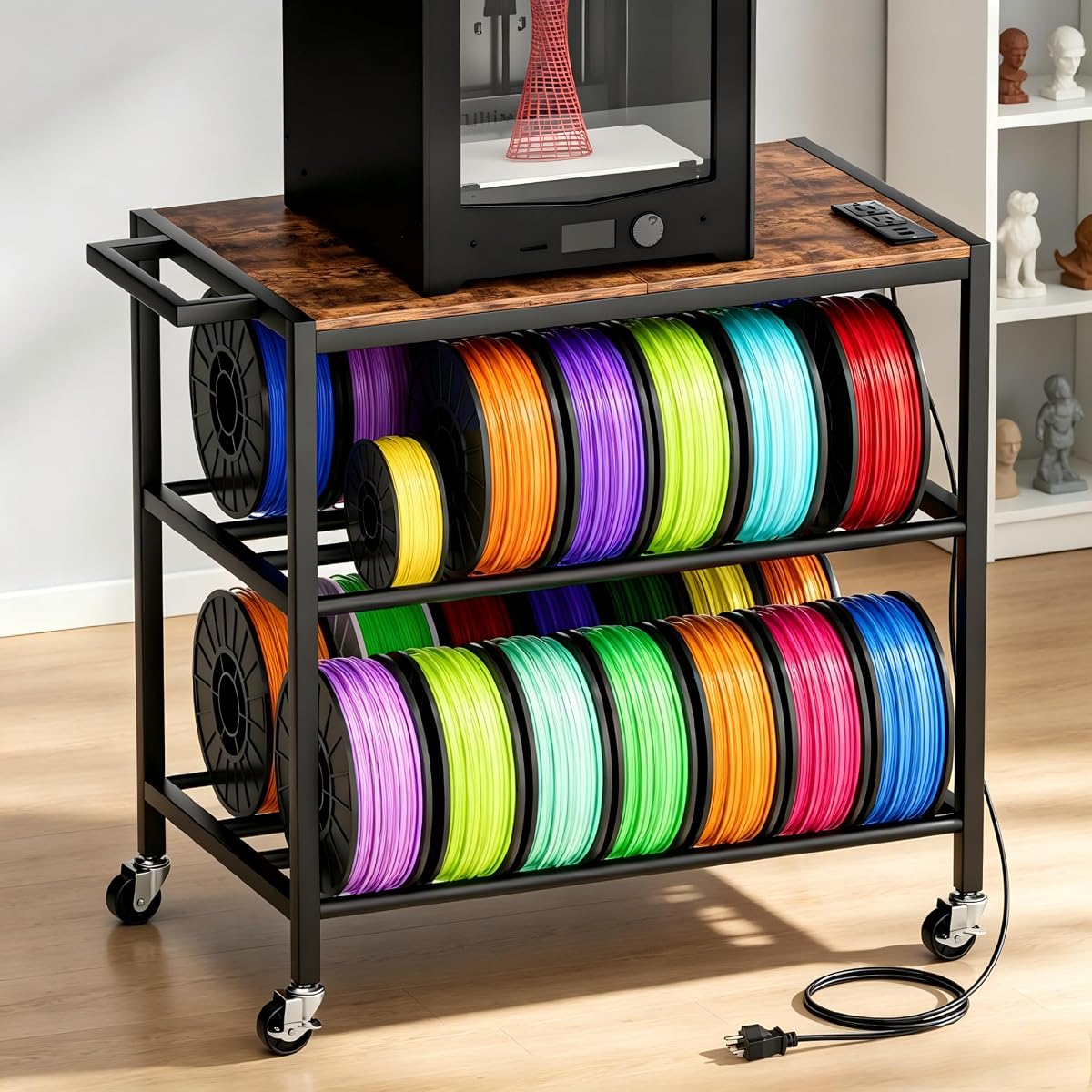


The Dual-Zoned 3D Printer Table is an expansive workstation rated 4.3 stars, with its strongest distinction being a one-piece tabletop divided into two dedicated working areas. It is designed for makers who run two full-size machines at once, want filament and AMS accessories close at hand, or need a more permanent station for a busy home or small workshop.
We may earn a commission when you buy through this link, at no additional cost to you.
Each side uses an independent closed-loop metal frame, so the load from a printer and its accessories is carried by the corresponding section rather than transferred through shared connecting screws. This is a thoughtful structural approach for a dual-printer table. The side-mounted mesh racks add another layer of organization, while the lower shelves provide room for stock filament, tools, and project materials. The stated static load capacity is 300 pounds, and the combined shelving can hold more than 48 filament coils.
The main trade-off is the size and complexity of the design. A dual-zone station naturally requires more floor area than a compact rolling shelf, and buyers should check the full dimensions of their printers before ordering. The supplied information does not list the table's overall dimensions, so the individual working zones and the space in front of each printer should be measured carefully. The more involved assembly is another consideration, although the included manual uses labeled diagrams and numbered parts.
This is the strongest choice for a dedicated multi-printer room, classroom, or production corner where filament volume and separation matter more than minimal footprint. It may be excessive for one occasional printer, but for two active machines it offers a rare combination of broad tabletop space, high storage capacity, and separate structural support. It is our premium recommendation for serious home makers and small studios.
The divided tabletop gives each printer its own working zone, while the two self-contained metal frames support the respective loads independently. This arrangement is especially useful when one machine is being serviced while another continues an active print.
Lower open shelves and dual side mesh racks separate spools, tools, and consumables from the main work surface. The supplied capacity of more than 48 coils is especially valuable for users who print in many colors or materials.
We may earn a commission when you buy through this link, at no additional cost to you.
This 2-tier filament storage shelf is rated 4.2 stars and offers a practical balance of compact storage, drawer organization, and mobility. Its listed dimensions are 23.6 inches long, 15.4 inches wide, and 31.5 inches high with wheels, which makes it suited to home offices, classrooms, and workshops where floor space is valuable.
We may earn a commission when you buy through this link, at no additional cost to you.
The top desktop is intended for a 3D printer, while two adjustable tiers can be configured according to filament size. Two fabric drawers create a separate home for screws, nozzles, wrenches, and other small parts that would otherwise disappear among larger supplies. The metal frame and particleboard shelves are supported by stated capacities of 60 pounds on top and 100 pounds on each lower shelf.
Mobility is handled by swiveling casters with safety locks. The casters can also be replaced with balance feet when the unit will remain in a fixed position, giving buyers flexibility between mobility and a steadier base. The product information recommends a non-slip mat beneath a printer and notes that casters are preferable when the printer is not placed on the table. Those details matter because a rolling stand still needs to remain stationary while a print is underway.
This stand works well for one active printer and a moderate filament collection, particularly in a shared room where tools need to be cleared away quickly. It is not designed to hold three machines, and its total load limits should be respected. For users wanting a compact, adaptable workstation with drawers rather than maximum multi-printer capacity, it is a sensible choice.
The two adjustable tiers give users room to reorganize storage as filament diameters, spool sizes, or project demands change. This flexibility makes the stand useful for both neatly packaged filament and a broader working inventory.
Two fabric drawers keep fasteners, tools, and accessories separated from filament. Their soft-sided construction also avoids taking up valuable shelf area, making them especially useful for frequently used maintenance items.
We may earn a commission when you buy through this link, at no additional cost to you.
The PT2 3D Printer Stand is a 4.2-star, three-tier system built around the idea of consolidating several devices in one footprint. It can hold up to three printers, while its removable top shelf doubles as a filament hub for 16 standard 1-kilogram spools. That makes it a more substantial workstation than a basic single-printer table.
We may earn a commission when you buy through this link, at no additional cost to you.
Each of the 23.6 by 23.6-inch desktop areas provides generous room for a printer, laptop, or tools. The product information specifically names compatibility with popular models such as the H2D, A1, Adventurer 5M, and K1 SE, but those examples should not be treated as a complete compatibility guarantee. Thick high-density wood panels and a reinforced steel frame are intended to reduce flex and resonance, while powder-coated legs are designed to resist scratches and wear.
The rack has braked rollers so it can be repositioned and then held in place during printing. Its substantial multi-printer design is the main drawback for anyone with only one compact machine: the stand may take up more room than necessary. The removable top shelf is a flexible feature, but buyers should understand that it serves a dual purpose before deciding how to arrange printers and filament.
This rack is well suited to small studios, labs, classrooms, and home users running several printers. Its combination of broad platforms, a large filament hub, and rolling mobility is particularly compelling for batch-printing workflows. It is an excellent high-capacity choice without the extreme storage breadth of the first-ranked dual-zone system.
The vertical three-tier arrangement gives each machine a dedicated level, reducing the need to move printers between a desk and storage area. Broad desktop dimensions also leave room for accessories beside larger printers.
The top shelf can store up to 16 standard 1-kilogram spools and can be removed when a different layout is needed. This flexibility helps users balance active printer space against material capacity.
We may earn a commission when you buy through this link, at no additional cost to you.
The FINOSEN 3D Printer Stand holds a 5.0 rating and stands out as a polished, feature-rich station for one printer. Its main selling points are four-tier filament storage, integrated power connections, substantial construction, and mobile placement, all of which make it more versatile than a plain shelf with a lower storage tier.
We may earn a commission when you buy through this link, at no additional cost to you.
The square desktop measures 23.62 inches by 23.62 inches, making it suitable for most standard printers. Below it, four storage tiers provide dedicated areas for different filament sizes and weights, while drawers organize tools and accessories. The frame uses 25 by 25 millimeter iron tubes and 15-millimeter MDF panels, adding rigidity where printer weight and filament stock can place substantial downward force.
Power management is unusually convenient. Two AC outlets, one USB port, and one Type-C port are built into the tabletop, and the supplied 5.5-foot cord helps consolidate connections. The stand also has 360-degree rollers, two of which can be adjusted for leveling. The trade-off is that a single desktop limits simultaneous printer capacity, and the product information does not provide a detailed overall height or weight rating.
This is our editor's choice because it combines the features most often sought in a daily 3D printer stand: organized material storage, nearby charging, tools within reach, and enough structural substance for regular use. Choose it for a home studio, office, or workshop where one printer is active and the surrounding system needs to be equally well organized.
Two AC outlets and both USB and Type-C connections are incorporated directly into the desktop. This reduces extension-cord clutter and makes the stand more practical for printers, scanners, and other powered accessories.
The four-level storage arrangement separates filament by size, type, color, or project. A dedicated drawer layer further distinguishes small tools and accessories from full-size spools.
We may earn a commission when you buy through this link, at no additional cost to you.
This 4.4-star printer cart is designed for makers who want a mobile station with enough room for one printer and a practical level of filament organization. Its 25 by 14.8-inch tabletop is larger than many compact stands, while the three lower tiers organize PLA, ABS, PETG, tools, and accessories.
We may earn a commission when you buy through this link, at no additional cost to you.
The standout feature is the built-in power station, which includes two AC outlets and two USB ports connected by a 55-inch cord. That allows the printer and several accessories to draw from a single nearby hub. Four 360-degree swivel casters make the cart easy to move, and two locking wheels help hold it in place once printing begins.
Assembly is described as straightforward, with a detailed manual, labeled parts, and an installation video. As with any mobile stand, the locking casters should be engaged before a long print so the station does not drift. The absence of a Type-C port and the narrower depth relative to some square platforms may matter for users with unusually wide accessories or printers with side-mounted controls.
This is a strong general-purpose option for hobbyists and professionals who need to move a single printer between a studio, office, or workshop. It offers more surface area than the smallest carts, useful power access, and clean tier-based storage without reaching the footprint or complexity of a multi-printer rack.
The four swivel casters make it practical to clear a workspace or move the printer to another room. Locking wheels then provide a stationary base for printing.
Two AC outlets and two USB ports keep common charging and power needs within reach. The 55-inch cord also offers more placement flexibility than a very short integrated lead.
We may earn a commission when you buy through this link, at no additional cost to you.
The Retro Brown Three-Tier Stand combines multi-printer storage with a compact vertical profile and integrated power. Rated 4.3 stars, it can hold up to three 3D printers, giving it a clear advantage over single-desktop carts for users who alternate among compact machines or run several small printers at once.
We may earn a commission when you buy through this link, at no additional cost to you.
Side-mounted spool rods keep filament visible and accessible without occupying the full shelf width. The lift-and-load design is intended to simplify spool changes, while the second tier includes two AC outlets and two USB ports. A reinforced metal frame, scratch-resistant engineered wood, a thickened base, and adjustable anti-slip feet support a stated load capacity of 150 pounds.
The main limitation is that it does not advertise a large numbered filament capacity in the supplied specifications. Buyers with an extensive material library may need to compare it with a dedicated filament hub or a model with many more spool positions. As with any vertically stacked stand, printer height and the clearance required for the build plate and filament tube should be checked before adding multiple machines.
This stand is a good fit for small studios, offices, and home workshops where several compact printers share a station. The retro brown finish also differentiates it visually from the many all-black or metal-framed alternatives, making it easier to integrate into a warm workshop or office environment.
Three printer levels use floor space efficiently, making this design appropriate for compact studios. The vertical arrangement keeps active machines visible and accessible.
Side-mounted lift-and-load rods keep spools within reach and make color or material changes more direct. The rods avoid consuming entire shelf surfaces.
We may earn a commission when you buy through this link, at no additional cost to you.
The Metal Printer Table with Power Hub is a compact 4.8-star option that combines a reinforced frame, two lower storage tiers, a built-in power station, and room for up to 36 standard 1-kilogram filament spools. It is our budget recommendation because it provides a unusually complete feature set without requiring a large multi-printer footprint.
We may earn a commission when you buy through this link, at no additional cost to you.
The tabletop measures 23.7 inches long and 15.8 inches wide, and the stand stands 29.8 inches high. Four adjustable feet help maintain balance on uneven floors, while the lower two-tier rack supports up to 100 pounds per tier. The filament area accommodates 200-, 500-, 1-, and 2-kilogram rolls depending on their physical spool size.
The power hub includes two AC outlets, two USB ports, one Type-C port, and a 65-inch cord. That long lead lets the stand be positioned away from the nearest wall outlet while keeping cables consolidated. The trade-offs are that the stand is not described as rolling, and only one printer can occupy the upper surface. Its rectangular top also requires a careful footprint check for large printers with protruding controls or filament paths.
This is a strong pick for a home office, classroom, garage, or studio that wants extensive filament organization in a relatively narrow footprint. Buyers should compare the listed tabletop with the printer's actual base and operating clearance. For anyone who does not need multiple printers or frequent movement, it delivers a well-balanced and economical station.
The lower rack holds up to 36 standard 1-kilogram spools and supports several common roll sizes. This makes the unit useful even for makers who prefer to keep most of their material inventory beside the machine.
A 65-inch cord gives the stand more freedom in room placement. AC, USB, and Type-C connections support several common device and accessory charging needs.
We may earn a commission when you buy through this link, at no additional cost to you.
The Black Two-Tier Filament Stand is a compact, understated version of the drawer-equipped rolling format. It carries a 4.2-star rating and shares the same useful combination found in the second-ranked product: a printer desktop, two adjustable tiers, two fabric drawers, and mobility through locking swivel casters.
We may earn a commission when you buy through this link, at no additional cost to you.
The dimensions are 23.6 by 15.4 inches, with a height of 31.5 inches with wheels or 29.5 inches when balance feet are used. The metal frame and particleboard shelves are rated for 60 pounds on top and 100 pounds on both lower tiers. This capacity difference means the desktop should be checked carefully against the weight of a larger printer, while the lower shelves can carry substantial filament and tool loads.
The black finish is well suited to offices, classrooms, and darker workshop corners where a visually lighter unit might show dust and wear. Buyers should also note the product's explicit stability guidance: use a non-slip mat beneath the printer, install casters when the printer is not on the stand, and lock the wheels during operation. It is otherwise a flexible option for users who need to relocate the station.
This stand is a practical choice for one printer, one or two moderate filament collections, and an assortment of small parts. It does not claim the multi-printer capacity of the three-tier units, but it provides the most relevant daily organization features in a relatively small footprint.
The black finish blends naturally with printer components and workshop furniture. It is especially suitable for offices and classrooms where a visually busy stand could look out of place.
Swiveling casters make the unit easy to move, while the locking option stabilizes it during a print. Replacing the casters with balance feet creates a more permanent installation.
We may earn a commission when you buy through this link, at no additional cost to you.
The Three-Tier Stand with Tool Bag is rated 4.4 stars and distinguishes itself through a flexible, detachable fabric bag rather than rigid drawers or built-in power. It is designed to consolidate a printer, filament, toolboxes, shipping boxes, and small accessories in a narrow vertical workstation.
We may earn a commission when you buy through this link, at no additional cost to you.
The top board is intended for mainstream printers, the middle level handles tools and shipping boxes, and the bottom roller rack stores multiple filament spools. A side fabric bag provides quick-access storage for smaller tools. Because it can be attached on the left or right, users can orient it to match the available wall, desk, or printer entry space.
A thick steel frame with cross support is intended to reduce printer vibration, while adjustable non-slip foot pads help keep the stand balanced. The waterproof tabletop can be wiped clean of printing dust and residue. The main omissions are integrated power and wheels, so the station is less convenient for frequent movement and requires nearby outlets or a separate power solution.
This stand suits a home craft corner, garage, office, or maker studio where tools are used often and a removable bag is preferable to fixed drawers. It is a strong option for users who also work with laser engravers, as the supplied information notes that the stand can support craft supplies and related equipment. For dedicated multi-printer operations, a larger rack would be more appropriate.
The detachable side bag can be installed on either side or removed for repositioning. This flexibility is useful when the available footprint or access path changes.
The waterproof top surface is designed to wipe away printing dust and residue. That makes routine cleanup easier in active garage and craft environments.
We may earn a commission when you buy through this link, at no additional cost to you.
The Carbon Fiber Three-Tier Stand is a robust 4.3-star rack for users who want to operate multiple printers and other equipment from one station. It can hold up to three printers simultaneously, and the broader platforms are also suitable for scanners and heavy-duty equipment, making it more versatile than a strictly printer-focused stand.
We may earn a commission when you buy through this link, at no additional cost to you.
Its side-mounted spool system uses a lift-and-load rod, allowing filament to be changed without removing it from the tube. Each printer station can accommodate six different filament colors according to the supplied information, while the hooks support up to 15 pounds each and accommodate 200-, 500-, and 1-kilogram spool sizes. This arrangement keeps material visible without consuming the entire shelf surface.
Construction details include a 20-millimeter reinforced metal frame, 12-millimeter scratch-resistant P2 particleboard, a 50-millimeter base support, adjustable anti-slip feet, and an anti-tip design. The stated total load capacity is 150 pounds. Two AC outlets and two USB ports are mounted on the second tier, and the product information mentions an independent high-wattage circuit for multiple devices.
This rack is a compelling option for advanced home makers, offices, and compact workshops running several machines. Before ordering, verify the height of your printers and the clearance required for lids, displays, and filament tubes because full dimensions are not provided. It offers a strong combination of capacity, accessible spool organization, and cable management, making it a practical high-end alternative to the dual-zone system in first place.
Three printer levels improve space efficiency for users who alternate among machines or need separate stations. The platform construction can also accommodate scanners and other heavy equipment.
The lift-and-load rod system makes changing filament more convenient by keeping it connected during many swaps. Adjustable feet and the anti-tip design help the rack remain stable during operation.
We may earn a commission when you buy through this link, at no additional cost to you.
The right shelf should match your printer count, available floor area, material inventory, and need for mobility. Compare dimensions, load ratings, shelf adjustability, power features, and assembly requirements before choosing a model.
Begin with the printer's actual base dimensions, not just the stand's listed width. Account for front controls, rear filament tubes, ventilation, removable build plates, and any open lid that may be raised during operation. A stand can technically fit a machine by width while still preventing the lid from opening fully or forcing the filament path into a tight bend. Models with square platforms, such as those measuring 23.62 or 23.6 inches in both directions, often suit larger printers better, but the final decision should always follow your machine's footprint and clearance needs.
A single-printer shelf is usually the most space-efficient choice for beginners and occasional makers. Multi-level racks can hold up to three printers, while the dual-zoned table provides two broad, separated work areas. More printer capacity is not automatically better, because stacked machines may need different amounts of vertical clearance and can make one printer inconvenient to access. Choose a multi-printer design only if you routinely run several machines or expect to expand your setup soon.
Filament storage should be evaluated by both spool quantity and supported spool size. Capacity claims such as 16, 36, or more than 48 coils may reflect different arrangements and loading methods, so they are not directly comparable. Some stands use horizontal rollers, some use side rods, and others provide open shelves where a spool can lie flat. Consider whether you use 200-, 500-, 1-, or 2-kilogram rolls and whether you need quick visual access, stronger weight support, or simply a place to keep occasional-use materials.
Look for a stated load rating on every level that will support a printer, filament, or heavy tools. A 150-pound multi-printer rating should not be interpreted as 150 pounds on every shelf if the manufacturer assigns different limits by level. Reinforced metal frames, cross supports, thick panels, locking casters, and adjustable anti-slip feet all contribute to stability. The best setup for print quality is a stationary base with locked wheels or firmly adjusted feet, particularly during long jobs.
Wheels are valuable when the printer must move between rooms, be shared, or be cleared from a workspace. Locking casters add convenience but should always be engaged before printing. Feet create a more permanent and stable station, which is often preferable for a busy print queue. Some products support both configurations by allowing the casters to be replaced with balance feet. Consider your available floor space, the route to the location, and the weight of the loaded stand before selecting a mobile design.
Integrated outlets can make a large difference in a dedicated printer area. AC outlets power the printer and accessories, while USB and Type-C ports are useful for charging controls, tools, or other low-power devices. Compare the number and type of connections, the integrated cord length, and whether the power components are mounted in a convenient location. A built-in hub does not eliminate the need to check electrical load limits or use properly rated equipment, but it can reduce extension-cord clutter considerably.
A printer stand often becomes the central storage point for nozzles, cutters, scrapers, wrenches, cables, adhesives, and maintenance tools. Drawers, fabric bins, tool bags, and open shelves each offer different access and capacity. Fabric drawers are convenient for small components but may be less rigid for heavy tools. A detachable bag can be repositioned, while fixed drawers create a cleaner permanent arrangement. Choose storage that matches the tools you reach for most often and leave enough open space for completed parts.
Most stands require assembly, and the complexity varies from a simple frame-and-shelf build to a large workstation with numerous components. Look for labeled parts, illustrated instructions, included tools, and clear caster or leveling instructions. Allow enough floor space to erect the unit safely, especially for dual-zone and three-tier models. For ongoing care, wipe dust from smooth tops, inspect fasteners, and keep the structure level. A non-slip mat can add grip beneath a printer and reduce the chance of the machine shifting.
Start by assembling the stand in an open area and checking every connection before placing equipment on it. Install shelves in the configuration that matches your filament sizes, attach the side bag or drawers where they are most accessible, and level the feet. If the stand has wheels, engage the locks or replace them with feet when the station will remain in one location. Place a non-slip mat under a printer when the listing recommends it.
Distribute heavy loads across the level designed for them and avoid exceeding the stated per-shelf or total capacity. Keep filament spools aligned on their rods or rollers so they cannot roll into a walk path or pull against a filament tube. Route power cords through the intended channels, avoid tightly bending filament tubes, and leave enough clearance around printer lids, controls, vents, and heated components.
For routine care, remove loose dust and debris from shelves and the tabletop with a soft, dry cloth. Wipe the top only with a material compatible with its finish, and never pour water directly onto electrical power modules. Periodically inspect bolts, caster locks, adjustable feet, and shelf supports. Re-level or tighten anything that shifts, and keep the base clear of floor irregularities that could introduce movement during a print.
Yes, but only if the stand is specifically designed for multiple machines. Three-tier models in this guide advertise capacity for up to three printers, while the premium dual-zone table provides two separated full-size work areas. Check the height of each printer, the clearance needed for lids and filament paths, and the stated load capacity before placing more than one machine on a tier.
A rolling stand can be stable if it has a rigid frame, suitable caster brakes, and level feet, but the wheels must be locked during a print. A non-slip mat beneath the printer can further reduce movement. For a permanently positioned workstation, replacing the casters with leveling feet is often the simplest way to maximize stability.
The right amount depends on your printing schedule, the number of materials and colors in use, and whether you prefer to keep everything within reach. A single-printer cart may suit a modest collection, while a dedicated hub holding 16, 36, or more than 48 spools is better for heavy users. Check supported spool sizes as well as the stated count before buying.
Built-in outlets are designed to consolidate connections, but users should follow the manufacturer's guidance and the electrical requirements of their printer and accessories. Avoid overloading the power hub, use suitable plugs, and keep liquids away from the tabletop. The integrated cord length should also be long enough to reach a wall outlet without creating a trip hazard.
Choose a shelf with a top surface slightly larger than the printer's base and check the operating space around the machine. A 23.6-inch square platform may suit many larger printers, while a narrower rectangular top can still work with a compact model. Include clearance for a front control panel, rear filament inlet, open lid, and ventilation.
Open shelves work well for bulky items, toolboxes, and supplies that are accessed less often. Drawers or fabric bags are better for small nozzles, cutters, wrenches, screws, and cables that would otherwise become scattered. The best layout keeps frequently used items near the front and heavier materials on lower, sturdier levels.
A properly constructed stand can reduce unwanted movement, especially when it has a rigid or cross-braced frame, thick panels, level feet, and locked wheels. The benefit depends on correct assembly and load placement. A heavy printer on a weak shelf can still transmit movement, so checking the frame and tightening all connections remains important.
It can be worthwhile if you already use a lot of filament, need organized small-part storage, or expect to add printers later. Otherwise, a single-printer stand may provide a simpler footprint and easier access. Multi-printer racks are most valuable when the additional levels and spool positions are genuinely part of your daily workflow.
The Dual-Zoned 3D Printer Table is the leading premium recommendation for two full-size machines, extensive filament storage, and independent frame support. The FINOSEN stand earns the editor's choice for its polished combination of four-tier storage, integrated power, mobile placement, and a single large printer desktop. The Metal Printer Table with Power Hub stands out as the best budget option because it provides broad spool capacity and useful power connections in a compact footprint.
For most buyers, the most important priorities are a footprint that genuinely fits the printer, adequate vertical clearance, stable construction, and storage that matches the filament and tools already owned. Multi-printer capacity is valuable only when the workload justifies it, while mobility and built-in power can make a shared workspace much more convenient. Compare every stand against your own equipment rather than relying only on the number of shelves.
Finally, confirm the current product dimensions, load limits, included hardware, and compatibility details on the listing before ordering. Product designs, included components, promotions, and pricing can change, so the latest listing is the best source for current specifications and availability.