
DARKROCK Classico Max Storage Master
4.4Editor score
Thirteen-drive mixed storage support
Broad motherboard compatibility
Vertical GPU mounting included
A server case for multiple drives must balance storage capacity, airflow, expandability, and practical access to every bay. The right enclosure can make a home NAS easier to maintain, provide room for a growing backup library, or support professional rack-mounted equipment without forcing a desktop case to handle demands it was never designed for.
We compared the ten cases in this guide by examining their stated drive capacities, motherboard support, cooling arrangements, expansion options, front-panel features, and installation formats. The list includes compact NAS enclosures, spacious tower cases, and 3U or 4U rackmount chassis, so the right choice depends heavily on where the system will live and how it will be used.
Each review highlights the most important benefits and limitations of its case, while the side-by-side table makes the major differences easier to scan. Ratings and configurations can change with different hardware revisions or manufacturer updates, so verify the current product listing and physical dimensions before purchasing. Prices and promotions also change regularly.
4.4Editor score
4.6Editor score

4.2Editor score
As an Amazon Associate we earn from qualifying purchases.
This comparison organizes the cases by drive capacity, enclosure format, cooling, and expansion support, making it easier to identify the model that matches your storage and deployment plans.
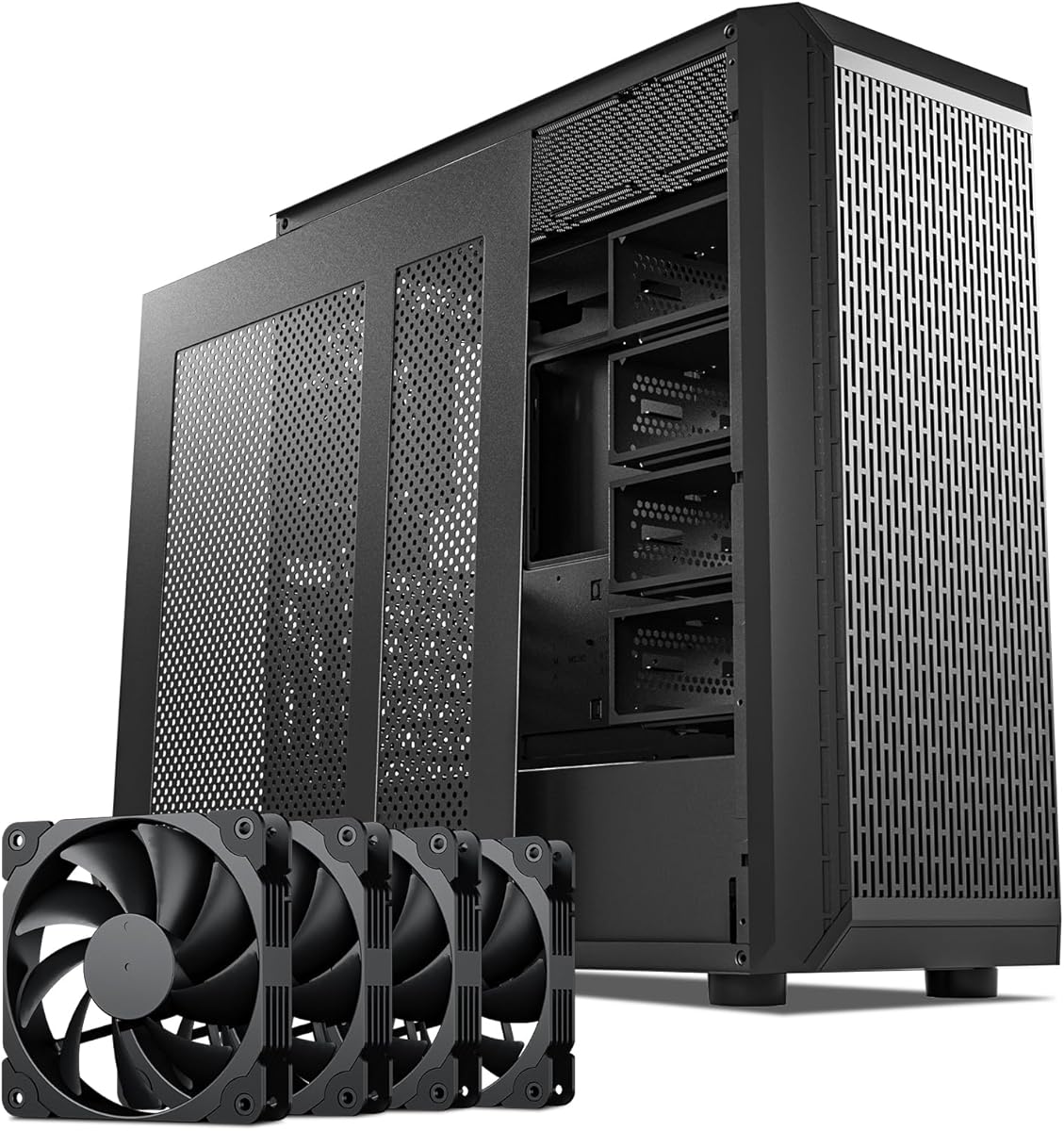



The DARKROCK Classico Storage Master is an ATX-style NAS enclosure built around a stated capacity of thirteen hard drives. Its 4.4 rating reflects a strong reception among buyers looking for abundant storage space in a case that also retains familiar desktop-case features. Mesh front and side panels, four included 120mm fans, and support for a 360mm radiator make it especially interesting for storage systems that also need capable component cooling.
We may earn a commission when you buy through this link, at no additional cost to you.
The most attractive feature is the balance between storage and general-purpose flexibility. A thirteen-drive allowance gives a builder considerably more room than a typical compact NAS case, while the vertical GPU mount can preserve clearance around a large graphics card and create a more orderly airflow path. The case also supports a 360mm radiator, making it less limited to low-power storage builds and more suitable for a compact workstation or high-performance home server.
The main drawback is that the supplied information does not spell out whether every drive position is a hot-swap tray, whether the hard-drive backplane is included, or which connector standards are used. A buyer planning frequent drive replacement should verify those details directly in the current listing. It is also a desktop enclosure rather than a rackmount unit, so users with an existing server rack need a fundamentally different design.
This is an appealing choice for a home NAS builder who wants substantial storage capacity without moving to a full 4U rack chassis. It may also suit a media server or workstation that uses the vertical GPU area and radiator support beyond ordinary NAS duties. For those who need straightforward drive access, the DARKROCK Classico Storage Master is a capable and potentially economical starting point.
The thirteen-drive capacity creates room for a large data pool without requiring multiple external enclosures. That makes the enclosure useful for media libraries, backup systems, and local archives where future expansion matters as much as the initial drive count.
Four 120mm fans, mesh panels, and 360mm radiator support create a stronger cooling foundation than a barebones storage box. This is valuable when the same case also hosts a powerful processor, an expansion card, or several temperature-sensitive drives.
We may earn a commission when you buy through this link, at no additional cost to you.
The Rosewill Helium NAS Max is a spacious ATX mid-tower designed for as many as eleven 3.5-inch hard drives. It carries a 4.0 rating and is positioned for DIY NAS, media-server, and small-business applications. The enclosure combines a large storage layout with four 140mm PWM fans, a mesh front panel, and a modern USB 3.2 Type-C front connector.
We may earn a commission when you buy through this link, at no additional cost to you.
Its key advantage is the combination of capacity and airflow. Eleven drive bays give a home server more flexibility than most compact cases, while the 140mm fans move a greater volume of air than smaller alternatives. PWM control is particularly useful for a storage system that may be present in a living space, where a quiet background is preferable to constant high-speed fan noise.
BTF motherboard compatibility is a useful detail for builders seeking a compact or unconventional processor and motherboard combination. The limitation is that the supplied listing does not confirm hot-swap trays, bundled backplane hardware, or individual drive connectors. It may also be important to check clearance around the tall 140mm fans when planning CPU coolers, especially if the motherboard is mounted in an unconventional orientation.
The Helium NAS Max is best suited to builders who prioritize many drive bays, quiet operation, and a conventional ATX layout. It is less convincing for a data center deployment because it is a mid-tower rather than a rackmount chassis. For a home office, studio, or media room, however, its black finish, Type-C connectivity, and generous cooling make it a polished multi-purpose storage platform.
Large PWM fans can move substantial air with less rotational speed than smaller fans. In a multi-drive NAS, that combination helps manage the heat generated by stacked hard drives while keeping acoustic output appropriate for a home or office.
The front USB 3.2 Type-C port provides a convenient way to connect compatible devices directly to the case. The included status lighting and all-black finish also help the enclosure blend into a professional workspace rather than looking like a generic storage box.
We may earn a commission when you buy through this link, at no additional cost to you.
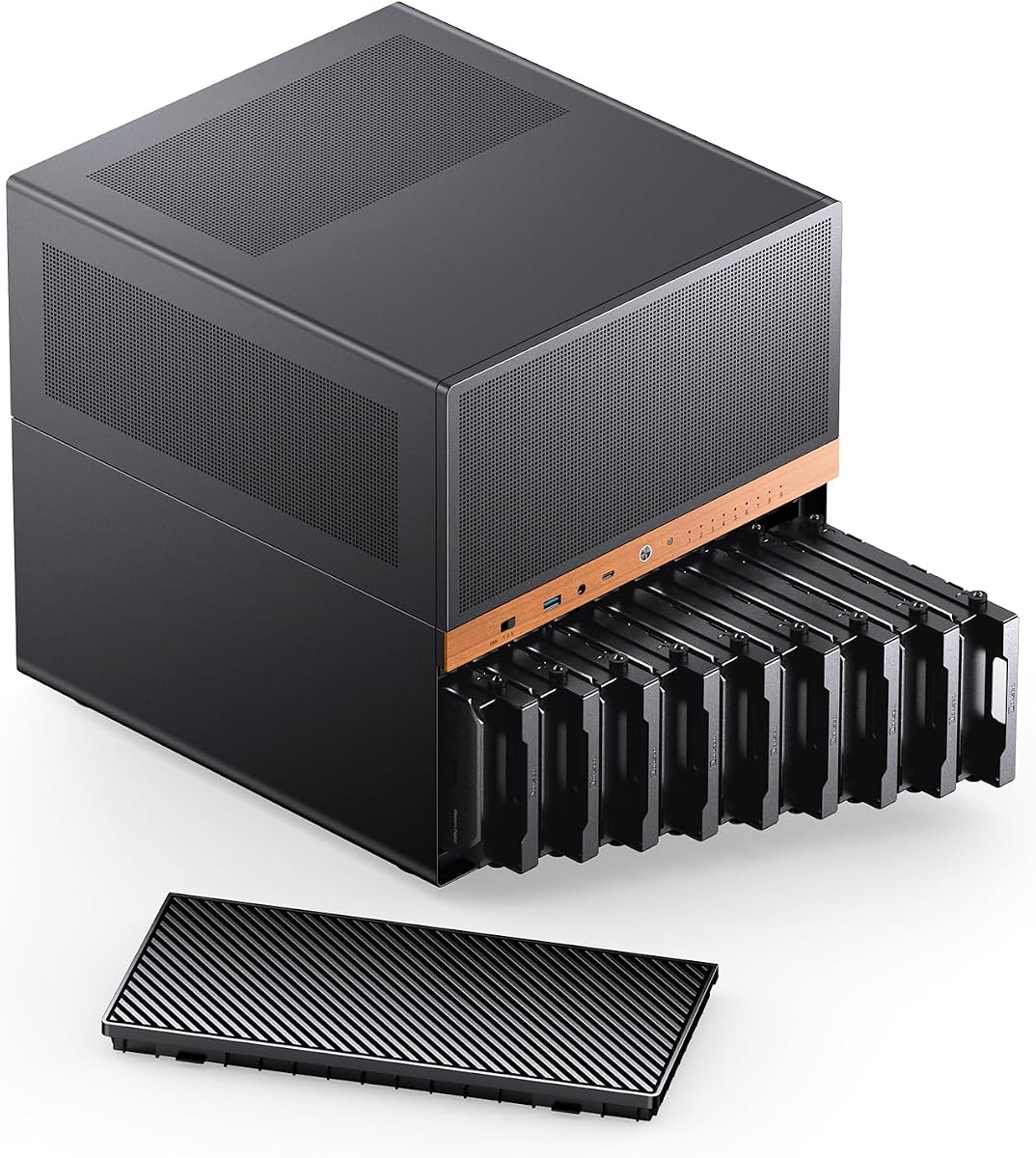
The JONSBO N6 is a purpose-built NAS case with nine hot-swappable HDD or SSD positions, making it the most compelling all-around option in this guide. Its 4.6 rating is the highest among the ten products. The Micro-ATX enclosure also offers flexible ATX or SFX power-supply positioning, two pre-installed fans, several additional fan locations, and support for a 240mm AIO cooler.
We may earn a commission when you buy through this link, at no additional cost to you.
Hot-swappable storage is the N6's defining feature. It supports the kind of maintenance workflow where a failing or outdated drive must be removed and replaced without dismantling the entire system. The removable HDD cage and one-piece top cover are also practical for assembly and service, while the black walnut veneer gives this functional enclosure a more distinctive appearance than a plain steel server box.
There are trade-offs. The case supports ITX and Micro-ATX motherboards rather than full ATX boards, and its power and backplane planning demands care. The listing states that three power interfaces may be enough for ordinary SATA or SAS mechanical drives, while enterprise drives with greater startup current may warrant all four. Users must also follow the stated restriction against placing multiple connectors from a single ATX 4-pin or SATA power cable into the backplane simultaneously.
The N6 suits serious home-server builders, media libraries, and compact NAS projects where serviceability is a top priority. It can also accommodate a reasonably long graphics card and a 240mm AIO, making it more versatile than a basic drive box. For anyone seeking a balanced combination of hot-swap convenience, flexible power, attractive design, and strong expandability, the JONSBO N6 is the leading choice in this roundup.
Hot-swappable bays are especially valuable when data must remain available or when a drive replacement is routine. The removable cage further simplifies initial assembly, servicing, and eventual expansion.
Multiple backplane power connections give builders room to use higher-current enterprise drives, but they also require careful cable selection. Checking drive startup requirements and following the manufacturer’s power guidance can prevent startup problems.
We may earn a commission when you buy through this link, at no additional cost to you.
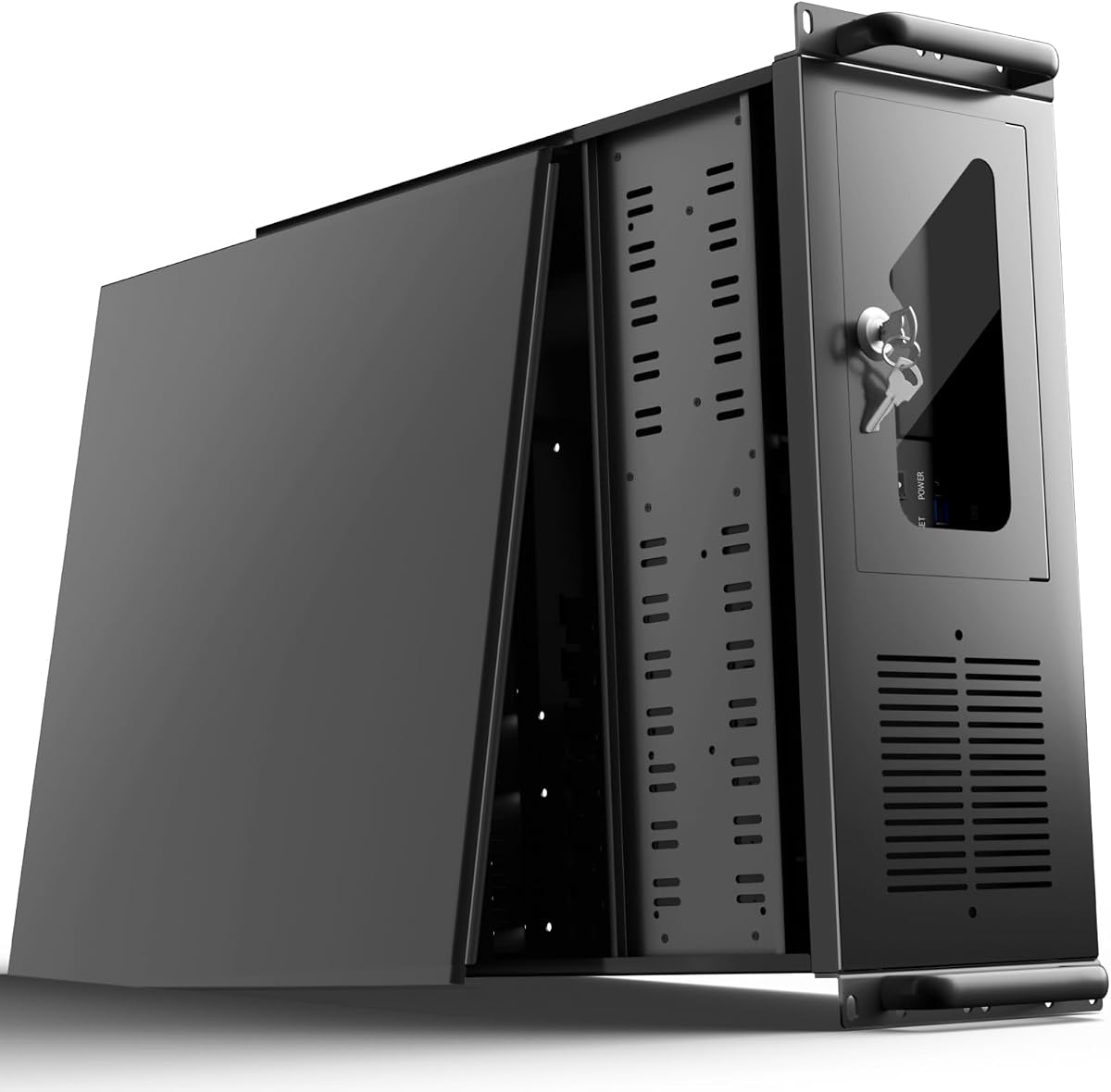
The UTLGAMENG 4U Rackmount is designed for home servers, office systems, and data-center-style deployments that need a substantial number of drives. Its stated 12 dedicated hard-drive bays, seven PCI slots, and standard 4U format distinguish it from ordinary desktop cases. It supports ATX, Micro-ATX, and Mini-ITX motherboards and standard ATX power supplies.
We may earn a commission when you buy through this link, at no additional cost to you.
Storage is the primary reason to select this chassis. Twelve dedicated drive bays provide a useful amount of room for RAID arrays, backup targets, media libraries, or mixed enterprise storage. Seven expansion slots allow the system to add network adapters, controllers, graphics hardware, or other PCIe equipment as requirements develop. Front USB 3.0 ports and LED indicators support routine administration.
Physical security and maintenance are also considered. A robust key-lock mechanism helps protect internal components in a shared or managed environment, while a side-panel air filter is intended to reduce dust entry. On the other hand, the listing does not explicitly confirm hot-swap functionality, so buyers who need tool-free drive replacement should not assume it is included. The case also requires actual 4U rack capacity and compatible mounting hardware in the target environment.
This model is well suited to a home lab, small office rack, or institutional deployment where drives and PCIe cards need more room than a tower offers. It is a less convenient choice for a quiet living-room NAS because rackmount access and environmental requirements differ. For a purpose-built storage server with room for growth, however, its twelve bays and seven expansion slots make it a practical foundation.
Twelve dedicated drive positions are especially useful for projects that need several RAID groups, backup devices, or separate pools. The seven PCI slots add another layer of future-proofing for controllers and network hardware.
Front USB 3.0 ports, status LEDs, a locking side panel, and a dust filter support the routine servicing and security needs of a managed server installation.
We may earn a commission when you buy through this link, at no additional cost to you.
The Rosewill RSV-R4000U is a standard 4U server chassis that combines eight internal 3.5-inch hard-drive bays with three 5.25-inch device spaces. Its 4.1 rating reflects a balanced design aimed at home servers, offices, and data-center environments. Seven PCI expansion slots and ATX or CEB motherboard compatibility make it more flexible than a purpose-built NAS-only enclosure.
We may earn a commission when you buy through this link, at no additional cost to you.
The mixed 3.5-inch and 5.25-inch layout is useful because not every server accessory occupies the same bay type. Hard drives can fill the primary storage area, while compatible optical devices, removable media hardware, or other 5.25-inch components can use the additional spaces. The four included fans consist of two 120mm PWM front fans and two 80mm rear fans, providing airflow through the front and across the drive area toward the exhaust.
Front-panel indicators for power, hard-drive activity, and LAN status make the chassis practical to monitor from a rack. Two front USB 3.0 ports simplify local connections, while the built-in front lock adds a layer of physical security. Compared with the larger 15-bay Rosewill model, this chassis uses less rack depth and offers fewer storage positions, so buyers should compare their desired capacity against the space available in their rack.
The RSV-R4000U is a good general-purpose server case for an installer who needs rack mounting, a substantial drive count, and multiple expansion slots. It is less appropriate for a compact home office or a highly specialized hot-swap NAS, since the supplied information does not emphasize tool-free drive replacement. Within conventional 4U rack builds, it offers a practical balance of storage, cooling, and manageability.
Eight hard-drive bays cover the core needs of a storage server, while the three 5.25-inch positions accommodate compatible legacy or removable-media devices. This is more versatile than a chassis built exclusively around one drive size.
Two front 120mm PWM fans move cool air into the enclosure, and two rear 80mm fans help exhaust warmer air. That arrangement supports the hard drives and keeps the rack-oriented chassis from operating as a sealed box.
We may earn a commission when you buy through this link, at no additional cost to you.
The Rosewill RSV-L4500U is the highest-capacity case in this guide, with 15 internal 3.5-inch hard-drive bays. Its 4.2 rating and extensive 4U rackmount design make it a strong choice for serious storage servers, virtualization hosts, backup systems, and institutional deployments where the number of storage devices is the central concern.
We may earn a commission when you buy through this link, at no additional cost to you.
Its drive density is supported by a substantial cooling package. Three front 120mm PWM fans, three middle 120mm fans, and two rear 80mm fans create a front-to-back cooling strategy that passes air through the drive region. E-ATX motherboard support also allows a more substantial board than basic ATX or Micro-ATX designs, while seven PCI slots provide room for multiple network adapters, storage controllers, and other expansion devices.
The trade-off is scale. This is a large 4U chassis intended for a proper rack rather than a compact home office, and the density of 15 drives places greater demands on airflow, vibration management, and power planning than a smaller storage box. Although the enclosure includes status indicators and a front lock, buyers should still plan cable routing and airflow carefully. Any RAID or hot-swap requirements should be confirmed with the exact controller and backplane being used.
This chassis is best for builders whose storage requirements justify a dedicated server enclosure and who have a suitable rack available. It offers the most room to grow while retaining broad motherboard and expansion support. For a smaller home NAS, it may be unnecessarily substantial, but for a high-capacity 4U storage platform, the RSV-L4500U offers one of the most capable layouts in the roundup.
Fifteen drives can generate meaningful heat, and the eight-fan arrangement helps move air through the enclosure in a deliberate path. This is one of the strongest cooling packages among the rackmount cases reviewed here.
E-ATX support and seven PCI slots provide room for a robust platform with specialized controllers and networking. That makes the enclosure more relevant to professional workloads than ordinary file storage alone.
We may earn a commission when you buy through this link, at no additional cost to you.
The DARKROCK Classico Max Storage Master combines ten 3.5-inch hard-drive positions with three 2.5-inch SSD positions. Its 4.4 rating and E-ATX support place it among the strongest desktop-style enclosures for users who want high storage capacity without moving directly into a rackmount chassis. Mesh panels and support for a 360mm radiator add a strong cooling foundation.
We may earn a commission when you buy through this link, at no additional cost to you.
Supporting E-ATX, ATX, Micro-ATX, and ITX motherboards gives this case unusual flexibility for a storage-focused design. The vertical GPU mount uses three vertical slots and places the card in front of and behind the rear fans, forming parallel air ducts for heat dissipation. This is useful for a compact workstation or game-adjacent server that may need a full-size graphics card.
The important caveat is that the hard-drive cages must be removed to install an E-ATX motherboard. That creates a direct trade-off between processor-platform flexibility and maximum storage density. The supplied information also does not identify hot-swap trays, backplane details, or drive connectors, so buyers should treat the 13-position figure as a capacity claim and verify the mounting system. As with any dense drive enclosure, airflow and vibration control become more important as the drive count rises.
The Classico Max is a good match for a high-capacity desktop NAS, editing workstation, or local archive where a 4U rack is unnecessary. It is especially appealing when a system needs both large hard-drive storage and modern motherboard support. Choose it when a tower format, vertical graphics card, and flexible processor platform matter more than tool-free hot-swap operation.
Ten 3.5-inch positions support bulk storage, while three 2.5-inch positions create dedicated space for SSDs. The combination allows fast scratch or cache drives to coexist with a large hard-drive archive.
Broad motherboard support, vertical GPU mounting, and 360mm radiator compatibility make this more useful for a high-performance system than a simple NAS box. The trade-off is that installing E-ATX requires removing the hard-drive cages.
We may earn a commission when you buy through this link, at no additional cost to you.
The Rosewill RSV-R4100U offers seven internal 3.5-inch hard-drive bays, two 5.25-inch device spaces, and seven PCI expansion slots in a standard 4U rackmount format. Its 4.0 rating aligns it with a straightforward server enclosure for home labs, offices, and compact enterprise installations where a moderate number of drives and expansion cards are needed.
We may earn a commission when you buy through this link, at no additional cost to you.
Its cooling package consists of one 120mm PWM fan at the front and two 80mm PWM fans at the rear. Front USB 3.0 ports and LEDs for power and hard-drive monitoring make local administration straightforward, and the included front lock provides physical security. ATX and CEB motherboard support gives the builder more platform choice than many smaller cases.
The important mechanical restriction concerns hard-drive mounting. The listing states that supported drives must have three screw holes on each side for a secure three-point connection and that two-screw-hole drives are not supported. This should be checked before buying any existing drives. The smaller drive count also means less storage than the larger rackmount models, and the three-fan arrangement may need careful placement in a densely populated system.
The RSV-R4100U is most appropriate for a rack project with a defined, moderate storage requirement. It works well for a compact backup server, a small business archive, or a home lab that needs expansion slots and rack integration. Buyers should confirm drive geometry, backplane requirements, and rack accessories before assembly, but the overall layout is conventional and understandable for experienced server builders.
Seven hard-drive bays and two 5.25-inch positions offer enough room for a moderate server without requiring the footprint of a 15-bay chassis. It is a practical middle ground for straightforward storage tasks.
The three-point mounting requirement is a meaningful mechanical detail. Checking the screw pattern of every drive before installation avoids discovering late in the build that an otherwise compatible drive cannot be secured correctly.
We may earn a commission when you buy through this link, at no additional cost to you.
The Rosewill RSV-Z3100U is a 3U rackmount server chassis built for a moderate number of hard drives. Its product title states six 3.5-inch bays, while the supplied description refers to four internal bays, so the exact current configuration should be confirmed before ordering. It also offers ATX motherboard compatibility, four PCI expansion slots, and two pre-installed 80mm PWM front fans.
We may earn a commission when you buy through this link, at no additional cost to you.
The most appealing feature is its 3U height. Compared with a 4U chassis, a three-unit enclosure can preserve valuable rack space for other equipment or allow more units to fit within a given cabinet. Two front USB 3.0 ports and LEDs for power, HDD, and LAN status support straightforward operation and monitoring. A standard rackmount design also gives the system a more professional appearance than an improvised tower installation.
There are two notable limitations. First, the bay-count inconsistency makes it especially important to consult the current manufacturer specifications and physical product photos. Second, four PCI slots provide less expansion room than the seven-slot 4U models in this guide. The two-fan cooling configuration is modest, and users filling every storage position should pay close attention to airflow and temperature placement.
The RSV-Z3100U is a sensible option for a space-conscious rack installation with a limited drive requirement. It may suit a small business file server, a compact backup appliance, or a home lab where conserving rack units is more important than maximizing expansion. The product is best considered after confirming its exact bay layout, and it is less suitable for projects that may eventually need many PCI devices.
A 3U enclosure uses one fewer rack unit than a 4U chassis. In a cabinet with limited capacity, that saved space can be more valuable than a large increase in drive or expansion slots.
The product title and description list different internal bay counts. Confirming the exact number and arrangement directly before purchase helps prevent a mismatch between the planned storage build and the delivered chassis.
We may earn a commission when you buy through this link, at no additional cost to you.
The SilverStone RM41-H08 is a 4U rackmount server case built around five hot-swappable 3.5-inch bays and three 5.25-inch device positions. Its 4.3 rating makes it one of the stronger-rated models in the guide. It supports up to five SAS or SATA drives, seven standard PCI or PCIe expansion slots, and SSI-CEB motherboards.
We may earn a commission when you buy through this link, at no additional cost to you.
The drive trays are designed to be tray-free and screw-less, making installation and replacement more convenient than with a basic fixed bay. Each tray includes an anti-theft lock, adding physical protection for sensitive data. Hot-swap support is particularly useful in environments where availability matters and a failed drive must be replaced quickly without powering down the entire system.
The primary limitation is the five-drive hot-swap capacity. This is a focused enterprise-style enclosure rather than a high-density storage chassis, and it may not suit a builder expecting a large array from the start. SSI-CEB support and the server-oriented layout also favor compatible professional components. Users should verify the exact backplane, controller, and power requirements for their selected SAS or SATA drives before assembly.
The RM41-H08 is a compelling choice for a small business, home lab, or institutional system that prioritizes secure hot-swappable storage over maximum bay count. Its combination of tool-free trays, anti-theft locks, seven expansion slots, and server-rack integration makes it particularly relevant to experienced server builders. It is less suitable for casual users who want a simple NAS tower with abundant drive positions.
Screw-less hot-swap trays can reduce the time required for installation and replacement. Integrated anti-theft locking adds a level of security that is useful when equipment may be accessible to more than one person.
Seven PCI or PCIe slots leave room for specialized controllers and network hardware, while support for SAS and SATA expands the possible drive configurations. The five-bay limit should be considered against expected storage growth.
We may earn a commission when you buy through this link, at no additional cost to you.
The right server case depends on the number and type of drives, whether the system must live in a rack, and how often storage will be serviced. The following factors help separate high-capacity NAS boxes from rack-oriented enterprise enclosures and general-purpose towers.
Start with the number of drives the finished system needs today, then add reasonable expansion room. A chassis with more bays can make cabling, airflow, and power planning more complicated, so maximum capacity is not automatically the most practical choice. Check whether advertised positions are exclusively for 3.5-inch hard drives, whether 2.5-inch SSDs have dedicated mounting areas, and whether every advertised bay is usable simultaneously. Rack cases may also reserve some bays or device spaces for optical media, control panels, or other functional hardware. Match the expected array size to the number of drive bays rather than relying on a broad capacity claim.
Hot-swap capability is one of the most important distinctions between a conventional computer case and a dedicated storage enclosure. It allows a drive to be removed or replaced without fully dismantling the system, which can improve availability and shorten maintenance. Hot swap does not, however, guarantee compatibility with every controller, operating system, or drive. Verify that the required backplane, connectors, controller, and power adapters are included. A case may have tool-less trays but no functioning backplane, so buyers should treat these as separate features and confirm the complete installation path before purchasing.
Hard drives produce heat during normal operation, and densely populated cases can restrict the air that reaches each bay. Mesh panels, front intake fans, rear exhaust fans, and well-placed fans across the drive cage can keep temperatures more consistent. Fan size is only one part of the equation: chassis depth, drive spacing, cable obstructions, and the direction of each airflow path also matter. Cases supporting radiators and AIO coolers are useful when the enclosure doubles as a workstation, but radiator capacity alone does not guarantee adequate cooling for the drives. Builders should also plan a sensible fan curve rather than running every fan continuously at maximum speed.
A multi-drive case may support ATX, E-ATX, CEB, SSI-CEB, Micro-ATX, or only Mini-ITX motherboards. The more advanced the platform, the more room the enclosure may need for full-size power supplies, heat sinks, and rear expansion cards. PCI and PCIe slot counts matter for storage controllers, HBA cards, network adapters, and GPUs. Some cases gain graphics-card clearance only after removing the hard-drive cage, while others place a card vertically to preserve internal space. Review the maximum processor-cooler height, graphics-card length, power-supply dimensions, and any conditional clearance notes before choosing a board.
A tower case is easier to place on a desk or inside a cabinet and often offers more flexibility for a home NAS or workstation. A 3U or 4U rackmount chassis integrates with existing infrastructure, looks more professional in a server room, and can provide higher drive density. Rack cases require compatible rack rails, sufficient depth, and often front access to storage. Choose a rackmount model only when a rack is available or planned; otherwise, its benefits may be outweighed by installation inconvenience. Mixed environments sometimes use a rackmount chassis on a stand during development, but the final deployment environment should determine the format.
Every hard drive needs a reliable SATA power connection, and multi-bay backplanes may require several connectors. Enterprise SAS drives can draw more startup current than ordinary desktop drives, so a loose collection of splitter cables may not be sufficient. Check the case’s power-supply options, the number of backplane power inputs, the cable restrictions, and the starting current of each drive. Some compact NAS cases accept ATX or SFX power supplies in multiple positions, giving the builder flexibility in power selection. Properly rated power distribution is essential because an overloaded or incorrectly connected backplane can cause startup failures or unreliable operation.
Drive bays may support 3.5-inch hard drives, 2.5-inch SATA SSDs, or enterprise SAS drives, but mounting patterns and backplane connectors can vary. One Rosewill model listed here specifically requires three screw holes on each side and excludes two-hole drives. Tool-less or screw-less trays are convenient, while physical locks can protect sensitive data in shared installations. For a system requiring unattended access, an anti-theft front panel and removable drive trays may be more valuable than decorative features. Buyers with existing storage should compare both the physical screw pattern and the electrical interface of every drive before committing to a case.
A server that runs continuously in an office or living space needs a different balance of noise and appearance than a locked rack appliance. Large PWM fans can provide strong airflow at lower rotational speeds, while hard drives themselves may produce noticeable vibration and clicking. A black mid-tower can fit a professional workspace more naturally than an exposed rack chassis. Front USB ports, power, drive, and network indicators make routine monitoring easier, and tool-free access to drives can shorten maintenance. Decide where the system will live and who will operate it, then favor the features that improve that specific daily experience.
Before installing any drives, assemble the enclosure without power, confirm that the motherboard, power supply, expansion cards, and cooling hardware fit, and inspect every bay for debris. Secure each hard drive with the correct screws or tool-less mechanism, then connect the data and power cables without sharply bending them. In a backplane-based system, follow the manufacturer’s connection diagram exactly and avoid combining incompatible power adapters. Power on the empty system first to verify that fans spin, indicators respond, and there are no abnormal diagnostic warnings.
After the case is stable, add drives in small groups and confirm that the controller detects each one. Populate the planned array in an order that reflects the operating system and backup strategy, leaving enough open bays and cable space for maintenance. Format and configure each drive through the intended controller, then configure the required RAID level, file system, and monitoring alerts. Do not assume that creating an array replaces backups; maintain an independent copy of important data and test the restoration process regularly.
Ongoing care includes watching temperatures, drive health, fan noise, and unusual vibration. Increase fan speed if airflow through the drive area is weak, but clean accumulated dust before adding more cooling hardware. Schedule drive health checks, keep the firmware and storage software current, and replace a failing drive promptly. If the case has a dust filter or removable panels, inspect them on a schedule that matches the surrounding environment. Always follow the manufacturer’s shutdown, hot-swap, and data-removal procedures before servicing a live drive.
An ATX or E-ATX mid-tower is usually the easiest high-capacity option for a home because it offers more drive positions than a compact NAS and does not require a server rack. A hot-swap Micro-ATX case is ideal when quick serviceability matters. Rackmount designs are better reserved for locations that already have a suitable rack and mounting environment.
Hot swap is valuable when a drive must be replaced without powering down the entire system, particularly for a business server or an always-available NAS. It does not by itself guarantee compatibility with every controller or drive, so the backplane, connectors, power, and operating system must be checked. A fixed-bay case can still work for a backup system that is intentionally shut down for maintenance.
Choose enough bays for the current storage array plus a reasonable amount of expansion. A five- or seven-bay case may be sufficient for a focused backup system, while nine to fifteen bays can accommodate larger RAID groups, mixed media libraries, and future growth. More bays also increase cooling, vibration, cabling, and power requirements, so capacity should match the intended workload.
No. Some cases accept standard ATX power supplies, some use SFX units, and others have proprietary expectations. The JONSBO N6 supports multiple ATX and SFX installation positions, while the other designs have their own requirements. Check the maximum power-supply dimensions and the case’s stated compatibility before purchasing a supply.
Larger fans can move more air at lower speeds, which may help reduce noise, but they are only effective when the chassis allows a clear front-to-back airflow path. Drive density, fan placement, cable routing, and dust management matter just as much. Compare the supported fan sizes and the enclosure depth before selecting larger or more numerous fans.
Not safely as a standard desktop installation. A server rack requires a chassis with the correct rack unit height, mounting ears or rails, front access, and suitable cable management. Some tower cases are sold with separate rack kits, but that arrangement is different from a purpose-built rackmount server case. Confirm dimensional and mounting requirements before installation.
It depends on the operating system and the storage arrangement. Some operating systems and motherboards can manage software RAID, while a hardware or HBA controller may be needed for server-grade features, hot-swap support, or more advanced drive management. Confirm that the case’s backplane is compatible with the selected controller and that the required data and power cables are included.
Arrange the drives in the manufacturer’s recommended orientation, preserve the intended intake and exhaust paths, and avoid routing data or power cables directly across the fans. Use the case’s included fan positions appropriately and set a sensible fan curve. Monitor drive temperatures and clean filters and vents regularly, especially in dusty or poorly ventilated environments.
The JONSBO N6 is the strongest all-around recommendation because it combines nine hot-swappable drive positions, flexible ATX or SFX power placement, a removable drive cage, and support for stronger cooling hardware. The DARKROCK Classico Storage Master is a compelling budget-oriented alternative with a stated thirteen-drive capacity, while the DARKROCK Classico Max Storage Master provides a similar tower-style foundation with dedicated SSD positions and broader motherboard support.
For rack-based systems, the Rosewill RSV-L4500U offers the highest stated drive count and the most substantial cooling package, while the RSV-R4000U provides a more balanced eight-bay configuration. The SilverStone RM41-H08 is the most focused hot-swap option, and the JONSBO N6 brings the most clearly documented serviceable NAS experience. Prioritize bay layout, backplane compatibility, airflow, drive geometry, and power requirements before considering any additional aesthetic features.
Finally, recheck the current manufacturer listing, included accessories, physical dimensions, and product rating before ordering, because configurations and availability can change. Retail promotions also vary over time. Once the case matches the planned drive count, installation environment, and power strategy, it becomes a dependable foundation for a storage system that can continue growing.