
Tonmom Adjustable Laptop Riser
4.5Editor score
Seven convenient height levels
Supports 10–15.6-inch laptops
Folds for easy travel
A portable laptop stand can transform a temporary workspace by raising the screen, improving airflow, and reducing the need to hunch over a low display. The best models balance a useful viewing height with a compact folding design, reliable support, and compatibility with the laptops people actually carry.
This guide compares ten stands based on their adjustment range, folding format, weight, stability, cooling design, device fit, and intended work scenarios. It covers everything from lightweight travel models to larger adjustable designs intended for shared desks, frequent typing, video calls, presentations, and sit-to-stand setups.
The selections reveal which options excel at truly compact travel, which provide the broadest laptop compatibility, and which are better suited to an established desk. Ratings and product details reflect the supplied listings, while prices and availability can change, so readers should confirm current information before purchasing.
4.5Editor score

4.8Editor score

4.8Editor score
As an Amazon Associate we earn from qualifying purchases.
The comparison below highlights each stand's adjustment system, portability, stability features, and device compatibility, making it easier to identify the right model for a fixed office, frequent travel, or shared workspaces.



The SODI Foldable Stand combines a strong 4.8 rating with one of the most travel-conscious designs in this guide. Its bifold aluminum frame, spring-loaded adjustment arm, six height settings, and broad 10- to 16-inch compatibility make it a convincing all-around choice for commuters, students, and home-office users. The listing also highlights a folded size of just 12.7 by 4.4 by 2 centimeters and a weight of 185 grams.
We may earn a commission when you buy through this link, at no additional cost to you.
Its main advantage is the balance between compactness and support. The spring mechanism can be repositioned in about a second, allowing the screen to move closer to eye level without cumbersome setup. Aluminum construction supports heat dissipation, while silicone pads at each laptop contact area help prevent scratches and sliding. The included velvet storage bag also makes it easier to keep the stand protected inside a backpack or laptop sleeve.
There are practical limitations. Because the design supports devices from 10 to 16 inches, it is not intended for larger workstation-class laptops, and the relatively narrow platform may offer less surface area than some broad-base models. As with any elevated laptop setup, users who type extensively will usually benefit from pairing the stand with an external keyboard and mouse rather than reaching over the raised device.
This is an especially strong recommendation for anyone who regularly works in libraries, cafés, hotel rooms, or temporary offices. It is also well suited to users who value fast adjustments and minimal carry weight more than a large swivel base. For those priorities, the SODI offers the most balanced feature set without demanding a dedicated footprint on the desk.
The small folded dimensions and low 185-gram weight make the SODI easy to carry between work locations. Its hinged structure opens directly into a working position, while the supplied storage pouch helps prevent the aluminum frame from rubbing against other bag contents.
The spring-loaded arm changes among six levels quickly enough for rapid transitions between calls, typing, and viewing. Raising the display can reduce the need to bend toward a desk-level screen, although an external keyboard remains the more comfortable choice for long typing sessions.
We may earn a commission when you buy through this link, at no additional cost to you.
The Lamicall Aluminum Stand earns a 4.7 rating and focuses on a stable, versatile desktop arrangement. It accommodates laptops from 10 to 17.3 inches, covering MacBook, MacBook Air, MacBook Pro, Surface, Dell XPS, Google Pixelbook, HP, ASUS, Acer, Chromebook, and Alienware models. That broad range makes it a practical one-size-fits-most option for offices and homes using different devices.
We may earn a commission when you buy through this link, at no additional cost to you.
The upgraded large base is one of its strongest features. A heavier platform is less likely to slide during vigorous typing, and the multiple ventilation holes help air circulate around the laptop. Smooth edges and anti-skid silicone are intended to protect both the device and the user's hands, while the aluminum material supports durability and heat transfer.
The main drawback is that this is a more substantial stand than models designed to disappear into a pocket. It folds for transport, but it is still best described as portable for a desk bag or vehicle rather than an ultra-compact daily carry item. Its raised position also changes keyboard and trackpad ergonomics, so people doing sustained typing may want a separate keyboard.
Choose the Lamicall when your device is close to 17 inches, your work involves heavy typing, or you want one stand that will serve many household or workplace computers. It is less compelling for travelers who value minimum packed size above stability, width, and a substantial aluminum construction.
The broad, weighted base is particularly useful when the laptop is actively typed on. It offers more resistance to shaking or sliding than a narrow travel stand, while the open platform underneath promotes ventilation during extended work.
Compatibility up to 17.3 inches makes the Lamicall useful in multi-device homes, shared offices, and IT environments. The adjustable structure can also fold away to conserve space when the desk is needed for other tasks.
We may earn a commission when you buy through this link, at no additional cost to you.
The Nulaxy Ergonomic Stand has a 4.7 rating and is built around stability, load capacity, and cooling. Its dual-rod mechanism is designed to distribute the laptop's weight more evenly than single-hinge designs, while the listing states that it can support equipment up to 22 pounds. Compatibility extends across 10- to 16-inch laptops, including popular MacBook, Dell XPS, HP, Lenovo, ASUS, and Chromebook models.
We may earn a commission when you buy through this link, at no additional cost to you.
The advanced heat-vent pattern in the upper panel is a meaningful distinction for users who perform sustained, demanding work. Open geometry allows more air to move through the support area, and silicone pads hold the device securely without exposing its finish to hard contact points. A separate external keyboard is advisable when the stand is positioned at a higher level for extended typing.
The trade-off is portability relative to ultra-thin models. Although the stand folds flat and can enter a backpack or briefcase, its heavy-duty construction is not intended to be pocket-carried. The 10-to-16-inch range also excludes some larger notebooks, so buyers should measure their device before ordering.
The Nulaxy is a strong fit for users who type frequently, work on a stationary desk, or want confidence that a heavier laptop will remain secure. It also suits people who appreciate the dual-foldable format but do not need the very smallest packed footprint. For that blend of rigidity and portability, it is a well-rounded recommendation.
Two support rods distribute the load and are intended to minimize screen movement during typing. This makes the stand more suitable than a lightweight model for users who type vigorously or work with larger, heavier notebooks.
The geometric vent pattern differs from a fully solid tray and allows more airflow around the computer's base. That design can be helpful during long sessions, especially when the laptop's underside has multiple intake openings.
We may earn a commission when you buy through this link, at no additional cost to you.
The Lamicall Portable Laptop Stand is the ultra-slim travel entry in this comparison, carrying a 4.4 rating. It weighs just 0.25 pounds, folds to approximately the size of a smartphone, and includes a carrying pouch. These characteristics make it especially appealing for commuters, students, and people who build a temporary workstation wherever they sit down.
We may earn a commission when you buy through this link, at no additional cost to you.
Spring-loaded legs provide six height settings and can raise the display in about a second. The open aluminum structure promotes airflow, while the silicone contact pads help keep the laptop from sliding or scratching. Different folding methods also allow the stand to serve as a tablet or laptop holder, which broadens its usefulness for reading, drawing, recipes, and video calls.
Its compatibility is limited to most slim and light laptops from 10 to 15.6 inches. The listing recommends using the lowest height for devices larger than 14.5 inches, and explicitly notes that the product does not contain magnets or magnetic attachment. Buyers should therefore consider the size and weight of their specific computer rather than assuming every 15.6-inch model will behave identically.
This stand is a strong choice when packed size is the deciding factor. It is less appropriate for a larger or heavier workstation laptop, but for a typical ultraportable device it combines fast adjustment, useful cooling, and minimal carry weight. The included pouch makes it straightforward to move between classrooms, offices, cafés, and hotel rooms.
At only 0.25 pounds and with a smartphone-like folded profile, the stand leaves room for the rest of a work bag. The pouch adds a little protection during transit and makes the product easy to retrieve when a temporary elevated workspace is needed.
The ability to reconfigure the folding structure gives this model more flexibility than a simple laptop tray. It can hold a tablet for viewing or drawing, which makes it useful in classrooms, kitchens, and presentation settings as well as at a conventional desk.
We may earn a commission when you buy through this link, at no additional cost to you.
The Tonmom Adjustable Riser is a straightforward, budget-conscious stand with a 4.5 rating. It raises a laptop from 2.78 to 6.5 inches across seven levels, allowing users to bring the display closer to eye level without a complicated adjustment mechanism. It supports laptops from 10 to 15.6 inches and works with Dell XPS, HP, ASUS, Google Pixelbook, Lenovo ThinkPad, Acer, Chromebook, and Microsoft Surface devices.
We may earn a commission when you buy through this link, at no additional cost to you.
Its triangle support design and broad anti-slip pad are intended to keep the laptop stable and protected. The forward-tilt angle and open body promote airflow, while smooth edges improve comfort when handling the stand. At 0.53 pounds and with a folded size of 10.5 by 1.96 by 0.68 inches, it can be carried in a laptop bag or work case.
Users should recognize the usual limitation of a raised laptop: the keyboard and trackpad move farther from the body. An external keyboard and mouse will create a more neutral working posture, especially for long sessions. The stand also does not extend beyond 15.6-inch compatibility, so larger gaming laptops and workstations are outside its intended range.
The Tonmom is a good choice for students, budget-conscious home workers, and frequent travelers who want more than a fixed slab. Seven levels provide useful control, the folding format is convenient, and the open construction is well suited to improving airflow. It offers the strongest blend of functionality and affordability in this list.
Multiple height settings make it easier to match the stand to different users, desks, and tasks. The adjustment range covers a meaningful elevation without requiring the unit to occupy the space of a large desktop riser.
The angled platform and open body allow air to circulate around the laptop rather than trapping it against a solid surface. This is a useful design for regular office or study sessions, although external cooling pads may still be appropriate for unusually intensive workloads.
We may earn a commission when you buy through this link, at no additional cost to you.
The Roost V3 is the premium travel pick, combining a 4.8 rating with an unusually low weight of six ounces. It can raise a screen from 6.5 to 12.5 inches and fits 12- to 18-inch laptops through its patented PivotGrips. The interlocking truss frame is designed to remain rigid, addressing the screen movement and base wobble that can undermine portable stands.
We may earn a commission when you buy through this link, at no additional cost to you.
Its two-handed lock provides a direct, repeatable way to set the height. Once selected, the V3 opens in one motion to the memorized position, which is useful for quickly recreating a familiar setup in a hotel room, office, or coworking space. The self-adjusting grips are intended to secure a broad range of supported laptop sizes without relying on one fixed contact shape.
The primary limitation is compatibility with smaller devices. Its supported range starts at 12 inches, so it is not the right choice for compact tablets or very small laptops. Its substantial screen lift also changes the relationship between the keyboard and the user, making an external keyboard and mouse highly desirable for regular typing.
The Roost is best suited to travelers who carry a full-size notebook, value near-zero screen movement, and want a substantial screen lift without carrying a heavy desk stand. It is less suitable for students with compact devices, but for compatible laptops it represents a refined, premium take on a portable riser.
The high-stiffness truss uses interlocking members to limit flex and screen shake. That rigidity is especially valuable when the stand is used for typing or when a stable image matters during a video call.
The two-handed lock allows a user to choose a height and reopen the stand directly at that setting. This repeatability is helpful for users who move between locations but want a similar viewing position each time.
We may earn a commission when you buy through this link, at no additional cost to you.
The OMOTON LA10 has a 4.6 rating and stands apart with its 360-degree rotating platform. The X-base supports smooth movement between the user and a colleague, making it particularly useful for presentations, shared demonstrations, and video calls. Its low center of gravity is designed to remain balanced while the screen turns, with subtle click feedback at set positions.
We may earn a commission when you buy through this link, at no additional cost to you.
Height and tilt are adjusted without tools, screws, or assembly. The stand raises a device from 1.8 to 10.4 inches, covering a wide range of working positions. Its open X-shaped frame allows airflow around the laptop, and an aluminum body helps conduct heat away from contact areas. Anti-slip silicone pads grip the device and protect its finish.
Portability is functional rather than minimal. The unit weighs 840 grams, or 1.85 pounds, and folds to 11.4 by 1.7 inches, so it fits in a backpack sleeve or carry-on better than a full desktop riser. Users must also remove the laptop or tablet before changing height or angle, as noted in the product information.
Choose the OMOTON for collaboration, presentations, or a desk where frequent screen sharing is common. It is a better fit for a permanent workstation than for minimalist travel, but the folding construction and included pouch still make it manageable between locations.
The rotating platform removes the need to physically move the entire stand when sharing a display. This makes the design useful for meetings, tutoring, demonstrations, and conversations where both the user and a nearby colleague need a clear view.
Friction-tight aluminum joints hold the selected angle without complicated hardware. The broad adjustment range accommodates both low browsing positions and higher screen-focused setups, while the low X-base helps maintain balance.
We may earn a commission when you buy through this link, at no additional cost to you.
The Amazon Basics Ergonomic Stand is a conventional all-purpose option with a 4.6 rating. It offers up to seven inches of height adjustment and supports laptops and tablets from 10 to 15.6 inches. Its recognizable aluminum construction, protective hooks, and ventilated open design make it well suited to everyday home and office setups.
We may earn a commission when you buy through this link, at no additional cost to you.
The stand is built from lightweight, rust-resistant aluminum and has a stated loading capacity of 11 pounds. Non-slip silicone pads and hooks help keep the device in place, while the open hollow structure promotes air circulation. The listing advises users to place it on a flat, solid surface and avoid excessive downward pressure while typing.
Its 1.7-pound weight and folded dimensions of 10 by 8.7 by 1.8 inches make it portable enough for a laptop bag, although it is not the smallest option here. Buyers should also be mindful that the stated size range does not guarantee identical balance for every large or heavy device. The listing specifically notes that larger or heavier computers may affect overall stability.
This model is a sensible pick for users who want adjustable height, a ventilated platform, and a familiar brand without moving to a specialty travel system. It works particularly well for a fixed desk, shared family workspace, or regular setup that can be folded away when needed. Pairing it with an external keyboard will produce the most comfortable long-session arrangement.
The hollow frame leaves more of the laptop's underside exposed than a fully enclosed riser. This promotes airflow during extended sessions and supports consistent performance without adding a powered cooling accessory.
Silicone pads reduce direct contact and improve grip, while protective hooks add another layer of retention. These features are especially useful on a fixed desk where the computer may be used for many hours.
We may earn a commission when you buy through this link, at no additional cost to you.
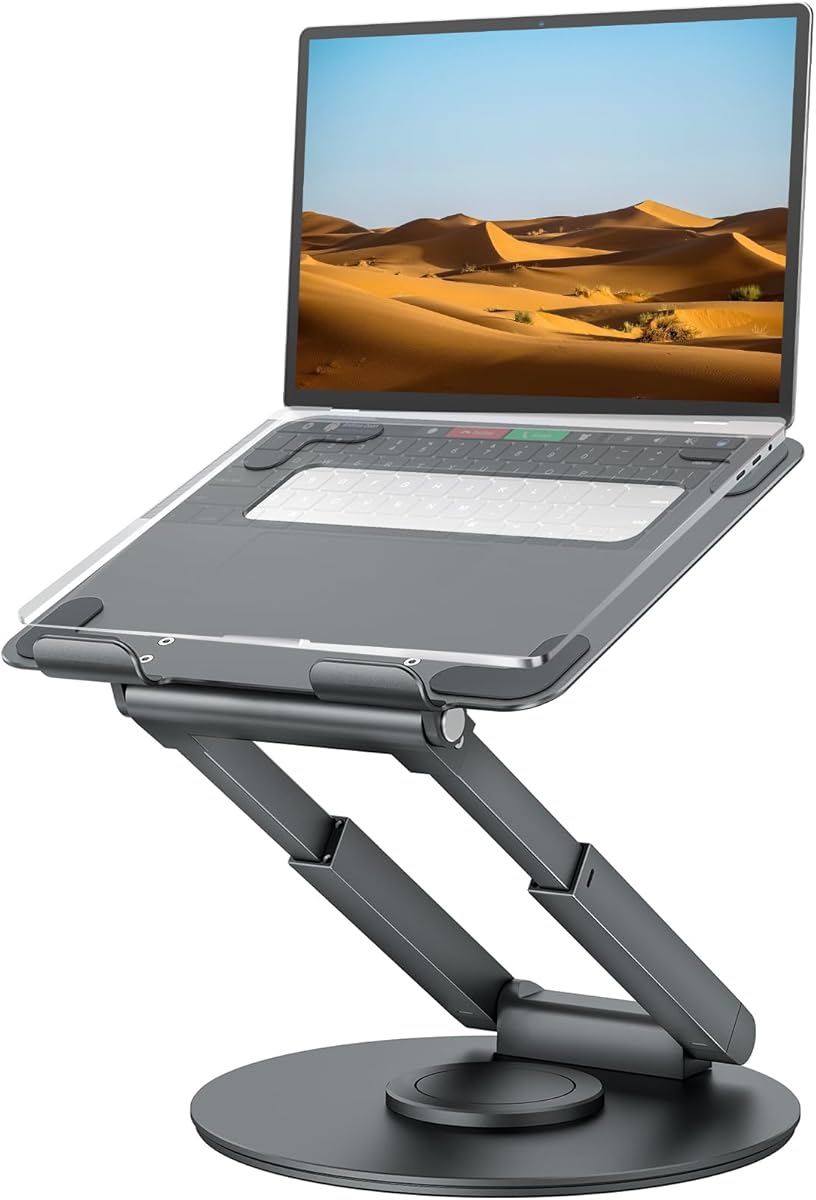
The tounee Telescopic Stand is built for a broader ergonomic use case than a conventional portable riser. It has a 4.7 rating, supports 10- to 17-inch laptops, and adjusts from 2.1 to 21 inches. That exceptional range allows the screen to move between seated and standing positions, encouraging users to alternate their posture during long workdays.
We may earn a commission when you buy through this link, at no additional cost to you.
A smooth 360-degree turntable makes it easy to redirect the display during conversations or presentations. The large aluminum base and dual pivot joints are designed for stability, with a listed capacity of up to 22 pounds. The stand also folds for storage, and its broad compatibility includes MacBook Pro and other popular 10- to 17-inch devices.
The primary trade-off is size. A mechanism that extends to 21 inches and rotates a full circle occupies considerably more space than a simple folding stand. It is therefore better classified as a portable desk system than an ultra-light travel accessory. Depending on the work surface and storage location, the collapsed form may still be substantial compared with pocket-sized models.
The tounee is ideal for users who alternate between sitting and standing, share screens, or want a wide range of screen positions from one base. It is less compelling for someone who needs to carry a stand across multiple locations every day. For a permanent or semi-permanent ergonomic workstation, however, its height range and rotating base provide exceptional flexibility.
The 2.1-to-21-inch adjustment range is much taller than that of a typical folding riser. It lets the screen move into a standing-friendly position without requiring a separate adjustable desk, provided the surface and working setup are suitable.
The rotating base lets the user turn the display toward a colleague without moving the stand itself. This is useful for quick demonstrations, collaborative editing, and face-to-face conversations.
We may earn a commission when you buy through this link, at no additional cost to you.
The Adjustable Portable Riser is a simple, approachable stand with a 4.5 rating. It raises the screen from 4.34 to 6.59 inches through six levels and supports laptops from 10 to 15.6 inches. Its triangle support design, open platform, and large silicone pad offer a practical combination of stability, cooling, and device protection.
We may earn a commission when you buy through this link, at no additional cost to you.
The forward-tilt angle and open construction promote airflow around the computer. Smooth edges improve handling, while the triangular support structure is intended to keep the laptop from moving during use. It weighs 0.49 pounds and folds to 9.96 by 1.98 by 0.68 inches, making it convenient to include in a work bag.
One important setup detail is that the two support bars must be inserted at the same level on both sides. Uneven placement can affect balance. The model also lacks a swivel base, large screen lift, and compatibility with devices above 15.6 inches, so buyers seeking those features should look elsewhere. Raised typing positions may also call for an external keyboard.
This riser is a solid choice for students, office workers, and travelers who want a uncomplicated foldable stand. It offers enough height adjustment for a more comfortable screen position while remaining easy to carry and quick to deploy. Its value lies in a clear, familiar design rather than advanced rotating or telescoping mechanisms.
The folding structure narrows into a slim package that can slide into most laptop bags. At just under half a pound, it is easy to carry without adding much bulk, and there are no powered components to manage.
The triangular support layout and broad silicone contact area help hold the laptop securely. Aligning both support bars at the same level is the key setup step, and using the stand on a flat surface will help maintain balance.
We may earn a commission when you buy through this link, at no additional cost to you.
The right portable laptop stand depends on how you work, which computer you carry, and how much you value compactness versus adjustability. Consider fit, stability, cooling, setup, and storage before making a choice.
Begin with the supported size range, but also consider the weight and shape of your specific computer. Most portable stands here support laptops from 10 to roughly 16 inches, while the Roost V3 fits 12- to 18-inch models and the Lamicall aluminum stand reaches 17.3 inches. A broad compatibility label is useful, but it does not guarantee identical balance for every thin notebook, gaming laptop, or workstation.
Choose a stand whose range comfortably includes your device, and use the lowest or most stable setting for larger computers when the manufacturer recommends it.
A useful portable stand should raise the display far enough to encourage a more neutral head position. Compact folding models commonly provide approximately 5.5 to 8.5 inches of adjustment, while the Roost V3 offers a six-inch screen lift and the tounee extends as high as 21 inches for standing work. Height is only one part of comfort: keyboard separation also affects ergonomics.
Prioritize a model with several easily selected levels if you share the device with users of different sizes. For long typing sessions, plan to use an external keyboard and mouse.
Portability should be measured by more than weight. A 185-gram stand that folds to 12.7 centimeters long is designed for a backpack or even a pocket, while the Lamicall Ultra-Slim folds to a smartphone-like profile and includes a pouch. Larger systems such as the OMOTON and tounee fold for storage but are better considered desk-portable than pocket-portable.
Think about where you will actually use the stand. Daily air-travel and commuting favor a thin foldable model, whereas occasional travel between offices can justify a more rigid, feature-rich design.
Stable support is especially important when the laptop is raised and used for typing. Options with a broad weighted base, dual support rods, triangle frames, or rigid truss structures are designed to reduce movement. The Nulaxy and tounee list 22-pound capacities, the Amazon Basics model lists 11 pounds, and the Roost uses an interlocking frame to limit flex.
Look for non-slip silicone, protective hooks, and a stable footprint as well as a stated load rating. Always use a flat surface, and avoid leaning on the edge of the laptop while typing.
Raising a laptop also creates room for air to move beneath it. Open frames, hollow constructions, ventilation holes, and vent-patterned upper panels can help dissipate heat. The Nulaxy stands out for its geometric heat-vent panel, the Lamicall aluminum model for multiple ventilation holes, and the OMOTON for its open X-frame.
A passive stand cannot replace active cooling for every intensive workload, but good airflow is still useful during long sessions. Check the location of your laptop's intake vents and avoid designs that unintentionally block them.
A portable stand should be easy to deploy when a new workspace is available. Spring-loaded models such as the SODI and Lamicall Ultra-Slim adjust in about a second, while the Roost remembers a selected height for one-motion setup. Traditional folding models may require both support bars to be placed at matching levels before the laptop is set down.
Choose the mechanism that matches your routine. Fast spring adjustment is convenient for shared desks, while a locking mechanism can provide greater consistency in a permanent workstation.
Rotation is valuable when a screen must face both the user and a nearby colleague. The OMOTON rotates smoothly through 360 degrees, while the tounee combines a full swivel base with a telescoping height range. These features are less necessary for solo work but can make a shared desk more flexible.
If you regularly present, teach, or collaborate in person, rotation is worth the added size. If your device is used only by one person, a simpler folding design may be easier to carry and store.
A good stand should remain clean, grip the computer without scratching it, and fit into a routine packing system. Silicone pads are common across the selection, while the SODI and Lamicall Ultra-Slim include storage pouches. The SODI also includes a velvet bag and manual. A carrying case can prevent the aluminum frame from rubbing against other items.
Check what is included before buying, especially if you already own a suitable sleeve. Periodically clean the contact pads and folded hinges so dust does not reduce grip or interfere with smooth movement.
Place the stand on a flat, stable desk before unfolding or adjusting it. For models with separate support bars, ensure that both bars are inserted at the same height before setting the laptop down. For spring-loaded designs, move the frame slowly and confirm that the device is seated securely on all intended contact points.
Raise the screen to a comfortable viewing level and confirm that the platform does not wobble. Connect an external keyboard and mouse if you plan to type for an extended period. Adjust the angle gradually, remove the device before changing rotating or tilting mechanisms, and make sure the laptop's bottom vents remain unobstructed.
When traveling, fold the stand only after checking that no cable is trapped in a hinge. Keep silicone surfaces free of dust and debris, and use the supplied pouch where available. Store the device on a level surface and avoid placing heavy objects on the stand when it is folded.
For light browsing, video calls, and short work sessions, using the laptop keyboard directly may be acceptable. For extended typing, an external keyboard is usually much more comfortable because it allows the screen to be raised without moving the keyboard excessively far from your hands. A separate mouse can also reduce shoulder and wrist strain.
It can improve passive cooling by keeping the laptop elevated and allowing air to move around its underside. Open frames, ventilation holes, and vent-patterned surfaces are especially helpful. However, a stand cannot provide the same cooling capacity as a powered accessory and may not be sufficient for every sustained, high-intensity workload.
The SODI and Lamicall Ultra-Slim are the strongest choices when packed size is the priority. The SODI weighs 185 grams and folds to 12.7 by 4.4 by 2 centimeters, while the Lamicall Ultra-Slim weighs 0.25 pounds and folds to a smartphone-like size. Both are more travel-friendly than rotating or telescoping desk systems.
No. Each model has its own size range, and weight can affect balance even when a device technically fits. Large gaming laptops and workstations may require a broader base, stronger support, or the lowest available adjustment setting. Check the compatibility range, load rating, and any model-specific recommendations before purchasing.
Rotation is helpful for shared screens, presentations, demonstrations, and face-to-face conversations. The OMOTON offers 360-degree rotation, while the tounee combines a swivel base with sit-to-stand height adjustment. These models are more substantial than simple folding stands, so buyers should consider how they will be carried and stored.
Most stands in this guide use silicone contact pads to reduce direct contact with the laptop's finish. Keep those pads clean, avoid folding the stand with the computer still attached, and do not slide the device across the platform. Protective hooks on the Amazon Basics model add another layer of retention.
An adjustable model is more useful when the stand is shared, moved between desks, or used by people with different viewing preferences. A fixed design can be simpler and less prone to accidental movement, but it provides less flexibility. The most versatile options here use multiple levels, spring-loaded arms, locking frames, or telescoping columns.
Capacity varies by model. The Nulaxy and tounee list support for devices up to 22 pounds, while the Amazon Basics stand lists 11 pounds. Some listings do not provide a load figure, so stability should be judged from the support structure, base design, and device compatibility. Heavy laptops still require careful placement on a flat surface.
The SODI Foldable Stand is the strongest all-around recommendation because it combines a high rating, six quick adjustment levels, a genuinely compact folded profile, aluminum construction, and broad laptop compatibility. The Tonmom Adjustable Riser delivers the most practical budget option, while the Roost V3 stands out as the premium travel choice with exceptional rigidity, a broad screen lift, and very low weight.
Prioritize the features that match your actual routine. Choose a thin spring-loaded model for daily travel, a broad stable frame for active typing, a rotating base for collaboration, or a telescoping design for sit-to-stand work. Remember to check the supported laptop size, weight requirements, folded dimensions, and whether an external keyboard is needed for comfortable long sessions.
Ratings, product configurations, and availability can change over time, and current prices are also likely to vary. Before buying, confirm the latest listing details, package contents, compatibility guidance, and current cost so the selected portable laptop stand remains the best fit for your devices and working environment.
