
Samsung 24” S40GD
4.4Editor score
Pivots for vertical viewing
Height-adjustable slim design
IPS panel with 100Hz
A monitor that can rotate vertical can transform a conventional workstation into a more adaptable setup for writing, coding, streaming, creative work, and long document review. The useful feature is not simply a rotating panel, but a stand that also controls height, tilt, swivel, and viewing angle while preserving a stable, comfortable display.
This guide compares ten monitors with confirmed vertical-pivot support, focusing on panel performance, portrait-mode ergonomics, resolution, refresh rate, color coverage, built-in audio, mounting options, and port selection. It also highlights important differences between gaming-focused models, business displays, and feature-rich screens designed for specialized professional workflows.
Each pick reveals which buyer it suits best, from a compact 23.8-inch business option to high-refresh QHD gaming monitors. Product details and availability can change, so check the current listing, port configuration, and rotation behavior before purchasing; prices and promotions also vary over time.
4.4Editor score

4.7Editor score
4.2Editor score
As an Amazon Associate we earn from qualifying purchases.
The comparison below places all ten rotating monitors side by side, emphasizing portrait capability, display performance, refresh rate, and stand flexibility. It makes it easier to identify a high-speed gaming option, a productive business display, or a specialized multi-port monitor for professional installations.


The CRUA 24.5-inch 200Hz combines a high-refresh gaming panel with a genuinely versatile ergonomic stand, making it a strong all-around choice for users who alternate between landscape gaming and portrait productivity. Its 4.2 rating reflects a capable specification set, although the Full HD resolution is less detailed than the QHD alternatives in this guide.
We may earn a commission when you buy through this link, at no additional cost to you.
The stand supports 90-degree rotation, 120 millimeters of height adjustment, -5 to 15 degrees of tilt, and -15 to 15 degrees of swivel. That range allows the display to move from a conventional wide setup to a portrait-oriented coding or document-viewing position without requiring a different stand. A 75 by 75 millimeter VESA pattern also supports wall mounting.
Gaming performance is driven by the 200Hz refresh rate, 3ms response time, and FreeSync support. The 1920 by 1080 panel covers 120 percent of sRGB, uses 8-bit color, and is rated at 300 cd/m² with a 1000:1 contrast ratio. Low-blue-light mode is included for longer sessions, while HDMI, DisplayPort, and a 3.5mm audio output cover the essential connections.
This is a good match for a mixed-use setup in which one screen must handle fast games, writing, spreadsheet work, and occasional portrait browsing. The main compromise is pixel density: creative professionals working on intricate images may prefer a QHD panel, while competitors seeking a business-oriented design may favor the cleaner Samsung or Dell options.
A 200Hz refresh rate and 3ms response time make this model better suited to fast motion than the 60Hz and 100Hz business-oriented choices. Adaptive synchronization can also help reduce tearing when the connected graphics hardware supports it.
The combination of pivot, height, swivel, and tilt controls makes portrait use practical rather than incidental. The panel can be moved into vertical mode and then adjusted to a comfortable height for coding, long documents, or narrow desk spaces.
We may earn a commission when you buy through this link, at no additional cost to you.
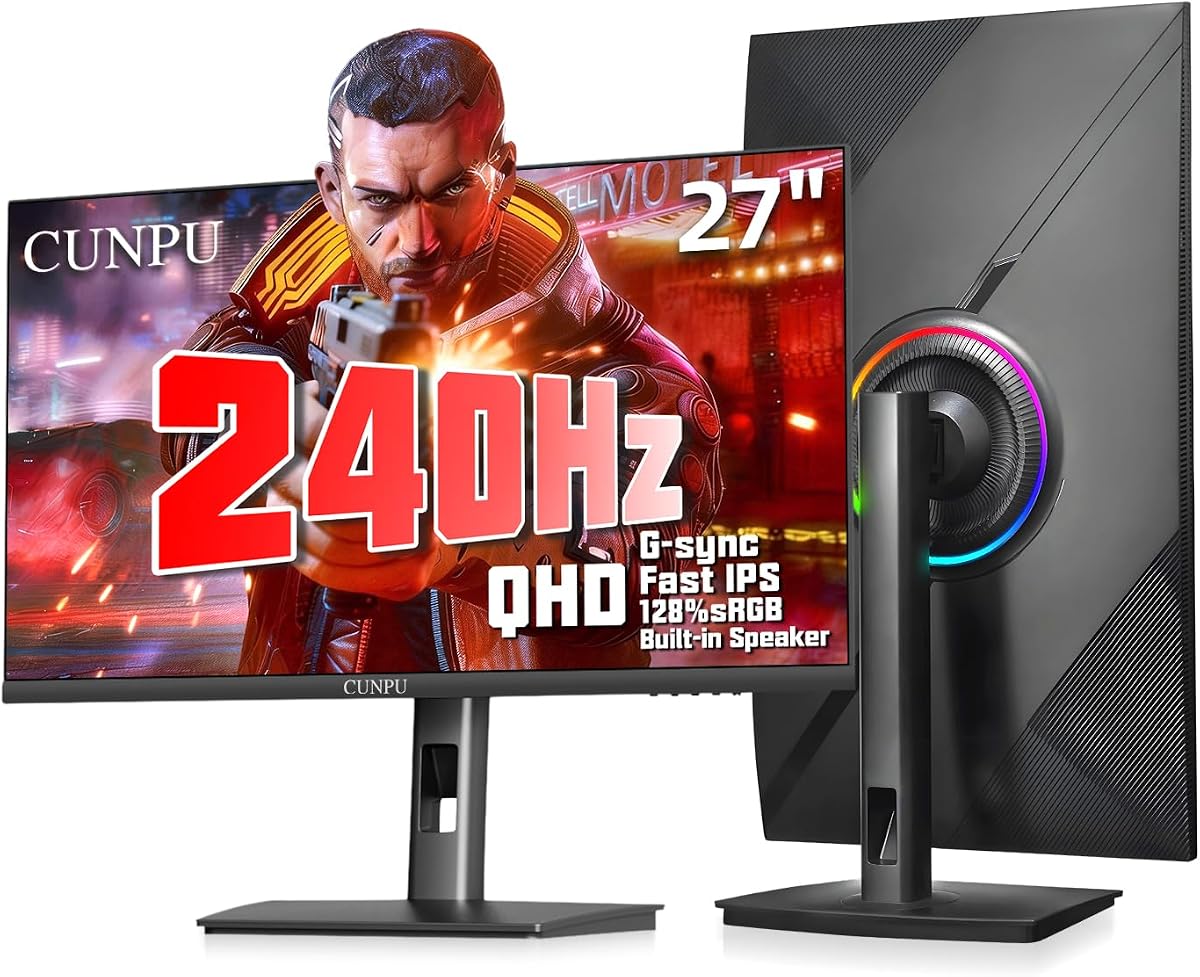
The CUNPU 27-inch 240Hz is the most feature-complete premium option here, combining a high-resolution fast IPS panel with broad stand movement and strong gaming support. Its 4.2 rating is backed by specifications aimed at both competitive players and professionals who need more screen detail than standard Full HD can provide.
We may earn a commission when you buy through this link, at no additional cost to you.
The 2560 by 1440 panel runs at 240Hz with a stated 1ms GTG response time and supports both FreeSync and G-Sync. Color coverage includes 125 percent sRGB and 100 percent DCI-P3, while HDR10 and a 1000:1 contrast ratio support more dimensional image quality. Two built-in 2W speakers add useful audio for casual media viewing and calls.
Ergonomics are a major strength. The stand offers 5.11 inches of height adjustment, -90 to 90 degrees of swivel, -90 to 90 degrees of pivot, and -5 to 15 degrees of tilt. The quick-mount bracket simplifies setup, while compatibility with 100 by 100 millimeter VESA mounts, desk stands, and articulating arms broadens mounting options.
This monitor is best for a high-end mixed-use desk where fast games, QHD productivity, and portrait workflows all matter. Its 240Hz mode and QHD resolution can place a heavier load on a graphics card and system, so buyers should ensure their hardware can drive the desired combination. Even so, the resolution, motion performance, and stand versatility make it a particularly compelling upper-tier choice.
The QHD panel preserves more working space and visual detail than Full HD, while the 240Hz refresh rate supports fast competitive games. This combination is particularly useful for users who do not want to choose between a detailed desktop and responsive motion.
Compatibility with both major adaptive-sync approaches offers flexibility across different graphics systems. Built-in speakers are not a substitute for a dedicated audio setup, but they improve the convenience of watching videos, joining calls, or playing games without extra equipment.
We may earn a commission when you buy through this link, at no additional cost to you.
This 23.8-inch monitor is distinguished less by gaming performance and more by its unusually broad set of connections. Its 3.7 rating is the lowest among the listed products, but the physical 90-degree stand rotation and mix of HDMI, VGA, BNC, USB, AV, and audio connections make it a specialist option for offices, surveillance, and mixed-source installations.
We may earn a commission when you buy through this link, at no additional cost to you.
The display provides 1920 by 1080 resolution, 100 percent sRGB coverage, 250 cd/m² brightness, a 178-degree viewing angle, and 1000:1 contrast. A 60Hz refresh rate and 5ms response time are appropriate for office work, media viewing, and general computing, though they are not designed to satisfy enthusiast gaming expectations.
The multi-function stand allows 90-degree rotation, 45-degree movement to either side, height adjustment, and upward tilt. Importantly, the product does not automatically rotate the image. Portrait orientation depends on the source device producing a rotated signal, so the connected computer or other equipment must support that function in its display settings.
This is a practical pick for technicians, control-room users, administrators, or home users connecting many source types. Its specialized connectivity may be unnecessary for an ordinary single-computer setup, and the 60Hz specification is a clear limitation for fast games. For those who need the ports and physical pivot, however, the feature set is unusually comprehensive.
HDMI and VGA cover common computers and media devices, while BNC, AV, USB, and audio connections broaden the monitor's usefulness in specialized environments. The included remote control and built-in speakers simplify operation in installations where direct button access is inconvenient.
The stand physically turns the screen, but the operating system or source device must deliver portrait content. Buyers should confirm that their computer supports rotated output before expecting a standard document or game to change orientation automatically.
We may earn a commission when you buy through this link, at no additional cost to you.
The Samsung 24-inch S40GD offers a restrained and professional design centered on a reliable IPS panel, 100Hz refresh rate, and an adjustable stand that can pivot into a vertical view. Its 4.4 rating is among the strongest in this guide, suggesting broad appeal without relying on the extreme specifications of the gaming models.
We may earn a commission when you buy through this link, at no additional cost to you.
The IPS panel is designed to maintain consistent color and brightness as viewing angles change, an advantage for office work, financial analysis, media editing, and shared screens. A 100Hz refresh rate offers smoother everyday motion than a standard 60Hz panel, and game-oriented picture settings allow users to adjust contrast and color by genre.
Vertical positioning comes from a height-adjustable screen with pivot capability, allowing documents, web pages, and side panels to be viewed in portrait orientation. Ultra-thin bezels maximize usable screen space and create a clean appearance, while reduced blue light and screen-flicker features support longer working sessions.
The Samsung is a strong recommendation for offices, home productivity, and casual gaming. It lacks the 240Hz motion performance, QHD pixel density, and integrated speaker details emphasized by some alternatives, but its measured customer rating, business-oriented styling, and fluid IPS panel make it an especially balanced option for a rotating monitor.
An IPS panel is a sensible choice for documents, spreadsheets, design review, and general browsing because colors and tones remain consistent across the screen. The 100Hz refresh rate also makes cursor movement and general interface transitions feel more fluid.
Ultra-thin bezels give the display a modern look that works well beside a second screen. Pivot support lets users turn a portion of the workspace vertical without adding a separate rotating stand.
We may earn a commission when you buy through this link, at no additional cost to you.
The KTC H27F7 combines a large 27-inch form factor, fast IPS technology, and 240Hz refresh rate with a stand that pivots through 90 degrees. Its 4.5 rating is one of the best among the gaming selections, making it appealing for players who also want a large screen that can move into portrait orientation.
We may earn a commission when you buy through this link, at no additional cost to you.
Fast motion is handled by a 240Hz refresh rate and stated 1ms response time, with adaptive sync intended to reduce tearing, lag, and stuttering. The FHD fast IPS panel delivers 131 percent sRGB coverage, 350 cd/m² brightness, 1000:1 contrast, and HDR support. Low-blue-light and flicker-free features are included for extended gaming sessions.
The stand is unusually flexible for a gaming monitor. It tilts from -5 to 20 degrees, pivots from negative 90 to positive 90 degrees, and offers 130 millimeters of height adjustment. This makes it possible to position the panel vertically for code, chat streams, or a narrow side display while still supporting a large landscape gaming layout.
Connectivity includes two HDMI inputs, DisplayPort 1.4, and a USB 2.0 port, with support for 100 by 100 millimeter VESA mounting. The three-year warranty and stated responsive support add reassurance. Its main limitation is Full HD resolution: the large 27-inch panel does not offer the fine detail of the CUNPU or KTC QHD model, making screen size and gaming speed its primary strengths.
The 240Hz refresh rate and one-millisecond response specification target fast competitive play. Users who prioritize motion clarity over maximum text density may find Full HD at this size more than sufficient.
A wide swivel and tilt range complement the 90-degree pivot, allowing the screen to face different positions on a large desk. Height adjustment helps align the 27-inch panel with a secondary display.
We may earn a commission when you buy through this link, at no additional cost to you.
The KTC H25T7-3 offers a compact 24.5-inch footprint, 240Hz refresh rate, and adjustable stand that includes pivot, tilt, and height controls. It is a natural fit for a smaller desk where a 27-inch gaming screen would be too imposing but a 60Hz business panel would feel less responsive.
We may earn a commission when you buy through this link, at no additional cost to you.
The fast IPS panel operates at 1920 by 1080 with 240Hz refresh and 1ms MPRT response. Its stated color characteristics include 114 percent sRGB, 1000:1 contrast, 16.7 million colors, 8-bit color, and 350 cd/m² brightness. HDR400 adds a basic high-dynamic-range feature, while low-blue-light and flicker-free settings are designed to improve visual comfort.
Vertical rotation is supported as part of an ergonomic stand with pivot, tilt, and height adjustment. That flexibility lets users move from a wide gaming configuration into portrait mode for messaging, coding, or content review. The panel also supports a 100 by 100 millimeter VESA mounting pattern for an arm or wall bracket.
Two HDMI 2.0 ports, one DisplayPort 1.4 port, and one USB 2.0 port provide useful connection flexibility. The principal caution is the absence of a numerical customer rating, making the listing less proven by user feedback than several alternatives. For a buyer who prioritizes compact size, speed, and rotation, however, this is a technically capable shortlist candidate.
The 24.5-inch format preserves much of the visual presence of a 27-inch screen while requiring less desk width. It can therefore be practical for smaller workspaces that still need a high-refresh gaming experience.
HDR400 provides brighter highlights and richer contrast than a standard SDR panel, although it is a more modest specification than advanced HDR formats. Low-blue-light and flicker-free features complement the gaming focus.
We may earn a commission when you buy through this link, at no additional cost to you.
The KTC H27E6S is the most technically advanced option in the guide, pairing a 27-inch QHD fast IPS panel with a 240Hz native refresh rate that can be overclocked to 275Hz. Its 4.5 rating and white enclosure make it a distinctive choice for buyers who want both strong specifications and a less conventional appearance.
We may earn a commission when you buy through this link, at no additional cost to you.
The 2560 by 1440 resolution adds useful detail for creative work, while the fast IPS panel is rated at 240Hz with a 275Hz overclocked mode. HDR400, 400 cd/m² brightness, 123 percent wide color gamut, and adaptive sync support a high-speed gaming and media-focused setup. Built-in speakers add convenience for daily entertainment and gaming.
The stand supports height, pivot, swivel, and tilt adjustment, including vertical rotation for coding, browsing, and content creation. VESA compatibility expands installation options. Two HDMI 2.0 ports, DisplayPort 1.4, and USB 2.0 provide a straightforward selection for PCs, laptops, and consoles.
This model is best for an enthusiast who wants QHD detail and elite refresh performance in a single rotating display. The most important practical consideration is hardware capability: a system and graphics card able to drive QHD at the selected refresh rate will make the most of the panel. Its feature set nevertheless represents the most ambitious balance of resolution, speed, brightness, and flexibility here.
QHD at 240Hz provides substantially more detail than Full HD gaming monitors while preserving very low latency. The advertised 275Hz overclocking mode offers an additional performance option when the PC, connection, and graphics settings support it.
A rated 400 cd/m² brightness gives the HDR400 presentation more visible headroom than many competing models. Integrated speakers make the monitor more self-sufficient for casual entertainment, although serious listeners will still benefit from dedicated audio hardware.
We may earn a commission when you buy through this link, at no additional cost to you.
The KTC H25T7-3 listed here is a 24.5-inch 240Hz gaming monitor distinguished by a clearly vertical-oriented stand, 400 cd/m² brightness, and substantial color coverage. Its 4.3 rating suggests a well-received balance of speed, picture quality, and ergonomics in a relatively compact format.
We may earn a commission when you buy through this link, at no additional cost to you.
The FHD fast IPS panel combines a 240Hz refresh rate with 1ms MPRT response and adaptive sync. Stated color performance includes 94 percent DCI-P3 and 114 percent sRGB, while HDR400 adds brighter highlights and deeper contrast. A 178-degree viewing angle and low-blue-light and eye-comfort features make the display practical for extended sessions.
Its key productivity advantage is the 90-degree pivot, supported by height adjustment, -5 to 20 degrees of tilt, and VESA compatibility. Users can move between landscape gaming and a portrait-oriented setup for code, chat, or a narrow secondary workflow. Two HDMI 2.0 ports and DisplayPort 1.4 allow switching among several devices.
This monitor is well suited to a compact mixed-use desk with a gaming emphasis. Compared with the 27-inch QHD choices, it offers less pixel density but can still deliver very high refresh rates and high brightness. Its most compelling combination is a relatively small footprint, strong motion specifications, bright HDR presentation, and genuine vertical rotation.
The 400 cd/m² figure provides comfortable brightness for well-lit rooms and gives HDR400 highlights greater visibility. The broad stated gamut is also useful for content that benefits from richer color.
A 24.5-inch screen can make portrait rotation more manageable on a modest desk. The 90-degree pivot preserves access to height and tilt controls, so portrait use does not have to mean a fixed viewing angle.
We may earn a commission when you buy through this link, at no additional cost to you.
The larger Samsung 27-inch S40GD brings the same balanced business-oriented design as the 24-inch version to a more expansive screen. Its 4.4 rating, IPS panel, 100Hz refresh rate, and vertical pivot support make it a strong option for productivity users who need more workspace than a compact display can offer.
We may earn a commission when you buy through this link, at no additional cost to you.
The IPS technology is intended to preserve vivid, consistent color across the screen as the viewing angle changes. That makes the monitor suitable for office applications, research, finance, content review, and general creative use. A 100Hz refresh rate helps keep motion and scrolling smooth without adopting the extreme specifications of dedicated gaming displays.
The height-adjustable, pivot-capable stand can move the display into portrait mode, while ultra-thin bezels help the 27-inch panel occupy a clean and modern visual footprint. Reduced blue light and screen-flicker features support eye comfort during long working periods. Game picture and contrast settings are also available for users who occasionally play games.
This Samsung is ideal for large desks, shared offices, and multi-monitor arrangements where a larger main display and an occasional portrait orientation are important. It is less compelling for competitive gamers seeking 240Hz performance, but for general computing, business applications, and smooth everyday motion, it delivers a focused and polished feature set.
The 27-inch panel provides additional horizontal and vertical working area compared with the 24-inch version. That extra space can reduce window switching and make large spreadsheets, reference material, and side-by-side applications easier to manage.
IPS color consistency, eye-comfort features, adjustable positioning, and a restrained borderless design support professional use. The result is a versatile monitor that does not need gaming-focused specifications to be practical throughout the workday.
We may earn a commission when you buy through this link, at no additional cost to you.
The Dell S2425HSM combines a highly rated 4.7 customer score with 144Hz performance, complete ergonomic adjustment, and integrated speakers. It is an especially balanced rotating monitor, serving office work, casual and competitive gaming, media viewing, and video calls without requiring a separate pair of desktop speakers.
We may earn a commission when you buy through this link, at no additional cost to you.
Its 23.8-inch FHD panel uses a 144Hz refresh rate and 1ms MPRT, providing smoother motion than the 60Hz and 100Hz alternatives. A 1500:1 contrast ratio supports clear image separation, while AMD FreeSync can help maintain a tear-free experience with compatible graphics hardware. The 4-star TÜV-certified display is designed to reduce harmful blue light without compromising color quality.
Height, tilt, pivot, and swivel adjustments make it easy to move the screen between landscape and portrait orientations. The compact FHD panel fits neatly into a two- or three-monitor arrangement, and dual 3W speakers cover basic audio needs. Dell Display and Peripheral Manager is also included for managing the monitor within a compatible Dell PC workspace.
The primary limitation is that the native resolution is Full HD, so fine editing and dense text may be less spacious than on a QHD model. Even so, the strong rating, 144Hz smoothness, integrated sound, eye-comfort certification, and flexible stand make this an excellent general-purpose recommendation for a home or office setup that needs vertical rotation.
A 144Hz refresh rate and one-millisecond MPRT produce noticeably smoother movement than standard office monitors. The specification also makes the display more versatile for fast games without adopting the extreme power demands of a 240Hz panel.
Full height, tilt, pivot, and swivel control makes the stand easy to adapt to different users and desk arrangements. Dual 3W speakers add practical volume and frequency range for daily media, calls, and casual gaming.
We may earn a commission when you buy through this link, at no additional cost to you.
Choosing a vertically rotating monitor involves balancing physical adjustment with resolution, motion performance, color quality, connectivity, and the demands of your workspace. The most important starting point is how often and why you will use portrait mode.
A vertically rotating monitor must physically pivot the panel, usually by approximately 90 degrees, while the operating system changes the content from landscape to portrait. The product listings in this guide explicitly describe pivot or 90-degree rotation support, but buyers should still check the stand design and full specifications because vertical marketing language does not always indicate a true rotating panel.
Hardware rotation and software rotation are separate parts of the process. The display can physically turn, but the connected computer, tablet, or other source must send a portrait-oriented signal. Modern operating systems commonly allow users to rotate the desktop, although some applications and source devices do not support portrait output properly.
Full HD at 1920 by 1080 is common among compact rotating monitors and can work well for general office use, document review, and gaming. QHD at 2560 by 1440 offers substantially more desktop space and finer detail, making it more attractive for coding, creative work, and dense productivity applications. A higher resolution also benefits from the extra vertical room created by portrait orientation.
A 60Hz monitor is mainly suited to office tasks, browsing, and video, while 100Hz provides a noticeable improvement in everyday fluidity. Models at 144Hz or higher are better for fast games, with 240Hz options targeting competitive play. The graphics card and source device must also be capable of driving the intended resolution and refresh-rate combination.
Pivot alone may not be enough to create a comfortable viewing position. Height adjustment helps align the screen with neighboring displays, tilt controls viewing angle, and swivel lets the panel turn toward another person or away from direct light. Models with a quick-mount bracket can also make installation and changes between the included stand and a monitor arm easier.
IPS panels are generally favored for their consistent colors and broad viewing angles, while fast IPS variants add low-latency gaming performance. Color-gamut figures, brightness, contrast ratio, and HDR support can indicate suitability for media or creative work, but the most useful comparison is whether the panel meets the color needs of the software and content you regularly use.
DisplayPort and HDMI cover most modern computer connections, but users of specialized equipment may need VGA, BNC, AV, USB, or audio connections. Check whether a USB port is a data connection, a charging connection, or an upgrade feature. VESA compatibility adds flexibility by allowing use with a wall bracket or articulating arm instead of the supplied stand.
A 27-inch screen provides more workspace but needs more desk depth and may dominate smaller setups. A 23.8-inch or 24.5-inch rotating display is easier to reposition and pair with a laptop. Built-in speakers can be useful for calls and casual media, though they rarely replace a dedicated audio system for serious entertainment.
Begin by assembling the stand on a stable, level surface and confirming that the panel is securely attached. Before rotating the display, raise it to a comfortable working height and make sure there is enough space on both sides of the desk. Do not force the pivot mechanism, and avoid lifting the monitor by the screen itself when changing its orientation.
For portrait mode, rotate the panel and then adjust the software orientation in the connected computer's display settings. Applications may rearrange themselves after the desktop changes, so it is useful to reposition windows before beginning detailed work. Leave enough clearance around the panel to accommodate the stand's pivot range and to avoid pushing against a wall or neighboring display.
Care for the monitor by cleaning it with a soft, lint-free cloth and avoiding liquid cleaners directly on the screen. Keep vents unobstructed, route cables so they do not pull against the moving stand, and tighten any height or mounting connections if the display develops a wobble. Periodically check that the base, pivot joint, and VESA hardware remain secure.
It means the stand can physically pivot the panel by approximately 90 degrees so the screen becomes taller than it is wide. This is useful for documents, code, social feeds, subtitles, and narrow multi-monitor layouts. The connected source device must also support portrait output for the content to display correctly.
Not necessarily. Hardware rotation allows the panel to turn, but the operating system or source device usually controls the image orientation. One of the listed monitors explicitly notes that it does not auto-rotate and depends on the source signal. Check operating-system display settings and application support before purchasing.
A smaller display is often easier to rotate because it requires less desk depth and has less weight at the end of the stand. A 27-inch screen provides more total workspace and can be preferable for dense professional work. The best size depends on desk depth, viewing distance, and the amount of side-by-side content you need.
No. Vertical orientation concerns workflow rather than refresh rate. A 100Hz monitor is smooth for most office and casual gaming tasks, while 144Hz offers a strong balance for entertainment and faster games. A 240Hz display makes the most sense when competitive gaming is a priority and the connected hardware can drive it.
QHD provides more pixels and therefore more usable text and code in portrait orientation. Full HD can still be perfectly adequate on a smaller display and may suit a more compact setup. Consider the screen size as well: Full HD on a 24-inch monitor can feel more usable than the same resolution stretched across a larger panel.
Only if the product supports the appropriate VESA pattern and the arm or bracket is compatible with the panel and stand. Several models in this guide support 100 by 100 millimeter mounting, while the CRUA supports 75 by 75 millimeters. Confirm dimensions, weight capacity, and rotation clearance before installation.
Pivot rotates the panel within its plane, allowing landscape-to-portrait movement. Swivel turns the entire stand left or right. Tilt changes the panel's upward and downward viewing angle. A comfortable setup often benefits from all three, especially when the display is used beside another screen or shared with someone else.
They are generally sufficient for system sounds, video calls, and casual viewing. Models with dual 2W or 3W speakers provide more useful output than basic one-speaker designs. For immersive games, music, or films, a dedicated soundbar or speaker system will still deliver stronger bass, separation, and volume.
The Dell S2425HSM is the most balanced general-purpose recommendation, combining a strong customer rating, 144Hz smoothness, integrated speakers, and complete height, tilt, pivot, and swivel control. The Samsung S40GD models offer polished business-oriented IPS displays, while the CUNPU and KTC performance models serve buyers who prioritize fast refresh rates and extensive gaming features.
When choosing, begin with your portrait workflow rather than the largest specification available. Confirm physical pivot support, source-device compatibility, and available desk clearance. Resolution, color quality, refresh rate, ports, and audio should then be matched to the tasks performed most often, whether that means coding, gaming, content creation, surveillance, or office productivity.
Finally, verify the current listing details, supported refresh-rate combinations, mounting pattern, and port configuration before ordering. Monitor designs, firmware, and bundle contents can change, and prices and promotions also fluctuate. Comparing the current product page with the priorities in this guide is the safest way to select the right rotating display for your desk.