
TOPGRO T1-Pro
4.5Editor score
Core i9-13900HX processor
RTX 4060 mobile GPU
32GB dual-channel DDR5
1TB PCIe 4.0 SSD
Discover the best Mini PC with Nvidia GPU options for gaming, creation, and compact builds, compared by graphics power, memory, cooling, and connectivity.
A Mini PC with Nvidia GPU can deliver a surprising amount of gaming and creative performance in a fraction of the space occupied by a traditional tower. The best examples pair capable mobile graphics with fast processors, ample memory, efficient cooling, and enough ports for peripherals and multiple displays.
This guide compares ten systems based on the supplied processor, graphics, memory, storage, networking, display, cooling, and upgrade information. It covers both dedicated Nvidia models and compact platforms that offer a route to external graphics, helping buyers distinguish gaming performance from broader workstation potential.
Each review highlights the strongest reasons to consider that particular machine and the compromises or uncertainties that deserve attention. Product listings, configurations, and prices can change, so buyers should confirm the current specification and accessory details before making a final purchase.
4.5Editor score

5.0Editor score

The table below places the ten compact systems side by side, emphasizing processor class, graphics hardware, memory, storage, and major connectivity features. It provides a quick way to identify dedicated Nvidia options, distinguish them from integrated or expandable platforms, and shortlist systems that match a particular gaming or productivity need.



The ASUS ROG GR70 combines a Ryzen 9 9955HX processor with an Nvidia GeForce RTX 50-Series mobile GPU in a compact, silver-hued enclosure. Its 5.0 rating is the highest numerical score in this roundup, and the supplied specifications position it as a high-performance option for demanding games, high-refresh displays, and graphics-heavy work where desk space is limited.
We may earn a commission when you buy through this link, at no additional cost to you.
Its defining strength is the combination of a flagship-class Ryzen 9000 Series processor and RTX 5070 mobile graphics. The product information specifically emphasizes smooth frame rates, low latency, and a capable gaming experience, while the custom cooling design is intended to control temperatures and acoustics during intensive workloads. Wi-Fi 7 and certified Bluetooth 5.4 add useful wireless flexibility, reducing reliance on cables for compatible peripherals and network access.
The main limitation is that the supplied listing does not identify the memory capacity, memory type, storage capacity, operating system, display outputs, or exact port selection. Those omissions make direct comparison with the more fully specified TOPGRO and ROG NUC systems difficult. A buyer should also understand that a mobile GPU in a mini PC can be constrained by system power and cooling, even when the underlying graphics chip is capable.
This is the strongest recommendation for a buyer who wants a dedicated Nvidia GPU without a full-size desktop and who prioritizes processor and graphics performance. It is particularly attractive for high-end compact gaming setups, provided the current listing confirms the memory, storage, display support, and warranty details needed for the buyer’s setup.
The Ryzen 9 9955HX and RTX 5070 combination targets the upper end of compact gaming. Its appeal lies in preserving dedicated Nvidia graphics and a powerful processor while avoiding the physical footprint of a conventional gaming tower.
The custom cooling system is designed to manage heat and noise under sustained load, while Wi-Fi 7 and Bluetooth 5.4 provide a modern wireless foundation. Together, these details make the GR70 feel designed for regular use rather than occasional desktop replacement.
We may earn a commission when you buy through this link, at no additional cost to you.
The TOPGRO T1-Pro is the most straightforward dedicated Nvidia option in this guide. It pairs a 13th Gen Core i9-13900HX with an 8GB RTX 4060 mobile GPU, dual-channel 32GB DDR5 memory, and a 1TB PCIe 4.0 NVMe SSD. Its 4.5 rating reflects a broadly favorable balance of gaming specifications, expandability, networking, and practical controls.
We may earn a commission when you buy through this link, at no additional cost to you.
The RTX 4060 brings hardware ray tracing, DLSS 3.0, and Max-Q technologies, giving gamers access to features not found in many older mini PCs. The 24-core, 32-thread i9-13900HX provides substantial multitasking capacity, while the included 32GB of memory is generous for modern games and creative applications. Storage expansion is also a key strength, with two additional M.2 2280 slots described in the supplied information.
Its RTX 4060 is an older class of mobile graphics than the RTX 50-Series alternatives, so buyers should not expect identical performance or feature support. The listing also contains an inconsistency: the headline identifies a 1TB SSD, while the expandable-storage description refers to additional capacity and a maximum of 8TB. That makes it especially important to verify the actual drive layout, operating system, and included accessories before ordering.
For a buyer seeking dedicated Nvidia graphics, ample memory, modern networking, and multiple outputs without moving to a premium flagship configuration, the T1-Pro is a persuasive choice. It is well suited to 1440p-class gaming setups when paired with an appropriate display, while its 2.5GbE LAN, Wi-Fi 6E, Bluetooth 5.3, and three-display support make it versatile beyond games.
The combination of 32GB DDR5, a fast PCIe 4.0 SSD, and a dedicated RTX 4060 removes several common bottlenecks in compact gaming PCs. It also provides enough memory for demanding games, background applications, and creative tools without relying on frequent upgrades.
Wi-Fi 6E, Bluetooth 5.3, and 2.5GbE Ethernet cover both wireless and wired connectivity. Adjustable RGB lighting and front-button fan controls add practical everyday convenience, while HDMI and DisplayPort outputs support a multi-monitor arrangement.
We may earn a commission when you buy through this link, at no additional cost to you.
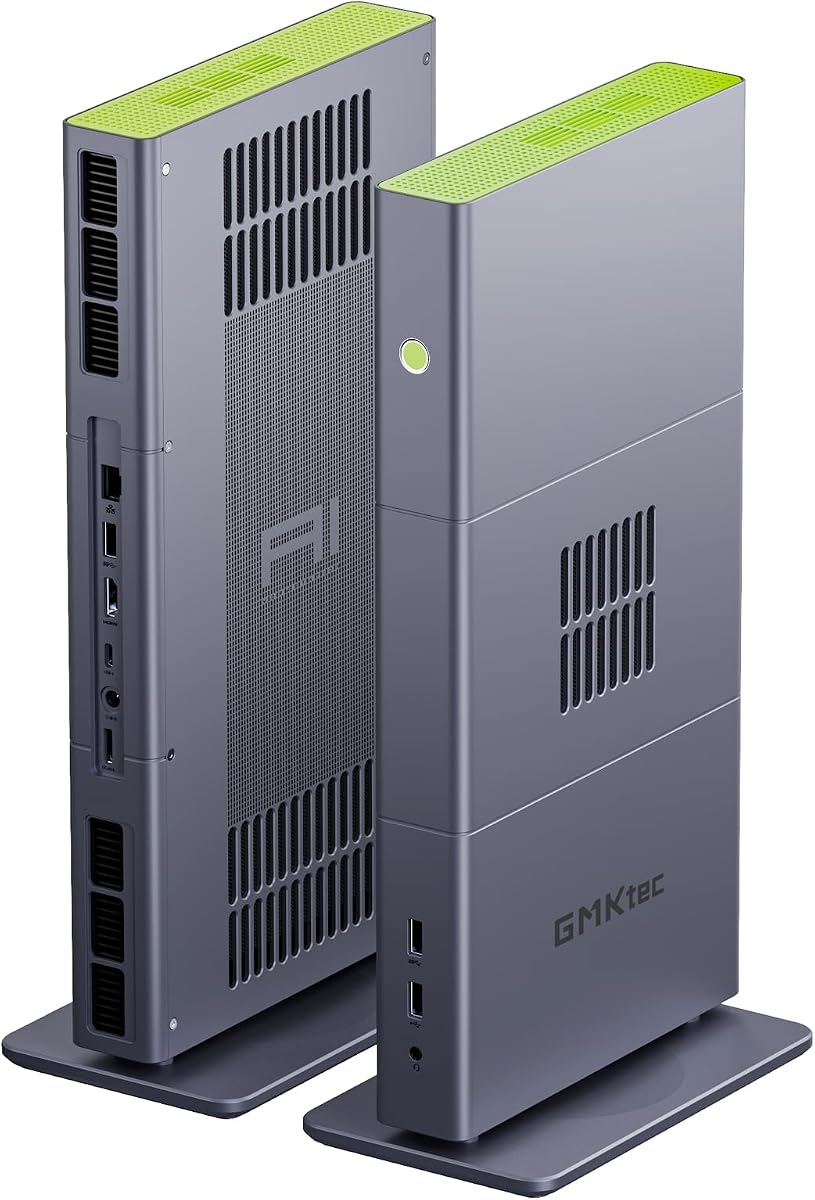
The GMKtec T1 is not a conventional dedicated-Nvidia gaming mini PC. Instead, it combines an Intel Core Ultra 9 285H processor, Intel Arc 140T integrated graphics, and an OCuLink interface that can accept an external graphics solution. That distinction matters: it is best viewed as a flexible compact platform that can become a high-performance gaming or workstation system when paired with suitable hardware.
We may earn a commission when you buy through this link, at no additional cost to you.
The processor includes 16 cores across performance and efficiency cores, a 5.4GHz turbo clock, and an Intel AI Boost NPU rated for up to 13 TOPS of INT8 computation. The integrated Arc 140T includes eight Xe cores and supports features such as DirectX 12, OpenGL 4.5, OpenCL 3, Quick Sync, and AV1 encoding and decoding. Display support extends to four screens through HDMI 2.1, DisplayPort 1.4, and USB Type-C.
The supplied information contains conflicting storage statements: the product title lists a 1TB PCIe 4.0 SSD, while the feature description says 2TB and also mentions three M.2 2280 expansion slots. Buyers should confirm the actual storage configuration. OCuLink is the main attraction for this category because it can provide desktop-class graphics expansion, but the dock, external GPU, power, and overall cost must be considered separately.
Choose the T1 if the goal is a powerful, compact, AI-capable, multi-display computer that may later receive an external GPU. It is not the most direct answer for someone who wants a ready-to-play Nvidia mini PC, and the lack of a customer rating adds another reason to review the current listing and return policy carefully.
OCuLink provides a higher-bandwidth path for an external graphics adapter than many conventional USB-based approaches. For buyers who already own compatible graphics hardware, this can make the T1 a flexible starting point rather than a fixed configuration.
The Core Ultra 9 processor includes a dedicated AI NPU, while the platform supports quad-screen output. Those capabilities make the mini PC relevant to local AI experimentation, video work, and productivity setups that need several high-resolution displays.
We may earn a commission when you buy through this link, at no additional cost to you.
This ROG NUC configuration combines an Intel Core Ultra 9 Series 2 ARL-HX processor with an Nvidia GeForce RTX 5070 mobile GPU, 32GB of DDR5 memory, and a 2TB NVMe SSD. It also includes Thunderbolt 4, a three-fan cooling system, and ROG ARGB lighting. The supplied 3.5 rating is lower than several alternatives, making careful review of buyer feedback and the exact configuration essential.
We may earn a commission when you buy through this link, at no additional cost to you.
The RTX 5070 is the center of the proposition, with DLSS support and Nvidia’s RTX 50-Series feature set. The platform is also advertised with up to 200+ platform TOPS and up to an 18% generation-over-generation improvement. Three fans and dual vapor chambers form the QuietFlow cooling design, while thumb screws provide tool-free access to memory and storage in the compact 3-liter enclosure.
The available information does not state a specific GPU power limit, maximum display configuration, networking standard, or operating system. Mobile GPU performance can vary substantially between systems even when the graphics chip is the same, so buyers should investigate the available graphics settings and cooling behavior. A lower rating does not automatically make the system slow, but it makes recent customer feedback an important part of the decision.
This ROG NUC makes sense for buyers who value a premium, serviceable mini PC with dedicated RTX graphics, generous storage, and straightforward upgrades. It is best suited to a buyer willing to confirm the current listing details and understand that the published rating reflects a less emphatic customer response than the leading systems in this guide.
Tool-free access makes it easier to reach memory and storage, a meaningful advantage for compact PCs that may need upgrades over time. The 2TB starting configuration also reduces the immediate need for a secondary drive.
The triple-fan, dual-vapor-chamber arrangement is intended to sustain performance while keeping noise under control. Buyers should still consider ambient temperature, workload intensity, and the system’s advertised power behavior when judging real-world performance.
We may earn a commission when you buy through this link, at no additional cost to you.
The ASUS ROG GR70 3D uses a Ryzen 9 9955HX3D processor and RTX 5070 laptop GPU, making it a high-end gaming-oriented alternative to the standard GR70. Its 3D designation is the key distinction, potentially shifting more processor resources toward gaming workloads while maintaining the strong general performance of the underlying Ryzen platform.
We may earn a commission when you buy through this link, at no additional cost to you.
The supplied product information emphasizes high frame rates, low latency, and smooth gameplay, supported by the RTX 50-Series mobile GPU. A custom cooling system is designed to control temperature and acoustics, while Wi-Fi 7 and Bluetooth 5.4 support contemporary wireless accessories. The compact silver enclosure is designed for desk-friendly placement and portability without sacrificing the major gaming components.
Because the listing does not provide memory, storage, operating system, or port information, a buyer cannot fully judge its everyday specification from the supplied details. No customer rating is available, which also removes one useful signal for evaluating consistency, thermals, and software quality. As with all compact gaming systems, the exact mobile GPU power limit and sustained performance are important details to confirm.
This model is best for a buyer who prioritizes gaming and wants a Ryzen 3D processor paired with an RTX 5070 in the smallest practical form. It may be especially relevant for competitive titles, high-refresh gaming, and simulation games, but the standard GR70 listing may offer more complete visible specifications for comparison.
The Ryzen 9 9955HX3D designation signals a processor designed with gaming performance as a central priority. In a compact system, that focus can complement a capable mobile GPU without requiring the extra physical space of a tower.
The custom cooling, compact silver chassis, and Wi-Fi 7 and Bluetooth 5.4 support mirror the broader GR70 design. That makes the 3D model a specialized choice within an established gaming mini PC platform.
We may earn a commission when you buy through this link, at no additional cost to you.
The GMKtec X3 is an AI-focused compact workstation built around the Ryzen AI Max+ 395, 128GB of LPDDR5X memory, and a 2TB PCIe 4.0 SSD. Its Radeon 8060S integrated GPU is powerful for a mini PC, but the defining feature is OCuLink support, which allows buyers to add a dedicated external graphics card for gaming, AI acceleration, rendering, or video production.
We may earn a commission when you buy through this link, at no additional cost to you.
The processor provides 16 Zen 5 cores, 32 threads, a boost clock up to 5.1GHz, and an XDNA 2 NPU with more than 50 peak AI TOPS. The supplied information also cites up to 126 TOPS of total AI performance. The Radeon 8060S uses 40 RDNA 3.5 compute units and can access the unusually large memory pool, making the platform well suited to local language models and other memory-intensive workloads.
This is not a ready-made Nvidia mini PC because it ships with AMD integrated graphics. An external Nvidia GPU would require a compatible OCuLink enclosure, sufficient power, appropriate cables, and the physical desk space to operate it. Onboard LPDDR5X also cannot be replaced like conventional SO-DIMM memory, although its capacity reduces the need for a conventional upgrade in many AI scenarios.
The X3 is a compelling choice for developers, researchers, and creators who want a small system with a large unified memory pool and the option of dedicated graphics. For conventional gaming, a system that includes an RTX GPU out of the box is more convenient, but this platform offers a path to far greater graphics flexibility.
The 128GB pool is the platform’s defining advantage. It gives integrated graphics and AI software access to much more memory than conventional gaming mini PCs, making large models and media projects easier to handle locally.
The PCIe 4.0 x4 OCuLink interface can carry a dedicated external GPU to a compatible dock. That turns the X3 from an integrated mini PC into a flexible platform for desktop-class graphics workloads.
We may earn a commission when you buy through this link, at no additional cost to you.
The BOSGAME M5 combines the Ryzen AI Max+ 395 with 128GB of 8000MT/s LPDDR5X memory and a 2TB PCIe 4.0 SSD. It targets buyers who want substantial AI and creative capability from a quiet, compact enclosure. Its 4.3 rating provides a stronger customer signal than the unrated alternatives, although it remains lower than the leading rated gaming systems.
We may earn a commission when you buy through this link, at no additional cost to you.
The processor includes 16 Zen 5 cores, 32 threads, 64MB of L3 cache, a 5.1GHz boost clock, and an XDNA 2 NPU. The supplied information cites 126 TOPS of total AI compute and describes use with 70-billion-parameter language models. The Radeon 8060S integrated GPU has 40 RDNA 3.5 compute units and can dynamically allocate as much as 96GB of the system memory to graphics tasks.
Display and storage flexibility are additional strengths. The system supports four 8K-at-60Hz monitors through HDMI 2.1, DisplayPort 1.4, and two USB4 ports with 40Gbps bandwidth, Thunderbolt 4 compatibility, power delivery, and DisplayPort Alt Mode. A second M.2 slot allows storage expansion or RAID according to the supplied information, but the 128GB LPDDR5X is soldered and cannot be upgraded.
The M5 is best for AI developers, video editors, engineers, and users who prioritize unified memory and multi-display workflows. It is less convenient as a dedicated Nvidia gaming recommendation because no discrete Nvidia graphics are included. A buyer should also compare the claimed game performance against the specific titles and settings that matter, rather than relying only on GPU positioning.
The 128GB LPDDR5X configuration allows the CPU, NPU, and integrated GPU to work with a shared pool. That is especially useful when local AI models or high-resolution media exceed the capacity of conventional gaming systems.
Four 8K display outputs and dual 40Gbps USB4 ports make the M5 attractive for editing suites, control rooms, and expansive desk setups. The USB4 interfaces also provide a convenient route for high-speed storage and peripherals.
We may earn a commission when you buy through this link, at no additional cost to you.
The ROG NUC 16 Edition 20 is the flagship specification in this guide, pairing an Intel Core Ultra 9 290HX Plus with an Nvidia GeForce RTX 5090 mobile GPU. It also includes 64GB of DDR5 memory, a 2TB PCIe Gen5 SSD, Wi-Fi 7, Thunderbolt 4, and an ultra-compact small-form-factor design. The supplied information presents it as a system for uncompromising gaming and content creation.
We may earn a commission when you buy through this link, at no additional cost to you.
An RTX 5090 mobile GPU is the obvious centerpiece. Combined with a Core Ultra 9 processor, it should appeal to buyers who want maximum graphics capability in a mini PC enclosure, including high-refresh gaming, demanding 3D work, and GPU-accelerated creation. The 64GB of DDR5 and PCIe Gen5 storage also position the system as more of a compact workstation than a basic gaming appliance.
The limited product description does not disclose exact display outputs, cooling architecture, power limits, memory speed, or upgrade access. It also has no customer rating, so there is no feedback signal to supplement the specification sheet. A mobile RTX 5090 implementation will still be constrained by chassis power and thermals, and a high-end graphics card can generate substantial heat and noise under sustained load.
For buyers who want the highest specified Nvidia graphics in this comparison and can accommodate a premium purchase, the ROG NUC 16 Edition 20 is the leading option. Confirm the current configuration, monitor support, warranty, and available customer feedback before ordering, particularly if the system will be used for long rendering or gaming sessions.
The RTX 5090 mobile GPU sits above every other dedicated graphics option in this guide. It is aimed at buyers who want maximum headroom for demanding games, ray tracing, content creation, and GPU-accelerated applications.
The 64GB DDR5 configuration provides comfortable room for large projects, while the 2TB PCIe Gen5 SSD supports fast game and media storage. Together, they make the NUC suitable for buyers whose compact computer must also function as a productivity machine.
We may earn a commission when you buy through this link, at no additional cost to you.
The Core Ultra 7 version of the ROG NUC pairs Intel’s Series 2 ARL-HX processor with an RTX 5060 mobile GPU, 32GB of DDR5 memory, and a 1TB NVMe SSD. Its 4.6 rating is the second-highest numerical score among rated products in the guide, making it a particularly attractive middle ground between the dedicated RTX 4060 system and the costlier higher-end ROG NUC configurations.
We may earn a commission when you buy through this link, at no additional cost to you.
RTX 50-Series mobile graphics bring DLSS support and the expected Nvidia gaming feature set, while the Core Ultra 7 processor is positioned for a blend of gaming, AI, and productivity. The three-fan QuietFlow system uses dual vapor chambers, and thumb screws simplify access to memory and storage. Thunderbolt 4 provides high-speed peripherals and external connectivity, while ARGB lighting adds a ROG-specific visual touch.
The 1TB SSD is a sensible starting point but may fill quickly with modern game installs, 4K media, and creative projects. As with the other ROG NUC models, the supplied information does not state the mobile GPU’s power limit, which can materially affect performance. Buyers should also confirm display outputs and the details of the warranty and support arrangements.
This ROG NUC is a strong recommendation for a buyer who wants a recent dedicated Nvidia GPU, a high customer rating, and a compact platform that supports practical upgrades. It offers a more balanced specification than the top ROG NUC models while remaining clearly more gaming-focused than the AMD-based AI mini PCs in the list.
The Core Ultra 7 and RTX 5060 pairing targets buyers who need strong gaming and general performance without automatically choosing the most expensive configuration in the range. The 32GB memory allocation is also suitable for demanding modern titles and multitasking.
The three-fan, dual-vapor-chamber design supports sustained workloads, while tool-free access makes memory and storage maintenance easier. Buyers can expand storage or memory as their needs develop, subject to the final system specifications.
We may earn a commission when you buy through this link, at no additional cost to you.
This configuration combines an Intel Core Ultra 9 Series 2 ARL-HX processor with an RTX 5070 mobile GPU, 32GB of DDR5, and a 1TB NVMe SSD. Compared with the similarly equipped Core Ultra 7 ROG NUC, it moves to a higher processor tier while retaining the same 32GB memory capacity and one-terabyte starting drive.
We may earn a commission when you buy through this link, at no additional cost to you.
The RTX 5070 brings DLSS and Nvidia’s RTX 50-Series capabilities, while the Core Ultra 9 contributes strong multithreaded performance and AI-oriented platform features. The system is advertised with up to 200+ platform TOPS and an up-to-18% generation-over-generation improvement. QuietFlow cooling uses three fans and dual vapor chambers, and the tool-free 3-liter design is intended to make memory and storage access straightforward.
The supplied rating is 4.1, which is respectable but lower than the 4.6 score of the Core Ultra 7 and RTX 5060 configuration and lower than the ASUS ROG GR70’s 5.0. That does not erase the stronger specification, but it is worth reading current customer comments for recurring concerns. The 1TB drive is also more modest than the 2TB ROG NUC configuration, and the exact GPU power behavior remains unspecified.
This model suits a buyer who specifically wants a Core Ultra 9 paired with an RTX 5070 and values a relatively recent gaming platform in a compact chassis. It should be considered alongside the 2TB version and the ASUS GR70, with the final choice depending on storage preference, platform preference, and the importance of current customer feedback.
The Core Ultra 9 provides additional multi-core capability for creation and multitasking, while the RTX 5070 targets high-refresh gaming and graphics effects. The combination is well suited to users who want one compact system for several demanding workloads.
Tool-free access and a three-fan cooling system make the ROG NUC easier to maintain over time. The compact design still places demands on cooling, so sustained loads warrant attention to fan behavior and the system’s advertised power settings.
We may earn a commission when you buy through this link, at no additional cost to you.
Choosing a compact gaming computer requires balancing graphics performance, processor capability, memory, cooling, display support, and upgrade potential. The most important distinction is whether a dedicated Nvidia GPU is included or whether one can be added later, because that choice changes both the budget and the expected gaming experience.
A dedicated Nvidia GPU is the central requirement for most buyers seeking a gaming-focused mini PC. The systems in this guide span the RTX 4060, RTX 5060, RTX 5070, and RTX 5090 mobile classes, with each step intended to provide more graphics capability than the previous tier. Nvidia features highlighted in the supplied product information include DLSS, hardware ray tracing, and Max-Q technologies on selected systems.
A fast processor keeps menus, games, background applications, and creative tools responsive. The list includes Ryzen 9 9955HX and 9955HX3D processors, 13th Gen Core i9-13900HX, and several Intel Core Ultra systems. For pure gaming, the 3D-oriented Ryzen model may be attractive, while Core Ultra and high-tier Ryzen systems offer broader multitasking performance. Buyers should consider both the processor tier and how the mini PC vendor configures power and cooling.
Modern games, creative software, and AI tools can consume substantial memory, so 32GB is a practical baseline for a new dedicated-GPU mini PC. The TOPGRO and ROG NUC options provide 32GB DDR5, while the GMKtec X3 and BOSGAME M5 offer 128GB of LPDDR5X for specialized AI and workstation use. A large unified or onboard memory pool can be extremely valuable, although it may not be user-upgradeable.
Mobile graphics processors operate within limited power and thermal envelopes, so cooling is not merely a cosmetic consideration. The ASUS ROG GR70 uses a custom cooling design, and the ROG NUC models use three fans with dual vapor chambers. A well-designed cooling system can maintain steadier performance during long games and render jobs, but buyers should still look for specific power limits, fan noise information, and credible customer feedback.
A 1TB SSD is enough for many installations but can be filled quickly by modern games, 4K video, and project files. The guide includes 1TB and 2TB configurations, and some systems provide additional M.2 slots. The TOPGRO supports two extra M.2 2280 slots according to its supplied information, while the BOSGAME M5 includes a second M.2 slot. Buyers should confirm slot availability, supported formats, and whether the operating system and recovery utilities are included.
Display output quality and port selection can matter as much as internal performance. The TOPGRO supports HDMI and DisplayPort with up to three displays, the GMKtec T1 supports four screens, and the BOSGAME M5 supports four 8K outputs. Thunderbolt 4 appears on all three ROG NUC configurations reviewed. Networking options include 2.5GbE Ethernet, Wi-Fi 6, Wi-Fi 6E, and Wi-Fi 7, with Bluetooth ranging from 5.2 to 5.4 depending on the model.
A mini PC that accepts M.2 drives, memory modules, or an external graphics card can adapt as needs change. The ROG NUC provides tool-free access to memory and storage, and the TOPGRO has additional internal M.2 slots. The GMKtec T1 and X3 use OCuLink for external GPU expansion, although buyers must separately obtain a compatible dock and graphics card and account for power, enclosure, and desk-space requirements.
Compact size is valuable only if the system fits comfortably in the intended location and can be serviced. Some mini PCs include adjustable fan controls, while others emphasize quiet cooling or a simple top-mounted power button. Consider the available desk space, monitor clearance, room ventilation, and whether a compact system will need to sit near an outlet. A larger external GPU solution can also eliminate much of the physical savings offered by the mini PC.
Begin by confirming that the system includes the intended processor, GPU, memory, and storage configuration, then connect the power adapter and peripherals before configuring the operating system. Use the supplied display cables and appropriate adapters, and make sure the monitor is connected to the port that best matches its resolution and refresh-rate capabilities. For a new system, complete the operating system setup and install the graphics, chipset, networking, and any application-specific drivers recommended by the manufacturer.
Give the mini PC room around its vents and avoid placing it inside a closed cabinet unless airflow is demonstrably adequate. Clean dust from exterior intake areas with compressed air while the system is powered off, and do not use liquid cleaners directly on the chassis. Check fan behavior and system temperatures during extended games or render tasks, but avoid repeatedly opening the case or changing power settings without understanding the product’s supported controls. The TOPGRO’s dedicated fan-speed button and ROG systems’ cooling features are intended to offer convenient management without constant intervention.
Use Windows or the applicable operating system’s built-in update tools, install storage and memory with the system powered down and disconnected, and keep important files backed up separately. For external graphics configurations, use a compatible OCuLink dock, adequate power, supported drivers, and cables that meet the bandwidth requirements of the chosen adapter. When the mini PC is no longer needed, shut it down fully, disconnect peripherals, store it in a dry and dust-free location, and retain the original packaging for easier servicing or transport.
A Mini PC with a current Nvidia mobile GPU can provide a strong gaming experience while using far less space than a tower. Performance depends on the specific GPU, its configured power limit, cooling, memory, and the display being used. A system with an RTX 5070 or RTX 5090 is positioned for more demanding work than an RTX 4060 configuration, but frame rates still vary by game and settings.
These labels identify different Nvidia graphics tiers, with the RTX 5090 representing the highest specified GPU in this guide and the RTX 4060 the lowest. Higher tiers generally offer more graphics performance, memory, and feature headroom, but mobile implementations can still differ because of power and cooling limits. Buyers should compare the complete system specifications rather than assuming every version of a named GPU performs identically.
32GB is a sensible target for a new gaming mini PC, especially when games, browsers, voice chat, background launchers, and creative applications run together. The TOPGRO and ROG NUC systems in this guide include 32GB. The 128GB systems serve different needs, providing extra capacity for local AI and memory-intensive workflows rather than simply being necessary for ordinary gaming.
Yes, if it has a compatible high-bandwidth expansion interface and you obtain a suitable enclosure or dock. The GMKtec T1 and X3 specifically provide OCuLink, which can support an external graphics adapter. You will also need the appropriate dock, power supply, cables, and Nvidia drivers, and the complete setup may occupy more desk space than a conventional mini PC.
A wired 2.5GbE connection generally offers a stable, low-latency path with fewer wireless variables, making it preferable when practical. Wi-Fi 7 can provide excellent speed and convenience on a properly configured network, but signal quality, router capability, congestion, and distance still matter. Many buyers will benefit from using Ethernet for online gaming while reserving wireless connectivity for accessories and convenience.
A 1TB SSD is a common starting point, but large games, updates, and creative media can consume it quickly. A 2TB configuration offers more breathing room, while M.2 expansion can make additional storage practical if the system supports it. Check whether the operating system is preinstalled, how much usable space is available, and whether adding a second drive affects supported configurations.
They can be, because the same GPU family may be configured with different power limits, cooling, and memory in each system. A capable mobile GPU can still deliver strong gaming performance, but maximum desktop results are not guaranteed. The most important details are the laptop or mini PC power configuration, sustained thermal behavior, and the particular screen or workload being targeted.
Confirm the processor, exact graphics card, memory, storage, operating system, display outputs, networking, warranty, and included cables. It is also important to check customer reviews for thermal noise, stability, and driver experiences. Because configurations and listings can change, use the current product page as the final source of truth before purchase.
The ASUS ROG GR70 stands out as the strongest all-around dedicated-Nvidia recommendation, combining a Ryzen 9 9955HX with an RTX 5070 mobile GPU, modern wireless connectivity, and a custom cooling design. The TOPGRO T1-Pro is the more practical dedicated-graphics value, with 32GB DDR5, a PCIe 4.0 SSD, flexible networking, and multiple display outputs. At the premium end, the ROG NUC 16 Edition 20 offers the most ambitious specification with an RTX 5090 mobile GPU, 64GB of memory, and PCIe Gen5 storage.
Prioritize the complete configuration rather than the GPU label alone. Memory, processor class, cooling, power limits, ports, storage expansion, and display support can materially change the experience. Buyers who need dedicated gaming graphics should favor a ready-to-use system, while AI developers or creators may find the 128GB-memory AMD platforms more valuable and can consider OCuLink when a dedicated external GPU is needed.
Finally, check the current listing, customer feedback, availability, warranty, and configuration details immediately before buying. Mini PC hardware can change between variants, and prices and promotions fluctuate. The links in this guide point to the reviewed Amazon listings, but the live product page should remain the final source for specifications, included accessories, and purchase terms.