
RedThunder One Handed Gaming Keyboard
4.4Editor score
Portable 35-key layout
Anti-ghosting across all keys
Driver-free plug-and-play use
Discover the best Left Handed Gaming Keyboards, comparing layouts, switches, connectivity, key mapping, ergonomics, and performance for left-handed players.
A left-handed gaming keyboard should place frequently used controls where your left hand can reach them without awkwardly crossing your body. The most effective options range from full-size southpaw models to compact one-handed keypads, each serving different needs in competitive shooters, MOBAs, MMOs, and everyday productivity.
We compared the ten products using the supplied specifications, focusing on layout, switch technology, programmability, connectivity, build design, and ergonomic features. The list also includes left-handed productivity keyboards and right-handed-mouse control keypads that place gaming inputs beneath the left hand.
Each review explains the product's strongest benefits, limitations, and ideal user, helping you narrow the field before buying. Ratings and specifications reflect the available product information, while product listings, configurations, and software support can change over time.
4.4Editor score

4.6Editor score

4.3Editor score
The comparison covers full-size southpaw boards, compact wired keypads, magnetic-switch rapid-trigger models, analog gaming controls, and ergonomic business keyboards, with the left-hand control requirement treated as the central deciding factor.


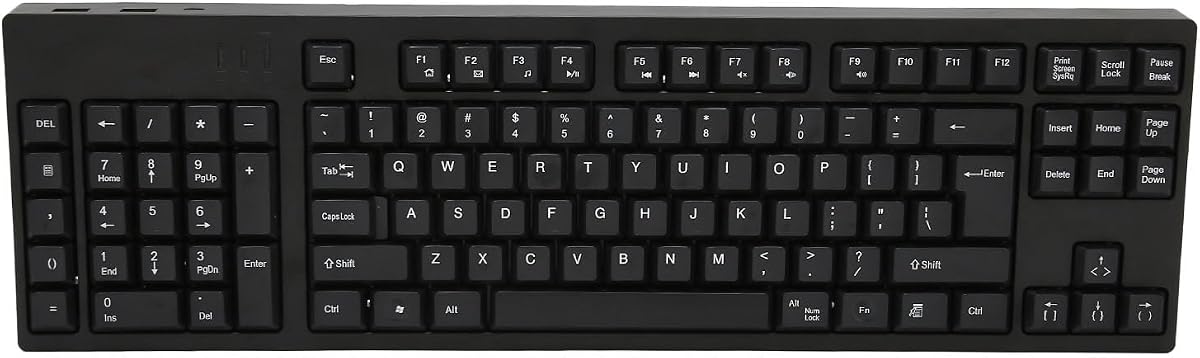

The RK ROYAL KLUDGE L98 stands out as the most complete conventional keyboard in this guide, combining a genuine southpaw numpad with mechanical construction, wireless connectivity, RGB lighting, and hot-swappable switches. Its 4.6 rating reflects a well-rounded feature set, and the relocated numpad directly addresses the central problem faced by left-handed users: keeping numerical entry away from the mouse hand.
We may earn a commission when you buy through this link, at no additional cost to you.
Its 98-key layout retains a substantial percentage of a full keyboard while moving the number pad to the left. That makes it practical for gaming, spreadsheet work, and general typing without forcing the user into a tiny keypad-only setup. The gasket-mounted structure, Cherry-profile PBT keycaps, and five layers of internal padding are especially appealing for shared rooms and late-night sessions, where hollow case noise and harsh vibration can be distracting.
Connectivity is another major strength. The L98 can operate through 2.4GHz wireless, Bluetooth 5.0, or a USB-C wired connection, allowing it to move between a gaming desktop, laptop, and other compatible devices. Its 8000mAh battery is unusually substantial for a keyboard of this size, with the supplied information citing up to 310 hours with RGB off and 51 hours with RGB on under the stated conditions.
This is the recommendation for anyone who wants a traditional keyboard experience but needs the numpad on the left. The main compromise is its larger size: players who want maximum mouse room may still prefer a one-handed gaming keypad. Nevertheless, the combination of southpaw ergonomics, modern connectivity, acoustic tuning, and switch customization makes the L98 the strongest all-purpose choice here.
Unlike conventional compact gaming keypads, the L98 includes a full left-side numeric cluster and a broad 98-key arrangement. It therefore supports detailed typing and data entry while still allowing the right hand to remain dedicated to aiming.
The three connection modes let users choose uncluttered wireless play for compatible systems or a wired link when they prefer a permanent desktop setup. Bluetooth also makes the board more useful away from the gaming desk.
Multiple foam and film layers reduce cavity noise, while the gasket structure softens the overall feel. The result is particularly relevant for users who type and play for many hours in an environment where a loud keyboard would be disruptive.
We may earn a commission when you buy through this link, at no additional cost to you.
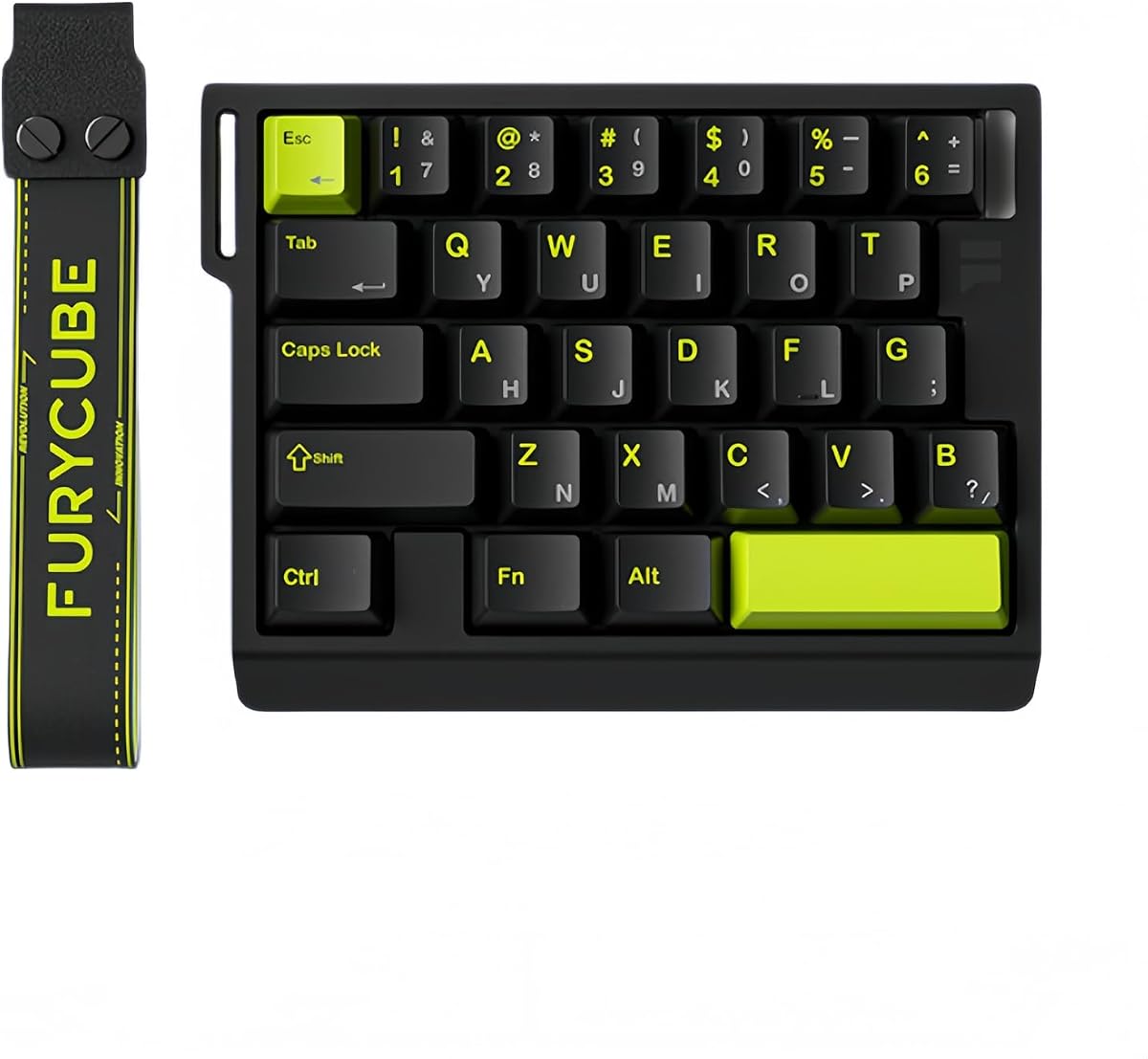
The RedThunder One Handed Gaming Keyboard is a straightforward 35-key gaming keypad with a 4.4 rating, RGB illumination, anti-ghosting, and a portable form factor. It is designed for PC gamers who want more control under the left hand without occupying the entire desk with a full-size keyboard, making it an accessible option for shooters and other action-focused titles.
We may earn a commission when you buy through this link, at no additional cost to you.
Its gaming-oriented details include a built-in game chip, a stated 3ms response time, and anti-ghosting across all 35 keys. Two macro-recording keys can capture and replay command sequences using the documented FN combinations. This provides useful shortcut support without requiring every action to fit on an ordinary unmodified keyboard.
The biggest practical benefit is simplicity. It is driver-free and plug-and-play, with stated compatibility for Windows, macOS, Linux, and several older Windows environments. Its small body, broad wrist rest, and RGB lighting make it easy to position beside a right-handed mouse. The supplied information does not describe adjustable analog movement, magnetic actuation, or extensive software-based key mapping.
Choose this model if portability, straightforward macros, and a compact gaming footprint matter more than advanced competitive features. It is less appropriate for players seeking thumbstick movement or finely adjustable trigger behavior, but it covers the essential one-handed keypad category without requiring a complicated setup.
Dedicated macro keys let users record common sequences and replay them with one press. The process is keyboard-driven, which makes the feature approachable even for users who do not want to learn a full configuration suite.
Because it controls only 35 keys, the keypad leaves considerable desk space for the mouse. That can benefit players who prefer large, sweeping movements in a game where sensitivity settings are not readily available.
Driver-free operation and broad operating system support make the keyboard easy to move between a gaming PC, laptop, or another compatible computer. The compact shell also simplifies storage and transport.
We may earn a commission when you buy through this link, at no additional cost to you.
The AZERON Cyborg II is a specialized one-handed gaming keypad designed for right-handed users who keep the mouse in the right hand and need keyboard-style movement commands under the left. Its 4.3 rating reflects an advanced control system rather than a conventional keyboard experience, with 30 mappable inputs and a Hall Effect analog thumbstick.
We may earn a commission when you buy through this link, at no additional cost to you.
The thumbstick is the defining feature. It supports WASD-like and 360-degree analog movement in compatible games, while allowing users to configure dead zones, sensitivity, cone angles, eight directional zones, and analog smoothing. It can also function as a mouse, and a mid-click function adds another layer of control without requiring a separate physical button.
Every one of the 30 inputs is individually connected rather than arranged around a matrix. That allows buttons to be assigned to keyboard, controller, mouse, or macro commands, with up to six layouts saved directly to the keypad. The supplied information also mentions profile-based RGB controls, a redesigned main board, and future software and modular enhancement support.
This is the premium pick for competitive players who value analog movement and fine-grained configuration. It is less suitable for someone who simply wants a compact keyboard, and the software demands a learning period. For its intended audience, however, the Cyborg II offers the most specialized and adaptable control scheme in the guide.
The Hall Effect thumbstick uses magnetic sensing to support analog movement while avoiding the drift associated with conventional potentiometer sticks. Adjustable zones and dead zones let players tailor how far the control must travel before the game responds.
Switching between game profiles does not require rebuilding every binding each time. Storing as many as six layouts directly on the keypad makes it practical to alternate between shooters, role-playing games, and non-gaming applications.
The adjustable structure is designed to accommodate different hand sizes, but the supplied guidance notes that this medium-sized model is intended for wrist-to-fingertip lengths of approximately 6.3 to 7.5 inches. Smaller hands may reach some controls less comfortably.
We may earn a commission when you buy through this link, at no additional cost to you.
The AZERON Keyzen combines a 4.6 rating with a 32-key layout, a 360-degree Hall Effect joystick, Cherry MX mechanical switches, and extensive programmability. It is built for one-handed control and follows the same broad left-hand-input concept as the Cyborg II, but it emphasizes interchangeable keycaps, modular construction, and support for Red, Brown, or Blue switches.
We may earn a commission when you buy through this link, at no additional cost to you.
All 32 keys can be mapped to keyboard, mouse, or controller actions, while the Hall Effect joystick provides true analog input without relying on a drifting potentiometer. N-key rollover is an important detail for gaming because it helps the keyboard register multiple simultaneous commands rather than blocking them during crowded inputs.
Ergonomics receive attention through a hand-shaped design, two included palm rests, adjustable finger angles, and swappable keycaps. Uniform DSA-profile caps provide another way to adapt the feel and appearance. The stated recommended wrist-to-fingertip length is 20 to 21 centimeters, or 7.9 to 8.3 inches, or more, so buyers with notably smaller hands should verify comfort before committing.
The Keyzen is well suited to gamers who want analog movement and high programmability without giving up familiar mechanical switches. It also supports users beyond games, including shortcuts for creative work and productivity. The main drawback is that advanced setup depends on software, and its recommended hand-size range may exclude some users.
Red switches provide a smooth and relatively quiet action, Brown switches add tactile feedback, and Blue switches deliver a more pronounced click. The ability to select among them makes the Keyzen adaptable to personal preferences and shared gaming setups.
The three-dimensional printed construction uses modular, replaceable components, allowing worn or modified pieces to be exchanged. Swappable keycaps and adjustable hand positioning add further scope for long-term personalization.
We may earn a commission when you buy through this link, at no additional cost to you.
The AJAZZ AK029 is a 29-key one-handed gaming keypad built around Hall Effect magnetic switches, rapid-trigger behavior, and high-speed wired communication. Its 4.5 rating and emphasis on competitive shooters make it a compelling option for players who want precise movement control from a compact left-hand device.
We may earn a commission when you buy through this link, at no additional cost to you.
The magnetic switches provide adjustable actuation with a stated precision of 0.01 millimeters and no bottom dead zone. Rapid Trigger allows a key to reset before the previous movement command is fully released, which supports faster corrections during strafing. Snap Key, or SOCD, and Dynamic Key Switch, or DKS, can also assign multiple actions to a single input.
The supplied specifications list an 8KHz polling rate, a 128KHz full-key scan rate, and latency as low as 0.125 milliseconds. A compact 29-key arrangement preserves mouse space, while an integrated wrist rest follows the palm shape. The aluminum alloy plate and five-layer acoustic structure aim to provide a stable, lower-noise experience with RGB lighting and 20 preset effects.
The AK029 is best for competitive FPS and MOBA players who understand or are willing to learn competition-oriented features. Its one-handed form and wired design are less suitable for users seeking a portable multi-device keyboard, but they make sense as a specialized performance tool beside a conventional right-handed mouse.
Because the magnetic mechanism detects travel continuously, a key can reset at a chosen distance rather than waiting for a fixed electrical connection to break. This gives shooters finer control over quick directional corrections.
The high polling and scanning specifications suit players who want the keyboard to keep pace with rapid input. A wired connection also avoids wireless interference concerns, although the product does not offer the tri-mode convenience of the RK L98.
Only 29 keys are included, and the integrated palm support keeps the device compact beside a mouse. That layout is purposeful: the left hand handles movement and actions while the right remains free for aiming.
We may earn a commission when you buy through this link, at no additional cost to you.
The Natural_A Left Handed Keyboard is a wired ergonomic model for business, accounting, and general productivity, with a 4.4 rating. Rather than focusing on competitive features, it directly addresses the discomfort that can arise when a left-handed user is forced to reach a numeric keypad on the right side of a standard keyboard.
We may earn a commission when you buy through this link, at no additional cost to you.
Its most important design element is the exclusive left-handed numeric keypad. The patented Natural_A key shape, laser-inscribed keys, and associated management software are intended to improve operating comfort and posture. Eight dedicated multimedia hotkeys provide quick access to common system controls, reducing the need to move the hands away from the keyboard.
Compatibility includes Windows XP, Windows 7, Windows 8, Windows 10, and Mac OS X, with PS/2 and USB options indicated in the supplied information. The listed dimensions are 18.72 by 8.1 by 0.98 inches, giving buyers a clear idea of its full-footprint design.
This keyboard makes the most sense for a left-handed office worker, bookkeeper, or spreadsheet user who also wants a comfortable place for occasional gaming. It lacks the RGB lighting, analog controls, high polling rates, and switch customization found in dedicated gaming products, so competitive players should look elsewhere.
A left-side numeric keypad removes the cross-body reach associated with conventional business keyboards. For accounting, data entry, and numeric shortcuts, that change in physical arrangement can be more meaningful than decorative gaming features.
Eight hotkeys keep frequently used system functions within reach. This makes the model more practical for mixed work sessions in which media controls, documents, and games are all part of the same computer setup.
We may earn a commission when you buy through this link, at no additional cost to you.
The Keychron C0 HE 8K is a 35-key wired gaming keypad that combines Hall Effect magnetic switches, an 8KHz polling rate, per-key RGB lighting, and browser-based configuration. Its 4.2 rating places it among the more approachable modern magnetic keypads, particularly for users who want customization without installing a full desktop application.
We may earn a commission when you buy through this link, at no additional cost to you.
The magnetic switches support adjustable actuation with a stated precision of 0.01 millimeters. By detecting key travel continuously, they enable Rapid Trigger behavior in compatible competitive titles. This makes the keypad better suited to shooters such as Valorant and CS2 than to conventional fixed-point switches, while its 35-key layout can also serve MMO, MOBA, and productivity workflows.
The configurator runs in a web browser and handles key mapping, actuation settings, and individual RGB lighting. Because it is compatible with both Windows and macOS, users can configure the same device across two systems without relying on separate native software packages. The product also targets streamers and creators with shortcuts for scene changes, push-to-talk controls, editing commands, and timeline functions.
The Keychron C0 HE 8K is a good middle ground between a basic gaming keypad and an analog specialist. It offers meaningful performance features and broad cross-platform use, but it is wired and its most advanced gaming benefits depend on software and game compatibility.
A browser-based configurator reduces setup friction and works across Windows and macOS. Key mapping, actuation behavior, and lighting can therefore be adjusted without maintaining separate native control programs.
Thirty-five programmable keys can represent editing commands, streaming controls, application shortcuts, and game abilities. That flexibility makes the keypad useful for a creator who plays games on the same machine rather than serving only one title.
Individual RGB illumination can make important bindings easier to identify during a session. It also allows active controls, layered setups, and game-specific profiles to be visually distinguished.
We may earn a commission when you buy through this link, at no additional cost to you.
The 109-Key Left Handed Keyboard is a straightforward full-size productivity board with a 5.0 rating, an ergonomic left-hand layout, and two additional USB interfaces. It is intended for business, accounting, and design users who need a conventional keyboard rather than a dedicated gaming keypad.
We may earn a commission when you buy through this link, at no additional cost to you.
Moving the numeric keypad to the left allows the left hand to work with numbers while the right hand remains available for the mouse or pointing device. All 109 keys are present, making it more suitable than a 29-key or 35-key gaming pad for general typing, document work, and creative applications that rely on dedicated function or navigation keys.
Its plug-and-play design requires no driver installation or complicated setup. The supplied information describes the housing as ABS material intended to provide stability and accurate typing, while Micro USB serves as the main connection. Two extra USB interfaces can accommodate compatible peripherals such as a mouse, flash drive, or other input device.
This model's perfect rating makes it a compelling simple choice for left-handed productivity, though ratings should not be confused with competitive gaming features. There is no stated analog control, magnetic actuation, RGB system, switch customization, or high polling rate. View it as a practical everyday keyboard that can support casual gaming.
The 109-key design should be easier to transition to than a compact keypad. Users retain familiar navigation and editing keys while gaining the left-side number cluster that makes the layout suitable for accounting and data-heavy tasks.
Two secondary USB ports add connection points without requiring another hub. That convenience is particularly relevant on a compact desk where cable space and accessible ports may be limited.
We may earn a commission when you buy through this link, at no additional cost to you.
The FKZ M30HE is a 30-key left-handed gaming keypad built around hot-swappable Hall Effect magnetic switches, adjustable actuation, Rapid Trigger behavior, and an 8KHz polling rate. Its 4.0 rating is the lowest among the listed products, but the underlying feature set is aimed at a specific group of competitive players.
We may earn a commission when you buy through this link, at no additional cost to you.
Actuation can be adjusted from 0.1 to 3.4 millimeters, with sensitivity refined to 0.01 millimeters. Rapid Trigger resets each key as soon as it travels a configured distance, while Dynamic Keystrokes can assign one analog key to four distinct operations. These are meaningful tools for shooters because they can make short corrections and multi-direction sequences more responsive.
The keypad includes individually illuminated RGB buttons with north-facing LEDs and support for musical rhythm effects. A web driver allows users to remap functions, create macros and hotkeys, select lighting modes, and change actuation settings. Because the magnetic switches are hot-swappable, users also have more freedom to alter the physical feel of the board than with a fixed magnetic design.
The FKZ M30HE is worth considering for an esports-focused player who wants a compact left-hand pad and enjoys tuning settings. Its lower rating may reflect the less certain overall experience, while the wired format and software-dependent features narrow its appeal compared with the Keychron C0 HE 8K.
The 0.1-to-3.4-millimeter trigger-travel range lets users choose between very shallow initial actions and deeper travel. Fine adjustments support personalized movement behavior, although the real benefit depends on the chosen game.
Hot-swappable sockets let users change compatible magnetic switches without soldering. That adds tactile and sound preferences to an otherwise electronically controlled keypad, though compatible switch availability should be checked before purchase.
The browser-based driver centralizes remapping, macros, lighting, and actuation changes. It provides broad control without a native application, making configuration convenient across compatible systems.
We may earn a commission when you buy through this link, at no additional cost to you.
The A4tech ERGOGUYS KBS-29BLK is a wired, left-handed keyboard intended for business and accounting users, with a 4.3 rating. Its identity is defined by ergonomics rather than gaming hardware: the layout is designed to reduce awkward reaching, while eight multimedia hotkeys provide direct access to common controls.
We may earn a commission when you buy through this link, at no additional cost to you.
The product title links the keyboard with RSI and carpal tunnel concerns and describes its patented Natural design as a way to reduce back and shoulder strain. These are the manufacturer's stated aims rather than a guarantee about an individual condition, so buyers should consider actual desk setup, posture habits, and any persistent discomfort separately.
The supplied data identifies the model as the KBS-29BLK left-handed wired USB keyboard in black. It does not provide a detailed switch, lighting, polling, or key-mapping specification. As a result, it should be evaluated as a practical ergonomic productivity product rather than compared directly with magnetic gaming keypads on latency-oriented features.
Choose the A4tech when numeric work, office productivity, and left-handed ergonomics matter most. It can also serve casual gaming, but gamers looking for RGB effects, programmable macros, analog movement, rapid-trigger switches, or a high polling rate should examine one of the dedicated gaming models instead.
The left-handed arrangement and sculpted design philosophy are intended to keep the arms in a more natural working position. This can be valuable for users who spend substantial time entering numbers or navigating documents.
A wired USB configuration avoids battery management and wireless pairing. For a fixed office desk, that predictable connection can be preferable to the complexity of a multi-mode gaming keyboard.
We may earn a commission when you buy through this link, at no additional cost to you.
The right choice depends on whether you need a complete keyboard, a compact one-handed pad, or a productivity-focused left-handed layout. Consider control placement, switch behavior, customization, connectivity, and the size of your hands before making a decision.
A true southpaw keyboard moves the numeric keypad to the left, while a one-handed gaming keypad concentrates movement and action keys beneath the left hand. Some specialized products are explicitly designed for right-handed users who keep the mouse on the right but need keyboard commands on the left. Check the stated orientation carefully because the term left-handed keyboard can describe two different control arrangements.
A 98- or 109-key board supports conventional typing and productivity, but it occupies much more desk space than a 29- to 35-key gaming pad. Compact keypads maximize mouse room and are easier to position, although they cannot replace every function of a full keyboard. Consider your monitor space, chair arm position, and whether you alternate between documents, games, and general computer work.
Conventional mechanical switches activate at a fixed point, while Hall Effect magnetic switches can detect travel continuously and permit adjustable actuation. Rapid Trigger can let a key reset before the previous command is fully released, which is useful for quick directional corrections. Magnetic features only provide their full benefit in games and software that support the relevant functions, so check game compatibility before committing.
A Hall Effect thumbstick or joystick adds 360-degree analog movement, adjustable dead zones, sensitivity, and directional zones to a one-handed pad. It can make movement more natural in compatible shooters, but it also adds complexity and requires appropriate hand size. Players who only need WASD-style digital commands may find a conventional 29- or 35-key keypad easier to manage.
Macro keys, remappable buttons, profiles, and per-key lighting can make a compact keypad much more useful. Look for a model that stores layouts on the device or provides a clear software interface. Browser-based configuration is convenient across systems, while dedicated software may offer deeper control. Verify whether mappings can represent keyboard, mouse, controller, and macro functions as needed.
Wired keypads offer a consistent connection and reduce setup complexity, while wireless models are easier to move between a desktop and laptop. Tri-mode boards offer 2.4GHz, Bluetooth, and USB-C, but their controls and software can be more involved. If your setup includes multiple computers, confirm operating system support, pairing behavior, and whether the desired configuration software works on each platform.
A wrist rest, angled palm support, adjustable components, and keycap shape influence comfort over long sessions. The Keyzen has a stated recommended reach of 7.9 to 8.3 inches or more, while the Cyborg II is intended for a 6.3-to-7.5-inch range with comfort varying for smaller hands. Measure from wrist to fingertip and compare that distance with the manufacturer's guidance rather than relying on broad terms such as ergonomic.
RGB lighting, rapid triggering, high polling rates, and analog sticks matter most to competitive gamers, while full-size layouts, numeric keys, and dedicated hotkeys help with office tasks. The Natural_A, 109-key, and A4tech options serve productivity better, while the RK L98 is the only listed model that combines a true southpaw numpad with extensive wireless and mechanical features.
Begin by placing the keyboard where your left forearm can approach naturally and your right hand can reach the mouse without crossing over. For a southpaw model, allow room for the relocated number pad. For a compact keypad, position it close enough to avoid reaching with the shoulder, and adjust the wrist rest so it supports the heel of the palm rather than pressing directly into the wrist.
Connect the device using its stated method, then install or open the required configuration utility for remapping, macros, lighting, or actuation settings. Competitive magnetic models should be tested in a compatible game before a session, starting with moderate trigger settings and raising sensitivity gradually. Save separate profiles for different games or applications so important bindings are not lost when switching layouts.
For care, unplug the keyboard before changing hot-swappable switches or cleaning around the sockets. Use compressed air or a soft brush to remove dust, and wipe the surface with a lightly dampened cloth rather than soaking it. Magnetic switches and Hall Effect joysticks should be kept free of metal debris. Allow the keyboard to dry completely before reconnecting it, and update its configuration software when new options become available.
No. A left-handed layout can reduce awkward reaching, but the best option depends on the game and control style. Shooters may benefit from a compact keypad with rapid trigger or analog movement, while strategy games and mixed productivity use may be better served by a full southpaw keyboard. Consider the controls you use most and whether the product supports the features your games require.
A southpaw keyboard is a conventional keyboard with the numeric keypad relocated to the left. A one-handed gaming keypad is much smaller and usually contains only movement, action, and macro keys for the left hand. The former supports broader typing and productivity tasks, while the latter saves desk space and places most controls beneath one hand.
Yes, and many one-handed gaming keypads are specifically designed around that arrangement. The left hand operates movement and action keys while the right hand controls the mouse. A true southpaw keyboard follows the same broad principle by moving the numeric keypad away from the mouse hand.
That depends on preference and game support. A Hall Effect thumbstick can provide analog movement, adjustable dead zones, and finer control over 360-degree motion without conventional stick drift. WASD remains more familiar and can be more consistent in games that do not support analog input. The Cyborg II and Keyzen therefore suit players who specifically value analog movement.
Rapid Trigger is a feature supported by many Hall Effect magnetic keyboards. It lets a key reset after the user has moved it a chosen distance, even if the original keypress has not fully returned to its starting position. This can make quick directional corrections faster in compatible competitive games. It is not useful in every title and may require game or software support.
Some basic keypads work immediately through plug-and-play operation, with macro functions controlled by onboard combinations. More advanced products need software for analog tuning, actuation points, detailed remapping, lighting effects, and profiles. Check the included features before purchase, especially if you plan to use the keypad for games outside its default layout.
Only for certain workflows. Compact 29- to 35-key models are optimized for gaming and cannot reproduce every key found on a standard board. The RK L98, 109-key left-handed model, and business-oriented options retain a much wider set of keys, making them more appropriate if you also type documents, edit media, or use a numeric keypad frequently.
Measure the distance from your wrist to the tip of your longest finger and compare it with the manufacturer's recommendation. The Keyzen is described as best suited to a reach of 7.9 to 8.3 inches or more, while the Cyborg II is a medium size intended for approximately 6.3 to 7.5 inches. If you fall outside the stated range, prioritize adjustable palm supports, key angles, and keycap positions.
The RK ROYAL KLUDGE L98 is the strongest overall recommendation because it combines a true left-side numpad with hot-swappable mechanical switches, tri-mode connectivity, extensive sound control, and a large battery. The RedThunder One Handed Gaming Keyboard offers the most approachable compact option, while the AZERON Cyborg II leads advanced users seeking analog movement and deeply programmable one-handed control.
Prioritize the layout that matches your work and play. Choose the L98 or a full-size left-handed model for productivity, a 29- or 35-key magnetic keypad for competitive shooters, and an analog thumbstick model when fine 360-degree movement is important. Also check game compatibility, software support, hand size, connectivity, and available desktop space before making a final choice.
Ratings, product configurations, software capabilities, and availability can change, so review the current listing and official product documentation before ordering. That final check helps ensure the selected left-handed keyboard includes the controls, connection method, and customization features needed for your particular setup.