
LA8N-BN LCD Digital Counter
Eight-digit seven-segment display
Up, down, and combined modes
Built-in CR2477 battery
IP66 front protection
LCD Digital Counter guide comparing ten models for accuracy, display type, counting range, sensor support, power options, installation, and best uses.
An LCD digital counter can turn repetitive manual tallying into a fast, reliable process, but the right model depends on how and where it will be used. Key considerations include digit capacity, sensor compatibility, power source, display visibility, and the physical space available for mounting.
The products in this guide range from handheld finger counters to panel-mounted totalizers and conveyor sensors. We compared their stated capacities, counting methods, displays, controls, power arrangements, installation requirements, and practical applications to help identify the most suitable option for each workflow.
Each pick highlights a distinct use, from budget-assisted knitting and workshop counting to industrial totalizing and automatic production lines. Ratings, configurations, availability, and pricing can change, so confirm the current listing and all technical details before purchasing.

4.8Editor score
4.6Editor score
The comparison below shows how the ten counters differ in display technology, capacity, power source, and counting method, making it easier to narrow the field before checking individual listings.


The DIGITEN 0-99999 Counter combines a five-digit LCD with an integrated proximity switch and magnetic sensor, making it a practical choice for automatic object or cycle counting. Its 4.6 rating reflects a well-regarded package that balances compact construction, straightforward controls, and a useful counting range for many workshop and production applications.
We may earn a commission when you buy through this link, at no additional cost to you.
The counter supports a range of 0-99999 and a maximum counting frequency of 20Hz, making it suitable for equipment where events occur quickly but not at extreme industrial rates. Installation is approachable because it uses a single AA 1.5V battery and includes both a proximity switch and magnet. RESET and PAUSE controls are positioned on the panel, reducing the need to navigate complicated setup routines.
Its primary limitation is capacity. A five-digit total is ample for knitting rounds, small batches, repeated machine cycles, and modest inventory tracking, but it may be limiting for long production runs that accumulate tens of thousands of events. It also appears intended for low-voltage sensing rather than direct control of high-voltage machinery, so proper equipment isolation and wiring discipline remain important.
This is a strong all-around pick for a user who wants automatic counting without the complexity of a larger industrial totalizer. Choose it when you need the supplied magnetic sensor, a battery-powered panel unit, and straightforward pause or reset operation rather than remote controls or very high counting speeds.
The included proximity switch and magnetic sensor allow the unit to count repeated mechanical events without a manual button press. Position the sensor where the moving part or target can reliably trigger it, then use PAUSE when changing materials or inspecting the batch.
The five-digit LCD provides a clear numerical total, while panel-mounted RESET and PAUSE buttons keep routine operation direct. Its compact format suits a dedicated machine, bench, or small production station where a larger handheld display would be inconvenient.
We may earn a commission when you buy through this link, at no additional cost to you.
The LA8N-BN is a feature-rich panel counter for users who need more than a basic event total. Its eight-digit seven-segment LCD, selectable counting modes, and no-voltage NPN input distinguish it from simpler handheld and magnet-triggered models, although the product data does not provide a customer rating.
We may earn a commission when you buy through this link, at no additional cost to you.
This counter can operate in count-up, count-down, or combined up-and-down mode. Selectable maximum speeds of 1 count per second, 30 counts per second, or 1 kilocount per second offer flexibility for slow machinery and faster signal sources, while the stated minimum signal width is 20 milliseconds. Terminal blocks simplify physical wiring, and a built-in CR2477 battery removes the need for an external supply.
Compatibility is the most important caveat. The unit is designed for matching no-voltage NPN input systems and should not be substituted for a voltage-input or free-voltage AC/DC model. Its 48 by 24 millimeter panel format also requires verification of the cutout, mounting depth, terminal clearance, bracket, waterproof ring, and cover. IP66 protection applies to the front panel only when properly installed with the sealing components.
The LA8N-BN best suits a technician or equipment operator replacing a matching panel counter or designing a new installation with precise control over counting direction and speed. It is less convenient for casual handheld counting, but it offers the strongest combination of display capacity, operating flexibility, and structured panel installation among this group.
Count-up, count-down, and combined operations make the unit useful for tallying, subtracting preset quantities, and tracking net cycles. Match the selected mode and speed to the original counter or equipment manual before wiring.
The terminal layout, signal type, panel dimensions, and mounting depth all matter. Disconnect equipment power before service and route wiring away from high-voltage and high-frequency interference to support dependable operation.
We may earn a commission when you buy through this link, at no additional cost to you.
This six-digit counter is purpose-built for knitting-machine applications and earns a 4.4 rating through its clear LCD, generous 0-999999 range, and magnet-based counting system. It is a natural choice for creators who want row or round totals displayed prominently while their machine remains active.
We may earn a commission when you buy through this link, at no additional cost to you.
The unit supports counting speeds up to 20 times per second, equivalent to 1,200 counts per minute, and displays an OK indicator when the magnet is sensed. It runs on ordinary AA batteries, with no external power supply required. Battery replacement is designed to be convenient, and the large six-digit screen offers an easy-to-read overview during repetitive work.
Its pause control doubles as a power-related control. Holding the pause switch for one second pauses the count, saves the data, and enters shutdown, while pressing it again for one minute turns the display on and resumes counting. That behavior may take some adjustment compared with a conventional power switch, and battery replacement remains a routine maintenance task.
This model is best for knitters, textile crafters, and instructors using compatible magnetic-induction knitting machines. It is less suitable for general production counting unless the equipment can be configured to trigger the sensor reliably. For that intended use, it offers a helpful balance of large digits, low-power operation, and a higher capacity than a five-digit unit.
The large display and sensing indicator make it easier to confirm that the machine is registering movement. This is useful when working on long rows or when the operator needs to verify the count without interrupting the workflow.
The long-press power and pause behavior preserves the current count while reducing energy use. Learn the timing before beginning a session so an accidental press does not interrupt a critical sequence.
We may earn a commission when you buy through this link, at no additional cost to you.
The Push-Button Tally Counter is designed for visible, manual counting in settings such as walking laps, workouts, sports, and general tally tasks. Its 4.6 rating, 2.3-inch LED display, and large responsive buttons make it approachable for users who value quick legibility over automatic sensing.
We may earn a commission when you buy through this link, at no additional cost to you.
Operation is refreshingly simple: a large button records each count, and one-touch reset clears the display. The unit remembers the last count when turned off, reducing the chance of losing a session total. A compact housing supports desktop use, while the included mounting accessories allow wall placement for elevated viewing.
The sturdy metal construction is a notable advantage over many lightweight plastic clickers. The bright LED screen is designed to remain readable day or night and from a distance, which is helpful in a gym, around a court, or at a busy event table. Because it counts through manual presses, it cannot automatically register passing objects or equipment cycles.
This is an excellent choice for lap counters, exercise trackers, event attendance, and straightforward tally work. It is not the right solution for a conveyor or a machine that needs sensor-triggered counting, but its readable display, simple controls, and durable body serve its intended purpose well.
The large LED display gives participants or supervisors an immediate view of the total. Its visible digits and large controls are particularly helpful for fast-paced activities where fumbling with a small clicker would be inconvenient.
The included mounting accessories give users two placement options. Use it flat on a desk for personal tallying or mount it where a group can view progress without crowding around the device.
We may earn a commission when you buy through this link, at no additional cost to you.
The LE8N Series is a panel-mounted LCD counter and totalizer designed around eight-digit time displays. It supports hours/minutes/seconds or hours/minutes units, giving it particular value for equipment that accumulates operating time and presents the result directly on a control panel.
We may earn a commission when you buy through this link, at no additional cost to you.
The product data identifies a built-in battery, manual reset, rectangular panel-mount bezel, and a compact physical layout. Its face measures 1.73 by 0.95 inches, while the listed depth is 2.28 inches and the bezel-to-back length is 2.13 inches. The 1/32-inch DIN panel cutout reference makes it important to verify the opening and mounting space before installation.
This model is less broadly described than several other products in the guide, and the available information does not include a customer rating or detailed input specifications. As a result, buyers should consult the current manufacturer documentation and compare the original unit before assuming compatibility. Its defined strengths are the eight-digit LCD, built-in power, and selectable time-based display units.
Choose the LE8N for a panel-based hour-meter or specialized totalizing application where the required display format and physical cutout are confirmed. It is not a substitute for a general-purpose parts counter without verifying its signal input, but it may be an excellent match for a compatible legacy machine.
Support for hours, minutes, and seconds, with an hours-and-minutes option, supports several common operating-time displays. Select the format that corresponds to the equipment and the resolution required by the application.
Panel-mounted equipment is unforgiving of dimensional mismatches. Confirm the cutout, depth, bezel shape, and rear clearance against the existing installation before ordering.
We may earn a commission when you buy through this link, at no additional cost to you.
The LED Lap Counter provides a large, highly visible total with both remote and front-panel control. Its 4.6 rating is supported by a flexible control scheme, up-count and down-count functions, and an audible beep that can alert an operator when the displayed value changes.
We may earn a commission when you buy through this link, at no additional cost to you.
Users can increase, decrease, or reset the value with the remote, while three physical buttons provide the same functions on the unit itself. A customer-supplied on-off switch activates the counter, and the initial number can be set before a session. The three-inch LED display is well suited to courts, fields, training rooms, and other locations where the number should be visible from a distance.
The audible change feature is useful but may not be desirable in every environment. It can be turned off using the remote, which helps when silence is needed. This model also uses an LED rather than an LCD, so it falls outside the strictest interpretation of the keyword despite offering many of the same counting functions as an LCD unit.
This is a strong pick for organized laps, golf, workout scoring, and event totals where a referee or coach needs remote control. It is less appropriate for permanent low-power equipment integration or for users specifically seeking a compact panel-mounted LCD, but its large display and dual control methods are highly practical.
The remote allows an official to change the count without leaving a position where the display cannot be seen. Local buttons provide a dependable alternative when the remote is out of reach or not needed.
The optional beep provides immediate confirmation that a value has changed, which can reduce errors during fast-paced activity. Disable it through the remote in quiet rooms or during events where sound would distract participants.
We may earn a commission when you buy through this link, at no additional cost to you.
The DIGITEN Photoelectric Counter is intended for automatic counting of output, flow, times, objects, and other recurring events. Its 4.1 rating comes with an important caveat: unlike a simple finger clicker, it depends on a photoelectric switch and reflector detecting a consistent interruption or reflection for every count.
We may earn a commission when you buy through this link, at no additional cost to you.
The package includes a six-digit counter, photoelectric switch sensor, and reflector. Its 0-999999 range is suitable for many production and traffic-counting applications, while the 100-240VAC power input supports operation where standard mains voltage is available. The LED display provides a bright numeric total for operators working near a conveyor or customer-counting point.
Object characteristics and placement can affect performance. The sensor must have a clear line of sight to its counterpart, and interruptions should occur consistently. A wide range of opaque items is generally easier to detect than edge cases such as highly transparent materials, and very fast movement may require careful adjustment of sensor positioning or timing.
This counter is best for conveyor lines, production output, inventory movement, and similar automatic workflows with reliable mains power. It is less attractive for portable use, isolated workshops without electrical access, or applications where a simple magnetic or proximity trigger would be easier to align.
Place the photoelectric sensor and reflector opposite one another with a clear optical path. Test the target material and adjust the alignment so every intended object produces one reliable interruption.
The broad AC input range makes the unit practical for a fixed production location. A stable power supply also avoids the battery-management concerns associated with portable magnetic counters.
We may earn a commission when you buy through this link, at no additional cost to you.
The Infrared Tally Counter is built for automatic piece counting in warehouses, packaging lines, sorting operations, and inventory workflows. Its 4.0 rating reflects a capable infrared system with a six-digit range and power-off memory, but users should understand the sensor's material limitations before installation.
We may earn a commission when you buy through this link, at no additional cost to you.
An invisible infrared beam detects an object when the beam is interrupted, adding one to the displayed count. The sensor can sense across distances of up to 27 inches and works best with regular opaque objects. The listing specifically notes that a standard photoelectric sensor cannot reliably detect black or transparent objects or sense metal, an important limitation for mixed inventory.
The AC100-240V input supports fixed installation, and power-off memory preserves the last value after an interruption. Top hooks and stickable backing make wall or conveyor-side mounting straightforward. A manual reset clears the count, while adjustable counting speed helps compensate for object movement. Faster lines may require more careful tuning than a default setting.
Choose this model for a controlled production line with regularly shaped opaque products. It is well suited to packaging and sorting applications where the material and movement pattern can be tested, but it is a poor match for mixed materials, metallic parts, or transparent packaging that the beam cannot distinguish reliably.
Test the actual items before committing to a mounting position. Opaque products generally produce the cleanest interruptions, while dark, transparent, and metallic objects may require a different sensor technology.
Power-off memory retains the last value after a shutdown or outage. This reduces the need to reconstruct long totals manually, although users should still follow normal procedures for planned resets.
We may earn a commission when you buy through this link, at no additional cost to you.
The H7EC BLM combines a clear six-digit LCD, a 0-999999 range, and a maximum counting speed of 200 times per second. Its 4.8 rating is the highest listed among these products, making it an especially attractive all-around totalizer for users who need fast response in a standard panel-mounted format.
We may earn a commission when you buy through this link, at no additional cost to you.
The 48 by 24 millimeter panel size fits a common industrial control layout and simplifies integration into suitable equipment. A count-locking setting can help prevent accidental changes, while panel-button reset provides direct control. The stated minimum signal widths include 3J-5OMS for a 10-second cycle and 3J-2.5MS for 200 counts per second, supporting use with appropriately timed sensor signals.
Because the unit accepts a no-voltage input rather than a powered voltage signal, it must be wired to a compatible dry-contact or no-voltage source. The absence of mechanical wear is another stated advantage because the counting is electronic. Buyers should still match the original device's input behavior, wiring arrangement, and signal timing before replacing an existing counter.
This is the best overall choice for a workshop, production line, or equipment panel needing a fast, legible electronic totalizer. It combines a higher capacity than five-digit models with a smaller standard panel footprint than many eight-digit alternatives, while its 200-count-per-second capability supports more demanding signal sources.
A maximum rate of 200 counts per second makes the H7EC suitable for frequent machine cycles and responsive sensor events. Match the signal width to the selected speed to avoid missed or overlapping counts.
The standard 48 by 24 millimeter format and panel-button reset support integration into compatible equipment. The count-locking option adds protection against unintended changes during operation.
We may earn a commission when you buy through this link, at no additional cost to you.
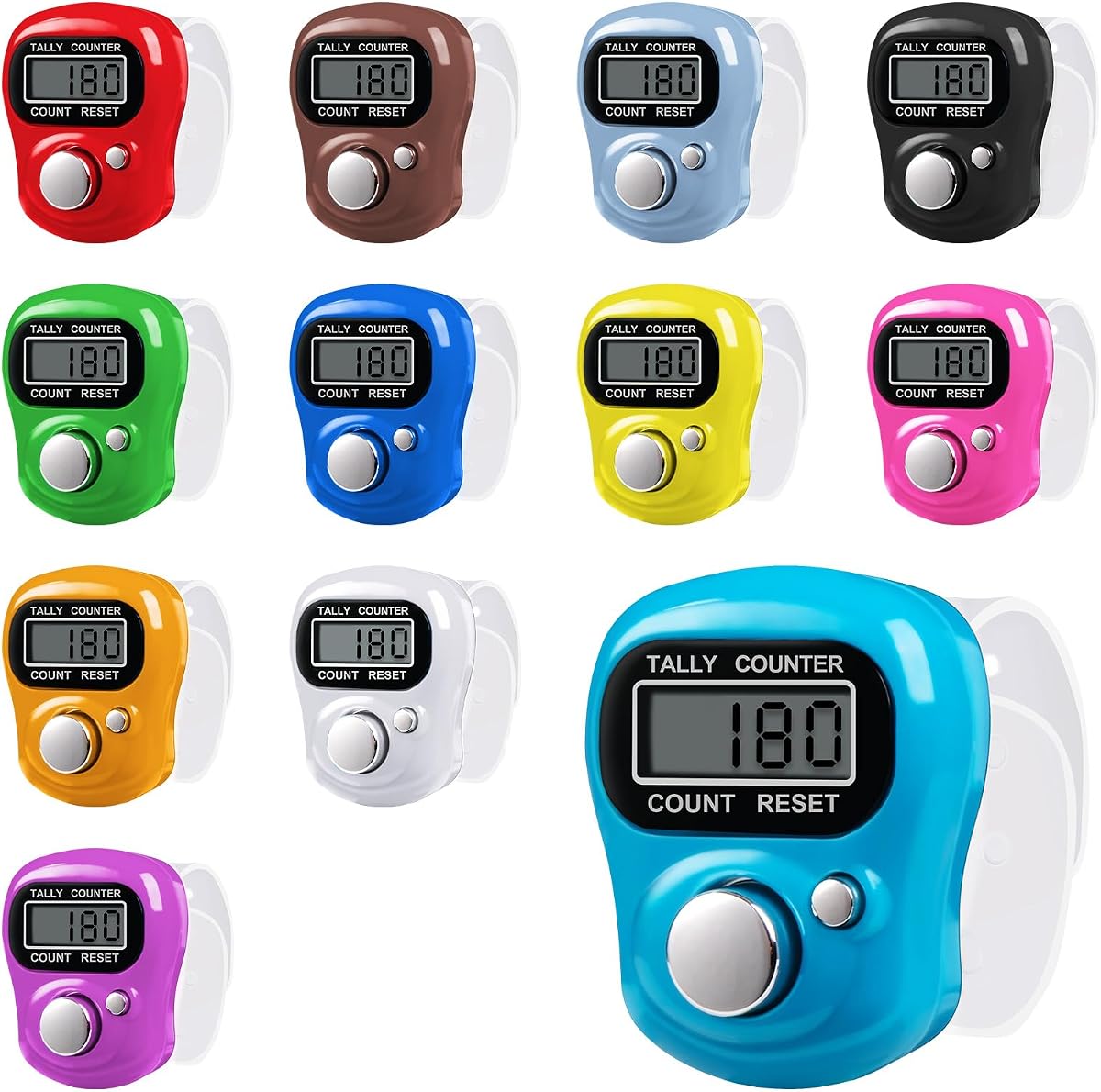
The Amble Electronic Finger Counter is the most convenient option for distributing a complete set of manual tally devices. The pack contains 12 five-digit LCD counters, and its 4.6 rating reflects a simple, approachable product suitable for schools, workshops, craft rooms, events, and casual counting tasks.
We may earn a commission when you buy through this link, at no additional cost to you.
The adjustable, skin-friendly strap fits most fingers and can also slide over small cylindrical items. Each counter has two buttons: one records a count and the other resets it to zero. The 0-99999 range covers many daily activities, and the automatic screen-off function conserves power after the device has been left unused. Pressing the count button again wakes the screen and retains the last digit recorded.
Because the device counts by manual button presses, it cannot register production events, machine cycles, or passing objects without a sensor. The five-digit maximum may also be reached more quickly in long inventory sessions, requiring a reset and a separate method of tracking subtotals. These limitations are reasonable for a lightweight handheld tally tool but important for industrial workflows.
This pack is an excellent value when several people need to count at the same time or when a replacement should be available for portable activities. Choose it for knitting, golf, laps, guest counts, attendance, school exercises, goods tallying, and office or warehouse tasks that are best handled with a basic manual clicker.
Twelve counters allow an instructor, workshop leader, or event organizer to equip multiple participants without purchasing units separately. It is also convenient for distributing counters among departments or keeping a spare available.
The soft, adjustable strap helps reduce hand fatigue during long tally sessions. The automatic screen-off function extends battery life while preserving the last recorded value for quick resumption.
We may earn a commission when you buy through this link, at no additional cost to you.
Start by defining what must be counted, how the counter will receive each event, and where the display will be installed. The most suitable unit then becomes a question of matching capacity, sensing method, power, controls, and environmental requirements to the workflow.
LCD displays are valued for readability, low power consumption, and suitability for panel-mounted equipment. They are particularly appropriate for long-duration counters that remain visible at a fixed workstation. LED displays can offer greater brightness and strong visibility from a distance, which is useful for lap counting, event scoring, and production-floor displays. A seven-segment arrangement provides large, distinct numerals, while a conventional segment display may be easier to read at a modest viewing distance.
Digit capacity determines the largest total that can appear before a reset. A five-digit counter reaches 99999, a six-digit counter reaches 999999, and an eight-digit model reaches 99999999. For knitting, attendance, and short batches, five digits may be sufficient. Production runs, traffic totals, and inventory sessions can reach higher levels more quickly, making six or eight digits preferable. Consider not only the final total but also whether subtotals must be recorded separately.
Manual counters use a button and suit personal tallying, laps, and small-group activities. Magnetic induction is useful when a moving knitting-machine component can pass a sensor. Proximity and photoelectric sensors support automatic machine and object counting. A digital lap counter may be manually operated but add remote controls, and an hour meter may accumulate elapsed time rather than count objects. The input method must match the physical event that should create each count.
Counting speed is the number of events the unit can register within a given period. A maximum of 20Hz suits many slower machine cycles, while the H7EC BLM reaches 200 times per second. Faster systems can be helpful on production lines, but they may require precise signal timing, suitable sensor positioning, and stable wiring. A faster maximum does not automatically guarantee accurate results if the trigger repeatedly bounces, overlaps, or arrives faster than the configured response can distinguish.
Battery-powered counters are portable, simple to install, and often appropriate for knitting machines, small equipment, and handheld use. Built-in batteries remove external wiring, although users must monitor and replace them. Fixed counters using AC power are better suited to production lines with continuous operation. Verify the stated input range, grounding, plug or terminal requirements, and local electrical codes before installing any mains-powered model.
No-voltage NPN inputs do not accept the same signals as powered voltage inputs or universal free-voltage models. Before replacing a counter, compare the model number, signal type, terminal numbering, reset arrangement, and original equipment manual. A mismatch may prevent counting, produce erratic readings, or create installation problems. Disconnect power before service, tighten terminals, and keep signal wiring away from high-voltage and high-frequency noise sources.
Panel counters require an accurate cutout, adequate rear depth, and sufficient clearance for terminals and covers. A standard 48 by 24 millimeter format appears on several models, but a listing alone does not prove exact compatibility. Check the bezel shape, mounting bracket, sealing components, terminal cover, and space behind the panel. Handheld and clicker counters need no cutout, but their strap, portability, and viewing angle may influence comfort.
Pause, reset, up-count, down-count, remote control, and power-off memory can each materially improve usability. A pause function helps during material changes or interruptions. Reset controls should be protected against accidental activation. Remote operation is valuable for sports and events, while memory helps preserve totals after shutdown. Confirm how each control behaves, including long-press requirements, and avoid operating a high-voltage circuit through a counter that is not designed for that function.
Before use, identify what causes the counter to register. For a manual model, learn the difference between the count and reset buttons. For a sensor-equipped model, position the sensor and its magnet, reflector, or target so each intended event creates exactly one trigger. If the counter is panel-mounted, verify the cutout, terminal layout, reset wiring, and available depth before inserting it.
Power the unit according to its instructions. Install the specified batteries, connect the proper no-voltage or voltage input, or use the supplied mains connection as applicable. Test with several deliberate events, confirm that the total changes by one for each event, and adjust sensor distance or counting speed if necessary. Lock the count where the model provides that feature, and learn how PAUSE, shutdown, and reset operate before relying on them during a session.
For care, keep displays and sensor surfaces free of dust, oil, yarn fibers, and adhesive residue. Do not immerse a panel counter or expose terminals to moisture unless the installation is specifically rated and sealed. Inspect wiring periodically, tighten loose terminals while power is disconnected, and replace batteries according to the manufacturer's guidance. Reset only when the current total has been recorded, and use the manual reset or selector rather than forcing the display or controls.
An LCD counter uses a liquid-crystal display that is easy to read and generally efficient for fixed panel installations. An LED counter uses light-emitting diodes, which can be brighter and easier to see across a room or production area. The choice should depend on visibility, power requirements, and the type of counting equipment involved rather than on display technology alone.
Yes, when it includes a compatible sensor and receives a clean trigger for each object. Magnetic, proximity, and photoelectric systems work differently, and reflective, transparent, dark, or metallic items may require special attention. Test the actual material and movement speed before trusting the total in production.
Choose a capacity based on the largest expected total between resets. Five digits cover up to 99999 events, six digits cover up to 999999, and eight digits cover substantially more. Long production runs, traffic counts, and high-volume inventory work generally justify a larger display than knitting, attendance, or casual lap counting.
It means the counter expects a compatible dry-contact or no-voltage switching signal rather than an externally powered voltage input. It cannot be assumed to work with every sensor or replacement counter. Confirm the model, terminal numbers, signal type, reset arrangement, and original equipment manual before installation.
First disconnect equipment power and verify the cutout, depth, bezel shape, and terminal clearance. Connect only the specified inputs, position the terminal cover and any sealing parts correctly, and secure the mounting hardware before restoring power. Test the count, pause, and reset functions with the machine or sensor operating normally.
Common causes include incorrect sensor alignment, unsuitable object material, excessive movement speed, poor wiring, electrical interference, or a trigger that lasts too long. Adjust the sensor position, verify the signal timing, test with representative items, and check the counting-speed setting. Transparent and metallic objects may require a specialized sensor.
It may be suitable if the operating temperature, vibration level, and enclosure requirements fall within the manufacturer's guidance. Some panel models are better suited to continuous industrial use, while battery units are convenient for standalone equipment and portable applications. Follow the stated environmental limits and inspect the compartment regularly.
Record the displayed value in your production log, worksheet, or inventory system, and confirm that the count is complete. Some models also provide power-off memory, while others store data when the pause control is used correctly. Memory should be treated as a convenience rather than a substitute for maintaining a separate record.
The H7EC BLM stands out as the best overall panel counter because it combines a highly rated six-digit LCD, a large 0-999999 range, rapid 200-count-per-second capability, and a standard 48 by 24 millimeter format. The LA8N-BN is the feature-rich premium option, offering eight digits, multiple counting directions, selectable speeds, terminal-block wiring, and potential front-panel sealing when correctly installed.
For portable and budget-conscious needs, the Amble 12 Pack is hard to overlook because it provides twelve simple finger counters with automatic screen shutdown. Buyers with magnetic knitting-machine setups can consider the dedicated six-digit knitting counter, while a button-operated model works when convenience and a large visible display matter more than automatic sensing.
Before ordering, verify the counting method, signal compatibility, capacity, power source, physical dimensions, and reset behavior against your equipment. Product configurations and ratings can change, and current prices also vary, so review the latest listing and manufacturer documentation before making a final purchase.
