
Redragon K512 RGB
4.5Editor score
Six onboard macro keys
Software-free macro recording
26-key anti-ghosting
Detachable magnetic wrist rest
Our 2026 guide compares 10 best keyboards with macro keys, covering programmability, switch type, connectivity, lighting, comfort, and value for shoppers.
Keyboards with macro keys compress complex commands into a single press, making them useful for gaming, streaming, productivity, and repetitive workflows. The best models combine flexible programming with responsive switches, convenient controls, sturdy construction, and a layout that remains comfortable during extended sessions.
This guide compares ten macro keyboards using the specifications and features supplied for each model. It considers macro capacity, onboard programming, switch technology, connectivity, anti-ghosting, lighting, wrist support, acoustic construction, and compatibility, while distinguishing between membrane, mechanical, wireless, and display-equipped designs.
Each review explains the strongest reasons to consider a particular board, along with its limitations and ideal user. The first three products earn the Best Budget, Editor's Choice, and Best Premium distinctions, and every listing includes its exact rating, so current prices and availability can change with the marketplace.
4.5Editor score

4.1Editor score
4.3Editor score
The comparison covers macro capacity, input technology, connection options, lighting, comfort features, and key advantages of each model, from a software-free membrane keyboard to display-equipped and premium mechanical designs.


The VSD K1 Pro stands out as the most versatile keyboard in this guide, earning a 4.1 rating for its unusually broad feature set. Its 87-key mechanical layout combines full-key onboard programming with a separate streaming deck, six LCD keys, three knobs, and a built-in TFT display. That combination gives it substantially more control potential than a conventional gaming keyboard with a small row of macro keys.
We may earn a commission when you buy through this link, at no additional cost to you.
Macro recording and free assignment are available to any key through the web-based interface or VSD Craf software, while switchable deck pages can hold individual actions or multi-step sequences. LCD keys can also display JPG, PNG, and GIF images, making the controls easier to identify. The smart display handles status information and customization options, and the knobs can control functions such as volume, backlighting, date and time, and connection modes.
The mechanical build adds further appeal. Hot-swappable sockets accept three-pin and five-pin switches without soldering, and a puller is included for changing switches or keycaps. Pre-lubed stabilizers, a gasket mount, extended silicone pads, single-key PCB slotting, and five layers of dampening create a softer, cleaner acoustic profile. RGB effects are adjustable, the stands offer three angles, and the supplied USB-A-to-USB-C cable is appropriate for most wired setups.
The trade-offs are worth noting. Advanced display and customization functions require VSD Craf, compatible Windows or macOS software, and a wired connection, so the board is less convenient for users who want completely wireless operation. It also lacks a numpad, making it less suitable for spreadsheet-heavy workflows that rely on dedicated numeric input. Even so, no other model here combines this level of programmable control, switch flexibility, and live-display utility. It is the strongest choice for streamers, productivity users, and dedicated macro enthusiasts.
The integrated deck is the K1 Pro's defining feature. Users can create switchable pages, assign commands and sequences, and personalize the LCD keys with visual identifiers, allowing a complex workflow to remain understandable at a glance.
Because nearly any key can be reassigned, the board is not limited to a fixed bank of macro buttons. That makes it possible to place frequently repeated actions under accessible keys while retaining a conventional typing layout.
We may earn a commission when you buy through this link, at no additional cost to you.
The Redragon K512 RGB is an economical entry into the macro-key category, with a 4.5 rating that leads this group. It uses a membrane switch platform but preserves the features many gamers expect: six dedicated G1 through G6 macro keys, onboard recording, full RGB lighting, anti-ghosting, media controls, and a detachable wrist rest. The result is a straightforward board that does not require software for its basic macro functions.
We may earn a commission when you buy through this link, at no additional cost to you.
The most important convenience is the ability to record and reassign G1 through G6 directly on the keyboard. Users can store game combos or shortcuts and change them without installing drivers, which reduces setup friction and makes the board practical for occasional travelers or shared computers. Compatibility with up to 26 simultaneous keys provides confidence during commands that combine movement, abilities, and modifiers.
Lighting includes seven presets and six customizable slots, with adjustable brightness ranging from vivid to off. The magnetic wrist rest supports long sessions, while double-shot injection-molded keycaps are designed to resist fading. Optional companion software remains available for advanced backlight effects and deeper macro configuration, giving beginners a simple starting point while preserving room for more complex use later.
Its main limitation is the membrane construction, which will not satisfy buyers seeking the distinct response and customization of mechanical switches. It also offers fewer macro keys than several competitors, including a larger onboard macro zone. Even so, the combination of software-free recording, a strong rating, anti-ghosting, RGB lighting, and wrist support makes the K512 a sensible value choice for first-time macro-key buyers and everyday gaming setups.
Recording G1 through G6 directly on the board makes the K512 approachable. A player can capture a sequence, test it during play, and replace it later without navigating a configuration application or installing drivers.
The detachable magnetic wrist rest improves desk ergonomics, while dedicated media controls and adjustable RGB lighting add everyday utility beyond competitive gaming. These features make the board useful for work as well as play.
We may earn a commission when you buy through this link, at no additional cost to you.
The Corsair K55 RGB PRO is built for gamers and streamers who want a comfortable membrane keyboard with useful macro controls. Its 4.4 rating reflects a balanced feature set that includes six dedicated macro keys, five RGB lighting zones, dedicated media and volume controls, an IP42 dust- and spill-resistant design, and a detachable rubber palm rest.
We may earn a commission when you buy through this link, at no additional cost to you.
The macro keys can be configured through CORSAIR iCUE software to perform functions, shortcuts, or keypress sequences. A notable alternative is support for instant streaming commands through Elgato Stream Deck software, which adds appeal for creators who already use that ecosystem. The RGB system supports six onboard effects, per-zone colors, and custom effects programmed in iCUE, giving users several levels of control without requiring constant manual adjustment.
Comfort is one of the board's most convincing attributes. The textured rubber palm rest helps support the hands and reduce slipping, while dedicated playback and volume controls make it easier to manage media without leaving a game. The membrane platform is less mechanically customizable than a hot-swappable model, but the full-size layout preserves familiar spacing and includes a conventional number pad for productivity.
Compared with the Redragon K512, the K55 offers stronger ecosystem integration and a more protective enclosure, although it does not provide the same software-free macro recording. It is a good recommendation for a streamer who wants Stream Deck integration, a gamer who values spill resistance, or a user who prefers a substantial palm rest and zoned lighting over mechanical switch customization.
Support for Elgato Stream Deck software gives the six macro keys a creator-focused purpose beyond ordinary game bindings. Streamers can place frequent actions within easy reach while keeping the rest of the keyboard familiar.
The IP42 rating offers useful protection against dust and spills, while the textured palm rest supports long sessions. Dedicated media and volume controls add further convenience for mixed gaming and entertainment use.
We may earn a commission when you buy through this link, at no additional cost to you.
The Redragon K580 combines a 4.5 rating with a mechanical feel, five easily accessible macro keys, and a straightforward full-size layout. It is designed for users who want dedicated macro controls without needing to install software for the basic task of recording a combination or shortcut. The G1 through G5 keys can be configured directly on the board, while a media row handles playback functions.
We may earn a commission when you buy through this link, at no additional cost to you.
Its upgraded switch sockets accept almost any switch, and the included Brown switches provide a gentle tactile bump with less noise than clicky alternatives. That combination makes the K580 approachable for someone entering the mechanical keyboard market while still allowing future customization. The keycaps use a double-shot process to resist fading, and the keyboard is rated for 50 million keystrokes.
Full anti-ghosting across the 104-key layout is useful in fast games where several commands may overlap. The board also supports optional companion software for advanced RGB effects and deeper macro profiles, but those tools are not necessary for everyday macro use. This balance between basic convenience and optional depth distinguishes it from boards that make software mandatory for even simple configuration.
The main drawbacks are modest. Five macro keys are fewer than the six offered by the K512 and K55, and the supplied media controls do not include the dedicated scroll wheel found on the K550. Nevertheless, the K580 is a balanced recommendation for gamers seeking mechanical response, hot-swappable flexibility, and software-free macro recording in a conventional full-size design.
The hot-swappable sockets make it possible to begin with the included Brown switches and change the feel later. This gives new mechanical-keyboard buyers room to experiment without immediately investing in a soldering setup.
Full anti-ghosting supports accurate registration when multiple keys are pressed together. That reliability is especially relevant for users assigning several inputs or modifiers to their macro keys.
We may earn a commission when you buy through this link, at no additional cost to you.
The Redragon K550 RGB is the clear macro-capacity specialist in this lineup, with a 4.1 rating and twelve dedicated G1 through G12 keys. It gives users more dedicated programmable controls than any other model here, while allowing every key to be edited directly on the board without requiring additional software. That combination suits competitive players who want numerous bindings within reach.
We may earn a commission when you buy through this link, at no additional cost to you.
The full-size mechanical layout is built around custom clicky Purple switches with a stated 55-gram actuation force and 1.1-millimeter pretravel. These provide a pronounced tactile event that many gamers appreciate as confirmation of a registered command. A brushed aluminum top plate adds weight and rigidity, helping the keyboard feel stable, while the included wrist rest supports longer sessions.
Several practical features improve desk organization. The USB pass-through port can accept a mouse, wireless receiver, or another peripheral, helping reduce the number of direct connections to the computer. Dedicated media controls manage playback, and a scroll bar at the upper right adjusts system volume. Optional Redragon software provides more advanced modes and effects for users who want to go beyond onboard editing.
The broad macro bank comes with trade-offs. Clicky Purple switches are likely to produce more sound than tactile Brown or linear Yellow alternatives, and the board does not offer hot-swappable sockets, so changing the feel is more involved. It also takes up substantial desk space. Even so, buyers who prioritize the largest accessible set of dedicated macro buttons will find the K550 unusually well equipped.
Twelve macro keys allow game bindings, editing shortcuts, and media actions to occupy separate physical controls. This reduces reliance on layered software commands and makes important functions easier to identify.
The aluminum top plate contributes rigidity, while the wrist rest, volume scroll bar, and USB pass-through create a more complete desktop accessory. These details make the K550 practical beyond competitive gaming.
We may earn a commission when you buy through this link, at no additional cost to you.
The Razer BlackWidow V4 X is a compact mechanical option for gamers who want fast inputs and six dedicated macro keys without occupying the space of a broad traditional desktop model. It carries a 4.5 rating and uses Yellow linear mechanical switches designed around a 1.2-millimeter actuation point and 45 grams of force.
We may earn a commission when you buy through this link, at no additional cost to you.
The switch specification favors responsiveness. Its linear action provides a smooth press without a tactile bump, while built-in sound dampeners help control the noise associated with rapid actuation. Razer also adds foam beneath the circuit board and lubricated stabilizers to reduce overall keyboard noise, creating a more refined acoustic profile than many barebones gaming boards.
Six macro keys provide room for common game commands, and a multifunction roller handles volume or other assigned functions. Secondary media keys support playback, while per-key Chroma RGB lighting provides extensive effects and a choice of more than 16.8 million colors. The switch construction is designed to produce brighter and more even lighting across the board.
Doubleshot ABS keycaps resist worn legends and have thicker walls for repeated use, while the compact layout preserves a numpad without stretching across a full desk. The main compromises are that macro configuration depends on software and no wrist rest is included. It is a strong choice for gamers who value speed, compactness, and a modern mechanical feel more than an all-in-one comfort package.
The 1.2-millimeter actuation point and 45-gram force create a quick, light response suited to rapid inputs. Sound dampeners keep the board from sounding excessively sharp without changing the fundamental linear action.
The board retains a numpad and dedicated media functions while reducing its overall footprint. That makes it easier to fit beside a mouse or compact gaming setup than many full-size alternatives.
We may earn a commission when you buy through this link, at no additional cost to you.
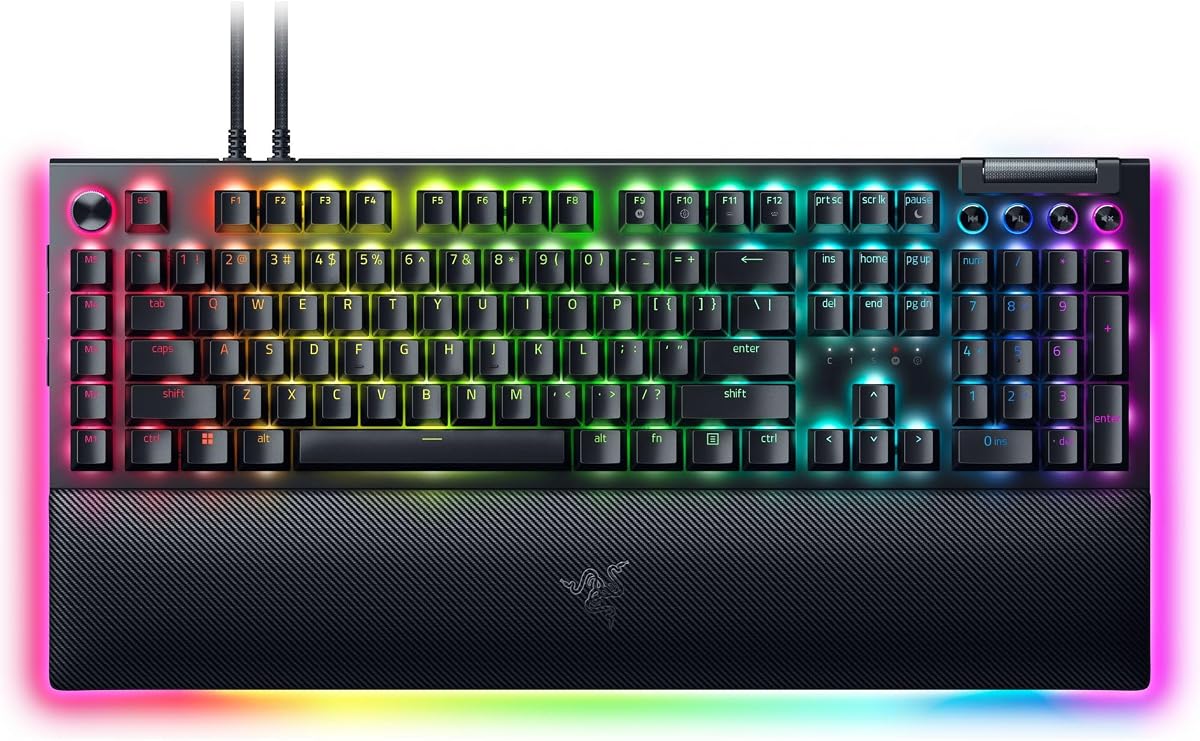
The Razer BlackWidow V4 Pro is the premium selection here, earning a 4.3 rating for its refined mechanical feel, extensive lighting, integrated command dial, and generous macro layout. Eight dedicated macro keys place more programmable actions within reach than most competing models, while the multifunction dial adds a separate axis of control that can be assigned according to the user's workflow.
We may earn a commission when you buy through this link, at no additional cost to you.
Green tactile switches are designed to balance response time with a noticeable tactile event. That feedback is useful for gaming because it helps confirm an action without requiring a click-style sound. The keyboard's premium positioning is also evident in the doubleshot ABS keycaps, which resist faded legends and use extra-thick walls for prolonged, repeated use.
Lighting extends beyond the individual keys. Per-key illumination and three-side underglow create a more dimensional appearance, particularly when paired with the included wrist rest. The magnetic plush leatherette rest adds soft support and includes its own Chroma RGB lighting, allowing the underglow effect to continue around the keyboard rather than stopping abruptly at the edge.
The premium construction naturally comes with a higher-tier feature set, and the board is designed primarily for a wired gaming setup rather than portable or multi-device use. Even so, the combination of eight macro keys, a programmable dial, tactile switches, durable keycaps, and synchronized lighting makes it the most complete option for a serious battlestation. It is well suited to gamers and power users who want granular control without assembling separate macro and control devices.
The multifunction dial adds another programmable input beyond the eight macro keys. Depending on the assigned profile, it can support a dedicated control task without occupying another keycap position.
The magnetic leatherette wrist rest combines support with integrated RGB lighting. Together with three-side underglow and per-key illumination, it creates a more cohesive and immersive desktop setup.
We may earn a commission when you buy through this link, at no additional cost to you.
The Redragon K618 PRO is the most flexible wireless option in the guide, with a 4.1 rating, a 4-by-5 macro zone, and support for USB-C, Bluetooth, and 2.4GHz wireless connections. Twenty dedicated macro keys provide exceptional command capacity, and they can record combinations or remap actions directly on the keyboard without installing software first.
We may earn a commission when you buy through this link, at no additional cost to you.
Tri-mode connectivity allows the board to move among a desktop PC, laptop, and tablet. The product information emphasizes that devices can be switched without re-pairing and describes the connection as zero lag. A one-touch control also switches between Windows and Mac operating systems, reducing friction when the keyboard is used across different platforms.
Its low-profile switches and keycaps reduce travel distance and overall thickness, creating a lighter-feeling typing experience that may be easier on the wrists. Stock Red linear switches provide smooth feedback, while a dedicated media control area supports volume and track adjustments. Optional software expands the options to include remapping any key, creating extensive keybinding combinations, and designing RGB effects with up to 16.8 million colors.
The compact format omits a numpad, so it is less suitable for users who rely heavily on numeric entry. As with any wireless keyboard, battery management also becomes part of routine care, while Bluetooth or 2.4GHz operation is most useful when a cable would be inconvenient. Overall, the K618 is a strong recommendation for a shared, mobile, or multi-device setup that values many macro keys and wireless flexibility.
The dedicated four-by-five macro zone is unusually large for a low-profile board. It enables a broad collection of shortcuts without requiring every action to be hidden behind software layers.
USB-C, Bluetooth, and 2.4GHz modes allow the keyboard to serve computers and tablets with less cable management. One-touch operating-system switching further supports a mixed-device workflow.
We may earn a commission when you buy through this link, at no additional cost to you.
The Logitech G213 Prodigy is a straightforward full-size gaming and productivity keyboard with a 4.2 rating. Rather than advertising a conspicuous row of dedicated macro keys, it focuses on software-based customization through Logitech G HUB, where users can create macros, select game mode, and coordinate lighting with other compatible Logitech G devices.
We may earn a commission when you buy through this link, at no additional cost to you.
The keyboard's slim membrane design is aimed at approachable everyday use. Each key is tuned for quick, responsive feedback, and an anti-ghosting gaming matrix supports control during multi-key commands. Its durable construction is designed to resist liquids, crumbs, and dirt, making it relatively straightforward to maintain compared with more complex mechanical assemblies.
Five customizable lighting zones offer more than 16.8 million colors, while dedicated media keys allow play, pause, mute, volume adjustment, and track skipping. An integrated palm rest and adjustable keyboard feet add comfort without requiring a separate accessory. The full-size arrangement also includes a numpad, making it practical for office tasks, data entry, and everyday productivity.
The main limitation is that the dedicated macro hardware is less visually prominent than on models with clearly labeled G keys. Users must discover and configure programmable keys through G HUB, and the membrane platform does not support switch replacement. For a buyer who wants familiar Logitech software, a clean full-size layout, and sufficient macro capability without specialized hardware, the G213 remains a practical recommendation.
G HUB serves as a central place for macro programming, game mode, lighting, and device synchronization. The approach favors users who already use Logitech software and want one interface for several accessories.
The integrated palm rest, full-size layout, media controls, and easy-clean membrane construction make the G213 suitable for mixed productivity and gaming use rather than a narrowly competitive setup.
We may earn a commission when you buy through this link, at no additional cost to you.
The Razer BlackWidow V4 rounds out the guide as a full-size mechanical keyboard with a 4.2 rating. It provides six dedicated macro keys, a multifunction roller, four media keys, and a magnetic plush leatherette wrist rest. Its layout and control arrangement are especially useful for gamers who want a recognizable full-size design rather than a compact board.
We may earn a commission when you buy through this link, at no additional cost to you.
Yellow linear switches use a 1.2-millimeter actuation point and require 45 grams of force, supporting fast inputs with a light press. Built-in sound dampeners help keep rapid use relatively controlled, while the doubleshot ABS keycaps are designed to withstand repeated use without their labels wearing away. The construction focuses on durability for high-frequency gaming sessions.
Chroma RGB per-key lighting combines with two-side underglow, allowing the board's appearance to be synchronized with a broader desktop setup and with games that support integrated effects. The multifunction roller and four media keys provide direct access to playback, brightness, and volume adjustments, reducing the need to leave the keyboard for common controls.
The included wrist rest attaches magnetically and supplies the cushioning that the more compact V4 X does not include, making this model more comfortable for long sessions. Its main limitation is that the macro bank contains six keys rather than the larger groups offered by the Redragon K550 or Redragon K618 PRO. Overall, it is a well-rounded choice for a full-size mechanical gaming setup that values speed, lighting, wrist support, and familiar Razer controls.
The light 45-gram linear switches and short 1.2-millimeter actuation point support rapid gaming input. Full-size spacing also keeps the layout familiar for users who move between work and play.
The magnetic plush leatherette rest adds long-session comfort without requiring a separate purchase. Its simple attachment also makes it easy to remove when desk space needs to change.
We may earn a commission when you buy through this link, at no additional cost to you.
The right macro keyboard depends on how many commands you need, how much setup you want to manage, the feel and sound you prefer, and whether your desk setup is fixed or mobile. These factors help narrow the field before comparing individual models.
Macro capacity determines how many dedicated commands you can place in direct reach. The Redragon K618 PRO leads this list with twenty dedicated macro keys, followed by the K550 RGB with twelve, while the Razer BlackWidow V4 Pro has eight and several other models provide five or six. A larger bank suits players who rotate through many abilities or creators who maintain numerous production actions. Smaller groups are usually enough for a handful of favorite commands, and they preserve a less crowded layout.
Programming method affects setup speed and long-term flexibility. The Redragon K512 and K580 can record macros directly without software, which is convenient for quick configuration and shared systems. Other boards, including the Corsair K55 RGB PRO and Logitech G213, rely on their respective software platforms for deeper control. The VSD K1 Pro supports web-based configuration and VSD Craf, while its display customization depends on compatible software. Check whether your preferred workflow and operating system are supported before buying.
Membrane switches generally provide a lighter, quieter, and less customizable experience, while mechanical switches offer distinct response styles and greater enthusiast appeal. Brown switches in the Redragon K580 provide a moderate tactile bump, the Razer V4 Pro uses green tactile switches, and the Yellow switches in the Razer V4 and V4 X deliver smooth linear travel. The VSD K1 Pro accepts three-pin and five-pin switches through hot-swappable sockets, allowing the feel to be changed later without soldering.
Most products here are wired, which supports a stable connection and removes the need to manage battery power. The Redragon K618 PRO is the notable wireless option, supporting USB-C, Bluetooth, and 2.4GHz modes with quick switching between devices. A wireless board suits flexible desks, shared computers, and travel, but users should verify wireless latency for their preferred game or task. Wired models are also generally simpler for permanent gaming stations and frequently changing software profiles.
A fixed macro bank is not the same as unrestricted reassignment. Some models reserve a clearly labeled group of macro keys, while the VSD K1 Pro allows free assignment to any key and supports multi-step workflows. The Redragon K618 PRO also supports broader remapping through optional software. Buyers who only need a few stable bindings may prefer dedicated keys, while advanced users may value the freedom to transform ordinary keys, create pages, and trigger sequences that would otherwise require several manual inputs.
Comfort depends on wrist support, switch travel, key layout, and the available desk area. The Corsair K55 RGB PRO, Razer BlackWidow V4, and Razer BlackWidow V4 Pro include substantial palm or wrist rests. The Redragon K512 uses a detachable magnetic rest, while the Redragon K618 PRO favors a thinner low-profile design for portability. Compact layouts can leave more mouse space, but models without a numpad may be less convenient for data entry. Match the board's dimensions and support accessories to how you actually work.
RGB lighting is now common across the category, but implementation varies. The Redragon K512 offers preset and customizable modes, the Corsair K55 divides its lighting into five zones, and the Razer models support per-key Chroma effects and underglow. The Logitech G213 also provides five customizable zones and synchronization with compatible Logitech G devices. For durability, look for double-shot keycaps, a metal top plate, spill resistance, and supported switch longevity. The Redragon K580 and K550 are rated for 50 million keystrokes, while the VSD K1 Pro also carries a 50-million-keystroke rating.
Some macro boards include features that go beyond a conventional G-key row. The VSD K1 Pro adds six LCD keys, three knobs, and a TFT display, allowing visual labels and page-based workflows. The Razer BlackWidow V4 Pro adds a programmable command dial, while the Redragon K550 provides USB pass-through and a volume scroll bar. These specialized controls can reduce friction in streaming, editing, and productivity, but they also make the boards larger or more specialized than a conventional gaming keyboard.
Begin by identifying the commands you use most often, then assign only those functions to the macro keys. Recording a short sequence on the keyboard is useful for testing a combination, while software profiles are better for layered commands, conditional steps, and named profiles. Save separate profiles for games or applications so that a command such as a text-entry sequence does not interfere with normal typing.
Organize the layout around reach and memory. Place frequently used actions where they can be triggered without moving the hand far, label the corresponding keys where possible, and avoid placing a destructive command next to a frequently used one. For display-equipped boards, use clear images on the LCD keys and switch pages deliberately. Test every macro in the target application, including any delay requirements, because software and games may interpret simultaneous key presses differently.
For care, disconnect the cable before cleaning or changing switches, and use a soft dry cloth or compressed air to remove dust from around the keycaps and macro controls. Membrane boards should be wiped gently rather than exposed to excessive liquid. Hot-swappable mechanical boards allow switches and keycaps to be changed more easily, but the sockets should still be handled carefully. Keep firmware and keyboard software updated, and check the manufacturer's guidance for cleaning agents that could damage coatings, plastics, or wrist-rest surfaces.
A normal key usually sends one standard keyboard command, while a macro key can trigger a sequence or a more complex function. Depending on the keyboard, that sequence may be recorded on the device or configured through software. A macro can save time when a task requires several presses, although poorly designed macros can fail when an application changes its timing.
They can be suitable for many gamers, particularly those who value quiet operation, simple setup, and a lower-cost full-size layout. The Redragon K512 and Corsair K55 RGB PRO include anti-ghosting and dedicated macro controls. Mechanical switches are still worth considering for users who prioritize stronger tactile feedback, faster response customization, and the ability to replace switches.
That depends on the model and its software. The Redragon K618 PRO includes a one-touch Windows and Mac operating-system switch, while other keyboards may be detected automatically or require compatible configuration software. Verify that the relevant programming utility supports the operating system and applications you plan to use before purchasing.
Not on every model. The Redragon K512 and K580 can record or edit their basic G-key macros directly on the keyboard, while the K618 PRO also offers an onboard macro zone. Other options, including the Corsair K55 RGB PRO and Logitech G213, place macro configuration within their software ecosystems. Onboard convenience is useful, but software generally offers more advanced sequences and profile options.
Modern wireless keyboards can be suitable, but connection mode matters. The Redragon K618 PRO supports USB-C, Bluetooth, and 2.4GHz connectivity, with 2.4GHz generally being the more appropriate mode for a gaming setup where responsiveness matters. Wired operation remains the simplest choice for a stationary desk because it removes wireless connection and battery variables.
Three or four dedicated keys are often sufficient for a small set of repeated commands, while six to eight offer more flexibility for games with numerous abilities. A larger bank makes sense for streamers, editors, and productivity users who regularly trigger longer action sequences. Consider both the number of keys and whether ordinary keys can also be remapped.
They matter most if you expect to change the typing feel, sound, or switch behavior over time. The VSD K1 Pro and Redragon K580 support socketed switches, reducing the need for soldering when changing components. If you already know which switch type suits you, hot-swapping may be less critical than comfort, layout, and macro functionality.
First confirm that the required macros can be recorded and edited, then check operating-system support, connection type, switch style, and physical layout. Also consider whether you need a numpad, wrist rest, visual display, or dedicated streaming controls. Reading current user feedback can help identify practical concerns, but final choice should reflect your own software and comfort preferences.
The VSD K1 Pro is the most capable all-rounder in the group, combining full-key programming, a streaming deck, a TFT display, hot-swappable switches, and extensive acoustic construction. The Redragon K512 RGB is the most accessible budget choice, while the Razer BlackWidow V4 Pro stands out as the premium model with eight macro keys, a programmable dial, tactile switches, and integrated lighting.
Prioritize the capabilities that will actually reduce friction in your routine. A software-free membrane keyboard may be ideal for straightforward gaming, a hot-swappable mechanical model offers more room for adjustment, and the Redragon K618 PRO is the stronger choice for wireless use and large onboard macro banks. Consider layout, comfort, connection, and software support before focusing on the number of macro buttons alone.
Marketplace prices, promotions, ratings, and availability can change, so check the current listing and recent customer feedback before making a final purchase. Confirm the included accessories, required software, operating-system support, and switch specifications. Those checks will help ensure that the chosen keyboard remains practical for your specific gaming, streaming, or productivity workflow.