
8mm Video8 Hi8 Camcorder VCR Tape Player Vintage Camera
Plays 8mm and Hi8
Includes USB capture device
Includes blank 8mm tape
Our expert Hi8 and 8mm video cassette player guide compares playback, digitizing, connectivity, format support, recording features, and ease of use.
Hi8 and 8mm video cassette players are specialized devices for viewing, preserving, and digitizing camcorder tapes from the analog era. A good unit should handle the tape formats in your collection, provide dependable playback, and offer connections that suit modern computers, televisions, storage media, or archival workflows.
We compared the ten options by examining format compatibility, playback and recording capabilities, included accessories, computer-transfer options, display features, warranties, and practical limitations. The list includes dedicated camcorder-style players, a standalone Digital8 recorder, and a converter that requires a separate tape source.
Each review explains what the device does best, who it suits, and where its feature set stops short. Ratings and product availability can change, so readers should confirm current specifications, included components, and compatibility before ordering a player for their collection.

4.5Editor score

4.7Editor score
This side-by-side comparison highlights the major differences in supported formats, recording ability, transfer methods, included components, and practical limitations across all ten products.


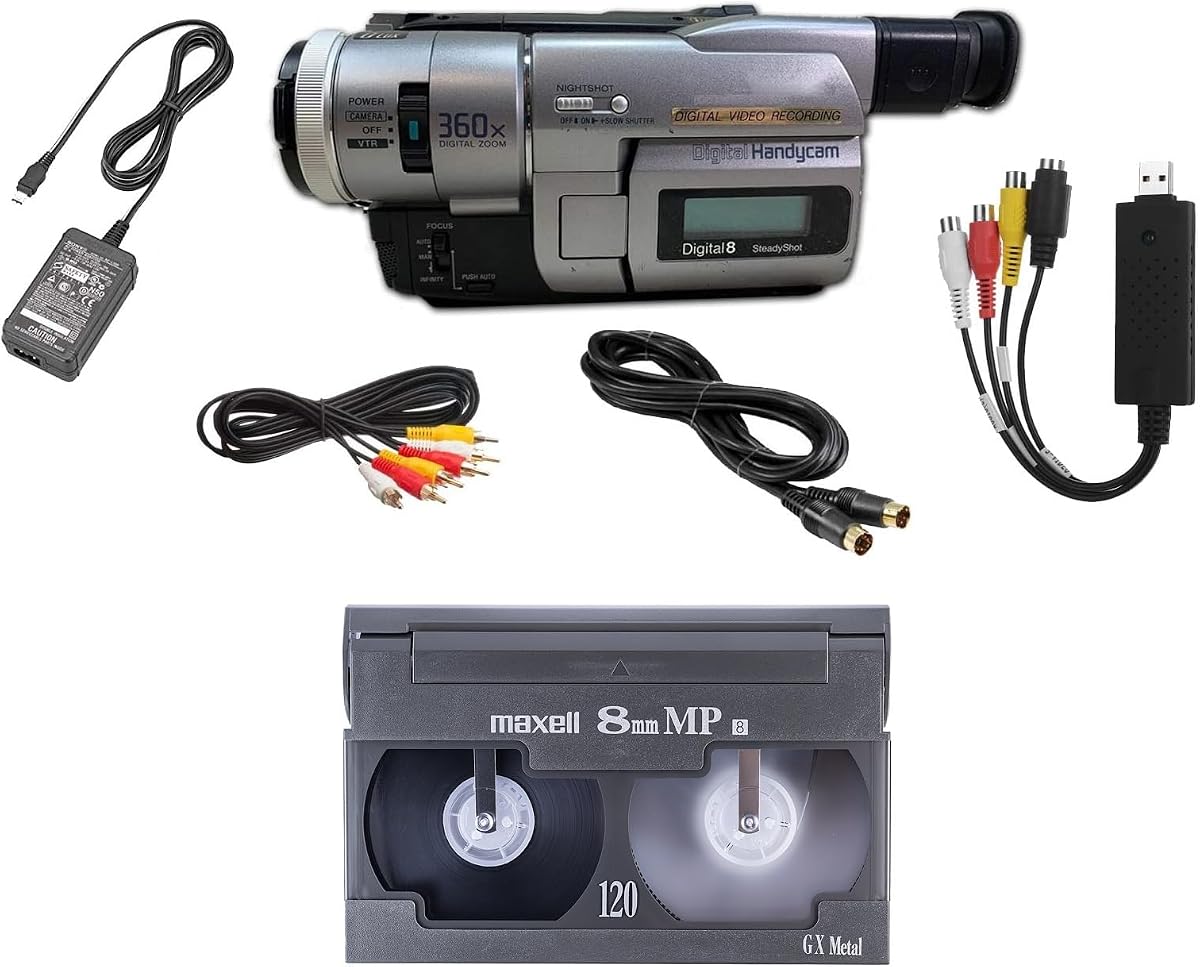

The 8mm Video8 Hi8 Camcorder VCR Tape Player Vintage Camera is a budget-oriented camcorder that combines tape playback, computer capture, and nostalgic recording in one package. It has no listed customer rating, so its appeal rests on the stated feature set rather than a substantial visible review history. That makes careful comparison with the specifications especially important.
We may earn a commission when you buy through this link, at no additional cost to you.
Its core strength is direct handling of 8mm and Hi8 tapes. The included USB capture device provides a route for transferring recorded material to a computer, while the supplied blank 8mm tape and recording function make the unit useful for creators seeking a warm, vintage aesthetic without digital filters. The package is therefore more versatile than a basic playback-only deck.
The main limitation is its narrower format coverage. It does not list Digital8 compatibility, and the supplied information does not describe advanced editing, editing controls, or multiple output types. Anyone with a large Digital8 library would need to confirm compatibility elsewhere or choose a model expressly designed for that format.
This is a strong selection for first-time owners who want to watch and digitize 8mm or Hi8 tapes without assembling several separate components. It is also appealing to experimental filmmakers interested in direct-to-tape footage. For collectors with mixed-format archives, however, a broader multi-format player may offer better long-term utility.
The device handles the two formats most often associated with compact analog camcorder tapes. Its USB capture hardware also creates a practical bridge between existing recordings and computer-based storage, making it easier to build a digital library without buying a separate capture interface.
Beyond preservation, the player supports shooting directly to tape with a deliberately warm look. The included blank 8mm tape removes one immediate barrier, although owners should still verify that their preferred recording mode and viewing setup are compatible with the unit.
We may earn a commission when you buy through this link, at no additional cost to you.
The Sony Camcorder for 8mm Digital8 Hi8 Tape Transfer to Computer USB and DVD carries a 4.0 rating and stands out for broad format coverage. It plays 8mm, Video8, Hi8, and Digital8 tapes, making it a practical choice for households or studios whose collection spans several generations of camcorder media.
We may earn a commission when you buy through this link, at no additional cost to you.
The supplied power supply and AV and S-Video cables support television viewing as well as transfer work. A USB capture device can move tapes into computer files or create DVD-ready material, and the listed compatibility includes Windows, Mac, USB, FireWire, and Thunderbolt workflows. That combination reduces the number of separate leads and accessories a user may need.
There are two meaningful constraints. First, the product is intended for playback rather than recording. Second, it does not support PAL, so tapes recorded under PAL television standards may not present the expected picture or transfer correctly. These limitations are understandable for a specialist archival deck but must be checked before purchase.
This Sony is an excellent choice for viewers who need broad format support and multiple connection options. It is particularly suitable for someone creating a mixed-format digital archive, as the four-format playback capability reduces the risk of owning separate devices for each tape family. PAL-region collections should seek a compatible alternative.
Supporting 8mm, Video8, Hi8, and Digital8 makes this camcorder unusually versatile for archival work. It can serve as a central viewing and transfer source when the collection contains tapes recorded with different consumer and professional camcorders.
AV and S-Video leads provide familiar routes to a television, while the capture device supports computer files and DVD creation. Support for several connection standards also gives users flexibility when working with older or newer computers.
We may earn a commission when you buy through this link, at no additional cost to you.
The Hi8 8mm Tape Player Handycam CCD Camcorder w/Nightshot, Blank Tape, USB (USB) has a 4.2 rating and combines archive playback with creative tape recording. It can play tapes on a television or computer, includes a USB adapter and digitizing software, and ships with a blank tape for immediate experimentation.
We may earn a commission when you buy through this link, at no additional cost to you.
Its standout creative feature is direct-to-tape shooting with a deliberately nostalgic appearance. The Nightshot function also adds a camera-oriented advantage for dim environments. Rather than functioning only as a preservation tool, this model lets owners create new material using the distinctive look associated with Hi8 and 8mm media.
The stated information does not explicitly confirm Digital8 playback, which limits its appeal for archives containing that format. It also depends on the included USB adapter and digitizing software for computer-based preservation, so buyers should ensure the workflow supports their computer and desired editing application.
At a 4.2 rating, this is one of the stronger-rated options in the group and offers an unusually broad combination of playback, recording, and transfer. It is best for collectors who want to digitize 8mm or Hi8 collections while also creating new retro-styled videos, rather than for users who require every major tape format.
The included blank tape makes the creative side immediately accessible. Users can record directly to tape, experience the warm aesthetic of the format, and use the same camcorder to play back older material for digitizing.
The USB adapter and tape digitizing software create a direct transfer path to a computer. Compatibility with the user's preferred editing and backup workflow is important, particularly for long archives where file organization and storage capacity matter.
We may earn a commission when you buy through this link, at no additional cost to you.
The Tech Collector 8mm, Digital8, and Hi8 Transfer Bundle has a 4.0 rating and is designed as a ready-to-use archiving package. It plays 8mm, Hi8, and Digital8 tapes, while the included USB capture device can transfer recordings to computer files or burn them to DVD.
We may earn a commission when you buy through this link, at no additional cost to you.
A useful part of the bundle is the collection of supporting pieces: a battery, AV cables for transfer or television playback, and an 8mm tape. That reduces setup friction for someone who wants to begin viewing and digitizing without separately sourcing basic accessories. The player can also handle any compatible 8mm tape in the collection.
The description does not list Video8 as a supported format, even though many Video8 tapes may appear in mixed collections. It also gives no PAL compatibility details, so international tape standards should be confirmed before committing to a large archive. The guaranteed working status and free returns provide some reassurance, but they do not replace format verification.
This bundle is a good middle-ground option for archivists who want 8mm, Hi8, and Digital8 support with a capture device and cables in one purchase. It is especially convenient for direct-to-TV viewing and DVD-oriented preservation. Buyers whose collection relies on Video8 or PAL recordings should look for more explicit compatibility.
The battery, AV leads, blank 8mm tape, and USB capture device cover several basic needs. This integrated approach can simplify a first transfer setup and make the device more approachable for users unfamiliar with archival camcorders.
Transferring to computer files offers flexibility for editing and backup, while DVD burning provides a tangible disc-based archive. Users can choose the output that best suits their storage, editing, and sharing requirements.
We may earn a commission when you buy through this link, at no additional cost to you.
The Portta VHS to Digital Converter, Video to Digital Recorder with Remote is the most flexible standalone digitizing device in this roundup. Its 4.5 rating reflects a feature set focused on recording analog sources to modern storage, and its 3-inch preview LCD and built-in speaker make the workflow accessible without a computer.
We may earn a commission when you buy through this link, at no additional cost to you.
The converter accepts composite AV, S-Video, and auxiliary audio input, supporting recording resolutions up to 1080P at 30Hz. Video can be stored as MP4 and audio as MP3 on a USB drive or TF card. Broad television-standard support includes NTSC-M/J, NTSC 4.43, and multiple PAL standards, making this converter more flexible for international analog collections.
Its essential limitation is equally clear: it is a capture box, not a tape player. It cannot independently play Hi8, VHS, DVD, Mini DV, or other media, so users need a compatible source deck or camcorder. Storage media is also not included, and high-capacity USB drives may require the unit's own power supply for reliable operation.
This is the top choice for users who already own a Hi8 or 8mm player but want a modern, computer-free way to record its output. It is also useful for digitizing several analog sources through one centralized device. It is not the right standalone choice for someone whose main goal is simply to watch and transfer cassette tapes.
The converter is designed to work directly with USB or TF storage, eliminating the need for capture software, drivers, or a demanding editing computer. Its preview screen and speaker also make it useful for checking recordings before committing them to storage.
Compatibility with Hi8, VHS, VCR, DVR, DVD, Mini DV, camcorders, and retro consoles makes this device more than a single-format solution. A collector can preserve several analog sources as long as the required source player and compatible connections are available.
We may earn a commission when you buy through this link, at no additional cost to you.
The Tech Collector Sharp 8mm Tape Player Camcorder w/Blank Tape, USB has a 3.9 rating and presents a straightforward way to play, record, and transfer camcorder tapes. The bundle includes a USB adapter, digitizing software, and a blank tape, giving users the essentials for immediate experimentation.
We may earn a commission when you buy through this link, at no additional cost to you.
Its defining appeal is the nostalgic direct-to-tape recording experience. The listed playback options include televisions and computers, while the USB package provides a route for preserving footage digitally. The package is positioned as an all-in-one introduction for users who want to experience physical camcorder media without assembling a separate transfer setup.
Format details are not listed as explicitly as they are for several competing products, so buyers should verify whether their collection contains only the supported 8mm and Hi8 media or also includes Digital8. The 3.9 rating is respectable but trails the strongest options, and the one-year warranty is shorter than the two-year coverage offered by the Portta converter.
This camcorder is most suitable for a beginner with a small 8mm or Hi8 collection and a strong interest in making new retro-style videos. It may also work as a secondary transfer device. For a large, mixed-format archive, a model with explicitly documented compatibility and more refined transfer options would be a safer long-term choice.
The included blank tape and familiar camcorder form remove the need to understand complex media formats before recording. Users can watch existing material, create new footage, and begin digitizing within a single package.
The USB adapter and digitizing software provide the essential bridge to a computer. Users should confirm compatibility with their operating system and backup plan before beginning a lengthy archive project.
We may earn a commission when you buy through this link, at no additional cost to you.
The 8mm Digital8 Hi8 Tape Player Nightshot CCD Handycam Camcorder w/Blank Tape, USB (USB) has a 3.3 rating, the lowest listed customer score among the reviewed products. Its title suggests support for 8mm, Digital8, and Hi8, while the included features center on playback, direct-to-tape recording, and USB transfer.
We may earn a commission when you buy through this link, at no additional cost to you.
Nightshot adds a creative camera function for dim settings, and the included blank tape makes the recording side of the product accessible. A USB adapter and digitizing software support transfer work, while playback can be directed to a television or computer. The supplied feature set resembles a compact creative camcorder with archiving functions.
The low rating suggests that buyers should examine customer feedback carefully once it becomes available. More importantly, the title's format labels do not provide the same detailed playback assurance as the Sony multi-format listing or the Tech Collector bundle description. The listing should therefore be verified for exact playback behavior and included accessories before purchase.
This model may suit a user who wants a single camcorder for playback, retro recording, and transfer, particularly when Nightshot matters. It is less compelling for a serious archivist because the lower rating and less explicit specifications create more uncertainty. A more clearly documented multi-format option is the better choice when preserving an irreplaceable collection.
The Nightshot function gives the camcorder a distinct advantage for dim scenes and nostalgic footage experiments. It can be particularly appealing to creators who value the look of older camcorders rather than modern low-light processing.
If all title-listed formats are supported in practice, the device could handle a meaningful range of tapes while retaining USB transfer and recording functions. Buyers should verify Digital8 operation directly with the seller or manufacturer before relying on it for a full collection.
We may earn a commission when you buy through this link, at no additional cost to you.
The 8mm Camcorder and 8mm Tape Player, Playback and transfer old 8mm tapes has a 3.6 rating and is aimed at a specific archival need: viewing and digitizing older 8mm recordings. It functions as a camcorder-style tape player and supports transfer of personal tapes to digital files.
We may earn a commission when you buy through this link, at no additional cost to you.
The package includes a battery and AV cables for transfer or television playback, along with an 8mm tape. Those additions make it easier to begin without separately buying common connection accessories. Its narrow focus may also simplify the experience for users who know they own standard 8mm tapes but do not need a highly specialized editing device.
Hi8 and Digital8 compatibility are not clearly specified. That is a significant limitation because physical tape shells may look similar while remaining incompatible with some mechanisms. The 3.6 rating also indicates less customer confidence than the leading products, making it wise to verify exact format support before ordering.
The device is best for a user whose archive consists mainly of regular 8mm tapes and who values a straightforward transfer bundle. It may also serve as an inexpensive second unit. Collectors with Hi8, Digital8, or Video8 tapes should choose a player whose documentation explicitly names every format in the collection.
Concentrating on 8mm playback can produce a more focused and approachable package for a limited archive. It avoids the complexity of a multi-format deck when standard 8mm is the only material that needs attention.
The battery, AV leads, and blank tape cover basic setup needs. Television playback provides a quick viewing option, while the player can also feed a computer for digital preservation.
We may earn a commission when you buy through this link, at no additional cost to you.
The Panasonic PV-8450 Video Cassette Recorder has a 3.9 rating and represents a different approach from the camcorder-style Hi8 and 8mm devices. It is a conventional Panasonic VCR with a full-size deck design, which may feel familiar to users who grew up transferring home videos with physical VCR equipment.
We may earn a commission when you buy through this link, at no additional cost to you.
A dedicated deck can make cassette insertion and transport controls more straightforward than navigating a small camcorder body. The Panasonic name may also appeal to buyers seeking a recognizable consumer-video platform. However, the supplied product information lists only the brand and VCR designation, so details about Hi8 playback, image quality, outputs, and recording functions are not provided.
Most importantly, a product being labeled as a VCR does not automatically establish that it accepts Hi8 or 8mm camcorder tapes. Those formats use different tape constructions, and compatibility must be confirmed. The absence of listed USB transfer or computer connections also makes this model less suitable as a modern digitization solution without separate equipment.
The PV-8450 is best considered only by someone who specifically wants a traditional full-size VCR and has verified that the deck supports the relevant tape format. It may suit a retro setup or an analog home-video collection, but it is not the most informative choice for a Hi8-focused digital archive.
The full-size VCR format provides an approachable way to handle cassettes for users accustomed to traditional video decks. Its controls and layout prioritize direct media operation rather than modern touchscreens or software-driven workflows.
Because the listing does not confirm Hi8, 8mm, Video8, or Digital8 playback, interested buyers should seek exact compatibility information. This prevents the common mistake of assuming that every VCR-shaped deck accepts camcorder cassette formats.
We may earn a commission when you buy through this link, at no additional cost to you.
The Sony GV-D200 Digital 8mm Portable Video Recorder has the highest listed customer rating at 4.7. It is a dedicated Sony recorder that plays Digital8, Hi8, and regular 8mm videocassettes, while also supporting Digital8 recording. That combination makes it unusually complete for users who want to view, preserve, and create within the 8mm family.
We may earn a commission when you buy through this link, at no additional cost to you.
Integrated 20-segment assemble editing is a meaningful creative advantage. Users can arrange up to 20 assembled scenes at a time without relying entirely on a computer editor. The built-in IEEE 1394 FireWire iLink port offers direct connectivity for compatible workflows, while composite ports make the tapes viewable on a television.
The interface is designed around an earlier generation of connectivity, and no USB transfer capability is listed. Modern computer users may therefore need a FireWire-compatible computer, an appropriate adapter or capture solution, and suitable software. The device also reflects the physical design and media conventions of its era rather than current compact digital standards.
Despite that dated connection strategy, the GV-D200 is a strong choice for a collector who values reliable format support, scene editing, and the ability to record Digital8 tapes. It stands out most clearly for owners with an existing FireWire-based setup or a willingness to establish one. Users seeking a modern USB-first workflow should instead prioritize the newer capture bundles.
Unlike playback-focused camcorders, the GV-D200 can record Digital8 media while also playing Hi8 and regular 8mm tapes. It offers a more complete creative and archival platform for users invested in the broader 8mm ecosystem.
The 20-segment editing function enables simple scene sequencing directly on the device. It is particularly useful for quick projects and for users who want basic assembly before transferring the finished result to a computer.
We may earn a commission when you buy through this link, at no additional cost to you.
The most important choice is whether you need a tape-reading device, a recording camcorder, or a separate analog-to-digital converter. Format coverage, transfer connections, storage options, and included accessories should be matched to the tapes and computers already in your possession.
8mm, Video8, Hi8, and Digital8 are often discussed together, but they are not interchangeable. A player that handles one format may not accept another, so buyers should inventory their collection by label and confirm each required format in the product documentation. The Sony multi-format camcorder lists 8mm, Video8, Hi8, and Digital8 playback, while the Tech Collector bundle lists 8mm, Hi8, and Digital8. Other products use format language in their titles without providing equally detailed descriptions.
Choose a model that explicitly supports every tape in your archive. Do not rely on a generic VCR label or visual similarity between cassette shells. If the collection includes mixed standards, a broadly documented multi-format player offers the safest path.
A playback-only device is ideal for viewing and digitizing existing tapes, while a recording camcorder can also create new footage on compatible media. Several budget options include a blank tape and support direct-to-tape shooting, which adds creative value but does not improve the basic reading capability of an existing tape. The Sony GV-D200 goes further by supporting Digital8 recording and on-device scene assembly.
Prioritize playback for preservation work and choose recording only when creating new retro-styled video is part of the intended use. This avoids paying for features that will not support the main archival task.
Computer transfer options vary from included USB adapters and digitizing software to FireWire connectivity or a standalone capture box. A USB-first workflow is usually more convenient with current computers, but the included software, operating-system support, and available storage still need confirmation. The Portta converter also supports DVD-oriented recording from a separate source player, while the Sony multi-format package offers file transfer and DVD burning.
Choose the workflow that matches your editing software, backup habits, and storage capacity. For a large collection, include the time needed to transfer, rename, organize, and verify files rather than focusing only on the initial connection.
Analog transfer systems depend on compatible connections. RCA composite video and audio are common, while S-Video can provide a better source for some analog tapes. The Portta recorder accepts composite, S-Video, and auxiliary inputs. Conversely, the Sony GV-D200 offers composite television connections and FireWire for digital transfer. Television format is also essential because the Sony multi-format listing explicitly lacks PAL support, while the Portta lists several NTSC and PAL standards.
Inventory the outputs of your existing source player and the inputs of the computer or capture device. Confirm the television standard of the tapes before purchase so that you do not end up with technically readable files that contain unusable picture or sound.
A useful package includes the leads, power supply, battery, capture hardware, or blank media needed to begin. The Tech Collector bundle lists a battery and AV cables, the Sony multi-format option includes a power supply plus AV and S-Video cables, and several compact camcorders include a blank tape. Other products may require an existing player, compatible storage device, or separate computer equipment.
Compare what is included against what you already own. A complete package may be convenient for beginners, while an owner with suitable leads and a spare Hi8 camcorder may get better value from a specialized capture device.
The Portta converter records up to 1080P at 30Hz and stores MP4 video on USB or TF media. This output resolution is suitable for many viewing and sharing needs, but it does not restore detail absent from the source tape. A digital file also requires enough storage and a sensible backup plan. The Sony multi-format bundle can create computer files or burn them to DVD, while the GV-D200 uses its older FireWire workflow for compatible digital capture.
Choose an output size and format that suit your intended archive. Make sure the resolution, file type, and storage destination align with the devices on which you expect to watch, edit, and preserve the recordings.
Compact camcorder-style players may be easier to store and reposition, while a full-size VCR can provide familiar transport controls and a straightforward cassette-loading experience. The Panasonic PV-8450 occupies the latter category, while most competing products in the list are portable camcorders. Neither form is inherently superior; ease of use and the availability of the necessary connections matter more.
Choose a design you can operate confidently and keep in a suitable storage area. If a family member will handle the device, familiar buttons and clear playback controls may be more valuable than a small screen or compact footprint.
Warranty coverage can provide useful support when an aging or refurbished-style media device is used with an extensive tape collection. The Portta converter includes a two-year warranty and lifetime technical support, while several camcorders state a one-year warranty. Other listings emphasize a guaranteed working condition and free returns. These statements should be considered alongside the exact terms available at the time of purchase.
Prefer a seller that offers clear returns and responsive support, especially if the unit will handle irreplaceable tapes. Keeping the original packaging, accessories, and documentation can also simplify servicing or replacement.
Before inserting a tape, inspect the cassette shell, labels, and tape window for cracks, warping, loose tape, or discoloration. Read the player's manual, connect the correct power supply, and make sure the transport mechanism is empty when the unit is first powered on. For computer transfers, connect the specified USB, FireWire, AV, or S-Video leads and launch the required digitizing software before playback.
Playback should be gentle and deliberate. Insert the cassette according to the mechanism's markings, select the proper tape or input setting, and let the player reach a stable frame before starting capture. Keep fingers away from exposed tape, never force a stuck cassette, and stop the device if the transport becomes noisy, jerky, or unusually slow. Record a short test transfer and inspect its picture, sound, duration, and file naming before processing an entire reel.
Store tapes vertically in a cool, dry, dust-free area away from direct sunlight, strong magnets, heat, and moisture. Clean the player's tape path only according to the manufacturer's instructions, and avoid opening a camcorder unless the user has the required technical knowledge. Maintain at least two digital copies of important transfers, verify the files periodically, and preserve the original cassettes even after successful digitization.
They are related camcorder tape formats, but they are not interchangeable. Regular 8mm and Video8 are analog-era formats, Hi8 improved picture quality, and Digital8 stores video digitally on tape shaped like 8mm media. A player must explicitly support the exact format of each cassette in your collection, so checking format labels is essential before purchasing.
Many devices in this guide include USB capture hardware, while the Sony GV-D200 uses FireWire and the Portta is a separate analog-to-digital recorder. The correct capture software and compatible computer ports are still required. Confirm operating-system support, connection type, and storage needs before transferring a large archive.
Yes. The Portta is a converter, recorder, and capture box that records an analog source, but it cannot play Hi8, VHS, DVD, Mini DV, or other tapes independently. You need a compatible Hi8 or 8mm camcorder or player to provide the video and audio signal.
No. Hi8 and 8mm camcorder tapes are not the same as standard VHS cassettes, and many VCR decks cannot accept them. Compatibility must be confirmed in the model's specifications. The Panasonic PV-8450 listing included in this guide does not expressly state Hi8 or 8mm support.
Choose playback-only equipment when the goal is to watch and digitize existing tapes. Choose a recording camcorder if you also want to produce footage directly on compatible tape. Several budget products include a blank tape and recording functions, which can be enjoyable but are unnecessary for a purely archival task.
Not every option supports PAL. The Sony multi-format camcorder explicitly lists no PAL support, whereas the Portta converter lists several PAL television standards. Check both the source tape standard and the complete capture chain, including the original camcorder, cables, converter, and software.
The Portta converter supports recording up to 1080P at 30Hz, which can be suitable for modern playback and sharing. Digitalization cannot restore every original detail, and file size grows with resolution. Choose a setting that matches your storage capacity, editing workflow, and intended viewing devices.
No. Keep the original cassettes in a safe, dry environment even after successful transfer. Digital files can suffer from storage failure, accidental deletion, or software changes, while the original tape remains the physical source of record. Maintain multiple backups and verify that transferred files open correctly before considering any future archival decisions.
The 8mm Video8 Hi8 Camcorder VCR Tape Player is the strongest budget-oriented starting point, combining 8mm and Hi8 playback with USB capture and a blank tape. The Portta Video to Digital Recorder earns the Editor's Choice designation for its standalone capture design, flexible USB or SD storage, and broad input support, while the Sony GV-D200 stands as the premium dedicated option with three-format playback, Digital8 recording, editing, and a 4.7 customer rating.
Start with the formats already in your possession rather than choosing by appearance alone. Multi-format players are safer for mixed archives, while the Portta converter is ideal when you already own a compatible source player and want computer-free digital recording. For actual tape creation, select a camcorder with recording and a blank tape; for pure preservation, prioritize playback, connections, and reliable file output.
Before ordering, verify the latest specifications, included accessories, television standard, computer compatibility, storage requirements, warranty terms, and return policy. Ratings and product details can change over time, so the final purchase should reflect both your collection and your preferred preservation workflow.