
JUQITECH Magic Style Keyboard Case
4.3Editor score
Wide Galaxy Tab model support
LED battery status display
Bluetooth 5.2 keyboard
Multi-touch gesture trackpad
Seven-color RGB backlighting
A floating Samsung Galaxy Tablet Case can transform a compatible Galaxy Tab into a more practical workstation, combining a magnetic cantilever stand, keyboard, trackpad, and sometimes stylus storage in one setup. The best choice depends on tablet size, typing needs, port access, and whether portability or workstation-style control matters most.
This guide compares ten cases and covers magnetic keyboard models alongside waterproof floating pouches. We evaluated the supplied compatibility lists, viewing mechanisms, input features, protection details, lighting options, and intended activities, while excluding subjective claims that could not be verified from the available information.
Each review shows which Galaxy Tab models the case supports and how its design serves a particular use. Some excel as all-in-one productivity setups, while others are better for reading near water. Marketplace listings and costs can change, so confirm the current model details before ordering.
4.3Editor score

4.5Editor score

4.5Editor score
As an Amazon Associate we earn from qualifying purchases.
The comparison below separates keyboard-based floating stands from waterproof floating pouches, making it easier to match the case style and features to your Galaxy Tab model and intended use.


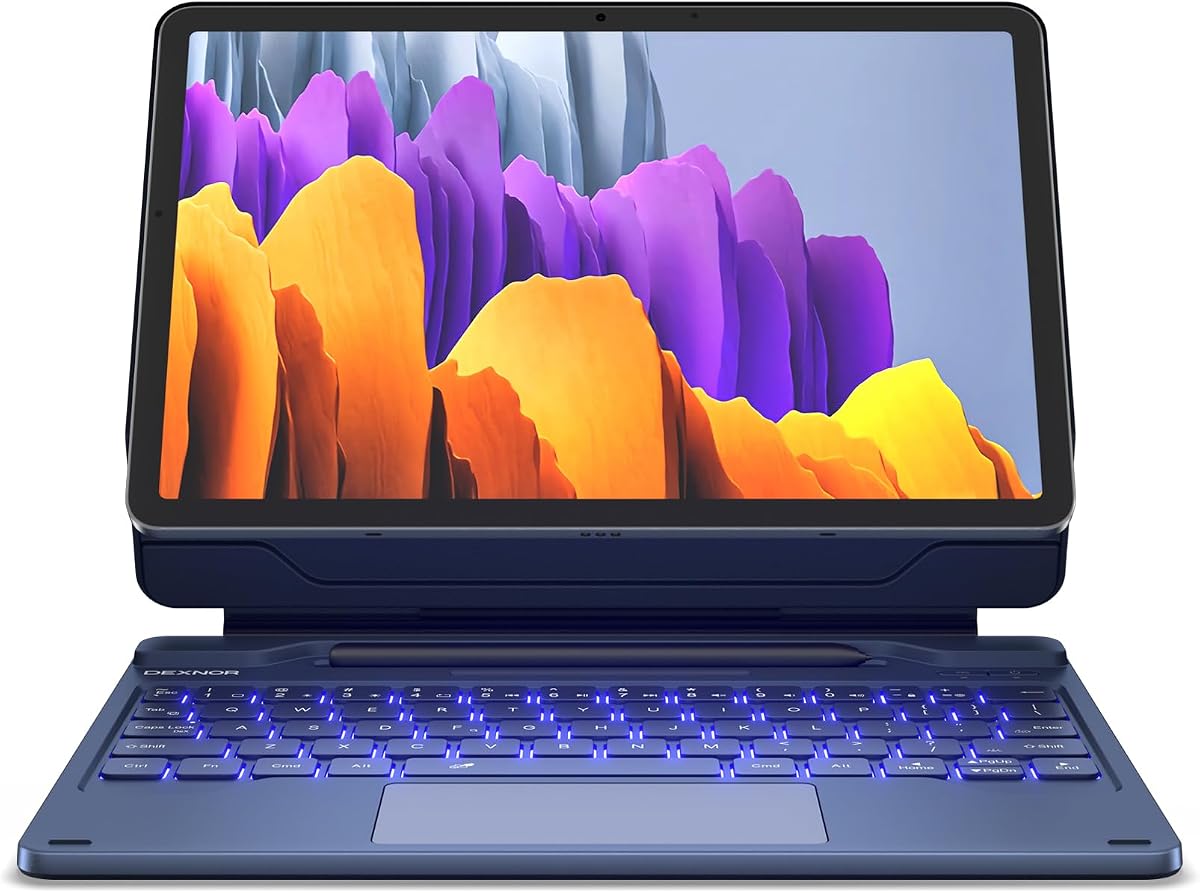


The Dexnor for Samsung Galaxy Tab S10 Lite/S10 FE/S9 FE/S9 Case with Keyboard is a polished productivity case for Galaxy Tab users who want a physical keyboard, trackpad, and elevated screen without assembling several separate accessories. Its 4.5 rating reflects a generally strong feature set, particularly for users moving between typing, browsing, presentations, and travel.
We may earn a commission when you buy through this link, at no additional cost to you.
The magnetic aluminum hinge creates the floating cantilever effect that distinguishes this case from a basic folio. It supports adjustable viewing angles, while the multi-touch trackpad adds swipe, pinch, and scroll controls for desktop-style navigation. The keyboard includes seven backlight colors, three brightness levels, a rechargeable 650mAh battery, and an automatic wake-and-sleep function.
Stylus organization is unusually thorough. One magnetic S Pen holder is built into the keyboard area, while a rear cut-out supports storage and charging. The supplied compatibility details cover specific 10.9-inch S10 Lite, S10 FE, and S9 FE configurations as well as the 11-inch S9, although the tablet and S Pen themselves are not included. Larger 12.4-inch Plus and FE Plus models are explicitly excluded.
This is the most balanced recommendation for a compatible S9, S10 Lite, or S10 FE owner who wants a complete work setup. It is less suitable for anyone whose tablet is a 12.4-inch or 14.6-inch model, or for a buyer seeking a waterproof floating pouch rather than a keyboard case.
The embedded magnets and aluminum hinge hold the tablet in a raised, laptop-like position while allowing the angle to be adjusted. That makes typing, video calls, note-taking, and presentations more natural than working on a flat tablet.
Two S Pen holders reduce the chance of leaving the stylus behind, while the trackpad and full keyboard bring familiar navigation controls to a compact Galaxy Tab setup.
We may earn a commission when you buy through this link, at no additional cost to you.
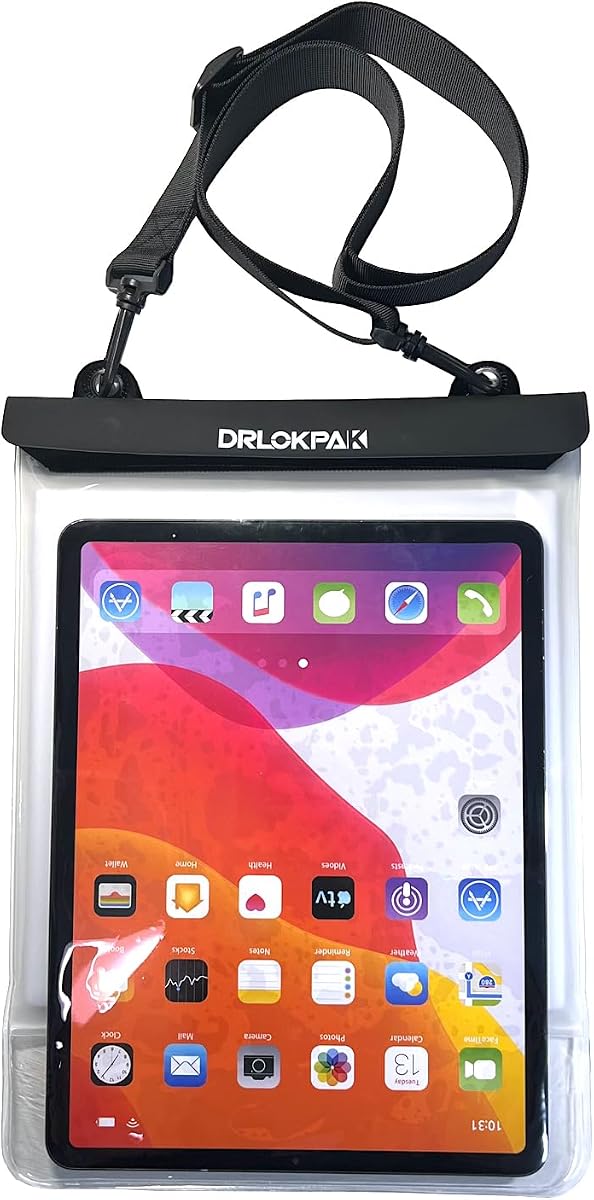
The DRLOKPAK Waterproof Tablet case Dry eReader Bag for Ipad Kindle up to 13" is designed for Galaxy Tab use around pools, beaches, boats, hot tubs, and other wet environments. Its 4.6 rating is among the strongest in this guide, and its IPX8 certification and stated protection up to 10 meters make it fundamentally different from the keyboard cases in the list.
We may earn a commission when you buy through this link, at no additional cost to you.
A double TPU waterproof ziplock surrounds the device, while a clear TPU film window preserves touch functionality. The user can navigate, read, or take pictures without removing the tablet from the protective pouch. EVA padding behind the bag helps keep the device from shifting against the screen, improving touch accuracy in the circumstances where that matters most.
The pouch is offered in 8.5-inch, 11-inch, and 13-inch formats, covering compatible devices with physical dimensions from 6 to 13 inches. The listed Galaxy Tab compatibility includes the 11-inch S9 and 12.4-inch S9+, but buyers must select the correct size and verify physical dimensions. The included adjustable 52-inch shoulder strap adds portability.
Choose this case if your priority is keeping a Galaxy Tab dry while retaining touch access, especially during travel or aquatic recreation. It is not the right choice for conventional laptop-style typing because it includes no keyboard, and the manufacturer advises washing the pouch with clean water, drying it, and performing a water test before use.
The clear window allows scrolling, reading, and navigation while the device remains sealed, so users do not need to handle a wet tablet with bare hands.
The IPX8 enclosure, sealed closure, and stated 10-meter protection target situations involving water, sand, snow, and dirt. A preliminary water test is still recommended.
We may earn a commission when you buy through this link, at no additional cost to you.
The JUQITECH Magic Style Keyboard Case for Samsung Galaxy Tab S11 S10 Lite S9 combines a magnetic floating stand with a trackpad, scissor-switch keyboard, and an unusually broad specified compatibility list. Its 4.3 rating is solid, and the inclusion of the 11-inch S8 and S7 expands its appeal for owners who do not own the newest Galaxy Tab.
We may earn a commission when you buy through this link, at no additional cost to you.
An aluminum alloy hinge supports the cantilever position, while a small LED screen reports the battery percentage, Caps Lock status, Bluetooth connection, and charging state. The keyboard connects through Bluetooth 5.2, uses larger scissor-switch keys, and provides seven RGB colors with three brightness levels plus a breathing mode. The 500mAh battery is stated to provide more than 80 hours of use and 130 days on standby.
The multi-touch trackpad supports swipes, pinches, scrolls, and app switching, and the keyboard provides a dedicated lock combination using Fn and Spacebar. Stylus support includes a rear magnetic slot and unobstructed side access, allowing the S Pen to remain stored or attached. Compatibility details include the S11, S10 Lite, S10 FE, S9 FE, S9, S8, and S7, with specific model numbers listed in the product information.
This is a strong choice for someone who wants extensive model selection, clear status indicators, and colorful keyboard lighting. Its limitations are straightforward: the tablet and S Pen are not included, and buyers should verify the exact model number rather than relying only on the general series name.
The built-in LED display is a practical refinement because it shows charging, connection, Caps Lock, and battery information without requiring users to navigate through another menu.
Seven RGB colors, three brightness levels, and a breathing lighting mode let users adapt the keyboard to different ambient lighting conditions while preserving a laptop-like input experience.
We may earn a commission when you buy through this link, at no additional cost to you.
This Dexnor listing offers a well-equipped floating setup for the Galaxy Tab S10 Lite, S10 FE, S9 FE, and S9. It shares a 4.5 rating and a feature-centered design centered on a magnetic stand, Bluetooth keyboard, trackpad, and stylus organization, making it a practical alternative when the same model family appears under a different listing.
We may earn a commission when you buy through this link, at no additional cost to you.
The aluminum alloy hinge and integrated magnets keep the tablet suspended in a laptop-like posture, and the angle can be adjusted to suit typing, viewing, or presentations. A multi-touch trackpad supports familiar gestures, while the keyboard offers seven backlight colors, three brightness levels, and a rechargeable 650mAh battery stated to last up to 200 working hours and 1,200 hours on standby.
The case also folds into a folio for front and back protection. Its S Pen provisions include a built-in magnetic keyboard holder and a rear cut-out that supports storage and charging. Listed compatibility is specific, covering the 10.9-inch S10 Lite, 10.9-inch S10 FE, 11-inch S9, and 10.9-inch S9 FE variants, with 12.4-inch Plus models explicitly excluded.
Users who want a raised display, physical keyboard, gesture navigation, and protected travel mode should give this listing close consideration. The main caveat is model specificity: the case is not a universal Galaxy Tab accessory, and neither the tablet nor S Pen is supplied.
Because the assembly folds into a slim folio, the tablet can be covered during transport rather than remaining exposed with the keyboard attached.
The stated battery endurance, three-and-a-half-hour USB-C recharge cycle, and automatic sleep function make the keyboard more practical for repeated mobile work sessions.
We may earn a commission when you buy through this link, at no additional cost to you.
The typecase Keyboard Case for Samsung Galaxy Tab 12.4", Trackpad, Magnetic is the highest-rated option in this guide at 4.7. It is aimed at owners of larger Galaxy Tab models who want a floating stand, physical keyboard, and trackpad combined with a protective cover, making it especially relevant to users who find smaller-screen working arrangements cramped.
We may earn a commission when you buy through this link, at no additional cost to you.
The durable hinge and built-in magnets hold the tablet in a floating cantilever position, and the viewing angle can be adjusted for typing, meetings, study, streaming, and travel. The multi-touch trackpad responds to tap, pinch, scroll, swipe, app-switching, and other multi-finger actions. Backlit keys provide 11 colors and three brightness levels for use in dim rooms.
Compatibility information covers the 12.4-inch Galaxy Tab S10+, S9 FE+, S9+, S8+, S7 FE, and S7+, along with listed SM-X and SM-T model numbers. Precise cutouts maintain access to ports and the camera, and the rear charging slot plus dedicated holder help organize an S Pen. The cover also provides protection around the tablet.
This is the leading recommendation for a compatible 12.4-inch Galaxy Tab owner. It combines a large-screen floating workstation with polished productivity features, but exact model verification is essential because similarly named Plus, FE Plus, and Ultra devices are not interchangeable in every case.
The 12.4-inch format provides more screen space for split views, document editing, and presentations while the floating hinge keeps the display elevated above the keyboard.
A dedicated holder and rear charging slot address two common tablet-accessory problems: where to keep an S Pen and how to maintain it in a protected location.
We may earn a commission when you buy through this link, at no additional cost to you.
The Keyboard Case for Samsung Galaxy Tab S11/S10/S9/S8 Ultra 14.6 Inch is designed for users who want the largest compatible Galaxy Tab to function as a full workstation. Its 4.5 rating and detachable keyboard design make it a strong choice for S11, S10, S9, or S8 Ultra owners who prioritize screen area and desktop-style control.
We may earn a commission when you buy through this link, at no additional cost to you.
A magic-style floating cantilever magnetic stand secures the tablet and allows multiple viewing angles. The keyboard supports Samsung DeX Mode for a more desktop-like experience and includes a dedicated AI key for quick access to intelligent features and voice-assistant functions. A precision multi-touch trackpad adds cursor control, gestures, and navigation without a separate mouse.
The seven-color backlighting has three brightness levels, allowing comfortable typing in dim environments. Its charcoal finish and durable construction are intended to protect the tablet, while the detachable keyboard gives users the option to separate the physical typing accessory from the floating support setup when only tablet use is required.
The main benefit is the scale of the workstation. It is well matched to large-screen work involving multiple windows, detailed documents, or media review. The trade-off is model exclusivity: the product is intended for 14.6-inch Ultra-style Galaxy tablets, so it will not suit owners of 10.9-inch, 11-inch, or 12.4-inch models.
A 14.6-inch display paired with a floating stand and trackpad offers considerable workspace for multitasking, while the keyboard adds tactile input for lengthy sessions.
DeX Mode support and the AI key distinguish this model from conventional keyboard folios by adding workstation and voice-assistant access directly through the keyboard.
We may earn a commission when you buy through this link, at no additional cost to you.
The second Dexnor listing for the Galaxy Tab S10 Lite, S10 FE, S9 FE, and S9 is a recognizable productivity option for travelers, students, and mobile professionals. Its 4.5 rating aligns with the same strong combination of a magnetic floating stand, backlit keyboard, multi-touch trackpad, and folio-style protection described by the product information.
We may earn a commission when you buy through this link, at no additional cost to you.
The aluminum alloy hinge is fitted with embedded magnets, allowing the tablet to be positioned at different viewing angles without feeling like a conventional flat folio. This benefits presentation viewing, travel, and regular typing. The trackpad supports multi-finger navigation, and the keyboard has seven solid backlight colors with three brightness levels for lower-light conditions.
A 650mAh rechargeable battery is stated to deliver up to 200 working hours and 1,200 standby hours, with a recharge time of three and a half hours through USB-C. Automatic wake and sleep functions help conserve power. The cover folds into a slim folio and includes both keyboard-based magnetic S Pen storage and a rear slot for charging or storage.
This is a sensible selection for a compatible smaller Galaxy Tab that will serve as a laptop alternative in offices, classrooms, and travel settings. Buyers should compare the specific model number against the supplied list and note that no larger Plus-style tablet, S Pen, or tablet is included.
The raised stand and adjustable hinge make it easier to align the display with viewers, while the trackpad offers a compact way to move through slides or web content.
The combination of a long stated battery duration, rapid USB-C recharging, and automatic sleep behavior helps preserve readiness during mobile workdays.
We may earn a commission when you buy through this link, at no additional cost to you.
The Dexnor for Samsung Galaxy Tab S10 FE+ Plus Case with Keyboard 13.1-inch fills a distinct niche: owners of the 13.1-inch Galaxy Tab S10 FE+ who need a keyboard, trackpad, and floating magnetic stand. Its 4.3 rating reflects a capable productivity accessory, but model specificity is the defining consideration.
We may earn a commission when you buy through this link, at no additional cost to you.
The aluminum alloy hinge and strong magnets create a stable floating cantilever that adjusts to different viewing angles. It is intended to remain steady during typing on a lap, while also supporting note-taking, video calls, streaming, and presentations. The multi-touch trackpad recognizes tap, pinch, scroll, and swipe actions for navigation through documents, websites, and presentations.
Its 500mAh-style product page describes different battery figures from the other Dexnor listings, including up to 10 hours with backlight on, 250 hours with it off, and 800 hours of standby, plus a three-and-a-half-hour USB-C recharge. A major feature is dual Bluetooth channel support, allowing the keyboard to connect to two devices and switch between work and entertainment.
The S Pen holder uses magnets, and the keyboard includes a dedicated one-press word-delete key on F12. A Fn-plus-Delete combination activates DeX Mode. The case is exclusively for the S10 FE+ model numbers listed and explicitly does not fit the 12.4-inch S10+, 10.9-inch S10 FE, or 14.6-inch S10 Ultra. Exact verification is essential.
Dual Bluetooth channels are useful for people who alternate between a work tablet and another Bluetooth device, reducing the need to repeatedly disconnect and re-pair.
The dedicated word-delete key and DeX shortcut provide efficient ways to correct text and move into a desktop-style workflow without relying solely on touch gestures.
We may earn a commission when you buy through this link, at no additional cost to you.
The DRLOKPAK Waterproof Tablet case Dry eReader Bag for Ipad Kindle up to 13" is especially relevant to beach, pool, and boating trips. Its 4.6 rating reflects a well-specified protective pouch, with IPX8 certification, stated protection up to 10 meters, and coverage against water, sand, and dust.
We may earn a commission when you buy through this link, at no additional cost to you.
The tablet stays inside a waterproof TPU enclosure with a double ziplock closure. A transparent window preserves touch response for reading, navigation, and photography, while EVA padding behind the device limits movement and helps maintain accurate contact with the screen. The product can also float, making it suitable for aquatic settings where losing sight of the device would be inconvenient.
Three size options—8.5 inches, 11 inches, and 13 inches—cover compatible devices between 6 and 13 inches. Galaxy Tab S9 11-inch and S9+ 12.4-inch compatibility is specifically listed, though the correct size and physical measurements must be checked. An adjustable 52-inch shoulder strap supports hands-free carrying.
This pouch is ideal for readers and travelers who want a Galaxy Tab near water without exposing it to spray, sand, or dirt. It does not add keyboard functionality, so touch operation remains the central interaction method. As with the other DRLOKPAK listing, users should wash the pouch, dry it properly, and conduct a water test before use.
The floating construction is useful in pools, baths, and other water settings where a conventional folio would be difficult to keep dry and supported.
Rear EVA padding holds the tablet more steadily against the transparent window, supporting steadier reading and more dependable touch interaction.
We may earn a commission when you buy through this link, at no additional cost to you.
The DRLOKPAK Waterproof Tablet case Dry eReader Bag for Ipad Kindle up to 13" provides a compact floating enclosure for larger compatible tablets and e-readers. It carries a 4.6 rating and the same core waterproof premise as the other DRLOKPAK options, making it worthwhile to compare size-specific listings before choosing.
We may earn a commission when you buy through this link, at no additional cost to you.
The case uses waterproof TPU material, a double TPU ziplock, and a high-clarity touch-sensitive film. Users can read, browse, and operate the touchscreen while the device remains enclosed, and the listed design also supports taking pictures without removing the tablet. The floating structure can remain on the water, while EVA padding helps reduce internal movement.
The available 8.5-inch, 11-inch, and 13-inch configurations accommodate devices ranging from 6 to 13 inches. The product information specifically mentions Galaxy Tab S9 and S9+ compatibility and advises checking physical dimensions before purchase. A 52-inch adjustable shoulder strap makes the pouch easier to carry around the neck or across the body.
This is the most relevant option in the guide for someone seeking waterproof floating protection for a larger Galaxy Tab or e-reader. It does not convert the tablet into a laptop and should be selected primarily for wet-environment access. Users should follow the cleaning, drying, and water-testing instructions before taking it near water.
Keeping the device inside the pouch during wet activities reduces repeated handling and exposure, while the clear window maintains access to essential screen functions.
The included strap and compact floating format suit camping, boating, sailing, surfing, pool visits, and other settings where a dry device is the priority.
We may earn a commission when you buy through this link, at no additional cost to you.
The best floating Galaxy Tab case is primarily a model-specific purchase. Begin with the tablet's exact model number, then decide whether you need a productivity keyboard, waterproof protection, or a light floating pouch.
Samsung uses similar-looking names for tablets with materially different dimensions, and case compatibility cannot safely be inferred from screen size alone. Review the full model number on the tablet's settings or rear label, then compare it with the case's supported identifiers. For example, some options cover 10.9-inch S10 Lite, S10 FE, and S9 FE models, while the Typecase option targets 12.4-inch Plus, FE Plus, and related variants. The S10 FE+ keyboard case is narrower still and explicitly excludes the S10 FE, S10+, and S10 Ultra.
Floating cases in this guide fall into two very different categories. Keyboard cases provide a raised screen, tactile keys, a trackpad, and often DeX support for office and school workflows. Waterproof pouches keep the tablet enclosed around pools, beaches, boats, and campsites while preserving touch use through a clear window. The latter provide no physical typing, while the former generally do not provide the same sealed water protection.
A useful floating design does more than raise the screen. Look for a durable hinge, strong integrated magnets, and enough adjustability to support typing, touch use, media viewing, and video calls. Cantilever stands are useful because the screen can hover above the keyboard, but stability still matters when the case is used on a lap. Narrow, non-cantilever floating models may also work well if the priority is simple elevation rather than a full laptop arrangement.
A keyboard that feels complete should include modern navigation options rather than forcing every action through the touchscreen. Multi-touch trackpads may support tapping, scrolling, swiping, pinching, and app switching, while a gesture lock can prevent accidental input. Keyboard extras worth comparing include backlight brightness, color options, battery indicators, dedicated shortcuts, and automatic sleep or wake behavior. A visible LED status panel is especially helpful for checking Bluetooth and charge state at a glance.
Most keyboard cases are wireless and need regular charging, so battery specifications matter for people who travel or work for long periods. Compare stated working time, standby time, recharge method, and the presence of automatic sleep functions. Bluetooth 5.2 is specified for the JUQITECH model, while the S10 FE+ Dexnor case supports two Bluetooth channels for switching between devices. These connectivity details can be more valuable than extra lighting when portability is the priority.
Galaxy Tab users often carry an S Pen, making its storage a meaningful case feature. Several keyboard cases include a magnetic holder, a rear slot, or both. A rear cut-out may support wireless charging, but buyers should verify the stated charging behavior and ensure that the chosen slot does not interfere with the case's magnetic stand. Note that a tablet and S Pen are not included with any of the listed keyboard cases.
Keyboard folios primarily provide everyday shell and cover protection, with their magnetic stands designed for productive use rather than immersion. Waterproof pouches have sealed closures, IPX8 certification, and stated protection up to 10 meters, but they still require careful closure and preparation. The manufacturer advises washing and drying the pouch and performing a water test before use. For sand, snow, or dirt resistance, inspect the closure carefully rather than assuming every accessory provides equal protection.
A larger tablet may be more productive when paired with a trackpad, but it also requires a larger case and a more substantial carrying plan. The 14.6-inch model targets Ultra users, while the 12.4-inch Typecase serves Plus and FE Plus families. Smaller 10.9-inch and 11-inch options are easier to carry but have less workspace. Waterproof pouches add bulk and a strap, so consider both the device and the enclosure together when assessing portability.
Begin by identifying your tablet's exact model and comparing it with the case's compatibility list. For a keyboard case, charge the keyboard through its USB-C connection, pair it using the specified Bluetooth process, and test the keyboard and trackpad before relying on them for important work. Attach the tablet to the magnetic stand with the screen facing the keyboard, then adjust the hinge to a stable angle that does not cause the tablet to lean forward.
For daily use, keep the magnetic surfaces free of grit, dust, and oily residue, as particles can interfere with attachment or leave marks. Clean a keyboard cover with a soft, lightly damp cloth according to the manufacturer's instructions, and avoid flooding ports, buttons, hinges, or openings. Do not place the tablet in the magnetic cradle with an incompatible keyboard attached, because the magnet arrangement and physical dimensions may not align.
Waterproof pouches require more deliberate care. Close the ziplock fully, ensure the transparent film is seated correctly, and wash the pouch with clean water before drying it in the closed position. Perform a water test before first use and after any closure or material change. After a wet outing, remove the device, wipe the pouch, and let both components dry in a cool, dry location.
A floating case elevates the tablet and holds it in a laptop-like position, usually with magnets and a hinged support. Keyboard-based versions add tactile typing, a multi-touch trackpad, backlighting, and sometimes DeX shortcuts. Waterproof floating pouches instead focus on sealed protection and touch access in wet environments. The appropriate choice depends on whether productivity or outdoor protection is the main requirement.
No. Compatibility depends on the exact Galaxy Tab family, display size, and model number. Cases for the 12.4-inch S9+, S10+, and related Plus models do not necessarily fit a 13.1-inch S10 FE+. The S10 FE+ keyboard is also explicitly limited and excludes several other models. Check the complete model identifier and every exclusion noted in the listing before ordering.
The keyboard cases in this guide are not described as waterproof enclosures. They provide folio-style front and back coverage and magnetic attachment, but their openings, electronics, and exposed keyboard are intended for normal use. If water, sand, or dust protection is essential, choose a sealed IPX8 pouch and follow its water-test and drying instructions.
It can, because the raised display creates a more natural viewing angle and keeps the keyboard below the screen. A cantilever design also lets the tablet float above the keyboard rather than resting directly against it. Actual comfort still depends on keyboard layout, hinge stability, viewing angle, and personal preference, so adjust the stand before beginning a long typing session.
No. The listed keyboard cases do not include a tablet or S Pen. Several provide holders or charging slots, but the stylus itself must be acquired separately. When shopping, treat a stylus slot as a storage or charging feature rather than confirmation that a compatible S Pen is part of the package.
The keyboard handles text entry and commands, while the trackpad handles cursor movement and gestures. The featured cases support actions such as tapping, scrolling, swiping, pinching, and app switching. This combination is especially useful in Samsung DeX Mode because it more closely reproduces the input arrangement of a conventional laptop.
The DRLOKPAK pouches are IPX8 certified and described as offering waterproof protection up to 10 meters, but the instructions call for washing, drying, and performing a water test before use. Make sure the closure is completely sealed and follow the manufacturer's guidance. Water resistance should never be treated as permission to ignore damaged seals or damaged material.
Remove grit and dust from both the tablet and the magnetic surfaces, align the case with the intended attachment points, and apply steady pressure until the magnets engage. Adjust the hinge to an angle that keeps the center of gravity stable, especially when typing on a lap. If the tablet shifts, reposition the stand rather than forcing an extreme angle.
The Dexnor S10 Lite/S10 FE/S9 FE/S9 keyboard case is the strongest all-around productivity recommendation in the guide, combining a magnetic floating stand, trackpad, backlit keyboard, and two stylus-storage options. JUQITECH offers the most expansive named Galaxy Tab compatibility and a particularly informative LED status display, while the Typecase 12.4-inch model stands out for larger Plus-family screens and its 4.7 rating.
Prioritize the case style that matches the task. Use a magnetic keyboard setup for documents, presentations, typing, and desktop-style navigation; choose a 14.6-inch option for a large Ultra workflow; select a 12.4-inch case for Plus and FE Plus models; and use a sealed floating pouch for reading or operating a tablet around water. Above all, verify the full tablet model number before purchasing.
The best floating case is one that fits the exact device, attaches securely, and provides the features you will actually use. Product listings, compatibility information, promotions, and market costs can change, so review the current seller page and recent model details before completing an order.