
YISHU 6Ft Surge Protector
4.6Editor score
Eight widely spaced AC outlets
Four USB charging ports
Compact six-foot flat cord
Extension cord for dorm buying guide comparing 10 flat-plug power strips for charging, reach, surge protection, mounting, and compact use in small rooms.
An extension cord for a dorm room must do more than reach a distant outlet. It should also organize charging cables, accommodate bulky adapters, protect connected electronics, and avoid taking over limited desk or floor space. The best options combine usable outlet spacing, a slim wall plug, several USB ports, and flexible mounting options.
We compared all 10 products by examining cord length, AC outlet count, USB-A and USB-C availability, flat-plug dimensions, surge and overload protection, outlet spacing, mounting features, and intended room use. The list includes compact six-foot models, versatile ten-foot strips, and extended fifteen-foot cords for harder-to-reach outlets.
Each review explains where that model stands out and where compromises may matter for a particular dorm setup. The top picks represent especially balanced options, while the full ranking includes alternatives for travelers, shared rooms, and students who need extra charging capacity. Product prices and availability can change, so compare current listings before buying.
4.6Editor score

4.7Editor score
4.8Editor score
The table below compares the leading dorm power strips by cord reach, AC and USB connectivity, physical design, and protective features, making it easier to identify the model that fits your room and charging routine.


The SUPERDANNY 10Ft Extension Cord, Flat Plug Surge Protector Power Strip is a strong all-around choice for a dorm because it combines generous outlet access with a very slim wall plug. It carries a 4.7 rating and provides eight AC outlets, two USB-A ports, and two USB-C ports. That makes it suitable for a laptop, phone charger, lamp, monitor, and several smaller accessories without requiring multiple wall adapters.
We may earn a commission when you buy through this link, at no additional cost to you.
Its defining physical feature is the 0.3-inch flat plug, which can sit more flush against a wall than a traditional projecting plug. The 45-degree right-angle form also helps preserve access to the receptacle below. On the strip itself, a four-side layout distributes the eight AC outlets so plugs are less likely to cover neighboring sockets. The listed 1.65 inches of spacing is helpful for roomier charger bricks, while the ten-foot cord gives a student flexibility to place the main hub on a desk or floor.
The protection package is also more substantial than a basic extension cord. The product data lists 1050 joules of surge protection, 1250-watt overload protection, 10-amp over-current protection, and fire-retardant casing. Two USB-A ports provide up to 5V/2.4A, while the two USB-C ports provide up to 5V/3A, with total USB output up to 15 watts. These are useful charging levels, although demanding laptops or several high-power USB-C devices may still require their own wall charger.
This is a particularly good recommendation for students who want one central charging point but dislike replacing one bulky adapter with another. Mounting holes on the back allow secure placement on a wall, desk, or counter, and the listed UL-recognized cable and V-0 fire-retardant casing add reassurance. Choose it when a balance of reach, outlet count, charging options, and space-conscious design matters more than having the smallest possible body.
Eight AC outlets and four USB ports give the strip enough capacity to serve as a shared charging station for a desk, bedside table, or study area. The four-side arrangement improves access when several adapter shapes are plugged in at once.
The 0.3-inch flat plug and right-angle profile can reduce conflicts with wall plates and furniture. Mounting holes add another way to reclaim loose desk and floor space.
We may earn a commission when you buy through this link, at no additional cost to you.
The One Beat 10Ft Extension Cord with Multiple Outlets, Flat Plug Power Strip combines six AC outlets with two USB-A and two USB-C ports. Its 4.7 rating and ten-in-1 design make it a flexible hub for dorm desks where students alternate between plugged-in devices and USB accessories. It is also explicitly positioned as a travel-friendly option, with a compact body that fits more readily into luggage than a full-size rectangular power strip.
We may earn a commission when you buy through this link, at no additional cost to you.
The 0.35-inch flat plug and 45-degree right-angle design help the unit sit close to a wall or disappear behind a bed, nightstand, or refrigerator. Its three-side outlet arrangement places the six AC sockets on multiple faces, and the listed 1.6 inches of spacing can accommodate larger adapters without blocking every neighboring outlet. Two mounting holes on the back allow installation on a wall, desk, or other suitable surface.
Safety features include a 900-joule surge rating, overload and short-circuit protection, and a protected indicator light. The USB-C ports provide up to 5V/3A, while the USB-A ports provide up to 5V/2.4A, with all USB output listed at up to 5V/3.1A. Smart detection is described as allowing the strip to adjust current delivery to connected devices, which is convenient when different chargers share the hub.
This model is ideal for students who want a compact travel companion or a tidy central station for a smaller collection of electronics. Its main limitation is that six AC outlets provide less capacity than the eight- and nine-outlet alternatives in this guide. If your dorm has many wall chargers or large desktop equipment, choose a larger model instead.
The listed 5.0-by-1.9-by-1.8-inch housing and three-sided layout make this a practical choice for luggage, small desks, and shared study areas. A ten-foot cord also allows the strip to be positioned away from a crowded outlet.
Two USB-A and two USB-C ports cover common charging cables while the AC outlets handle larger electronics. This reduces the number of wall adapters crowding a dorm room outlet.
We may earn a commission when you buy through this link, at no additional cost to you.
The YISHU 6Ft Surge Protector Power Strip with 8 Widely Outlets & 4 USB Ports is a compact and economical choice for dorms where the outlet is already close to the desk. It has a 4.6 rating and combines eight AC outlets with four USB ports, allowing up to 12 devices to connect according to the product information. The three-sided body distributes its outlets to improve access.
We may earn a commission when you buy through this link, at no additional cost to you.
A major benefit is the listed 1.8 inches of spacing between outlets. That is wider than the spacing cited by many competing strips and gives large wall chargers more room without taking over adjacent receptacles. The 45-degree flat plug helps it fit into tight spaces and keeps the outlet below it available. At six feet, however, the cord is best suited to a nearby wall outlet rather than a distant one across the room.
The safety specification includes ETL certification and 900 joules of minimum energy-absorbing capacity. Overload, short-circuit, over-current, over-voltage, and overheating protection are all listed, giving the strip a more comprehensive safety feature set than a basic three-outlet extension. Each USB-A port provides up to 5V/2.4A, while the USB-C port provides up to 5V/3A, making it suitable for many common personal electronics.
This is a strong budget recommendation for students who need several outlets but do not need maximum cord reach. Two mounting holes on the back allow secure placement on a wall, desk, or other surface, and the product data notes a 30-day return and 12-month warranty. Choose it for compact charging near one outlet; move to a longer model if your dorm layout has a distant power source.
The 1.8-inch separation is especially helpful in shared rooms where several people may plug in oversized adapters. A three-sided arrangement also gives each plugged device more than one possible direction.
The six-foot length reduces cable clutter when the wall outlet is near the intended furniture. It is a straightforward option for a bedside table, compact desk, or dorm vanity.
We may earn a commission when you buy through this link, at no additional cost to you.
The 10Ft Flat Extension Cord with Multiple Outlets, Surge Protector Power Strip stands out for its roomy outlet spacing. Its 4.7 rating reflects a balanced feature set, while the listed two inches between AC outlets offers useful clearance for larger power adapters. The strip has six AC outlets, two USB-A ports, and one USB-C port, making it less USB-heavy than many products in the ranking.
We may earn a commission when you buy through this link, at no additional cost to you.
A 0.35-inch flat plug and 45-degree right-angle body help the extension cord fit behind furniture or close to a wall. At ten feet, it offers enough flexibility for a desk positioned several feet from an outlet without becoming difficult to route. The product is also mountable through two holes on the back, which can help keep the main body elevated or secured where a loose strip would otherwise occupy floor space.
The listed safety system combines 1050 joules of surge protection with 1250-watt overload protection, 10-amp over-current protection, and a 1382°F fire-retardant casing. USB-A outputs reach 5V/2.4A and the USB-C output reaches 5V/3A, with total USB output up to 15 watts. That makes it useful for phones, earbuds, watches, and similar accessories, but it does not replace a high-output USB-C charger for demanding devices.
This model makes sense for students with several large AC adapters who value access over maximum USB port count. The two-inch spacing is a meaningful advantage in crowded dorm rooms, and the longer cord provides more placement freedom than the YISHU model. It is a sensible alternative when broad compatibility and easy plug access matter more than having two additional USB-A sockets.
Two inches of clearance gives bulky charger bodies room to remain connected without covering neighboring sockets. That makes the strip practical for a desk shared by several devices and adapters.
The cord can reach farther than a six-foot strip while remaining short enough for easy cable management. It works well behind a dorm desk, nightstand, or shelving unit.
We may earn a commission when you buy through this link, at no additional cost to you.
The Olcorife Flat Plug Power Strip with a 10-foot extension cord is designed around compactness and outlet access. It has a 4.7 rating, eight widely spaced AC outlets, three USB-A ports, and one USB-C port. According to the product data, as many as 12 devices can be connected simultaneously, making it a capable central hub for a dorm room or shared workspace.
We may earn a commission when you buy through this link, at no additional cost to you.
Its most striking feature is the listed 0.27-inch ultra-thin plug, which is thinner than the 0.3-inch and 0.35-inch plugs used by several competing products. The product description also emphasizes a three-sided design that reduces its overall size and mass. These characteristics are useful in small rooms, but they do not eliminate the need to route a ten-foot cord carefully through a shared space.
The primary specified safety feature is a built-in circuit breaker that cuts power when the rated load is exceeded, helping guard against overcurrent and overheating. Unlike several other products in this roundup, the supplied information does not state a joule surge-protection rating. That makes it harder to compare its surge capability directly with models listing 900, 1050, or 1080 joules, even though the compact format remains appealing.
Two mounting holes on the back allow the strip to be secured to a wall, and its light, portable construction is aimed at students who may use it in a dorm, home office, or while traveling. It is a good choice for maximizing connections in a small footprint, but buyers who prioritize a clearly specified surge rating may prefer a model that publishes one.
The 0.27-inch plug is designed to slide into tight wall-outlet gaps and sit behind nearby furniture. It can be especially helpful in dorm rooms where every inch of outlet clearance matters.
Eight AC outlets and four USB ports allow students to keep phones, laptops, tablets, headphones, and small accessories connected to one unit. The distributed three-sided layout improves access.
We may earn a commission when you buy through this link, at no additional cost to you.
The SUPERDANNY 15Ft Extension Cord with Multiple Outlets is built for dorm layouts where the nearest usable wall outlet is far from the desk or bed. Its 4.8 rating, long cord, six AC outlets, and four USB ports make it a flexible solution for reaching distant or awkwardly positioned outlets without relying on a permanently installed fixture.
We may earn a commission when you buy through this link, at no additional cost to you.
The 0.3-inch flat plug and 45-degree right-angle design help it sit flush against the wall, while a four-side outlet layout allows multiple directions of access. The listed compact size of 5.28 by 1.73 by 1.69 inches helps offset the visual bulk of the longer cable. Mounting holes let the strip be attached under a desk, along a wall, or to a counter when cord management matters.
Protection features include 1050 joules of surge protection, 1382°F fire-retardant construction, 1250-watt overload protection, and 10-amp over-current protection. Two USB-A and two USB-C ports support common accessories, with USB-C output up to 5V/3A and total USB output up to 15 watts. As with the ten-foot version, the strip is more appropriate for everyday peripherals than for replacing a full laptop charging brick.
Choose this model when cord reach is the dominant challenge, such as in a room where furniture blocks access to the outlet. The extra five feet compared with a ten-foot strip can eliminate an awkward extension chain, although the longer cable should be secured to prevent tripping or becoming a visual mess in a shared room.
Fifteen feet gives the strip enough length to connect a desk or bed to a distant wall outlet. It is useful when a bed, wardrobe, or storage unit blocks direct access.
The listed 1050-joule surge protection and 1250-watt overload protection carry over to this longer version. It retains a 0.3-inch plug and a four-side outlet arrangement.
We may earn a commission when you buy through this link, at no additional cost to you.
The 15 Ft Extension Cord with six outlets and four USB charger ports is a strong choice for students who want long reach and a complete installation package. Its 4.8 rating reflects a versatile design, while the flat plug and 45-degree profile make the fifteen-foot cord easier to position around a wall or behind a desk. Six AC outlets, two USB-A ports, and two USB-C ports support up to ten connected devices.
We may earn a commission when you buy through this link, at no additional cost to you.
Unlike some competing models, this strip includes two screws and a mounting template. Its mounting holes can be used horizontally or vertically on walls, workbenches, counters, and other dorm surfaces. The product description also notes spacing intended for larger transformer-style plugs, although it recommends keeping those plugs under 1.6 inches wide. This is a detail worth checking against chargers that have unusually broad bodies.
A circuit breaker with an OFF/RESET switch shuts off connected equipment when an overload is detected at the stated 1250-watt rated power. A soft indicator light shows when the strip is working. The four USB ports provide a combined output of 5V/3.1A, and Smart IC technology is described as detecting connected devices to deliver appropriate current.
This model is best for a dorm setup where the power strip will remain in one location rather than move between rooms. Included mounting hardware simplifies installation, and the long cord handles awkward outlet positions. Its total USB output is suitable for common accessories but remains modest for heavy USB-C charging, so high-power devices may still need a separate charger.
Two screws and a mounting template make it easier to attach the strip without locating separate hardware. Horizontal or vertical placement can fit the available wall and furniture space.
The OFF/RESET control and soft working indicator provide a straightforward way to manage power. The breaker is rated for 1250 watts, making the stated capacity important when selecting connected equipment.
We may earn a commission when you buy through this link, at no additional cost to you.
The 10 Ft Extension Cord with six AC outlets and four USB ports is a strong all-around hub for dorm desks. It carries a 4.8 rating and is described as a ten-in-1 power strip with a 15-amp, 1875-watt AC rating. Its stated pure-copper construction and current-carrying capacity make it appealing for students who want a conventional extension cord with extensive USB connectivity.
We may earn a commission when you buy through this link, at no additional cost to you.
The 0.35-inch flat wall plug and 45-degree right-angle design help the strip sit close to a wall or behind furniture. A 10-foot cord provides enough reach for most dorm arrangements, while the inclusion of four mounting screws makes wall or desk installation more convenient. The product data says the strip can remain stable on a desktop or nightstand and that the low-profile construction is lighter than an ordinary power strip.
Protection includes a stated 1080-joule surge rating, overload protection, short-circuit protection, and over-current protection. The ON/OFF switch can shut off the strip when power exceeds the rated value. Two USB-C ports provide up to 5V/3A, while the two USB-A ports provide up to 5V/2.4A. Smart charging technology is described as detecting devices and delivering more efficient charging without requiring multiple converter blocks.
This is a compelling choice for students who want a long cord, a clearly stated surge rating, and USB-C charging in a desk-mounted design. The 1080-joule rating is among the higher specified values in this guide, although surge ratings are not directly interchangeable in every scenario. Check the product instructions and your own device requirements before connecting high-value equipment.
The listed pure-copper construction supports the stated 15-amp current capacity. A 1080-joule surge rating and an automatic overload switch add useful protection for dorm electronics.
Four included screws and end fixation points allow the strip to be attached securely. This keeps the ten-foot cable and ten connections organized around a desk or wall.
We may earn a commission when you buy through this link, at no additional cost to you.
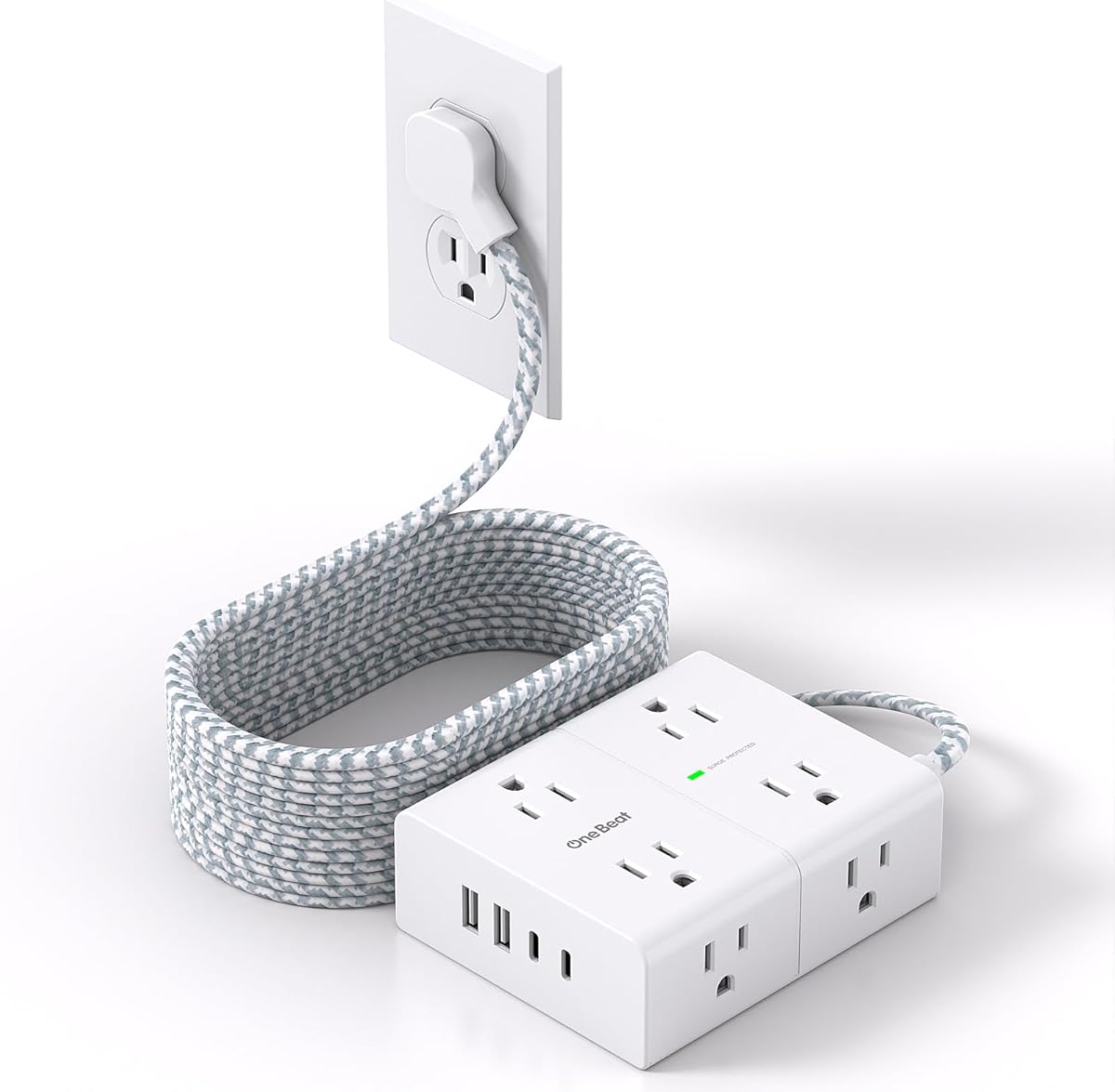
The One Beat 15 Ft Flat Plug Surge Protector Power Strip combines long reach with an unusually generous outlet layout. Its 4.8 rating, eight AC outlets, and four USB ports make it a premium choice for dorm rooms with numerous devices. The listed 2.2-inch spacing between outlets is the widest among the products featured, which helps when several large adapter bodies need to remain connected.
We may earn a commission when you buy through this link, at no additional cost to you.
A 0.35-inch flat wall plug and 45-degree right-angle shape allow the strip to sit close to a wall and preserve access to the receptacle below. At 15 feet, it can serve a desk, bed, or study area when the wall outlet is distant. The three-sided design distributes the eight AC outlets, while dual USB-C ports and two USB-A ports provide convenient charging for phones, tablets, and accessories.
The listed 1080-joule surge protection is paired with an ON/OFF switch that can shut off power when the rated value is exceeded. The strip also lists overload, short-circuit, over-current, over-voltage, and overheating protection. Its PC shell is described as flame retardant at 1382°F, and both RoHS and ETL certification are noted in the product information.
This is the most versatile pick in the guide for a student who has many devices, values wide plug spacing, and needs a long cord. Its trade-off is physical size and a combined USB output of 5V/3.1A, so it is not the smallest option and may not deliver the power some modern USB-C laptops require. It remains a strong premium hub for a broad mix of dorm electronics.
The listed 2.2-inch spacing reduces the chance that one large wall charger will block adjacent outlets. It is especially useful in a shared dorm room or a workstation with several power bricks.
A fifteen-foot cord solves awkward room layouts, while 1080-joule surge protection and multiple automatic safeguards provide a robust feature set. The OFF switch adds direct control over connected equipment.
We may earn a commission when you buy through this link, at no additional cost to you.
The Mifaso Extension Cord with Multiple Outlets is the capacity-focused option in this roundup. It has a 4.8 rating and provides nine widely arranged AC outlets plus four USB charging ports, allowing up to 13 devices to connect according to the product information. That makes it a natural center point for a shared dorm room where several people need access to power at the same desk.
We may earn a commission when you buy through this link, at no additional cost to you.
The three-sided design helps accommodate large plugs without excessive overlap, and the listed 1.57-inch spacing is sufficient for many standard charger bricks. A 15-foot flat extension cord can reach distant outlets, while a 45-degree angled plug helps preserve access to the wall receptacle below. Two mounting holes allow horizontal or vertical installation on walls, counters, workbenches, and dorm-room surfaces.
The strip includes 900 joules of surge protection, overload protection, and an ON/OFF switch that shuts off when power exceeds the rated value. It also lists short-circuit, over-current, over-voltage, and overheating protection. The product data specifies a maximum of 1875 watts and 15 amps, and explicitly warns that exceeding these values can create serious hazards. The fire-retardant PC shell is listed as resistant at 1382°F.
This model is best for a student who needs the largest number of AC connections or coordinates power for several roommates. Its 900-joule surge rating is lower than some alternatives, and the combined USB output of 5V/3.1A is suitable mainly for common accessories. It offers impressive capacity, but proper load management is more important than simply filling every socket.
Nine AC outlets and four USB ports create a large shared charging hub. This is useful for dorm desks or communal work areas where several students need access to outlets.
Mounting holes and the three-sided body make the strip adaptable to walls, counters, and workbenches. Proper placement helps keep a long cable and numerous plugs out of walking paths.
We may earn a commission when you buy through this link, at no additional cost to you.
Choosing an extension cord for a dorm means balancing reach, outlet access, charging options, protection, and safe placement. The right model depends on your furniture layout, the number and size of chargers, and whether the strip will remain mounted or travel with you.
Start by measuring from the wall outlet to the desk, bed, or other intended location. A six-foot strip works well when the outlet is close and excess cable would create clutter. Ten feet is a versatile length for most dorm rooms, while fifteen feet is useful when furniture blocks direct access or the outlet is across the room. Longer cords offer freedom but need secure routing to avoid trip hazards and tangles.
Choose the shortest length that comfortably reaches your setup. A compact local strip is easier to manage than an unnecessary fifteen-foot cable.
Count the actual wall chargers and power bricks you expect to use rather than focusing only on the advertised outlet total. Wide spacing matters because many laptop and phone adapters are wider than the socket openings alone would suggest. The featured products list spacing from 1.57 inches to 2.2 inches, and some use a three- or four-sided body to provide access from several directions.
For a shared desk, eight or nine AC outlets can be worthwhile. If you only need a few devices, six outlets may be sufficient and less visually bulky.
USB ports can reduce the number of bulky wall adapters competing for a dorm outlet. Most products here include two USB-A and one or two USB-C ports, while some provide three USB-A ports. The listed USB-C output generally reaches 5V/3A, and total combined output is commonly 15 watts. That is appropriate for many phones, earbuds, watches, and light accessories but may be insufficient for a high-power laptop or demanding tablet.
Match the ports to your device mix. If USB-C is your primary cable, prioritize USB-C count; if you still use legacy cables, keep enough USB-A ports.
A thin plug can slide behind a bed, nightstand, sofa, or desk without forcing the wall outlet away from other equipment. The featured flat plugs range from 0.27 inches to 0.35 inches thick and commonly use a 45-degree right-angle form. That angle can leave the receptacle below available, while a flat profile reduces the gap needed behind furniture.
Look for both a low-profile plug and a right-angle shape when space is tight. Measure the available clearance before buying if your furniture sits close to the wall.
A surge protector is intended to divert or absorb energy associated with power spikes, while overload and over-current protection help prevent the strip from operating beyond its rating. Published figures in this guide range from 900 to 1080 joules for surge-energy capacity. Overload limits are commonly listed as 1250 or 1875 watts, depending on the model. These figures are not interchangeable, so check the label and instructions for the exact product.
Do not treat a stated joule figure as permission to exceed the strip's continuous power rating. Use the reset or OFF switch as directed and never force incompatible plugs.
Most products in this guide have two mounting holes on the back, allowing attachment to a wall, desk, or counter. Some include screws or a template, while others require separate hardware. Mounting can keep a hub elevated, preserve desk surface area, and route a long extension cord along furniture rather than across a walking path. It is particularly valuable beneath a desk or beside a bed.
Choose a mountable model if the strip will serve as a permanent station. A flatter, lighter design may be better if you plan to pack it for travel instead.
Dorm residents often move between rooms, carry equipment to the library, or travel between home and campus. Compact three-sided models and lightweight strips are easier to pack than larger rectangular power bars. The tradeoff is that more compact bodies may offer fewer AC outlets, while longer cords are more useful in fixed installations than in luggage. A flat plug can also reduce snagging during transport.
For frequent travel, balance port count with packed size. For a permanent dorm setup, prioritize capacity, reach, and mounting.
Every power strip has a maximum rated load, and dorm rooms often contain devices with different power demands. Larger computer monitors, gaming laptops, and some appliances can consume more than a phone or lamp. The listed limits include 1250 watts for some products and 1875 watts for others. A USB-C port's 5V/3A output should also not be confused with a full laptop-charging output.
Check the input or output label on the charger and device before connecting it. If you are unsure, use the device's original wall adapter rather than forcing a high-power load through a shared strip.
Begin by deciding where the strip will live and how its cord will reach the nearest wall outlet. Keep the main body accessible, avoid stretching the cable tightly between furniture, and route it along a wall, under a desk, or behind a bed where it will not interfere with foot traffic. If the strip includes mounting holes, secure it to a suitable surface using the specified method and appropriate hardware.
Plug in only devices and chargers that are compatible with the strip's stated electrical ratings. Do not exceed its listed wattage or amperage, and avoid connecting multiple high-power heating appliances or kitchen-style appliances to one strip. Use the USB ports for compatible devices, and do not assume that every USB-C port can charge a laptop at the same rate as the manufacturer’s wall charger.
For care, inspect the cord and plugs periodically for cracks, discoloration, pin damage, or a hot connection. Unplug the strip before inspecting or cleaning it, and do not use it if the housing, switch, or cable is damaged. Keep the strip dry, away from excess heat, and clear of bedding, curtains, and other flammable material. Follow the instructions included with the product if they differ from general guidance.
A flat plug can be especially useful in a dorm because it takes up less space against the wall than a projecting plug. It can slide behind a bed, nightstand, or desk, while a right-angle form may preserve access to the outlet below. The plug still needs enough room to bend the cord naturally without straining the connection.
A six-foot cord is usually sufficient when the wall outlet is close to your desk or bed. Ten feet provides more flexibility for common room layouts, while fifteen feet is helpful when furniture blocks access or the outlet is far away. Measure the route first and choose the shortest practical length to minimize clutter and trip risks.
You can use a power strip with a laptop as long as the combined load remains within the strip's rated wattage and amperage. Use the laptop's original charger and verify that the charger or USB-C port supplies the power level the computer requires. A strip with 1250 watts has less continuous capacity than one rated at 1875 watts.
A 900-joule rating indicates the stated energy-absorbing capacity used for surge protection. It does not mean the strip can continuously supply 900 watts, nor does it guarantee protection from every possible surge event. Continuous load limits, construction, grounding, and the condition of the wiring also matter, so follow the manufacturer's instructions.
Mounting can improve safety and organization by keeping the strip elevated and the cord out of walking areas. Most products here have two rear mounting holes, and some include screws or a template. Make sure the surface is suitable and that the cord is not bent sharply at the plug or mounting point.
No. A strip's USB ports usually share a total power budget and generally provide lower output than a dedicated wall charger. The featured models commonly list USB-C output up to 5V/3A and combined USB output around 15 watts. Check the device's charging requirements and use its original adapter when greater output is needed.
Count the chargers and powered devices you plan to connect, including bulky laptop and monitor adapters. Six AC outlets can cover a modest setup, while eight or nine may be useful for a shared desk. Wide outlet spacing is often more valuable than a large count because it prevents large adapters from blocking neighboring sockets.
It can be used there if the cord is not crushed, pinched, exposed to heat, or placed where it creates a tripping hazard. Do not place the strip under loose bedding, where heat can build up, and do not run the cable through a doorway or under a rolling chair. Inspect the connection regularly because furniture movement can damage cables.
The SUPERDANNY 10Ft Power Strip is the most balanced overall choice because it combines eight AC outlets, four USB ports, a very slim plug, generous spacing, surge protection, and mounting holes. The YISHU 6Ft model is a strong budget option for a nearby outlet, while the One Beat 15Ft model offers the best premium combination of long reach, wide spacing, and extensive protection.
For most students, prioritize the distance to the nearest outlet, the number and shape of your chargers, and the amount of desk or floor space available. Flat plugs help in tight areas, wide-spaced outlets prevent conflicts, and USB-C ports reduce adapter clutter. Longer cords should be secured carefully, and all connected equipment must remain within the strip's stated electrical limits.
Finally, check the current listing, product instructions, certification marks, and ratings before ordering. Product configurations and prices can change over time, and a dorm's power needs can change as furniture and devices move. The best extension cord is the one that reaches the intended setup, organizes charging safely, and stays within its documented capacity.