
Uncaged Ergonomics Retractable Tower
5.0Editor score
Retractable six-foot extension cord
320-joule surge protection
Wall and under-desk mounting
Discover the 10 best desk mounted outlet towers, comparing power capacity, USB charging, surge protection, mounting options, and desk organization.
Desk mounted outlet towers bring several outlets and USB charging ports together in a compact vertical or clamp-mounted design. A useful model can reduce cable clutter, keep frequently connected devices within reach, and organize a home office, dorm room, studio, or shared workspace without requiring extensive installation.
This guide compares ten desk mounted outlet towers across important considerations such as AC outlet count, USB-C and USB-A charging, wattage, surge protection, cord length, mounting style, footprint, and switching controls. The list includes freestanding towers, retractable-cord models, flat-plug designs, and adjustable desk clamps for different workspace needs.
Each review explains the product's strongest features, practical trade-offs, and ideal buyer. The top selections represent different priorities: extensive charging capacity, a retractable and mountable design, and a versatile tower with independently controlled sections. Product availability, features, and prices can change, so confirm current details before purchasing.
5.0Editor score

4.5Editor score

4.7Editor score
The comparison below highlights the main differences among the ten selected towers, including their connection counts, charging capabilities, protection features, and installation methods. Specifications are based on the supplied product information and should be checked against the current listing before purchase.




The TenTrend Power Strip Tower is a compact 14-in-1 charging station rated at 4.5 stars. It combines six AC outlets with two 65W USB-C ports, two 20W USB-C ports, and four 15W USB-A ports, making it the most charging-capable model in this roundup by stated wattage.
We may earn a commission when you buy through this link, at no additional cost to you.
Its charging arrangement is designed for a mixed collection of devices. The two higher-output USB-C ports can serve compatible laptops, while the additional USB-C and USB-A connections accommodate phones, tablets, earbuds, and other accessories. Built-in overcurrent, overvoltage, short-circuit, and overheating protection adds a substantial safety layer.
The tower measures 3.15 by 3.15 by 5.12 inches, so it occupies considerably less desk area than a long horizontal power strip. Its flat plug is only 0.31 inches thick, while the five-foot flat extension cord can sit more discreetly along a wall, desk, or floor. The main caveat is that maximum charging rates depend on connected devices, cables, and how shared power is allocated.
This is an excellent choice for a desk where a laptop, phone, tablet, and several accessories all need regular access to power. It combines generous AC capacity, broad USB selection, and a compact body without requiring permanent installation. For shoppers who prioritize flexible charging over a clamp or retractable-cord design, it is the strongest all-around recommendation in the guide.
The pair of 65W USB-C ports gives this tower an advantage when charging power-hungry compatible devices. The 20W USB-C and 15W USB-A ports add convenient options for smaller electronics, reducing the need for a separate collection of wall adapters.
The narrow vertical body keeps several outlets and charging ports within reach while preserving usable desk space. Its flat plug and flat five-foot cord also make placement behind furniture and along a wall edge more streamlined.
We may earn a commission when you buy through this link, at no additional cost to you.
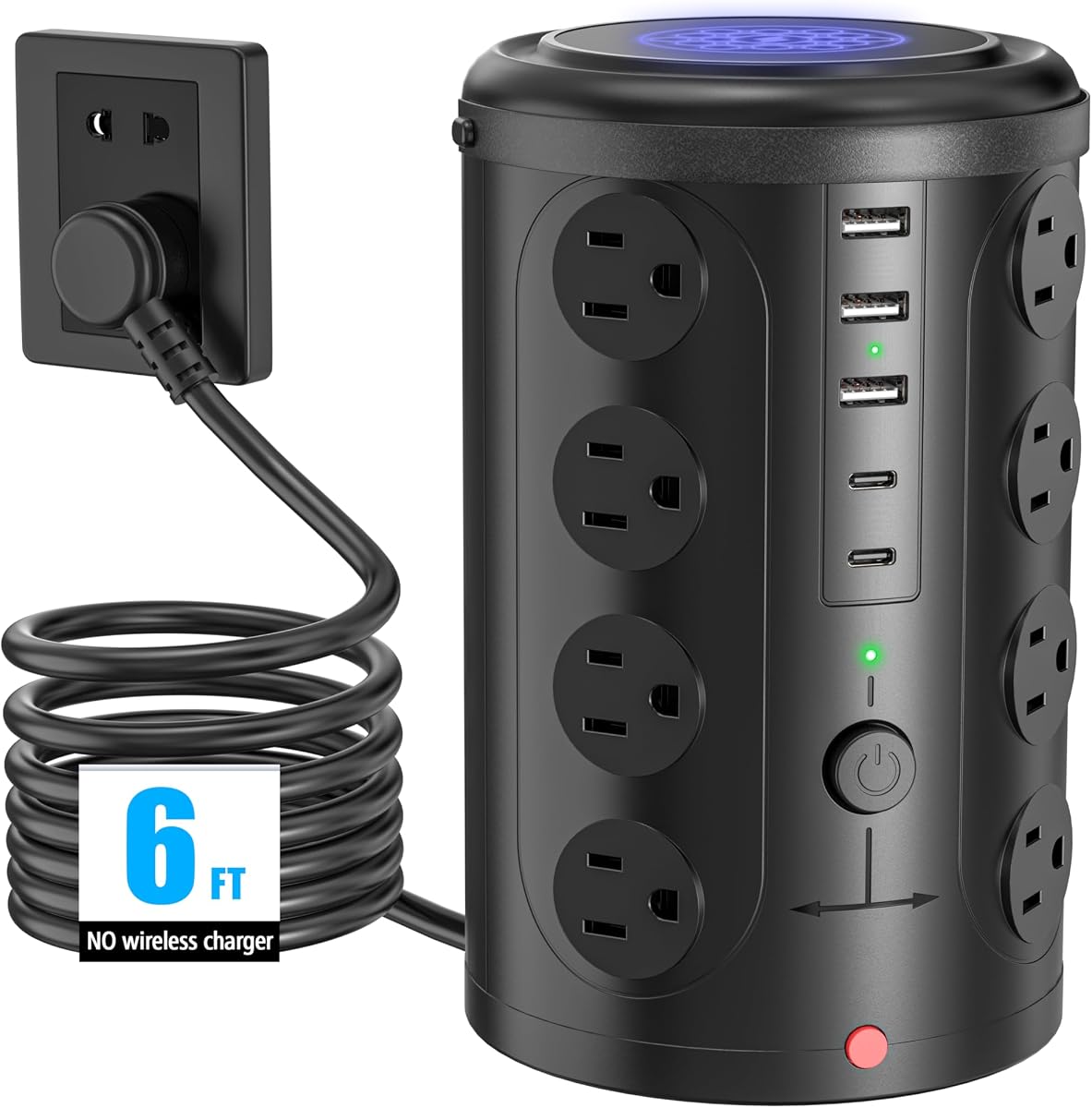
The Uncaged Ergonomics Retractable Power Strip Tower carries a 5.0 rating and stands out for its installation flexibility. It combines four AC outlets, two 20W USB-C ports, and two USB-A ports in an upright cube designed for desks, shelves, floors, and shared spaces.
We may earn a commission when you buy through this link, at no additional cost to you.
Its standout feature is the built-in retractable six-foot cord. Pulling out only the needed length and releasing the cord allows it to rewind, reducing loose cable around the tower. Mountable feet add another layer of flexibility by allowing the unit to attach to a wall, workbench, or under-desk surface.
Protection is specified at 320 joules, and the tower uses 16-gauge copper cable rated for 1625W. The stated surge rating is more relevant to protecting sensitive electronics than the basic outlet count alone, particularly for laptops, monitors, routers, and consoles. The trade-off is that four AC outlets are fewer than those offered by many conventional towers in the list.
Buyers who dislike excess cord on the floor or want the freedom to move and mount their outlet tower should give this model serious consideration. The USB-C output is suited to phones, tablets, watches, and earbuds, but it is not the strongest option for demanding laptop charging. Overall, its retractable and mountable design is especially useful in flexible professional, dorm, or shared-workspace environments.
The built-in reel stores the six-foot cord inside the base after use. This makes the tower especially appealing where a traditional extension cord would create slack, tangles, or a tripping hazard around furniture.
Included mountable feet allow the tower to be secured to a wall, workbench, or underside of a desk. That gives users a way to preserve surface space while retaining access to the outlets and USB ports.
We may earn a commission when you buy through this link, at no additional cost to you.
The SMALLRT 16-in-1 Power Strip Tower is rated at 4.7 stars and balances a large AC outlet count with useful section controls. It provides 12 AC outlets, three USB-A ports, and one USB-C port, allowing up to 16 connected devices to share one compact charging station.
We may earn a commission when you buy through this link, at no additional cost to you.
Four separated switches divide the tower into independently controlled sections. That is a meaningful convenience in offices, dorm rooms, and homes where a user can shut down selected electronics without unplugging every device. The tower also includes overload, short-circuit, and over-current safeguards, along with a stated 125V, 10A, 1250W rating.
Its USB power is less advanced than that of the TenTrend or Anker models. The listed total is 5V and 3.4A, with up to 2.4A per USB-A port and 3A for USB-C, so it is better suited to typical accessories than high-power laptop charging. The supplied listing also refers to both six and ten feet when discussing the cord, making the exact length worth verifying.
This tower is a practical pick for buyers who need many AC connections and value independent switches more than rapid charging. It is particularly suitable for a college room, shared office, conference table, or home desk with several low- and medium-draw devices. The switch layout and generous outlet count make it a versatile budget-oriented choice.
Independent switching allows groups of outlets to be turned off as needed. This reduces the need to disconnect devices individually and can make it easier to control which equipment remains powered.
The high AC outlet count is useful in dorm rooms and shared work areas where many users need nearby power. The vertical form keeps the connections compact rather than spreading them across a long horizontal strip.
We may earn a commission when you buy through this link, at no additional cost to you.
The Anker Nano Power Strip earns a 4.8-star rating and is the dedicated clamp-mounted option in this guide. Its ten-port layout includes six AC outlets, two USB-C ports, and two USB-A ports, split into upper and lower zones for easier access and less visual clutter.
We may earn a commission when you buy through this link, at no additional cost to you.
A 70W USB-C output using GaN technology gives it enough stated capability for compatible laptops and tablets, a major advantage over towers with lower USB-C ratings. The 1500-joule surge protection adds another layer for sensitive equipment, while the five-foot cord provides reach from a wall outlet to the clamped position.
The adjustable clamp is designed to fit desk edges from 0.6 to 1.8 inches thick. It is not compatible with curved desk edges, edges sloped over 45 degrees, or desks without a suitable edge. Buyers should measure the desktop before ordering, since the installation method is the source of the model's key benefit but also its main limitation.
This is the strongest option for a permanent workstation where a laptop and several peripherals share a desk. The clamp keeps the strip secure, supports one-hand unplugging, and prevents it from shifting or occupying valuable surface area. It is less suitable for renters, unusual desks, or users who want a freestanding tower that can move from room to room.
The 70W USB-C port offers a substantial upgrade for compatible laptops and tablets. It makes the clamp useful as a daily workstation hub rather than merely a collection of low-power accessory ports.
Securing the strip to the desk prevents it from sliding while leaving the desktop clear. Separate top and bottom zones help organize access, and the stable mount makes one-handed plugging and unplugging more convenient.
We may earn a commission when you buy through this link, at no additional cost to you.
The SMALLRT 12-Outlet Tower has a 4.8-star rating and delivers 12 AC outlets plus four smart USB ports, including one USB-C connection. Its compact 16-in-1 format suits home offices, dorm rooms, and other locations that need many outlets without a long horizontal strip.
We may earn a commission when you buy through this link, at no additional cost to you.
The USB-C port is specified at up to 3A, while the USB-A ports support up to 2.4A each. Smart technology is described as detecting connected devices and delivering suitable charging output. The 6.5-foot pure-copper extension cord offers reasonable reach, and the reinforced junction between the cord and tower is intended to reduce wear at a frequently flexed point.
Safety features include overload protection and a reset/off switch with an integrated circuit breaker. The housing uses fire-resistant PC material, and the base includes an anti-slip mat to reduce wobbling or sliding. Compared with models offering four separated switches, this tower provides less granular control, so users will usually switch the entire group at once.
This is a well-rounded freestanding choice for anyone who needs many AC outlets and one capable USB-C port. The anti-slip base is especially useful on a frequently touched desktop, while the reinforced construction and breaker support make it a natural fit for dorm rooms, home offices, and shared workspaces. It does not clamp to a desk or offer the strongest laptop charging in the group.
The anti-slip mat helps the tower remain upright when plugs are inserted or removed. A steadier base is useful in busy work areas because it reduces the chance of the entire tower shifting or sliding.
The dedicated USB-C port provides a convenient place to charge compatible modern devices without carrying a separate wall brick. The remaining USB-A ports remain useful for accessories that use the older connector.
We may earn a commission when you buy through this link, at no additional cost to you.
The 21-in-1 Surge Tower is rated at 4.6 stars and has the largest outlet count in the comparison. Its vertical body combines 16 AC sockets with three USB-A ports and two USB-C ports, offering connections for as many as 21 devices.
We may earn a commission when you buy through this link, at no additional cost to you.
Wide spacing between the AC outlets is intended to make room for larger power supplies and reduce blocked access. The tower is rated at 1875W on 125V and up to 3600W on 240V. USB output totals 17W and 3.4A across the five ports, which is suitable for many small personal electronics but not high-power laptop charging.
Safety provisions include 10A overload protection, a built-in short-circuit fuse, and lightning protection. The six-foot cord gives the tower more placement flexibility, while its vertical structure helps preserve desk space. Its trade-off is that the broad feature set does not include advanced fast charging, independent switches, or a clamp-style installation.
This tower makes the most sense for conference tables, shared offices, dorm rooms, and other busy locations where numerous AC plugs are needed. The wide-spaced layout is especially helpful for chargers that would obstruct neighboring outlets. Users seeking one fast USB-C connection for a laptop should look elsewhere, but those focused on sheer outlet availability will find this model difficult to equal.
The 16-outlet configuration is valuable in shared environments where numerous people bring laptops, monitors, lights, and other equipment. Concentrating those connections into one vertical tower avoids the sprawl of several conventional strips.
Generous distances between sockets make it easier to fit bulky adapters without preventing adjacent outlets from being used. That practical layout is a meaningful advantage in conference rooms and multi-device offices.
We may earn a commission when you buy through this link, at no additional cost to you.
The TESSAN Tower Power Strip has a 4.8-star rating and is designed around a particularly slim wall plug. Its 0.31-inch flat head sits close to the wall, while the angled arrangement helps preserve access to an adjacent outlet on a standard duplex receptacle.
We may earn a commission when you buy through this link, at no additional cost to you.
The tower provides 11 AC outlets and three USB ports, allowing up to 14 devices to charge at once. Two USB-A ports are specified at up to 2.4A each, and the USB-C port at up to 3A. A six-foot extension cord adds placement flexibility, while four rubber feet at the base help prevent sliding across a desk or bedside surface.
The 1050-joule surge rating is paired with overload, short-circuit, and over-current protection. An on/off switch offers straightforward control of the connected group. Compared with the largest towers, the 11-outlet count is more modest, but the thin plug and four-sided compact design make this model easier to conceal behind furniture or position close to a wall.
This is a good option for nightstands, compact home offices, dorm rooms, and other areas where a bulky plug would be conspicuous or inconvenient. It provides enough ports for a broad range of accessories and AC devices, although buyers needing high-speed laptop charging or dozens of sockets should choose a more specialized model.
The thin plug can sit nearly flush against a wall, making it easier to place the tower behind a sofa, bed, nightstand, or other narrow piece of furniture. The right-angle design also helps avoid wasting the neighboring socket.
A 1050-joule rating and several circuit protections add security for connected equipment. The 14-connection capacity remains versatile without making the tower excessively large.
We may earn a commission when you buy through this link, at no additional cost to you.
The VILONG Dual Layer Desk Clamp Power Strip has a 4.4-star rating and is built around a flexible two-level mounting design. It includes 10 AC outlets, two USB-A ports, and a 20W USB-C port, with support for up to 13 connected devices.
We may earn a commission when you buy through this link, at no additional cost to you.
The clamp can support both under-desk and desktop charging positions, giving users a way to place the power station according to their workspace. Installation requires no drilling or extra tools: the unit is clamped to the desk and twisted into place. The stated maximum desk thickness is 1.6 inches.
Two independent switches provide more granular control than a single master switch, while a 700-joule surge rating and built-in circuit breaker guard against overloads, short circuits, and overheating. The housing is described as fire-resistant ABS plastic. The main limitation is that its surge rating and USB-C output are both below the figures offered by the higher-end models in the list.
This clamp is most appropriate for users who want a dedicated desktop hub with the option to hide part of the system below the work surface. Its ten AC outlets provide enough capacity for a substantial workstation, and the installation process is straightforward. Those with thicker desks, curved edges, or a need for maximum surge protection should check compatibility carefully.
The dual-layer structure can place outlets above or below the desktop, depending on the user's preference. This flexibility makes it possible to keep frequently used connections visible while positioning others out of the way.
The mounting process avoids permanent alterations to the desk. Once secured, the clamp remains attached and allows convenient one-handed unplugging without the strip shifting or tipping.
We may earn a commission when you buy through this link, at no additional cost to you.
The 12-Outlet USB Tower is rated at 4.7 stars and offers a balanced combination of AC capacity, USB connectivity, and surge protection. It has 12 AC outlets and four smart USB ports, split between two USB-A and two USB-C connections, for 16 available ports.
We may earn a commission when you buy through this link, at no additional cost to you.
The USB system is rated at a total output of 3.4A. Each USB-A port can deliver up to 3.1A, while the USB-C ports are listed at up to 3.4A. The product information states that the USB-C charging can be up to 30 percent faster than a standard 5W charger, though actual performance will depend on the connected device and its charging protocol.
Its 1800-joule surge rating is one of the highest stated figures in the guide, supported by overload, short-circuit, and over-current protection. A reset/off switch provides a straightforward way to control power. The compact tower measures 3.15 by 3.15 by 5.79 inches and uses four rubber feet to remain stable on a surface.
The 0.30-inch plug and 45-degree right-angle design help the tower sit neatly behind sofas, nightstands, bookshelves, and headboards. It is a strong all-around choice for people who want more surge protection than basic towers offer and who appreciate both USB-A and USB-C connections. It remains a freestanding design rather than a permanent clamp.
The 1800-joule rating provides a meaningful safety specification for computers, displays, and other sensitive equipment. Automatic overload, short-circuit, and over-current safeguards add further protection.
Having two of each USB connector type supports a broader collection of accessories. It is particularly convenient in spaces where older devices and newer USB-C products are both used regularly.
We may earn a commission when you buy through this link, at no additional cost to you.
The 16-in-1 Flat Tower has a 4.8-star rating and combines 12 AC outlets with four smart USB ports. Two of the USB connections are USB-C, while the other two are USB-A, allowing the tower to serve a varied collection of phones, tablets, earbuds, and other accessories.
We may earn a commission when you buy through this link, at no additional cost to you.
The AC section is rated at 1875W and 15A, with wide spacing intended to accommodate different types of equipment. The integrated circuit breaker is paired with a 1080-joule protection rating. Overload, short-circuit, over-current, over-voltage, and overheating protection are all listed, giving the tower a broad safety feature set.
Its most distinctive physical feature is the braided fabric cord, which is described as flexible and less prone to tangling. The 0.35-inch flat plug is slightly thicker than the 0.30- and 0.31-inch plugs on some competing models, but it remains designed to sit close to the wall and fit behind common furniture. A reset/off switch controls the connected devices.
This tower is well suited to homes, apartments, and dorm rooms where an organized freestanding hub is wanted without clamp installation. It provides abundant AC outlets and modern USB connectivity at a straightforward price tier, although its USB output is not intended to compete with high-watt laptop chargers. It is a polished and practical final option in this comparison.
The fabric-covered cord is designed to remain flexible and reduce the visual mess associated with ordinary extension cords. It is a practical detail for a tower that may sit in a frequently used work or study area.
Twelve AC outlets are separated to make room for assorted adapters and power bricks. This reduces the chance that one bulky plug will block several neighboring connections.
We may earn a commission when you buy through this link, at no additional cost to you.
The right desk mounted outlet tower depends on how the workspace is used, which devices need power, and whether a freestanding, retractable, or clamped design best suits the available space. The following factors help narrow the field before comparing individual models.
Outlet count should reflect the number of devices that require direct AC power. Models in this guide range from four to 16 AC sockets, so a user with a laptop, monitor, speakers, lamp, and several accessories may need substantially more capacity than someone who mainly charges a phone and tablet. Outlet spacing matters as much as the raw count because bulky laptop and monitor power bricks can otherwise block adjacent sockets. The six-outlet Anker and four-outlet retractable tower are more appropriate for streamlined workstations, while the 12- and 16-outlet models suit shared desks and conference areas.
USB-C output varies dramatically across the selected products. The TenTrend tower includes two 65W USB-C ports, the Anker clamp provides 70W USB-C, and several other models offer USB-C ports around 20W or 3A. Higher wattage is most relevant to compatible laptops and tablets, while phones, earbuds, watches, and smaller accessories can often be served by lower-output ports. USB-A remains useful for accessories that do not use USB-C. Check the power requirements of your devices rather than treating the port count as the only measure of charging capability.
Desk mounted outlet towers can mean several physical approaches. Freestanding vertical towers take up little surface space and can move between locations, while clamp models attach directly to a desk and preserve nearly all usable desktop area. The Uncaged model goes further with a retractable cord and mounting feet for wall, workbench, or under-desk installation. The VILONG clamp adds two positioning layers, while the Anker Nano uses an adjustable clamp. Choose the style that matches your desk construction, how often you move equipment, and whether permanent attachment is acceptable.
Surge protection is especially valuable for computers, monitors, routers, consoles, and other sensitive electronics. The listed models range from 320 joules to 1800 joules, with the Uncaged and 12-Outlet USB Tower offering especially high stated ratings. Overload, short-circuit, over-current, over-voltage, and overheating protection may also be included. These features should complement—not replace—careful use of the tower within its stated amperage and wattage limits. A high port count is not useful if the connected load exceeds the rating or if protective circuitry is repeatedly tripped.
Cord length determines where the tower can sit relative to a wall outlet. Most products use cords between five and 6.5 feet, while the SMALLRT 16-in-1 listing contains conflicting references to six and ten feet, so that measurement should be confirmed. Flat plugs occupy less space behind furniture and are easier to leave connected than bulky right-angle bodies. Some models also angle the plug to preserve access to the neighboring outlet. Retractable cords offer another solution by storing excess length inside the tower base.
A master switch is convenient for turning off a complete group of devices, but independent controls can be more useful. The SMALLRT 16-in-1 model includes four separated switches, and the VILONG clamp includes two independent switches. These controls let users shut down selected outlets without unplugging every connected item. For a shared office or family workspace, segmented power management may reduce unnecessary standby consumption and make it easier to isolate a group when troubleshooting.
A vertical tower is designed to occupy less desk area than a horizontal strip, but its footprint still matters. The TenTrend tower measures 3.15 by 3.15 by 5.12 inches, and the 12-Outlet USB Tower is similarly narrow with a little more height. Flat bases and rubber feet help prevent sliding, while a clamp removes the need for a supporting surface altogether. Consider the placement of bulky adapters as well as the tower's listed dimensions, and allow enough room to reach the switches and disconnect plugs comfortably.
Different environments create different priorities. Dorm rooms benefit from abundant outlets, compact construction, and individual control. Home offices may require a high-wattage USB-C port for a compatible laptop. Conference rooms and shared workspaces often need many widely spaced AC outlets. Nightstands and bedroom setups benefit from flat plugs, manageable cord routing, and enough USB charging for personal accessories. A clamp is best where surface area is precious, while a freestanding tower is more convenient for renters or people who reorganize their equipment frequently.
Before installation, read the current product instructions and confirm the outlet tower's electrical rating against the devices you plan to connect. Position the unit where its cord will not create a trip hazard, and avoid placing it where liquids, excessive heat, or direct sunlight could affect the housing. For clamp models, measure the desktop thickness and inspect its edge before securing the bracket.
Connect high-draw and higher-wattage charging devices to the ports designed for their power levels, and distribute loads across available outlets rather than exceeding the tower's stated amperage or wattage capacity. Use the master or section switches to shut down groups of devices when they are not needed. Never overload the unit, force plugs, or use it in wet locations, and stop using it if the housing, cord, plug, or switch appears damaged.
Keep the tower stable, avoid hanging heavy cords over its edges, and route the extension cord so it remains flat and untangled. Periodically check that plugs remain secure and that ventilation openings are not obstructed. Clean the exterior with a dry or lightly damp cloth after disconnecting power, and follow the manufacturer's guidance for any model with a clamp, retractable reel, or specialized charging electronics.
A vertical or clamped tower can improve organization by keeping connections compact and reducing loose cord clutter, but safety depends more on proper installation, electrical ratings, and protection features than on shape alone. Look for surge and overload protection, use the tower within its stated limits, and never daisy-chain power strips unless the manufacturer explicitly permits it.
No. The USB-C ports vary considerably, with outputs ranging from approximately 20W to as high as 70W in the TenTrend and Anker selections. Check the laptop's charging requirements and the port's maximum output, and note that several towers distribute a shared power budget among connected USB devices.
A clamp is best for a permanent workstation where every inch of desk space matters and the desk thickness is compatible. A freestanding tower is easier to reposition and generally more suitable for renters, dorm rooms, nightstands, and shared spaces. The Uncaged Retractable Tower offers a third option by combining a freestanding body with mounting feet and a retractable cord.
The selected products state ratings from 320 to 1800 joules, and those figures are not directly interchangeable in every circumstance. For computers, monitors, network equipment, and other valuable electronics, compare the stated rating, look for overload and short-circuit safeguards, and confirm the unit's compatible power rating.
It can, especially when compared with several wall adapters and a conventional horizontal strip. A vertical layout groups connections in one footprint, while flat plugs, braided cords, and retractable cables improve routing. Cable-management sleeves or clips may still be needed for cords running from the tower to individual devices.
The listed models range from eight combined AC and USB connections on the Uncaged tower to 21 on the 21-in-1 model. Port count is only a theoretical capacity, and actual performance depends on the output ratings, connected devices, shared power allocation, and whether the total load remains within the tower's electrical limits.
No. A higher-wattage port is useful for compatible laptops and tablets, but it does not improve a phone, watch, or earbud beyond what those devices can accept. Match the port output and supported charging protocol to the equipment, and also consider whether the tower's other protections and outlet layout better meet your needs.
It depends on the model. The Uncaged Ergonomics Retractable Tower specifically includes mountable feet for wall, workbench, or under-desk placement, while the VILONG and Anker products use desk clamps. Other vertical towers are generally freestanding, so check the installation details before assuming they can be mounted.
The TenTrend Power Strip Tower is the most versatile overall option because it combines six AC outlets with eight USB ports and up to 230W of stated charging capacity. The Uncaged Retractable Tower is ideal for flexible placement, while the SMALLRT 16-in-1 Tower provides a generous outlet count and four separately controlled sections at a budget-friendly tier.
Prioritize the requirements that affect daily use: choose high-wattage USB-C for a compatible laptop, enough AC sockets and spacing for bulky adapters, and a mounting style that fits the desk. Surge protection, retractable cords, independent switches, and flat plugs can make a meaningful difference, but they should complement rather than replace careful electrical planning.
Finally, confirm the current specifications, compatibility limits, warranty terms, and price directly on the product listing. Ratings, designs, port configurations, and promotional details can change over time, so the most current listing should guide the final purchase decision.