
AI Auto-Tracking Sports Filming System
4.4Editor score
Digital ball and action tracking
True 180-degree field view
20 included cloud-storage hours
App-based live streaming
Compare 10 court cameras with auto tracking for tennis, including sports cameras, smartphone systems, and professional PTZ options for games and practice.
A court camera with auto tracking for tennis should follow a player without requiring someone to stand behind the camera and make constant adjustments. The most useful systems combine dependable movement detection, a wide enough field of view, flexible placement, and clear options for recording, highlighting, or live streaming. Hardware alone is not enough; software, connectivity, and mounting also shape the experience.
The products in this guide were compared using the supplied specifications, ratings, tracking features, supported sports, output options, and included accessories. The list covers dedicated sports cameras, smartphone-based tracking systems, and professional PTZ cameras with AI tracking. It also distinguishes equipment designed specifically for court coverage from general-purpose live-production cameras that can be adapted to tennis.
Each review explains what the product is best positioned to handle, including court viewing, player tracking, streaming, and coaching use. The recommendations also make clear where general-purpose tracking may not suit fast tennis movement. Product ratings and configurations can change over time, and current prices, availability, software requirements, and included accessories should be checked before purchasing.
4.4Editor score

3.9Editor score

4.5Editor score
This side-by-side comparison highlights each camera's tracking method, image capabilities, court coverage, and recording or streaming options. The dedicated sports systems offer the most straightforward tennis workflow, while the professional PTZ models provide extensive production connections and greater control.


The XbotGo Falcon is a purpose-built sports camera that combines AI-assisted tracking, 4K recording, and Wi-Fi live streaming in one unit. Its listed rating is 3.9, but its feature set is particularly relevant to tennis parents, coaches, and club players who want the camera to follow play rather than remain pointed at one fixed location.
We may earn a commission when you buy through this link, at no additional cost to you.
The camera uses a dual-lens arrangement, with a dedicated recording lens and an AI-assisted lens intended to improve tracking. Its stated 6 TOPS AI performance and eight-core processor underpin automatic centering of players and key action. The supplied information specifically names soccer, basketball, football, and team sports rather than tennis, so buyers should confirm compatibility and behavior with their preferred app before committing.
Storage flexibility is another strength. The Falcon supports microSD cards and cloud storage, while a standard 1/4-inch tripod connection makes it straightforward to place along a baseline or on a sideline. The trade-offs are its lower listed rating compared with most professional PTZ options and the absence of an explicit tennis-specific claim in the product description.
It is best for users who want an integrated sports-recording device rather than a complex multi-camera production system. For a player or family wanting relatively simple setup, AI-assisted subject centering, 4K footage, and optional live viewing, the Falcon is the most cohesive all-around recommendation in this guide.
The AI-assisted lens is designed to recognize and keep primary action centered during dynamic games. That can reduce the need for manual reframing, although tennis-specific recognition should be verified in the current software.
A dedicated recording lens, 4K capture, microSD support, cloud options, and built-in Wi-Fi live streaming provide several ways to preserve and share a match or practice session.
We may earn a commission when you buy through this link, at no additional cost to you.
The XbotGo Chameleon is a portable AI sports camera system with a 3.8 rating. It is designed to record hands-free while the user coaches, plays, or watches, using xbotVision AI 2.0 tracking across more than 20 sports, including individual disciplines such as gymnastics and martial arts.
We may earn a commission when you buy through this link, at no additional cost to you.
Its two notable optics are a 360-degree panoramic tracking capability and a 120-degree ultra-wide-angle AI lens. The camera records 4K at 60fps and adds AI-assisted editing, montage creation, and integrated live streaming. A Bluetooth remote and Apple Watch integration simplify angle adjustments and previews, while the optional T4 tripod can create a higher courtside perspective.
The important limitation is that the supplied description emphasizes soccer, basketball, and other team sports without explicitly naming tennis. Its broad sports support is encouraging, but users should confirm that a tennis activity profile exists and that rapid changes in direction are handled as desired. The 3.8 rating is also the lowest among the rated products.
This is a strong choice for a tennis household that also records multiple activities and values a portable, app-connected system. It is especially attractive when 4K 60fps, panoramic views, and automatic editing matter more than the extensive professional outputs found on PTZ cameras.
Support for over 20 sports gives the Chameleon broader household utility than a single-purpose court camera. Tennis users should still verify sport-specific recognition and editing presets in the current app.
The wide AI lens and panoramic tracking create useful flexibility when action moves across a court. Pairing the camera with the T4 tripod offers a more elevated angle without requiring a dedicated operator.
We may earn a commission when you buy through this link, at no additional cost to you.
The BallerCam-based AI Auto-Tracking Sports Filming System has a 4.4 rating and offers a remarkably direct way to film moving play. It uses digital recognition to follow the ball and key action while remaining physically stationary, with a 180-degree ultra-wide lens providing full-court or full-field context.
We may earn a commission when you buy through this link, at no additional cost to you.
The product recognizes basketball, soccer, futsal, flag football, and volleyball according to the supplied listing, and it is built on sports-tracking AI informed by more than two million games. An iPhone mounted on a tripod performs the recording, while the app starts live streams, creates watch links, and produces downloadable highlight clips.
Its limitations are concrete: the listing specifies compatibility with the iPhone 15 Pro, and tennis is not among the explicitly named sports. Digital tracking also depends on the phone, application, lighting, and court geometry. A stationary camera cannot recreate every physical panning movement, but the wide field avoids the mechanical pan errors that affect some PTZ systems.
For an iPhone 15 Pro owner seeking inexpensive hands-free game filming, this is the most budget-focused recommendation. It is well suited to families and casual coaches who value easy clips and live sharing more than professional camera controls.
The 180-degree lens keeps the playing area in view while digital tracking keeps the ball and key action centered. This hybrid approach is useful for tennis, subject to confirming supported activity profiles.
The app can begin a live stream with a simple watch link, clip interesting moments, download them to the camera roll, and share them without a complicated editing workflow.
We may earn a commission when you buy through this link, at no additional cost to you.
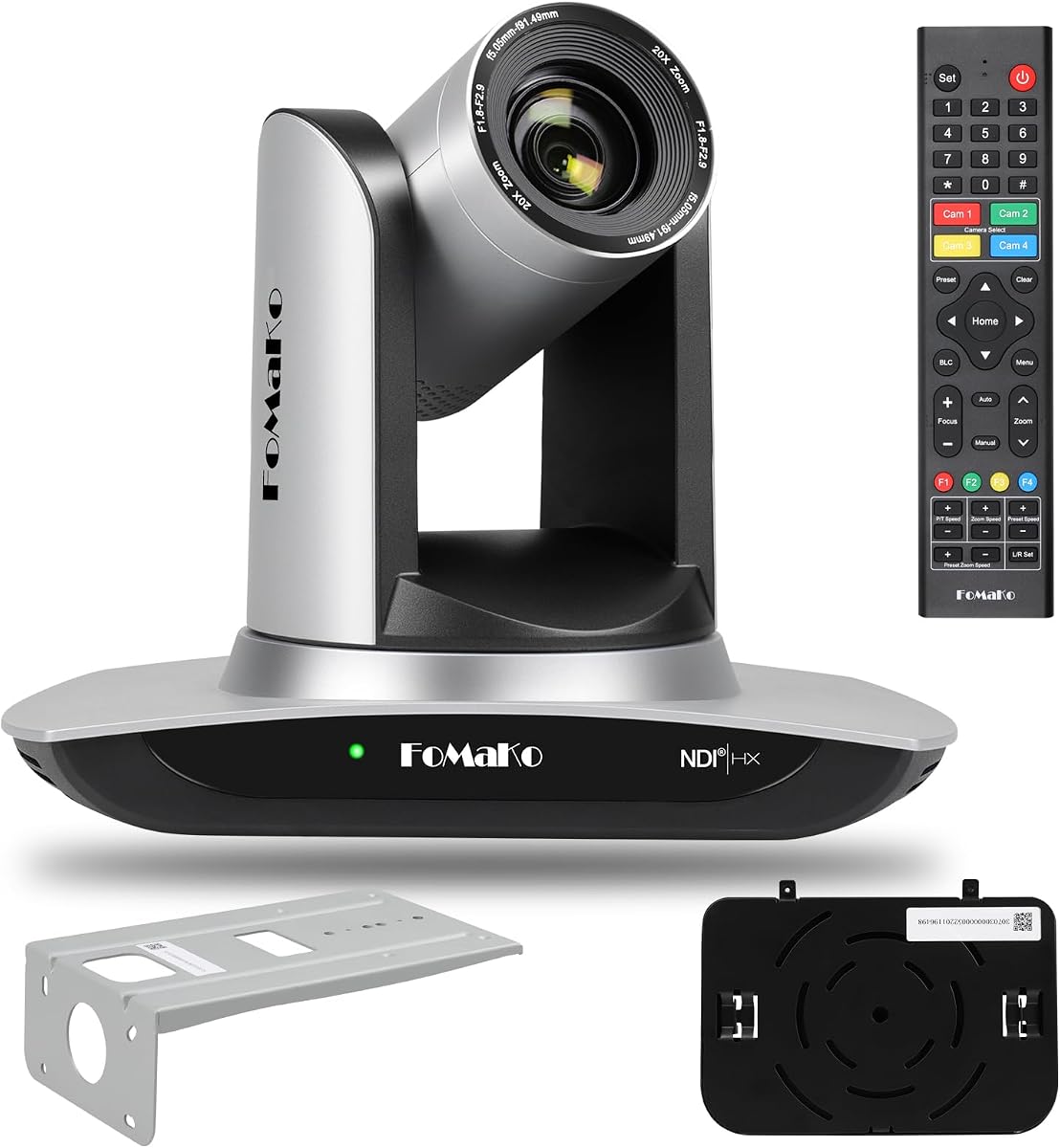
The FoMaKo K20UH is a professional PTZ camera with a 4.4 rating, 4K output, 20x optical zoom, and third-generation AI tracking. Although its background is in worship, education, conferences, and live production, its pan, tilt, zoom, and tracking controls can be adapted to a tennis court.
We may earn a commission when you buy through this link, at no additional cost to you.
Gen 3 tracking provides configurable modes, sensitivity, target size, character position, and lost-target behavior. Real-time and regional tracking options are particularly relevant when a player may leave the frame. The camera can output through HDMI 2.0, USB 3.0, LAN, and NDI, with support for RTSP, RTMP, SRT, and other control or streaming protocols.
Physical movement distinguishes it from digital-only tracking: the camera pans across 340 degrees and tilts across 120 degrees, while the optical zoom can isolate a player or pull back for court context. That makes it promising for tennis, but the original tracking behavior must be tested because general human tracking is not necessarily optimized for a rapidly moving ball or abrupt player changes.
Choose this model when you need professional outputs, remote control, and physical pan-and-tilt movement. It is less convenient for a family seeking a one-button sports camera, yet it provides considerable flexibility for tennis clubs, academies, and production-minded users.
Tracking sensitivity, figure size, position, and lost-target actions can be tailored to a scene. Regional tracking is useful when the camera should remain within a defined court area.
HDMI, USB, LAN, and NDI outputs support recording, switching, and live-streaming workflows. NDI HX3 certification and PoE support also suit permanent or semi-permanent installations.
We may earn a commission when you buy through this link, at no additional cost to you.
The XbotGo Falcon NT4 Bundle combines the Falcon AI sports camera with a steel tripod, offering a more complete setup than buying a camera and support separately. The supplied listing does not include a product rating, so there is no numerical customer feedback to evaluate alongside the other cameras.
We may earn a commission when you buy through this link, at no additional cost to you.
Its main advantage is readiness. The NT4 tripod provides stable support, while the lightweight design is described as easy to assemble and move between fields and courts. The Falcon contributes hands-free AI tracking, allowing a parent or coach to focus on the match rather than adjusting the camera manually.
Tennis is not explicitly listed among the bundle's named sports, which instead include soccer, basketball, football, volleyball, baseball, softball, and lacrosse. Buyers should confirm tennis support in the current app. The absence of listed ratings also means this bundle offers less visible customer feedback than the more established options in the comparison.
It is a convenient choice for first-time sports-camera buyers who want a stable support included. If tennis recognition is confirmed, the complete package reduces setup friction and provides a sensible starting point for games, drills, and family recordings.
The steel tripod supplies a firm baseline for the camera and removes the need to source a compatible stand separately. It can be positioned along a fence or in a stable court-side location.
The described lightweight construction and quick assembly support portable use. This is useful for players who practice at different clubs or practice every week in a different location.
We may earn a commission when you buy through this link, at no additional cost to you.
The FoMaKo K600N bundle is the premium option in this guide, combining three cameras with 4K 60fps output, 20x optical zoom, and Gen 3 AI tracking. Its 4.5 rating reflects a broadly strong feature set, while the multi-camera format is well suited to tournaments, training facilities, and clubs that need different court views.
We may earn a commission when you buy through this link, at no additional cost to you.
Each camera supports HDMI, NDI HX3, USB 3.0, 3G-SDI, LAN, and PoE workflows, with RTSP, RTMP, and SRT support. Multiple outputs permit local recording, IP production, switching, and direct live streaming. Gen 3 tracking offers adjustable modes, sensitivity, target size, and target-position behavior, allowing operators to refine how a player is followed.
This is not a casual one-camera solution. Three PTZ units require placement, power, cabling or network planning, and a workflow for selecting views. While the cameras can pan, tilt, and zoom mechanically, tennis-specific subject recognition still needs practical verification. The 4K 60fps capability is attractive for slow-motion analysis, while 3G-SDI outputs 1080p at 60fps.
The bundle makes the most sense for organizations producing a polished event or requiring simultaneous angles. Serious tennis coaches, academies, and tournament operators gain the most from its redundancy, connectivity, and switching flexibility. A household wanting one unattended camera can achieve the core goal with a less complex product.
Multiple cameras can cover the baseline, center court, and a secondary activity area. This redundancy is valuable for live events, interviews, or simultaneous coaching and spectator coverage.
HDMI, NDI HX3, USB 3.0, 3G-SDI, and LAN provide flexible paths into switching and streaming systems. The included 4K 60fps workflows also support detailed slow-motion review.
We may earn a commission when you buy through this link, at no additional cost to you.
The Tenveo 4K NDI PTZ Camera has a 4.4 rating and specializes in deep-learning-based humanoid and face tracking. It is a professional live-streaming camera rather than a dedicated sports action camera, but its 20x optical zoom, 4K capture, and smooth mechanical movement can be useful around a tennis facility.
We may earn a commission when you buy through this link, at no additional cost to you.
Tracking features include portrait tracking, autoframing, presenter mode, and the ability to maintain a lock when the target is briefly obstructed. The camera rotates 350 degrees horizontally and 180 degrees vertically, with remote and professional serial control options. Simultaneous HDMI, USB, and IP/NDI outputs support different parts of a production chain.
The central caveat is target selection. Humanoid and face tracking may identify a player, but a tennis ball moves differently from a person, and rapid direction changes can challenge a presenter-oriented system. A club would also need appropriate software, networking, and mounting to exploit the NDI workflow. No built-in microphone is included.
This camera is a good choice for facilities that also need lecture capture, meetings, worship, and sports coverage. For tennis, it works best when the primary target is a player who can be framed reliably and when the operator tests tracking behavior before a match.
The tracking system is designed to retain a human subject even during brief obstruction. Presenter and autoframing modes can reduce manual camera operation around a court.
Simultaneous HDMI, USB 3.0, and IP/NDI channels let a team record locally while streaming or switching. PoE support can simplify network installation at permanent venues.
We may earn a commission when you buy through this link, at no additional cost to you.
The PTZOptics Move SE 30x has the highest listed rating in this comparison at 4.7. It is a general-purpose auto-tracking PTZ camera designed for education, conferences, and live broadcasts, with a 30x optical zoom and 1080p recording at 60fps.
We may earn a commission when you buy through this link, at no additional cost to you.
Its connectivity is extensive. Simultaneous HDMI, SDI, NDI, USB, and IP outputs cover professional and computer-based workflows. Users can control the camera through an IR remote, network connection, RS-232, RS-485, web interface, control app, USB port, or camera management platform. A Sony UHD CMOS sensor and adjustable resolutions support the stated 1080p 60fps output.
For tennis, the 30x zoom is particularly useful because a camera can alternate between a tight view of a server and a wider view of the full court. However, its auto-tracking is not documented as ball tracking, and the 1080p ceiling is less detailed than the 4K alternatives. A live operator or carefully configured zone may still be necessary for changing rallies.
Choose the Move SE when control flexibility, optical reach, and a strong listed rating matter most. It is a convincing all-around PTZ purchase for clubs with mixed production needs, provided the user understands that its core strength is professional operation rather than tennis-specific AI analysis.
A powerful zoom makes it possible to frame a distant player tightly or reveal a full court from one position. This reduces the need for multiple cameras when angles are less important than coverage.
IR, network, serial, app, web, USB, and management-platform options accommodate both simple remote operation and professional control rooms. Network discovery streamlines initial connection.
We may earn a commission when you buy through this link, at no additional cost to you.
The AVKANS LV20N carries a 4.6 rating and provides 20x optical zoom, Gen 3 AI tracking, and both NDI HX2 and HDI HX3 options. Its professional interfaces include HDMI, SDI, USB 3.0, and NDI, giving it strong flexibility for live production.
We may earn a commission when you buy through this link, at no additional cost to you.
Tracking can be configured by area, sensitivity, speed, and mode. Presenter, zone, and hybrid modes offer different ways to define a target's movement boundaries. The camera supports OBS, vMix, Streamlabs, ProPresenter, Wirecast, and other NDI software, while the included free multicamera app allows supported devices to stream and record.
Its specification explicitly warns that it tracks only one person and cannot follow people who run like soccer or hockey players. That limitation deserves careful attention for tennis: a player sprinting to retrieve a deep shot may be too dynamic for reliable tracking. SDI offers professional locking connections and long runs, and the tally light communicates preview or program status.
This model is best for a controlled court or training environment where one player remains within a defined tracking area. It may also serve clubs needing a dedicated live-stream camera alongside a more sports-specific recording device.
Presenter, zone, and hybrid modes offer different levels of freedom. These settings are useful when a player practices in a contained area or remains on one half of the court.
A controllable tally light can indicate preview or program status in compatible NDI software. This helps operators avoid choosing the wrong camera during a live event.
We may earn a commission when you buy through this link, at no additional cost to you.
The FoMaKo FMK20UH is a 4.6-rated PTZ camera with Gen 3 AI tracking, 20x optical zoom, and full 1080p output up to 60fps. Like several other professional options in this guide, it is marketed primarily for churches, education, and live streaming, but its remote movement and zoom are useful in a tennis setting.
We may earn a commission when you buy through this link, at no additional cost to you.
Simultaneous HDMI, LAN/Ethernet, USB 3.0, and NDI outputs support flexible recording and streaming. NDI 6 and HX3 certification, H.264 and H.265 encoding, PoE, and low-bandwidth-friendly protocols can simplify a network-based installation. Compatibility includes vMix, OBS, ProPresenter, StreamYards, Streamlabs, Wirecast, and Zoom.
Tracking settings include mode, sensitivity, figure size, character position, and lost-target behavior, with both real-time and regional options. These controls are valuable, though the camera does not claim tennis-specific ball tracking. The unit has no built-in microphone, so external powered audio is needed for commentary. It also offers wall, ceiling, tripod, and desktop mounting.
This is a sensible pick for a club or coach who wants a professional PTZ camera and reliable streaming software compatibility without a multi-camera package. Its final suitability for tennis depends on verifying the tracking response with an actual player and a moving ball.
Real-time and regional modes, together with adjustable sensitivity and target size, help define how the camera responds. These controls can reduce unnecessary movement around a confined court.
NDI, RTSP, RTMP, SRT, and conventional outputs make the camera approachable for common live-production tools. PoE can reduce cable requirements in a permanent installation.
We may earn a commission when you buy through this link, at no additional cost to you.
The best camera depends on whether you need one unattended sports recorder, a smartphone-based highlight tool, or a professional PTZ installation. Court dimensions, player speed, tennis-specific support, recording quality, connectivity, and operating convenience should guide the decision.
AI tracking is not a single standardized technology. Some systems are trained for people, some for teams and balls, and others for general presenters. A camera may track a human body beautifully while struggling with a tennis ball or with a player who changes direction abruptly. The supplied information explicitly supports sports such as soccer, basketball, volleyball, and football, while tennis is not directly named for any product in this roundup.
Look for explicit tennis support, current activity profiles, and evidence that a player can remain framed during rallies. If the manufacturer does not name tennis, treat the camera as a potentially adaptable solution rather than a guaranteed match-recording system. Testing with a representative player is the safest approach.
A stationary sports camera with a wide lens and digital crop can follow action without mechanical movement. This reduces motor noise, prevents missed framing during pan errors, and often simplifies installation. A physical PTZ camera, however, can cover a larger area, zoom toward a distant player, and provide natural broadcast-style camera movement.
For a single recreational court, digital tracking may be sufficient. For a large venue, multiple courts, a tournament, or professional streaming, PTZ movement and interchangeable views become more valuable. A three-camera bundle provides the greatest coverage but also demands more setup and coordination.
A 180-degree lens is explicitly designed to see a full court or field while digital tracking keeps action centered. PTZ options range from 20x to 30x optical zoom, allowing a wide overview or a close view of a server, return, or reaction. Optical zoom preserves more detail than digital cropping.
Consider the camera's distance from the court as well as the lens specification. A very wide view can make players small, while a tight optical view may not contain the full action. The best solution frames the complete baseline or court initially, then uses tracking or zoom to improve visibility during play.
The choices range from 4K 60fps on the premium FoMaKo bundle to 1080p 60fps on professional PTZ cameras, with dedicated sports options also offering 4K and 4K 60fps. Higher resolution benefits large displays, detailed coaching review, and cropping. A 60fps frame rate can make fast strokes and player movement easier to inspect.
Do not choose solely by headline resolution. Compression, sensor quality, lens performance, lighting, and the amount of court included in the frame all affect the final image. Ensure the phone, computer, storage, network, and streaming platform can support the camera's selected output without unnecessary delays.
Wi-Fi is convenient for a portable sports camera, while NDI, RTSP, RTMP, SRT, HDMI, USB, SDI, and LAN support professional production systems. PoE can simplify a permanent court installation by combining network power and data, while NDI HX3 can provide efficient IP video across a suitable network.
If the main goal is sending a link to family, a simple app-based watch link may be enough. If the goal is a polished broadcast, prioritize output compatibility with your switcher or streaming software. Check platform requirements, network conditions, and whether additional microphones, cables, switches, or control hardware are needed.
A useful tennis camera must be placed where it has a clear view, power, network access if required, and protection from weather or accidental impact. Tripods are ideal for portable setups, while wall and ceiling mounts are more secure for permanent venues. The XbotGo bundles include tripods, and the professional PTZ models support several mounting styles.
Look for a wide field of view that includes the baseline and likely run-off area. Test tracking boundaries at the start of the session rather than adjusting them during a match. If the camera uses a phone, check that the phone remains ventilated, connected to power if necessary, and positioned where the court surface does not obstruct the lens.
Long matches can consume substantial storage, so consider whether the camera records locally, sends footage to an app, or supports cloud storage. The AI Auto-Tracking Sports Filming System includes 20 hours of cloud storage, while the Falcon supports both microSD cards and cloud options. Apps that generate clips can save time when the goal is player development or social sharing.
For a formal match, reliable continuous recording should take priority over automatic editing. For practice, quick clips of a serve, rally, or technique can be more useful. Confirm export formats, camera-roll access, and whether highlight generation works without a recurring subscription.
A phone-based tracker can cover casual family recording, a dedicated sports camera offers a more integrated experience, and professional PTZ equipment adds mechanical movement, extensive outputs, and installation flexibility. Multi-camera bundles are appropriate for organizations that need several views or a complete live-production setup.
Avoid paying for professional features that will remain unused. A parent filming one practice may need only reliable tracking and easy sharing, while a club running tournaments may need SDI, NDI, tally lights, network control, and operator support. Consider the total system cost, including accessories, storage, streaming software, and power.
Start by placing the camera outside the playing area with a stable tripod or mount and a clear view of the entire court. Power and connect the system before players begin, then confirm the app, live-stream link, recording destination, tracking mode, and storage status. Test a short sequence involving forehands, backhands, serves, and movement to the corners before recording a full match.
Adjust tracking sensitivity, target size, and region limits according to the sport profile and court dimensions. For PTZ cameras, establish a wide preset for the baseline and a tighter preset for serves or close-ups, but avoid excessive zooming that leaves the ball outside the frame. Keep the camera lens clear, protect it from moisture and direct sun, and ensure cables or tripods cannot enter the playing area.
After the session, stop recording before removing storage, confirm the files are complete, and create any needed highlights. Clean the lens with a soft dry cloth, inspect mounts and connections, and store the camera in a dry protective environment. Update the app or camera firmware when recommended, particularly before a new event, and periodically verify that streaming and tracking settings have not been reset.
The BallerCam-based system explicitly follows the ball and key action digitally, but its listed supported sports do not include tennis. The XbotGo cameras use sports AI across team and individual activities, while the professional PTZ models generally target people. For tennis, confirm the current activity profiles, and test the system with a player hitting from different corners before relying on it.
A PTZ camera offers mechanical movement, optical zoom, and broadcast-style framing, making it suitable for larger facilities and professional streams. A fixed sports camera is usually simpler, quieter, and easier to deploy for one court. The best choice depends on whether you need advanced production control or a compact system that records highlights without an operator.
The featured professional models provide 20x or 30x optical zoom. A longer lens lets a camera cover a large venue and still isolate a server or player. The field of view must remain wide enough to include the court, so zoom should be paired with a good home position and a tested tracking configuration.
Several professional PTZ cameras, including the Tenveo and FoMaKo FMK20UH, have no built-in microphone. You will need an external powered microphone for commentary or audible practice sound. Dedicated sports cameras may capture ambient sound, but the supplied descriptions do not guarantee microphone quality, so check the specifications and test the audio before an event.
Yes. The XbotGo Falcon and Chameleon include built-in Wi-Fi streaming, the BallerCam-based system provides app-based watch links, and the professional PTZ models support network and broadcast outputs. The required setup varies from a phone and tripod to switchers, computers, capture devices, and stable network infrastructure.
The BallerCam-based system offers a simple app and phone-based workflow, while the XbotGo Falcon and Chameleon provide more integrated sports-camera operation. The professional PTZ options require more setup and usually benefit from an operator. The easiest choice is the one that matches both your tennis verification requirements and your tolerance for configuring devices.
Place it securely behind a baseline or at a clear elevated sideline position with the full court in view. Avoid obstructions, direct glare, and locations where a ball or player could strike the equipment. Set regional tracking limits so the camera does not chase players outside the intended area, and use a wide initial preset for rallies.
4K is useful when the camera is far from the court or when clips will be cropped for technique review. A high-quality 1080p 60fps source can also provide smooth motion and sufficient detail. The more important factors are player visibility, consistent tracking, frame rate, and whether the complete rally remains inside the frame.
The XbotGo Falcon is the strongest all-around dedicated sports option, combining AI-assisted tracking, 4K dual-lens recording, flexible storage, and simple streaming. The BallerCam-based system is the leading budget choice for an iPhone 15 Pro owner, while the three-camera FoMaKo K600N bundle is the most premium solution for clubs and production teams that need several angles and extensive outputs.
Most buyers should prioritize verified tennis support over general AI claims, then confirm that the camera can retain a player during fast directional changes. Field of view, optical reach, recording format, app workflow, and power at the court are equally important. Professional PTZ models offer greater control but require setup, and dedicated sports cameras are usually easier to deploy.
Ratings, software features, bundles, and prices can change, so verify the current listing before buying. Check included accessories, device compatibility, storage requirements, tracking modes, warranty details, and the total cost of the streaming setup. Those checks will help ensure that the selected camera remains useful beyond a single practice session.