
VTech SN5147
4.0Editor score
Corded and cordless handsets
Extra-loud visual ringer
One-touch photo speed dial
Compare the best Captioned Telephone options for hearing support, accessibility, large controls, hands-free calling, and connectivity, with practical guidance
A captioned telephone can make everyday communication easier for people with hearing loss, limited vision, memory difficulties, or reduced mobility. The best model depends on whether real-time captions, amplified sound, large controls, voice operation, and simple photo-based dialing matter most. Reliable connectivity and an understandable setup process are equally important.
This guide compares ten accessible landline and home telephone options using their stated features, including captioning, sound amplification, visual alerts, large buttons, hands-free controls, photo speed dial, and voice commands. The list covers dedicated captioning phones, amplified senior phones, VoIP models, voice-controlled phones, and service bundles rather than treating every accessibility feature as interchangeable.
Each numbered review identifies the strongest benefit, important limitations, and the type of user most likely to appreciate the telephone. The first three receive overall awards, while the remaining entries provide specialized alternatives. Product availability, service requirements, features, and pricing can change, so buyers should confirm current details and compatibility before ordering.
4.0Editor score

4.3Editor score

5.0Editor score
The comparison below highlights the accessibility approach, core calling features, connectivity needs, and best-fit user for each telephone. Only the Hamilton CapTel provides stated real-time captioning, while the alternatives emphasize amplification, visual alerts, large controls, voice operation, photo dialing, or hands-free access.




The Hamilton CapTel 2400iSPNBT is the clearest match for someone searching specifically for a captioned telephone. It has a 4.3 rating and distinguishes itself with large, real-time captions for incoming and outgoing calls. Rather than requiring the user to rely entirely on amplified audio, the phone provides a visual transcript on an easy-to-read touchscreen.
We may earn a commission when you buy through this link, at no additional cost to you.
Its captioning system can operate automatically or with live operator assistance, giving households a choice between a fully automated experience and added human support. Captioned voicemail is built into the answering machine, allowing messages to be reviewed directly on the display. Customizable caption size and tone controls, amplified gain up to 40dB, and hearing aid compatibility make the interface more adaptable to different hearing needs.
The important qualification is that this is not a self-contained analog landline. It requires high-speed internet, standard electrical power, and in some cases telephone service. Captioning registration and service are limited to US residents with hearing loss. Those requirements add complexity, but they are inseparable from the real-time captioning that makes this model distinctive.
This is the leading recommendation for a buyer who needs captions rather than merely louder sound. It is also well suited to someone who wants captions on voicemail and may benefit from live operator assistance. Buyers without compatible internet service should consider an amplified or visual-alert telephone instead, while eligible US users should verify the current registration process before purchase.
Real-time captions give users access to the substance of a conversation even when portions of speech are difficult to hear. The large touchscreen, adjustable caption size, and tone controls can make the display more comfortable for different vision and hearing needs.
Voicemail transcripts let users review messages at their convenience without relying entirely on audio playback. Automatic captions can be supplemented with live operator support for calls when extra assistance is preferred.
We may earn a commission when you buy through this link, at no additional cost to you.
The Photo Dial Senior Phone is an accessible conventional landline built around recognition rather than memorization. It carries a 4.2 rating and provides eight customizable photo speed-dial buttons, a programmable SOS button, oversized pictorial keys, a 110dB ringer, a flashing visual indicator, and hands-free calling. That combination makes it useful for seniors with memory, vision, hearing, or dexterity challenges.
We may earn a commission when you buy through this link, at no additional cost to you.
Its strongest feature is the photo interface. A user can recognize a family member and press the corresponding key instead of searching through a list of names or recalling a full telephone number. The large buttons, adjustable receiver and ringer volume, and visual call light provide several ways to notice and understand incoming calls. Redial and hands-free operation add further convenience.
This telephone does not caption conversations, so it should not be confused with a true CapTel-style device. Its SOS key also must be programmed before use and does not automatically call emergency services. Nevertheless, its simple controls, no-battery corded construction, and four-step setup make it a sensible lower-cost choice for households that need a reliable accessible telephone without an internet-based captioning subscription.
Choose this model for a parent or relative who benefits from familiar photographs, large controls, and loud alerts but does not need speech-to-text. It is also a good option for a nursing home, hospital, or assisted-living room where a straightforward corded phone is easier to manage than a more complex cordless system.
Eight customizable photo keys turn the telephone into a visual directory. This reduces reliance on memory and makes it easier for a user with dementia, poor vision, or limited familiarity with traditional keypads to initiate a call.
A high-volume ringer, adjustable receiver, and flashing visual indicator provide complementary ways to notice incoming calls. This is particularly helpful in a noisy home or when the user cannot hear the ring clearly.
We may earn a commission when you buy through this link, at no additional cost to you.
The VTech SN5147 is a hybrid amplified senior phone with a 4.0 rating. It combines a reliable corded base with one cordless handset, making it a versatile choice for a household that wants a dependable telephone near the main phone line and mobility around the home. It does not provide real-time captions, but it supports hearing loss in several other ways.
We may earn a commission when you buy through this link, at no additional cost to you.
The system includes a 90dB adjustable ringer, a flashing visual indicator, and a one-touch boost of up to 50dB for calls. Oversized high-contrast buttons and an extra-large display improve dialing and Caller ID reading. Full-duplex speakerphone functions on both the base and handset, while the digital answering machine offers slow playback and remote access for reviewing messages.
Call management is another strength. It can block up to 1,000 robocalls and unwanted numbers, while four photo speed-dial slots provide one-touch contact with loved ones. The design is feature-rich, which may require initial programming and learning, and its cordless handset introduces the usual charging and battery considerations. Still, the corded base remains a meaningful advantage when reliability matters.
This is a strong all-around recommendation for a senior who needs amplified sound, visual alerts, hands-free calling, and telephone flexibility. It is particularly suitable for households that want both a wall or desk phone and a mobile handset. It will not satisfy someone whose primary requirement is a visible transcript of each spoken word.
The corded base provides a familiar connection to the home phone line and is designed to remain useful during power outages. A cordless handset adds room to move without losing access to the main features.
The combination of extra-loud ringer, visual flashing indicator, amplified audio, and hearing-oriented controls makes this more adaptable than a basic amplified phone. It addresses both call notification and conversation volume.
We may earn a commission when you buy through this link, at no additional cost to you.
The Voice-Operated Home Telephone offers an unusual accessibility approach: answering, dialing, and ending calls with speech rather than button presses. It has no supplied customer rating, so buyers will have less historical feedback to consult. Its potential strength is straightforward hands-free operation for people with mobility or vision difficulties.
We may earn a commission when you buy through this link, at no additional cost to you.
The telephone is described as always on and always ready to listen for a command. Users can answer, dial, and hang up with their voice, and the listing emphasizes good call quality. Because it uses an existing home phone line, it may appeal to households that want hands-free control without replacing their line service or learning a complex touchscreen interface.
Voice operation does introduce practical considerations. The product's always-listening nature may not suit someone who is uncomfortable with a continuously active microphone. It also provides no stated captioning, visual caller identification, answering-machine features, or amplified specifications in the supplied information, so it should be evaluated as a specialized control method rather than a complete accessibility package.
This telephone is best for a user who can reliably speak commands but has difficulty reaching buttons or reading a display. Caregivers should test command recognition in the intended home environment and discuss privacy preferences with the user. People primarily seeking captions, visual alerts, or large labeled keys should choose a more explicitly specialized telephone.
Voice commands can make ordinary call tasks accessible when hand control, fine motor skills, or visual navigation are difficult. The same hands-free approach applies to answering, dialing, and ending calls.
The listing describes the telephone as always listening for a command. Users who value speech control should verify recognition reliability and determine whether continuous listening fits their privacy preferences.
We may earn a commission when you buy through this link, at no additional cost to you.
The Big Button Picture Phone is a straightforward amplified corded telephone with a 4.2 rating. It emphasizes visibility, familiar contact identification, and adjustable call volume. It is designed for seniors with hearing loss, low vision, or memory difficulties and can be used on a desk or mounted on a wall.
We may earn a commission when you buy through this link, at no additional cost to you.
Three replaceable picture buttons store the telephone numbers of favorite contacts. The remaining controls are large, and the phone supports amplification up to 40dB. It also includes nonslip plastic pieces to reduce movement on a tabletop. Stored contact information is protected against loss when the telephone line is unplugged, which is useful during installation or line changes.
Its simplicity is both its strength and its limitation. There is no real-time captioning, and the feature list does not mention a visual ringer, caller ID, voicemail, or hands-free operation. The wall mounting and nonslip base improve physical stability, yet the smaller photo-button count may be less accommodating for users who need more than a few frequently called contacts.
Choose this model for someone who values large keys, adjustable sound, and a small set of familiar contacts without needing advanced digital features. It is especially appropriate when simplicity, low visual complexity, and reliable corded operation matter more than call screening, message recording, or speech-to-text services.
Large buttons make the keypad easier to locate and press, while three picture contacts give important people a visual shortcut. This approach reduces visual and cognitive effort without requiring a display-heavy interface.
The wall-mount hardware and nonslip desktop pieces let caregivers position the phone securely. A fixed location also encourages the handset to be returned to its base after a call.
We may earn a commission when you buy through this link, at no additional cost to you.
The FLYINGVOICE FIP12WP is a feature-rich home VoIP phone with a 5.0 rating. It is designed for seniors and especially for users with dementia or Alzheimer's who benefit from visual contact cues. Its customizable image keys, large buttons, dedicated help key, amplified audio, visual alert, and wall-mountable design create a broad accessibility package.
We may earn a commission when you buy through this link, at no additional cost to you.
Sound is a major highlight. The handset supports volume over 90dB, while the speakerphone exceeds 110dB, making the phone suitable for users with significant hearing loss or for placement in a noisy environment. The bright red indicator provides a visual cue for incoming calls or missed messages, and volume adjustment is available directly on the phone.
Compatibility is the decisive qualification. The FIP12WP is not a traditional analog phone and cannot connect directly to a POTS wall jack. It needs an active VoIP service, SIP server, or PBX system. Buyers without that infrastructure should not assume it is a direct replacement for an ordinary landline. The programmable help key also needs to be configured before use.
This is the most versatile choice in the roundup for a household that already has reliable VoIP service and wants advanced accessibility at one fixed station. It works especially well where dementia, low vision, hearing loss, and limited mobility overlap. Confirm service compatibility and help-key programming before installation.
Each image key can hold a family photograph, turning the phone into a visual contact list. Users with dementia or memory loss can identify a person before making a call rather than relying entirely on written names and numbers.
Very high handset and speakerphone output support callers with substantial hearing loss. The red top light supplements the audio ring, helping users notice calls in noisy rooms or when the sound is difficult to hear.
We may earn a commission when you buy through this link, at no additional cost to you.
The Serene Innovations High Definition Amplified Phone has a 3.5 rating and a notably sparse product description. The supplied information identifies it as a high-quality product designed for performance and describes it as an amplified phone. That makes it a basic alternative for buyers whose main concern is increased call volume rather than captions or advanced accessibility controls.
We may earn a commission when you buy through this link, at no additional cost to you.
Because the product data does not describe exact amplification levels, button sizes, visual alerts, answering-machine functions, or compatibility, it is difficult to compare it confidently with the more fully specified models in this guide. The high-definition positioning may appeal to someone seeking a conventional amplified telephone without a large feature set, but it does not establish a specific advantage over the VTech, FIP12WP, or photo-dial options.
The lower rating is another reason to review recent customer feedback before buying. A compact or simple phone can still be suitable when the user's needs are narrow, but shoppers should confirm the specifications, connection type, included accessories, and warranty directly on the listing. The limited description offers no basis for claiming a particular accessibility benefit beyond amplification.
This phone is best considered a specialized option for a straightforward user who wants amplified audio and does not need captions, photo speed dial, voice control, or sophisticated call filtering. For those who need stronger visual cues, large controls, or easy memory support, one of the better-documented models is the safer choice.
The core benefit is amplified sound in a phone oriented toward senior use. It may be appropriate for a user who only needs louder calls and prefers a less complicated alternative to connected service bundles.
The limited published details make current confirmation essential. Buyers should examine the full listing, customer feedback, connection requirements, and control layout before deciding that this model meets their accessibility needs.
We may earn a commission when you buy through this link, at no additional cost to you.
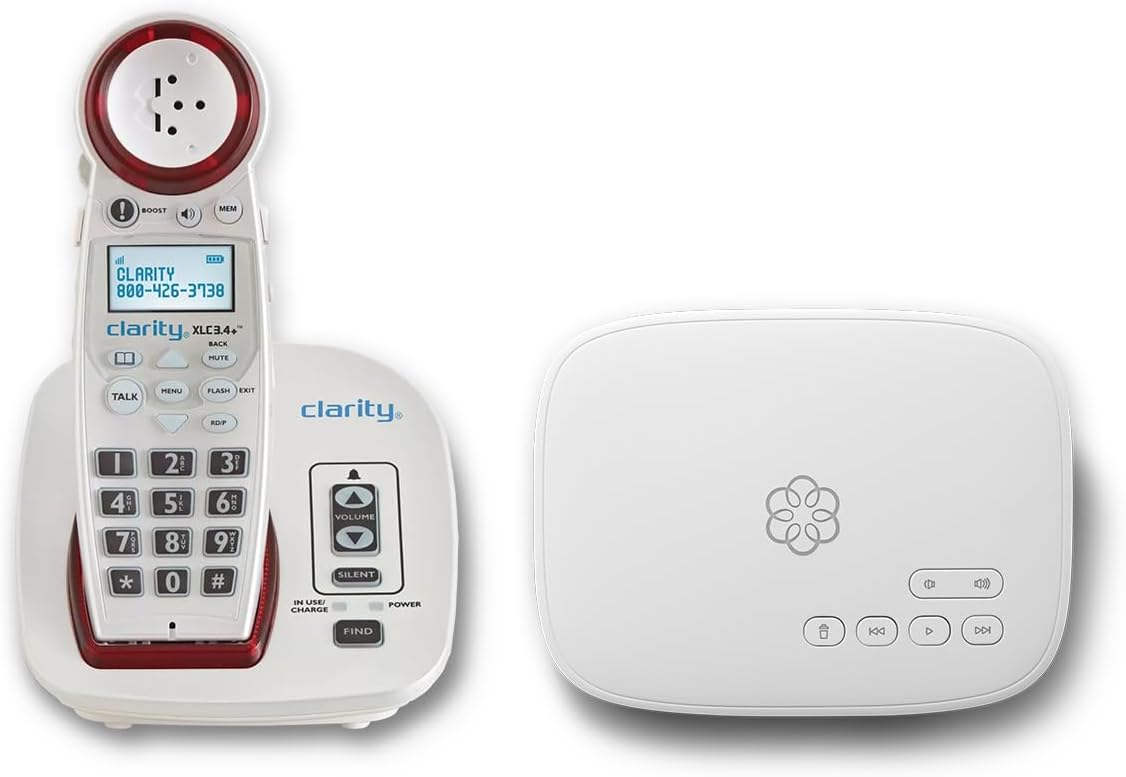
The Ooma Telo with Clarity XLC3.4+ is a service bundle rather than a standalone phone, and it has a 4.5 rating. It pairs an amplified cordless phone with home calling service, offering users an integrated alternative to traditional landline equipment. The package includes a visual ringer, adjustable ring and speaker volume, a talking keypad, Caller ID, and hearing aid compatibility.
We may earn a commission when you buy through this link, at no additional cost to you.
The service side of the bundle is substantial. It provides nationwide calling across the US, Canada, and Mexico, advanced robocall blocking, a contacts-only calling option, and emergency features that send the registered address to dispatchers and can notify loved ones by text. Setup assistance and 24/7 concierge support are also included with the stated plan.
The main trade-off is the subscription requirement, which introduces a recurring cost and service dependency. The handset is cordless, so it also needs charging, and the package does not offer live captions. Users who want a self-contained, no-subscription landline should look elsewhere. Those who value managed service, call filtering, and integrated support may see the bundle as a complete solution.
This model suits a senior who wants an accessible cordless telephone without assembling a separate service and handset package. It is especially attractive when robocall reduction, emergency address support, and concierge setup assistance matter. Confirm service coverage, current plan terms, and hearing compatibility before ordering.
A visual ringer, adjustable volumes, talking keypad, and hearing aid compatibility address several common hearing-access needs. The cordless format also allows the user to take calls beyond a fixed desk.
Call blocking, emergency address information, setup assistance, and concierge support add value beyond basic telephone hardware. These managed features may reduce some of the configuration burden for a new user.
We may earn a commission when you buy through this link, at no additional cost to you.
The 40dB Voice Dialer Phone combines voice commands, amplified audio, a visual ringer, and speaking Caller ID. It has a 2.1 rating, the lowest among the products in this guide, so prospective buyers should approach it more cautiously and review recent customer feedback. Its feature set is extensive, and that complexity may be related to the learning curve.
We may earn a commission when you buy through this link, at no additional cost to you.
Users can answer, end, and dial calls with three configurable command words. Seventeen voice memories are available for frequently called contacts, while the phone speaks Caller ID and can announce a number before dialing it. A two-line LCD, visual LED ring indicator, speakerphone, hands-free volume control, programmable emergency key, redial, pause, and power-failure protection are also listed.
The telephone offers earpiece volume up to 40dB and separate low, medium, and high ringer settings. It can be used with large buttons, and its voice memory may help users with visual or mobility limitations. Still, the low rating means that feature richness should not be confused with reliability. Voice recognition quality, menu navigation, and setup support deserve particular attention.
This phone may suit a technically capable user who values multiple speech-controlled functions and stored voice contacts more than simplicity. It is not a good first choice for someone who needs captions or a very straightforward interface. Buyers should compare recent feedback and confirm that the advanced voice features meet their needs before purchasing.
Seventeen programmable voice memories expand on the basic answer, dial, and end commands. The speaking Caller ID and pre-dial number announcement can make the phone easier to operate without reading a display.
The many menus, programmable prompts, and memory entries may overwhelm a user who prefers a simple senior phone. Clear audio prompts and careful configuration are essential for realizing the stated benefits.
We may earn a commission when you buy through this link, at no additional cost to you.
The Nine-Photo Senior Landline has a 4.2 rating and focuses on visual contact memory, extreme sound levels, and hands-free calling. Nine photo memory keys give it the largest stated photo-contact set in this roundup, offering a broad directory of family members and friends for users with dementia, memory loss, or poor vision.
We may earn a commission when you buy through this link, at no additional cost to you.
Incoming ringtones reach over 110dB, while earpiece volume exceeds 90dB, with three independent volume settings. A synchronized LED flash provides a visual call alert, and hands-free mode reduces the need to hold the receiver. Redial and flashback controls help users repeat or correct a call, while programming a contact reportedly takes four steps and about 20 seconds.
The telephone connects through a standard RJ11 line and needs no batteries or external power supply, which can be helpful during a power interruption. It is also intentionally basic: it does not support caller ID, voicemail, message recording, or internet calling, and it has no real-time captions. These limitations make it a focused communication tool rather than a multifunction home telephone system.
Choose this model for a senior who values many photo contacts, a very loud ringer, visual alerts, and the reliability of a simple corded connection. It is particularly well suited to direct family calling rather than managing sophisticated digital features. Buyers who need voicemail, caller identification, captions, or service-based screening should choose a more advanced model.
Nine photo keys allow a user to see more important contacts without memorizing numbers. The visual directory is practical for family communication and may reduce frustration associated with scrolling or recalling digits.
The phone uses an RJ11 line and requires neither batteries nor a power supply. Its corded design can remain useful during a power outage, while the handset returns to a fixed position after use.
We may earn a commission when you buy through this link, at no additional cost to you.
The right accessible telephone depends on the user's primary barrier, existing service, and tolerance for setup. Real-time captions, amplified sound, visual alerts, large controls, photo dialing, voice control, and hands-free operation solve different problems, so one feature should not be treated as a substitute for another.
Real-time captions and amplified sound serve different needs. The Hamilton CapTel 2400iSPNBT displays live captions for incoming and outgoing calls, supports auto or assisted captioning, and also includes captioned voicemail. It therefore suits a user who needs to see what is being said. Other products in the guide primarily make speech louder, add visual ring alerts, simplify controls, or reduce the need to press buttons. A buyer should determine whether the goal is to follow conversations visually or simply to hear more comfortably, because only one listed model provides stated real-time transcription.
Prioritize live captions whenever missing words, accents, or uncertain audio create safety or independence concerns. If speech is still understandable and the main problem is a low ringer or quiet receiver, an amplified senior phone may be simpler and less demanding to set up.
The connection requirement can determine which products are usable at all. The Hamilton CapTel requires high-speed internet, electrical power, and sometimes telephone service. The FIP12WP requires an active VoIP service, SIP server, or PBX system and cannot connect to a standard analog wall jack. The Ooma Telo bundle includes a subscription-based service. By contrast, the Photo Dial Senior Phone, Big Button Picture Phone, and Nine-Photo Senior Landline use a standard home phone line without batteries or a separate power supply. Voice-operated models may also rely on an existing home line.
Match the telephone to service already available in the home. Check internet quality, analog line availability, charging needs, and installation support before ordering, because a feature-rich model is of little value if its required infrastructure is unavailable.
Useful amplification varies by model and by where it is applied. The Hamilton CapTel offers up to 40dB amplified gain and hearing aid compatibility. The VTech SN5147 combines a 90dB extra-loud ringer with one-touch audio assistance of up to 50dB. The Big Button Picture Phone supports up to 40dB amplification, while the Nine-Photo Senior Landline states over 90dB earpiece volume and over 110dB ringtones. The FIP12WP provides handset volume over 90dB and speakerphone volume exceeding 110dB. The Ooma bundle also supports hearing aid compatibility and adjustable ringer and speaker volume.
Look at both incoming and conversation volume rather than comparing one headline number. A very loud ringer cannot compensate for an inaudible receiver, so consider hearing aid compatibility, speakerphone quality, tone control, and the user's specific hearing profile as well.
Visual alerts are useful when a ringer cannot be heard, the room is noisy, or a user is sleeping. The Hamilton CapTel provides visual information through captions, while the Photo Dial Senior Phone, VTech SN5147, Nine-Photo Senior Landline, Voice Dialer Phone, and FIP12WP all describe flashing or LED call indicators. The Ooma bundle includes a visual ringer. Controls range from an extra-large backlit VTech display to large pictorial buttons, a touchscreen, a talking keypad, and programmable voice commands.
Choose the interface that matches the user's actual strength. A large button does little for someone with advanced vision loss, while a sophisticated display may be harder than a conventional keypad. The best arrangement is one the user can independently identify, understand, and operate without repeated caregiver intervention.
Photo speed-dial buttons are particularly valuable for users with dementia, memory loss, or difficulty associating names and numbers. The Photo Dial Senior Phone offers eight customizable photo buttons and a programmable SOS key. The Nine-Photo Senior Landline provides nine photo contacts. The Big Button Picture Phone includes three replaceable picture buttons, while the VTech SN5147 has four photo speed-dial slots. The FIP12WP adds customizable image keys and a dedicated help key. The VTech and Photo Dial products also use broader call-blocking and message features.
Prioritize the number and clarity of contact images rather than assuming more is always better. A smaller set of well-known contacts may be more usable, and the images should be placed where they can be seen and pressed confidently. Confirm that stored numbers will not be lost during routine line maintenance.
Hands-free features can reduce strain for people with arthritis, tremors, weak grip, limited mobility, or bedridden use. The Photo Dial Senior Phone, Nine-Photo Senior Landline, VTech SN5147, 40dB Voice Dialer Phone, and Ooma/Clarity bundle all include hands-free calling. The Voice-Operated Home Telephone goes further by allowing spoken control of dialing, answering, and hanging up. Its always-listening design, however, may not suit every user, especially someone with a strong preference for privacy or limited confidence in speech recognition.
Test any voice feature in a realistic room and with the user's natural speaking pattern. For physical accessibility, also consider handset weight, button spacing, speakerphone placement, and whether the phone can remain securely on a table or wall mount.
A telephone may do more than place and receive calls. The Hamilton CapTel presents voicemail captions, and the VTech SN5147 includes a 22-minute digital answering machine with remote access and slow playback. The Ooma service adds robocall blocking, a contacts-only option, and concierge support. The FIP12WP includes a programmable help key. By contrast, the Nine-Photo Senior Landline explicitly lacks caller ID, voicemail, and recording, making it better for straightforward family contact than call management.
Choose based on the daily routine. A missed-call filter and answering machine may be valuable in a busy household, while excessive menus can make a phone harder for a cognitively impaired user to manage. Compare the features a caregiver will actually use and avoid paying for complexity that adds no practical value.
The best telephone is one that can be installed, programmed, and used consistently. The Hamilton CapTel requires internet service and eligibility registration, the Ooma bundle includes personal setup assistance, and the FIP12WP depends on an existing VoIP environment. Several conventional landlines advertise simpler setup, with the Photo Dial Senior Phone described as a four-step process and the Nine-Photo Senior Landline offering straightforward contact programming. Rechargeable handsets, replacement accessories, and service support can affect long-term convenience.
Consider the person who will maintain the phone as well as the person using it. A device that is easy to call but difficult to reconfigure may create problems after a line change or service update. Check included parts, support availability, return options, and the current product listing before making a final selection.
Begin by confirming the required service, placing the phone where it is easy to reach, and connecting it according to its manual. For the Hamilton CapTel, complete the hearing-loss registration and connect the phone to high-speed internet. For the FIP12WP, install or confirm active VoIP service, SIP server, or PBX connectivity before configuring the help button. Users of the Ooma bundle should complete the included setup assistance and verify that emergency address information is correct.
Program the most important functions while the user is present. Load clear photographs into photo buttons, label each contact, place frequently used numbers in speed-dial locations, and teach the user how to answer, end, redial, or request help. Voice models should be tested with the user's preferred command words. If the phone includes a separate emergency or SOS key, program it carefully and remind the user that it must be activated manually; it should not be treated as a guarantee of an immediate emergency call.
For care, wipe the handset and screen with a soft, slightly damp cloth, avoiding harsh chemicals and excess moisture. Keep the charging base, power adapter, and phone line secure, and avoid placing the handset where it can fall. Test the ringer, visual alert, speakerphone, and caption display periodically. Stored contacts, service settings, caption registration, and the telephone line should also be checked after a power outage, service interruption, or equipment change.
The Hamilton CapTel 2400iSPNBT is the only product in this guide with stated real-time captions for incoming and outgoing calls. It displays the conversation on a large touchscreen and supports both automatic and operator-assisted captioning. Captions are also available for voicemail. The other models improve access through amplification, visual alerts, large buttons, photo dialing, hands-free operation, or voice control rather than a live transcript.
It depends on the model. The Hamilton CapTel requires high-speed internet, while the FIP12WP requires active VoIP infrastructure and the Ooma Telo bundle requires a subscription-based service. The Photo Dial Senior Phone, Big Button Picture Phone, and Nine-Photo Senior Landline use a traditional home phone line and do not require internet connectivity. Check the exact connection requirements for the model being considered.
Ease depends on the individual, but photo-dial models are often practical because users can press a familiar face instead of recalling a number. The Nine-Photo Senior Landline offers nine photo contacts, the Photo Dial Senior Phone offers eight, and the FIP12WP provides customizable image keys. The VTech SN5147 and Big Button Picture Phone provide fewer photo slots but may suit users who need additional traditional features.
An amplified phone may be sufficient when the main problem is a low-volume receiver or difficult-to-hear ringer. Amplified models in this guide offer increased handset or speaker volume, loud ringers, and sometimes hearing aid compatibility. However, louder sound does not create captions and may not solve speech recognition problems. A person who needs to see words as they are spoken should consider the Hamilton CapTel.
Yes, especially for users who value simple, familiar operation over app-based calling. A photo-dial telephone reduces the need to memorize or enter numbers and can be easier to manage in a home, hospital, or care setting. Its limitations are that it will not provide captions, and some models deliberately omit caller ID, voicemail, or recording, so buyers should confirm those omissions against their needs.
A corded phone is simple, stays in one location, and may keep working during a power interruption when it uses the analog line. A cordless phone provides mobility and is convenient for moving around the home, but it requires battery charging and a working base. The VTech SN5147 combines both approaches, while the Ooma bundle provides a cordless service-based alternative with a subscription.
It can, provided the photographs and buttons are large and clearly positioned. Photo keys let the user identify a contact visually instead of reading a small name or number, while large buttons make the keypad easier to navigate. The FIP12WP and VTech SN5147 also provide visual alerts. The exact benefit depends on the user's vision, and careful placement and contrast remain important.
Confirm the required line type, internet or VoIP compatibility, power needs, captioning eligibility, and whether handsets must be charged. Also check the size of buttons and display, visual ringer behavior, stored-contact capacity, voicemail and caller ID, call blocking, and the amount of setup assistance offered. Current service terms and product features should be checked on the listing because details can change.
The Hamilton CapTel 2400iSPNBT is the leading choice for a buyer whose priority is visible, real-time communication, while the VTech SN5147 offers a balanced corded and cordless system for broader everyday use. The FIP12WP stands out for customizable image keys, high amplified output, a visual alert, and a dedicated help key, although it requires an existing VoIP setup. These top picks cover the strongest reasons to choose a modern accessible telephone.
For a simple family phone, the Photo Dial Senior Phone and Nine-Photo Senior Landline are compelling because they use familiar images, large controls, loud alerts, and standard home lines without battery charging. The Big Button Picture Phone serves a similar but smaller-contact audience. Users who prioritize voice control can consider the dedicated Voice-Operated Home Telephone or the more complex 40dB Voice Dialer Phone, while the Ooma bundle suits households seeking managed service and support.
Ultimately, prioritize the barrier that affects the user most often: captions for missed speech, amplification for quiet calls, visual alerts for missed rings, photo buttons for memory, or hands-free control for limited mobility. Verify current specifications, service compatibility, eligibility, and pricing directly before purchasing, since product details and costs can change over time.