
ASUS Zenbook Duo Dual OLED
4.5Editor score
Dual 3K 144Hz touchscreens
32GB RAM and 1TB SSD
ASUS Pen 3.0 included
A touchscreen ASUS laptop can combine the productivity of a conventional notebook with the immediacy of a tablet, but the best model depends on how and where you work. Screen quality, portability, keyboard comfort, battery capacity, processing power, and included accessories all shape the experience more than the touchscreen label alone.
This guide compares ten ASUS touchscreen laptops spanning the Zenbook and Vivobook families. We examine resolution, panel technology, refresh rate, brightness, weight, memory, storage, processor capabilities, ports, biometric security, convertible designs, and bundled accessories to identify the strongest options for work, study, travel, entertainment, and creative workflows.
Each pick represents a distinct balance rather than a single universal winner. The top choices cover premium dual-screen productivity, lightweight OLED mobility, and value-focused everyday computing. Product configurations and prices can change, so confirm the current listing and specifications before making a purchase.
4.5Editor score

5.0Editor score

5.0Editor score
As an Amazon Associate we earn from qualifying purchases.
The comparison below highlights the most important differences among the ten ASUS touchscreen laptops, including display size and resolution, processor, memory, storage, portability, and standout features.



The ASUS Zenbook-14 OLED Touchscreen Laptop is our strongest all-around recommendation for buyers who want a premium display, restrained proportions, and modern performance without moving to a bulky workstation. Its listed 5.0 rating reflects an exceptionally positive customer response. The 14-inch 2K OLED panel offers a 1920 x 1200 resolution, 16:10 aspect ratio, 500-nit peak HDR brightness, and 100% DCI-P3 color coverage.
We may earn a commission when you buy through this link, at no additional cost to you.
Performance comes from the AMD Ryzen AI 9 465 processor, which supplies 10 cores and 20 threads with speeds up to 5.0 GHz. Its NPU is rated at up to 50 TOPS for supported AI workflows, while Radeon 880M integrated graphics handle ordinary business graphics, media, and light content creation. The 16GB of LPDDR5X memory and generous 1TB SSD make the laptop a practical fit for browser-heavy work, presentations, spreadsheets, remote meetings, and active project files.
Portability is a major advantage. At approximately 2.82 pounds and 0.6 inch thick, the Zenbook is easier to carry than a typical 15- or 16-inch notebook. The 75Wh battery, backlit keyboard, and 1080p IR camera with privacy shutter support daily productivity. Connectivity includes Wi-Fi 6E, Bluetooth 5.4, USB4 Type-C, another USB-C port, USB-A, and HDMI 2.1. The included stylus, sleeve, cleaning cloth, and flash drive add practical value, although the integrated graphics are not intended to replace a dedicated gaming GPU.
Choose this model if you frequently work in documents, browse the web, attend calls, or travel between offices. It is particularly attractive for buyers who value OLED color, a wide 16:10 workspace, and a light enclosure over intensive 3D rendering or gaming. For those priorities, it is the most balanced touchscreen ASUS laptop in this guide.
The 100% DCI-P3 OLED panel and 500-nit peak HDR brightness make this screen useful for photo review, media consumption, and presentation work. The 16:10 format also provides more vertical room than a conventional 16:9 display, which is helpful when arranging documents or editing timelines.
The bundled stylus makes direct on-screen navigation more practical, while the sleeve and cleaning cloth help protect and maintain the device. A separate flash drive provides removable storage for transfers, backups, or files that should not remain on the internal SSD.
We may earn a commission when you buy through this link, at no additional cost to you.
The ASUS Zenbook 14 inch 2K OLED Touchscreen Laptop Computer Ryzen AI 9 465 CPU offers a compact OLED laptop focused on mobility, vivid visuals, and modern productivity. Its 5.0 rating places it among the most favorably reviewed products in this roundup. The 14-inch AMOLED touchscreen delivers deep blacks, vivid color, and crisp detail suited to streaming, creative work, and interactive navigation.
We may earn a commission when you buy through this link, at no additional cost to you.
The Ryzen AI 9 465 processor provides 10 cores and 20 threads and supports AI-assisted workflows through an NPU rated at up to 50 TOPS. With 16GB of DDR5 memory and a 1TB SSD, this configuration is well suited to multitasking, cloud applications, web browsing, document editing, and general content creation. The supplied description identifies it as a Copilot+ PC, allowing compatible AI features to support search, summaries, and task organization.
At 2.8 pounds and just 0.6 inches thick, the machine should appeal to commuters and students who want a capable display without carrying a large chassis. Its Jasper Gray construction is paired with MIL-STD 810H durability testing, a backlit keyboard, Wi-Fi 6E, Bluetooth, Windows 11 Pro, and three USB ports, including two high-speed USB 3.0 connections. The available specifications do not list a stylus, and the port list is less detailed than on the first Zenbook.
This laptop is a good fit for mobile professionals, students, and multimedia users who prioritize an OLED panel and low weight. It is especially compelling for users comfortable with integrated graphics and applications that do not demand a discrete GPU. Buyers who need the broadest accessory bundle should compare it with the first Zenbook, while those wanting the lightest traditional clamshell experience will find this model appealing.
A 2.8-pound weight and 0.6-inch profile make the Zenbook straightforward to carry between classes, meetings, and travel destinations. The MIL-STD 810H testing also provides useful reassurance that the chassis is designed for the bumps and shocks associated with regular commuting.
The processor's dedicated AI capability can accelerate compatible on-device workflows such as searches, summaries, and content refinement. Actual feature availability depends on Windows updates, application support, and account settings, so buyers should verify the functions they expect to use.
We may earn a commission when you buy through this link, at no additional cost to you.
The blue ASUS Vivobook 15 is the value-focused selection for shoppers who want a large touchscreen, modern processing power, and practical business features without moving to an OLED premium model. It carries a 5.0 rating and pairs a 15.6-inch FHD NanoEdge touchscreen with an Intel Core 7 150U processor, 16GB of DDR5 memory, and a 1TB SSD. That combination is well matched to office work, school, browsing, and routine multitasking.
We may earn a commission when you buy through this link, at no additional cost to you.
Windows 11 Pro provides the business-oriented foundation, while the fingerprint reader offers convenient biometric sign-in. A physical webcam privacy shield helps prevent unwanted camera exposure during calls, and the backlit keyboard supports comfortable typing in dim conditions. The dedicated numeric keypad is useful for accounting, inventory, data entry, and spreadsheet work. A 180-degree lay-flat hinge adds flexibility for sharing the screen or arranging the laptop in different workspace configurations.
Connectivity includes one USB-C port and three USB-A ports, giving buyers a practical mix of legacy and modern peripherals. The included PCO cooler is designed to help maintain thermal performance during demanding work, although the package has been opened solely for upgrade purposes. PCOnline US provides a one-year coverage on the upgraded RAM and SSD, while the other components retain the original one-year manufacturer's coverage. Those distinctions should be reviewed before purchase.
This Vivobook is best for students, office workers, and families seeking a roomy touchscreen at a more accessible configuration level. Its standard 1920 x 1080 panel is less advanced than the OLED options, but the larger screen, fingerprint reader, numeric keypad, and complete 1TB storage configuration create a compelling practical package.
Windows 11 Pro adds familiar management and security capabilities, while the fingerprint reader simplifies daily sign-in. The physical webcam shield is a simple but effective addition for people who handle confidential material in shared offices, classrooms, or meeting rooms.
The 15.6-inch display provides a generous canvas for spreadsheets, browser windows, documents, and presentations. A dedicated numeric keypad further differentiates this model from ultraportables, making it more practical for repetitive numerical entry.
We may earn a commission when you buy through this link, at no additional cost to you.
This 24GB configuration of the ASUS Vivobook 15 stands out for buyers who want extra memory without changing the familiar 15.6-inch touchscreen design. It has a 4.7 rating and retains the Core 7 150U processor, 1TB SSD, Windows 11 Pro, fingerprint reader, backlit keyboard, numeric keypad, and 180-degree lay-flat hinge found in the related configuration.
We may earn a commission when you buy through this link, at no additional cost to you.
The principal advantage is 24GB of DDR5 RAM. Compared with a typical 16GB machine, that additional capacity gives users more headroom when keeping numerous browser tabs, communication applications, spreadsheets, and background services open. It may also reduce the likelihood of needing to close applications or rely on virtual memory during heavy multitasking, although real-world performance still depends on the workload and software involved.
The 15.6-inch 1920 x 1080 NanoEdge touchscreen makes direct interaction convenient, while the lay-flat hinge can make screen sharing easier. The numeric keypad adds value for business and data-heavy users. Connectivity is handled through one Type-C and three Type-A ports, and a PCO cooler is included for additional thermal support. As with the 16GB edition, the original seal was opened for upgrades, with a one-year PCOnline US coverage period on upgraded components.
Consider this model when memory-intensive multitasking matters more than OLED fidelity or convertible flexibility. It is well suited to students maintaining large project files and office users who keep many applications open. Buyers who do not need the extra memory can step down to the 16GB version and preserve the same core display and processor experience.
The 24GB memory capacity is the defining reason to choose this version over the 16GB model. It gives demanding users more flexibility when moving between large spreadsheets, numerous browser tabs, meetings, and creative applications without constantly managing open programs.
The blue Vivobook design combines a familiar clamshell layout with useful professional details. The fingerprint reader, webcam shield, backlit keyboard, and numeric keypad make it more suitable for a full workday than a basic touchscreen alternative.
We may earn a commission when you buy through this link, at no additional cost to you.
The ASUS Vivobook 16 OLED 120Hz Touchscreen Flip is the most flexible conventional convertible in the guide. Its 5.0 rating and 360-degree hinge support laptop, tent, stand, and tablet modes, allowing the user to adapt the device for typing, media viewing, presentations, sketching, or hands-on navigation.
We may earn a commission when you buy through this link, at no additional cost to you.
The 16-inch OLED touchscreen combines rich color with a smooth 120Hz refresh rate. That makes it especially attractive for scrolling, streaming, creative review, and presentations where fluid motion and visual depth matter. An Intel Evo Edition Core Ultra 7 258V processor, 32GB of LPDDR5X memory, and a 1TB SSD provide a modern platform for productivity and multitasking.
Connectivity is led by Thunderbolt 4 and Wi-Fi 7, while the physical webcam shield and face login improve convenience and privacy. A high-capacity battery is designed to support work and entertainment away from an outlet. Because this is a 16-inch convertible, it will be larger and heavier than the 14-inch Zenbook models, and the available information does not identify a bundled pen.
Choose this Vivobook if you value a large OLED screen, smooth motion, and multiple physical configurations. It works well for media-heavy users, creative professionals, and students who alternate between a keyboard workflow and direct touch input. It is less appropriate for buyers who prioritize the lightest possible travel weight.
The 360-degree hinge is more than a visual feature. Laptop mode supports conventional productivity, tent and stand modes can simplify media viewing or presentations, and tablet mode makes touch navigation and stylus work more natural when a pen is available separately.
The 120Hz OLED panel is a strong match for scrolling, animation, and fluid on-screen interaction. Thunderbolt 4 expands access to compatible docks and accessories, while Wi-Fi 7 supports the newest compatible routers and networks.
We may earn a commission when you buy through this link, at no additional cost to you.
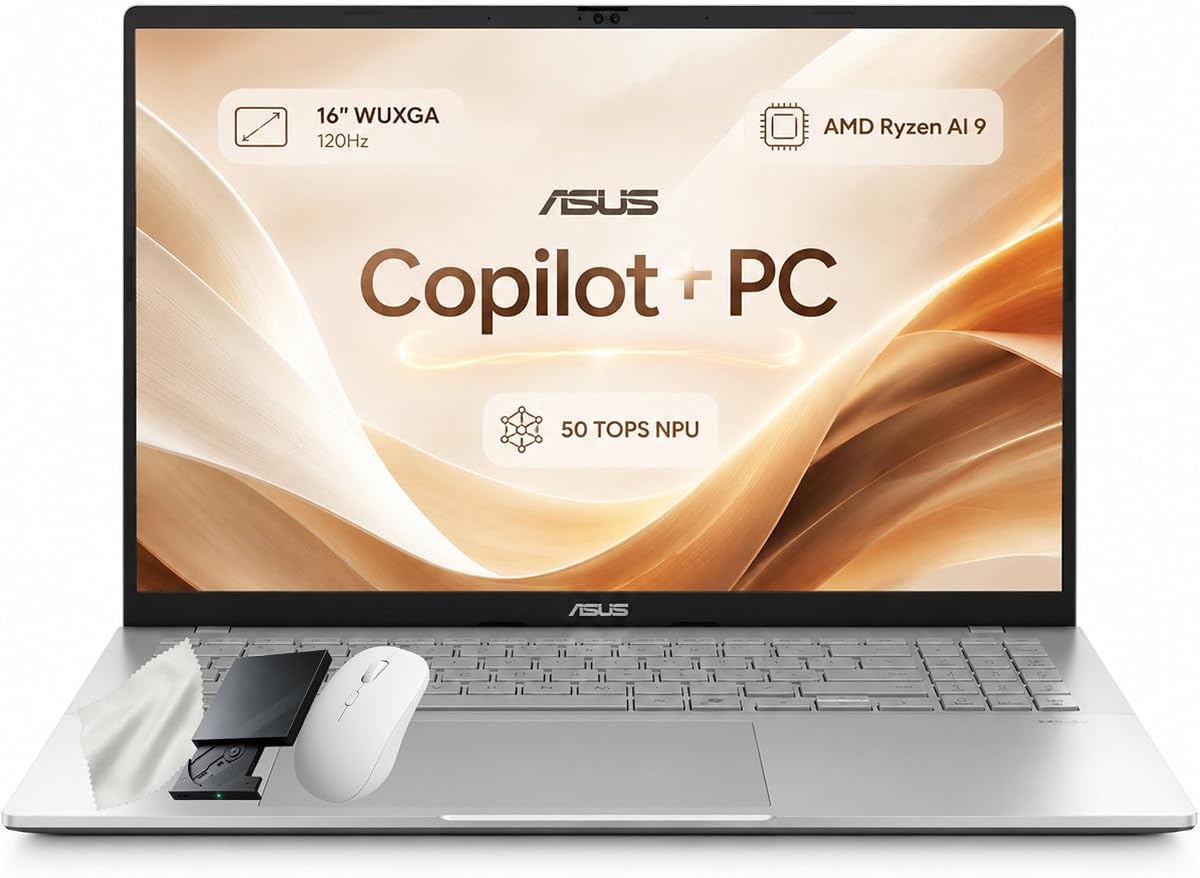
The ASUS Vivobook S16 is a roomy, high-memory touchscreen laptop aimed at professionals and students who need a large working area. It carries a 5.0 rating and combines the AMD Ryzen AI 9 465 processor with 32GB of DDR5 memory and a 1TB PCIe Gen4 SSD. The laptop's screen is a 16-inch WUXGA 1920 x 1200 touchscreen with a 16:10 aspect ratio, 400-nit brightness, and 120Hz refresh rate.
We may earn a commission when you buy through this link, at no additional cost to you.
The processor provides 10 cores and 20 threads with speeds up to 5.0 GHz and 34MB of cache. Its XDNA NPU is rated at up to 50 TOPS for supported Copilot+ PC experiences, while integrated Radeon graphics are intended for everyday visual workloads. The 32GB memory configuration is particularly helpful for people who regularly operate many browser tabs, business applications, and large working files at once.
Windows 11 Pro, a 1080p IR camera, Windows Hello facial sign-in, and a camera privacy shutter support professional use. The backlit chiclet keyboard includes a numeric keypad, and the port selection includes two USB-A connections, two USB-C connections with display and power delivery, HDMI 2.1, and a 3.5mm audio jack. A 70Wh battery and 3.75-pound design keep it portable for its 16-inch category.
This is a strong option for users who value screen area and memory over ultraportable dimensions. It is well suited to spreadsheet-heavy work, presentations, coding, study, and general office productivity. For lighter travel needs, the 14-inch Zenbooks are easier to carry, while buyers wanting OLED color should consider the 16-inch OLED Flip.
The 16-inch 16:10 display offers more usable space for side-by-side documents, browser windows, and communication tools. Its 120Hz refresh rate keeps scrolling and general interaction smooth, even though the standard panel does not provide the same color depth or contrast as OLED.
The 32GB memory and PCIe Gen4 SSD create a strong foundation for demanding multitasking. Two USB-A, two USB-C, HDMI 2.1, and an audio jack provide practical peripheral options without requiring a dock for common accessories.
We may earn a commission when you buy through this link, at no additional cost to you.
The 2026 ASUS Zenbook Duo is the premium choice for buyers who want a fundamentally different computing experience. Its 4.5 rating reflects an advanced but specialized design built around two 14-inch Lumina OLED touchscreens. Both screens offer 3K resolution, a 144Hz refresh rate, 100% DCI-P3 color, and up to 1000 nits of HDR brightness, creating a highly capable visual workspace.
We may earn a commission when you buy through this link, at no additional cost to you.
Inside, a 16-core Intel Core Ultra 9 386H processor, 32GB of RAM, and a 1TB SSD support demanding multitasking and content-heavy workflows. The AI platform provides up to 50 TOPS for compatible Copilot features such as file retrieval, summaries, and searches. Six speakers with Dolby Atmos support provide a more complete entertainment and presentation experience than a typical compact laptop.
A magnetic keyboard and integrated kickstand allow the Duo to move quickly between dual-screen productivity, desktop, sharing, and laptop configurations. The anti-reflection coating and E Reading mode are useful for prolonged reading, while Wi-Fi 7, Bluetooth 5.4, two Thunderbolt 4 ports, USB-A, and HDMI 2.1 provide modern connectivity. The included protective sleeve and ASUS Pen 3.0 complete the package.
This model is ideal for power users who routinely work across multiple applications, need a broad canvas, or value a stylus and an unusually rich display setup. The trade-off is complexity, physical bulk, and a higher-end configuration. It is not necessary for ordinary browsing, but for creative and professional users who can exploit two screens, the payoff can be substantial.
A second 3K OLED panel can serve as a dedicated reference, control surface, presentation display, or expanded workspace. The magnetic keyboard removes the need to type directly on the touchscreen, preserving a conventional working experience when needed.
The ASUS Pen 3.0 supports wireless charging and MPP 2.6 compatibility, making it ready for drawing, annotation, and precise navigation. Dolby Atmos-equipped speakers add value for streaming and presentations, although the dual-screen chassis remains more specialized than a standard notebook.
We may earn a commission when you buy through this link, at no additional cost to you.
The gray ASUS Zenbook 14 OLED Laptop is a compact touch-and-pen option for users who want a high-quality display and a bundled stylus. It features a 14-inch 2K 1920 x 1200 OLED touchscreen, 500-nit brightness, 100% DCI-P3 color, and a 16:10 aspect ratio. The product information does not provide a customer rating, so its feedback strength cannot be compared numerically with the other models.
We may earn a commission when you buy through this link, at no additional cost to you.
Its AMD Ryzen AI 9 465 processor includes 10 cores, 20 threads, 10MB of L2 cache, and 24MB of L3 cache with speeds up to 5 GHz. The integrated Radeon graphics and AI capability make it appropriate for productivity, communications, media, and light creative work. It includes 16GB of 7500 MHz DDR5 memory and a 512GB SSD, a configuration that offers less storage than several other recommendations.
The included stylus makes the touchscreen more useful for handwriting, annotation, sketching, and precision selection. A backlit keyboard, Wi-Fi 6E, Bluetooth 5.4, Dolby Atmos, Smart Amp Technology, and a 1080p IR camera with privacy shutter round out the features. Thunderbolt 4 provides a modern connection for compatible docks, displays, storage, and charging accessories.
Choose this Zenbook when portability, OLED quality, and pen input are the priorities. It is well suited to students, note-takers, and professionals working away from a desk. Buyers who need more local storage may prefer a 1TB configuration, while Windows 11 Home users focused on business management may want to compare a Pro-equipped alternative.
Including a pen immediately makes the touch panel useful for annotation and detailed selection. It is a meaningful advantage for users who want to sketch ideas, mark documents, or work through interface controls that benefit from more precise input.
The 2K OLED screen, 500-nit brightness, and broad DCI-P3 color coverage deliver an attractive visual experience for both work and entertainment. Its 16:10 format provides a taller workspace while keeping the panel smaller than the 16-inch alternatives.
We may earn a commission when you buy through this link, at no additional cost to you.
The ASUS Vivobook 16 Inch Touch Laptop is a balanced large-screen option for people who want more workspace and strong everyday specifications without moving to a dual-screen premium design. Its 5.0 rating accompanies an AMD Ryzen AI 9 465 processor, 32GB of DDR5 memory, a 1TB SSD, and a 16-inch 1920 x 1200 touchscreen with a smooth 120Hz refresh rate.
We may earn a commission when you buy through this link, at no additional cost to you.
The processor's integrated NPU delivers up to 50 TOPS, supporting compatible AI-enhanced video editing, conferencing noise reduction, and smart multitasking features. The 120Hz display improves scrolling and direct interaction, while the 16-inch size is useful for coding, spreadsheets, and simultaneous multi-window management. Its 400-nit brightness is suitable for normal indoor use, though it sits below the 500-nit and HDR figures offered by some OLED models.
The laptop includes two USB-A ports, two USB-C ports with display output and power delivery, HDMI 2.1, and a 3.5mm audio jack. A Full HD IR camera supports Windows Hello and includes a manual privacy shutter. The backlit keyboard, numeric keypad, and precision touchpad support productive office work. With a 70Wh four-cell battery and a 3.75-pound weight, it is reasonably portable for a 16-inch notebook.
This Vivobook is a sensible selection for professionals, students, and creators who need a large touch display and generous memory. Choose it when smooth scrolling, extensive windowing, and device flexibility matter more than OLED contrast. The 14-inch Zenbooks offer a lighter alternative, while the VivoBook Flip provides a more versatile hinge mechanism.
The vertical space of a 16-inch 16:10 display is valuable when reviewing long documents, arranging complex spreadsheets, or keeping several applications visible. The 120Hz refresh rate also makes touch navigation feel more immediate than a standard 60Hz panel.
A 3.75-pound chassis and 70Wh battery keep the laptop practical for office and classroom use. USB-C power delivery provides convenient charging, while the mix of USB-A, USB-C, and HDMI allows common accessories to connect without a large adapter.
We may earn a commission when you buy through this link, at no additional cost to you.
The ASUS Zenbook Duo UX8406CA-PS99T is a specialized dual-screen laptop for creative professionals and power users who routinely benefit from a larger digital workspace. Its 4.4 rating reflects a capable premium machine with a distinctive design. Both 14-inch Lumina OLED touchscreens use a 2880 x 1800 resolution, 16:10 aspect ratio, 120Hz refresh rate, 500-nit HDR peak brightness, and Pantone-validated 100% DCI-P3 color.
We may earn a commission when you buy through this link, at no additional cost to you.
Its Intel Core Ultra 9 285H processor, Intel AI Boost NPU, and Intel Arc graphics support advanced productivity and AI-capable workflows. Memory totals 32GB of LPDDR5X, while a 1TB SSD provides ample storage for applications and project files. Dual Screen, Desktop, Sharing, and Laptop modes let users adapt the device to different tasks, and a detachable Bluetooth keyboard restores a familiar typing setup.
The 75Wh battery is rated for up to 16 hours of video playback in Laptop mode and nine hours in Dual Screen mode, though real-world runtime depends on settings and workload. The 3.64-pound, 0.57-inch chassis is impressively slim, yet two large panels still create more visual and physical complexity than a standard laptop. MIL-STD 810H testing, Wi-Fi 7, Bluetooth 5.4, Thunderbolt 4, USB-A, HDMI 2.1, and a combined audio jack cover durability and connectivity.
The included sleeve, ASUS Pen 2.0, and 65W USB-C charger make the package ready for mobile creative work. This model is best for editors, designers, developers, and multitaskers who can use a second display productively. If one display is sufficient, the standard Zenbook 14 is lighter, simpler, and generally easier to carry.
Two Pantone-validated OLED panels provide rich color and high resolution for photo review, illustration, editing timelines, and reference material. The 120Hz refresh rate also makes the large interface feel fluid during navigation and on-screen work.
The detachable Bluetooth keyboard allows the display assembly to function as a compact desktop when a second screen is not needed. Sharing Mode can be useful for presenting work, while the integrated kickstand supports stable viewing from multiple angles.
We may earn a commission when you buy through this link, at no additional cost to you.
The most useful touchscreen ASUS laptop is the one whose size, performance, display quality, and flexibility match your daily work. Consider how you interact with the screen, what applications you run, and how often the computer must travel.
A 14-inch panel is the most portable option, while a 15.6-inch screen offers a larger canvas for documents, spreadsheets, and presentations. A 16-inch display is better for coding, detailed editing, and multi-window workflows, although it generally means a larger and heavier chassis. Resolution should be high enough to keep text sharp: the 14-inch Zenbooks use 1920 x 1200, the 16-inch Vivobooks also use 1920 x 1200, and the Zenbook Duo models reach 2880 x 1800 on each panel. Consider both the stated resolution and the 16:10 aspect ratio, which provides additional vertical working space compared with a 16:9 display.
Choose a smaller high-resolution screen for mobility and a larger one for stationary productivity. Dual-screen designs add exceptional workspace but are best reserved for users who can regularly exploit two displays.
OLED screens provide deep blacks, high contrast, vivid color, and strong HDR capability, making them ideal for media consumption, photo review, and entertainment. The first two Zenbooks and the Vivobook Flip use OLED, while the Zenbook Duo models add two OLED panels. Standard touchscreen laptops in this guide provide 400-nit panels that are suitable for normal office and classroom use. They may be easier on the budget and can still deliver smooth interaction when paired with a 120Hz refresh rate. Brightness, color coverage, and refresh rate should be considered together rather than treating touch responsiveness as the only display metric.
Prioritize OLED for image quality and contrast; prioritize resolution and screen size when document clarity or workspace is the priority. Standard panels are more appropriate when the main goal is productive interaction rather than media quality.
Most models in this guide use the AMD Ryzen AI 9 465, offering 10 cores and 20 threads with speeds up to 5.0 GHz. The Vivobook configurations use Intel Core 7 150U, while the higher-end convertible and Duo models feature Intel Core Ultra processors. The Ryzen AI system's NPU is listed at up to 50 TOPS, and compatible Copilot+ functions can assist with search, summaries, content refinement, and task organization. AI capability should complement rather than replace a consideration of general processing power, memory, cooling, and software compatibility. Integrated graphics are appropriate for office work and media but are not equivalent to a dedicated GPU for advanced 3D rendering or modern gaming.
Select the processor according to your applications, not only the AI headline. For office productivity, the Core 7 options are sufficient, while Ryzen AI and Core Ultra models offer more cores and specialized on-device acceleration for demanding workflows.
Memory capacity determines how much data can remain active without slowing down. The 16GB configurations suit ordinary browsing, office work, and education, while 24GB gives heavy multitaskers more flexibility. The 32GB options are better for large project files, numerous browser tabs, creative applications, and virtualized workflows. All models include a 1TB SSD except the 512GB configuration of the stylus-equipped Zenbook. A larger SSD reduces the need to manage local files carefully, although cloud storage and removable media can supplement limited capacity. Memory may be upgradeable on some Vivobook configurations, but buyers should verify the specific listing and warranty details before assuming upgradeability.
Choose 16GB for normal use, 24GB for demanding office multitasking, and 32GB for intensive creative or technical work. Favor 1TB storage unless your needs are modest and you are comfortable managing local files.
Weight, thickness, and battery capacity determine how comfortably a laptop fits into a commute. The 14-inch Zenbooks are approximately 2.8 pounds and 0.6 inches thick, making them the strongest choices for frequent travel. The 16-inch Vivobook models weigh about 3.75 pounds, while the dual-screen Zenbook Duos remain relatively thin but have a more complex chassis and two panels to power. Battery figures range from 70Wh and 75Wh in several conventional models to 99Wh in the 2026 Zenbook Duo. Actual runtime varies with screen brightness, refresh rate, workload, wireless use, and whether a dual-screen mode is active. Port selection also affects portability because frequently used accessories should connect without requiring a large dongle.
For daily commuting, prioritize a light 14-inch design and a 70Wh-or-greater battery. For desk-based productivity, prioritize screen size and performance, as a larger Vivobook or Duo may offer more value despite additional weight.
Convertible hinges add value when you alternate between typing, presenting, watching media, and direct touch interaction. The Vivobook 16 OLED Flip supports laptop, tent, stand, and tablet modes, making it a flexible middle ground. The Zenbook Duo takes a different approach, using two screens and a detachable magnetic or Bluetooth keyboard. A bundled stylus is listed with both Zenbook Duo models and one 14-inch Zenbook. Pen support can improve annotation, drawing, handwriting, and precision selection, but the benefit depends on the quality of the included pen and the buyer's willingness to use it. Verify compatibility and included accessories carefully because not every touchscreen configuration supplies a pen.
Choose a convertible when physical mode changes have a clear purpose in your routine. Choose a stylus-equipped model when handwriting, drawing, or precise on-screen input is central to the task.
Windows 11 Pro appears on most recommendations and adds business-oriented management and security capabilities, while one Zenbook ships with Windows 11 Home. Fingerprint readers, IR cameras, and Windows Hello support convenient biometric sign-in, and physical or manual webcam privacy shutters help block unwanted camera views. For external devices, look for USB-C power delivery, Thunderbolt 4, HDMI 2.1, USB-A, and a 3.5mm audio jack. Wi-Fi 6E is common across the lighter Zenbooks, while Wi-Fi 7 is standard on the convertible and dual-screen premium configurations. Bluetooth 5.4 appears throughout the list.
Prioritize a fingerprint reader, privacy shutter, modern Wi-Fi, and the exact external ports your equipment requires. Check Windows edition and accessory support before treating two similarly named configurations as interchangeable.
Begin by configuring Windows, signing into your preferred account, and updating the operating system and device drivers. Set display scaling so text and controls remain comfortable without appearing oversized. For a stylus-equipped model, pair the pen through the appropriate Bluetooth or ASUS utility and complete a brief test in a drawing or note-taking application. Adjust screen brightness and the refresh rate to balance visual smoothness with battery life.
Treat the touch surface as a sensitive input area. Avoid pressing excessively hard, using sharp objects, or applying cleaners directly to the panel. A dry microfiber cloth is appropriate for routine wiping; for persistent marks, lightly dampen the cloth with water after checking the manufacturer's care guidance. Keep the lid supported when using the machine in tent or stand mode, and do not place heavy objects against either screen in a dual-screen configuration. Use the included sleeve for transport and keep the stylus protected to reduce damage or loss.
For a healthy daily workflow, leave adequate space around vents and use a stable hard surface. Clean the exterior with a soft cloth, periodically inspect ports for dust, and update applications and firmware when ASUS provides them. If the display becomes unresponsive, restart the system and check the touchscreen and graphics drivers before attempting more extensive troubleshooting. Recalibrate touch controls through the operating system's display settings if taps or gestures are misaligned.
OLED is generally better for color depth, contrast, viewing dark scenes, and HDR content. It can also provide an excellent touch experience, but battery life and price may be less favorable than with some standard panels. A standard 120Hz touchscreen remains a practical choice when productivity, a larger workspace, and conventional computing are the priorities.
The 14-inch Zenbook models are the strongest travel options in this guide because they weigh approximately 2.8 pounds and are only about 0.6 inches thick. Their 2K OLED panels, Ryzen AI processors, and 75Wh-class battery design preserve strong productivity and media capabilities. A 16-inch Vivobook offers a larger screen but adds more weight and physical bulk.
No, 16GB is sufficient for many students and office users. However, 24GB or 32GB gives you more room to keep many browser tabs, office applications, and large files open at once. The higher-memory Vivobook and Zenbook Duo configurations are more relevant to heavy multitaskers, developers, and creative professionals.
They are surprisingly slim for dual-screen systems, with the listed models measuring about 0.57 inches thick. The first Duo weighs 3.64 pounds, while the newer dual-3K design remains highly portable by normal laptop standards. Nevertheless, the wider multi-panel shape and detachable keyboard can feel bulkier than a conventional 14-inch notebook.
Yes, particularly when the display is paired with a compatible stylus. The stylus-equipped Zenbook 14 and both Zenbook Duo configurations provide a more complete pen experience. For annotation or handwriting, confirm the operating system's handwriting tools, pen compatibility, and included accessories before purchasing.
Windows 11 Pro adds business-oriented security, management, and remote-work capabilities that may be important in an organizational environment. Windows 11 Home can still support an individual professional, student, or family. The right choice depends on employer policy and the specific management or security features your work requires.
Most of the listed models include HDMI or USB-C display output, and premium configurations add Thunderbolt 4. The exact resolution, refresh rate, and power delivery behavior depend on the processor, panel, and operating system. Check the product's port list and your monitor's requirements before connecting an external display.
A 1TB SSD is convenient for Windows, applications, media, and active project files, and it is the most common configuration in this roundup. The 512GB Zenbook option can still be sufficient when cloud storage is used for less frequently accessed material. Check your largest applications and existing files before reducing local storage.
The ASUS Zenbook 14 OLED Touchscreen Laptop is the most balanced overall recommendation because it combines a vivid 2K 16:10 OLED panel, a light enclosure, 16GB of memory, a 1TB SSD, strong connectivity, and a useful stylus bundle. The 2026 Zenbook Duo is the premium choice for users who can take advantage of two 3K 144Hz OLED touchscreens, while the Vivobook 15 with 16GB of memory provides the most approachable large-screen package.
Prioritize the features you will use every day. Choose a 14-inch Zenbook for mobility, a 15.6-inch Vivobook for numerical entry and a larger standard panel, a 16-inch Vivobook for extended multitasking, and a Zenbook Duo for a true multi-screen creative workflow. Memory, Windows edition, stylus inclusion, and the exact port list can differ between otherwise similar models, so review the current configuration carefully.
Prices and availability change frequently, and marketplace listings can introduce variations that are not apparent from a model family name. Before buying, confirm the display resolution and refresh rate, processor, memory, storage, operating system, included stylus or accessories, warranty coverage, and return terms. Those checks will help ensure the selected touchscreen ASUS laptop fits both your workflow and your budget.
