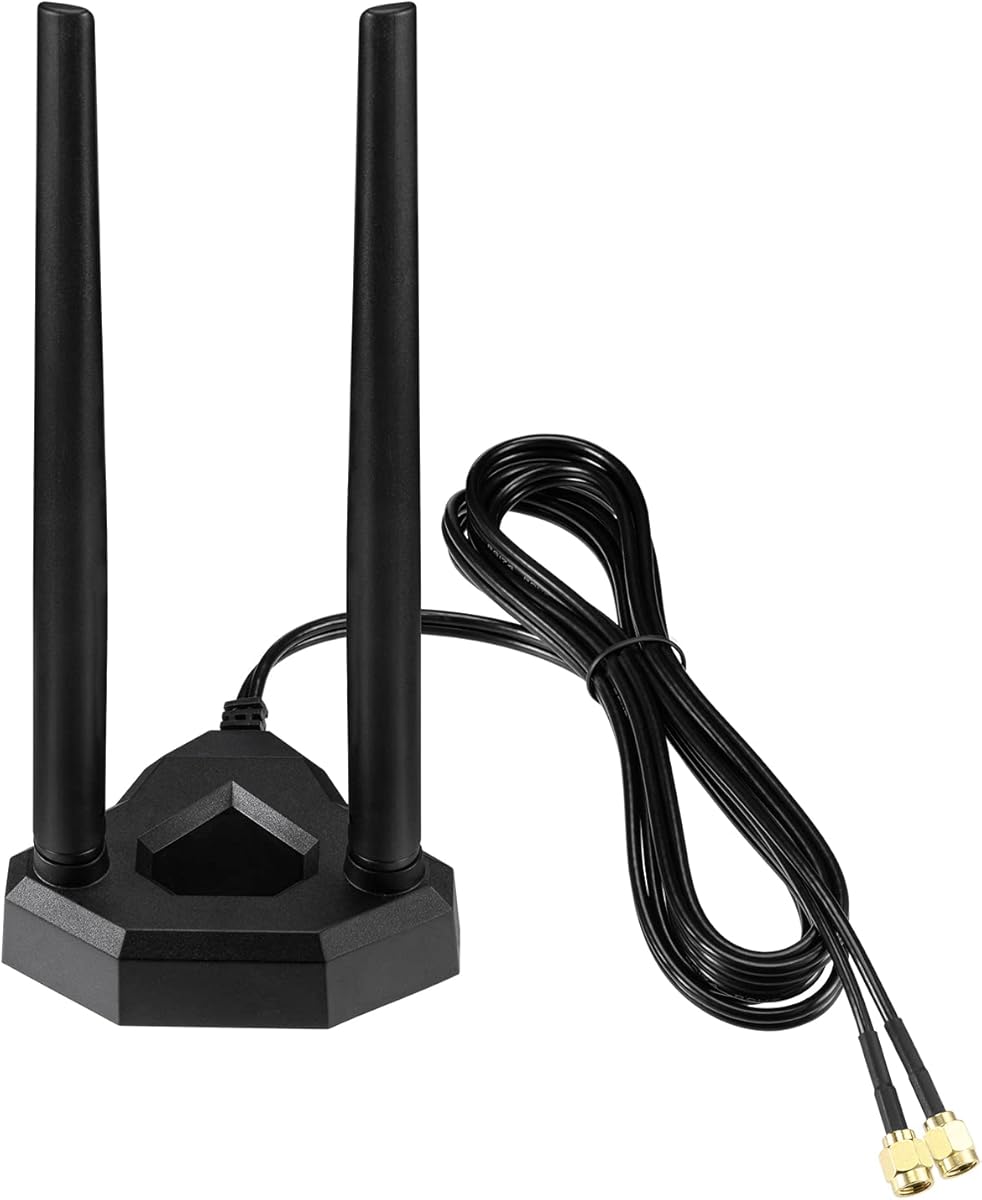
Eightwood Dual Band WiFi Antenna
4.5Editor score
2.4 and 5.8 GHz
6.5-foot extension cable
Magnetic mounting base
Antenna for Router guide comparing the best dual-band, tri-band, outdoor, Wi-Fi 6E, and high-gain options for routers, access points, and cameras today.
A router antenna can improve wireless coverage, strengthen reception, and help equipment placed near a window, wall, or outdoor enclosure maintain a more dependable connection. The right choice depends on connector type, supported frequency bands, gain, placement, and whether the device needs indoor flexibility or outdoor durability.
This guide compares ten antennas and Wi-Fi antenna kits designed for routers, access points, USB adapters, network cards, security cameras, and related wireless equipment. We evaluated the supplied specifications, including frequency support, connector standards, gain, mounting options, intended applications, and compatibility notes, rather than claiming hands-on testing.
The list covers budget dual-band models, flexible magnetic-base antennas, Wi-Fi 6E and 6 GHz options, outdoor high-gain antennas, a professional tri-band kit, and a mobile-hotspot setup. Each review explains the strongest use case and limitations, while current prices and availability can change at any time.
4.5Editor score

4.6Editor score

4.4Editor score
The table below compares all ten antennas by radio bands, connector type, gain or antenna design, mounting method, and primary equipment compatibility. These details are essential because a high-gain antenna will not automatically work with a router that uses a different connector or frequency range.


The Bingfu Dual Band WiFi 2-Pack earns a 4.6 rating and stands out as a flexible general-purpose router antenna. Its 2.4 GHz, 5 GHz, and 5.8 GHz coverage addresses the frequencies used by Wi-Fi routers, USB adapters, wireless cards, hotspots, and many security-camera systems, while the two-pack format gives users an option for dual-antenna or MIMO arrangements.
We may earn a commission when you buy through this link, at no additional cost to you.
Both antennas use an omnidirectional RP-SMA male connection and provide 3 dBi gain. That makes the set especially suitable for indoor equipment whose removable antenna port accepts an RP-SMA female connection. The listed compatibility extends beyond routers to desktop and mini PCI Express network cards, external USB adapters, IP cameras, DVR recorders, backup cameras, industrial routers, FPV equipment, and wireless extenders.
The main limitation is connector specificity. The RP-SMA male connector has internal threads and no center pin, so it will not fit the opposite connector type. It is also important to note that the 3 dBi figure describes antenna gain rather than guaranteed internet speed. Walls, interference, router output, device placement, and the original internal antennas can all affect the final result. Despite those caveats, the two included antennas add flexibility at a relatively modest cost.
This is our strongest all-around recommendation for users who need one inexpensive antenna or a matched pair for a compatible router. It is particularly attractive for desktop PCs, USB adapters, security cameras, and routers with removable dual-band antennas. Verify the connector and supported frequency bands before ordering, and place each antenna where it has an unobstructed view of the area you want to cover.
The two-pack gives you enough hardware to replace both antennas on a compatible MIMO system. Equal antennas also make it easier to create a balanced installation than combining unrelated antenna models or using one external and one internal antenna.
Its frequency coverage and connector format suit routers, network cards, USB adapters, and security equipment. The long list of supported applications also makes it useful for users who may move the antenna between different compatible systems.
We may earn a commission when you buy through this link, at no additional cost to you.
The Eightwood Dual Band WiFi Antenna has a 4.5 rating and offers one of the most useful installation features in this guide: a 6.5-foot extension cable attached to a magnetic base. That combination allows an indoor router antenna to be moved away from a metal enclosure, cabinet, or crowded desk and placed in a location with a clearer path to connected devices.
We may earn a commission when you buy through this link, at no additional cost to you.
This omnidirectional antenna supports 2.4 GHz and 5.8 GHz radio bands and is listed as compatible with 802.11 b/g/n/ac/ax and Wi-Fi 6 equipment. It can be used with wireless routers, PCI and PCIe network cards, motherboards with built-in Wi-Fi, desktop and notebook computers, external USB adapters, access points, hotspots, range extenders, and security cameras.
The product information also states that the antenna can improve Bluetooth range and reception stability for headphones, headsets, wireless controllers, and Bluetooth network cards. That broader capability does not guarantee a noticeable improvement in every environment, but it makes the antenna a more versatile option than a single-purpose Wi-Fi accessory. Its main technical limitation is that it does not cover the 6 GHz band required by Wi-Fi 6E systems.
Choose this antenna when placement flexibility and straightforward indoor installation matter more than tri-band support. It is well suited to routers positioned in poor signal locations, desktop adapters, and compatible cameras. The supplied guidance to test different positions and adjust both stubs is sensible, because antenna direction and proximity to interference can be as important as nominal gain.
A router trapped behind a monitor, inside a cabinet, or beside a large metal object may perform poorly despite having adequate radio specifications. The long cable and magnetic base let you relocate the antenna without moving the entire router.
Although it lacks a 6 GHz antenna element, this model supports devices listed as compatible with Wi-Fi 6. It can be a sensible upgrade for compatible 2.4 and 5 GHz systems that need better antenna placement.
We may earn a commission when you buy through this link, at no additional cost to you.
The Eightwood WiFi 6E Tri-Band Antenna carries a 4.4 rating and is the most feature-focused general-purpose option in the top three. It supports 2.4 GHz, 5 GHz, and 6 GHz, making it appropriate for a router or adapter that uses the expanded Wi-Fi 6E spectrum rather than limiting the upgrade to older dual-band systems.
We may earn a commission when you buy through this link, at no additional cost to you.
Its 6.5-foot cable and strong magnetic base make it easier to move the radio element to a favorable indoor location. The product information specifically recommends testing different positions and adjusting the two stubs in multiple directions. That approach is useful because a nominally capable antenna cannot compensate for a severely obstructed or poorly oriented placement.
Compatibility is broad across wireless routers, PCIe network cards, desktop and notebook computers, external USB adapters, WLAN access points, hotspots, range extenders, and security IP cameras. The connector is RP-SMA male with internal threads and no center pin, so it requires an RP-SMA female port. Users with SMA, TS-9, or N-Type connections need a different solution or an appropriate adapter.
This is a strong premium choice for a compatible Wi-Fi 6E setup that needs external placement control. It offers 6 GHz support, a generous cable, and a simple magnetic base, but the package includes only one antenna. People running a true dual-antenna MIMO configuration should plan accordingly and may prefer the Bingfu two-pack if its lower 3 dBi dual-band coverage is sufficient.
Supporting the 6 GHz band is the defining benefit here. It makes the antenna relevant to Wi-Fi 6E routers, adapters, and compatible network equipment that can actually operate on the newer spectrum.
The magnetic base allows rapid positioning changes without permanent hardware. Try several locations and orientations, keeping the antenna away from enclosed metal and other electronics that may interfere with radio propagation.
We may earn a commission when you buy through this link, at no additional cost to you.
The Eifagur Outdoor 7dBi Dual Band antenna has a 3.6 rating, the lowest in this roundup, but its specifications serve a distinct purpose. It is intended for longer-distance or outdoor coverage using 2.4 GHz, 5 GHz, and 5.8 GHz, with 7 dBi of nominal gain and an omnidirectional radiation pattern.
We may earn a commission when you buy through this link, at no additional cost to you.
The included three-meter RG174 cable gives the installer more separation between the antenna and the router, access point, or camera. A wall-mount bracket and four screws support a fixed exterior installation, while the listed applications include routers, hotspots, PCI and PCI-E cards, external USB adapters, range extenders, security cameras, DVR systems, vehicle cameras, and industrial equipment.
Its lower rating should be considered alongside the fact that outdoor installations vary significantly by location, building materials, line of sight, equipment power, and local interference. Nominal gain does not guarantee a particular distance or throughput. A larger-gain antenna can also produce a narrower effective radiation pattern in some directions, so a 7 dBi model may not be ideal for every room or multi-sided building.
The antenna is a practical candidate for a backyard structure, office, store, warehouse, restaurant, or exterior camera where an indoor stub cannot provide satisfactory coverage. Confirm the RP-SMA male connection and ensure the receiving device has a matching RP-SMA female port. It is best suited to users who need outdoor reach more than a compact, repositionable indoor antenna.
The wall bracket and long cable make it easier to mount the antenna outside a router or camera enclosure. A higher location can reduce interference from walls, furniture, and other indoor obstructions.
Seven dBi can improve gain compared with a low-gain stub antenna, but it does not automatically produce faster internet service. Equipment capability, interference, and unobstructed placement still determine the outcome.
We may earn a commission when you buy through this link, at no additional cost to you.
The Superbat WiFi 6E Tri-Band Antenna has a 4.3 rating and combines full tri-band support with an indoor-friendly extension cable. It operates across 2.4, 5, and 6 GHz and is listed for 802.11 b/g/n/ac/ax and Wi-Fi 6E equipment, making it relevant to modern routers that support the 6 GHz band.
We may earn a commission when you buy through this link, at no additional cost to you.
The six-foot RP-SMA cable provides enough freedom to position the antenna away from the host device, while the magnetic base allows secure attachment to a metal surface. The listed compatible equipment includes routers, hotspots, PCI and PCIe Wi-Fi cards, desktop and notebook computers, external wireless USB adapters, built-in Wi-Fi and Bluetooth motherboards, FPV systems, and security cameras.
Compared with the Eightwood WiFi 6E option, this antenna has a similar central purpose but a slightly different physical design and a supplied cable length of six rather than 6.5 feet. Its product information does not state a specific gain figure, so comparisons with the 6 dBi, 7 dBi, and 9 dBi models should focus on band coverage, connector fit, and placement rather than assuming equal or superior output.
This is a good option for someone building a compatible Wi-Fi 6E setup and needing to move the antenna away from a crowded computer or router area. It also works for compatible security cameras and USB adapters. Confirm the RP-SMA male interface, and place the magnetic base only on an appropriate metal surface where the cable can remain unstrained.
The 6 GHz element is the key technical advantage over dual-band antennas. It is appropriate for systems that use Wi-Fi 6E and may help in congested environments where additional spectrum is available.
The extension cable and magnetic base suit desktop and laptop installations in which the router or wireless card is kept away from the strongest usable signal position. A metal surface near the placement area is needed for the magnetic attachment.
We may earn a commission when you buy through this link, at no additional cost to you.
The Eightwood WiFi Antenna with RP-SMA Male Connector has a 4.5 rating and provides 6 dBi of gain across 2.4 GHz, 5 GHz, and 5.8 GHz. With a vertical polarization, omnidirectional orientation, and 50-ohm impedance, it is a flexible indoor option for compatible routers, hotspots, network cards, USB adapters, access points, and range extenders.
We may earn a commission when you buy through this link, at no additional cost to you.
The antenna includes two RP-SMA male connections and a 200-centimeter, or 6.5-foot, extension cable. A magnetic base supports vertical mounting on steel, and the total antenna height is listed as 8.6 inches including that base. The package contains one dual Wi-Fi antenna rather than two separate units, so buyers should understand how the two leads connect to the intended equipment.
Placement advice is especially important for this model. The manufacturer recommends positioning the antenna high and unobstructed, experimenting with one element vertical and the other horizontal, and aligning the antenna with the router or access point. Those suggestions are more meaningful than simply attaching a higher-gain antenna and leaving it wherever convenient.
This product is a good middle ground for users who want more gain than a low-profile indoor stub but do not need 6 GHz support. It is listed for security cameras, vehicle and backup cameras, FPV goggles and receivers, and drone controllers as well as conventional network hardware. Compatibility is the deciding factor: both the radio bands and the dual RP-SMA male connections must match the host equipment.
The 6 dBi specification offers a meaningful upgrade over a basic 3 dBi stub for compatible setups. Adjusting the elements can help refine reception when a router and client are positioned at different angles.
Beyond routers, the product is listed for security and vehicle camera systems, FPV goggles, receivers, cameras, and controllers. Those applications benefit from an elevated, flexible antenna position.
We may earn a commission when you buy through this link, at no additional cost to you.
The Eifagur 9dBi Long Range Dual Band antenna has a 4.7 rating, the highest customer rating among the products supplied, and targets outdoor router, access-point, and camera installations. It supports both 2.4 GHz and 5 GHz/5.8 GHz, providing broad dual-band compatibility for modern wireless systems.
We may earn a commission when you buy through this link, at no additional cost to you.
Its defining specification is 9 dBi of high-gain design. The product is described as suitable for extending coverage around routers and access points while also serving security IP cameras, RV cameras, and other wireless devices. The outdoor-ready construction is intended to withstand exterior conditions, making it a candidate for exterior camera networks, remote equipment, and outdoor access points.
One detail deserves particular attention: the supplied specifications do not identify the connector type or extension-cable length. That makes physical verification essential before purchase. A high-gain antenna cannot connect to a router simply because it supports the right frequency; the interface must also match. Users should inspect the router or camera port and confirm the missing details with the listing or manufacturer.
This antenna is best for users seeking a stronger outdoor signal over a meaningful distance and who can mount it in a clear, elevated position. The high rating is encouraging, but customer ratings do not replace compatibility checks or placement planning. If the required connector and physical mounting provisions are confirmed, it is a strong choice for long-range dual-band coverage.
The 9 dBi specification is the highest in this guide. It can be useful when an indoor router or access point needs to communicate with equipment located beyond a wall, across a yard, or near an exterior camera.
The supplied product information does not state the connector or cable length. Confirm those physical requirements, along with the host device's supported bands, before making an outdoor installation.
We may earn a commission when you buy through this link, at no additional cost to you.
The TRENDnet TEW-A057 Outdoor Tri-Band Omni Antenna Kit has a 4.5 rating and is the most specialized installation in the list. It includes a pair of outdoor omnidirectional antennas, each measuring 20 by 178 millimeters, and supports 2.4 GHz, 5 GHz, and the 6 GHz band associated with Wi-Fi 7.
We may earn a commission when you buy through this link, at no additional cost to you.
Its frequency-specific peak gains are 3 dBi at 2.4 GHz, 6.2 dBi at 5 GHz, and 7 dBi at 6 GHz. The antennas use N-Type female connectors, so they are appropriate for routers and access points with matching N-Type female ports. This is a meaningful distinction from the RP-SMA models in the guide and makes connector verification particularly important.
Outdoor readiness is another defining feature. The stated operating range is minus 40 to 70 degrees Celsius, or minus 40 to 158 degrees Fahrenheit. The kit is also listed as NDAA and TAA compliant for use in the United States and Canada, which may matter for commercial, public-sector, or institutional projects that require specific supply-chain standards.
This kit is an excellent choice for a matched dual-antenna outdoor installation using compatible N-Type equipment. It is less convenient for a typical consumer router with RP-SMA ports unless a correct adapter or system is available. Users should not judge the kit solely by its 7 dBi figure: performance varies by band, and the 2.4 GHz gain is lower. Match both antennas, mount them thoughtfully, and confirm the connection standard first.
The wide operating-temperature range and compliant construction make this kit more suitable for fixed exterior installations than lightweight indoor antennas. Its pair of matched units also supports symmetrical dual-antenna setups.
Adding 6 GHz support alongside 2.4 and 5 GHz makes the kit relevant to newer Wi-Fi 7 hardware. Each band has its own peak gain, so coverage and installation expectations should be evaluated by frequency.
We may earn a commission when you buy through this link, at no additional cost to you.
The NETGEAR Omnidirectional MIMO Antenna 6000451 has a 3.9 rating and is designed for a narrower but well-defined purpose: improving the mobile broadband reception of NETGEAR M5 and M6 hotspot routers. It is compatible with the M5 MR5200 and the M6 MR6150 and MR6550 models.
We may earn a commission when you buy through this link, at no additional cost to you.
The antenna is intended to improve performance in locations where 4G or 5G service is weak, such as buildings, vehicles, and remote sites. Its listed frequency bands include legacy cellular technologies and LTE/5G ranges from 600 to 960 MHz and 1710 to 5925 MHz. As an omnidirectional MIMO antenna, it is better suited to users who need coverage in several directions rather than a narrowly focused point-to-point link.
Installation is straightforward and requires no software. The package includes two TS-9 converters, two SMA connectors, clips, and two suction cups for laptop attachment. This accessory flexibility is useful when moving between compatible hotspot hardware or different mounting locations, and the slim profile is appropriate for travel and vehicle use.
The key limitation is model specificity. This is not a general Wi-Fi router antenna for standard 2.4, 5, or 6 GHz networks. It is also marked for use in the United States and Canada, so carrier and regional compatibility should be considered. It is a sensible choice for a supported NETGEAR mobile hotspot owner who needs better cellular reception without moving the entire router.
The antenna is designed to help a compatible mobile hotspot maintain a stronger connection to the cellular network. It can be particularly useful in buildings, vehicles, and remote locations where coverage is sparse.
Clips, suction cups, converters, and SMA connectors support several practical arrangements. The included hardware reduces the need for extra mounting parts when attaching the antenna to a compatible hotspot or laptop.
We may earn a commission when you buy through this link, at no additional cost to you.
The Dual 2.4GHz 6dBi Indoor Omni-Directional WiFi Antenna kit has a 4.5 rating and targets a specific upgrade: adding external antennas to a compatible router that does not normally have removable antenna hardware. The kit includes two 6 dBi omnidirectional antennas and two 20-centimeter U.FL or IPEX-to-RP-SMA pigtail cables.
We may earn a commission when you buy through this link, at no additional cost to you.
The RP-SMA female connectors work with most indoor wireless access points and routers that accept that interface. The pigtails feature gold-plated bulkhead connectors measuring 8 millimeters, also described as 5/16 inch. This makes the set more useful for internal router modifications than a simple screw-on replacement antenna.
Its strongest advantage is the two-antenna arrangement. Routers using two internal antenna elements may benefit from external antennas positioned more effectively than antennas trapped inside a plastic enclosure. However, the kit supports only 2.4 GHz, so it is unsuitable for a modern router that also requires 5 GHz or 6 GHz coverage. The short cable also leaves less freedom to route each antenna to an ideal location.
This kit is recommended for technically confident users who know their router's internal antenna connections and can safely perform a compatible retrofit. It is not the simplest choice for a beginner or a router with fixed nonstandard antenna leads. Confirm the internal connector type, avoid opening the router while connected to power, and route the pigtails without pinching or sharply bending them.
The U.FL or IPEX-to-RP-SMA pigtails make it possible to move compatible internal antennas outside a router enclosure. That can help when the original antenna position is obstructed by the router's housing or placed close to noisy electronics.
Because the antennas cover only 2.4 GHz, they should be used with 2.4 GHz-only equipment or a setup that separates its bands. A modern tri-band router normally requires appropriate antennas for each supported frequency.
We may earn a commission when you buy through this link, at no additional cost to you.
The best router antenna is the one that matches the supported radio bands, connects to the correct port, and can be placed where it can communicate effectively. Start with the device and installation environment, then compare gain, cable length, mounting hardware, and weather resistance.
Connector compatibility is the most important physical requirement. The products in this guide include RP-SMA male, RP-SMA female, N-Type female, TS-9, and SMA interfaces. RP-SMA and SMA look similar but differ in thread construction and center-pin arrangement, while TS-9 and N-Type are entirely different systems. An antenna with the correct frequency response can still be unusable if its connector does not physically match the router or adapter.
The antenna must support every frequency used by the device and the clients it serves. Dual-band products generally cover 2.4 GHz and 5 GHz or 5.8 GHz, while tri-band products add 6 GHz for compatible Wi-Fi 6E or Wi-Fi 7 equipment. A 2.4 GHz-only antenna can improve an older network but will not cover a modern tri-band router. Connector compatibility and radio-band compatibility must both be satisfied.
Gain describes how an antenna concentrates its radio energy, not how fast the internet connection will become. The list ranges from 3 dBi indoor antennas to 9 dBi outdoor models, with 6 and 7 dBi options between them. Higher gain can help across greater distances or through obstructions, but it may also narrow the effective coverage in some directions. For a room, 3 to 6 dBi is often more appropriate than a large high-gain outdoor unit.
Most options here are omnidirectional, spreading radio energy around the antenna rather than concentrating it into one narrow beam. This is convenient for clients located in different directions. Placement still matters: raising the antenna, keeping it away from metal, and moving it outside a crowded cabinet can make a large practical difference. Directional placement requires more careful aiming and is not the focus of these products.
A longer extension cable allows the antenna to be separated from a router enclosed in a cabinet, behind a monitor, or inside another piece of equipment. Magnetic bases are convenient for movable indoor setups, while wall brackets and screws are better for fixed exterior placements. The 20-centimeter pigtail cables in the internal retrofit kit provide less routing freedom, so they are best for shorter, controlled installations.
Indoor antennas benefit from flexible placement, compact construction, and magnetic or simple mounting options. Outdoor antennas need weather resistance, secure attachment, and enough cable to reach from the protected equipment to an exterior mounting point. The TRENDnet kit includes an explicit operating-temperature range, while the Eifagur outdoor products are described as outdoor-ready. Exposure to weather should never be assumed safe for an indoor-only plastic antenna.
Consider whether the antenna is for a router, access point, USB adapter, PCIe card, security camera, FPV system, or mobile hotspot. Some products serve many categories, while others are intentionally specialized. The NETGEAR unit targets cellular-capable M5 and M6 hotspots rather than ordinary Wi-Fi routers, and the 2.4 GHz retrofit kit requires internal access and compatible U.FL or IPEX leads.
A two-antenna package may be preferable for a router with two external antenna ports, especially when both positions can be optimized. A single high-gain antenna may be enough for one access point or camera. The Bingfu set includes two matching 3 dBi antennas, the Eightwood dual-band model uses two RP-SMA male leads on one assembly, and the TRENDnet kit includes two outdoor units. Match the physical arrangement and connector count to the host system.
Begin by shutting down and disconnecting the router, access point, camera, or adapter. Read the equipment documentation to identify the port, connector, supported frequencies, and any manufacturer-specific antenna requirements. If the router uses internal antennas, open it only if you are comfortable doing so, disconnect the battery or power source where applicable, and avoid working on a powered device.
Attach the correct antenna, secure the connector by hand, and route the cable without creating sharp bends, tension, or pinching. Position an indoor magnetic-base antenna above or away from the router where practical, especially if the router sits inside a cabinet or near metal objects. For outdoor models, mount the antenna securely, keep the connector and cable entry protected from moisture, and avoid modifying the supplied cable or bracket.
Reconnect and power the equipment, then test the connection in the locations that matter. Rotate or reposition the antenna, try different stub angles where applicable, and compare results with the original antenna. Keep the antenna exposed rather than wrapping it in metal, and periodically inspect magnetic mounts, brackets, cables, seals, and connector security. If performance changes significantly, move the antenna or check the connection before changing equipment.
The best antenna is one that supports the router's active frequency bands, matches its connector, and can be placed in an unobstructed location. Indoor users may benefit most from a magnetic-base antenna with a flexible cable, while longer distances or exterior equipment call for a weather-rated, higher-gain option. A multipack is useful when the router has two external antenna ports.
A higher-gain antenna may improve signal strength and stability, but it does not increase the internet speed available from the service provider. Actual throughput still depends on the router, client device, network congestion, interference, and placement. It is also possible that a large high-gain antenna is unnecessary for a nearby indoor client.
RP-SMA is the reverse-polarity version of SMA and is commonly used on Wi-Fi antennas. The supplied RP-SMA male antennas have internal threads and no center pin, so they connect to an RP-SMA female port with external threads and a center pin. Do not rely on appearance alone, because standard SMA and RP-SMA can otherwise be easy to confuse.
A 6 GHz-compatible antenna will not create 6 GHz capability in hardware that lacks a suitable radio and matching specifications. It can be used with some 2.4 and 5 GHz equipment, but the router must accept the connector and the antenna must be designed to cover the bands that equipment uses. A tri-band antenna is therefore most valuable when the connected system genuinely supports 6 GHz.
Place it as high and as unobstructed as practical, and keep it away from dense metal, closed cabinets, and concentrated electronics. A longer cable is useful when the router itself is in a poor location. Test several positions and orientations because walls, furniture, interference, and the direction of connected clients can materially affect the result.
A router with two antenna connections can usually operate with a single antenna, although coverage, spatial diversity, and MIMO performance may be reduced. Two matched antennas are generally preferable when both ports can be positioned effectively. Check whether the router requires two antennas for its advertised MIMO operation and whether the antenna package provides the necessary leads.
Yes, but an outdoor-rated model may be larger, heavier, and more directional in practical coverage than a compact indoor antenna. Indoor use can still benefit from its gain and a longer mounting cable. Conversely, a small indoor antenna is not automatically weather-resistant and should not be exposed to rain or moisture unless the manufacturer specifically permits it.
Many mesh systems use fixed internal antennas and are not designed for user replacement. A separate antenna is more relevant when the mesh unit has exposed connectors, when a single access point serves a difficult area, or when a camera or client needs a better-positioned external antenna. Check the device documentation before buying a replacement for a sealed mesh system.
The Bingfu Dual Band 2-Pack is the strongest overall choice for its broad equipment compatibility, two-antenna format, and balanced 2.4, 5, and 5.8 GHz coverage. The Eightwood Dual Band Antenna is the best budget option for flexible indoor positioning, while the Eightwood WiFi 6E Tri-Band Antenna is the top premium pick when full 6 GHz support and adjustable placement are priorities.
Beyond those recommendations, prioritize connector fit and frequency support before considering gain. A 9 dBi outdoor antenna is not better for a cramped desk, and a tri-band model cannot compensate for the wrong port. Choose the construction and mounting method that fit the environment, and invest time in testing positions because even a technically compatible antenna needs a clear path to communicate.
Current prices, ratings, availability, and listing details can change, so check the latest product page before ordering. Confirm the router model, port markings, supported bands, and included accessories against your setup, and use the product's guidance to position the antenna where it can operate as effectively as possible.