
OWC 8TB Envoy Ultra
4.4Editor score
Over 6000MB/s transfer speed
High-capacity portable SSD
Shock and weather resistance
Our Thunderbolt 5 Storage Solutions guide compares portable SSDs, rugged drives, RAID enclosures, and docks for speed, capacity, compatibility, and portability
Thunderbolt 5 storage solutions combine high-speed transfer bandwidth, broad device compatibility, and flexible capacity options for everything from portable backups to professional multi-drive workflows. The right choice depends on more than headline speed: enclosure design, SSD performance, port availability, cooling, durability, and host compatibility all influence the result.
We compared the listed products using their supplied specifications, stated interfaces, capacity, physical design, ratings, and intended use. The guide covers direct Thunderbolt 5 storage, compatible enclosures, rugged portable drives, RAID systems, and closely related docks that can improve how external storage connects to a computer.
Each review identifies the product's strongest use case, important limitations, and the buyer it suits best. The rankings reflect the supplied product information rather than personal testing, while availability, host support, configurations, and prices can change, so current listing details should be checked before purchase.
4.4Editor score
4.4Editor score
The comparison below covers portable SSDs, rugged hard drives, multi-bay RAID storage, and Thunderbolt connectivity solutions, with special attention to the interface, speed, capacity, and physical design stated in each product listing.



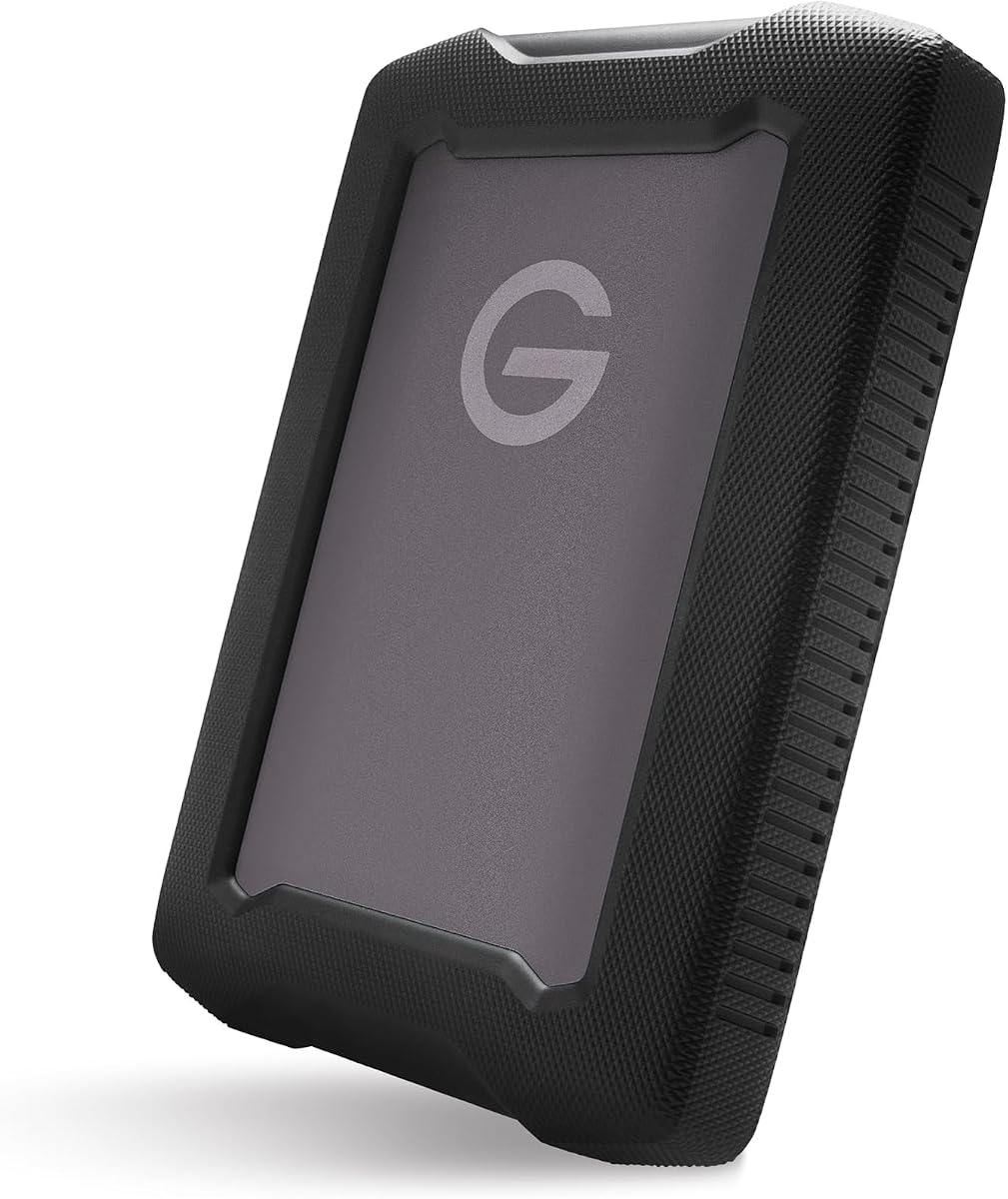
The G-DRIVE 5TB ArmorATD is a rugged portable hard drive aimed at photographers, filmmakers, and other users who need substantial backup capacity in a durable enclosure. It combines a mechanical 5TB drive with USB-C connectivity, up to 130MB/s performance, and compatibility with Thunderbolt 3 hosts. The supplied product data does not include a customer rating, so the recommendation rests on its stated specifications and physical design.
We may earn a commission when you buy through this link, at no additional cost to you.
Its defining strength is the combination of capacity and protection. The anodized aluminum enclosure is designed to feel substantial, while the bumper improves grip and helps shield the drive during transport. The listing also states that the enclosure resists rain, dust, and crushing, making it more appropriate for field work than an ordinary bare-metal desktop drive. USB-C at 5Gbps offers broad usability, and Thunderbolt 3 compatibility provides a faster path when the connected computer and cable support it.
The important limitation is speed. A stated maximum of 130MB/s is far below the over-6000MB/s performance claimed by the NVMe options in this guide. It will also be much slower than modern USB4 or Thunderbolt 5 SSDs when moving large active project files. Mechanical storage remains reasonable for archives, completed footage, and incremental backups, but it is not a substitute for a scratch disk during high-resolution editing.
This is the most practical choice in the list for buyers who prioritize storage density, portability, and physical resilience over rapid transfers. It is also not literally a Thunderbolt 5 product; it belongs here because it supports Thunderbolt 3 systems and can serve as a durable high-capacity companion to newer storage setups. Choose it for archives and field backups, but keep a faster SSD nearby for current working files.
The aluminum shell, easy-grip bumper, and stated resistance to rain, dust, and crushing make this drive better suited to mobile backup duty than an exposed portable HDD. Its 5TB capacity leaves room for photo libraries, project files, and other material that no longer needs constant editing access.
USB-C provides the standard connection, while Thunderbolt 3 compatibility allows suitable computers to use the faster interface available in the chain. Actual results depend on the host controller, source drive, file type, and whether another device occupies the same bus.
We may earn a commission when you buy through this link, at no additional cost to you.
The OWC Envoy Ultra 4TB is a portable NVMe storage solution built around the Thunderbolt 5 generation while retaining compatibility with Thunderbolt 3, Thunderbolt 4, and USB4 systems. Its supplied rating is 4.4 out of 5, and OWC describes peak real-world transfer performance of more than 6000MB/s. That combination of speed, useful capacity, and portability makes it a strong all-around choice for demanding creative and productivity workflows.
We may earn a commission when you buy through this link, at no additional cost to you.
The enclosure is designed for users who need more than conventional external storage without moving to a multi-bay desktop system. It is bus-powered, includes a built-in Thunderbolt cable, and uses a fanless heat-dissipating aluminum design. OWC also states that it is shock resistant and weatherproof, while compatibility extends to Macs, PCs, iPad Pros, Chromebooks, and Surface devices.
No Thunderbolt 5 drive can deliver maximum performance to every host. The computer must expose a compatible port, the cable path must support the required bandwidth, and sustained workloads still depend on the internal drive and workload. USB4 systems may work through the OWC Ultra Maximizer feature, but the highest throughput generally requires the newest host and connection chain. These are ecosystem limitations rather than defects in the enclosure.
The Envoy Ultra 4TB is a strong recommendation for editors, photographers, developers, and advanced users who want one portable drive to cover both active projects and larger libraries. It is especially attractive when four terabytes provides more breathing room than a smaller configuration without requiring the scale of an eight-terabyte drive. Confirm host and accessory compatibility before buying, especially if your daily computer is older.
The stated performance above 6000MB/s is aimed at eliminating waits during large-file transfers. It is especially valuable when moving source footage, project libraries, virtual machines, or build artifacts rather than small documents.
Support for multiple host types makes the Envoy Ultra useful for teams that move between desktop and portable systems. The built-in cable and bus-powered design also reduce the number of separate accessories required for a basic mobile setup.
We may earn a commission when you buy through this link, at no additional cost to you.
The OWC Envoy Ultra 2TB brings the same stated performance and portability concept as the larger Envoy Ultra configuration into a more compact capacity point. It is intended for users who want fast access to active media and project files without carrying a multi-bay or desktop storage solution. Its supplied customer rating is 4.4 out of 5.
We may earn a commission when you buy through this link, at no additional cost to you.
Key strengths include over 6000MB/s real-world speed, bus-powered operation, a built-in Thunderbolt cable, and a fanless heat-dissipating aluminum enclosure. OWC describes the unit as rugged, shock resistant, and weatherproof, while also listing compatibility with Macs, PCs, iPad Pros, Chromebooks, and Surface devices. The five-year limited warranty adds useful reassurance for a portable working drive.
The two-terabyte capacity is the main trade-off. It works well for a focused active project, a recent archive, or a traveling production kit, but users with growing media libraries may eventually want to move completed work to a larger drive. As with every high-speed portable SSD, advertised performance assumes a suitable host, cable, and sustained workload rather than every type of transfer.
This is a convincing option for creative professionals who want a small, quiet, and exceptionally fast working drive. It also suits developers moving code, virtual environments, or test datasets between compatible computers. Buyers should prioritize host compatibility first, then confirm that two terabytes matches their immediate needs rather than planning around all future data.
The enclosure's compact, bus-powered format is well suited to a mobile editing or production kit. It avoids external power and uses passive cooling, allowing fast storage to travel between compatible locations.
The supplied compatibility list covers major desktop platforms and several portable device families. OWC's Ultra Maximizer feature is also described as helping extract the maximum available speed from Thunderbolt 3, Thunderbolt 4, and USB4 machines.
We may earn a commission when you buy through this link, at no additional cost to you.
The OWC 8TB Envoy Ultra is the high-capacity portable option in this lineup, combining a large storage capacity with the same stated over-6000MB/s performance as the other Envoy Ultra models. It is aimed at editors and media professionals who need both rapid access and enough room to keep active footage, project files, and archives close at hand.
We may earn a commission when you buy through this link, at no additional cost to you.
Its physical design remains portable and bus-powered rather than deskbound. The fanless heat-dissipating aluminum enclosure is described as rugged, shock resistant, and weatherproof, and the built-in Thunderbolt cable reduces setup friction. Compatibility with Thunderbolt 5, Thunderbolt 4, Thunderbolt 3, USB4, Macs, PCs, iPad Pros, Chromebooks, and Surface devices broadens its practical appeal.
Compared with the 2TB and 4TB versions, the trade-off is bulk and the financial commitment associated with higher capacity. Capacity also does not eliminate the need for a sensible backup strategy, particularly when irreplaceable footage is the goal. Furthermore, users must still supply a modern host and appropriate connection to reach the stated performance ceiling.
The 8TB Envoy Ultra is the premium choice for buyers who want one portable drive to serve as a high-speed working volume and consolidated media store. It is less compelling for a small temporary project, but especially attractive for travel, field production, and compact edit suites. Ensure your host supports the interface and plan a separate backup for irreplaceable material.
Eight terabytes provides more room for source media and working files while preserving a portable, bus-powered form. That makes it a middle ground between a small scratch SSD and a multi-bay desktop enclosure.
The listed shock resistance and weatherproofing address common travel concerns. The enclosure's passive cooling approach also avoids the noise of a fan while providing a path for heat dissipation during demanding workloads.
We may earn a commission when you buy through this link, at no additional cost to you.
The OWC ThunderBay 8 is an eight-bay Thunderbolt storage enclosure for users who need multiple disks, RAID configurations, and expandable capacity rather than a single portable volume. It supports universal 2.5-inch and 3.5-inch SSDs or hard drives, and its supplied rating is 4.2 out of 5. Although it uses Thunderbolt 3 rather than Thunderbolt 5, its dual-port architecture remains highly relevant to high-bandwidth storage workflows.
We may earn a commission when you buy through this link, at no additional cost to you.
Two Thunderbolt 3 ports provide a path for daisy-chaining, and the listing states that six units can be connected together for substantial aggregate storage. A second port can also support other Thunderbolt devices. Bundled SoftRAID Premium adds RAID 0, 1, 4, 5, and 1+0 options, along with Apple RAID and Windows Disk Manager support. Plug-and-play operation and included cables simplify initial setup.
The trade-offs are physical size, power requirements, and the need to select and configure drives. This is a desktop-class solution rather than a pocketable drive. Its Thunderbolt 3 interface may also be the deciding factor for buyers already invested in that ecosystem, while systems built around newer Thunderbolt 5 hosts may prefer a newer enclosure or direct NVMe product.
The ThunderBay 8 is best suited to studios, production teams, and advanced enthusiasts who need several drives in one enclosure. It is particularly compelling when redundancy, fast rebuilds, or centralized capacity matter more than compactness. Check drive compatibility and intended RAID level carefully before adding disks, and maintain an independent backup of critical material.
Universal bays support both 2.5-inch and 3.5-inch SATA devices, making it possible to combine SSD performance with hard-drive capacity. The daisy-chain architecture also creates a path toward much larger aggregate storage.
The included SoftRAID Premium package supports several RAID levels and multiple operating systems. For users comfortable configuring storage, that can make it easier to balance speed, redundancy, and usable capacity.
We may earn a commission when you buy through this link, at no additional cost to you.
The OWC miniStack STX 20TB combines storage and connectivity in one compact desktop unit. It includes a 20TB 7200RPM enterprise hard drive, an open M.2 slot for a user-supplied NVMe drive, and a Thunderbolt 4 hub with three additional Thunderbolt 4 ports. Its supplied rating is 5.0 out of 5, the highest among the rated products in this guide.
We may earn a commission when you buy through this link, at no additional cost to you.
The enclosure is described as the first Thunderbolt-certified Thunderbolt 4 storage solution and is compatible with Thunderbolt 3, Thunderbolt 4, Thunderbolt 5, and USB-equipped systems. OWC states real-world performance of up to 770MB/s for 4K video editing. The hub portion adds display support, device charging, and room for five Thunderbolt devices, three USB devices, and two displays.
One important distinction is that the 20TB total comes from the included enterprise hard drive, while the NVMe M.2 slot allows users to add their own 2280 drive. This hybrid arrangement offers high-capacity archival storage and a place for a faster scratch volume, but it does not make every task run at the speed of a Thunderbolt 5 NVMe enclosure. The host interface is Thunderbolt 4 rather than 5, despite broad compatibility.
The miniStack STX is a compelling one-box solution for editors who want both capacity and a hub. It is particularly useful when a desk is short on Thunderbolt ports or when a single unit can handle archives, a fast project drive, displays, and peripherals. Buyers should confirm the M.2 drive they plan to install and the display arrangements supported by their specific host.
Combining a high-capacity hard drive with an NVMe slot and three extra Thunderbolt ports can simplify a workstation. It reduces the number of separate boxes needed for project storage, fast scratch space, displays, and accessories.
The host port can deliver up to 96W to the computer, while the downstream ports support multiple display configurations. This makes the enclosure more than a passive drive holder and adds value to a laptop-based editing setup.
We may earn a commission when you buy through this link, at no additional cost to you.
The OWC Thunderbolt 5 Dual 10GbE Network Dock is not a self-contained drive, but it is a relevant part of a Thunderbolt 5 storage strategy. Its upstream Thunderbolt 5 connection and three downstream Thunderbolt 5 ports can connect external storage while also providing network access. Two 10GbE RJ-45 ports, a 2.5GbE port, and several high-speed USB ports make it a connectivity centerpiece.
We may earn a commission when you buy through this link, at no additional cost to you.
Thunderbolt 5 provides up to 80Gb/s bidirectional data bandwidth and up to 120Gb/s display bandwidth according to the supplied specifications. Each Thunderbolt device port supplies 15W, while a dedicated 10Gb/s USB-C port also provides up to 15W. Display support can reach three 8K displays at 60Hz with DSC, subject to the host computer's capabilities.
The main caveat is that it stores no files by itself. Its value depends on the external drives, NAS, or other storage you attach. It also carries the lowest supplied rating in the group at 3.3 out of 5, and operating-system requirements are detailed, including current macOS, Windows 11, or the latest Ubuntu depending on the host interface.
This dock is best for a desktop that needs both fast external storage and high-speed networking. It can be particularly useful in shared studios, media workflows, and NAS access setups where a 10GbE path is valuable. Buyers should verify operating-system support and host capabilities, and they should choose it for connectivity rather than treating it as a direct storage purchase.
The combination of Thunderbolt 5 downstream ports and dual 10GbE networking allows a workstation to maintain high-speed access to both locally attached storage and network-hosted data. That makes the dock relevant to NAS and collaborative media environments.
External storage, displays, Ethernet, USB peripherals, and charging can be organized behind a single host connection. The included power supply supports the dock's broader port and power-delivery capabilities.
We may earn a commission when you buy through this link, at no additional cost to you.
The OWC Express 1M2 80G 2TB is a portable NVMe enclosure with a USB4 80Gb/s interface and a supplied rating of 4.5 out of 5. It combines over 6000MB/s stated real-world performance with a replaceable internal SSD, making it a flexible option for users who want speed now and the ability to upgrade capacity or performance later.
We may earn a commission when you buy through this link, at no additional cost to you.
The enclosure supports 2280 and 2242 NVMe M.2 drives across PCIe Gen 3, Gen 4, and Gen 5, according to the listing. Its patented heat-dissipating design is intended to protect the drive and maintain consistent performance without fan noise. The included USB4 cable and bus-powered design keep the package straightforward to carry between compatible Macs, PCs, iPad Pros, Chromebooks, and Surface devices.
The key caveat is that USB4 and Thunderbolt 5 are related but not interchangeable labels. This unit does not present itself as a native Thunderbolt 5 enclosure, and maximum speed depends on the host's USB4 implementation. OWC also warns that PCIe Gen 5 SSDs require careful selection because host computers, docks, and hubs have power limits; a drive drawing more than 11 watts during sustained operations may not be appropriate.
The Express 1M2 is ideal for a buyer who values a user-replaceable SSD and a strong portable speed proposition. It can serve as a compact scratch drive, a high-speed media cache, or an expandable general-purpose volume. Choose it when USB4 compatibility is preferable to a native Thunderbolt 5 enclosure, and verify the replacement drive's size, connector, and power requirements.
A replaceable 2280 or 2242 M.2 drive gives the enclosure a useful upgrade path. Users can select the capacity and generation that match their workload rather than being limited to one fixed internal configuration.
The passive heat-dissipating design helps keep the SSD cool and consistent during demanding transfers. Silent operation is also attractive in quiet offices, edit suites, and recording environments.
We may earn a commission when you buy through this link, at no additional cost to you.
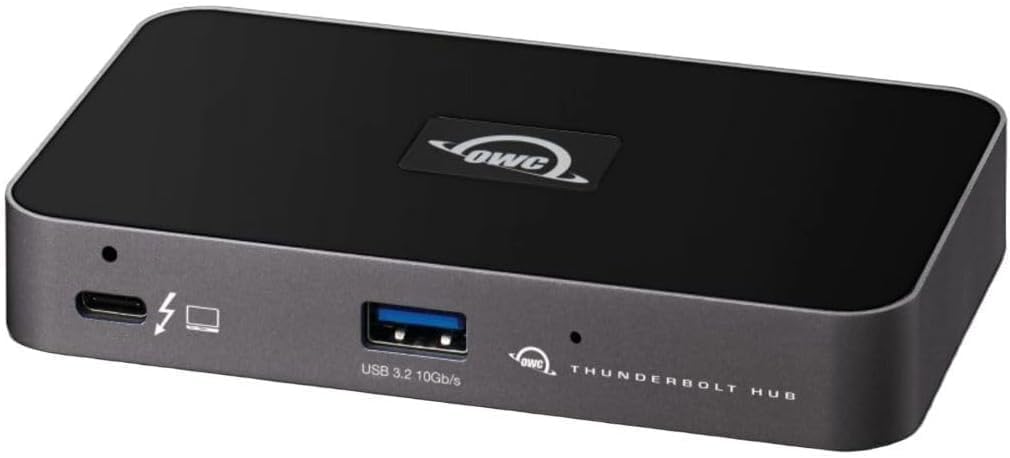
The OWC Thunderbolt Hub is a compact five-port connectivity solution rather than a storage drive. It provides three Thunderbolt 4 ports and one USB 3.2 Gen 2 Type-A port, making it useful for expanding the number of external storage devices, displays, and accessories connected to a laptop or desktop with limited ports.
We may earn a commission when you buy through this link, at no additional cost to you.
Thunderbolt 4 provides a 40Gb/s connection and supports displays up to 8K in the listed specifications. An adjustable LED makes the hub easier to see in different working environments, while the Kensington Nano Security Slot provides a way to deter casual removal. The hub's supplied rating is 4.4 out of 5.
Its limitations are significant when compared with current Thunderbolt 5 docks. It has fewer ports, only one USB-A connection, and no Ethernet or dedicated charging information in the supplied data. It is intended to simplify connections rather than maximize bandwidth, and the three downstream Thunderbolt ports are more useful for daisy-chained devices than for simultaneous heavy storage workloads.
The OWC Thunderbolt Hub is a good choice for a portable workstation that needs extra Thunderbolt connections and one legacy USB-A port. It can serve as a simple way to connect an external SSD, a display, and another Thunderbolt accessory, particularly for users of Thunderbolt 3 or 4 laptops. It is not the strongest option for a full modern desktop dock, but it is focused and easy to carry.
The hub offers a practical way to avoid continually swapping a single Thunderbolt connection among several peripherals. It is small enough to fit into a laptop bag and avoids the larger footprint of a full-featured desktop dock.
The Kensington Nano Security Slot is a useful feature in shared offices or semi-permanent installations. The adjustable LED provides a clear visual indication without demanding attention from the user.
We may earn a commission when you buy through this link, at no additional cost to you.
The Anker Prime TB5 is a fourteen-in-one Thunderbolt 5 docking station designed to consolidate storage, networking, displays, charging, and peripheral connections. Although it does not include storage itself, it is one of the most capable Thunderbolt 5 hubs in the guide and can serve as the central connection point for an external Thunderbolt SSD or multi-drive enclosure.
We may earn a commission when you buy through this link, at no additional cost to you.
Its port selection includes an upstream Thunderbolt 5 connection, two downstream Thunderbolt 5 ports, two USB-C ports, three USB-A ports, SD and TF card readers, 2.5Gbps Ethernet, audio, AC input, and an HDMI 2.1 or DisplayPort 2.1 connection. Anker states that a 150GB file can move through the Thunderbolt 5 port in 25 seconds under the relevant conditions.
Power delivery reaches up to 140W through the upstream port using PD 3.1, while the two front USB-C ports share 45W. Display support includes one 8K display at 60Hz or dual 8K at 60Hz for compatible Thunderbolt 5 Windows laptops. The advanced active cooling system is designed to control temperatures when the dock is heavily loaded.
This dock is ideal for a laptop-centered studio that wants many ports in one location. It can connect a fast external drive, network storage, card readers, displays, and charging without occupying several laptop ports. The trade-off is its larger desktop-style form and the need for the included AC power, so it is less relevant to a minimalist mobile kit. Confirm host, display, and charging requirements before purchase.
The unusually broad port mix reduces the need for separate adapters and readers. Storage devices, high-resolution displays, Ethernet, SD or TF media, and everyday USB accessories can all be organized through the dock.
The active cooling system is intended to protect performance and reliability when several demanding devices are connected. That makes it particularly relevant to users who regularly transfer large files while also running displays and other peripherals.
We may earn a commission when you buy through this link, at no additional cost to you.
The right Thunderbolt 5 storage solution depends on the host, the required capacity, the type of data, and whether speed or rugged portability matters most. These factors help separate direct NVMe storage, multi-bay systems, and connectivity accessories that support a complete workflow.
In short, verify interface support before comparing headline transfer speeds.
In short, choose a speed class that matches how quickly you need to move and access files.
In short, buy for realistic near-term storage plus an expansion path when available.
In short, use SSDs for speed and hard drives for economical capacity.
In short, match physical protection to the travel, handling, and environment.
In short, understand the RAID level's risk profile and always keep an independent backup.
In short, consider heat and power limits before selecting a high-speed SSD.
In short, choose a hub whose ports, displays, networking, and charging match the workstation.
Before connecting a drive or dock, identify the host's fastest available port and use a cable that supports the required interface and bandwidth. For a new portable SSD, confirm that the system recognizes the drive and that its storage format is compatible with the intended operating systems. If the device is part of a multi-drive or RAID system, install and configure the software before importing critical data.
For active media, copy or move large files with enough free space on both the source and destination, and avoid interrupting writes unnecessarily. Backups should follow a repeatable schedule, while especially valuable media should also have at least one copy stored separately. When using a multi-bay enclosure, follow the drive-removal procedure supported by its RAID software and avoid pulling a disk from a mounted array without understanding the consequences.
To preserve portability and longevity, keep portable devices in a protective sleeve, avoid exposing them to standing moisture or extreme heat, and give hot NVMe enclosures time to cool after sustained transfers. Active and passive cooling systems both need airflow. Periodically verify the health of important drives, review backup logs, and replace any cable or adapter that shows physical damage.
It depends on the specific product. The OWC Envoy Ultra line is listed as compatible with Thunderbolt 3, Thunderbolt 4, and USB4 machines, while the miniStack STX supports several Thunderbolt and USB-equipped systems. Older ports will provide lower performance, and features such as the fastest transfer rates or highest display bandwidth may remain unavailable. Always check the product's host requirements and the capabilities of the particular computer.
No, not necessarily. Newer Thunderbolt 5 products in this guide can work with older Thunderbolt and USB4 hosts, often at reduced speeds. A Thunderbolt 5 computer, suitable cable, and compatible controller are required to take full advantage of the newest bandwidth. For a dock, operating-system requirements and display capabilities may also limit which functions are available.
Both are portable NVMe products with stated performance above 6000MB/s, but they approach flexibility differently. The Envoy Ultra is presented as a ready-to-run Thunderbolt 5 portable solution with a built-in cable. The Express 1M2 uses a USB4 80Gb/s interface and lets the user choose or replace a compatible 2280 or 2242 M.2 SSD, making it especially attractive for future upgrades.
No. The OWC Dual 10GbE Network Dock and Anker Prime TB5 Dock are connectivity hubs that provide ports for external storage, displays, networks, and peripherals. They can serve as the central connection for a Thunderbolt SSD, enclosure, or NAS, but they do not contain storage themselves. The OWC Thunderbolt Hub and miniStack STX serve similar connectivity roles, with the latter also including substantial storage capacity.
A Thunderbolt SSD is much better for active projects because it provides dramatically higher transfer performance and lower latency. A portable hard drive can offer greater capacity per dollar and remains useful for archiving, backups, and infrequently accessed files. The G-DRIVE ArmorATD in this guide is also designed with stronger physical protection, so ruggedness and speed should be evaluated separately.
It can, depending on the dock, the connected device, and the host. Bandwidth is shared in some configurations, and the host controller plus cable can impose lower limits. A native Thunderbolt 5 connection is generally preferable when maximum speed is the goal. Displays, networking, and other attached devices may also affect the experience even when the storage link itself retains adequate bandwidth.
The enclosure supports PCIe Gen 5 NVMe M.2 SSDs, but OWC warns that careful selection is required. Host computers, docks, and hubs have bus-power limits, and the manufacturer recommends a Gen 5 SSD that consumes 11 watts or less during sustained read or write operations. Check the enclosure format, connector, key type, and power requirements before installing an upgrade.
No. RAID can maintain availability or improve performance after certain failures, but it does not protect against accidental deletion, malware, theft, fire, or every other form of data loss. The ThunderBay 8 offers several RAID configurations through SoftRAID, yet important files should still be copied to a separate drive or storage system located independently from the main array.
The OWC Envoy Ultra 2TB stands out as the balanced all-purpose choice, offering the stated high performance, portability, broad compatibility, and a five-year limited warranty. The 4TB version is equally capable and gives buyers more room for active projects, while the 8TB model is the stronger high-capacity option. The G-DRIVE ArmorATD serves a different need, prioritizing 5TB of rugged mechanical storage for field backup and archives.
For larger or more specialized setups, prioritize the connection path before choosing an enclosure. The ThunderBay 8 is for multi-bay RAID expansion, the miniStack STX combines high-capacity storage with a hub, and the Express 1M2 offers an upgradable portable NVMe design. When a dock is part of the plan, the OWC Dual 10GbE option emphasizes networking while the Anker Prime TB5 offers the broadest collection of ports, displays, and charging.
Before ordering, confirm the computer's interface, the cable, the intended operating system, and the capacity required for the actual workflow. Product availability, configurations, and prices can change, so review the current listing details before making a final purchase decision.
