
Caydo T3 AI Drawing Projector
4.6Editor score
Five progressive built-in themes
AI-generated projectable outlines
Native 720P entertainment features
WiFi and Bluetooth connectivity
Kids Drawing Projector guide comparing 10 top models for different ages and skill levels, tracing features, app connectivity, safety, and included art supplies.
A kids drawing projector turns outlines into a low-pressure path from imagination to finished artwork. The best options combine clear images, engaging content, easy controls, and enough guidance to keep children drawing independently, whether they are tracing animals, practicing letters, or creating custom scenes from a photo or written idea.
This guide compares ten drawing projectors based on their supplied age guidance, tracing systems, built-in artwork, app features, included supplies, portability, safety features, and creative flexibility. It includes traditional disc-based projectors, app-connected models, AI-assisted tools, and a light-up tracing pad for children with different interests and experience levels.
Each review explains what distinguishes the product, where it may be less convenient, and the kind of child or family it best suits. Ratings reflect the information available for the listed products, while features, availability, and bundle contents can change. Always check the current listing before purchasing.
4.6Editor score

4.8Editor score

4.4Editor score
The comparison below highlights each projector's recommended age, content style, creative technology, and practical extras, helping families narrow the field without overlooking differences in setup, portability, and learning value.




The Flycatcher smART Sketcher 2.0 is a 4.5-rated drawing projector for children ages five and older, combining physical tracing with smartphone and tablet connectivity. Its defining strength is the range of ways it can be used: more than 60 preloaded images provide immediate projects, while the Bluetooth-enabled app adds personalized drawings, interactive tutorials, and a way to project a photograph of something the child wants to draw.
We may earn a commission when you buy through this link, at no additional cost to you.
The supplied content ranges across animals, landmarks, and vehicles, giving a broad starting point without requiring a child to invent every subject from scratch. Step-by-step tutorials help beginners understand how an image is assembled, while customizable options make room for a child to alter the result. That balance between structure and freedom is particularly useful for children who are learning to plan shapes but do not want a rigid tracing worksheet.
The principal compromise is dependence on a more involved creative system. Younger children may need help navigating the app, editing an image, or moving between a personal project and the built-in library. Additional creativity pack cartridges can expand the selection, but they also make the system less self-contained than a projector supplied with all of its content. The app-dependent features are most satisfying when a parent or older child is comfortable with basic tablet controls.
This is a strong choice for a child who quickly tires of repeating the same ten outlines. It suits families seeking educational progression, broad subject variety, and a personalized digital component in one drawing system. For younger beginners who need something completely straightforward, one of the disc-based alternatives may be easier, but for broader creative freedom the smART Sketcher 2.0 is one of the most capable picks in this group.
A child can photograph a toy, pet, person, or other favorite subject, edit it in the app, and project the resulting image for tracing. This makes the projector feel less like a fixed coloring tool and more like a bridge between imagination and physical art.
Step-by-step tutorials and a broad preloaded library give children enough structure to begin successfully. Once they recognize the stages, they can adapt the images and add details of their own rather than merely completing a coloring page.
We may earn a commission when you buy through this link, at no additional cost to you.
This AI Drawing Projector is rated 4.4 and designed for ages five through twelve, offering a particularly imaginative route into tracing. Children can enter an idea, such as a dancing dragon or a castle in space, and receive a custom picture to project, trace, and color. They can also transform photographs of relatives, pets, toys, or memorable occasions into outlines for their own artwork.
We may earn a commission when you buy through this link, at no additional cost to you.
The built-in library contains 50 pictures, so the toy is useful without opening the AI features. Optional Drawing Packs and Learning Packs broaden the selection with subjects such as animals, holidays, ocean life, letters, numbers, and stories. The learning format adds spoken English words and numbers through a built-in speaker, allowing children to listen, repeat, trace, and color while working with a matching image.
One important limitation is that the Learning Pack audio is specific to those packs; regular Drawing Packs do not read words or numbers aloud. The product also has no lithium battery and must remain connected to its included USB cable and a compatible 5V/1A adapter or power bank. That tethered design is less convenient than a fully self-contained battery product, but it also removes the need for battery replacements.
The projector is ideal for a child who thinks in stories and wants to draw a family member, pet, or imaginary scene rather than choose from fixed templates. It also offers useful educational breadth for early learners. Families should verify that a suitable power adapter is available and are comfortable supervising the AI creation and photo-upload process.
The written-idea feature is especially useful when a child wants a subject that is not represented in the physical discs. The generated outline gives a concrete shape to follow, while coloring and added details keep the final result under the child's control.
Converting a photograph into a traceable picture can produce more personal art than standard animal templates. It offers children a way to make gifts, family portraits, and drawings of beloved pets using subjects they already care about.
We may earn a commission when you buy through this link, at no additional cost to you.
The Blue Marble Learn to Draw Projector is a 4.4-rated, straightforward option built around four image discs, nine markers, and illustrated instructions. Its patent-pending design lets children trace full images without blocking the projector light, a practical improvement that can prevent frustrating gaps in a finished drawing. The setup is simple enough for a child to move from opening the materials to beginning a project with little assistance.
We may earn a commission when you buy through this link, at no additional cost to you.
The discs are not merely collections of finished pictures. Illustrated instructions explain drawing fundamentals, while one disc contains a step-by-step tutorial for a complete fantasy scene. After tracing, children can follow suggested colors or substitute their own choices. That balance helps a young artist learn color relationships and sequencing while still allowing personal interpretation.
Unlike several app-based competitors, this projector has no digital learning curve and does not depend on a phone, tablet, WiFi connection, or external power arrangement. The trade-off is a smaller and less customizable body of content. As the child becomes familiar with the four discs, they will need additional artwork or ideas of their own to maintain novelty.
This projector is an excellent first drawing tool for children who are ready for guided tracing but do not need advanced digital features. The included markers and compact folding legs make it convenient for travel, quiet afternoons, or a shared activity. Parents seeking a straightforward introduction to projection drawing should find this model easier to understand and maintain than a more complicated smart projector.
The ability to trace without placing a hand directly over the light source makes the image easier to follow. This design supports cleaner contours and reduces the frustration of repeatedly adjusting a child's position to uncover a hidden section.
Built-in compartments hold the markers and image discs, while folding legs reduce the space the projector occupies. The result is a kit that is easier to organize than a collection of loose art supplies and easier to take along when creativity needs to travel.
We may earn a commission when you buy through this link, at no additional cost to you.
The Caydo T3 Joy carries a 4.8 rating, the highest listed rating among these ten products, and is intended for children ages four and older. It combines 120 built-in patterns across four themes with step-by-step drawing sequences and optional app-based AI tools. The breadth makes it difficult to exhaust quickly, while the structured stages help younger children understand what to draw next.
We may earn a commission when you buy through this link, at no additional cost to you.
The built-in patterns cover cute animals, space adventures, and other themes designed to appeal broadly. Every design is divided into manageable stages, supporting patience and confidence as children move from initial lines to a completed picture. The Caydo App extends that library by turning a photograph into a clean outline or by generating a projectable scene from a written prompt such as a superhero puppy.
Light direction and session timing are important parts of the design. The projector shines downward onto paper rather than directly toward a child's eyes, and its SGS certified RG0 blue-light safety provides an additional layer of reassurance for parents. Adjustable timer options of 0.5, 1, and 2 hours make it easier to structure drawing sessions and introduce rest breaks without constant supervision.
The T3 Joy is a strong all-around choice for a child who is ready for meaningful content variety but may not need a full entertainment system. Its AI features require a connected device and adult assistance at first, and the sloth-themed design may not suit every child. Even so, the combination of accessible tutorials, a large library, safety controls, and custom outlines makes it an especially well-rounded recommendation.
With 120 patterns organized into four themes, children have enough material for repeated drawing sessions without needing a new product each time. The staged instructions also make the large collection approachable rather than overwhelming.
Photographs and written ideas can become projectable outlines, allowing children to move beyond stock images. The child still traces, colors, and modifies the result, so the tool assists the drawing process without replacing the hands-on creative work.
We may earn a commission when you buy through this link, at no additional cost to you.
The Thin Air Brands Drawing Projector is a 4.6-rated kit designed for children ages three and up. It centers on 32 animal drawings spread across four sturdy discs, with eight crayons and one pad of artist paper included. The focused animal library gives young children familiar subjects to trace and color while keeping the available choices easy to understand.
We may earn a commission when you buy through this link, at no additional cost to you.
Its physical design emphasizes durability. The projector is made from rugged ABS plastic described as resistant to shock and impact, which is valuable for a toy likely to be handled by preschool-aged children. The kit also includes a colorful gift-style box and a 30-day warranty against manufacturing defects, providing extra reassurance for first-time buyers.
Operation is pleasantly uncomplicated. After inserting three AA batteries, which are not included, the child places paper beneath the projector's arms, turns the on knob, slides in a disc, and begins tracing. There is no app to learn, photo account to create, or charging routine to establish. The limitation is equally clear: the content is limited to animals, so children who quickly want vehicles, characters, letters, or custom ideas may exhaust the four discs.
For families introducing a preschooler to drawing projectors, this is a practical and durable choice. It also works well for travel because the projector and paper can be used without a connection to a wall outlet. Provided that the household can supply batteries and the child enjoys animal subjects, it offers a focused, uncomplicated introduction to tracing and coloring.
The impact-resistant ABS construction and straightforward controls are more appropriate for the intended age than a fragile, feature-heavy device. A simple on knob reduces the chance that a child will accidentally change settings or disconnect the activity.
Animal images provide a coherent theme for early tracing practice. Children can learn outlines, coloring, and hand-eye coordination using recognizable subjects without navigating complicated menus or unfamiliar terminology.
We may earn a commission when you buy through this link, at no additional cost to you.
The Caydo T3 AI is a 4.6-rated premium model for children ages five and older. Unlike a simple tracing projector, it combines a drawing system with native 720P projection, WiFi, Bluetooth, and media playback. Its core appeal remains artistic: five built-in themes progress from simple lines through letters to more detailed patterns, all supported by step-by-step guidance.
We may earn a commission when you buy through this link, at no additional cost to you.
Photographs become clean, traceable outlines, allowing children to create portraits of friends, drawings of family pets, or personalized handmade gifts. The app can also generate scenes from ideas such as a dinosaur riding a skateboard. These features expand the projector beyond a finite set of discs and make it easier for a child to turn an imagined subject into a drawing they can complete.
As a native projector, the T3 can also display cartoons or play music after a drawing session. Automatic brightness adjustment helps maintain a clear image in different rooms, and 0.5-, 1-, and 2-hour timers provide reminders to rest. The light is directed down toward paper, with SGS certified RG0 blue-light safety stated for the product. It is important to distinguish this richer T3 configuration from the more focused T3 Joy model.
This projector is best for a family that wants a multi-purpose creative station rather than a minimal tracing toy. The extra media functionality increases both its appeal and its complexity, and children may need help with network setup and app permissions. For a child ready for AI tools, progressive themes, and occasional projection entertainment, however, it offers the broadest combination of creative functions in the roundup.
Native 720P projection, WiFi, and Bluetooth give the T3 a broader role than a conventional outline projector. It can serve as a drawing station, a wall projector, and a speaker, which may help it remain useful as a child's interests develop.
The five built-in themes begin with simple lines and advance toward letters and detailed patterns. That sequence lets parents start with manageable projects and gradually introduce greater challenge without relying entirely on adult-created ideas.
We may earn a commission when you buy through this link, at no additional cost to you.
The Gohero Drawing Projector is a 4.3-rated drawing set for children ages three to six, with 64 projection images, ten color pens, three drawing stencils, and a pad of drawing paper. It provides enough material for a child to choose a subject, trace its outline, and experiment with color, while the stencils add another way to practice shapes and composition.
We may earn a commission when you buy through this link, at no additional cost to you.
Physical adjustment is a notable strength. The projector rotates through 360 degrees, moves up and down, and includes a focus control for sharpening the projected image. These settings help a family position the unit comfortably at a table, on the floor, or against a wall. The supplied material can be used on the included whiteboard or on ordinary drawing paper, giving the child some control over the working surface.
The kit is designed to be stored in the same box that serves as the projector's sturdy storage case. That makes cleanup more convenient and supports travel to restaurants, family gatherings, or car rides. Its limitations are the standard result of a disc-based design: the content cannot be expanded with custom photos or AI, and the product does not offer the same learning progression or multi-use functions as the app-connected alternatives.
The Gohero is a solid choice for a child who wants a broad selection of straightforward tracing subjects and appreciates a complete art set. It may be particularly useful for travel, where keeping accessories together matters. Parents should verify that the projector is easy for their child to position, since the multiple adjustments offer more flexibility but also require a little supervision.
Rotation, height movement, and focus adjustment help create a clearer tracing area on different tables and surfaces. These controls are more versatile than a fixed projector and can reduce the need to hunch over an awkwardly positioned image.
The projector's box stores the accessories together after play. Combined with the included pens, stencils, and paper, that organization makes the set convenient for keeping a child creatively occupied away from home.
We may earn a commission when you buy through this link, at no additional cost to you.
The KETIEE Drawing Projector is a 4.5-rated compact toy for children ages three and older. Rather than using a large overhead table, it follows a familiar tracing-book format with an integrated projector, a drawing book, twelve drawing pens, nine discs, and an erasable board. A child inserts a preprinted slide, turns on the light, and follows the projected pattern on the working surface.
We may earn a commission when you buy through this link, at no additional cost to you.
The discs contain patterns of varying difficulty, allowing a child to progress from simpler forms to more involved drawings. Its advertised projection, copy, draw, and music functions add variety to the basic tracing format, while the soft light, smooth ABS edges, and soft nib are designed with young hands in mind. The enclosed design also reduces the chance that a child will knock the projector onto the floor.
Because it uses an erasable board and a dedicated drawing book, it is not necessarily the easiest choice for families that prefer unlimited ordinary paper. A child who loves scribbling on loose sheets may find the included setup restrictive. The nine-disc selection is also smaller than the libraries offered by several competitors, and there is no app-based generation of custom subjects.
The KETIEE is appealing for a parent seeking a compact, self-contained introduction to projection drawing. It can help a preschooler recognize shapes and colors, practice coordination, and enjoy drawing without a large footprint. It is best suited to children who will work with the supplied board and book rather than those who immediately want to draw on standard paper.
The reusable ABS material, smooth edges, soft light, and soft nib support comfortable use for younger children. Keeping the projector and drawing surface in one unit also makes the toy easier for a small child to manage independently.
Nine discs with varying difficulty let a child choose an appropriate challenge. The progression supports early learning goals such as shape recognition, color perception, and hand-eye coordination without requiring a separate tutorial system.
We may earn a commission when you buy through this link, at no additional cost to you.
The Crayola Light Up Tracing Pad is a 4.6-rated light-box-style drawing toy for children ages six and older. Its LED surface illuminates designs so children can transfer them accurately by hand, making it a close cousin to a drawing projector with a different physical format. The kit includes 12 short colored pencils, 10 tracing sheets with multiple mix-and-match designs, 10 blank sheets, and one graphite pencil.
We may earn a commission when you buy through this link, at no additional cost to you.
Compared with a projector that casts an image from above, the light pad places the drawing surface directly over the illumination. This makes the outline consistently visible and may feel more familiar to children who have used a traditional light box. The non-slip frame helps keep the pad stable, while the even lighting is intended to support a smooth tracing experience.
Its creative range goes beyond simple animal outlines. The product supports sketching, animation basics, and expressive lettering, so it may be useful for older children developing more varied artistic interests. Additional designs can be downloaded online, extending the physical collection without requiring a specialized app. It can also serve a classroom, where several children can work on art lessons or group activities around the same type of tool.
The main caveat is that it requires three AA batteries, sold separately, and that its workflow differs from a true overhead projector. Families specifically seeking projected tracing may prefer one of the disc-based models. For a child who enjoys Crayola products, lettering, and mix-and-match designs, however, this light pad offers a polished and educational alternative.
The illuminated panel keeps the source design directly beneath the sheet. That arrangement is easy to understand and can be more comfortable for children who want a stable, flat drawing surface rather than an image projected over the page.
Tracing sheets, blank sheets, and online designs support tracing, free drawing, lettering, and animation-inspired exercises. The mix of guided and open-ended tasks makes the pad useful for both structured lessons and independent creative work.
We may earn a commission when you buy through this link, at no additional cost to you.
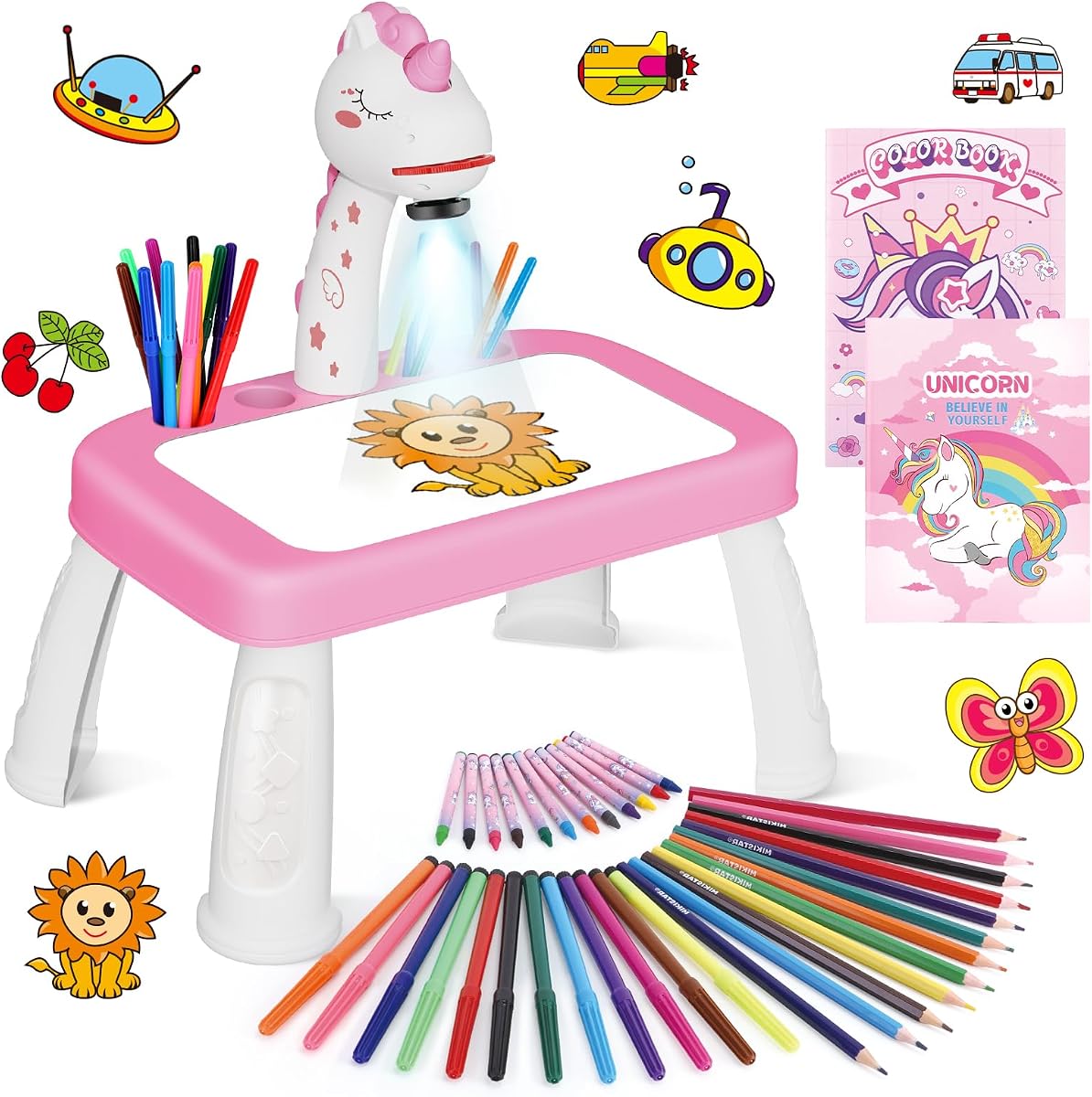
The Unicorn Drawing Projector is a 4.4-rated drawing and crafts set for children ages three and older. Its unicorn-shaped table is paired with nine projection discs and a notably broad supply package: 12 color drawing pens, 12 colored pencils, 12 crayons, a drawing book, a unicorn sticker book, and a board eraser. A child can begin tracing and then use the supporting materials for coloring, sketching, and sticker-based art.
We may earn a commission when you buy through this link, at no additional cost to you.
The upgraded drawing table is described as larger than its predecessor and intended to give children comfortable working room. Its assembly is simple, and projected patterns can be adjusted for clarity. Construction uses high-quality ABS material, while the drop-resistant design adds confidence for a toy likely to be used by energetic preschoolers.
The prominent unicorn theme is both the product's strongest visual feature and its main limitation. A child who loves unicorns may find the entire kit especially engaging, while another child may prefer animals, vehicles, or educational subjects. Because there is no app or photo-to-outline function, older children may eventually need new discs or independent drawing ideas to stay interested.
This projector is well suited to a preschooler who responds to a coordinated fantasy theme and appreciates having many types of art materials ready to use. It is also a practical choice for families seeking a single kit that supports several creative formats. For children whose interests are not tied to unicorns, a model with a broader subject library may be the better fit.
The unicorn-shaped table, sticker book, and decorative theme make the product feel like a special creative kit rather than a generic projector. That visual identity can encourage a young child to become interested in tracing and drawing.
Pens, pencils, crayons, paper, stickers, and an eraser allow children to move between tracing, coloring, sketching, and collage-style activities. The variety adds value for families who want more than a single-purpose drawing device.
We may earn a commission when you buy through this link, at no additional cost to you.
The right kids drawing projector depends on the child's age, interests, attention span, and willingness to use an app. Comparing content, image clarity, included accessories, adjustment options, and safety features is more useful than focusing on any one specification.
Recommended ages provide a useful starting point, but the skills a product emphasizes matter more than the number alone. Preschool-oriented systems often offer animal discs, simple outlines, chunky art materials, and nearly automatic controls. Systems aimed at children five and older may add step-by-step lessons, letters, detailed patterns, photographs, or AI-assisted outlines. A young child needs a project that can be completed without a parent deciphering every stage, while an older child can benefit from a tool that supports more deliberate planning.
Choose a model that offers graduated difficulty rather than one that presents only very simple or very advanced work. Look for staged instructions, multiple pattern levels, and a way for the child to customize a finished image. The best match supports the child's current skills while leaving room to advance.
A large library can keep a child engaged, but quantity is only useful when the artwork is varied and understandable. Disc-based products are predictable and work without connectivity, while app-connected models may offer personal photos, text prompts, additional packs, or expanding themes. Check whether the built-in content includes interests the child already has, such as animals, vehicles, space, letters, numbers, or fantasy scenes.
Prefer a library with several levels of difficulty and a clear way to change images. A broad collection of similar characters has less value than a smaller set that teaches shapes and subjects. For families wanting longevity, content that can be expanded is especially helpful, but it should complement rather than replace a satisfying out-of-box selection.
A child cannot trace what they cannot see clearly. Look for a projector that focuses the image, allows height or angle adjustment, and is designed so the child's hand does not block the light. Overhead models should project downward onto the page, while light-box designs illuminate the design directly beneath the sheet. Consider the working surface and whether the projected image can be made large enough for a child's hand.
Adjustable focus, rotation, and height make it easier to obtain a crisp outline across different tables. These controls are particularly useful for children with different seating positions. Clear adjustments and stable construction are often more important than extra decorative features.
Smart features can make a projector more personal, but they also add setup, account, device, or connectivity requirements. Photo conversion is useful for portraits, pets, and meaningful gifts, while text-to-image tools can turn an elaborate imaginary scene into a traceable outline. The child should still perform the physical tracing and coloring so the device assists rather than replaces artistic participation.
Choose app features that suit your family's comfort level. Consider whether the parent is willing to help with downloads, permissions, updates, and uploads. A device-free projector is generally easier for younger children, while a connected model offers greater creative range for an older child who is already confident with a tablet.
A complete kit can be easier to use than a projector sold on its own. Look for paper, crayons, colored pencils, markers, a drawing book, a whiteboard, stencils, or an eraser that matches the intended activity. The amount of paper matters for children who draw often, while different media encourage them to try color, texture, and shading. Check whether required batteries, adapters, or other essentials are included.
Choose supplies that fit the child's age and the surface included with the projector. Toddlers need soft, easy-to-grip tools, while older children can handle standard pencils and markers. A larger collection is useful only if the projector and drawing surface are designed to work comfortably with it.
A downward-facing projector is generally a more comfortable format for creative play because the image shines onto paper rather than directly at the user. Some models also state SGS certified RG0 blue-light safety, while others describe softer light without making the same formal claim. Timer options can remind families to pause after a defined period, especially for younger children.
Prioritize a stable downward projection design, a non-obstructing light path, and clear adult guidance about supervised use. Certification is a useful point to verify on the current listing, but it should complement sensible setup rather than substitute for it. Keep the projector on a stable surface and avoid directing the lens into anyone's eyes.
A collapsible design, integrated compartments, or a storage case makes cleanup easier and allows the projector to travel. Portable choices are useful for restaurants, family trips, waiting rooms, or quiet sessions away from home. Consider whether every accessory fits in the case and whether the unit can operate without a nearby wall outlet. A battery-powered model offers more freedom than one requiring a permanent connection.
Choose a setup that can be packed without loose pens rolling away or discs becoming lost. A larger table may provide more drawing room, while a compact book-style system can be easier for a child to carry. Confirm that folded size, power method, and included storage align with where the product will be used most often.
Start by setting the projector on a stable, level surface with enough room for the paper and the child's drawing hand. Read the product instructions, install the correct batteries or connect the specified power supply, and dim the room if needed. Choose a simple image for the first session so the child can learn the tracing process without the pressure of completing a complicated design.
Slide in the selected disc or open the app, adjust the focus, height, and angle until the outline is sharp, and position the child so a hand will not cover the light. Place paper over the projected area, secure the paper if it tends to move, and invite the child to trace one line at a time. After the outline is complete, remove the projector if the design permits, add color, and add personal details that were not in the original picture.
Clean the unit only as directed by its manufacturer. Keep the lens and projection surface free of crayon marks, adhesive residue, dust, and scratches, and do not immerse the projector. Store discs and accessories in the designated box or compartments, and remove batteries during extended storage if the manual recommends it. Check the current product listing for compatible power accessories, replacement discs, downloadable content, and updated care instructions.
Suitability depends more on the product's guidance and difficulty than on a child's birthday alone. The models in this guide range from listed use for ages three and up to ages five through twelve. Younger children generally benefit from simple animal outlines, easy controls, and chunky supplies, while older children can use letters, detailed themes, photo conversion, and AI-generated outlines. An adult should still supervise initial setup and help younger children understand how to keep their hand away from the light.
Not all of them do. Disc-based products such as the Blue Marble, Thin Air Brands, Gohero, KETIEE, and Unicorn Drawing Projector work without a connected device. The Flycatcher smART Sketcher 2.0 uses Bluetooth app connectivity, while the AI Drawing Projector and Caydo models add custom creation features. Check the current listing because app requirements and supported devices can change as software evolves.
Several connected models can transform a photograph into a clean projectable outline. The AI Drawing Projector and both Caydo models state that photos can be converted for tracing. This can make portraits of relatives or drawings of pets into personal projects. A parent should select suitable images, help with the upload, and keep the activity focused on the child's tracing and artistic choices rather than complicated editing.
It depends on the format a child prefers. A traditional projector casts an outline downward onto ordinary paper, which can feel more like drawing from a window. A light-up tracing pad places the source design directly under the sheet, offering a flat work surface and even illumination. Both support hand-eye coordination and accuracy, so the deciding factors are the child's comfort, available space, and the types of activities included.
Use a stable table, place the paper directly beneath the lens, and adjust the focus before the child begins. Keep the projected image large enough for the child's hand, and teach the child to move the drawing hand rather than cover the light source. Models with adjustable height, angle, rotation, or focus are easier to configure for different children and surfaces.
First, move the projector into a darker room and confirm that the correct slide or disc is fully inserted. Then adjust the focus and distance from the paper, using the height and angle controls if available. Wipe the lens or projection window with a soft dry cloth, following the manufacturer's guidance. Persistent blur may indicate alignment or image-quality issues, so consult the product instructions rather than attempting a repair.
Many models can support art lessons, letter practice, shape recognition, and independent creative work. The Crayola Light Up Tracing Pad is specifically described as useful for classroom art lessons and group interaction, while several disc-based projectors work on ordinary paper. For a shared classroom, a stable unit, multiple copies of the image sheet, and enough consumable paper may matter more than app features.
Handle image discs by their edges and keep them away from food, liquids, excessive heat, and direct sunlight. Clean the projector's surface with a soft, dry cloth and follow the manual for any removable lens cover. Do not immerse the electrical unit or use harsh chemicals. Store accessories in the supplied case or compartments, and verify replacement content and power requirements before ordering additional parts.
The Caydo T3 Joy stands out as the most well-rounded choice for ages four and older, combining 120 built-in patterns, staged instruction, AI customization, downward projection, and timed sessions. The Caydo T3 AI is the premium selection for families who also value native 720P projection, WiFi, Bluetooth, and entertainment functions. The Blue Marble Learn to Draw Projector is the simplest all-in-one option, offering physical discs, a structured lesson, markers, and compact storage without app complexity.
Prioritize the child's age, attention span, and preferred type of art over the largest feature list. A disc-based projector is often easiest for a preschooler, a broad traditional library works well for animal and vehicle fans, and connected or AI-assisted systems reward children who are ready to work with a parent on photos or original ideas. Clear image adjustment, included supplies, and a stable downward light path can affect daily usability more than secondary features.
Before purchasing, confirm the current listing details, compatibility requirements, included accessories, and content access. Product bundles, software support, and available add-ons can change, and ratings reflect changing customer feedback rather than a physical inspection by the author. Comparing the latest information against the priorities in this guide will help you choose a drawing projector that feels useful today and remains engaging as the child's skills grow.
