
AULA WIN60 HE
4.5Editor score
0.02mm rapid trigger step
Up to 8000Hz polling rate
Hall Effect magnetic switches
Compact 60% gaming layout
Web-based customization driver
Looking for a keyboard for Valorant? This expert guide compares 10 gaming keyboards for latency, rapid trigger, layout, connectivity, build, and comfort.
A keyboard for Valorant must translate movement, ability, and weapon commands consistently while you react quickly to changing rounds. The most important traits include low input latency, dependable rapid trigger behavior when supported, a compact layout that leaves room for aiming, and keys that remain comfortable during long sessions.
The keyboards in this guide were compared using the specifications and feature descriptions supplied for each model. We considered polling rate, switch technology, actuation control, layout, connectivity, stabilization, sound-dampening construction, customization options, and the practical demands of a tactical first-person shooter.
Each review identifies the feature that makes a particular model worth considering, along with any compromises revealed by its design. Ratings reflect the supplied customer feedback, while features and prices can change, so confirm the current listing and software compatibility before making a final purchase.
4.5Editor score

4.4Editor score

4.6Editor score
The comparison below highlights the major hardware and usability differences among all ten keyboards, from 60% magnetic-switch designs to wireless 75% and 96% layouts, so Valorant players can narrow the field by the features that matter most to their setup.


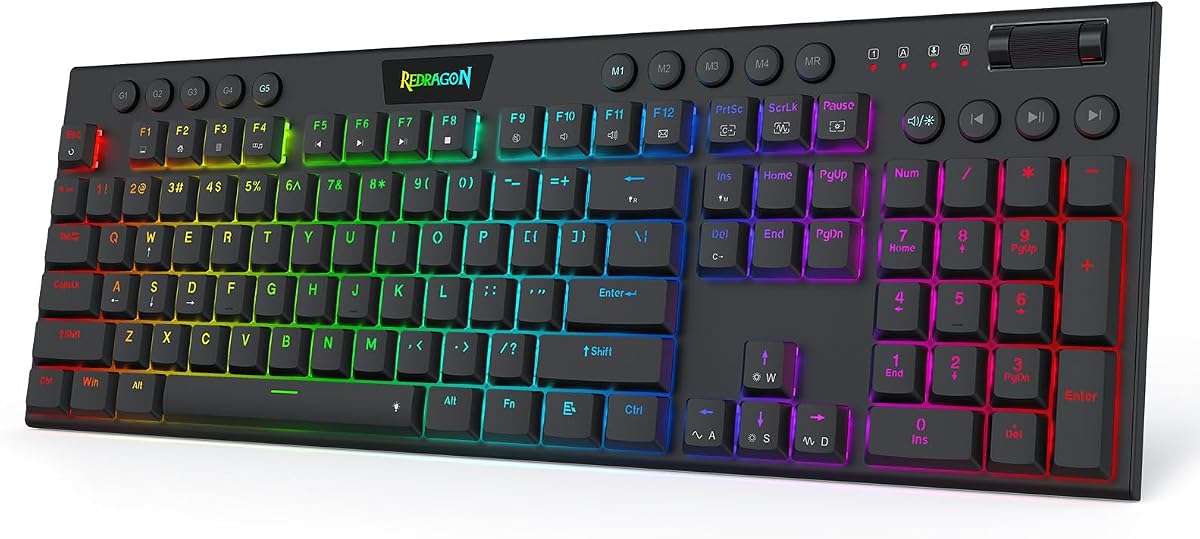




The Redragon K673 HE is a full-size magnetic gaming keyboard built around features that directly support fast FPS play. Its supplied rating is 4.1, and the standout qualities are an 8,000Hz wired connection, Rapid Trigger, PRCS, and adjustable actuation from 0.1mm to 3.4mm. For Valorant, that combination offers unusually granular control over how movement and ability keys are registered.
We may earn a commission when you buy through this link, at no additional cost to you.
Its UltraMag POM magnetic switches detect keypresses without physical contact, allowing the keyboard to reset a key as soon as it rises far enough to satisfy the configured threshold. Rapid Trigger is particularly relevant when a player releases movement after a peek or counter-strafe because it can prevent a previously pressed directional key from remaining active longer than intended. The advertised 8,000Hz connection and the ability to save several actuation profiles add further control for different play styles.
The dual-module floating structure and internal dampening layers are designed to reduce the harsh, rigid sensation associated with some gaming boards. A separate knob handles backlight brightness and media playback, reducing reliance on layered shortcuts. The trade-off is that this is a wired design with no wireless flexibility, and its advanced features depend on desktop or web-based configuration, so players who dislike setup software may find it less convenient.
The K673 HE is a strong choice for a Valorant player who wants rapid-trigger control without moving to a 60% board. It suits dedicated desktop setups where a stable wired connection and a full-size layout matter more than portability. Overall, it is a versatile competitive keyboard, although buyers should confirm driver compatibility and their preferred actuation behavior before committing.
Rapid Trigger and adjustable actuation make this board useful when your movement timing needs to be finely controlled. Saving separate profiles can also help you create distinct settings for tactical movement, abilities, and general typing.
The floating switch-plate design and dampening layers aim to reduce harsh sound and unwanted vibration. That makes the keyboard more suitable for long Valorant sessions where repeated movement inputs could otherwise create a distracting, rigid noise pattern.
We may earn a commission when you buy through this link, at no additional cost to you.
The Redragon K686 HE combines a full-size layout with the fast-switching behavior sought by competitive FPS players. It carries a 4.4 rating and supports an 8,000Hz wired connection, Rapid Trigger, PRCS, and Hall Effect switches with a 0.1mm to 3.4mm adjustment range. Those controls make it easier to tune repeated movement commands around a consistent preferred actuation point.
We may earn a commission when you buy through this link, at no additional cost to you.
The supplied feature information emphasizes that the magnetic switches register without physical contact. In practical terms, this enables the keyboard to distinguish different stages of a keypress and rapidly reset a released key when the configured threshold is met. For Valorant, that can be useful during a fast peek, strafe, or counter-strafe, particularly for players who want very little residual movement after a key is released.
A dual-module floating construction and an independent, anti-wobble switch plate work with dampening layers to soften the typing and gaming feel. The single knob provides direct access to lighting brightness and media playback. The main compromises are the keyboard's full-size footprint and wired-only design, both of which may be less attractive if desk space is at a premium or a wireless connection is important.
The K686 HE is best for a player who wants rapid-trigger versatility but still values a number pad and conventional full-size organization. It is also a sensible option for mixed gaming and productivity use because its calibration options extend beyond a single movement setup. For a more compact board with similar magnetic-switch principles, the Redragon K618 HE and AULA models offer alternative layouts.
Saved actuation profiles make it possible to establish a preferred baseline and then move between settings without rebuilding the configuration from scratch. This is particularly useful when switching between Valorant matches and everyday computer use.
The independent switch plate is intended to limit movement and instability, while the dampening structure softens the key action. Together, they provide a more settled alternative to a rigid, sharply clicking gaming board.
We may earn a commission when you buy through this link, at no additional cost to you.
The Redragon K618 HE stands out for its low-profile magnetic-switch design and a supplied rating of 5.0. It supports 8,000Hz wired polling, Rapid Trigger, adjustable actuation from 0.1mm to 2.8mm, and a compact structure intended to reduce travel. These qualities align closely with Valorant, where frequent movement inputs and short decision windows reward a keyboard that feels immediate and unobtrusive.
We may earn a commission when you buy through this link, at no additional cost to you.
A dedicated four-by-five macro zone provides 20 programmable keys, while separate media controls and a scroll wheel handle lighting and audio. The description states that macros can be recorded and adjusted without installing software, which is a meaningful convenience for players who want direct control without navigating a configuration utility before every session.
The shorter switch and keycap profile is designed to produce quicker actuation and a lighter feel on the wrists. The limitation is that low-profile designs inevitably differ from a standard keyboard's taller profile, and the maximum stated actuation range of 2.8mm is narrower than some full-size magnetic alternatives. Players accustomed to a traditional shape may need time to build muscle memory.
The K618 HE is a compelling recommendation for a Valorant player who prioritizes fast travel, compact ergonomics, and onboard shortcuts. It is especially appealing for users who dislike the routine of opening software to configure every action. With the strongest supplied rating in the group, it is an attractive choice for competitive play, although its unconventional layout should be compared carefully with your usual keyboard.
The low-profile magnetic switches are designed to sense movement with less physical travel than conventional switches. That can reduce finger movement during long rounds while retaining adjustable actuation and rapid-trigger behavior.
Twenty macro keys and dedicated media controls provide useful direct access during play. Their ability to record or adjust combinations without software keeps setup away from the critical path when the match begins.
We may earn a commission when you buy through this link, at no additional cost to you.
The Corsair Clipper PRO MINI 60 is a compact Hall Effect keyboard explicitly oriented toward competitive FPS play. Its 4.4 rating reflects a favorable supplied customer score, while Rapid Trigger, a 0.1mm reset, Multi-Action, Smart Tap, and Tap Lock provide detailed control over how movement keys behave. It is a strong candidate for players who regularly peek, stop, and redirect.
We may earn a commission when you buy through this link, at no additional cost to you.
FlashTap SOCD is intended to create cleaner directional inputs and sharper counter-strafing, while CORSAIR AXON hyper-processing supports an 8,000Hz polling rate. The MGX HyperDrive linear Hall Effect switches offer adjustable actuation from 0.2mm to 3.8mm, zero drift, and a stated 100 million-keystroke durability rating. This combination of movement-focused features and broad tuning makes the board especially relevant to Valorant.
The 60% format saves desk space, leaving more room for a broad mouse movement. Dual-layer sound dampening keeps the keyboard quieter and less distracting, while IP57-rated water and dust resistance and durable PBT keycaps are useful for long sessions. As a compact wired board, however, it omits a dedicated function row and does not offer the wireless flexibility of some alternatives.
The Clipper PRO MINI 60 is a strong recommendation for a competitive player who wants advanced movement features in a space-saving 60% layout. It balances fast reset behavior, counter-strafe tools, and durable construction, making it particularly convincing for Valorant. Confirm that its special movement functions suit your preferred control scheme and that the compact layout meets your everyday needs.
Rapid Trigger, Tap Lock, Smart Tap, and FlashTap SOCD offer several ways to shape directional input. These are particularly relevant when a Valorant player wants a key to stop registering movement as soon as it is released.
The compact 60% layout frees desk area for aiming, and dual-layer dampening helps reduce distracting key noise. Together, these details support a cleaner competitive station without requiring a full-size board.
We may earn a commission when you buy through this link, at no additional cost to you.
The Razer Huntsman Mini 60% uses linear optical switches rather than Hall Effect magnetic switches, giving it a distinct approach to fast input. It has a 4.6 rating, a 1.0mm actuation distance, an aluminum top frame, and a compact layout. The optical switches are described as registering 15 to 30 percent faster than other linear switches at that stated distance.
We may earn a commission when you buy through this link, at no additional cost to you.
Razer Snap Tap can prioritize the most recently pressed key within an assigned pair, offering another way to manage opposing movement commands. It is off by default and can be enabled in Razer Synapse 4. Hypershift provides macro remapping, while individual per-key RGB lighting is compatible with popular games and a broad collection of integrated lighting products.
Oil-resistant double-shot PBT keycaps are designed to resist grime and wear, while the aluminum top frame adds structural rigidity. The key trade-offs are the lack of dedicated arrow and function rows on this Mini layout, plus the need to use Synapse for programmable features. A buyer who values plug-and-play simplicity without giving up customization may need to reconcile those points.
The Huntsman Mini 60% is a good option for a Valorant player who prefers established optical-switch responsiveness and a simple compact footprint. It may not offer the same deep magnetic actuation tuning as the HE models, but Snap Tap and full programmability make it versatile for movement-heavy setups. It is best suited to users who appreciate Razer software and its wider device integration.
The switch design registers presses through an optical beam at a 1.0mm actuation distance. This provides a fast linear action for competitive movement without relying on the adjustable magnetic system found on the HE keyboards.
Synapse 4, Hypershift, Snap Tap, and Chroma lighting create a broad configuration environment. That maturity is particularly useful if you already use other compatible Razer hardware or want synchronized lighting effects.
We may earn a commission when you buy through this link, at no additional cost to you.
The AULA WIN60 HE is a compact Hall Effect keyboard with several features aimed directly at Valorant and other FPS games. Its supplied rating is 4.5, and the main attractions include an 8,000Hz polling rate, a 0.02mm rapid-trigger step, adjustable magnetic switches, and a 60% layout designed to preserve desk space for mouse movement.
We may earn a commission when you buy through this link, at no additional cost to you.
The web-based driver allows players to remap keys, create macros, and customize RGB lighting from a connected internet-enabled device. The stated lightweight driver approach reduces the installation burden associated with some full desktop utilities. Magnetic sensing without physical contact also allows the keyboard to provide a broad range of controlled activation behavior rather than one fixed mechanical trigger point.
The main compromises are the wired connection and compact layout, which omits a dedicated arrow-key cluster. While the trigger specification is highly refined, actual results depend on software settings, game behavior, and the rest of the computer system. The board is therefore most attractive to players willing to spend a little time tuning it rather than those who want completely automatic movement behavior.
The WIN60 HE is a compelling value pick for a Valorant player who wants fine rapid-trigger control and a high advertised polling rate. It is particularly useful in compact desks where every extra centimeter matters for aiming. With web-based configuration and a dedicated FPS orientation, it balances advanced competitive controls with straightforward setup.
The stated 0.02mm rapid-trigger step allows for a narrow distinction between pressing and releasing a key. That granularity is attractive for players trying to eliminate unwanted directional input during a counter-strafe.
The web-based utility can be opened from an internet-connected device for key mapping, macros, and lighting. This reduces the need to install a large desktop application and makes configuration more convenient on the go.
We may earn a commission when you buy through this link, at no additional cost to you.
The AULA WIN68 HE is a 68-key magnetic gaming keyboard that seeks to retain familiar controls while remaining compact. Its 4.5 rating is supported by an 8,000Hz polling rate, a stated latency of 0.3ms, adjustable actuation from 0.02mm to 3.44mm, and separate arrow keys. Those features make it a practical middle ground between an extremely compact board and a conventional full-size keyboard.
We may earn a commission when you buy through this link, at no additional cost to you.
The Windows web driver supports rapid trigger, SOCD, DKS, MT, and TGL functions, as well as key mapping, macro editing, and RGB lighting. Each key can receive its own press and reset sensitivity, allowing movement behavior to be personalized by key rather than applied as one global setting. The board also includes 14 lighting presets and south-facing LEDs for visible keycap illumination.
The most important limitation is platform compatibility. Although the keyboard can switch between Windows and Mac layouts, the supplied information specifies that the web driver does not support Mac, which could frustrate users who rely on the same detailed configuration on both systems. Many commands also rely on FN combinations, so learning the shortcuts takes some time. Otherwise, the 68-key arrangement preserves useful navigation keys while saving desk space.
The WIN68 HE is a good fit for a Valorant player who wants adjustable magnetic controls but dislikes the loss of arrow keys. It balances compact size, wired reliability, and broad per-key configuration. It is especially practical for PC gaming and mixed use where separate navigation keys remain valuable.
The 68-key layout saves substantial desk area while retaining separate arrow keys. That makes the board easier to use for editing, menus, and general productivity than a smaller layout with layered navigation commands.
Individual actuation and reset settings let you tune different keys independently. The available rapid-trigger, SOCD, DKS, MT, and TGL functions offer several ways to shape movement and macro behavior.
We may earn a commission when you buy through this link, at no additional cost to you.
The AULA F75 Pro is the most flexible wireless option in this guide and also serves as a capable general-purpose mechanical keyboard. It has a 4.6 rating, an 81-key 75% layout, a rotary knob, and three connection modes: Bluetooth 5.0, 2.4GHz wireless, and USB wired. It can also hold connections to five devices, making it useful for moving between a gaming PC, laptop, tablet, or phone.
We may earn a commission when you buy through this link, at no additional cost to you.
The hot-swappable base accepts three-pin or five-pin switches, allowing players to change the feel without soldering. Pre-lubed LEOBOG Reaper switches and pre-lubed stabilizers are included to provide a smoother action and reduce common mechanical keyboard inconsistencies. Five layers of filling material help reduce cavity noise, while the extended silicone pad and single-slot PCB are intended to improve stability and resilience.
Unlike the HE boards in this guide, it does not offer magnetic rapid trigger, and its heavier custom-style construction may occupy more desk space than a dedicated 60% FPS keyboard. Wireless operation also introduces a different set of priorities: convenient reconnection and device switching matter more than having the most granular movement controls. Nevertheless, the 75% layout retains arrow keys and balances gaming with productivity well.
The F75 Pro is a strong recommendation for a player who wants wireless freedom, device switching, and a polished mechanical typing experience without giving up hot-swappable customization. It is less suited to players whose main priority is advanced rapid-trigger behavior, but it covers everyday Valorant needs while adding broader multi-device utility.
Bluetooth, 2.4GHz, and wired modes cover different desk and travel situations. The 2.4GHz option is designed for low-latency wireless gaming, while USB provides a stable wired alternative.
Three-pin and five-pin switch support makes it possible to alter the keyboard's feel as preferences change. The pre-lubed stabilizers and layered dampening are designed to reduce the rough or hollow sensations common to custom-style boards.
We may earn a commission when you buy through this link, at no additional cost to you.
The ATTACK SHARK X68 HE combines a 66-key layout with detailed Hall Effect control. Its supplied rating is 4.6, and its specifications include an 8,000Hz polling rate, 0.01mm rapid-trigger accuracy, adjustable actuation from 0.1mm to 3.4mm, and a theoretical stated latency of 0.125ms. It also allows four functions to be assigned to four different pressing depths on a single key.
We may earn a commission when you buy through this link, at no additional cost to you.
The web-based QMK driver provides remapping, macros, hotkeys, lighting customization, and configurable activation and deactivation points. This makes it possible to vary behavior between typing and gaming instead of accepting a single global setting. The keyboard's full-key anti-ghosting and separate arrow keys further improve its practicality for a compact competitive layout.
Its top-mounted structure, anodized aluminum-alloy positioning plate, double-layer PORON, and pre-lubed stabilizer switches are designed to create a stable, quiet action. A curved wrist rest supports longer use, and south-facing LEDs sit beneath double-shot Cherry-profile PBT keycaps. The trade-off is that the design remains wired, and the configuration depends on a web driver rather than a conventional local application.
The X68 HE is a good fit for a Valorant player who wants extremely fine trigger settings while retaining arrow keys and cross-platform layout switching. It may appeal to users who also use Mac computers because a one-button mode change is included, although the primary web-driver workflow is described as a firmware-style interface. It is a compact, feature-rich option for competitive desktop play.
Assigning four functions to different pressing depths provides more control than a simple on-off trigger model. This can be useful for experimentation, although the most practical setup will vary by player.
A top-mounted layout, PORON damping, and a curved wrist rest support stability and comfort. The separate arrow keys and compact footprint make the board more versatile than a minimal gaming layout.
We may earn a commission when you buy through this link, at no additional cost to you.
The ASUS ROG Strix Scope II 96 is a premium full-size solution that retains a number pad while using a compact 96% layout. Its supplied rating is 4.6, and it supports Bluetooth for up to three devices, low-latency 2.4GHz wireless through ROG SpeedNova, and USB wired connectivity. It also supports PC and Mac and claims up to 1,500 hours of battery life in 2.4GHz mode.
We may earn a commission when you buy through this link, at no additional cost to you.
Hot-swappable, factory-lubed ROG NX Snow linear switches are included, and the keyboard can also be configured with ROG NX Storm clicky switches for a more tactile feel. Integrated sound-dampening foam and switch pads are designed to reduce pinging, echoes, and unwanted acoustic harshness. Individual per-key RGB lighting and fully programmable keys provide additional customization for game controls and media.
The principal compromise is that this is not a dedicated magnetic-switch board with rapid-trigger control. It also takes up more desk space than the 60% alternatives and, for a low-sensitivity Valorant player, may not leave as much room for mouse movement as a compact FPS layout. Nevertheless, the number pad and dedicated navigation controls make it highly useful outside gaming. A detachable wrist rest and three tilt positions support longer sessions.
The Scope II 96 is an excellent premium choice for a gamer who wants a full number pad, wireless flexibility, and a refined mechanical feel without giving up useful controls. It is less appropriate for players whose main goal is advanced counter-strafe tuning, but for general Valorant play, productivity, and multi-device use, it offers an unusually complete feature set.
The 96% arrangement preserves the number pad, arrow cluster, and function area in a narrower footprint than a traditional full-size board. It offers a practical balance for players who alternate between Valorant and everyday computer tasks.
SpeedNova wireless, multi-device Bluetooth, and wired operation provide flexible connectivity. Integrated foam and switch pads soften the acoustic profile, while the detachable wrist rest and tilt adjustment improve comfort.
We may earn a commission when you buy through this link, at no additional cost to you.
The right Valorant keyboard balances fast input, comfortable movement keys, a layout that suits your desk, and dependable configuration. Use the following factors to compare magnetic-switch gaming boards with optical, mechanical, and wireless alternatives.
Rapid trigger is most relevant on Hall Effect keyboards because the keyboard can detect key movement and reset a key as soon as it rises beyond a configured threshold. This can help prevent a released movement key from remaining active, which matters during counter-strafing and other rapid changes of direction. Adjustable actuation gives you control over how far a key must travel before it registers, but a lower setting is not automatically better for every player. A precise setting that remains consistent under pressure is generally more useful than an extremely low threshold that causes accidental movement.
Prioritize reliable rapid-trigger controls, clear per-key settings, and a calibration process that lets you establish a stable baseline.
Polling rate describes how frequently the keyboard reports its state to the computer. Models in this guide advertise polling rates up to 8,000Hz, alongside wired or low-latency wireless connections. The headline number is only one part of the system: software, USB connection, computer performance, and game behavior also influence the experience. For competitive Valorant play, a stable wired connection and responsive controls remain more important than chasing a specification the rest of the setup cannot consistently support.
Treat a high polling rate as one advantage rather than a substitute for dependable hardware and a responsive entire system.
A 60% keyboard removes the function row, navigation cluster, and number pad to create a compact playing surface. That extra room can benefit players who use large mouse movements, although a 66-key, 68-key, 75%, or 96% layout may be more convenient for editing and daily work. Consider whether you need visible arrow keys, how often you switch between Valorant and other applications, and whether your desk can accommodate a full-size board without restricting mouse movement.
Choose the smallest layout that still supports your navigation habits and leaves enough space for comfortable aiming.
The list includes Hall Effect magnetic switches, linear optical switches, and conventional mechanical switches. Magnetic switches offer adjustable actuation and rapid-trigger functions. Optical switches provide a fast fixed actuation point without physical contact, with models such as the Razer Huntsman Mini 60% using a 1.0mm distance. Mechanical switches use conventional contact-based action and are often preferred by users who enjoy a broader range of switch feel, customization, and sound profiles. Each approach can work for Valorant; the key distinction is how much control you want over timing and movement behavior.
Pick magnetic switches for granular timing, optical switches for fast fixed action, and mechanical switches for traditional feel and customization.
Advanced competitive features usually require configuration through a desktop or web-based driver. Look for clear options for actuation, rapid trigger, SOCD, per-key mapping, macros, lighting, and saved profiles. Consider operating-system support as well: one of the AULA models is explicitly Windows-only in its web driver, while the ATTACK SHARK model includes Windows and Mac layout switching. A driver that you can reach through a browser may be convenient, but you should still confirm the functions and operating-system requirements shown on the current listing.
Verify driver compatibility and the availability of the exact settings you need before choosing a configurable keyboard.
Wired keyboards offer a straightforward connection and avoid wireless battery management, making them a common choice for competitive setups. Wireless boards add portability, cleaner desks, and quick device switching, but their input behavior and connection stability depend on the implementation. The AULA F75 Pro supports Bluetooth, 2.4GHz, and wired modes, while the ASUS ROG model similarly offers tri-mode connectivity. Decide whether portability is worth the additional considerations, or whether a consistent wired link best matches your routine.
Use wired mode for the simplest competitive setup, or choose tri-mode connectivity if device flexibility is a major priority.
Long Valorant sessions reward a stable chassis, comfortable key profile, and controlled acoustics. Top-mounted plates, floating switch modules, layered foam, PORON, and silicone filling can reduce harshness or hollow resonance, while low-profile switches shorten travel and wrist movement. A detachable wrist rest and adjustable tilt can improve comfort. Sound is subjective, so a board that feels solid and suits your switch preference may be more enjoyable than one selected solely for a specific noise description.
Prioritize a stable, comfortable shape and sound that does not distract you during repeated movement inputs.
A keyboard used for gaming is also likely to handle chat, menus, and daily computer tasks. PBT keycaps are designed to resist wear, oil, and grime better than many inexpensive alternatives, while an IP57 rating adds water and dust resistance for a more resilient design. Hot-swappable sockets let you change switches without soldering, and multi-device connectivity can make one board useful across a PC, laptop, and other devices. Consider the full range of tasks you expect to perform rather than focusing only on match-day performance.
Favor durable keycaps, maintainable switches, and connectivity that matches how you use a computer beyond Valorant.
Begin by installing the recommended driver, updating it when needed, and confirming that the keyboard is recognized by your computer. For a magnetic model, set a moderate actuation point before making rapid adjustments. Test each movement key in a suitable environment, then establish separate profiles for Valorant and everyday typing. A stable baseline is easier to refine than a configuration that begins at the most sensitive setting.
In Valorant, use the keyboard's movement features only if you understand how they affect your key behavior. Rapid trigger, SOCD, DKS, Smart Tap, and Tap Lock can change the way opposing directional inputs are processed, so test them in a low-stakes match before relying on them in ranked play. Keep your key bindings, sound settings, and mouse controls consistent while evaluating a new keyboard rather than changing several variables at once.
For care, disconnect the cable when cleaning the board and use a soft, dry cloth or a lightly dampened cloth around the keys. Avoid spilling liquid into the switch area, and allow the board to dry fully if it becomes wet. Keep dust and debris away from the underside, and follow the manufacturer's guidance before replacing hot-swappable switches. Periodic cleaning and careful storage will help preserve key feel, lighting, and switch performance.
Hall Effect keyboards can be better when you want adjustable actuation, rapid trigger, or per-key movement controls. They can register and reset keys based on physical movement rather than a single fixed contact point. They are not automatically better for every player, however, because tuning takes time and movement features must be configured correctly.
A 60% keyboard frees desk space and leaves more room for mouse movement, which many FPS players prefer. It usually removes the function row, arrow keys, and number pad, so check whether you can handle FN shortcuts or lack a dedicated navigation cluster. The best layout is the one that supports your gameplay and daily tasks without forcing awkward input habits.
A high polling rate can reduce the interval between keyboard reports, but the practical benefit also depends on connection stability, software, system performance, and the game. Several models here support up to 8,000Hz, while the Razer optical and ASUS mechanical designs focus on other strengths. A stable, responsive setup matters more than a headline specification alone.
Rapid trigger can help a released movement key reset earlier, which is useful when stopping, peeking, or changing direction. The effect depends on correct configuration and your playstyle, and some movement features may have rules or behavior constraints in competitive modes. Test settings outside ranked games before changing your established control method.
A wired keyboard is a simple and dependable choice for a stationary competitive setup. Wireless models can reduce cable clutter, support multiple devices, and work well with a dedicated low-latency receiver, but they add battery and connection considerations. If you play primarily at one desk, the AULA F75 Pro and ASUS ROG Strix Scope II 96 still provide wired options for greater flexibility.
Software is generally required for advanced features such as adjustable actuation, rapid trigger, key remapping, macros, profiles, and lighting control. The Redragon K618 HE offers a notable exception by providing 20 onboard macro keys that can record or adjust combinations without installing software. For the other models, confirm that the driver supports your operating system before purchasing.
Comfort depends on switch travel, force profile, sound, and your desk and hand position. Low-profile magnetic switches can reduce physical travel, while optical switches offer a short fixed action. Padded or dampened boards may also reduce distracting sound, but the best choice is one whose shape, feedback, and configuration you can comfortably use for long periods.
Yes, a mechanical keyboard can be well suited to Valorant when its response is reliable and the layout meets your needs. The ASUS ROG Strix Scope II 96, for example, offers fast pre-lubed linear switches, programmable keys, and tri-mode connectivity. Unlike magnetic models, it does not provide the same adjustable rapid-trigger behavior, so consider which features matter most to you.
The Corsair Clipper PRO MINI 60 is the strongest all-around choice for a player who values rapid trigger, SOCD movement tools, a compact layout, and sound dampening. The AULA WIN60 HE delivers particularly fine trigger resolution and an accessible feature set, while the ASUS ROG Strix Scope II 96 is the premium choice for wireless connectivity, a number pad, and a refined full-size mechanical experience.
Your priority should determine the category. Choose magnetic-switch models for granular movement control, optical switches for short fixed actuation, and a traditional mechanical or 75% design for broader everyday use. Also consider desk space, software compatibility, connectivity, comfort, and whether you value onboard controls more than the smallest possible footprint.
Ratings and product availability can change, and current listing details may differ from the supplied specifications. Before buying, confirm the switch type, supported operating systems, driver functions, layout, and current price. That final check helps ensure the keyboard you choose remains a comfortable and reliable tool for your particular Valorant setup.