
ASUS Chromebook Flip CX1
4.3Editor score
Convertible 360-degree display
Eight gigabytes of RAM
Up to 11-hour battery life
A MacBook alternative should deliver the essentials people value in a premium portable computer: a comfortable display, dependable battery life, responsive everyday performance, and enough flexibility for work or study. The best choice depends on whether you prefer a traditional Windows laptop, a touch-enabled Chromebook, or a premium machine with exceptional computing power.
We compared all ten products by processor, memory, storage, display, portability, connectivity, battery claims, operating system, and practical features such as convertible hinges, stylus support, keyboards, and cameras. The list covers affordable Chromebooks, versatile touch-screen convertibles, Windows business laptops, and high-end systems for demanding creative workflows.
Each review explains the strongest reasons to consider the model, along with limitations that may affect your decision. Reader ratings, product details, availability, and pricing can change, so confirm the current listing and specifications before buying. The first three recommendations highlight the strongest balance of capability, versatility, and value.
4.3Editor score

4.4Editor score

4.4Editor score
As an Amazon Associate we earn from qualifying purchases.
The table below compares the core hardware, display, portability, and operating systems of all ten models, making it easier to identify a Chromebook, Windows laptop, or premium performance option.




The HP Chromebook 14 x360 Plus has a 4.2 rating and stands out as a flexible, approachable alternative for people who want a touch-screen computer without committing to a conventional Windows laptop. Its 360-degree hinge allows it to operate as a standard notebook, tent, stand, or tablet, while the Intel N150, 4GB of memory, and 128GB of storage target everyday productivity.
We may earn a commission when you buy through this link, at no additional cost to you.
The 14-inch WUXGA touchscreen produces a 1920-by-1200 resolution and includes narrow bezels, 300-nit brightness, and an anti-glare coating. That combination should be useful for browsing, reading, classes, document editing, and video calls. USB-C, USB-A, an audio jack, Wi-Fi 6, and Bluetooth 5.4 provide the essential connectivity expected from a modern portable device.
The principal compromises are modest memory and storage. Although the Intel N150 supports smooth web browsing, document work, streaming, and light multitasking, 4GB of RAM leaves less room for demanding applications and numerous heavy workloads. The 128GB UFS drive also calls for careful management of downloaded files, though cloud storage and Google applications can reduce the need for local capacity.
This is a compelling recommendation for students, families, and casual users seeking a durable convertible with a large touchscreen. It is less appropriate for intensive creative software, advanced professional applications, or users who want a full Windows installation without modification. For those needs, consider a Windows model such as the Samsung Galaxy Book4 or Lenovo Flex 14.
The four supported modes make the x360 useful for more than conventional typing. Students can use tent mode for classes, readers can rotate the display into tablet mode, and users can stream video in stand mode without carrying a separate tablet.
ChromeOS is designed around web applications, Google Workspace, automatic updates, cloud backup, and built-in Google Assistant support. Its automatic update expiration is listed as October 2026, providing a clear indication of the operating system's expected support window.
We may earn a commission when you buy through this link, at no additional cost to you.
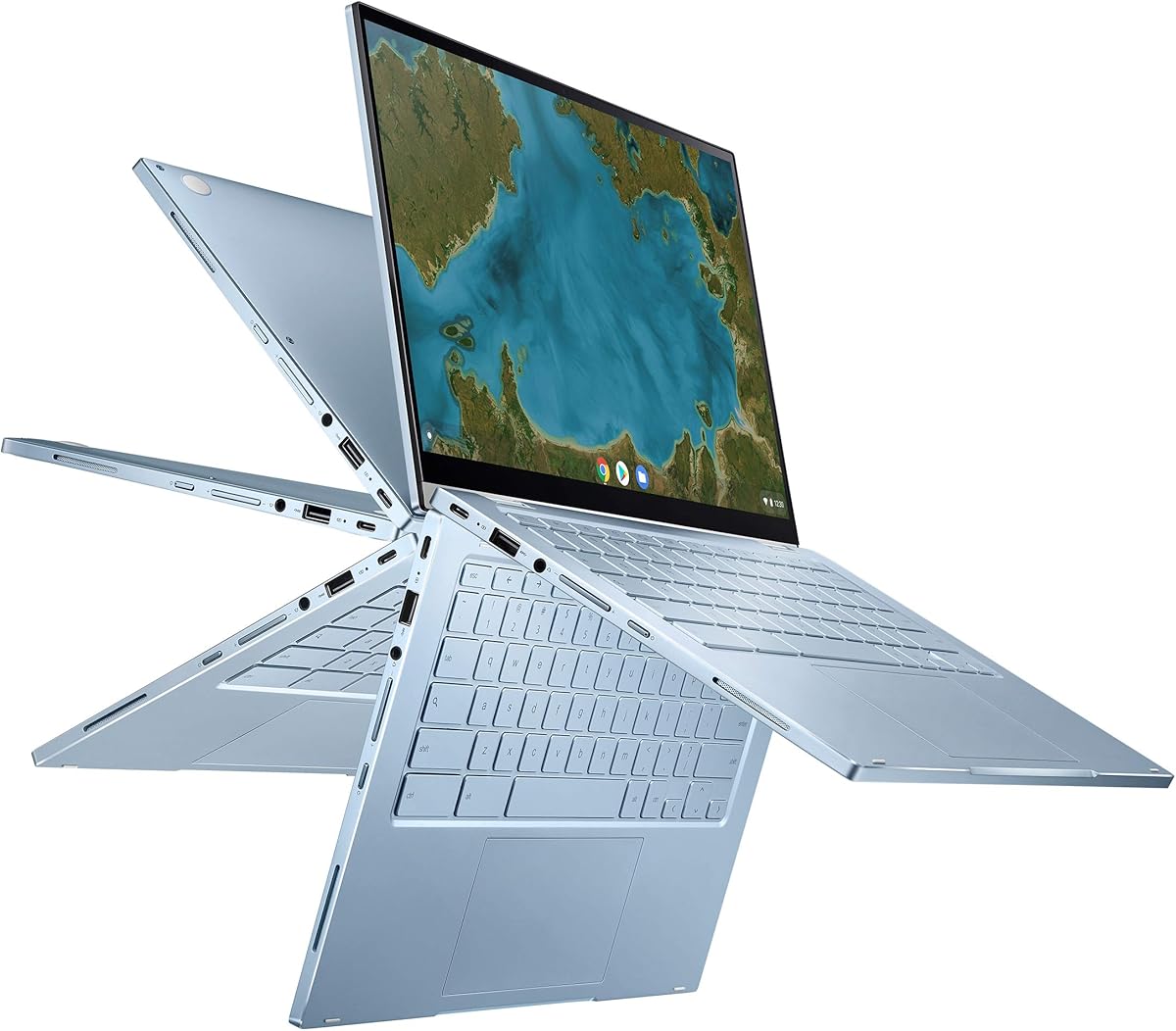
The ASUS Chromebook Flip CX1 carries a 4.3 rating and is one of the most balanced options in the roundup. It combines a 14-inch full HD NanoEdge touchscreen with 8GB of RAM, allowing more comfortable multitasking than many similarly positioned ChromeOS notebooks. Its Intel Celeron N4500 is not a high-power processor, but it is suitable for the browsing, editing, learning, and communication tasks associated with Chromebook use.
We may earn a commission when you buy through this link, at no additional cost to you.
The 360-degree flippable display supports clamshell, tent, stand, and tablet modes. The machine weighs 3.59 pounds and is built to a US military-grade MIL-STD 810H standard, making it an attractive option for students and commuters who move between locations. Its claimed battery life reaches up to 11 hours, although real-world results will depend on workload and operating conditions.
Connectivity is a notable strength. It includes two USB 3.2 Gen 1 Type-C ports with display and power-delivery support, two USB 3.2 Gen 1 Type-A ports, a microSD card reader, and two audio jacks. Wi-Fi 6 and Bluetooth 5.2 support modern wireless accessories. These details make the CX1 more accommodating than a basic tablet or minimalist Chromebook.
Choose the CX1 if you want a full-size convertible and value memory more than maximum processing power. It is a strong fit for Google-based schoolwork, web research, document collaboration, and media consumption. For intensive applications, extensive local files, or a desktop operating system, move up to a Windows laptop with a faster processor and larger SSD.
The eight gigabytes of RAM distinguish this model from many entry-level Chromebooks. It offers more room for multiple browser tabs, video calls, online documents, and classroom applications without making the short list of specifications sound oversized or unrealistic.
Two Type-C and two Type-A USB ports provide flexibility for external storage, displays, peripherals, and charging. The microSD reader is especially useful when you need to move files without relying entirely on the cloud or the 128GB internal drive.
We may earn a commission when you buy through this link, at no additional cost to you.
The Samsung Galaxy Book4 has a 4.4 rating and is the most versatile traditional laptop in this group. It runs Windows 11 Home and combines a ten-core Intel Core 7 150U processor with 16GB of upgraded DDR4 memory and a 512GB NVMe SSD. That configuration offers a more familiar and capable alternative for people who rely on desktop software, business applications, or files stored locally.
We may earn a commission when you buy through this link, at no additional cost to you.
Its 15.6-inch full HD IPS panel covers 100% of the sRGB color space, reaches 300 nits, and uses an anti-glare finish. The display is well suited to documents, spreadsheets, presentations, web work, and media consumption. A backlit keyboard, numeric keypad, fingerprint reader, 720p camera, and integrated microphone make it particularly practical as a daily office or school computer.
Connectivity is unusually thorough for a thin notebook. It includes Wi-Fi 6E, Bluetooth 5.1, gigabit Ethernet, HDMI 2.1, two USB-A ports, two USB-C ports with data transfer and power delivery, a card reader, a power connector, and a combination audio jack. Its listed 54.4Wh battery promises up to 12 hours of non-gaming use, while the 3.46-pound weight remains reasonable for a 15.6-inch machine.
The Galaxy Book4 is recommended for professionals, students, and households wanting Windows without a convertible compromise. Its large screen may not appeal to travelers, and users requiring advanced Windows administration features may need Windows Pro. Even so, the processor, memory, storage, display, and connectivity create the strongest all-around configuration among the non-Apple alternatives here.
The Intel Core 7 150U combines two performance cores with eight efficient cores and 12 threads. Together with 16GB of memory and NVMe storage, it provides a more capable foundation for multitasking, office productivity, web research, and compatible professional applications.
The backlit keyboard, fingerprint reader, numeric keypad, Ethernet connection, and generous port selection make this laptop easier to use as a long-term workstation. These details reduce reliance on adapters and add conveniences that are often absent from budget-focused portable computers.
We may earn a commission when you buy through this link, at no additional cost to you.
The Google Pixelbook Go has a 4.2 rating and remains compelling for buyers who prioritize portability. It weighs barely one kilogram, measures 13 millimeters thick, and combines a 13.3-inch touchscreen with a fanless design. Those characteristics make it easy to carry and comfortable to use directly on your lap.
We may earn a commission when you buy through this link, at no additional cost to you.
Its eighth-generation Intel Core processor, 8GB of memory, and 128GB eMMC storage provide the fundamentals for browsing, document editing, video communication, and media use. Google Assistant is integrated, while the Titan C security chip, built-in antivirus software, and automatic ChromeOS updates help keep the system protected without demanding manual maintenance.
The claimed battery life reaches up to 12 hours, and fast charging reportedly supplies up to two hours of use after a 20-minute charge. A backlit keyboard, quiet Hush Keys, a spacious touchpad, dual stereo speakers, and a display with up to 8.3 million pixels make it pleasant for classes, travel, and entertainment. These qualities explain why it remains a recognizable Chromebook option.
The main drawback is its age. An eighth-generation Intel Core processor and 64GB-class design language may not satisfy buyers seeking modern workstation performance, and 128GB of storage is restricted. It remains most appropriate for lightweight ChromeOS tasks, students, and travelers who value weight and simplicity above demanding applications and large local libraries.
At barely one kilogram and 13 millimeters thick, the Pixelbook Go minimizes the physical burden of carrying a full laptop. Its compact proportions and long claimed endurance make it particularly convenient for commuting, campus use, and work in locations where outlet access is uncertain.
The backlit keyboard, accurate touchpad, quiet keys, fanless construction, and stereo speakers create a refined experience for writing, browsing, and media. Its touchscreen also adds flexibility for casual touch interaction without turning the device into a bulky tablet.
We may earn a commission when you buy through this link, at no additional cost to you.
The Lenovo Flex 14 has a 4.4 rating and stands out for combining a full Windows environment with a touch display and included active pen. It is a particularly compelling alternative for students, note-takers, and creative users who want a traditional notebook that can also support direct screen input.
We may earn a commission when you buy through this link, at no additional cost to you.
Inside, an AMD Ryzen 5 3500U processor and Radeon Vega 8 graphics support work, streaming, gaming, and accelerated photo or video editing. The 12GB of DDR4 memory and 256GB NVMe SSD provide a more generous configuration than many entry-level Chromebooks, while the 1920-by-1080 touchscreen provides a productive canvas for handwritten notes and drawings.
Several thoughtful design features improve daily use. A physical block-privacy shutter closes the webcam when it is not needed, while the included active pen enables direct annotation and sketching. HDMI, USB-C, and USB 3.1 connectivity covers common accessories, and the listed battery life reaches up to 10 hours with recharge technology designed to reach 80 percent in about one hour.
The trade-offs center on platform age and performance class. Windows 10 provides broad application compatibility, but buyers should consider the current software and support trajectory. The Ryzen 5 3500U is also an earlier-generation platform, making the Flex 14 better suited to general productivity and light creative work than intensive professional workloads. For those priorities, it remains a versatile choice.
The included active pen makes the touchscreen more useful for handwritten notes, diagrams, annotations, and sketches. Rather than treating touch as a novelty, this feature gives the Flex 14 a clear advantage for students and users who prefer a more paper-like workflow.
Unlike a Chromebook, the Flex 14 provides a full Windows 10 platform, making it easier to work with conventional desktop applications and local files. The convertible display retains the option to reposition the screen for different tasks without surrendering that software flexibility.
We may earn a commission when you buy through this link, at no additional cost to you.
The ASUS Chromebook Flip C433 has a 4.3 rating and appeals to buyers who want a large screen in a relatively compact enclosure. Its 14-inch full HD NanoEdge display uses ultra-narrow bezels to create the footprint of a 13-inch laptop while retaining a 16:9 viewing format and 360-degree convertible hinge.
We may earn a commission when you buy through this link, at no additional cost to you.
The Intel Core m3-8100Y processor can reach 3.4 GHz and is designed to feel responsive in ChromeOS. With 8GB of LPDDR3 memory, the system has sufficient capacity for many browser tabs, Google applications, streaming, and online collaboration. A backlit chiclet keyboard improves usability in dim conditions, while the convertible design supports laptop, tent, stand, and tablet arrangements.
Storage is the most significant limitation. The included 64GB eMMC drive leaves relatively little room for downloaded media or offline files, and the two USB-C ports plus one USB-A port offer a smaller selection than the ASUS CX1. Still, cloud storage can be effective for students and casual users whose documents and applications already live in web-based services.
The C433 is a good fit for travelers, students, and home users who prioritize a compact footprint, narrow bezels, and a touch display. It is less appropriate for large offline media collections or demanding desktop applications. Between the two ASUS Chromebooks in this guide, the CX1 offers more storage and ports, while the C433 prioritizes compact screen design.
The four-way NanoEdge design minimizes wasted space around the panel. That allows the C433 to provide a 14-inch display without requiring the footprint buyers might associate with a much larger notebook, making it easier to fit into backpacks and small workspaces.
Eight gigabytes of RAM helps the Chromebook handle several open tabs and common web applications, while the 64GB drive places the burden of file management on cloud storage or an external drive. Users should choose this model with that balance in mind.
We may earn a commission when you buy through this link, at no additional cost to you.
The Lenovo Flagship Chromebook has a 4.2 rating and focuses on a thin, light design suited to education and everyday mobile use. It weighs 2.86 pounds and pairs a 14-inch full HD IPS touchscreen with a 0.73-inch-thick enclosure. The narrow display bezels and LED backlight help it feel modern despite its modest internal specifications.
We may earn a commission when you buy through this link, at no additional cost to you.
Its MediaTek Kompanio 520 is an eight-core processor built around four Cortex-A73 and four Cortex-A53 cores. The product information describes it as an upgrade for everyday activities, including classes, remote learning, browsing, office applications, video playback, and communication. A 720p webcam, privacy shutter, and dual-array microphone make it particularly appropriate for online learning and meetings.
The 4GB of RAM and 64GB of eMMC storage are the main limitations. They are adequate for web-centric work and a manageable number of applications, but heavy multitasking, large offline libraries, and locally installed demanding software are not the strengths of this configuration. Its port selection—one USB-A, one USB-C, a microSD reader, and an audio jack—is appropriately simple for a highly portable model.
Buy the Lenovo Flagship Chromebook when a light touchscreen, modern wireless connection, and ChromeOS convenience matter most. It is well suited to remote learning, web research, writing, and video calls. Users who routinely work offline or demand full desktop software should look toward the Galaxy Book4, Flex 14, or another Windows alternative with more storage and memory.
The 720p camera, dual-array microphone, privacy shutter, and full HD touch display create a practical remote-learning setup. ChromeOS support for Google Classroom, Zoom, and web-based documentation reinforces the model's suitability for students and families.
At 2.86 pounds, the Chromebook is easy to carry for a full day of classes or remote work. Wi-Fi 6 and Bluetooth 5.1 provide modern wireless connectivity, while the microSD reader offers a simple way to expand accessible file storage.
We may earn a commission when you buy through this link, at no additional cost to you.
The Apple MacBook Neo has the highest rating in the roundup at 4.6 and provides a compact premium macOS experience. It combines the A18 Pro chip, 8GB of unified memory, a 256GB SSD, and a 13-inch Liquid Retina display in a portable aluminum enclosure. Although it is technically a MacBook rather than a substitute, it is useful as a reference point for the portability and integration buyers may want from an alternative.
We may earn a commission when you buy through this link, at no additional cost to you.
Apple emphasizes Apple Intelligence, AI applications, and built-in tools such as FaceTime and Messages. The 13-inch display supports one billion colors, improving the presentation of photographs, videos, and creative work. A 1080p FaceTime HD camera, dual-microphone array, and side-firing speakers cover communication and media needs, while the keyboard is color-coordinated with the selected enclosure.
The listed battery life reaches up to 16 hours, making endurance a major selling point. The durable recycled aluminum enclosure is described as reaching 60 percent recycled content by weight. Integration with an iPhone allows users to view and control the phone, transfer messages, bring photos onto the Mac, and continue calls through the computer.
Its main constraint is the 8GB memory configuration, which may be modest for heavy multitasking or demanding professional work, while 256GB of storage is limited for large creative libraries. The MacBook Neo is best for students, mobile professionals, and users already invested in the Apple ecosystem who prioritize display quality, battery life, and portability over maximum internal specifications.
The MacBook Neo demonstrates what a premium portable notebook can offer in a compact 13-inch format. Its vivid display, aluminum body, long claimed endurance, and polished macOS experience provide useful benchmarks for shoppers comparing the comfort and convenience of competing systems.
The A18 Pro chip supports a strong focus on AI-assisted tasks, while continuity features connect the computer with an iPhone. These capabilities are especially relevant to users who already handle notes, messages, photos, and calls across Apple's device ecosystem.
We may earn a commission when you buy through this link, at no additional cost to you.
The renewed 14-inch MacBook Pro with M1 Max has a 4.4 rating and is the clear choice in this list for users with demanding creative or development workloads. Its 64GB of unified memory and 2TB SSD storage are exceptionally generous, allowing large applications, project files, virtual environments, and serious multitasking to coexist more comfortably than on conventional alternatives.
We may earn a commission when you buy through this link, at no additional cost to you.
Apple's M1 Max chip provides the processing and graphics foundation for demanding workflows, while the 14-inch Pro display offers the high-resolution canvas expected by photographers, designers, video editors, and developers. The system's large memory and storage also make it useful for users who want a portable workstation that can handle sustained workloads rather than only lightweight web tasks.
This is a renewed product, so condition and support deserve careful attention. Amazon-qualified suppliers professionally inspect, test, and clean it, and the listing states that visible cosmetic imperfections should not be visible at arm's length. The battery is guaranteed to retain more than 80 percent of its original capacity. Accessories may be compatible and functional rather than original, and the computer may arrive in generic packaging.
Choose this MacBook Pro if your workload justifies substantial memory and storage and you are comfortable with renewed equipment. It is less logical for web browsing, schoolwork, or document editing, where the Chromebook and Galaxy Book4 alternatives in this guide offer more approachable configurations. Check the current condition report, included accessories, battery statement, and return eligibility before making a final decision.
Sixty-four gigabytes of unified memory is the defining feature. It gives creative applications, development tools, virtual machines, and large project libraries considerable room to operate, making this model substantially more specialized than the other entries.
The computer is professionally inspected and tested, but it is not Apple certified. Review the stated battery capacity, cosmetic condition, included accessories, generic packaging, and 90-day replacement or refund eligibility before deciding whether the configuration offsets the renewed status.
We may earn a commission when you buy through this link, at no additional cost to you.
The renewed Intel MacBook Pro has a 3.7 rating and offers a familiar professional design with 16GB of RAM and 512GB of storage. Its 2.6GHz Intel Core i7 processor reflects an earlier generation of MacBook Pro hardware, but the combination may still appeal to buyers seeking a large display, dedicated memory, and local storage for established macOS applications.
We may earn a commission when you buy through this link, at no additional cost to you.
The product title identifies a 15-inch format, while the available product bullet describes a 13.3-inch Retina display. That discrepancy makes it especially important to inspect the current listing and product images before buying. The limited information also means buyers should not assume particular ports, battery condition, keyboard layout, warranty terms, or cosmetic details beyond what the listing confirms.
Its strongest advantages are the 16GB memory, 512GB storage, and familiar Intel Core i7 platform. Those specifications can be useful for productivity software, development environments, and creative applications that benefit from a dedicated laptop. The 512GB drive also offers more local capacity than several Chromebooks included here, reducing reliance on cloud storage for routine files.
This is the most cautious recommendation in the guide because it carries the lowest rating and the least detailed supporting description. Prospective buyers should verify the actual screen size, display condition, battery health, included accessories, operating system, return terms, and internal specifications. It may suit a budget-conscious macOS user, but the Samsung Galaxy Book4 offers clearer specifications and a more conventional buying experience.
The title calls for a 15-inch model, but the available bullet mentions a 13.3-inch Retina display. Confirm the current size and display specifications directly on the product page because the difference can materially affect portability and workspace.
A renewed computer can provide substantial hardware at a lower entry point, but condition and included components may vary. Review cosmetic imagery, battery information, warranty coverage, return policy, and every listed specification before considering this model over a newer alternative.
We may earn a commission when you buy through this link, at no additional cost to you.
The right alternative depends on operating system, workload, display preferences, portability, and battery needs. Use the following factors to narrow the field before comparing individual models.
ChromeOS excels in web-based learning, Google Workspace, browsing, and lightweight communication. Its automatic updates, cloud-oriented workflow, and built-in protections reduce maintenance, but traditional desktop applications and extensive offline file management may be less convenient. Windows laptops provide broader compatibility with business software, development tools, games, and locally installed programs. macOS remains attractive for users tied to Apple software, iPhone integration, and a polished Unix-based environment.
Start with the applications you already use. If your day revolves around Docs, Gmail, Classroom, streaming, and browser-based tools, a Chromebook can be sufficient. If you depend on specialized Windows or macOS applications, choose a conventional laptop rather than planning around operating-system limitations.
Entry-level Intel N-series and Celeron processors are designed for routine tasks such as browsing, writing, streaming, and video calls. A Core i7, Ryzen 5, or newer Apple silicon platform provides a stronger foundation for multitasking and compatible professional software. Memory is equally important: 4GB leaves little margin for many simultaneous applications, 8GB is more comfortable for general use, and 16GB or more supports demanding workflows.
Do not judge a computer by processor branding alone. Consider memory, storage type, cooling, thermal limits, and the applications you need. For a web-first student, a modern Chromebook with 8GB may be more responsive than a premium system configured with insufficient memory.
Storage capacity determines how many applications, documents, photographs, videos, and offline course materials you can keep locally. A 64GB eMMC drive is compact and inexpensive but can fill quickly, while 128GB is more comfortable for a Chromebook and 256GB provides greater flexibility. NVMe storage in Windows laptops generally offers faster transfer and response than basic eMMC storage. Cloud services can reduce local demand, but they are not a substitute for reliable access to important files.
Consider whether you work online or offline and whether you use streaming rather than downloaded media. Students who work exclusively through cloud applications may manage with less storage, while creative professionals should prioritize a large and fast SSD.
Resolution, brightness, color coverage, gloss, and touch support all influence the experience. Full HD panels are suitable for most productivity tasks, while 100% sRGB coverage is advantageous for photos and design. Anti-glare finishes help in bright rooms, whereas glossy screens can look deeper and more vivid but may create reflections. Touchscreens add flexibility for writing, drawing, tablet use, and media consumption.
Think about where you will use the computer. A matte, high-resolution display is useful for travel and classrooms, while a premium color-rich panel benefits creative work. Avoid choosing a larger screen solely by appearance when your priority is easy portability.
Battery claims provide a useful comparison, but actual runtime depends on screen brightness, workload, wireless activity, and operating conditions. A computer around one kilogram is easy to carry all day, while a 15.6-inch business notebook may offer more workspace but require a larger bag. Fanless systems are quiet and cool, although a more powerful processor may require active cooling to sustain demanding workloads.
For students and commuters, prioritize measured weight, dimensions, charger size, and reliable endurance. For desk-based work, a larger screen and stronger cooling may matter more. A claimed 10-, 12-, or 16-hour runtime should be treated as a maximum rather than a guarantee.
USB-C, USB-A, HDMI, a card reader, Ethernet, and an audio jack determine how many adapters you need. USB-C is particularly useful when it supports power delivery, data transfer, and external display output. Wi-Fi 6 or Wi-Fi 6E improves wireless performance and compatibility with current routers, while Bluetooth handles accessories and peripherals. A full-size keyboard, backlight, fingerprint reader, and numeric keypad can also improve long-term usability.
List the devices you expect to connect before choosing a model. If you regularly use external monitors, wired networking, legacy accessories, or memory cards, pay closer attention to port selection than to a specification that has little effect on your daily routine.
Convertible hinges let a notebook change between clamshell, tent, stand, and tablet modes, but added mobility can introduce weight, thickness, and performance trade-offs. Stylus support is especially valuable when the included pen works well with the display. Webcam shutters improve privacy, while backlit keyboards and accurate touchpads enhance comfort. Google Assistant, Apple Intelligence, and platform-specific continuity features may matter if you already use those ecosystems.
Choose features that support a recurring activity rather than adding novelty. A stylus benefits someone who writes and sketches every week, while a premium AI feature is less important if your daily work is limited to browsing and documents.
New, renewed, and customized systems can offer different value depending on your needs. Renewed equipment may provide strong specifications but can carry cosmetic wear, non-original accessories, and reduced battery capacity. Customized or resealed products may include upgraded components alongside modified warranty arrangements. Check the exact listing, included items, battery condition, return policy, and warranty coverage before placing an order.
The safest approach is to compare the complete package rather than focusing on the headline processor. A less powerful but clearly documented new computer may be a safer purchase than an unclear older system for a buyer who values straightforward support.
Begin by completing the operating system's initial setup, connecting to a trusted network, and signing into the appropriate account. Update the system, review privacy and security settings, and create a backup routine before transferring important files. For ChromeOS, confirm that your preferred browser, Google Workspace, and cloud-storage services are ready. For Windows or macOS, create an account, install essential security updates, and configure automatic backups.
Use the device on a stable surface with adequate ventilation, particularly when the computer is actively working. Clean the display with a soft microfiber cloth and avoid placing liquids near the keyboard, ports, or screen. Keep the storage drive from becoming completely full, since free space helps with updates and system performance. Charge through the manufacturer-supported adapter and follow battery guidance for long-term storage.
For a convertible model, use a protective case when transporting it and avoid pressing hard on the touchscreen. If a stylus is included, store it securely and confirm compatibility before using a different pen. Protect accounts with strong unique passwords and multifactor authentication, keep the operating system current, and review installed applications periodically. Taking these simple steps helps preserve performance, security, and resale value.
For browsing, Google Workspace, online classes, video calls, streaming, and web-based work, a Chromebook can cover many of the same daily needs as a MacBook. It is less suitable when you depend on macOS-specific applications, advanced desktop software, extensive offline files, or specialized creative workflows. The ASUS CX1, HP x360 Plus, and Pixelbook Go are strongest for web-centered tasks.
The best alternative depends on what the MacBook Pro is being used for. The Samsung Galaxy Book4 offers the strongest conventional Windows specification in this guide, while the Lenovo Flex 14 includes a stylus and convertible display. The renewed M1 Max MacBook Pro serves as a premium performance benchmark, and the MacBook Neo prioritizes portability, color-rich display quality, and Apple ecosystem integration.
Eight gigabytes is generally comfortable for web browsing, document editing, video calls, and several common applications, while 16GB provides more headroom for multitasking, development, creative tools, and larger project files. Four gigabytes can feel restrictive when many browser tabs and applications are open. Match memory to your workload rather than assuming more is necessary for basic use.
A touchscreen is helpful for direct navigation, reading, drawing, note-taking, and using a convertible in tablet or stand mode. It is less important when you spend nearly all your time with a keyboard and external monitor. The Lenovo Flex 14 stands out because it includes an active pen, while the HP and ASUS convertibles offer touch without a bundled stylus.
A renewed laptop can be worthwhile when it offers specifications that fit your budget and you accept its condition. The M1 Max model in this guide is professionally inspected and tested, with a stated battery-capacity condition, but it is not Apple certified and may include generic accessories. Review the current condition details, return policy, warranty, and included items before buying.
Several models have stated endurance ranging from roughly 10 to 16 hours under specified conditions, but maximum claims rarely represent constant heavy use. Screen brightness, video playback, Wi-Fi activity, browser tabs, and processor load all affect results. Treat the published figures as comparative guidance and keep a charger available for demanding days.
A 14-inch model is usually easier to carry and often feels more balanced for school, travel, and regular commuting. A 15.6-inch display provides more workspace and can suit desk-based work, multitasking, and media viewing. The Samsung Galaxy Book4 favors the larger format, while several Chromebooks and the Lenovo Flex 14 keep their main displays at 14 inches.
Check the processor, memory, storage type, screen size, display specifications, ports, battery information, operating system, wireless standard, and warranty. For renewed or customized machines, also review cosmetic condition, battery capacity, included accessories, and return eligibility. Confirm that the current product page still matches the configuration described in the listing.
The Samsung Galaxy Book4 is the strongest all-around choice because its Intel Core 7 processor, 16GB of memory, 512GB NVMe SSD, strong display, and broad connectivity create a capable Windows notebook. The ASUS Chromebook Flip CX1 is the best budget-oriented recommendation for web work, study, and convertible use, while the renewed M1 Max MacBook Pro represents the premium performance option.
Prioritize the features tied to your actual workload. Choose a Chromebook for online learning and browser-based productivity, a Windows convertible for touch and desktop-software flexibility, and a high-memory premium machine for demanding creative or technical tasks. Display size, portability, stylus support, and ports should then be matched to how you intend to work rather than to a single specification.
Ratings, configurations, availability, and pricing can change over time, so review the current listing before making a final decision. Confirm the screen size, memory, storage, operating system, condition, warranty, and return terms directly on the product page. That final check helps ensure the chosen MacBook alternative remains the right fit as products and software continue to evolve.