
MINISFORUM NAB9S
4.5Editor score
Intel Core i9-13900HK processor
Dual 2.5G Ethernet ports
Quad 4K display support
Memory and storage expansion
Our Intel Core i9 Mini PC guide compares ten powerful compact computers for gaming, creative work, networking, and everyday productivity in detail before
An Intel Core i9 Mini PC combines flagship-class processor performance with a chassis small enough for a desk, media cabinet, or monitor mount. The best models suit demanding creative work, intensive multitasking, compact gaming setups, advanced networking, and local AI applications, but their strengths vary considerably.
We compared processor generations, core counts, memory, storage, display support, networking, cooling, expansion, and workstation features across ten models. The list includes complete systems, compact performance PCs, enterprise-oriented mini workstations, and a barebone platform, covering options for different budgets and technical needs.
Each review explains the most useful features, practical trade-offs, and ideal users, while the comparison table offers a faster overview. Ratings and product details reflect the supplied listings, but prices and availability change, so confirm the current listing and configuration before making a purchase.
4.5Editor score

4.6Editor score

4.5Editor score
The table below compares all ten systems by processor, memory, graphics, and connectivity, making it easy to identify the option that best matches your workload.


The MINISFORUM M1-1390 pairs an Intel Core i9-13900HX with 32GB of DDR4 memory and a 1TB PCIe 4.0 SSD, creating one of the strongest general-purpose compact systems in this guide. Its 4.5 rating reflects a favorable balance of performance, connectivity, and practical expandability for office, creative, and enthusiast use.
We may earn a commission when you buy through this link, at no additional cost to you.
The processor is the main attraction. Its 24 cores and 32 threads combine eight performance cores with 16 energy-efficient cores, while boost clocks reach 5.4GHz and the listed cache reaches 36MB. This configuration is well suited to parallel work such as video exports, software compilation, rendering, extensive browser sessions, and running several demanding applications at once.
Connectivity is equally notable. The system includes 2.5GbE, Wi-Fi 6E, Bluetooth 5.2, HDMI 2.1, DisplayPort 1.4, and a USB-C port with power, display, and data functions. It can drive up to three 4K displays, while five USB ports provide room for peripherals. Memory can expand to 96GB, and the dual-storage arrangement can accommodate as much as 8TB.
The main compromise is that it uses DDR4 rather than newer DDR5 memory, and integrated Intel UHD Graphics is not a substitute for a high-end discrete GPU in demanding 3D games. Even so, few similarly compact machines combine this many CPU cores with flexible storage and excellent networking. It is our pick for buyers who want exceptional multitasking and upgrade room without designing a custom workstation.
Consider the M1-1390 if your work revolves around rendering, coding, media processing, data analysis, or running many applications concurrently. For a gaming-focused build, users wanting newer memory, or buyers who need a full-size PCIe graphics slot, one of the expandable MS-01 models may be more appropriate. Otherwise, this is a highly capable all-around Intel Core i9 Mini PC.
The 24-core, 32-thread processor is the most important feature for users who divide their attention among demanding applications. Its hybrid design can allocate large and smaller tasks efficiently, making the system more compelling for rendering, compilation, and heavy multitasking than a typical office mini PC.
Dual memory slots, two M.2 storage positions, support for large capacities, and three video outputs reduce the likelihood of an early upgrade. That makes the M1-1390 appealing for buyers planning to keep a compact workstation for several years.
We may earn a commission when you buy through this link, at no additional cost to you.
The Beelink GTi13 is a compact mini workstation with an Intel Core i9-13900HK, 32GB of DDR5 memory, and a 1TB SSD. Its 4.6 rating places it among the strongest-rated products here, while Thunderbolt 4, dual 2.5G networking, and a PCIe expansion slot make it particularly versatile.
We may earn a commission when you buy through this link, at no additional cost to you.
The 14-core, 20-thread processor uses six performance cores and eight efficiency cores, with a maximum boost of 5.4GHz and 24MB of cache. It is well matched to programming compilation, live production, 3D modeling, video editing, and gaming while other applications remain open. The 65W processor design seeks to balance processing power with thermal and energy demands.
Its feature set extends beyond the processor. Two 2.5GbE ports support high-speed wired workflows, Wi-Fi 6 uses an Intel AX200 chipset, and Bluetooth 5.2 handles peripherals. Thunderbolt 4 provides 40Gbps data transfer, 100W power delivery, and display connectivity, while an SD card slot is useful for media professionals. A fingerprint reader adds convenient local access.
The PCIe x8 slot opens the system to a compatible graphics card or other accelerator, but buyers must account for the physical and power requirements of that expansion. The supplied configuration also has a simpler storage layout than some competitors. For users who value a polished balance of speed, networking, fast memory, and compact expansion potential, the GTi13 is easier to recommend than for users focused on maximum internal storage.
The GTi13 suits creative professionals, programmers, home-lab enthusiasts, and gamers who want a compact PC with premium interfaces. It is a particularly strong candidate for a Thunderbolt-based desk setup because the USB-C connection can handle data, displays, and charging. If internal drive expansion or a conventional PCIe x16 slot is more important, the MINISFORUM MS-01 deserves closer attention.
Thunderbolt 4 makes it easier to build a clean desk around one compact computer. A compatible display or dock can handle several peripherals, high-speed storage, and display signals while the system itself remains small enough for a secondary workspace.
Two 2.5GbE ports are useful for direct connections to fast storage, networks, and other computers. The fingerprint reader adds a practical shortcut for logins, while Wi-Fi 6 and Bluetooth 5.2 keep the system suitable for everyday wireless setups.
We may earn a commission when you buy through this link, at no additional cost to you.
The KAMRUI Hyper H2 uses a 14th-generation Intel Core i9-14900HX with 24 cores, 32 threads, 36MB of cache, and boost speeds up to 5.8GHz. It arrives with 32GB of DDR4 memory and a 1TB PCIe 4.0 SSD, and its 4.5 rating reflects strong performance in a particularly small enclosure.
We may earn a commission when you buy through this link, at no additional cost to you.
This is one of the fastest processors in the group on paper. The high core count supports intensive multitasking, content creation, and parallel processing, while the 5.8GHz maximum boost benefits short, demanding tasks. Integrated Intel UHD Graphics handles 4K playback and three 4K displays through HDMI 2.0, DisplayPort 1.4, and USB-C.
Thermal design receives careful attention. The listed cooling system combines a silent centrifugal fan, dual copper heat pipes, a dual-fin module, and an aluminum heatsink intended to keep both CPU and SSD temperatures under control. Storage can be expanded to 4TB, memory to 64GB, and the included VESA bracket makes it easy to place behind a display.
Its networking is simpler than that of several competitors, with one 1Gbps Ethernet port, and DDR4 offers less bandwidth than DDR5. Neither issue undermines its suitability for CPU-heavy creative work or compact gaming, but they are relevant for buyers focused on future memory speed or multi-gigabit networking. The Hyper H2 is best for those who prioritize clock speed, core count, and minimal desk footprint.
Choose the Hyper H2 for rendering, game streaming, high-frame-rate gaming with suitable titles, and demanding office workloads in a very small package. Its newer processor may also appeal to buyers who want more headroom than a 13th-generation mobile i9 offers. Users who need faster memory or multiple high-speed Ethernet ports should examine the Beelink GTi13 or a MINISFORUM MS-01 configuration instead.
At 5.04 by 5.04 by 1.63 inches, the Hyper H2 can free meaningful desk space. The included VESA mount further reduces clutter by allowing the computer to sit behind a compatible monitor while retaining access to its ports.
Compact computers must move heat efficiently, and the Hyper H2's centrifugal fan and copper heat-pipe design are intended to maintain performance during extended workloads. Users should still leave adequate ventilation around the enclosure and avoid placing it inside a fully enclosed cabinet.
We may earn a commission when you buy through this link, at no additional cost to you.
The MINISFORUM NAB9S combines an Intel Core i9-13900HK with 16GB of DDR4 memory and a 500GB PCIe 4.0 SSD. It stands out for features usually associated with more specialized systems, including two 2.5GbE ports, four-display support, and a tool-free removable top cover.
We may earn a commission when you buy through this link, at no additional cost to you.
The processor provides 14 cores, 20 threads, and a maximum clock speed of 5.4GHz. That is ample performance for office productivity, programming, content creation, and running multiple applications, and its hybrid architecture helps divide work between performance and efficiency cores. Integrated graphics support high-definition playback and general graphical workloads.
Networking is a major strength. The two 2.5GbE ports are suitable for firewall duties, network aggregation, file services, and direct high-speed storage connections. Wi-Fi 6 and Bluetooth 5.2 provide modern wireless options, while dual HDMI and dual USB-C video outputs allow as many as four independent 4K displays.
The main limitation is the starting configuration. Sixteen gigabytes of memory and 500GB of storage can feel modest for intensive creative work or large project libraries. Fortunately, two DDR4 SO-DIMM slots support up to 32GB, and the system accepts one M.2 PCIe 4.0 NVMe drive alongside a 2.5-inch SATA drive. The NAB9S offers useful value, though it is our budget selection rather than the strongest finished specification.
This mini PC is well suited to buyers building a compact office, a multi-monitor productivity system, or a lightweight network appliance. It also works for general home computing and media use. Creative professionals with large active projects should plan a memory and storage upgrade from the outset, while anyone requiring a dedicated GPU should choose a platform with a suitable expansion slot.
The combination of two HDMI and two USB-C video outputs is uncommon at this level and can support a trading desk, engineering workspace, editing timeline, or security-monitoring setup. Verify the selected displays and adapters before buying, since software and operating-system support can affect multi-monitor behavior.
A tool-free removable top cover makes it easier to add memory or storage without opening the entire chassis. The combination of an M.2 NVMe position and a 2.5-inch bay provides a practical balance between speed and affordable capacity.
We may earn a commission when you buy through this link, at no additional cost to you.
The MINISFORUM MS-01 is a mini workstation built for demanding infrastructure and professional workflows. It combines an Intel Core i9-13900H with 32GB of DDR5 memory, a 1TB SSD, four high-speed network interfaces, two USB4 ports, extensive storage support, and a full PCIe 4.0 x16 slot.
We may earn a commission when you buy through this link, at no additional cost to you.
Its networking is the defining feature. Two 10Gbps SFP+ ports support link aggregation and professional network equipment, while two 2.5GbE RJ45 ports provide flexible copper connections. The listing notes one controller with Windows Server support, strengthening its relevance for network services, NAS access, and business infrastructure. USB4 also adds Thunderbolt Ethernet capability at high line rates.
Storage and expansion options are equally serious. The workstation supports three M.2 2280 positions, 22110 drives, a U.2 NVMe adapter, and RAID configurations including RAID 0 for capacity and RAID 1 for redundancy. The PCIe 4.0 x16 slot accepts a high-performance graphics card, network card, or storage controller, allowing the base system to grow into a specialized workstation.
Its trade-offs are size, complexity, and power compared with a simple office mini PC. Users who only need browsing, office applications, and one display will not use most of these capabilities. Still, for a home lab, small business, engineering workstation, or high-speed network server, the MS-01's extensibility is difficult to match. It earns the premium recommendation because it is more than a fast small PC.
The finished MS-01 configuration is the better choice for buyers who want everything installed and ready. Choose it for multi-gigabit networking, large storage arrays, virtualized environments, a compact server, or a system that may later receive a discrete GPU. It is particularly compelling when preserving an upgrade path matters more than obtaining the smallest possible footprint.
The mix of SFP+ and RJ45 interfaces lets users connect fiber or copper equipment without changing the computer. That flexibility is valuable for NAS systems, virtual storage, backbone connections, and multi-gigabit home and business networks.
The PCIe 4.0 x16 slot and multiple SSD positions turn the MS-01 into a modular workstation. A buyer can begin with integrated graphics for productivity and later add a professional accelerator, while redundant storage arrangements help protect important data.
We may earn a commission when you buy through this link, at no additional cost to you.
The GEEKOM IT13 MAX is a modern Intel Core Ultra 9 mini PC built around a 65W Core Ultra 9 185H, 16GB of DDR5 memory, and a 1TB SSD. Its 4.6 rating and combination of local AI acceleration, quiet cooling, broad operating-system support, and a three-year warranty make it our editor's choice.
We may earn a commission when you buy through this link, at no additional cost to you.
The newest processor generation brings an Intel AI Boost NPU alongside CPU, integrated graphics, and media capabilities. This is useful for compatible local language models, computer vision, document processing, meeting summaries, and other AI-assisted tasks. The system also supports Windows and major Linux distributions, making it practical for developers, engineers, and homelab users rather than Windows-only users.
Display and network flexibility are excellent. Dual Ethernet ports support separate wired connections, while the listed output configuration supports up to four simultaneous displays, including 8K through USB-C and 4K through HDMI. The IceBlast 3.0 cooling system is designed to sustain 65W performance with a lower noise profile than many compact competitors.
The principal limitation is memory. Sixteen gigabytes can be restrictive for large local models, intensive 4K timelines, several virtual machines, and other memory-heavy applications. It is also not intended to compete with a discrete graphics card for 3D rendering. Even so, the balance of local AI capability, quiet operation, network support, and warranty coverage is unusually attractive for a compact productivity system.
The IT13 MAX fits developers, engineers, students, editors, and office users who want a small machine with modern AI features and flexible software support. It is a strong candidate for a quiet home office, Linux workstation, or multi-screen desk. Buyers planning model training, large virtualized environments, or continuous high-resolution editing should first plan an upgrade to more memory and storage.
Compatible local AI workloads can reduce unnecessary cloud uploads and keep sensitive documents closer to the user. The NPU is designed to accelerate supported inference tasks, although application compatibility and model size remain important practical limits.
The listed IceBlast 3.0 cooling approach is aimed at sustained 65W operation with reduced noise. That makes the IT13 MAX suitable for offices, studios, classrooms, and shared workspaces where a louder tower would be disruptive.
We may earn a commission when you buy through this link, at no additional cost to you.
The MINISFORUM MS-01 Barebone includes the Intel Core i9-13900H platform and chassis without RAM, SSD, or an operating system. It is an appealing option for builders who already own compatible components or want to tailor memory, storage, and graphics precisely to a demanding workstation.
We may earn a commission when you buy through this link, at no additional cost to you.
The processor supplies 14 cores, 20 threads, a maximum boost of 5.4GHz, and integrated Intel Iris Xe graphics. Two DDR5-5200 memory slots and multiple M.2 positions provide a modern foundation, while the full-size PCIe 4.0 slot can accept a discrete graphics card, network card, or storage controller. The listing specifically notes compatibility with an RTX 3050.
Networking remains the standout. Two 10Gbps SFP+ ports and two 2.5GbE RJ45 ports allow a wide range of professional and high-speed network connections. USB4 provides fast peripherals and display options, while HDMI and the USB4 outputs support multi-monitor configurations. Storage support includes RAID 0 and RAID 1, enterprise U.2 SSDs, and 22110 M.2 drives.
This is not the easiest recommendation for a first-time computer buyer. The missing memory and storage mean additional components and setup are required, and an operating system must also be supplied. The barebone format is most valuable to experienced users, system builders, and organizations with standardized component inventories. The included conversion adapter, power equipment, heat sink, cable, and manual add convenience.
Buy the barebone version when you need specific memory capacities, enterprise storage, a particular graphics card, or a carefully controlled build. It is particularly useful for homelab, CAD, rendering, post-production, digital-signage, and network-computing projects. For a ready-to-use system, the fully configured MS-01 is the more straightforward purchase.
A barebone chassis lets buyers choose memory speed and capacity, storage interfaces, and a graphics solution suited to the task. This avoids paying for components that will be replaced and makes the system easier to standardize for multiple installations.
The standard PCIe slot, RAID support, enterprise drive options, and multi-gigabit networking make the platform suitable for projects that outgrow a conventional mini PC. Expansion hardware must match the case's physical clearance, power limits, and cooling expectations.
We may earn a commission when you buy through this link, at no additional cost to you.
The GEEKOM XT13 Pro combines an Intel Core i9-13900H with 32GB of memory and a spacious 2TB PCIe 4.0 SSD. Its 4.1 rating is the lowest among the ten products, but the underlying specification remains capable of serious productivity, content creation, and compact gaming tasks.
We may earn a commission when you buy through this link, at no additional cost to you.
The 14-core, 20-thread processor boosts up to 5.4GHz and provides the hybrid performance expected from a 13th-generation mobile Core i9. Intel Iris Xe graphics include AV1 encoding and decoding, which is useful for modern media workflows. The generous memory and storage configuration supports multiple virtual machines, large creative libraries, and games without immediate capacity pressure.
Wi-Fi 6E operates across 2.4GHz, 5GHz, and 6GHz bands, while Bluetooth 5.3 supports wireless peripherals. The listing emphasizes a three-year hardware warranty, local repair support, and extended technical guidance, making the system more attractive for users who view a mini PC as a long-term office or creation machine.
The main weakness is that the product does not offer the same obvious upgrade path as the MS-01. There is no clearly listed full-size PCIe expansion slot, so buyers who need a powerful discrete GPU should look elsewhere. Its lower rating also warrants attention, although the provided information does not identify a specific recurring problem. Capacity and support are its strongest points.
The XT13 Pro is a good match for content creators, developers, and home users who want a small, ready-to-use system with large storage. It can also handle suitable games and everyday creative applications. Choose it for memory, storage, wireless capability, and warranty support; choose another model for more display outputs, multiple Ethernet ports, or a dedicated graphics expansion path.
A 2TB starting point is unusually useful for a compact computer because it reduces the need to move large project files to external storage. It can hold operating systems, applications, media libraries, and game collections while leaving room for growth.
The three-year hardware coverage and local repair support can provide more confidence for office and creative deployments. Wi-Fi 6E and Bluetooth 5.3 make the system flexible for modern wireless peripherals and networks without requiring a wired connection for every task.
We may earn a commission when you buy through this link, at no additional cost to you.
The GEEKOM GT13 MAX is a professional AI-focused mini PC built around the Intel Core Ultra 9 185H. It includes 16GB of DDR5 memory, a 1TB SSD, Intel Arc graphics, an AI Boost NPU, modern wireless connectivity, and support for as many as four displays.
We may earn a commission when you buy through this link, at no additional cost to you.
Its AI capabilities distinguish it from ordinary Core i9 systems. The NPU is rated at up to 11 TOPS and can support compatible lightweight language models, private document question answering, retrieval-augmented search, OCR, transcription, subtitles, image processing, noise reduction, and AI-assisted coding. Local processing can reduce unnecessary cloud uploads while retaining access to cloud tools for more demanding research.
The processor provides 16 cores and 22 threads, while Intel Arc graphics include eight Xe cores, ray tracing, and AV1 decoding. Dual USB4, dual HDMI 2.0, and Mini DisplayPort 1.4 support up to four displays. Wi-Fi 7, Bluetooth 5.4, and dual 2.5GbE ports create an unusually modern connectivity package.
The 16GB memory configuration is the most significant limitation for large AI models, virtual machines, and intensive creative editing. It is expandable to 96GB, while storage can reach 6TB, so the platform itself supports upgrades. Cooling uses IceBlast 2.0, a quiet fan, and a full-copper heatsink. The listed testing range of minus 20 to 55 degrees Celsius supports office, studio, education, and enterprise use.
The GT13 MAX is well suited to developers, engineers, traders, editors, and office users who value modern connectivity and a four-screen workspace. It is particularly compelling where data control matters, such as private document analysis and transcription. Ensure that the applications and models you intend to run actually support the local NPU, and plan a memory upgrade if your workload is intensive.
The NPU adds hardware specifically intended for supported AI inference, reducing the need to run every task on the CPU or discrete graphics processor. This can improve responsiveness and energy efficiency when applications are optimized to use the available acceleration.
Wi-Fi 7, dual 2.5GbE Ethernet, USB4, and four-display support make the GT13 MAX ready for contemporary professional desks. Traders, programmers, designers, and analysts can spread windows across several screens while retaining flexible wired and wireless networking.
We may earn a commission when you buy through this link, at no additional cost to you.
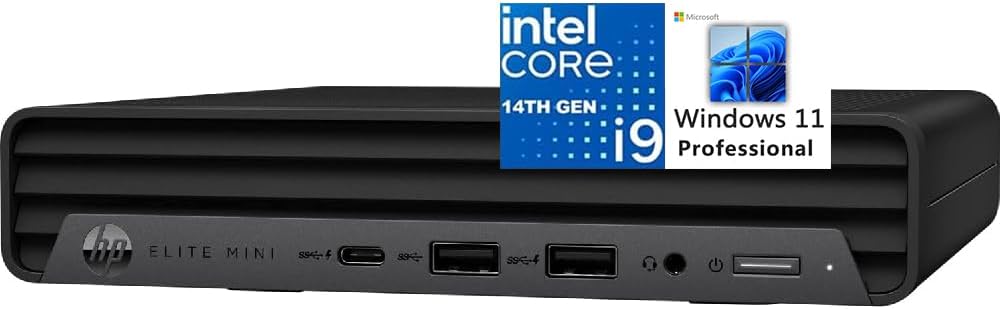
The HP Elite Mini 800 G9 is an office-oriented Intel Core i9 mini PC that arrives as a complete package. It includes Windows 11 Pro, a full-size wired keyboard, a mouse, 16GB of DDR5 memory, and a 1TB PCIe NVMe M.2 SSD, reducing the setup required for a conventional business deployment.
We may earn a commission when you buy through this link, at no additional cost to you.
Its Intel Core i9-14900T processor provides 24 cores and 32 threads through eight performance and 16 efficiency cores. Maximum boost reaches 5.5GHz with 32MB of cache. Intel UHD Graphics 770 supports the listed display configuration, including up to three 4K screens through two DisplayPort 1.4 connections and HDMI 2.1.
The included USB selection includes five USB-A ports, one USB Type-C connection with 20Gbps signaling, and a 3.5mm headset and microphone combination jack. Wi-Fi 6 uses a RealTek RTL8852BE adapter, Bluetooth is included, and a single RJ45 port provides wired networking. The listed ultra-quiet design is appropriate for reception desks, shared offices, studios, and home workspaces.
With 16GB of memory, some demanding business workloads may require an upgrade, especially when running large datasets or numerous virtualized applications. It also has less visible high-speed network and expansion potential than the MS-01, making it more of a polished general-purpose office system than a modular server platform. The included peripherals may also be unnecessary for buyers who already have preferred equipment.
The Elite Mini 800 G9 is an attractive option for organizations that want a recognized commercial system, Windows 11 Pro, and peripherals in one package. It is also suitable for a home office, a compact productivity setup, or a quiet multi-monitor desk. Choose the NAB9S for more multi-gigabit networking, or the Beelink GTi13 for faster memory and Thunderbolt 4 if those features matter more.
Windows 11 Pro and the full-size keyboard and mouse make this a straightforward choice for users who want a complete system rather than a collection of parts. The 64-bit operating system also fits modern business software and security management requirements.
The combination of quiet operation and three-display support works well for financial monitoring, design review, office productivity, and control-room-style tasks. The system provides a broad port selection so several USB peripherals can be connected without a large hub.
We may earn a commission when you buy through this link, at no additional cost to you.
The right Intel Core i9 Mini PC depends on processor generation, memory type, display count, network requirements, expansion, and the operating system included with the machine. Consider these factors before comparing the final configurations.
Core count and thread count indicate how much work the processor can handle in parallel, while the hybrid architecture found in modern Core i9 chips divides performance and efficiency cores among different tasks. The 13th-generation i9-13900H, i9-13900HK, and i9-13900HX models offer 14 cores and 20 threads, while the i9-13900HX and i9-14900HX configurations reach 24 cores and 32 threads. The newest Core Ultra 9 185H systems offer 16 cores and 22 threads with an NPU for compatible AI tasks.
Choose higher core counts for rendering, compiling, video processing, large datasets, and many simultaneous applications. Shorter, burst-oriented tasks may benefit from a high maximum clock, while everyday office use rarely requires the highest specification. Always consider cooling because sustained performance depends on the system being able to dissipate heat.
Memory determines how many applications and datasets the system can keep active. The included configurations range from 16GB to 32GB, with expansion support differing by model. Sixteen gigabytes can be adequate for ordinary office use but may constrain local AI models, virtual machines, and heavy creative editing, while 32GB provides a more comfortable starting point for serious multitasking.
DDR5 offers greater bandwidth and improved efficiency, but DDR4 systems may still meet the needs of a particular workload at a lower overall cost. Check maximum supported capacity, slot count, and whether memory is included. Barebone systems require both compatible memory and an operating system to be added.
An NVMe PCIe 4.0 SSD provides fast boot times, application launches, and transfers of large project files, but its capacity determines how much you can keep locally. The systems here include configurations from 500GB to 2TB. Consider how many M.2 positions are available, whether a 2.5-inch drive can be added, and whether RAID 0 or RAID 1 is supported.
Performance users should favor a model with multiple NVMe positions and enough capacity for source media, caches, virtual machines, and projects. Storage-heavy operators may also need U.2 or 22110 support. Remember that RAID improves capacity or redundancy rather than making a drive inherently faster, and backups remain necessary.
Display support matters for traders, editors, engineers, and office users who rely on multiple screens. Several systems support three displays, while the NAB9S, IT13 MAX, and GT13 MAX can support four. The MS-01 models add USB4 video output, while the HP includes two DisplayPort connections and HDMI. Confirm maximum resolution, refresh rate, and whether displays require adapters.
Integrated Intel UHD Graphics is suitable for office applications, 4K playback, and some lighter games. Modern Core Ultra systems add Intel Arc graphics and media features, but high-end 3D rendering and gaming still generally require a discrete GPU. Prioritize a full-size PCIe expansion slot if a powerful accelerator is part of the plan.
A single 1Gbps Ethernet connection handles most homes and offices, but 2.5GbE and 10GbSFP+ interfaces are valuable for NAS devices, large transfers, virtualized storage, and professional networks. The MINISFORUM MS-01 is the standout here with two 2.5GbE ports and two 10Gbps SFP+ ports. Other systems emphasize Wi-Fi 6, Wi-Fi 6E, or Wi-Fi 7 for flexible wireless use.
Also examine USB-C functionality. A USB-C port with DisplayPort Alternate Mode can drive a display, while Thunderbolt 4 adds faster data transfer, display support, and power delivery. Check the number of USB-A ports, audio connections, card readers, and whether a docking solution is included or merely supported.
A Core i9 processor in a small enclosure creates substantial heat, and performance may be limited if cooling is inadequate. Look for systems listing active cooling, heat pipes, larger fans, or dedicated SSD cooling. The IT13 MAX and HP emphasize quiet operation, while the Hyper H2 and NAB9S highlight upgraded thermal components and airflow channels.
Choose based on the location of the computer. A conference room, bedroom, recording studio, or shared office may make acoustics as important as raw speed. A larger workstation chassis generally has more room for cooling and expansion, while a monitor-mounted model is easier to hide but still needs unobstructed airflow.
The HP Elite Mini 800 G9 includes Windows 11 Pro, a wired keyboard, and a mouse, making it the most immediately complete office package. The MS-01 barebone model includes no RAM, storage, or operating system, while the other complete systems are primarily positioned as desktop replacements. Check whether an operating system is installed and whether a license is included.
Barebone systems can be economical for experienced builders who already own compatible parts, but they require extra purchases and setup. Complete systems are generally easier for beginners and offices. Linux compatibility, driver availability, and the user's familiarity with operating-system installation should also influence the decision.
Place the mini PC on a stable, hard surface with open space around its vents. Do not place it inside a fully enclosed cabinet, on soft fabric, or directly beside a heat-producing device. Connect the display and essential peripherals first, then power on the system and complete the operating-system setup if the product is supplied without one.
For a monitor-mounted installation, use the supplied VESA hardware where provided and confirm that the mount pattern matches your display. Route cables carefully so they do not block airflow. Keep the case free of dust, use a surge-protected power source, and shut the system down normally before moving it or attaching expansion hardware.
Monitor internal temperatures and storage health through the supplied utilities or your operating system's monitoring tools. Update the operating system, chipset software, network drivers, and security components regularly. When memory or storage needs expanding, follow the manufacturer's guidance, match the correct form factor and generation, and back up important data before changing the internal configuration.
An Intel Core i9 Mini PC can provide strong CPU performance, fast load times, and a compact alternative to a gaming tower. The result depends on the integrated graphics, cooling, memory, and storage configuration. For modern 3D games at high settings or resolutions, a system with a suitable PCIe slot and a capable discrete GPU is generally more appropriate.
Core Ultra 9 represents a newer processor generation that combines CPU cores with more capable integrated graphics and an AI-focused NPU. Core i9 models in this guide are powerful 13th- or 14th-generation processors with strong CPU performance, but they generally lack the same dedicated neural acceleration hardware. Choose Core Ultra 9 for compatible local AI tasks and newer media capabilities.
For browsing, office work, and video playback, 16GB is generally a practical minimum, although 32GB offers more comfort during heavy multitasking. Creators, developers, virtual-machine users, and local AI enthusiasts should favor 32GB or more. Check whether the system has accessible memory slots and what maximum capacity the manufacturer supports.
A modern Core i9 Mini PC can replace a conventional desktop for office work, browsing, media creation, programming, and many other tasks. Its small size and low power requirements can also make it convenient for a home office or media cabinet. Users requiring specialized expansion cards, extensive internal storage, or high-end gaming may still need a tower.
Faster Ethernet connections are useful when moving large files to a NAS, connecting directly to another workstation, or operating network services. A 10GbSFP+ interface also allows professional fiber or network-adapter options. For ordinary internet browsing, a standard gigabit connection is enough, but faster ports can materially improve local workflows.
A barebone model makes sense if you already own compatible RAM and SSDs or need a highly customized workstation. It can reduce waste by avoiding unnecessary supplied components and lets you choose memory capacity, storage type, and graphics hardware. First-time buyers generally find a complete system easier to set up and maintain.
Most of the systems support three displays, while the NAB9S, IT13 MAX, and GT13 MAX are listed with support for four. The MS-01 and other USB4-equipped systems can also provide advanced display options. Verify the operating system, graphics driver, adapters, resolution, and refresh-rate requirements before connecting multiple screens.
The higher-core-count models are well suited to video editing because they accelerate exports, effects, and other parallel tasks. A 32GB memory configuration and PCIe 4.0 storage provide a better foundation for 4K or larger projects than 16GB and smaller storage. Color-critical work, complex 3D effects, and GPU-heavy effects may still require more memory or a discrete graphics card.
The MINISFORUM NAB9S is the value-oriented choice, offering a capable Core i9 processor, four-display support, and dual 2.5GbE networking. The GEEKOM IT13 MAX is the editor's choice for modern AI capabilities, quiet operation, flexible software support, and a strong warranty. The MINISFORUM MS-01 earns the premium recommendation because its 10GbSFP+ networking, PCIe 4.0 x16 slot, and enterprise storage options make it a true expandable workstation.
Prioritize the features your workload actually requires. High core counts help rendering, compilation, and multitasking; 32GB of memory gives creative and development projects more breathing room; multiple Ethernet ports benefit NAS and network workloads; and a PCIe slot is important if you may add a discrete GPU. For ordinary home use, fewer specialized features may be more valuable than maximum expandability.
Product listings, configurations, ratings, and prices can change over time, so verify the current processor, included memory and storage, operating system, warranty, and port selection before ordering. Once those details match your needs, an Intel Core i9 Mini PC can provide impressive performance while freeing significant desk space and simplifying the surrounding setup.