
Creative Sound Blaster AE-X
4.4Editor score
ESS ES9039Q2M DAC
32-bit/384kHz playback
350mW headphone amplification
ASIO 2.3 and DSD256
Our PC Sound Cards for Audio Recording guide compares 10 options for music, podcasting, streaming, and gaming to help you choose wisely.
A PC sound card can transform how you capture, monitor, and play back audio, but the right model depends on your recording setup. Music producers may need high-resolution conversion and instrument inputs, while podcasters and streamers often prioritize microphones, effects, and simple monitoring.
This guide compares ten internal, external, and mobile-friendly sound cards across recording resolution, connectivity, headphone support, monitoring options, and creator-focused features. It includes traditional PC audio upgrades, dedicated streaming mixers, compact instrument interfaces, and adapters designed to restore missing audio ports.
Each pick highlights the product's most useful capabilities, limitations, and ideal recording scenario, helping readers distinguish genuine recording tools from basic audio adapters. Ratings and specifications reflect the supplied product information, while prices and availability can change over time.
4.4Editor score

4.6Editor score

4.4Editor score
The comparison below covers the ten featured models side by side, emphasizing the recording path, monitoring capabilities, resolution, and form factor that most directly affect a PC-based audio workflow.


The Creative Sound Blaster Audigy Fx Pro is an internal PCIe sound card for listeners and recorders who want a substantial upgrade over motherboard audio. Its supplied rating is 4.2, and its defining strengths are high-resolution playback, discrete 7.1-channel output, and a generous set of connections for a desktop PC.
We may earn a commission when you buy through this link, at no additional cost to you.
Playback can reach 32-bit/384kHz with a stated signal-to-noise ratio of up to 120dB. The card supports separate analog outputs for immersive multichannel systems, along with SPDIF, headset connections, microphone input, and line input. That range makes it useful for recording projects that also involve large speaker systems, external sources, or game audio.
The trade-off is its installation process. Unlike a USB interface, this card occupies a PCIe slot and requires a compatible desktop rather than a laptop. It also does not provide dedicated guitar or microphone preamps, so a serious music producer may still need a conventional recording interface. Its compact 10.5cm body and half-height bracket help when space is limited.
Overall, the Audigy Fx Pro suits users who want one internal card to handle high-fidelity playback, surround output, headset use, and basic analog capture. It is less convincing as a dedicated music-recording preamp, but for a PC whose onboard audio is modest, it offers broad capability in a compact package.
The card's 32-bit/384kHz playback support and 120dB stated signal-to-noise ratio make it attractive for detailed listening on compatible high-resolution sources. Its output-stage flexibility also gives a desktop user more options than a basic onboard codec.
SPDIF, line input, microphone input, headset outputs, and discrete 7.1-channel analog connections cover many desktop audio arrangements. The included half-height bracket improves compatibility with compact cases.
We may earn a commission when you buy through this link, at no additional cost to you.
The PUPGSIS Gaming Audio Mixer is aimed at streamers, podcasters, and gamers who want a hardware control surface rather than a conventional bare-bones sound card. It carries a 4.4 rating and combines microphone capture, live effects, background-audio input, and trigger pads in one unit.
We may earn a commission when you buy through this link, at no additional cost to you.
Its 1/4-inch TRS input is compatible with XLR microphones, but the required 1/4-inch TRS-to-XLR cable is not included and may need to be added separately. The mixer also cannot accept 48V condenser microphones or USB microphones, so microphone choice matters before purchase. For compatible dynamic XLR microphones, however, the input offers a clearer path to a dedicated broadcast-style setup.
Four programmable buttons can trigger custom clips such as laughter, applause, or alarms. A voice changer, adjustable reverb, and noise reduction make the unit particularly useful for live commentary. Bluetooth is input-only, allowing music or backing tracks to reach the mixer from a phone, tablet, or computer, but it cannot carry the mixed output to wireless headphones or a microphone.
This is an excellent budget choice for creators who value instant effects and hands-on control more than pristine studio conversion. Wired monitoring is necessary for zero-latency listening. Buyers should verify their microphone connector and accept that the mixer is designed primarily for streaming and spoken content rather than multitrack music production.
Combining an XLR microphone path, four assignable pads, noise reduction, reverb, and a voice changer removes the need for several separate pieces of creator equipment. The result is especially approachable for live streams and podcasts.
Bluetooth is useful for bringing backing tracks into the mixer, but it cannot transmit the final mix to wireless headphones or a wireless microphone. Use wired monitoring and connections when dependable low-latency operation is required.
We may earn a commission when you buy through this link, at no additional cost to you.
The Optimal Shop 6 Channel External Sound Card is a USB 2.0 adapter aimed at users who need multi-channel output and optical S/PDIF capture. It supports six-channel 5.1 analog playback, and the supplied rating is 3.7, placing it among the more specialized options in this list.
We may earn a commission when you buy through this link, at no additional cost to you.
For recording, the optical input can accept digital audio and send it to the computer through USB. Supported sampling rates include 32kHz and 44.1kHz for digital recording, while analog recording is fixed at 48kHz. Analog playback expands to six channels, giving the product a clear advantage for users connecting a 5.1 speaker system.
Digital 5.1 output is conditional rather than automatic. The source must contain suitable DTS 5.1 content, the player must pass the signal through without decoding, and the optical receiver or amplifier must perform the decoding. Ordinary two-channel music will remain two-channel, so this is primarily a home-theater and surround-game feature rather than a studio advantage.
The card is most useful for a desktop or laptop that lacks suitable analog connections and needs a simple external route for optical input and surround output. Its 3.7 rating calls for careful consideration, especially if direct monitoring, premium conversion, or uncomplicated setup is the main goal.
Optical S/PDIF input expands digital capture options, while analog recording remains available through the physical audio connections. Sampling behavior differs by mode, so check the requirements of your software before relying on a particular rate.
The six-channel analog side is useful for surround playback, but the optical path requires a genuine multichannel source, correct passthrough playback, and an external decoder. The card does not create surround channels by itself.
We may earn a commission when you buy through this link, at no additional cost to you.
The Guitar Audio Pocket Interface is a compact 24-bit/48kHz audio interface built around direct instrument capture. It is intended for electric guitars, basses, live streaming, and mobile recording, and it works with Android devices, laptops, iPads, and iPhones through USB Type-C and a Lightning-to-Type-C adapter.
We may earn a commission when you buy through this link, at no additional cost to you.
Its main attraction is straightforward low-latency capture with video synchronization. A 1/4-inch instrument jack accepts guitar or bass, while a 3.5mm headphone connection provides direct monitoring. Physical volume buttons and a green-to-red indicator help users avoid excessive monitor levels that could introduce distortion.
The product records only and does not include editing, mixing, effects, or multitrack capture. It is therefore not a replacement for a full desktop recording interface. Its appeal lies in portability and quick setup: it uses plug-and-play operation, requires no battery, and can move between a laptop and compatible mobile device with minimal change.
For a musician who records direct guitar parts for streams or practice sessions, this is a practical specialty tool. It is less suitable for podcasters who need microphone preamps, musicians seeking multiple inputs, or anyone who expects onboard mixing features. Its 4.1 rating reflects a useful but narrowly focused design.
USB Type-C connectivity opens the interface to compatible laptops and Android devices, while the included adapter supports iPhone and iPad use. That flexibility makes it useful for capturing the same instrument in different locations.
This unit captures a direct signal and provides headphone monitoring but no editing, effects, or mixing controls. Creators should treat it as a focused capture device rather than a complete production console.
We may earn a commission when you buy through this link, at no additional cost to you.
The SABRENT USB External Stereo Sound Card is a basic adapter for adding functioning audio connections to a computer with missing or faulty onboard jacks. It has a 4.3 rating and focuses on simplicity: a USB Type-A plug, a 3.5mm stereo headphone output, and a separate 3.5mm mono microphone input.
We may earn a commission when you buy through this link, at no additional cost to you.
Because it is USB bus-powered and recognized as a standard USB audio device, it requires no driver, software, or external power. It is listed as compatible with broad Windows, Linux, and Mac OS X environments, making it a practical option for older and mixed-system setups that need a reliable stereo path.
There are important limits. The green output jack is for headphones or powered speakers, while the pink input supports a mono 3.5mm microphone. It cannot use a four-pole headset through one combination plug, does not power passive speakers, and does not add surround channels. It is a two-channel recording adapter, not a music-production interface.
The adapter is best for voice recording, online meetings, basic narration, and restoring audio ports on a laptop, desktop, or mini PC. Managed computers may block new USB audio devices through policy, so corporate users should check with IT. For uncomplicated stereo capture without installation, it remains a strong fit.
The SABRENT restores separate headphone and microphone connections to systems whose onboard jacks are damaged or absent. It is particularly useful for straightforward voice capture and communication rather than instrument recording.
USB bus power and class-compliant operation minimize setup. Connect the adapter, select it in the operating system, and use the green jack for stereo output and pink jack for a mono microphone.
We may earn a commission when you buy through this link, at no additional cost to you.
The Biaze USB Audio Adapter is a compact USB-to-audio solution for replacing faulty onboard ports or adding a convenient headphone and microphone connection. Its 4.6 rating is the highest among the general-purpose adapters in this comparison, reflecting a broadly attractive mix of compatibility and ease of use.
We may earn a commission when you buy through this link, at no additional cost to you.
The built-in DAC supports output up to 16-bit/48kHz and adds noise reduction to the signal path. A 3.5mm speaker or headphone output and a separate mono microphone input support both listening and speaking. Importantly for common gaming headsets, the adapter also accommodates dual-plug wired headsets and supports CTIA standards.
Compatibility is broad across modern and older Windows releases, macOS, Linux, Chromebook, Surface, Raspberry Pi, and listed PlayStation systems. No driver or external power is required, so the adapter is easy to deploy on shared computers, travel kits, and systems where installing an internal card would be inconvenient.
This is a strong choice for meetings, classes, voice chat, streaming, and casual recording. Its 16-bit/48kHz ceiling is sufficient for many practical applications but does not target high-resolution studio production. The mono microphone input is another boundary, making it less suitable for stereo microphone techniques or multitrack recording.
Support for PC, Mac, Linux, Chromebook, Raspberry Pi, and listed console platforms makes this adapter adaptable across mixed setups. Its driver-free design also reduces friction when moving between systems.
A dedicated DAC handles conversion up to 16-bit/48kHz, while the advertised noise reduction can improve perceived clarity. The dual-plug headset support is especially useful for conventional gaming and communication headsets.
We may earn a commission when you buy through this link, at no additional cost to you.
The Creative Sound Blaster AE-X is a high-end internal PCIe card aimed at users who want reference-oriented playback, powerful headphone amplification, and low-latency PC audio. It carries a 4.4 rating and uses the ESS ES9039Q2M DAC with a stated signal-to-noise ratio of up to 130dB.
We may earn a commission when you buy through this link, at no additional cost to you.
Playback support reaches 32-bit/384kHz, and the built-in headphone amplifier can deliver up to 350mW at 32 ohms. That output capability is significant for demanding headphones, reducing the need for a separate headphone amplifier in many desktop listening arrangements. The card also supports DSD256 and ASIO 2.3 for compatible high-resolution and low-latency workflows.
Creative Nexus adds a 10-band parametric equalizer and AutoEq personalization, allowing users to tune the output to different headphones or preferences. Coaxial output and optical input broaden compatibility with external desktop audio equipment. As a PCIe card, however, it requires a compatible desktop and physical installation rather than simple USB connection.
The AE-X is best for audiophile playback, gaming, and desktop workflows where a strong DAC and headphone stage matter. It does not advertise dedicated instrument or microphone preamps, so recording musicians may still prefer a dedicated audio interface. As a premium internal sound card, it provides the most advanced conversion and monitoring specification in this group.
The 350mW output at 32 ohms gives the AE-X enough power for many demanding headphones. That can create a more integrated desktop system without requiring a separate headphone amplifier.
Support for 32-bit/384kHz, DSD256, and ASIO 2.3 targets users with compatible source material and software. Parametric EQ and AutoEq add practical control for critical listening and personalized playback.
We may earn a commission when you buy through this link, at no additional cost to you.
The Focusrite Scarlett Solo 3rd Gen is the most conventional music-recording interface in the group, yet it is also one of the most focused. Its 4.6 rating reflects a well-known recording workflow built around a mic preamp, two instrument inputs, and up to 24-bit/192kHz recording.
We may earn a commission when you buy through this link, at no additional cost to you.
The Solo can capture a vocal and an instrument simultaneously, making it useful for singer-songwriter sessions, demonstrations, podcasts with a musical bed, and small home-studio recordings. Switchable Air mode adds brightness for acoustic instruments, while Gain Halos provide visual guidance that helps users reduce clipping and distortion.
Two low-noise balanced outputs support clean monitoring through compatible studio monitors or headphones. The included software bundle contains Pro Tools Intro+, Ableton Live Lite, Cubase LE, and Hitmaker Expansion, giving new users recording software, instruments, effects, and mastering tools. A three-year warranty provides added reassurance for hardware purchases.
The Solo does not offer the effects pads, voice changing, or surround features found in creator mixers, and its two-input limit may eventually feel restrictive. For a singer, songwriter, or producer who wants dedicated recording tools and monitoring in a compact USB-C package, it remains one of the most purposeful choices.
A microphone preamp and two instrument inputs cover the most common solo recording arrangements. The combination makes it possible to record a performance without building a larger multi-input interface.
Balanced low-noise outputs support clean playback, and the included software suite helps users begin recording immediately. Gain Halos make input levels easier to interpret during a take.
We may earn a commission when you buy through this link, at no additional cost to you.
The UGREEN USB Sound Card Adapter is a portable stereo adapter for upgrading or restoring audio connections on a laptop or desktop. It has a 4.4 rating and provides a 3.5mm headphone connection plus microphone access through a TRS-oriented design.
We may earn a commission when you buy through this link, at no additional cost to you.
Its built-in DAC supports audio up to 16-bit/48kHz and includes noise reduction, which can improve clarity for casual listening, communication, and basic recording. The adapter operates over USB without external power or additional drivers, making setup as simple as selecting it as the active audio device.
Compatibility covers a wide range of Windows releases, Linux, Mac OS X, PS5, PS4, Chromebook, Surface Pro 3, and Raspberry Pi systems. It is not listed as compatible with PS3. Its durable ABS construction and compact size also make it suitable for travel, office use, and shared workstations.
UGREEN is best for users seeking an affordable way to bypass weak onboard audio, connect conventional headphones, or capture simple voice content. The 16-bit/48kHz ceiling and lack of dedicated preamps, monitoring controls, or multichannel inputs make it an adapter rather than a professional production interface.
The adapter's compact ABS body and bus-powered USB connection make it easy to carry between computers. It is a straightforward way to add a familiar headphone jack to compatible systems.
The integrated DAC, noise reduction, and 16-bit/48kHz support suit everyday playback and voice recording. Broad compatibility makes the adapter useful across a changing mix of personal and shared devices.
We may earn a commission when you buy through this link, at no additional cost to you.
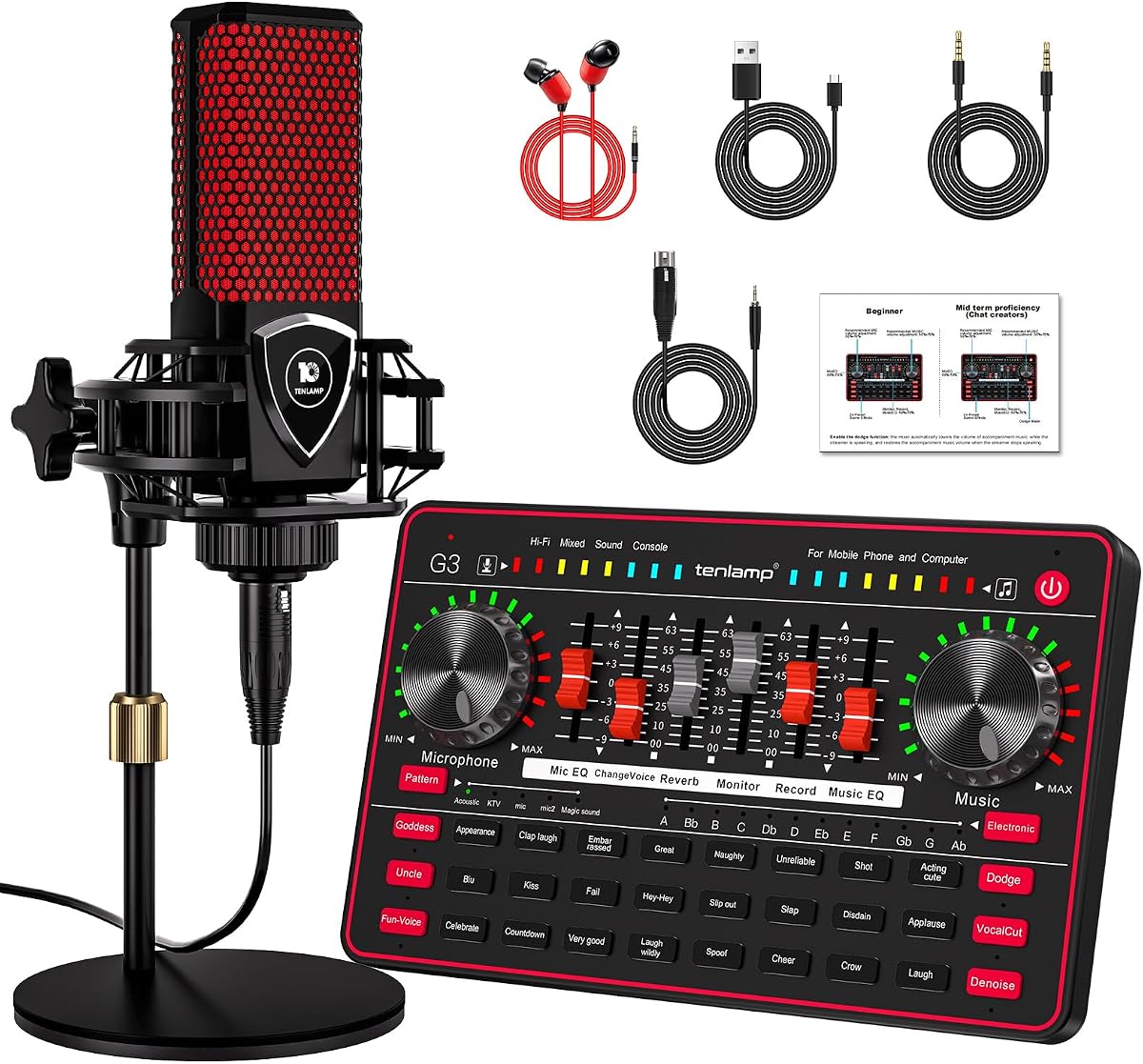
The TENLAMP G3 Creator Bundle is an all-in-one package for podcasters, streamers, and casual content creators. It combines a sound board, 3.5mm condenser microphone, and round base stand, giving new users the basic tools needed to begin recording and streaming.
We may earn a commission when you buy through this link, at no additional cost to you.
The mixer includes noise reduction, bass and treble controls, a voice changer, and five adjustable reverb modes. Twenty-four built-in effects, such as applause and laughter, add interactive elements to live broadcasts. The included microphone is designed for simple 3.5mm capture, while the stand provides a convenient desktop mounting solution.
A built-in 1000mAh battery makes the package suitable for mobile recording, travel, and remote events. It can connect with PCs, Macs, and mobile devices, and the straightforward setup avoids the complexity of assembling separate microphones, mixers, and stands. This accessibility is a major advantage for new creators.
The package is less appropriate for musicians seeking high-resolution studio conversion, balanced connections, or multiple instrument inputs. Its 4.1 rating reflects a creator-focused bundle rather than a precision recording tool. For a first podcast or live stream, however, it offers an unusually complete and approachable package.
The bundle removes the need to source a microphone, stand, and effects mixer separately. Its straightforward connections make it attractive to beginners assembling a first podcast or streaming setup.
A built-in battery supports use away from a stationary desk, while noise reduction, reverb presets, and a voice changer make the mixer useful for speech-led content. The creator controls favor immediacy over studio-depth adjustment.
We may earn a commission when you buy through this link, at no additional cost to you.
The right sound card depends on the source being recorded, the required connectors, monitoring behavior, software compatibility, and the portability of your setup. Start with the type of recording rather than the number of features printed on the box.
Resolution and sample rate determine how much detail a recording can preserve, but the highest specification is not automatically the most useful choice. The Focusrite Scarlett Solo supports recording up to 24-bit/192kHz, while the Guitar Audio Pocket Interface records at 24-bit/48kHz. The Creative internal cards emphasize high-resolution playback, and the basic USB adapters generally reach 16-bit/48kHz. Check the capabilities of your recording software, project file format, and computer before selecting a device based on headline specifications.
Connector requirements should dictate the input section. The PUPGSIS mixer accepts XLR microphones through a separately required 1/4-inch TRS-to-XLR cable but does not support 48V or USB microphones. The Focusrite Solo includes high-headroom microphone and instrument preamps, while the TENLAMP G3 includes a 3.5mm condenser microphone. Basic USB adapters usually provide only a mono 3.5mm microphone input. Confirm the physical jack, electrical compatibility, and any accessory requirements before purchasing.
A recording interface must let you hear the captured signal clearly and with minimal delay. The Creative AE-X includes a powerful 350mW at 32-ohm headphone amplifier, while the Guitar Audio Pocket Interface and TENLAMP G3 provide 3.5mm monitoring outputs. The PUPGSIS offers adjustable wired monitoring for zero-latency listening but does not send its output over Bluetooth. Low-latency workflows can also depend on compatible ASIO support, which the AE-X explicitly provides.
Internal PCIe cards such as the Creative Audigy Fx Pro and AE-X suit desktop builds with available expansion slots and a desire for a permanent audio upgrade. USB adapters are easier to move between laptops and desktops and require no internal installation. Pocket-style interfaces and creator mixers can cross into mobile workflows when their connector and power requirements are compatible. The Optimal Shop model also uses USB 2.0 but prioritizes surround and optical functions rather than portability.
Podcasters and streamers may prioritize immediate controls over studio conversion depth. The PUPGSIS includes four assignable pads, a voice changer, noise reduction, and adjustable reverb. The TENLAMP G3 adds 24 sound effects, five reverb modes, and voice controls. These features are convenient for live production, but they do not replace multitrack recording, high-quality preamps, or flexible routing found in dedicated music interfaces.
The simplest sound card is useful only if the computer recognizes it and the recording application can select it as the input device. The SABRENT and UGREEN adapters emphasize driverless USB Audio Device Class operation, while the creative mixers and focused instrument interfaces target plug-and-play use with their stated platforms. The Optimal Shop's legacy Windows support may appeal to older systems, although its specialized optical and surround setup is less predictable in modern applications. Verify operating-system, connector, and application support before ordering.
Low latency matters when monitoring a performer, playing along live, or synchronizing sound with video. The Guitar Audio Pocket Interface advertises low-latency digital processing for synchronized capture, and the Creative AE-X supports ASIO 2.3 and DSD256. The PUPGSIS requires wired monitoring for zero-latency listening. Actual latency also depends on the host software, buffer settings, operating system, and computer, so the interface specification is only one part of the chain.
Surround support can be worthwhile for gaming, films, and desktop theater, although it is rarely essential for voice or music recording. The Audigy Fx Pro provides discrete 7.1-channel analog output, while the Optimal Shop supports 5.1 analog playback and optical S/PDIF input. True 5.1 through optical output requires compatible encoded content, player passthrough, and an external decoder. Users seeking a straightforward stereo or microphone workflow should not pay for surround complexity they cannot use.
Install the device according to its form factor. A PCIe card requires power-down, opening the case, inserting the card, securing the bracket, installing any required drivers, and reconnecting the audio cables. A USB adapter or mixer should be connected to the computer, selected in the operating system's sound settings, and then selected again inside the recording application if it offers separate input and output menus.
Before recording, set an appropriate input level, perform a short test take, and listen through headphones for noise, clipping, delay, or unwanted room sound. Connect the intended microphone or instrument, confirm the correct input channel, and use monitoring volume indicators where provided. For creator mixers, load sound samples into the programmable pads and test the voice changer and reverb at a moderate level before going live.
Care for the hardware by keeping connectors clean, avoiding pressure on small 3.5mm plugs, and using supported USB ports or cables. Protect a condenser microphone from moisture and impact, and keep mobile interfaces away from excessive heat. Update the computer or interface drivers when needed, back up effect assignments and mixer settings, and store portable units in a protective case to prevent damage to the jack or housing.
Not always, because many modern computers include usable onboard audio. A dedicated interface can provide better preamps, lower noise, balanced connections, direct instrument inputs, lower-latency monitoring, and more dependable ports. Consider one when your existing input clips, sounds noisy, lacks the required jack, or cannot handle your recording and monitoring needs.
A basic USB sound card usually provides a simple digital-to-analog and analog-to-digital path with 3.5mm connections. An audio interface is designed more specifically for recording and often includes better preamps, balanced outputs, instrument inputs, direct monitoring, and professional software integration. Both can record on a PC, but they target different levels of production.
Most USB-based options in this guide are compatible with laptops, including the SABRENT, UGREEN, Biaze, Focusrite, PUPGSIS, Optimal Shop, and TENLAMP products. The Creative Audigy Fx Pro and Creative AE-X are internal PCIe cards and require a compatible desktop. Confirm the exact operating-system and connector requirements before purchasing.
That depends on the microphone and interface. Condenser microphones that need 48V power require a compatible preamp or interface with phantom power. The PUPGSIS XLR mixer explicitly does not support 48V microphones, while the TENLAMP bundle includes a 3.5mm condenser microphone intended to work without a traditional XLR phantom-power connection.
A 44.1kHz or 48kHz sample rate is suitable for most music and voice projects, while higher rates can help when the hardware and workflow support them. The important rule is to select the same rate in the recording application and use it consistently. Higher rates consume more storage and processing capacity, so they are not automatically necessary.
The Audigy Fx Pro supports discrete 7.1-channel analog output, and the Optimal Shop model supports 5.1 analog playback and optical S/PDIF. For optical 5.1, the source must contain suitable multichannel content, the player must use passthrough, and an amplifier or decoder must process the signal.
Use a wired connection, select a compatible low-latency driver such as ASIO where available, and choose a buffer size that balances responsiveness with stability. The Creative AE-X supports ASIO 2.3, while the Guitar Audio Pocket Interface advertises low-latency synchronized capture. Recording software, operating system, and system performance also influence the final delay.
Choose PCIe when you want a permanent upgrade in a desktop, need the card's internal surround or advanced output features, and are comfortable installing hardware. Choose USB when you value portability, want to use the device across computers, or need a straightforward way to replace missing ports. Neither format automatically guarantees better recording quality.
The Focusrite Scarlett Solo 3rd Gen stands out as the most complete choice for recording music, with dedicated preamps, instrument inputs, balanced monitoring, high-resolution conversion, and included production software. The Creative AE-X is the strongest premium internal option for high-resolution playback, powerful headphone amplification, and low-latency workflows, while the PUPGSIS mixer offers the most approachable hardware package for streaming and podcasting.
Your priorities should determine the remaining choice. Choose the TENLAMP G3 for an all-in-one creator bundle, the Guitar Audio Pocket Interface for portable direct-instrument capture, the Optimal Shop adapter for optical and surround features, or one of the USB adapters when the real need is reliable basic stereo and microphone connectivity. More features do not automatically mean a better fit for every recording environment.
Before buying, verify the microphone or instrument connector, required cables, operating-system support, monitoring arrangement, and resolution supported by your software. Prices, ratings, and availability can change, so check the current listing and recent customer feedback when you are ready to make a purchase.