
Frigga 4G Cellular Temperature & Humidity Monitor with Email App Alerts
4.2Editor score
Supports cellular and Wi-Fi
Provides on-device voice alarms
Stores records for up to two years
Compare the best remote temperature monitoring system for home, covering cellular alerts, Wi-Fi connectivity, sensors, accuracy, battery life, and data storage.
A remote temperature monitoring system for home gives you continuous visibility into temperature and humidity, even when you are away. The right setup can protect pipes, pets, plants, wine collections, basements, nurseries, and older adults while delivering alerts through a smartphone or email.
We compared ten products based on connectivity, sensor accuracy, remote access, alert options, display quality, battery life, data retention, and monitoring flexibility. The list covers cellular systems for locations without reliable internet, Wi-Fi models for connected homes, and Bluetooth options for simpler local monitoring.
Each review identifies the purpose that suits the product best, from multi-room household coverage to remote cabin and RV protection. Ratings and specifications reflect the supplied product information, while availability, features, and prices can change, so confirm current details before purchasing.
4.2Editor score

4.7Editor score

4.5Editor score
The table below compares all ten systems by connectivity, measurement coverage, alert capabilities, and monitoring features, making it easier to identify the right option for your home or remote location.


The Cellular Temperature Monitor, Power Outage Alarm & Humidity Sensor is our strongest all-around recommendation because it removes the need for a home internet connection while adding meaningful protection against power outages. Its 4.7 rating reflects a strong balance of monitoring features, simple setup, and flexible use across homes, RVs, vehicles, and pet locations.
We may earn a commission when you buy through this link, at no additional cost to you.
Temperature, humidity, power state, and device connectivity are monitored in a single unit. Users can define high and low thresholds, add as many as five contacts, and receive unlimited text and email alerts when conditions become unsafe or the device loses power. A built-in rechargeable battery provides up to three days of operation, allowing the monitor to continue reporting during an outage rather than going dark with the household router.
Readings are refreshed every 10 seconds, while the most recent measurement is uploaded to the online portal every 10 minutes. One year of server storage can be downloaded as a CSV file, making the system useful both for immediate warnings and longer-term pattern analysis. The trade-off is dependence on cellular coverage and a subscription renewal after the included two years, so buyers should consider long-term service costs and signal availability before installing it.
Choose this product for cabins, basements, RVs, rental properties, or any location where Wi-Fi may be absent or unreliable. It is especially compelling for owners who want power-loss notifications alongside environmental alerts. For a connected home needing several rooms under one ecosystem, one of the multi-sensor Wi-Fi systems may be more convenient, but this is the best standalone option for dependable remote monitoring away from conventional internet service.
The internal battery is the defining advantage for remote sites. Because cellular operation does not depend on household electricity or Wi-Fi, the unit can keep measuring and communicating for up to three days after power is lost.
Custom environmental thresholds, power-loss alerts, battery warnings, and downloadable history make the monitor more than a basic digital gauge. Its data retention is particularly helpful for identifying recurring temperature or humidity patterns.
We may earn a commission when you buy through this link, at no additional cost to you.
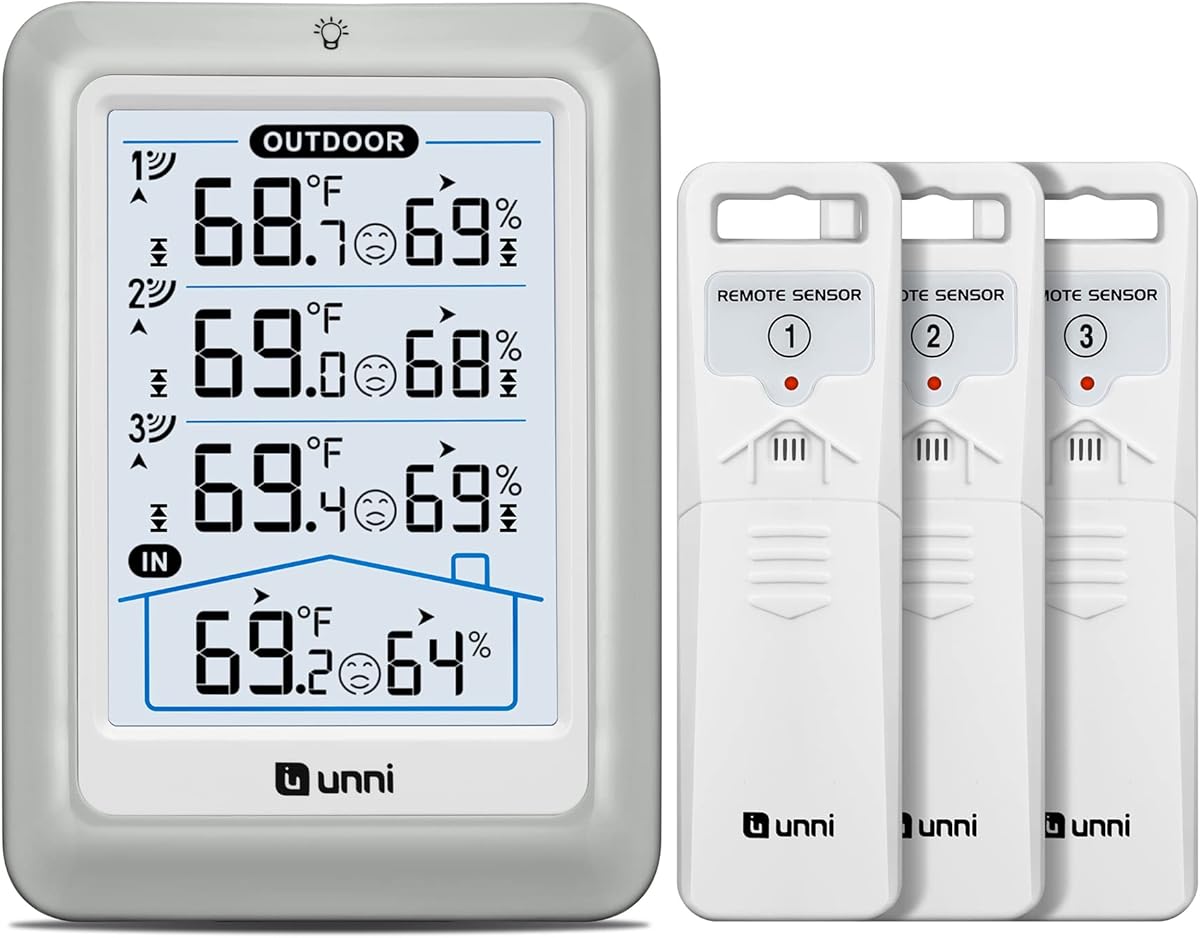
The Indoor Outdoor Thermometer Wireless 4.5 Inch Display Digital Hygrometer is a practical choice for households that want immediate readings from several outdoor locations without installing a connected hub or account. It combines a readable 4.5-inch console with three outdoor sensors and maintains a 4.4 rating.
We may earn a commission when you buy through this link, at no additional cost to you.
The included sensors transmit temperature and humidity data as far as 328 feet, updating every 30 seconds. The console displays conditions from all three remote locations, making it useful for comparing shaded and exposed areas, tracking patio or garden conditions, or monitoring different parts of a property. Its accuracy claims are ±2°F for temperature and ±5% for humidity across broad indoor and outdoor measurement ranges.
Additional features include switchable Celsius and Fahrenheit units, a comfort indicator, daily maximum and minimum records, outdoor alerts, a low-battery indicator, and a backlight with three brightness settings. It can sit on a table or mount on a wall and can operate from batteries or a connected USB cable. Its main limitation is that remote monitoring primarily happens through the included display rather than a smartphone app, making it less suitable for travel alerts or off-site supervision.
This is an excellent match for a home, greenhouse, patio, or workshop where local visibility matters more than cloud-based history. It offers a different kind of remote monitoring than Wi-Fi or cellular products: each sensor communicates directly with a central display. Pick it when you want several outdoor measurement points and a dependable household console, but do not expect smartphone notifications while away.
Three separate sensors make it possible to identify where heat accumulates or humidity differs around a property. The wide console presents the measurements in one place for quick everyday reference.
The adjustable backlight improves visibility in different rooms, while USB or battery operation lets the unit move with your setup. Wall mounting and tabletop placement also support different monitoring habits.
We may earn a commission when you buy through this link, at no additional cost to you.
The Govee Indoor Hygrometer Thermometer 3Pack H5075 with Bluetooth App Control is our best budget pick for monitoring several rooms in one home. The three-pack offers a 4.5 rating and gives you separate sensors for spaces such as a nursery, bedroom, basement, or garage without requiring a central display unit.
We may earn a commission when you buy through this link, at no additional cost to you.
Each sensor uses a Swiss-made sensing component with stated temperature accuracy of ±0.54°F and humidity accuracy of ±3% relative humidity. Readings refresh every two seconds, while the bright three-inch LCD shows current conditions, maximum and minimum records, and dry, comfort, or wet indicators. The Govee Home app adds remote notifications and historical graphs to the basic local display.
The principal limitation is that the Bluetooth connection reaches up to 196 feet rather than connecting through the internet. You generally need to be within that range to view live information in the app, so this is better described as nearby remote monitoring than off-site cellular surveillance. The system nevertheless provides preset range alerts, 20 days of online records, and CSV export of up to two years of collected data.
This three-pack is a sensible choice for homeowners who want broad indoor coverage at a modest entry point. Place one unit in each location that matters, configure separate thresholds, and use the app to check conditions while moving around the property. For monitoring a vacation home, detached garage, or other distant location, choose a Wi-Fi or cellular system instead.
Three independent units let you monitor different microclimates without juggling multiple brands. Each sensor keeps a local LCD readout even when the phone is out of Bluetooth range.
Two-second refresh speed makes the display responsive to changing conditions. Historical curves and exportable records help users review trends rather than relying only on an instantaneous value.
We may earn a commission when you buy through this link, at no additional cost to you.
The Frigga 4G Cellular Temperature & Humidity Monitor with Email App Alerts is our best premium choice because it combines cellular independence with optional Wi-Fi, multiple alert channels, and generous data retention. Its 4.2 rating indicates a capable system with some tradeoff in complexity compared with simpler indoor sensors.
We may earn a commission when you buy through this link, at no additional cost to you.
A preinstalled global SIM and two years of cellular service support locations without dependable internet. At home, the device can alternatively join a 2.4 GHz or 5 GHz Wi-Fi network by long-pressing the power button. This dual-connectivity design is especially useful for cabins, basements, crawlspaces, warehouses, RVs, and vacation homes because it lets users choose the most practical connection for each location.
The screen refreshes every five seconds in constant-on mode, and the app can receive the latest readings every 10 or 30 minutes. Alerts can arrive through push notifications, email, and an on-device voice alarm. Users can establish thresholds for temperature and humidity and also be notified about power failures, pipe-freeze risks, disconnections, or drops. Shared access lets family members or team members monitor the same location.
The built-in rechargeable battery supports up to seven days on a full charge, while continuous plugged-in operation suits long-term installations. Records remain available for up to two years and can be downloaded as CSV files. The main drawback is that premium flexibility comes with a cellular renewal after the included period and more settings to configure. It is ideal for a serious monitoring project where alert reliability and data depth justify a more advanced setup.
Using cellular at remote properties and Wi-Fi at home reduces the need for separate devices. The same hardware can therefore support both everyday monitoring and off-grid protection.
Push, email, and local voice alarms provide several ways to notice a problem. Power, disconnection, and freeze-risk alerts expand the system beyond basic environmental tracking.
We may earn a commission when you buy through this link, at no additional cost to you.
The X-Sense Wi-Fi Thermometer Hygrometer with LCD, 3 Sensors & Base Station is well suited to families that want one connected monitoring system shared across the household. Its 4.5 rating reflects strong accuracy, useful local controls, and an app designed for monitoring conditions from multiple locations.
We may earn a commission when you buy through this link, at no additional cost to you.
Three sensor units communicate with the included base station, which connects to the X-Sense Home Security App through a 2.4 GHz Wi-Fi network. The sensors provide temperature readings within ±0.36°F and humidity readings within ±2% relative humidity across their stated operating range. An LCD, adjustable alarm volume, comfort icons, and the local base station make the system useful even before anyone opens the app.
Users can set temperature and humidity ranges, receive phone notifications, and hear an alarm when conditions leave the permitted band. Low-battery warnings are also sent through the app. Historical views include maximum, minimum, and average temperature and humidity, and up to 12 users can monitor the environment simultaneously. That sharing capacity is especially valuable for parents, caregivers, roommates, or property managers.
The main compatibility issue is that the base station supports only 2.4 GHz Wi-Fi, not 5 GHz. Homeowners with a modern dual-band router may need to confirm that its 2.4 GHz network is available and can connect the device. Once configured, however, this is an attractive option for a connected home that wants several rooms, local audible warnings, and easy household collaboration.
Supporting up to 12 simultaneous users makes the kit useful for families and shared spaces. Each person can check conditions without managing a separate physical display.
The base station offers an audible warning inside the home, while app notifications reach phones. This layered approach improves the chance that an abnormal reading is noticed promptly.
We may earn a commission when you buy through this link, at no additional cost to you.
The X-Sense Smart Wi-Fi Thermometer Hygrometer, 3 Sensors & Base Station stands out for households that may expand beyond three rooms over time. It carries a 4.5 rating and supports a much larger connected system than the package alone might initially suggest.
We may earn a commission when you buy through this link, at no additional cost to you.
The current kit includes three thermo-hygrometers and a base station. Up to 50 devices can be linked to one base, with no more than 10 being thermo-hygrometers, and the stated coverage reaches 1,700 feet. That makes the system suitable for homes, basements, attics, garages, and adjoining buildings where a single sensor would be insufficient.
Beyond standard temperature and humidity, the app calculates dew point and vapor pressure deficit. Those measurements are especially relevant to plant care, wine storage, and other situations where moisture conditions matter. Historical graphs can be reviewed by day, month, or year, and data can be exported to identify trends. Phone alerts notify users when readings leave their configured range.
The sensors use replaceable 1,200 mAh AAA batteries rated for up to one year, while low-battery warnings help prevent silent monitoring gaps. Like the other X-Sense system, it depends on 2.4 GHz Wi-Fi, so router compatibility should be checked first. It is a strong option for technically comfortable buyers who want a scalable monitoring platform rather than a single-purpose sensor.
A base station can support a broad collection of linked devices, allowing coverage to grow without changing ecosystems. The included three sensors provide a practical starting configuration.
Dew point and vapor pressure deficit add context beyond raw humidity. These readings help users evaluate plant conditions and identify moisture patterns with greater precision.
We may earn a commission when you buy through this link, at no additional cost to you.
The Govee WiFi Thermometer Hygrometer H5179 with App Notification Alert is a straightforward connected sensor for bedrooms, basements, nurseries, and other indoor spaces. Its 4.3 rating reflects dependable core measurements, familiar app controls, and a design that is easy to place almost anywhere.
We may earn a commission when you buy through this link, at no additional cost to you.
The sensor supports both stable Wi-Fi and Bluetooth through the Govee Home app, giving users a way to configure the device locally and later access readings remotely. It does not support 5 GHz Wi-Fi, so users must place it on a 2.4 GHz network. Swiss-made sensing hardware provides stated accuracy of ±0.54°F for temperature and ±3% relative humidity, with readings refreshing every two seconds.
Users can establish preferred temperature and humidity ranges and receive an app alert when either leaves the range. The supplied information notes that Bluetooth settings apply to the alert function, which is worth confirming during setup. Online viewing covers 20 days of data, while export can include up to two years of accumulated information. The app also supports a widget for convenient access to current readings.
Unlike a multi-pack or base-station kit, this is a single compact unit with a lanyard loop. That makes it easy to add one location at a time and useful for a focused monitoring project. Choose it when you want a capable app-connected gauge without the complexity of a hub. For a home with several rooms, buying multiple units or choosing a three-pack may deliver better coverage.
The small enclosure and included lanyard make placement straightforward. It can sit on a shelf, be mounted using an appropriate support, or move with the area being monitored.
Range alerts reduce the need to check the device constantly. The optional widget also brings readings closer for users who want a quick visual check throughout the day.
We may earn a commission when you buy through this link, at no additional cost to you.
The Govee WiFi Thermometer Hygrometer H5103 with Electronic Ink Display is appealing for users who value a readable screen and long intervals between battery changes. It has a 4.2 rating and combines a local electronic ink display with app-based remote access.
We may earn a commission when you buy through this link, at no additional cost to you.
The sensor supports 2.4 GHz Wi-Fi and Bluetooth through the Govee Home app, but 5 GHz networks are not compatible. A Swiss-made sensor delivers stated temperature accuracy of ±0.54°F and humidity accuracy of ±3% relative humidity, while the reading refresh rate is every two seconds. Users can set temperature and humidity ranges and receive an app notification whenever conditions move outside those limits.
The electronic ink display is designed for clear, low-power reading, and the battery is rated for approximately six months. A replaceable 1.5-volt AA alkaline battery makes maintenance straightforward. The supplied information notes 13 days of online graph viewing and export of data seen over the previous two years, giving the product a useful combination of immediate readings and retrospective analysis.
This model is most suitable for a connected home where the sensor can remain on one 2.4 GHz network and the display should stay readable between app checks. It is less appropriate for remote locations without internet or for people who need longer online graph access without exporting. Within those boundaries, its long battery life and clear display make it a practical choice.
The electronic ink screen provides a persistent local reading without behaving like a bright general-purpose screen. That suits a sensor expected to remain visible in a hallway, bedroom, or office.
Users can review recent graphs in the app and export broader historical data. The combination helps connect immediate condition checks with longer-term environmental trends.
We may earn a commission when you buy through this link, at no additional cost to you.
The eMylo WiFi Thermometer Hygrometer, Smart Indoor Temperature Humidity Sensor is an affordable entry into connected monitoring and smart-home automation. Its 4.0 rating is the lowest in this group, but the device offers useful functionality for homes that want readings to trigger other connected equipment.
We may earn a commission when you buy through this link, at no additional cost to you.
It connects directly to a 2.4 GHz Wi-Fi network through the Smart Life or Tuya app without requiring a hub. Stated measurement coverage runs from 14.2°F to 140°F and 0% to 99% relative humidity, with accuracy of ±1°C or ±1.8°F and ±5% relative humidity. Readings should be allowed approximately 30 minutes to stabilize after installation or relocation.
Push notifications, low-battery reminders, one year of history, and data export are included without a subscription. Optional text messages and phone calls require a separate paid service, an important distinction when comparing alert options. Tuya scenes can use the readings to control compatible fans, humidifiers, or dehumidifiers when conditions become too hot, cold, dry, or humid.
Alexa and Google Assistant can report current readings by voice, although settings, alerts, and automations must be managed in the app. This sensor is best for users building a broader smart-home routine or wanting remote readings without a hub. It is less suitable for precision-sensitive applications, critical freeze detection, or users who require phone-call alerts without an additional service.
Temperature and humidity can serve as triggers for compatible climate equipment. This makes the sensor more than a display and allows the home to respond without a manual command.
Push alerts, low-battery notices, history, and export remain available without a subscription. Only enhanced communication methods add a separate paid service.
We may earn a commission when you buy through this link, at no additional cost to you.
The Govee Indoor Hygrometer Thermometer H5075 with Bluetooth App Control is a clean, uncomplicated option for one indoor room. Its 4.5 rating demonstrates that a focused device can still deliver strong accuracy, useful local information, and app-based alerts without a hub or complex base station.
We may earn a commission when you buy through this link, at no additional cost to you.
A Swiss-made sensor provides stated temperature accuracy of ±0.54°F and humidity accuracy of ±3% relative humidity, with readings refreshing every two seconds. The bright three-inch LCD displays large numbers along with maximum and minimum records. Dry, comfort, and wet indicators give an immediate interpretation of humidity rather than requiring the user to interpret a number alone.
The app supports remote monitoring within a 164-foot Bluetooth connection, preset range alerts, and historical graphs. Twenty days of curve views are available online, and data from up to two years can be exported in CSV format. The sensor works with homes, greenhouses, and other indoor areas, but because it uses Bluetooth rather than Wi-Fi or cellular service, it cannot send meaningful alerts while the user is far away.
Choose the single-unit model when you need a dependable gauge for a nursery, bedroom, wine cellar, plant area, basement, or similar space and remain nearby. For notifications that must reach a phone across town, choose a Wi-Fi or 4G model. Within its local-monitoring role, this Govee remains an attractive and easy-to-understand option.
Large digits and clear comfort icons make the display convenient for quick checks. Maximum and minimum records preserve a basic sense of recent variation.
Bluetooth access provides a convenient way to check nearby conditions and configure alerts. Curve views and CSV export add useful history without changing the sensor into a Wi-Fi device.
We may earn a commission when you buy through this link, at no additional cost to you.
The most useful system is the one that matches your connectivity, locations, alert needs, and maintenance preferences. Consider what must be monitored, how quickly you need to know about a problem, and whether phone notifications are essential before choosing a design.
Connectivity determines where the monitor can operate and how you receive information. A 4G cellular model is the strongest option for cabins, vacation homes, basements, RVs, and other places where reliable internet may not be available. It also continues operating through a household power outage when its internal battery is charged. Wi-Fi models are convenient for connected homes because they upload information continuously without using cellular service, although most support only 2.4 GHz networks. Bluetooth models offer the simplest setup and local app access, but their limited range makes them better suited to nearby monitoring than off-site alerts. Check the router, network band, and signal coverage before buying.
A home may contain rooms with very different temperature and humidity conditions. A single-unit sensor is adequate for a focused location, while a three-pack or base-station system makes it easier to watch several rooms at once. Outdoor properties may need separate sensors for shaded gardens, garages, patios, or crawlspaces. Pay attention to wireless range, but also consider signal obstruction and how the sensors will communicate. Multi-sensor systems usually provide one convenient dashboard and consistent alerting, whereas independently operating sensors can be easier to move and expand individually.
Accuracy specifications show how closely readings should match a trusted reference. Smaller stated error margins are useful when precise conditions matter, such as maintaining a plant collection or protecting sensitive spaces. The measurement range should also cover every environment you intend to monitor. Indoor sensors may not be suitable for extreme outdoor temperatures, while outdoor-rated wireless probes serve a different role. Consider both temperature and humidity accuracy, especially if you plan to trigger fans, humidifiers, or dehumidifiers from the readings.
Alerts are what transform a gauge into a useful monitoring system. Look for adjustable high and low thresholds, power-failure warnings, low-battery notices, and disconnection alerts. Phone push notifications are convenient, while email and text messages can provide redundancy. Some premium products also offer an audible local alarm, useful if a phone is silent or not immediately nearby. Cellular services may include messaging for a period, while some smart-home platforms reserve phone calls or texts for a paid plan. Confirm which alerts are included before installation.
Battery life determines how much maintenance a sensor needs and whether it can remain active during an outage. Rechargeable systems are convenient for plugged-in locations but should have a backup battery for emergencies. Replaceable-battery devices are easy to service and often provide long idle life, particularly when they use electronic ink or passive LCD screens. USB power can keep a console illuminated, while batteries make placement more flexible. Match power strategy to the location: a frequently accessible indoor sensor offers different requirements from an unattended basement or vacation property.
Historical data helps reveal recurring humidity problems, unstable temperatures, and the effect of seasonal changes. App graphs are convenient for quick trend review, while CSV export allows records to be examined in a spreadsheet or another analysis tool. Retention differs considerably across products, from roughly two weeks of visible online graphs to as much as two years of downloadable history. Consider whether you need real-time awareness, a record for troubleshooting, or long-term evidence of how a property behaves.
The app determines how easily you configure thresholds, review readings, and share access. Look for intuitive graphs, easy pairing, adjustable alerts, and clear low-battery status. Households may need multiple users, while property managers may prefer the ability to share limited access with family or a team. Smart-home integration can add value when readings automatically control compatible equipment. Voice-assistant support is useful for hands-free checks, but it often provides only current readings and does not replace the app for configuration.
The local display determines how quickly someone can understand conditions without opening an app. Bright LCD screens with large numbers work well in bedrooms and nurseries, while electronic ink displays consume less power and remain readable over long periods. Multi-sensor base stations may provide a central overview, whereas separate sensors suit distributed properties. Placement also matters: avoid direct sunlight, heating vents, exterior doors, and other spots where readings would not represent the space you intend to monitor.
Begin by deciding which areas need continuous coverage and what conditions should trigger an alert. Unbox the system, identify each sensor and base station, read the setup instructions, and install the appropriate app before pairing devices. For Wi-Fi products, confirm that the network uses a supported band and that the signal reaches the base station. For cellular systems, check coverage at the intended location and activate the included service before relying on the monitor.
Position sensors away from direct sunlight, drafty doors, heating and cooling vents, kitchen appliances, bathrooms, and exterior walls. Place each unit where it can represent the room's typical conditions rather than an isolated hot or cold spot. Set conservative high and low thresholds based on the equipment, pets, plants, or building materials you are protecting. Add contacts, test the alerts, and verify that every recipient recognizes what the warning means before relying on the system during an actual event.
Routine care includes checking battery notifications, confirming recent readings appear in the app, and cleaning the vents gently when dust accumulates. Review graphs periodically to identify recurring patterns instead of repeatedly changing thresholds without a reason. Cellular service renewals should be added to the household maintenance calendar, while Wi-Fi and Bluetooth products should be checked whenever the router, network band, or app changes. Test alerts after a battery replacement, firmware update, or move to a new location.
Bluetooth sensors pair directly with a phone within a limited range and are best for nearby monitoring. Wi-Fi sensors connect through a compatible home network and provide remote access while internet service is available. 4G models use cellular data, making them suitable for remote locations and often more resilient during power outages. The right choice depends on location, router compatibility, and how urgently alerts must reach you.
It depends on the model and its power design. Cellular monitors with built-in rechargeable batteries can continue operating for the stated battery duration because they do not depend on a Wi-Fi router. Plugged-in Wi-Fi sensors may stop reporting if the router loses power, while battery-powered Bluetooth sensors can keep measuring but usually cannot send remote notifications outside their limited range.
Yes, if you choose a multi-sensor package or an expandable base-station system. Three-pack and multi-sensor kits are convenient for common rooms, basements, and nurseries, while larger ecosystems can cover more of a property. Independent single sensors can also be deployed around a home, although they may require separate app management and may not share one consolidated dashboard.
A stable 2.4 GHz Wi-Fi network offers broad compatibility because many temperature sensors do not support 5 GHz. Users with a dual-band router should place the sensor or base station on the 2.4 GHz network. Cellular models provide an alternative when the router is far away, unreliable, or unavailable at a vacation property.
For general household monitoring, an error of less than 1°F is often sufficient, while precision-sensitive spaces may benefit from tighter specifications. Humidity accuracy matters when managing mold risk, wood flooring, plants, or stored goods. Also consider the sensor's operating range and whether readings are taken near a heat source, sunlight, draft, or exterior wall.
They are valuable when you need off-site monitoring at a location without reliable Wi-Fi. Cellular plans commonly provide remote access, text or email alerts, and continued operation during outages. Before buying, compare the included service period, renewal terms, cellular coverage, alert channels, and whether a similar Wi-Fi sensor could cover the location at a lower long-term cost.
Some app-compatible models can act as triggers in an automation platform, allowing compatible fans, humidifiers, or dehumidifiers to respond when readings leave a set range. Not every product supports automation, and the sensor itself may not control the equipment directly. Check compatibility with your smart-home ecosystem and confirm that the required hubs or integrations are available.
Choose a representative location away from direct sunlight, heating and cooling vents, exterior doors, appliances, and other sources of artificial heat or moisture. For freezing protection, place the sensor where it can detect a risky room temperature rather than directly beside a radiator. For plant care, monitor near canopy level and away from a humidifier or a cold window.
The Cellular Temperature Monitor, Power Outage Alarm & Humidity Sensor is the strongest overall option because it combines independent cellular operation, environmental and power-loss alerts, a three-day internal battery, and downloadable history. The Frigga 4G Cellular Monitor is the premium alternative for buyers who want Wi-Fi flexibility, on-device voice alarms, and longer data retention, while the Govee H5075 three-pack offers the most practical way to monitor several rooms economically.
Prioritize the connection method first: choose cellular for a remote building or unreliable internet, Wi-Fi for a connected home, and Bluetooth for nearby single-room use. Then match sensor count to the spaces that matter, select alert channels that people will notice, and verify accuracy, range, battery behavior, and app permissions. The correct system should provide dependable information without demanding more setup or maintenance than you will actually manage.
Ratings, features, network compatibility, and availability can change over time, and prices also fluctuate. Review the current product listing and service terms before buying, especially if you depend on cellular renewal terms, included messaging, or a particular app ecosystem. Taking a few minutes to confirm coverage and compatibility can prevent most setup disappointments.