
Razer Reclusa X Mini
4.8Editor score
Hot-swappable switch sockets
Compact 65% layout
Advanced gaming input features
Dual-layer acoustic dampening
This Razer Gaming Keyboard guide compares ten models for speed, switch feel, wireless freedom, build quality, lighting, comfort, and competitive features.
A Razer gaming keyboard can shape how quickly you move, how clearly you hear the game, and how comfortably you play for hours. The strongest choices balance responsive switches, durable keycaps, useful controls, vivid lighting, and a layout that suits your available desk space.
We compared ten Razer keyboards across important categories, including switch technology, actuation options, polling rate, connectivity, wrist support, sound design, macro controls, and RGB lighting. The guide covers full-size, tenkeyless, compact, wired, wireless, mechanical, optical, and Hall Effect models.
Each pick reveals what makes it stand out and where it may fall short for your setup. Ratings and product details reflect the supplied listings, while prices and availability can change, so compare the current offering and features before making a final purchase.
4.8Editor score

4.6Editor score

4.3Editor score
The comparison below places all ten keyboards side by side, focusing on switch approach, layout, connectivity, specialized gaming features, comfort hardware, and lighting so buyers can quickly identify the model that fits their playstyle and desk.

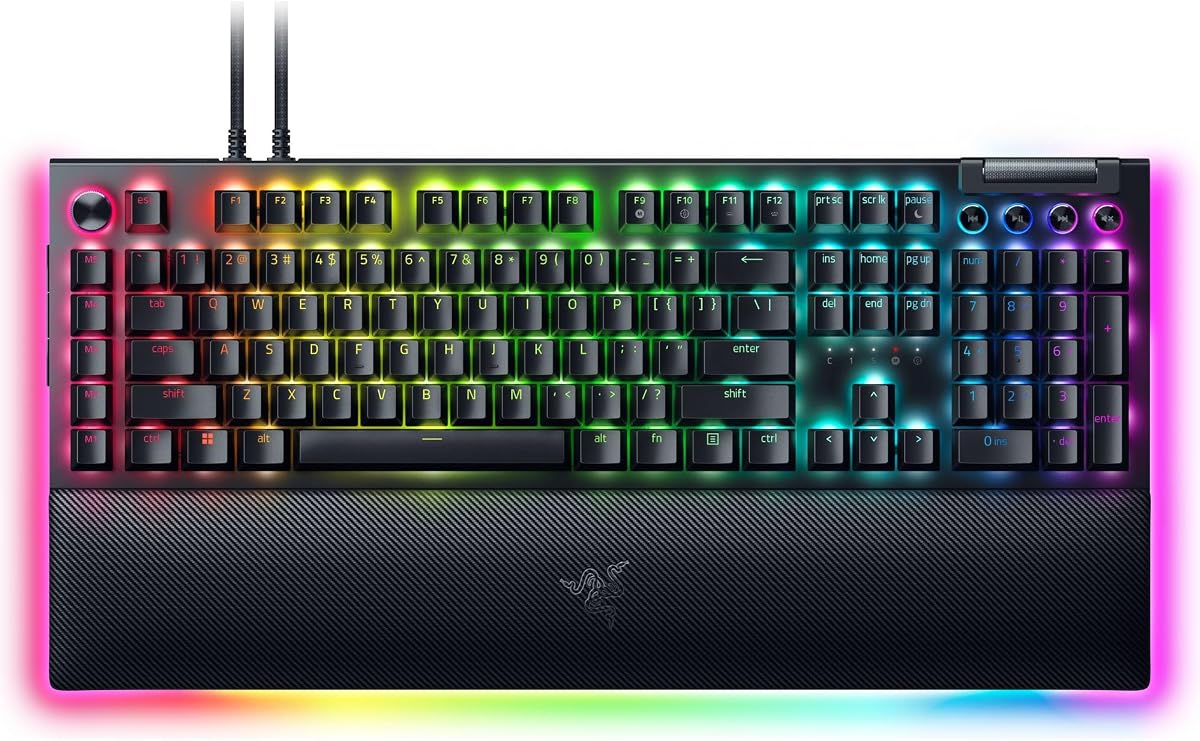
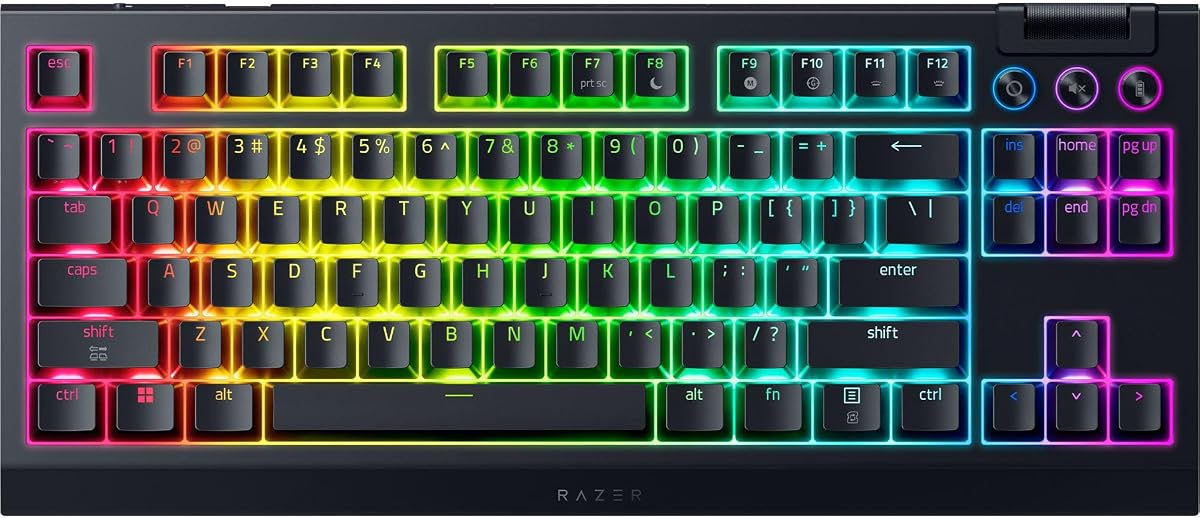



The Razer BlackWidow V4 X is a well-balanced gaming keyboard for players who want fast inputs, familiar full-size convenience, and a broad collection of controls without moving into specialized esports hardware. Its customer rating is strong, and the supplied specification highlights a particularly accessible combination of speed, durability, lighting, and acoustic refinement.
We may earn a commission when you buy through this link, at no additional cost to you.
Yellow mechanical linear switches register at a 1.2mm actuation point and require 45g of force, producing quick, smooth movement with minimal interruption. A multi-function roller, secondary media controls, and six dedicated macro keys make the board practical for games that benefit from shortcut commands. Doubleshot ABS keycaps are designed to resist worn legends, while the switch structure supports brighter and more even Chroma RGB illumination.
The keyboard also pays attention to sound rather than focusing only on raw specifications. Foam beneath the circuit board and lubricated stabilizers are intended to reduce unwanted resonance and produce a cleaner typing experience. This makes the V4 X appealing for shared rooms as well as for players who alternate frequently between gaming and everyday typing.
Its main limitation is the full-size footprint, which can occupy a large section of a desk, and it does not offer wireless connectivity. Nevertheless, gamers who want conventional mechanical switches, reliable programmability, and polished Razer lighting will find the V4 X easy to recommend. It is the strongest general-purpose choice in this guide for desktop gaming setups.
The short 1.2mm actuation point and low 45g force requirement make the yellow switches well suited to quick presses and repeated actions. Their linear behavior also avoids a tactile bump that might interrupt movement combinations during a fast sequence.
Six programmable macro keys, a multi-function roller, and secondary media keys reduce the need to move a hand toward mouse-side software controls. They can support game commands, media functions, brightness changes, and volume adjustments.
We may earn a commission when you buy through this link, at no additional cost to you.
The Razer Ornata V3 focuses on a lower profile and a more conventional membrane-like experience. It is a compelling choice for players who want the familiar feedback of a standard keyboard but prefer slimmer keys and less wrist extension. Its solid customer rating reflects a design that prioritizes everyday comfort and simplicity.
We may earn a commission when you buy through this link, at no additional cost to you.
Razer calls the switch design mecha-membrane, combining the responsive, clicky character associated with mechanical keyboards with the familiar feel of a conventional unit. Shorter switches and slimmer keycaps encourage a more natural hand position, which can be useful during long workdays as well as extended gaming sessions.
The UV-coated keycaps are designed to resist fading, wear, and tear, while backlit dedicated media keys provide immediate access to play, pause, skip, brightness, and volume controls. A magnetic soft-touch wrist rest attaches to the keyboard and adds support without requiring users to position a separate accessory manually.
Competitive players who depend on adjustable actuation, extremely high polling rates, or advanced movement features may prefer a Huntsman model. For everyone else, the Ornata V3 is a comfortable, approachable board that emphasizes a familiar feel, compact key travel, and understated everyday usability.
Slimmer keycaps and shorter switches keep the wrist at a more natural angle than a tall mechanical board. The result is especially relevant for users who game for extended periods or alternate between typing, browsing, and gaming.
Dedicated backlit media controls are easy to identify and operate, while the magnetic wrist rest stays aligned with the keyboard. This creates a more self-contained setup than using a detached pad that can gradually move.
We may earn a commission when you buy through this link, at no additional cost to you.
The Razer BlackWidow V4 Pro is a feature-rich full-size keyboard for users who want tactile feedback, extensive programmable controls, and a dramatic desktop lighting setup. Its customer rating is solid, and the supplied features show that it aims to serve players who frequently customize commands and want every control within easy reach.
We may earn a commission when you buy through this link, at no additional cost to you.
Green mechanical switches provide distinct tactile feedback, helping the user confirm each press without requiring a particularly forceful push. The standout control is the programmable command dial, which can be assigned a custom function, while eight dedicated macro keys provide room for longer game commands or utility shortcuts.
Lighting is especially prominent here. Per-key illumination combines with a three-side underglow when the magnetic wrist rest is attached, creating a more immersive effect than a standard top-lit board. The plush leatherette wrist rest also supports long sessions, while doubleshot ABS keycaps use extra-thick walls and wear-resistant labeling.
This is not the smallest or most specialized option in the roundup. It requires substantial desk space and offers more controls than a minimalist buyer may ever use. Even so, it is an excellent choice for a dedicated gaming station, productivity setup, or streamer desk where customizable controls and visual presence matter.
Green switches give every press a noticeable tactile event, while the command dial and eight macro keys expand control beyond the standard key arrangement. This makes the board appealing for games and applications that benefit from dedicated shortcuts.
The combination of per-key lighting, three-side underglow, and an illuminated magnetic wrist rest gives the board a dramatic battlestation presence. The wrist support and visual lighting are designed to work together as one complete setup.
We may earn a commission when you buy through this link, at no additional cost to you.
The Razer Huntsman V3 Pro 8KHz is built for competitive players who want exceptionally fast polling and precise control over how keys register. Its customer rating is strong, while features such as 8000Hz HyperPolling, Rapid Trigger, and adjustable analog actuation distinguish it from conventional mechanical and optical boards.
We may earn a commission when you buy through this link, at no additional cost to you.
Second-generation analog optical switches offer a 0.1–4.0mm actuation range and a stated 100 million-keystroke lifespan. Rapid Trigger helps reset keys as soon as the finger begins to lift, while Razer Snap Tap prioritizes the newest direction input between two assigned keys. Together, these features target the rapid counter-strafing and direction changes demanded by competitive shooters.
The board can be adjusted without opening software. Its onboard LED array provides visual guidance for actuation height and Rapid Trigger sensitivity, and settings can be saved directly to the keyboard. A digital dial handles volume and switch-related functions, while three dedicated buttons cover media and custom macro duties.
This level of speed comes with a steep learning curve. Players must understand actuation settings and avoid overusing features that do not suit their game. Nevertheless, competitive users seeking the strongest specialized feature set in this guide will find the Huntsman V3 Pro 8KHz especially compelling.
Rapid Trigger and adjustable actuation let players fine-tune when a key begins and stops registering. Razer Snap Tap further prioritizes the latest movement direction, which can make quick changes feel more decisive in competitive shooters.
The LED array and onboard settings make critical trigger adjustments accessible during a match. Saving preferences to the keyboard is particularly useful for users who want consistent behavior without launching configuration software before every session.
We may earn a commission when you buy through this link, at no additional cost to you.
The Razer Reclusa X Mini stands out as a compact, customizable keyboard with the strongest customer rating in the supplied group. It brings hot-swappable sockets, competitive input tools, Chroma RGB, and a refined acoustic design into a 65% format that is especially attractive for smaller desks.
We may earn a commission when you buy through this link, at no additional cost to you.
The socketed PCB accepts both three-pin and five-pin mechanical switches, allowing users to change the feel without soldering. Pre-installed Razer Orange Tactile Mechanical Switches Gen-3 provide quieter tactile actuation and clear feedback, while the hot-swap system gives enthusiasts an easy path to future experimentation.
The sound profile receives unusual attention for a compact board. A PPS plate, custom stabilizers, and dual-layer silicone dampening work together to reduce resonance and create a plush bottom-out. That makes the keyboard suitable for shared spaces where a sharp or hollow typing experience would be distracting.
Its main compromise is the 65% layout, which removes the dedicated function row and saves desk space. Some users may also find the gaming feature set excessive for everyday typing. Even so, the combination of versatility, strong rating, customization, and compact proportions makes the Reclusa X Mini an unusually complete entry-level Razer option.
Three-pin and five-pin compatibility means changing switches is straightforward and tool-friendly. Users can begin with the included tactile switches and later select linear or other compatible options to match a preferred typing or gaming feel.
Razer Snap Tap, Snap Flex, and Dual-Keypress Priority add movement and execution options to a compact board. A 1000Hz polling rate, N-key rollover, and anti-ghosting support cover the core reliability requirements for a modern gaming keyboard.
We may earn a commission when you buy through this link, at no additional cost to you.
The Razer BlackWidow V4 TWL combines wireless freedom with a tenkeyless layout and hot-swappable mechanical switches. Its customer rating is the second-lowest in this list, but the supplied specifications make it a practical option for buyers who value desk space, flexible connectivity, and long battery life.
We may earn a commission when you buy through this link, at no additional cost to you.
Razer HyperSpeed Wireless is designed for lag-free gaming, and the keyboard can also pair with a compatible Razer mouse through the same dongle using multi-device support. Bluetooth expands the setup further by allowing the user to toggle among three connected devices, which is useful when moving between a gaming PC, laptop, and another workstation.
The socketed PCB supports three-pin and five-pin switches, so users can replace the included orange switches and tune the keyboard to their preferences. A top-mounted stainless-steel plate, tape-enhanced PCB, lubricated stabilizers, and two layers of foam improve the typing and acoustic experience.
The TKL format omits the number pad, creating more room for mouse movement while preserving the keys needed for gaming. It is still a wired design, and battery charging must be considered, but the combination of wireless performance, multi-device pairing, customization, and a 980-hour stated battery makes this a distinctive Razer keyboard.
HyperSpeed Wireless handles gaming, while Bluetooth supports three paired devices for broader desktop use. The ability to share a dongle with a compatible Razer mouse can also simplify a competitive setup without occupying multiple USB ports.
A steel plate, enhanced PCB construction, lubricated stabilizers, and two foam layers work together to reduce noise. Hot-swappable sockets allow the feel to be changed later, while the roller and three control buttons remain fully remappable.
We may earn a commission when you buy through this link, at no additional cost to you.
The Razer Huntsman Mini 60% is built for players who want maximum desk space and a minimalist competitive layout. Its customer rating is strong, and the combination of optical switches, an aluminum frame, durable PBT keycaps, and broad lighting support gives it a distinct identity beyond simply being small.
We may earn a commission when you buy through this link, at no additional cost to you.
Razer Linear Optical switches register at a 1.0mm actuation distance, advertised as 15–30% shorter than other linear switches. The design is intended to support rapid repeated input, while a matte aluminum top frame improves structural rigidity. Oil-resistant doubleshot PBT keycaps provide a textured surface that resists grime buildup and long-term wear.
The board includes fully programmable macros through Razer Hypershift and supports Razer Snap Tap for prioritizing the newest input between two assigned keys. Chroma RGB synchronization extends beyond games to Razer hardware, Philips Hue, and more than 30 listed partners, with individual key lighting across a large color range.
The compact 60% arrangement is the central tradeoff. It removes the function row, navigation cluster, arrow modifiers, and number pad, so users must be comfortable with layer shortcuts and compact keycap choices. For a dedicated FPS station where mouse space is priority, however, it remains one of the most focused options in the guide.
The 60% layout keeps only the essential gaming and letter areas, freeing substantial desk space for wide mouse movement. It is a deliberate choice for competitive shooters and minimal desk arrangements rather than a general-purpose productivity layout.
Linear optical switches provide short, consistent actuation for quick input. Hypershift, Snap Tap, and detailed Chroma RGB support give the compact board more programming depth than its size might initially suggest.
We may earn a commission when you buy through this link, at no additional cost to you.
The Razer Huntsman V3 Pro is an esports-focused analog optical keyboard for players who want precise control over key timing. Its customer rating is solid, and the supplied details emphasize a refined alternative to standard mechanical switches for fast repeated inputs and movement corrections.
We may earn a commission when you buy through this link, at no additional cost to you.
The second-generation analog optical switches can be configured across a 0.1–4.0mm actuation range and carry a stated 100 million-keystroke lifespan. Rapid Trigger resets a key at the earliest sign of finger lift, while Razer Snap Tap makes the most recent directional input take priority. These are particularly relevant for quick strafe changes in first-person shooters.
An onboard LED array allows players to review and modify actuation height and Rapid Trigger sensitivity without relying on software, and configurations can be saved to the keyboard. A multifunction digital dial manages volume and analog settings, while three dedicated buttons provide media and macro functions.
The complexity is meaningful, and users who only need a dependable conventional keyboard may find a simpler model easier to maintain. Its textured doubleshot PBT keycaps, onboard memory, and magnetic firm leatherette wrist rest reward players who want a durable, competition-oriented setup with premium adjustments.
The wide actuation range allows a user to choose a short, immediate trigger or a more deliberate press. Rapid Trigger and Snap Tap then refine how movement keys behave when directions change rapidly.
Textured PBT keycaps are built to resist shine, fading, and wear, while the wrist rest provides firm support for long sessions. Onboard controls reduce the need to interrupt a match for configuration changes.
We may earn a commission when you buy through this link, at no additional cost to you.
The Razer BlackWidow V4 is a straightforward full-size mechanical keyboard centered on green clicky switches. Its customer rating is the lowest among the selected products, yet the listed features still make it relevant for players who prefer unmistakable tactile and audible feedback, programmable shortcuts, and a complete desktop layout.
We may earn a commission when you buy through this link, at no additional cost to you.
The green switches have a 1.9mm actuation point and require 50g of force, combining a clear physical event with relatively light activation. Unlike a linear switch, the clicky bump confirms each press through both touch and sound. This can be satisfying for fast action games, although users sharing a room may prefer quieter options.
Six dedicated macro keys support custom playstyle commands, while Razer Chroma RGB per-key lighting and two-side underglow create a more dimensional lighting effect. A magnetic plush leatherette wrist rest secures to the keyboard and adds support during extended play, while doubleshot ABS keycaps emphasize legend durability.
Its lower customer rating gives buyers a reason to compare its feel and controls with the BlackWidow V4 X before purchasing. It remains a capable full-size option for users who specifically want clicky switches and underglow, but it is not the automatic first choice for every gamer.
The clicky green switches provide a noticeable actuation event at a moderate 50g force. This gives users immediate confirmation of each input, which can be useful in action games where timing and consistency matter.
The complete layout includes a number pad and dedicated macro keys for a broad range of uses. Per-key lighting and two-side underglow add a visible battlestation effect, while the attached wrist rest supports longer sessions.
We may earn a commission when you buy through this link, at no additional cost to you.
The Razer Huntsman V3 HE Magnetic TKL is a specialized wired keyboard for competitive FPS players who want magnetic switch control, a very high polling rate, and more mouse space than a full-size board. Its customer rating is the lowest in the group, so the features should be compared carefully with personal preferences and game requirements.
We may earn a commission when you buy through this link, at no additional cost to you.
Hall Effect magnetic switches support Rapid Trigger and adjustable actuation from 0.1–4.0mm, allowing players to decide precisely when movement keys register. Dynamic Keystroke can trigger up to four actions from one key, while Snap Flex provides key-release activation for more nuanced control. The true 8000Hz HyperPolling rate is designed for extremely rapid communication between the keyboard and computer.
The tenkeyless layout retains essential gaming keys while creating additional room for low-sensitivity mouse movement. A 5052 aluminum alloy top case, detachable USB-C cable, hybrid onboard storage for up to six profiles, and anti-ghosting support make it suitable for repeated competitive use.
Its wired design avoids wireless battery concerns, and Synapse Web offers a browser-based route to adjust magnetic switch behavior, actuation, and Rapid Trigger. The learning curve and mixed customer feedback are the main reasons to consider alternatives. Even so, players seeking Hall Effect control and 8000Hz performance in a TKL format will find this model technically compelling.
Magnetic switches measure key travel to support precise actuation and Rapid Trigger behavior. Dynamic Keystroke and Snap Flex add further control for demanding movement sequences and unusual keybind combinations.
The TKL format creates room for mouse movement without removing the essential navigation area. A detachable USB-C cable, aluminum case, anti-ghosting, and six onboard profiles support dependable operation at LAN events and during regular play.
We may earn a commission when you buy through this link, at no additional cost to you.
The right Razer gaming keyboard depends on the games you play, the space available on your desk, and whether you value raw input speed, sound, wireless freedom, customization, or a comfortable everyday typing experience. The most important distinction is often the switch and control system rather than the lighting.
Razer options range from conventional mechanical switches to mecha-membrane, linear optical, analog optical, and Hall Effect magnetic switches. Linear switches suit smooth, rapid presses and light tactile switches provide a visible bump, while clicky green switches emphasize sound and confirmation. Optical switches use light-based actuation, while analog and magnetic systems can vary the point at which a key registers. For competitive shooters, adjustable actuation and Rapid Trigger are more relevant than the switch label alone.
Polling rate indicates how frequently the keyboard reports its state to the computer. The 1000Hz option on the Reclusa X Mini and conventional wired boards is a common baseline, while the Huntsman V3 Pro 8KHz and Huntsman V3 HE TKL support 8000Hz. That higher rate can reduce the interval between input and report, but the visible benefit depends on the game, monitor, system, and player. Features such as Snap Tap, Rapid Trigger, and Dynamic Keystroke can also influence movement responsiveness.
A full-size keyboard includes the main typing area, function row, navigation cluster, arrow keys, and number pad. It is convenient for productivity but takes up substantial desk space. The TKL format removes the number pad, while 60% and 65% layouts go further by removing additional keys. More compact formats create room for mouse movement but require more familiarity with layers, alternate functions, and compact keycaps. Choose based on your game and workflow rather than desk space alone.
Wired keyboards provide a straightforward connection and avoid battery management, making them a natural fit for stationary competitive setups. The BlackWidow V4 TKL supports 2.4GHz HyperSpeed Wireless for gaming and Bluetooth for several connected devices, making it more flexible for mixed work and play. Wireless performance is most relevant when a clean desk or portable setup is important. Check connector placement, charging requirements, and compatibility with other devices before choosing a wireless model.
Razer keyboards use a mixture of doubleshot ABS and doubleshot PBT keycaps across these models. PBT is valued for a textured finish and resistance to shine and grime, while the listed ABS caps emphasize durable legends and thicker walls. Aluminum top frames and cases can improve structural integrity. A magnetic wrist rest adds comfort, but a sturdy frame alone does not determine switch feel. Consider keycap material, case construction, stabilizers, and the overall finish together.
Mechanical and clicky switches generally produce more sound than low-profile or tactile alternatives, although design, stabilizers, foam, and dampening all influence the result. The BlackWidow V4 X, Reclusa X Mini, and BlackWidow V4 TKL specifically include foam or other acoustic materials. Quiet typing can be useful in shared rooms or during voice chat. A satisfying deeper sound may be preferable in a private setup, so the ideal choice depends on your surroundings as much as personal preference.
Macro keys, a multi-function roller, a command dial, and dedicated media buttons can make common actions easier to perform. The BlackWidow V4 X and BlackWidow V4 Pro provide six and eight macro keys respectively, while the Huntsman models use a digital dial and three buttons. Chroma RGB supports per-key lighting and synchronization with compatible games and devices. Control count matters more than color count for utility, while lighting matters more for an immersive battlestation.
A keyboard that feels excellent during a short match may become uncomfortable over a full workday. Low-profile models can reduce wrist extension, while a magnetic wrist rest provides consistent support without sliding around. The Ornata V3, BlackWidow V4 Pro, and both Huntsman V3 Pro listings include wrist rests, with the BlackWidow V4 Pro adding illumination. Users who type and game heavily should also consider switch travel, keycap texture, desk height, and their own hand position.
Connect the keyboard using its supplied cable or, for a compatible wireless model, pair the appropriate receiver or Bluetooth device. Before starting a demanding session, update the keyboard firmware and Razer software through the supported configuration utility. Create separate profiles for gaming, typing, and media use, then assign macros, lighting effects, and actuation settings according to each game. If a model supports onboard profiles, save the most important settings directly to the keyboard before moving to another computer.
For analog, optical, or magnetic models, begin with conservative actuation settings and make small adjustments. A short trigger may feel responsive in one game but cause accidental actions in another, especially when the key also performs a non-movement function. Test new settings in a practice environment before using them in ranked matches. Enable Razer Snap Tap, Rapid Trigger, Dynamic Keystroke, or Dual-Keypress Priority only when the behavior fits the game and the player's normal movement habits.
Keep the keyboard free of dust, crumbs, and liquids, and avoid pulling keycaps from the board unless you understand the switch structure. For a hot-swappable model, power down and disconnect the cable before changing switches, then confirm that replacement switches match the supported three-pin or five-pin format. Clean keycap surfaces with a soft, lightly dampened cloth, allow the keyboard to dry fully before reconnecting it, and remove the wrist rest when cleaning beneath the keyboard.
The Huntsman V3 Pro 8KHz is the strongest option for users who want true 8000Hz polling, analog optical switches, Rapid Trigger, and adjustable actuation. The Huntsman V3 HE Magnetic TKL offers similar competitive tools with Hall Effect switches in a mouse-friendly layout. Players who prefer a conventional full-size board can consider the BlackWidow V4 X, while the compact Reclusa X Mini also includes several advanced gaming features.
Linear switches press smoothly without a tactile bump, which often feels best for rapid gaming input. Tactile switches include a noticeable bump that confirms activation without producing the same sharp click as clicky models. Clicky switches provide both audible and tactile feedback, which some players enjoy but others may find too loud. Your preference and the noise level of your environment should guide the choice.
A 60% layout maximizes mouse space but removes more keys and requires greater familiarity with layers. A 65% layout remains compact while adding more essential keys than the Huntsman Mini. TKL preserves the navigation cluster and arrow area without a number pad, and full-size is most convenient for productivity. Competitive players often prefer TKL or compact layouts, while general office use is easier with a full-size board.
They are useful if you enjoy experimenting with switch feel or want to replace a switch without soldering. The Reclusa X Mini and BlackWidow V4 TKL accept both three-pin and five-pin options according to their supplied specifications. Hot-swapping does not make every switch compatible, so confirm the physical pin count, stem type, and manufacturer guidance before buying replacements.
A higher polling rate allows the keyboard to report input more frequently, but the benefit varies with the game, computer, monitor, and player. It is most relevant in competitive titles where very small input intervals can matter. Adjustable actuation, Rapid Trigger, and Snap Tap can also influence movement feel, so it is sensible to consider the complete feature set rather than focusing on one specification.
Yes, and several models include features designed for productivity as well as gaming. The BlackWidow V4 X has dampening and lubricated stabilizers for a cleaner typing sound, while the Ornata V3 uses a low-profile design and media controls. The BlackWidow V4 TKL can switch between wireless gaming and three Bluetooth devices. For extensive numeric data entry, a model with a full-size layout remains more convenient.
You need compatible Razer hardware and the relevant software to synchronize supported effects. Most keyboards in this guide provide per-key lighting, while some add underglow or wrist-rest lighting. The number of colors is only one part of the experience; game integrations, device synchronization, and the ability to customize individual effects often matter more in daily use.
Wired models are simple, always connected, and avoid battery management, making them suitable for fixed competitive stations. The BlackWidow V4 TKL supports 2.4GHz HyperSpeed Wireless for gaming and Bluetooth for three devices, offering more flexibility for mixed use. Choose wireless when a cleaner or more portable setup is important, and check the current connection and battery specifications before buying.
The Razer BlackWidow V4 X is the most balanced overall recommendation because it combines quick linear switches, useful macros, durable keycaps, refined acoustics, and per-key lighting without requiring extensive setup. The Reclusa X Mini stands out as the best budget choice for its hot-swappable construction, advanced input features, strong customer response, and compact footprint. At the premium end, the Huntsman V3 Pro 8KHz delivers the most specialized competitive package with 8000Hz HyperPolling, Rapid Trigger, adjustable analog actuation, and onboard configuration.
Your priorities should determine the rest of the field. Choose the BlackWidow V4 Pro for programmable controls and dramatic underglow, the Ornata V3 for low-profile comfort, the BlackWidow V4 TKL for wireless flexibility, or the Huntsman Mini 60% for maximum desk space. Hall Effect and optical models are ideal when precise movement behavior matters more than a conventional mechanical feel.
Before ordering, verify the current listing, included accessories, software compatibility, and switch options for your chosen model. Prices and product availability can change, and features that seem excessive at first may become valuable after installation. Whichever keyboard you choose, give it time to settle into your desk, lighting setup, and game-specific control profile before making your final judgment.